FREE Great Programs for Windows 7

Status
Not open for further replies.
Vipre PC Rescue

"The VIPRE Rescue Program is a command-line utility that will scan and clean an infected computer that is so infected that programs cannot be easily run.

The VIPRE Rescue Program is packaged into a self-extracting executable file (.exe) that prompts the user for an "unpack" or installation location, then starts the scanner and performs a deep scan. The user can start the program either by opening it via windows or from the command line.

Virus definitions are included, and the program is self-running once executed. The initial scan, and all subsequent scans, include Rootkit Detection. Four command line options are available, perform a deep scan, perform a quick scan, log the events, and disabling the rootkit.

Detections are consistent with the full VIPRE, and the VIPRE Rescue Program is designed to disinfect a system so infected that a user cannot install VIPRE."


Tried, tested and working with Windows 7 x64. It's now part of my USB toolkit :)
Please add it to the list :)
 

My Computer My Computer

OS
XP Pro/Vista Ultimate (64)/Windows 7 Ultimate Signature Edition(64)
CPU
Core 2 Duo E8500 @ stock
Motherboard
Gigabyte EP45-UD3R
Memory
8Gb (4 X 2Gb) Corsair Dominator 1066Mhz DDR2
Graphics Card(s)
XFX ATI Radeon 4870 1Gb
Sound Card
Onboard 7.1
Monitor(s) Displays
BenQ E2200Hd, Asus VW161D, HP L1506
Screen Resolution
1920 X 1080
Hard Drives
Seagate 7200.12 500Gb
2 X Hitachi 1Tb
PSU
CoolerMaster 650 EPD
Case
Thermaltake
Cooling
2 X Noctua 120mm's, Stock Intel
Keyboard
Logitech
Mouse
Logitech
This is a very nice thread. Thanks for all the info.
 

My Computer My Computer

Computer Manufacturer/Model Number
Asus K60IJ
OS
Windows 7 Ultimate x64
CPU
Intel Pentium Dual Core T4200
Motherboard
HP Laptop
Memory
4gb PC-6400
Graphics Card(s)
Integrated Intel GMA 4500
Sound Card
onboard(laptop)
Monitor(s) Displays
16"
Screen Resolution
1300 X 766 with true 720p HD support
Hard Drives
320GB 5400RPM
Mouse
Microsoft 3000 laptop mouse
Internet Speed
15mbit+ down and 768kbit up
Other Info
1TB external Western Digital Essentials HDD
Please add SeaMonkey to the list.

SeaMonkey is made by The Mozilla Foundation, same people who make Firefox.

Download here: The SeaMonkey Project

SeaMonkey is an all-in-one web browser suite that uses the same engine that Firefox does. It's like Firefox but way better because instead of having multiple apps to use for web browsing, email and IRC, SeaMonkey has all of these built in.

You can easily transfer all of your bookmarks and settings from Firefox and Thundarbird ( including all existing mail) into SeaMonkey.

It is super handy to just glance down at the toolbar while browsing and be able to see if you have new email and you can open the mail program and reply right away without having to open a separate application. SeaMonkey's built in email client can do everything Thunderbird can do.

Many of the more popular extensions and plugins work with SeaMonkey just like Firefox.

In fact, as far as I know, SeaMonkey is the Only internet suite that combines a browser, email/newsgroups and an IRC client into one package.

I used to use Firefox and Thunderbird separately, but now that I have been using SeaMonkey for a while, I find it indispensable.
 

My Computer My Computer

OS
Windows 7
Please add Classic Shell to the list.

Download: Welcome to Classic Shell

Windows 7 suffers from not having two features many people want. The Classic Start Menu is gone from Windows 7 and the "UP" button in Windows Explorer has been removed too.

Classic Shell is a tool that restores both of these to Windows 7. You can choose to install both or just one or the other from the same application.

The Classic Shell Start Menu is nice. It is streamlined and simple to use.

Personally, I like the Windows 7 Start Menu, but I really needed the UP button working in Windows Explorer so I just installed the UP Button portion of the application.
 

My Computer My Computer

OS
Windows 7
Thank you DarkPhoenix. Classic Shell added. :)
 

My Computer My Computer

Computer type
PC/Desktop
Computer Manufacturer/Model Number
Self built custom
OS
64-bit Windows 11 Pro for Workstations
CPU
Intel i7-8700K OC'd to 5 GHz
Motherboard
ASUS ROG Maximus XI Formula Z390
Memory
64 GB (4x16GB) G.SKILL TridentZ RGB DDR4 3600 MHz
Graphics Card(s)
ASUS ROG-STRIX-GTX1080TI-O11G-GAMING
Sound Card
Integrated
Monitor(s) Displays
2 x Samsung Odyssey G7 27"
Screen Resolution
2560x1440
Hard Drives
1TB Samsung 990 PRO M.2,
4TB Samsung 990 PRO PRO M.2,
TerraMaster F8 SSD Plus NAS
PSU
Seasonic Prime Titanium 850W
Case
Thermaltake Core P3
Cooling
Corsair Hydro H115i
Keyboard
Logitech wireless K800
Mouse
Logitech MX Master 4
Internet Speed
2 Gb/s Download and 100 Mb/s Upload
Antivirus
Malwarebyte Anti-Malware Premium
Browser
Google Chrome
Other Info
Logitech Z625 speaker system,
Logitech BRIO 4K Pro webcam,
HP Color LaserJet Pro MFP M477fdn,
APC SMART-UPS RT 1000 XL - SURT1000XLI,
Galaxy S23 Plus phone
Please add Classic Shell to the list.

Download: Welcome to Classic Shell

Windows 7 suffers from not having two features many people want. The Classic Start Menu is gone from Windows 7 and the "UP" button in Windows Explorer has been removed too.

Classic Shell is a tool that restores both of these to Windows 7. You can choose to install both or just one or the other from the same application.

The Classic Shell Start Menu is nice. It is streamlined and simple to use.

Personally, I like the Windows 7 Start Menu, but I really needed the UP button working in Windows Explorer so I just installed the UP Button portion of the application.

Very neat indeed. Although, despite Windows 7 not having the "Up" button, you can simply click on the name of the folder you want to navigate "Up" to in the address bar of Explorer. So, in effect, the address bar doubles as the "Up" button as well.
 

My Computer My Computer

Computer Manufacturer/Model Number
Dell Inspiron 1520 (Laptop)/ Home (Desktop)
OS
Windows 7 x64 / Same
CPU
Intel Core 2 Duo T7250 / Intel Core i7 930
Motherboard
Intel 945 / Asus P6X58D-E
Memory
4GB / 6GB
Graphics Card(s)
NVIDIA GeForce 8400M GS / ASUS 1GB
Sound Card
Whatever Dell gave me :-( / Onboard
Monitor(s) Displays
15.4" LCD / Crappy CRT
Hard Drives
Seagate 500GB SATA; 7200 RPM / Seagate 1TB SATA; 7200 RPM
PSU
N/A / OCZ Fatal1ty 550W Modular
Case
N/A / Antec 900
Cooling
Air
Mouse
Microsoft Presenter (Bluetooth)
Xchat runs well in windows 7
 

My Computer My Computer

Computer Manufacturer/Model Number
Acer
OS
Windows 7 64bit Home Premium
CPU
Pentium Dual-Core 2.70GHz
Memory
2GB DDR2
Graphics Card(s)
NVIDIA GeForce 7100
Sound Card
NVIDIA nForce 630i HD Audio with 5.1 Channel Audio Support
Monitor(s) Displays
1
Hard Drives
320 GB SATA
PSU
350W
Splash Lite

For watching .mkv and .mp4 files Splash Lite works well. If you have a sufficiently beefy video card, you can enable GPU acceleration. I normally use VLC or MPC but for HD content I use Splash Lite. It doesn't have a lot of bells and whistles, but when you advance the slider to seek into the video, it updates instantly. I've never seen it crash from advancing the slider. I like VLC very much but I think it crashes on me when I advance the slider with .mkv files more than half the time.

For subtitle support I believe it is limited to external .srt files. Not feature rich to be sure. But stable.
 

My Computer My Computer

Computer Manufacturer/Model Number
HP Media Center
OS
Windows 7 32 bit
CPU
AMD 5200+ dual core
Memory
2 GB
Graphics Card(s)
NVidia GeForce 6150SE 128 MB
Monitor(s) Displays
CRT
Screen Resolution
1280x1024
Hard Drives
500 GB Sata internal :

SIIG USB 3.0 docking stations w/WD Caviar Black 6 Gb/s drives
Keyboard
PS/2
Mouse
PS/2 Wheel Mouse
Other Info
SIIG USB 3.0 PCIexpress card.
SPlayer - A Truly Lightweight Media Player
The best part is it plays back from the point you stoped the Video
Must Try
 

My Computer My Computer

Computer Manufacturer/Model Number
Alienware m17
OS
Windows 7 Ultimate
CPU
Core 2 Extreme CPU Q9300 @ 2.53GHz
Memory
4 GB
Graphics Card(s)
2x3870 Ati
Hard Drives
2x500 GB Samsung 7200rpm
I havn't seen XBMC mentioned. It's a Media Player with a wonderfull graphic interface. I have been using it to watch boxee, and play raw .iso files. (No mounting needed!) Although there were some issues in the beginning, I have been running it for a while, and it appears to be stable
Downloads | XBMC
 

My Computer My Computer

Computer Manufacturer/Model Number
HP Touchsmart
OS
XP Media Edition / Vista /Win 7 Home Premium
CPU
Win 7 Machine: Intel Core 2 Duo T5850 @ 2.16GHz Merom 65nm
Motherboard
Pegatron Corp. EVE Model
Memory
4GB Dual Channel DDR2 @ 333MHz 5-5-5-15
Graphics Card(s)
Nvidia Defaul 1920X1200 256MB GeForce 9300M
Sound Card
SoundMAX Integrated Digital HD Audio
Monitor(s) Displays
HP 25" Flat Panel Touch Screen
Screen Resolution
1900X1200
Hard Drives
500 GB Seagate ST3500620as (Sata) 1.5 TB Seagate External
Keyboard
HP Model RK713A
Internet Speed
3.0Gb
nFLVPlayer is a really good FLV Player. It's the only FLV player I've found with a brightness control.

nFLVPlayer requires the Active X version of Adode Flash Player. AFP is normally installed by IE, but if you use Firefox, a downloadable version of AFP is available here.
 

My Computer My Computer

Computer Manufacturer/Model Number
Dell Dimension E521
OS
Windows 7 Home Premium - 32-bit Version
CPU
AMD Sempron 3400+ running at 1.8GHz
Motherboard
Dell Inc 0HK980 A01
Memory
4GB Total Physical DDR2 SDRAM; 3.44GB recognized by Windows
Graphics Card(s)
NVIDIA GeForce 6150
Sound Card
SigmaTEL
Monitor(s) Displays
Dell E176 Flat Panel
Screen Resolution
1280x1024
Hard Drives
Western Digital 74.5GB (main system drive)
Seagate FreeAgent 1TB USB
PSU
I don't know...Dell, maybe?
Case
MiniTower
Cooling
Umm...a fan.
Keyboard
Dell Standard 104-key
Mouse
Kingston One-button USB
Internet Speed
1.5Mbits (maximum)
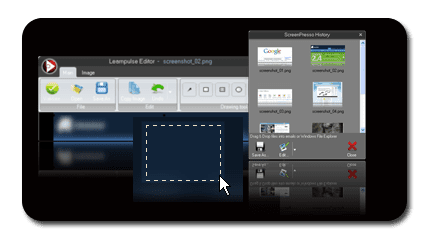
Screenpresso: Screenpresso - Home

shot.png

Features

Capture windows and region

Simply capture part of the screen or a specific window with the same shortcut. Simple.
Screenshot history

Don't bother to save screenshots on your drive, Screenpresso does for you. Practical
Attach screenshots to emails

Drag and drop screenshots from history directly to your favorite email editor. Webmails like GMail are also taken into account! Swift.
Built-in image editor

Crop, spotlight an area or comment parts of captured image. Efficient.

Capture scrolling part

Can't fit it on the screen ? Make a unique image thanks to the stitching mechanism. Smart.
Add effects

Look like a pro. Add drop shadow, round corners and reflection and more. Sleek.
Resize bunch of images

Need to export images or create thumbnails at specific size, one click.
Share screenshots on Twitter

Easy share screenshots on Twitter thanks to Twitpic integration.


Complete feature list...

Homepage
 

My Computer My Computer

Computer Manufacturer/Model Number
self built
OS
Windows 7 Professional 64-bit
CPU
Intel E8400 3GHz
Motherboard
Intel DX48BT2
Memory
Kingston PC3-10700H 4Gb
Graphics Card(s)
XFX Radeon HD 5850 BlackEd.
Sound Card
Asus Xonar DG
Monitor(s) Displays
2x Samsung SM-T220HD 22"
Screen Resolution
1680x1050 on two monitors
Hard Drives
OCZ Vertex 2 120gb 3.5" (OS)
Seagate Momentus XT 500gb
Samsung F3 1Tb (games)
2x Samsung F1 1Tb
PSU
Thermaltake ToughPower 850w
Case
Thermaltake Armor
Cooling
Scythe Mugen II
Keyboard
Microsoft Comfort Curve USB
Mouse
Razer Diamondback 3G
Internet Speed
8128/443

My Computer My Computer

Computer Manufacturer/Model Number
Lenovo G450
OS
Windows 7 Ultimate 32bit (6.1, Build 7600)
CPU
Pentium R (Dual Core) T4300 2.1GHz
Memory
2GB DDR3 SDRAM
Graphics Card(s)
Intel GMA X4500
Hard Drives
320GB IDE HDD
"7capture automatically handles complicated transparency problems such as rounded corners and Aero semi-transparent windows backgrounds.

No matter what Windows version you are using, 7capture will do its magic: clean rounded corners on Windows XP, alpha transparency in Windows Vista and Windows 7. 7capture will even capture your theme's color for even better looking screenshots. Unattractive screenshots are part of history."
 
Last edited:

My Computer My Computer

OS
Windows 7
Thank you Paul. 7capture added. :)
 

My Computer My Computer

Computer type
PC/Desktop
Computer Manufacturer/Model Number
Self built custom
OS
64-bit Windows 11 Pro for Workstations
CPU
Intel i7-8700K OC'd to 5 GHz
Motherboard
ASUS ROG Maximus XI Formula Z390
Memory
64 GB (4x16GB) G.SKILL TridentZ RGB DDR4 3600 MHz
Graphics Card(s)
ASUS ROG-STRIX-GTX1080TI-O11G-GAMING
Sound Card
Integrated
Monitor(s) Displays
2 x Samsung Odyssey G7 27"
Screen Resolution
2560x1440
Hard Drives
1TB Samsung 990 PRO M.2,
4TB Samsung 990 PRO PRO M.2,
TerraMaster F8 SSD Plus NAS
PSU
Seasonic Prime Titanium 850W
Case
Thermaltake Core P3
Cooling
Corsair Hydro H115i
Keyboard
Logitech wireless K800
Mouse
Logitech MX Master 4
Internet Speed
2 Gb/s Download and 100 Mb/s Upload
Antivirus
Malwarebyte Anti-Malware Premium
Browser
Google Chrome
Other Info
Logitech Z625 speaker system,
Logitech BRIO 4K Pro webcam,
HP Color LaserJet Pro MFP M477fdn,
APC SMART-UPS RT 1000 XL - SURT1000XLI,
Galaxy S23 Plus phone
Screenpresso: Screenpresso - Home

View attachment 47358

Features

Capture windows and region

Simply capture part of the screen or a specific window with the same shortcut. Simple.
Screenshot history

Don't bother to save screenshots on your drive, Screenpresso does for you. Practical
Attach screenshots to emails

Drag and drop screenshots from history directly to your favorite email editor. Webmails like GMail are also taken into account! Swift.
Built-in image editor

Crop, spotlight an area or comment parts of captured image. Efficient.

Capture scrolling part

Can't fit it on the screen ? Make a unique image thanks to the stitching mechanism. Smart.
Add effects

Look like a pro. Add drop shadow, round corners and reflection and more. Sleek.
Resize bunch of images

Need to export images or create thumbnails at specific size, one click.
Share screenshots on Twitter

Easy share screenshots on Twitter thanks to Twitpic integration.


Complete feature list...

Homepage

This is Nice
any other better Freeware
for Windows 7 64bit :)
for Desktop Screen Capture

Please
 

My Computer My Computer

Computer Manufacturer/Model Number
Alienware m17
OS
Windows 7 Ultimate
CPU
Core 2 Extreme CPU Q9300 @ 2.53GHz
Memory
4 GB
Graphics Card(s)
2x3870 Ati
Hard Drives
2x500 GB Samsung 7200rpm
Iconoid at Iconoid - Hide and show desktop icons, maketransparent backgrounds you can change desktop icon text to any color & more. You need to disable drop shadows for it to work.

Edit: It took away start button I can click in the spot where it was & it still will show start menu & slows the startup 2

I found a x64 port http://www.highrez.co.uk/downloads/ all I tried is changing icon text color & it is more stable now the start button is OK now. After I unzip (it's a .rar) it I put all the stuff in a new folder & put it in my documents & started it there. I have restarted a few times & all is OK
 

My Computer My Computer

Computer type
Laptop
Computer Manufacturer/Model Number
Sager NP9170
OS
Win 7 Pro x64 / Win 10 Pro
CPU
Intel(R) Core(TM) i7-3630QM CPU @ 2.40GHz
Motherboard
CLEVO P170EM
Memory
12 GB
Graphics Card(s)
(1) Intel(R) HD Graphics 4000 (2) NVIDIA GeForce GTX 675M
Sound Card
(1) Realtek High Definition Audio (2) Intel(R) Display Aud
Monitor(s) Displays
17.3
Screen Resolution
1920x1080
Hard Drives
(1) Samsung 860 EVO 500GB(OS) (1) Samsung 860 EVO 500GB(Data)
Keyboard
Backlite
Antivirus
MSE, Malwarebytes Pro
Browser
Firefox
Other Info
DESKTOP: Custom-built.
OS: Win 10 Pro x64.
CASE: Rosewill R5.
CPU: Intel I5 4670K CPU @ 3.40GHz.
CPU COOLER: Cool Master Hyper 212 EVO.
MOTHERBOARD: Asus Z87-A.
MEMORY: Kingston HyperX 2x4 GB.
GPU: Nvidia Geforce 650 TI.
PSU: Corsair TX750.
DRIVES: (1) Samsung 840 120 GB SSD (2) Western Digital blue 500 GB 7200 RPM.
Iconoid at Iconoid - Hide and show desktop icons, maketransparent backgrounds you can change desktop icon text to any color & more. You need to disable drop shadows for it to work.

Edit: It took away start button I can click in the spot where it was & it still will show start menu & slows the startup 2

I found a x64 port http://www.highrez.co.uk/downloads/ all I tried is changing icon text color & it is more stable now the start button is OK now. After I unzip (it's a .rar) it I put all the stuff in a new folder & put it in my documents & started it there. I have restarted a few times & all is OK

Refer to:

http://www.sevenforums.com/software/10233-iconoid-64-bit-install-problem.html

See my posts in Phil's Forum at Highrez on Iconoid for x64 (username Patreides). Have you tried the SAVE/RESTORE function? It still has some bugs in the x64 port but the base HIDE/UNHIDE function is working.
 
Last edited:

My Computer My Computer

OS
XP Pro & Vista Home Premium (x86); Windows Ultimate 7600 x64 Retail
Iconoid at Iconoid - Hide and show desktop icons, maketransparent backgrounds you can change desktop icon text to any color & more. You need to disable drop shadows for it to work.

Edit: It took away start button I can click in the spot where it was & it still will show start menu & slows the startup 2

I found a x64 port http://www.highrez.co.uk/downloads/ all I tried is changing icon text color & it is more stable now the start button is OK now. After I unzip (it's a .rar) it I put all the stuff in a new folder & put it in my documents & started it there. I have restarted a few times & all is OK

Refer to:

http://www.sevenforums.com/software/10233-iconoid-64-bit-install-problem.html

See my posts in Phil's Forum at Highrez on Iconoid for x64 (username Patreides). Have you tried the SAVE/RESTORE function? It still has some bugs in the x64 port but the base HIDE/UNHIDE function is working.

Yes that where I found it. & the save/restore did not restore after a restart, all I wanted was to change text color so iam happy there are other programs for save/restore.
 

My Computer My Computer

Computer type
Laptop
Computer Manufacturer/Model Number
Sager NP9170
OS
Win 7 Pro x64 / Win 10 Pro
CPU
Intel(R) Core(TM) i7-3630QM CPU @ 2.40GHz
Motherboard
CLEVO P170EM
Memory
12 GB
Graphics Card(s)
(1) Intel(R) HD Graphics 4000 (2) NVIDIA GeForce GTX 675M
Sound Card
(1) Realtek High Definition Audio (2) Intel(R) Display Aud
Monitor(s) Displays
17.3
Screen Resolution
1920x1080
Hard Drives
(1) Samsung 860 EVO 500GB(OS) (1) Samsung 860 EVO 500GB(Data)
Keyboard
Backlite
Antivirus
MSE, Malwarebytes Pro
Browser
Firefox
Other Info
DESKTOP: Custom-built.
OS: Win 10 Pro x64.
CASE: Rosewill R5.
CPU: Intel I5 4670K CPU @ 3.40GHz.
CPU COOLER: Cool Master Hyper 212 EVO.
MOTHERBOARD: Asus Z87-A.
MEMORY: Kingston HyperX 2x4 GB.
GPU: Nvidia Geforce 650 TI.
PSU: Corsair TX750.
DRIVES: (1) Samsung 840 120 GB SSD (2) Western Digital blue 500 GB 7200 RPM.
Status
Not open for further replies.
Back
Top