ATI Radeon HD 4800 series

Mitch656

New member
Power User
VIP
Local time
10:12 PM
Messages
722
Location
Australia
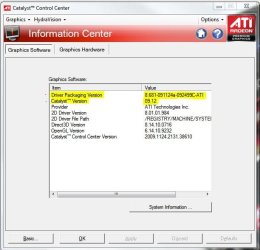
Hi, im trying to download the latest driver for my ATI radeon HD 4800.

Im trying to get version 9.12, but it doesnt seem to budge from version 8.632.1.2000

i have even unistailled it and got windows to find the updates, it still say at the one i just showed you

i even download it from the ATI site
 
Last edited:

My Computer My Computer

Computer type
PC/Desktop
Computer Manufacturer/Model Number
Custom Build
OS
Windows 7 Professional 64bit
CPU
Intel Core i5 - 2500K @ 3.30GHz
Motherboard
Gigabyte Z77-HD3
Memory
4GB DDR3
Graphics Card(s)
EVGA Nvidia GeForce GT 740 2GB DDR3
Screen Resolution
1680 x 1050
Hard Drives
1T Samaung HD/ 1T toshiba external drive/ 1T western digital external drive/ 2T seagate external drive/ 250gb samaung SSD
PSU
Antec 430W
Keyboard
Microsoft Wireless Keyboard 800
Mouse
Microsoft Wireless Mouse 1000
Antivirus
AVG
Browser
Internet Explorer
Hi, im trying to download the latest driver for my ATI radeon HD 4800.

Im trying to get version 9.2, but it doesnt seem to budge from version 8.632.1.2000

i have even unistailled it and got windows to find the updates, it still say at the one i just showed you

i even download it from the ATI site

Use Driver Sweeper to clean out the old drivers, then try installing the new ones
 

My Computer My Computer

Computer Manufacturer/Model Number
Acer Veriton m261 (modded)
OS
Win 7 pro 64-bit, Ubuntu 9.10 64-bit
CPU
Intel Core 2 Duo 2.60 Ghz
Motherboard
Whatever came with the system
Memory
4 gb ddr2 667 Mhz
Graphics Card(s)
NVidia Geforce 9400 GS 1 gb ddr2 550 mhz GPU
Sound Card
Intergrated
Monitor(s) Displays
samsung SyncMaster 2494 24"
Screen Resolution
1080p
Hard Drives
80gb - IDE
750gb - SATA II
PSU
whatever came with the system
Case
whatever came with the system
Cooling
whatever came with the system
Keyboard
Apple Aluminium (Awesome)
Mouse
Some awesome Dell mouse, really good.
Internet Speed
100mbps
First I don't even think that the Cat 9.2 supports Windows 7, pretty sure official support wasn't added until the 9.3. Also the latest is 9.12, with the 10.1 due out soon (some time between now and the end of the month). as far as that driver version it looks like it is the cat 9.6 or 9.7.
 

My Computer My Computer

Computer type
PC/Desktop
Computer Manufacturer/Model Number
Me
OS
Win 7 Ultimate x64
CPU
FX-8350 @ 4.6 GHz so far
Motherboard
Asus M5A97 EVO
Memory
ADATA XPG V1 Series Black 8GB DDR3 1600
Graphics Card(s)
Sapphire R9 270x Dual-X
Sound Card
Xonar DGX w/ Corsair Vengence 1300
Monitor(s) Displays
Acer S232HL Abid
Screen Resolution
1920x1080
Hard Drives
120 GB OCZ Vertex 3
500 GB Seagate 7200.12
PSU
Antec Earthwatts 650W Green
Case
Antec Three Hundred
Cooling
Cooler Master 212 EVO
Keyboard
Logitech G510
Mouse
Logitech G500s
Internet Speed
35000/3000
I think he meant 9.12 drivers,?
 

My Computer My Computer

Computer Manufacturer/Model Number
Self Build 64bit
OS
Vista Ult64, Win7600
CPU
Intel Core 2 Quad Q6600 @ 2400 MHz 64bit OS
Motherboard
Asus P5E3 Deluxe WiFi @p 64 bit OS
Memory
4096 MB DDR3-SDRAM
Graphics Card(s)
ATI Radeon HD 3870 Series x2 Crossfired
Sound Card
Realtek on board
Monitor(s) Displays
Samsung SyncMaster - 23 inches
Screen Resolution
1680x1050 pixels at 60 Hz in True Colors
Hard Drives
Hitachi (250 GB)/Samsung 750 GB. /Barracuda 160 GB.
My Book 1 TB external..
PSU
Cooler Master 1000w
Case
Cooler Master Cosmos 1000.
Cooling
Fans and fresh air,
Keyboard
Wireless
Mouse
Wireless
Internet Speed
Never fast enough
Other Info
I use a Magnum.
Hi, im trying to download the latest driver for my ATI radeon HD 4800.

Im trying to get version 9.2, but it doesnt seem to budge from version 8.632.1.2000

i have even unistailled it and got windows to find the updates, it still say at the one i just showed you

i even download it from the ATI site

i think you might be getting the catalyst version (9.12, current) mixed up with the actual driver version (8.681-091124a-092499C-ATI, current) Drivers & Support | GAME.AMD.COM
 

Attachments

  • cat.JPG
    cat.JPG
    46.9 KB · Views: 287

My Computer My Computer

Computer Manufacturer/Model Number
Rig 1
OS
Windows 7 Ultimate x64
CPU
AMD Phenom II X4 940 Black Edition @ 3.4GHz (AM2+)
Motherboard
Gigabyte GA-MA790X-UD4P (AM2+)
Memory
Corsair CM2X4096-8500C5 (4 X 2GB)
Graphics Card(s)
XFX Radeon HD 5770 / Diamond Radeon HD 5770 CrossFireX
Sound Card
Asus Xonar DS (PCI)
Monitor(s) Displays
Samsung SyncMaster 932bw+ (3)
Screen Resolution
4320x900
Hard Drives
OCZ Vertex 2 80 GB - Windows 7 System --
WD Caviar Black 1TB - Music, Movies, Vids, Pics --
WD Caviar Black 640GB - User Profiles & Games --
WD My Book 320GB external
PSU
Corsair CMPSU-750TX
Case
Cooler Master HAF 932
Cooling
Corsair Hydro Series H50
Keyboard
Logitech Desktop Wave
Mouse
Logitech LX8 Laser
Internet Speed
20 down / 2 up
Other Info
LG GGC-H20L Blu-Ray / HDDVD combo --
Hauppauge HVR-1250 --
Silverstone MFP-51 --
Logitech Webcam C600
Hi, im trying to download the latest driver for my ATI radeon HD 4800.

Im trying to get version 9.2, but it doesnt seem to budge from version 8.632.1.2000

i have even unistailled it and got windows to find the updates, it still say at the one i just showed you

i even download it from the ATI site

i think you might be getting the catalyst version (9.12, current) mixed up with the actual driver version (8.681-091124a-092499C-ATI, current) Drivers & Support | GAME.AMD.COM

Agreed.

Also, you don't need use "drive cleaner" fix a driver problem. It seems that every time there's a driver issue or question of any kind, drive cleaner gets mentioned as the "fix all". Snake oil I tell you.

This is not a direct attack on Coolness, it's an attack on the ideal that Drive Cleaner is the fix all for driver issues.

My two cents.
 

My Computer My Computer

Computer type
PC/Desktop
Computer Manufacturer/Model Number
Custom built by me.
OS
Windows 10 Pro
CPU
Intel Core i7-4770K (3.5Ghz)
Motherboard
Gigabyte G1 Sniper 5 (F10 Bios)
Memory
32 gig Corsair Dominator Platinum (4x8Gig)
Graphics Card(s)
Sapphire Tri-X R9 Fury
Sound Card
Soundblaster ZXR
Monitor(s) Displays
NEC PA242W 24" LCD Monitor
Screen Resolution
1920 x 1200
Hard Drives
Primary - Samsung 850 Pro (512gig), Samsung 840 Pro (256gig), 2TB WD Caviar Black.
PSU
EVGA Supernova 1000 G2
Case
Cooler Master HAF X
Cooling
Corsair H100i with Corsair Air Series SP120 Quiet Fans
Keyboard
Logitech Wireless Wave
Mouse
Logitech Performance MX
Internet Speed
High Speed Cable
Antivirus
Norton Security
Browser
IE11
Other Info
Memory Timings - 1866MHz @ 9-9-9-27-1T @ 1.5 volts
I've managed to update my driver but not to 9.12

i manged to get up 8.681.0.0 which was published 24/11/2009
 

My Computer My Computer

Computer type
PC/Desktop
Computer Manufacturer/Model Number
Custom Build
OS
Windows 7 Professional 64bit
CPU
Intel Core i5 - 2500K @ 3.30GHz
Motherboard
Gigabyte Z77-HD3
Memory
4GB DDR3
Graphics Card(s)
EVGA Nvidia GeForce GT 740 2GB DDR3
Screen Resolution
1680 x 1050
Hard Drives
1T Samaung HD/ 1T toshiba external drive/ 1T western digital external drive/ 2T seagate external drive/ 250gb samaung SSD
PSU
Antec 430W
Keyboard
Microsoft Wireless Keyboard 800
Mouse
Microsoft Wireless Mouse 1000
Antivirus
AVG
Browser
Internet Explorer
I've managed to update my driver but not to 9.12

i manged to get up 8.681.0.0 which was published 24/11/2009
9.12 is the catalyst control center (ccc) version, while 8.681.0.0 is the actual driver version. you are good and up to date :)
 

My Computer My Computer

Computer Manufacturer/Model Number
Rig 1
OS
Windows 7 Ultimate x64
CPU
AMD Phenom II X4 940 Black Edition @ 3.4GHz (AM2+)
Motherboard
Gigabyte GA-MA790X-UD4P (AM2+)
Memory
Corsair CM2X4096-8500C5 (4 X 2GB)
Graphics Card(s)
XFX Radeon HD 5770 / Diamond Radeon HD 5770 CrossFireX
Sound Card
Asus Xonar DS (PCI)
Monitor(s) Displays
Samsung SyncMaster 932bw+ (3)
Screen Resolution
4320x900
Hard Drives
OCZ Vertex 2 80 GB - Windows 7 System --
WD Caviar Black 1TB - Music, Movies, Vids, Pics --
WD Caviar Black 640GB - User Profiles & Games --
WD My Book 320GB external
PSU
Corsair CMPSU-750TX
Case
Cooler Master HAF 932
Cooling
Corsair Hydro Series H50
Keyboard
Logitech Desktop Wave
Mouse
Logitech LX8 Laser
Internet Speed
20 down / 2 up
Other Info
LG GGC-H20L Blu-Ray / HDDVD combo --
Hauppauge HVR-1250 --
Silverstone MFP-51 --
Logitech Webcam C600
OH, but when i try and install CCC it never installs.

I remember in windows XP the was a ATI icon in task tray, and then in Vista and 7 it was never there
 

My Computer My Computer

Computer type
PC/Desktop
Computer Manufacturer/Model Number
Custom Build
OS
Windows 7 Professional 64bit
CPU
Intel Core i5 - 2500K @ 3.30GHz
Motherboard
Gigabyte Z77-HD3
Memory
4GB DDR3
Graphics Card(s)
EVGA Nvidia GeForce GT 740 2GB DDR3
Screen Resolution
1680 x 1050
Hard Drives
1T Samaung HD/ 1T toshiba external drive/ 1T western digital external drive/ 2T seagate external drive/ 250gb samaung SSD
PSU
Antec 430W
Keyboard
Microsoft Wireless Keyboard 800
Mouse
Microsoft Wireless Mouse 1000
Antivirus
AVG
Browser
Internet Explorer
when you right click your desktop, is Catalyst Control Center the first entry of the list?
if so, then catalyst is installed.
 

Attachments

  • cccdiag.jpg
    cccdiag.jpg
    46 KB · Views: 12

My Computer My Computer

Computer Manufacturer/Model Number
Rig 1
OS
Windows 7 Ultimate x64
CPU
AMD Phenom II X4 940 Black Edition @ 3.4GHz (AM2+)
Motherboard
Gigabyte GA-MA790X-UD4P (AM2+)
Memory
Corsair CM2X4096-8500C5 (4 X 2GB)
Graphics Card(s)
XFX Radeon HD 5770 / Diamond Radeon HD 5770 CrossFireX
Sound Card
Asus Xonar DS (PCI)
Monitor(s) Displays
Samsung SyncMaster 932bw+ (3)
Screen Resolution
4320x900
Hard Drives
OCZ Vertex 2 80 GB - Windows 7 System --
WD Caviar Black 1TB - Music, Movies, Vids, Pics --
WD Caviar Black 640GB - User Profiles & Games --
WD My Book 320GB external
PSU
Corsair CMPSU-750TX
Case
Cooler Master HAF 932
Cooling
Corsair Hydro Series H50
Keyboard
Logitech Desktop Wave
Mouse
Logitech LX8 Laser
Internet Speed
20 down / 2 up
Other Info
LG GGC-H20L Blu-Ray / HDDVD combo --
Hauppauge HVR-1250 --
Silverstone MFP-51 --
Logitech Webcam C600
Nope, view is the 1st opition

it says it installing every time, but it never does
 

My Computer My Computer

Computer type
PC/Desktop
Computer Manufacturer/Model Number
Custom Build
OS
Windows 7 Professional 64bit
CPU
Intel Core i5 - 2500K @ 3.30GHz
Motherboard
Gigabyte Z77-HD3
Memory
4GB DDR3
Graphics Card(s)
EVGA Nvidia GeForce GT 740 2GB DDR3
Screen Resolution
1680 x 1050
Hard Drives
1T Samaung HD/ 1T toshiba external drive/ 1T western digital external drive/ 2T seagate external drive/ 250gb samaung SSD
PSU
Antec 430W
Keyboard
Microsoft Wireless Keyboard 800
Mouse
Microsoft Wireless Mouse 1000
Antivirus
AVG
Browser
Internet Explorer
Are you installing the 9.12 hotfix drivers without the 9.12 officials first. There is an issue with the 9.12 hotfix drivers not updating the version number, so they will actually display the last version that you had installed.

Anyway I would just scrap the 9.12's all together and grab the 12.1 Betas here. Don't worry about the size, they are X86 and X64's in one that is why the file size is large.

Whenever I have issues with my ATI drivers, I perform a clean install of new drivers. This is how I do it which may be similar to how others do it as well.

Step 1. Download and install Driversweeper.

Step 2. Run the ATI installer and proceed until you get to the option of installing or uninstalling and select uninstall. The ATI installer is optimized for removing ATI components so it is recommended over using add/remove programs or device manager for uninstalling.

Step 3. Disable automatic driver installation. See note:

   Note
Go to Start > Search > (Type in) gpedit.msc > Computer Configuration > Administrative Templates > System > Device Installation > Device Installation Restrictions > (Right Click) Prevent Installation of Devices not described by other policy settings > Edit > Select ENABLED


Note: This will need to be set back to NOT CONFIGURED before proceeding with the new driver installation or you may get errors during the installation.


Step 4. Reboot into safe mode and run driversweeper.
Step 5. Reboot back into Windows 7 wait a couple of minutes for your system to fully boot up and then revert the change made in the above note for the automatic driver installation.
Step 6. Install the new drivers and reboot when prompted to do so.


There is a good chance that just running the ATI installer to uninstall the old drivers and then installing the new ones without rebooting first may resolve your issue but if you are having problems, I would suggest to spend the extra few minutes to clean up the old drivers.
 

My Computer My Computer

OS
Windows 7 Ultimate X64
CPU
Q6600 @3.6
Motherboard
DFI X38-T2R
Memory
2X2 Mushkin
Graphics Card(s)
XFX 4870X2
Monitor(s) Displays
Philips 240PW
Hard Drives
Intel X25-M 80GB
PSU
PCP&C 750W
Case
Antec 900
Cooling
TRUE 120
Step 3 shouldn't be necessary - uninstalling via control panel and rebooting leaves a generic vga adaptor - then after sweeping reboot back into safe mode and install the latest drivers.
 

My Computer My Computer

Computer Manufacturer/Model Number
Sony Vaio Z46GDU
OS
Windows 7 Ultimate x86-64
CPU
[email protected] 1066MHz FSB
Motherboard
Sony branded
Memory
6GB DDR3 1066MHz
Graphics Card(s)
9300M GS 256MB Dedicated (Speed) + Intel4500MHD (Stamina)
Sound Card
Realtek HD Audio
Monitor(s) Displays
13.1' WXGA
Screen Resolution
1600x900
Hard Drives
320GB 7200RPM w/ 16MB cache
Internet Speed
1MB/s
Can you provide a valid reason for dumping the 9.12 drivers and going with betaware? Unless the OP feels like dealing in beta drivers, I say stick with the official ones.

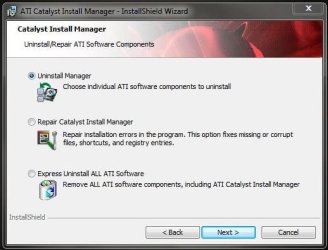
Also i've been using ATI drivers since 2000 and all I've ever done is either uninstall them through the control panel, or, in the more recent times, use the Catalyst Install Manager to unstall the Catalyst drivers and CCC panel.

Catalyst Install Manager.JPG

In more problematic situations...

1- uninstall the drivers,
2- delete the old driver folder - C:\ATI\Support
3- reboot,
4- go to Device Manager,
5- remove the video card - check the box that says remove drivers,
6- reboot.
7- Install new drivers,
8- reboot.
9- Success!?!?!

Either of these procedures have alway worked for me without ever having to use drive cleaner. But to each his own.

For ATI video card issues check this website, which i'm also a member of...

Driver Section - CATALYST Drivers - Rage3D Discussion Area

All forums - Rage3D Discussion Area - Powered by vBulletin

Peace.
 

My Computer My Computer

Computer type
PC/Desktop
Computer Manufacturer/Model Number
Custom built by me.
OS
Windows 10 Pro
CPU
Intel Core i7-4770K (3.5Ghz)
Motherboard
Gigabyte G1 Sniper 5 (F10 Bios)
Memory
32 gig Corsair Dominator Platinum (4x8Gig)
Graphics Card(s)
Sapphire Tri-X R9 Fury
Sound Card
Soundblaster ZXR
Monitor(s) Displays
NEC PA242W 24" LCD Monitor
Screen Resolution
1920 x 1200
Hard Drives
Primary - Samsung 850 Pro (512gig), Samsung 840 Pro (256gig), 2TB WD Caviar Black.
PSU
EVGA Supernova 1000 G2
Case
Cooler Master HAF X
Cooling
Corsair H100i with Corsair Air Series SP120 Quiet Fans
Keyboard
Logitech Wireless Wave
Mouse
Logitech Performance MX
Internet Speed
High Speed Cable
Antivirus
Norton Security
Browser
IE11
Other Info
Memory Timings - 1866MHz @ 9-9-9-27-1T @ 1.5 volts
OH, but when i try and install CCC it never installs.

I remember in windows XP the was a ATI icon in task tray, and then in Vista and 7 it was never there


You only downloaded the driver and not the CCC, remember?

The Downloads page shows the latest driver to be 9.12, but some here are saying that is only the Catalyst version and that you have the latest driver: http://game.amd.com/us-en/drivers_catalyst.aspx?p=win7/windows-7-32bit

Maybe some of the Catalyst experts here can explain to you why you may or may not need Catalyst Control Center. I've always thought of it as bloatware, unless you want specialized controls over your card..
 
Last edited:
If you download the first file (51.6MB) from that link you get the entire package (CCC and drivers).

CCC allows you to tweak your card's settings for various games as well as overclock it. It also has a fan control as well. It also have tweaks/settings that you may or may not want to use on your monitor/TV set.

If you feel these aren't for you, don't install. However the program doesn't take up much space and is quite responsive.

In short, I'd install it.

ATI Catalyst Control Center™ (old version)
 

My Computer My Computer

Computer type
PC/Desktop
Computer Manufacturer/Model Number
Custom built by me.
OS
Windows 10 Pro
CPU
Intel Core i7-4770K (3.5Ghz)
Motherboard
Gigabyte G1 Sniper 5 (F10 Bios)
Memory
32 gig Corsair Dominator Platinum (4x8Gig)
Graphics Card(s)
Sapphire Tri-X R9 Fury
Sound Card
Soundblaster ZXR
Monitor(s) Displays
NEC PA242W 24" LCD Monitor
Screen Resolution
1920 x 1200
Hard Drives
Primary - Samsung 850 Pro (512gig), Samsung 840 Pro (256gig), 2TB WD Caviar Black.
PSU
EVGA Supernova 1000 G2
Case
Cooler Master HAF X
Cooling
Corsair H100i with Corsair Air Series SP120 Quiet Fans
Keyboard
Logitech Wireless Wave
Mouse
Logitech Performance MX
Internet Speed
High Speed Cable
Antivirus
Norton Security
Browser
IE11
Other Info
Memory Timings - 1866MHz @ 9-9-9-27-1T @ 1.5 volts
Always use the "Custom" option when installing. It allows you to select what you want and disregard the rest so they do not conflict.
 

My Computer My Computer

Computer type
PC/Desktop
Computer Manufacturer/Model Number
Self made
OS
windows 7 home premium 64, and Windows 10 64 bit
CPU
I7 940
Motherboard
ASUS P6TX58D Premium- BIOS VERSION 1402
Memory
12 GB Dominator 3 channel 1600
Graphics Card(s)
Radeon R9 Fury Nitro
Sound Card
Z1
Monitor(s) Displays
50 Inch Panasonic TV
Screen Resolution
1920x1080
Hard Drives
Main drive OCZ Revodrive V2 and 8 TB multi drives
PSU
Coolermaster 1000
Case
CoolerMaster 932
Cooling
Coolermaster Dual fan
Keyboard
mx 5500 revolution
Mouse
mx 5500 revolution
Internet Speed
12 mb
Browser
Chrome
Other Info
set up for 3D Blue Ray applications with a surround room of 12 speaker Definitive Technology and multi amps, main is driven by yamaha M-65
Can you provide a valid reason for dumping the 9.12 drivers and going with betaware? Unless the OP feels like dealing in beta drivers, I say stick with the official ones.

Provide a valid reason, no. Provide an opinion, yes. The 9.12's may be WHQL but they also have a 9.12 hotfix that was released shortly after the official drivers. Which tells you that WHQL may be recommended but that does not always mean it is better.

I could have recommended the 9.11 or 9.10 WHQL also, but I have no idea what games the OP is playing. So the default recommendation from me are the newest drivers to provide support for the newest games.

As for my procedure for clean installation of drivers, I posted it because it is what works for me when I have issues not resolved through a basic re-installation. It is not necessarily meant to be any more preferred than anyone else way of doing it.

There are people who can just install new drivers over old ones and never have problems and there are people who try everything and end up wiping their hard drive and reinstalling Windows just to get things to work properly. I am somewhere in between that mix. When someone is online for hours looking for a solution to a problem and I can provide, with what may seem somewhat unnecessary amount of steps, a solution in what would only be an extra few minutes from a regular installation procedure. I see it as worth someones time to try out.
 

My Computer My Computer

OS
Windows 7 Ultimate X64
CPU
Q6600 @3.6
Motherboard
DFI X38-T2R
Memory
2X2 Mushkin
Graphics Card(s)
XFX 4870X2
Monitor(s) Displays
Philips 240PW
Hard Drives
Intel X25-M 80GB
PSU
PCP&C 750W
Case
Antec 900
Cooling
TRUE 120
I'm actually aware of the hotfix drivers and what they are as discussed here - New Cat. 9.12 Hotfix. - Rage3D Discussion Area and at the moment most of us don't require them; just like most of us don't need to be playing with beta drivers. But...between the two, I’d go with the hotfix drivers.

My contention has to do with this whole idea of trying everything else instead of trying to get the "correct" WHQL drivers installed first.

Every time someone has a driver problem one of the first posts will be to use "Drive Cleaner", try these beta/hacked drivers, or just install the driver and dump this or that because it's "bloatware".

Here's an idea... How about we get the "correct" drivers installed?

If the OP used beta drivers and had the same issues, then we would all chime in about pitfalls of using "unsupported" betaware, that the driver is beta for a reason. And we would be right.

Now, I understand you sometimes have to use elaborate steps to get a driver installed, and the purpose of any forum is to provide help in accomplishing that task. I get it, it's just that my attitude is to start with the simple, work from there. Betaware and drive cleaners aren't necessary simple steps.

At any rate you are correct, you've expressed your opinion, and I've expressed mine.

No harm no foul :)

Peace :cool:
 

My Computer My Computer

Computer type
PC/Desktop
Computer Manufacturer/Model Number
Custom built by me.
OS
Windows 10 Pro
CPU
Intel Core i7-4770K (3.5Ghz)
Motherboard
Gigabyte G1 Sniper 5 (F10 Bios)
Memory
32 gig Corsair Dominator Platinum (4x8Gig)
Graphics Card(s)
Sapphire Tri-X R9 Fury
Sound Card
Soundblaster ZXR
Monitor(s) Displays
NEC PA242W 24" LCD Monitor
Screen Resolution
1920 x 1200
Hard Drives
Primary - Samsung 850 Pro (512gig), Samsung 840 Pro (256gig), 2TB WD Caviar Black.
PSU
EVGA Supernova 1000 G2
Case
Cooler Master HAF X
Cooling
Corsair H100i with Corsair Air Series SP120 Quiet Fans
Keyboard
Logitech Wireless Wave
Mouse
Logitech Performance MX
Internet Speed
High Speed Cable
Antivirus
Norton Security
Browser
IE11
Other Info
Memory Timings - 1866MHz @ 9-9-9-27-1T @ 1.5 volts
Back
Top