Wrong dates on folders / Windows Explorer

sylvialdgsd

New member
Local time
12:44 PM
Messages
13
Hello,
Is there a way to force Windows Explorer (Windows 7 Premium) to display the proper dates in the "date modified" category? It's displaying the same date as in "date created". I've edited some of the files in that folder a few days ago but it still displays a 2008 date.
Thanks in advance,
Sylvia
 

My Computer My Computer

OS
Windows 7
"date modified" & "date created" fall under the same date because you have not modified the folder yet, until you do the dates wont change.
 

My Computer My Computer

OS
Windows 7 Ultimate x64 Service Pack 1 (Build 6.1.7601)
CPU
Intel Core 2 Quad Q6600 (G0 Kentsfield) LGA775 (FC-LGA6)
Motherboard
GIGABYTE GA-EP35C-DS3R (Rev. 2.1)
Memory
Corsair TW3X4G1333C9A 4GB PC-10600 (2x XMS3 2GB)
Graphics Card(s)
ASUS nVIDIA GeForce 560
Sound Card
RealTek ALC885/889A/890
Monitor(s) Displays
ChiMei CMV CT-730D 17inch (LCD Monitor)
Screen Resolution
1280-1024 60Hertz (Ture Colour 32bit)
Hard Drives
2x Barracuda 7200.10 SATA 3.0Gb/s 160-GB Hard Drive ST3160815AS (AHCI)
PSU
ANTEC 750w Earthwatts
Case
Thermaltake Shark (VA7000SWA ATX) Full Tower
Cooling
Front 120mm fan (1400 RPM) /Rear 120mm (1400 RPM) blue LED
Keyboard
Labtec Media Desktop Y-SAD65
Mouse
Razer DeathAdder 3G Infrared Sensor (1800DPI)
Internet Speed
Telstra BigPond Elite Liberty ADSL2+ 24Mbps/256kbps
Other Info
ASUS PCE-N13 802.11n Wireless LAN card
Thanks for your quick reply, Crispy. :)
I have modified the files a few times but it still displays a 2008 modified date on the folder.
Sylvia
 

My Computer My Computer

OS
Windows 7
Hi Sylvia,

Also could you please tell me what happens if you rename the folder itself?

It may be also an idea to verify that your PC date time is correct (and regional settings are correct)and to check the bios date and motherboard battery (if the bios date is wrong). I expect these to be correct; but they're a good solid box to tick off your troubleshooting checklist. :)
 

My Computer My Computer

Computer Manufacturer/Model Number
Custom Hack job
OS
Windows 7 Ultimate 64 bit
CPU
Intel(R) Core(TM)2 Quad CPU Q8200 @ 2.33GHz
Motherboard
GigaByte EP45-UD3
Memory
8 GB Kingston
Graphics Card(s)
Nvidia GeForce 9600GT
Sound Card
Soundblaster Audigy
Monitor(s) Displays
AOC x2 22"
Hard Drives
2 x Samsung 500GB (RAID)
2 x Samsung 2TB
1 x WD Green 2TB
1 x Seagate 1TB
1 x Samsung 500GB
PSU
Thermaltake QFan 750W
Case
CM Scout Gaming
Cooling
Coolermaster V10
Keyboard
Microsoft Wireless Keyboard 1000
Mouse
Microsoft Wireless Optical 2000
Internet Speed
320
Other Info
Winfast PVR2000CP
LG DVD-RAM DVD/RW/DL Super Multi
Linksys WMP300Nx2 Wireless Adapter
Thanks for your answer, TimStitt.
The dates of both the BIOS and the regional settings are correct.
Nothing happens if I rename a file or a folder. Weird...
I already had that problem when the computer was on Vista (these files are on a 2nd partition).
Thanks again,
Sylvia
 

My Computer My Computer

OS
Windows 7
Are you positive you have access to the drive?
Could it be possible the files are bring written to:
C:\Users\[username]\AppData\Local\VirtualStore
 

My Computer My Computer

Computer type
PC/Desktop
Computer Manufacturer/Model Number
Alienware Aurora ALX R4
OS
Windows 10 Pro (x64)
CPU
Intel Core i7-3930K (3.2GHz - 4.5GHz)
Motherboard
Alienware Aurora-R4 x79
Memory
4x Samsung 4GB PC3-12800 DDR3 (16GB 1600MHz)
Graphics Card(s)
Nvidia Geforce GTX 690
Sound Card
SteelSeries Siberia Elite
Monitor(s) Displays
Dell UltraSharp U3011
Screen Resolution
2560x1600
Hard Drives
Samsung 850 Pro 256 GB, Seagate 1TB Desktop Hybrid HDD, 2x Western Digital 4TB Green HDD
PSU
875W Some Dell PSU <.<
Case
Alienware Aurora ALX
Cooling
Custom Liquid Cooling (EK CPU & GPU blocks) dual EK 480RAD
Keyboard
Logitech G710+ Mechanical
Mouse
Logitech G700s
Internet Speed
Verizon Fios (50 mbps average)
Other Info
Server: Intel NUC D54250WYK: i5-4250U, 16GB, 256 GB mSATA, Windows Server 2012 R2
Are you positive you have access to the drive?
Could it be possible the files are bring written to:
C:\Users\[username]\AppData\Local\VirtualStore
Yes.

And no, the files are not written in the virtual store. I just checked and this folder is empty.

Thanks again for you help.

Sylvia
 

My Computer My Computer

OS
Windows 7
Howzabout a snipped screenshot of your saved file location just for the heck of it?
 

My Computer My Computer

Computer type
PC/Desktop
Computer Manufacturer/Model Number
Custom
OS
7 x64 Ultimate
CPU
AMD Ryzen 5
Motherboard
Gigabyte GA-AB350-Gaming
Memory
16GB DDR4
Graphics Card(s)
Radeon R7 360
Monitor(s) Displays
2 x Dell U2518D
Screen Resolution
2560x1440 2560x1440
Hard Drives
WD 500GB x2
Samsung SSD 128MB (OS)
XPG SX8200 Pro M.2 2280 1TB
PSU
Antec 500
Cooling
Hyper 212 EVO
Keyboard
Logitech cordless K800
Mouse
Logitech M510
Antivirus
Avira
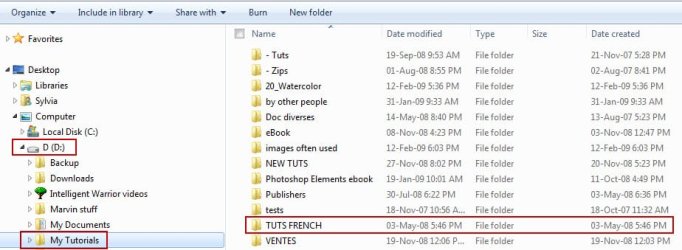
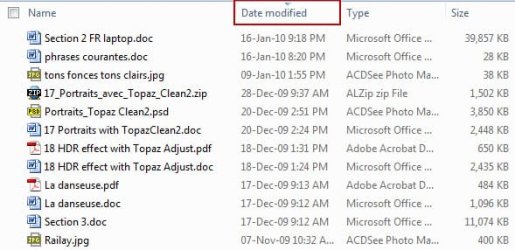
Here are 2 screen captures. The second one shows that a bunch of files have been modified very recently...
They're all located on a 2nd partition.
 

Attachments

  • wrong_dates1.jpg
    wrong_dates1.jpg
    50.2 KB · Views: 93
  • wrong_dates2.jpg
    wrong_dates2.jpg
    35.5 KB · Views: 85

My Computer My Computer

OS
Windows 7
Hello,
Is there a way to force Windows Explorer (Windows 7 Premium) to display the proper dates in the "date modified" category? It's displaying the same date as in "date created". I've edited some of the files in that folder a few days ago but it still displays a 2008 date.
Thanks in advance,
Sylvia

When you are saying that "edited some of the files in that folder a few days ago" are you trying to modify a file that was created in 2008 and the date for that file is it saying the created date or the modified date is 2008?
 

My Computer My Computer

OS
Windows 7 Ultimate x64 Service Pack 1 (Build 6.1.7601)
CPU
Intel Core 2 Quad Q6600 (G0 Kentsfield) LGA775 (FC-LGA6)
Motherboard
GIGABYTE GA-EP35C-DS3R (Rev. 2.1)
Memory
Corsair TW3X4G1333C9A 4GB PC-10600 (2x XMS3 2GB)
Graphics Card(s)
ASUS nVIDIA GeForce 560
Sound Card
RealTek ALC885/889A/890
Monitor(s) Displays
ChiMei CMV CT-730D 17inch (LCD Monitor)
Screen Resolution
1280-1024 60Hertz (Ture Colour 32bit)
Hard Drives
2x Barracuda 7200.10 SATA 3.0Gb/s 160-GB Hard Drive ST3160815AS (AHCI)
PSU
ANTEC 750w Earthwatts
Case
Thermaltake Shark (VA7000SWA ATX) Full Tower
Cooling
Front 120mm fan (1400 RPM) /Rear 120mm (1400 RPM) blue LED
Keyboard
Labtec Media Desktop Y-SAD65
Mouse
Razer DeathAdder 3G Infrared Sensor (1800DPI)
Internet Speed
Telstra BigPond Elite Liberty ADSL2+ 24Mbps/256kbps
Other Info
ASUS PCE-N13 802.11n Wireless LAN card
When you are saying that "edited some of the files in that folder a few days ago" are you trying to modify a file that was created in 2008 and the date for that file is it saying the created date or the modified date is 2008?
What I'm saying is that no matter what I do in a folder (including in the C:), the date of the "date modified" of the folder remains unchanged.
 

My Computer My Computer

OS
Windows 7
Nothing happens if I rename a file or a folder. Weird...
Sylvia

To clarify, if you rename the TUTS FRENCH folder, it's date modified does not change? Is this correct?

I checked on my system and if I change the files inside the folders the date modified doesn't change for the folder; but if I rename the folder the date modified changes.

Some other thoughts:
- Particular programs effect date modified differently, please try to change the files with at least two different programs (e.g. Paint, word)
- I have a script that I wrote to ensure that I have access to secondary drives on my system. It was designed to give me access in Windows 7 when all items on the drive appeared as read only (this happens sometimes on new installs). As it is permission related it may help for your situation, it may also do nothing :p; but I will post it if you want to try it.
 

My Computer My Computer

Computer Manufacturer/Model Number
Custom Hack job
OS
Windows 7 Ultimate 64 bit
CPU
Intel(R) Core(TM)2 Quad CPU Q8200 @ 2.33GHz
Motherboard
GigaByte EP45-UD3
Memory
8 GB Kingston
Graphics Card(s)
Nvidia GeForce 9600GT
Sound Card
Soundblaster Audigy
Monitor(s) Displays
AOC x2 22"
Hard Drives
2 x Samsung 500GB (RAID)
2 x Samsung 2TB
1 x WD Green 2TB
1 x Seagate 1TB
1 x Samsung 500GB
PSU
Thermaltake QFan 750W
Case
CM Scout Gaming
Cooling
Coolermaster V10
Keyboard
Microsoft Wireless Keyboard 1000
Mouse
Microsoft Wireless Optical 2000
Internet Speed
320
Other Info
Winfast PVR2000CP
LG DVD-RAM DVD/RW/DL Super Multi
Linksys WMP300Nx2 Wireless Adapter
Thanks for your quick reply, Crispy. :)
I have modified the files a few times but it still displays a 2008 modified date on the folder.
Sylvia

The date of the folder is not supposed to reflect changes to the files inside the folder.
 

My Computer My Computer

Computer Manufacturer/Model Number
Custom
OS
Windows 7 Ultimate RTM (Technet)
CPU
3.00 gigahertz Intel Core2 Duo E8400
Motherboard
ASUSTeK Computer INC. P5K/EPU Rev 1.xx
Memory
4GB
Graphics Card(s)
ATI Radeon X1950 Pro
Sound Card
Built in HD Audio
Monitor(s) Displays
22" Gateway LCD
Screen Resolution
1920 x 1200
Hard Drives
ST3160023A [Hard drive] (160.04 GB) -- drive 0, rev 8.01, ST3500630AS [Hard drive] (500.11 GB) -- drive 2, rev 3.AAK
ST3500630AS [Hard drive] (500.11 GB) -- drive 1, rev 3.AAK
Keyboard
Logitech G11
Mouse
Microsoft Wireless Laser Mouse 5000
Internet Speed
13.44 Mbps
Thanks for your quick reply, Crispy. :)
I have modified the files a few times but it still displays a 2008 modified date on the folder.
Sylvia

The date of the folder is not supposed to reflect changes to the files inside the folder.

Thanks for clarifying MacGyvr, this is exactly what I hoped my test would prove (and it did). I just needed someone else to agree and prove that my system did not also have a problem. :D
 

My Computer My Computer

Computer Manufacturer/Model Number
Custom Hack job
OS
Windows 7 Ultimate 64 bit
CPU
Intel(R) Core(TM)2 Quad CPU Q8200 @ 2.33GHz
Motherboard
GigaByte EP45-UD3
Memory
8 GB Kingston
Graphics Card(s)
Nvidia GeForce 9600GT
Sound Card
Soundblaster Audigy
Monitor(s) Displays
AOC x2 22"
Hard Drives
2 x Samsung 500GB (RAID)
2 x Samsung 2TB
1 x WD Green 2TB
1 x Seagate 1TB
1 x Samsung 500GB
PSU
Thermaltake QFan 750W
Case
CM Scout Gaming
Cooling
Coolermaster V10
Keyboard
Microsoft Wireless Keyboard 1000
Mouse
Microsoft Wireless Optical 2000
Internet Speed
320
Other Info
Winfast PVR2000CP
LG DVD-RAM DVD/RW/DL Super Multi
Linksys WMP300Nx2 Wireless Adapter
To clarify, if you rename the TUTS FRENCH folder, it's date modified does not change? Is this correct?
Yes.

- Particular programs effect date modified differently, please try to change the files with at least two different programs (e.g. Paint, word)
No luck either...

- I have a script that I wrote to ensure that I have access to secondary drives on my system. It was designed to give me access in Windows 7 when all items on the drive appeared as read only (this happens sometimes on new installs). As it is permission related it may help for your situation, it may also do nothing :p; but I will post it if you want to try it.
Sure, why not? You never know. Thanks! :)
 

My Computer My Computer

OS
Windows 7
Here are two permission related scripts.

Take Ownership
- In this zip file are an install and remove file for this feature. When installed you can right click on any folder/file and take full ownership of it (providing that you have an administrator account)

Clear Read-only on Drives
-When Run as an elevated Administrator it clears the Read only attributes on your hard drives and gives you a report.

Good luck.
------
A synopsis of our findings so far on your issue
Correct me if I am wrong
  • The modified date for a folder does not change, even when it is renamed
  • The modified dates for files also do not change
  • We recognise that if files are changed within a folder, this will not change the modified date of the folder.
  • Regional settings, bios times, bios battery are all a-ok
  • The modified date issue is not due to sole use of a 3rd party program (i.e. it occurs in a variety of file change methods, such as a file edited in WORD or PAINT)
 

Attachments

My Computer My Computer

Computer Manufacturer/Model Number
Custom Hack job
OS
Windows 7 Ultimate 64 bit
CPU
Intel(R) Core(TM)2 Quad CPU Q8200 @ 2.33GHz
Motherboard
GigaByte EP45-UD3
Memory
8 GB Kingston
Graphics Card(s)
Nvidia GeForce 9600GT
Sound Card
Soundblaster Audigy
Monitor(s) Displays
AOC x2 22"
Hard Drives
2 x Samsung 500GB (RAID)
2 x Samsung 2TB
1 x WD Green 2TB
1 x Seagate 1TB
1 x Samsung 500GB
PSU
Thermaltake QFan 750W
Case
CM Scout Gaming
Cooling
Coolermaster V10
Keyboard
Microsoft Wireless Keyboard 1000
Mouse
Microsoft Wireless Optical 2000
Internet Speed
320
Other Info
Winfast PVR2000CP
LG DVD-RAM DVD/RW/DL Super Multi
Linksys WMP300Nx2 Wireless Adapter
Thanks for the scripts, TimStitt :)
I just ran it, and here's the text that showed up:
----------------------------------
DISKPART LIST OF DRIVES 17/Jan/10
----------------------------------

If this Log is blank, try running the batch from an elevated CMD prompt

Microsoft DiskPart version 6.1.7600
Copyright (C) 1999-2008 Microsoft Corporation.
On computer: SYLVIA-PC

DiskPart was unable to open or read the script file.
Make sure the file you specified exists.


------------------------------------------------------------------------------------
PLEASE REVIEW THIS LOG

NOTE1: It is expected that any DVD drives and the System drive
will FAIL the attempt to change their attributes, these should be ignored.

NOTE2: In testing this script it was noted that when diskPart is used repeatedly

------
A synopsis of our findings so far on your issue
Correct me if I am wrong
  • The modified date for a folder does not change, even when it is renamed
I just found out it happens only in my D. My C and E partitions are OK. I thought the C was doing the same thing but no.

  • The modified dates for files also do not change No, they change.

  • We recognise that if files are changed within a folder, this will not change the modified date of the folder. WRIGHT
  • Regional settings, bios times, bios battery are all a-ok WRIGHT
  • The modified date issue is not due to sole use of a 3rd party program (i.e. it occurs in a variety of file change methods, such as a file edited in WORD or PAINT) WRIGHT
 

My Computer My Computer

OS
Windows 7
If this Log is blank, try running the batch from an elevated CMD prompt

Ha... I forgot to tell you to right-click on the batch file and select 'Run as administrator' (this would then be an 'Elevated CMD prompt'). Apologies!
Explanation: The problem is that the batch file creates a vbs script that runs over your drives and ensures that you have access to them, the vbs script won't run unless the little black CMD window (that the batch file runs in) is elevated to administrator.

Please run as administrator and then re-test your modified date issue.
------

Thanks for affirming my other questions, this means that our narrowed-down problem is 'On the D drive, the modified date for a folder does not change, even when that folder is renamed'.

I freely admit how strange this is :confused: but at least we are finding out more about the issue. Do you know the partitioning structure of your D drive, is it FAT16, NTFS, something else?
 

My Computer My Computer

Computer Manufacturer/Model Number
Custom Hack job
OS
Windows 7 Ultimate 64 bit
CPU
Intel(R) Core(TM)2 Quad CPU Q8200 @ 2.33GHz
Motherboard
GigaByte EP45-UD3
Memory
8 GB Kingston
Graphics Card(s)
Nvidia GeForce 9600GT
Sound Card
Soundblaster Audigy
Monitor(s) Displays
AOC x2 22"
Hard Drives
2 x Samsung 500GB (RAID)
2 x Samsung 2TB
1 x WD Green 2TB
1 x Seagate 1TB
1 x Samsung 500GB
PSU
Thermaltake QFan 750W
Case
CM Scout Gaming
Cooling
Coolermaster V10
Keyboard
Microsoft Wireless Keyboard 1000
Mouse
Microsoft Wireless Optical 2000
Internet Speed
320
Other Info
Winfast PVR2000CP
LG DVD-RAM DVD/RW/DL Super Multi
Linksys WMP300Nx2 Wireless Adapter
Hi TimStitt,

I ran the script as administrator this time, no change...

Thanks for affirming my other questions, this means that our narrowed-down problem is 'On the D drive, the modified date for a folder does not change, even when that folder is renamed'.

I freely admit how strange this is :confused: but at least we are finding out more about the issue. Do you know the partitioning structure of your D drive, is it FAT16, NTFS, something else?

Thank YO for taking the time to help me. :)

The D partition is formatted as FAT32. The 2 other partition are NTFS.
I think I'll just format the D as NTFS, it might fix the problem.

Thanks to all of you for your help/suggestions. :)

Sylvia
 

My Computer My Computer

OS
Windows 7
The D partition is formatted as FAT32. The 2 other partition are NTFS.
I think I'll just format the D as NTFS, it might fix the problem.

Thanks to all of you for your help/suggestions. :)

Sylvia

Hi Sylvia,
I was angling towards a reformat to NTFS if your drive was FAT32. I think that this is your best bet, strange things happen with large FAT drives (whoops.... that was not meant to sound funny :p ).

If the reformatting as NTFS solves your problem then please let us know.

and good luck!
-Tim
 

My Computer My Computer

Computer Manufacturer/Model Number
Custom Hack job
OS
Windows 7 Ultimate 64 bit
CPU
Intel(R) Core(TM)2 Quad CPU Q8200 @ 2.33GHz
Motherboard
GigaByte EP45-UD3
Memory
8 GB Kingston
Graphics Card(s)
Nvidia GeForce 9600GT
Sound Card
Soundblaster Audigy
Monitor(s) Displays
AOC x2 22"
Hard Drives
2 x Samsung 500GB (RAID)
2 x Samsung 2TB
1 x WD Green 2TB
1 x Seagate 1TB
1 x Samsung 500GB
PSU
Thermaltake QFan 750W
Case
CM Scout Gaming
Cooling
Coolermaster V10
Keyboard
Microsoft Wireless Keyboard 1000
Mouse
Microsoft Wireless Optical 2000
Internet Speed
320
Other Info
Winfast PVR2000CP
LG DVD-RAM DVD/RW/DL Super Multi
Linksys WMP300Nx2 Wireless Adapter
Back
Top