Install All messed up - with Ubuntu - HELP

Setup Did not prepare files for 1st use...

Thanks for all the help. I really appreciate it.

I finally finished the install "Install Completed". It rebooted itself. I was expecting the "Setup preparing your files for 1st use" but instead I got back to the initial Install screen expecting me to click NEXT to continue and that is to do the whole install all over again.

What should I do? Please any help would be greatly appreciated.
 

My Computer My Computer

At a glance

Windows Vista Home PremiumAMD Turion(tm)64 X2 Mobile Technology TL-58 1...1.00 GB
Computer Manufacturer/Model Number
Dell Inspiron 1521
OS
Windows Vista Home Premium
CPU
AMD Turion(tm)64 X2 Mobile Technology TL-58 1.90GHz
Memory
1.00 GB
Thanks for all the help. I really appreciate it.

I finally finished the install "Install Completed". It rebooted itself. I was expecting the "Setup preparing your files for 1st use" but instead I got back to the initial Install screen expecting me to click NEXT to continue and that is to do the whole install all over again.

What should I do? Please any help would be greatly appreciated.
Mimi;

What exactly did you do? Is this an upgrade disk? Did you start the upgrade from Vista? Did you click next after the reboot to complete the install?

Where are you now, are you back to Vista?
 

My Computer My Computer

At a glance

...
OS
...
Doing reinstall again...

Hi Robert,

You are back. Hurry.

I have a full version of Windows 7 Ultimate on the DVD that came with the box.

After "installation completed" and it rebooted itself, it sat on the "Choose Language" screen waiting for me to start it all over again.

Thanks...Mimi
 

My Computer My Computer

At a glance

Windows Vista Home PremiumAMD Turion(tm)64 X2 Mobile Technology TL-58 1...1.00 GB
Computer Manufacturer/Model Number
Dell Inspiron 1521
OS
Windows Vista Home Premium
CPU
AMD Turion(tm)64 X2 Mobile Technology TL-58 1.90GHz
Memory
1.00 GB
Sorry, TYPO

I meant

"You are back. Hurray", not Hurry
 

My Computer My Computer

At a glance

Windows Vista Home PremiumAMD Turion(tm)64 X2 Mobile Technology TL-58 1...1.00 GB
Computer Manufacturer/Model Number
Dell Inspiron 1521
OS
Windows Vista Home Premium
CPU
AMD Turion(tm)64 X2 Mobile Technology TL-58 1.90GHz
Memory
1.00 GB
I booted up in Windows 7

Forgot to tell you that it indeed booted up to Windows 7 and then display the Windows 7 Install screens all over again.
 

My Computer My Computer

At a glance

Windows Vista Home PremiumAMD Turion(tm)64 X2 Mobile Technology TL-58 1...1.00 GB
Computer Manufacturer/Model Number
Dell Inspiron 1521
OS
Windows Vista Home Premium
CPU
AMD Turion(tm)64 X2 Mobile Technology TL-58 1.90GHz
Memory
1.00 GB
Hi Robert,

You are back. Hurry.

I have a full version of Windows 7 Ultimate on the DVD that came with the box.

After "installation completed" and it rebooted itself, it sat on the "Choose Language" screen waiting for me to start it all over again.

Thanks...Mimi

I meant

"You are back. Hurray", not Hurry

Forgot to tell you that it indeed booted up to Windows 7 and then display the Windows 7 Install screens all over again.
Hummmmmm ... with a full version, all you need do is boot to the DVD and select the "Custom" install path. Your Vista files will be saved as "Windows.old".

Please try again and take careful note of the steps you go through and any messages you get back. It should go just like Brink's tutorial?

And I knew what you meant ... ;)
 

My Computer My Computer

At a glance

...
OS
...
Started Install within Vista

...also, I did start the Install within Vista.

After install completed, it rebooted itself and sat on the Windows 7 pick-language screen. I clicked NEXT and the Install starts over.

If I just closed the Window, It asked me if I am sure that I wanted to exit Install.

I started this loop over 3 times.

I am missing the "Setup preparing your files for 1st use" screen after the final auto reboot, I think.
 

My Computer My Computer

At a glance

Windows Vista Home PremiumAMD Turion(tm)64 X2 Mobile Technology TL-58 1...1.00 GB
Computer Manufacturer/Model Number
Dell Inspiron 1521
OS
Windows Vista Home Premium
CPU
AMD Turion(tm)64 X2 Mobile Technology TL-58 1.90GHz
Memory
1.00 GB
...also, I did start the Install within Vista.

After install completed, it rebooted itself and sat on the Windows 7 pick-language screen. I clicked NEXT and the Install starts over.

If I just closed the Window, It asked me if I am sure that I wanted to exit Install.

I started this loop over 3 times.

I am missing the "Setup preparing your files for 1st use" screen after the final auto reboot, I think.
Please try again. Just boot to the DVD, you do not want to start the install from within Vista, and proceed with the install like shown in the tutorial.

At least you did not get any blue screens!!!

;)
 

My Computer My Computer

At a glance

...
OS
...
Hi Robert,

I re-did this loop 3 times. So, the 2nd and 3rd time after its auto reboot, it came right back to the Install Window.

With the Windows 7 DVD in, I did a hard-boot to restart. It came back now and is again sitting on the Install Window.
 

My Computer My Computer

At a glance

Windows Vista Home PremiumAMD Turion(tm)64 X2 Mobile Technology TL-58 1...1.00 GB
Computer Manufacturer/Model Number
Dell Inspiron 1521
OS
Windows Vista Home Premium
CPU
AMD Turion(tm)64 X2 Mobile Technology TL-58 1.90GHz
Memory
1.00 GB
Install gone to almost done.....

Oh yes, I not only did not get the BLUE screen, the install went all the way to the first-phase completion. All thanks to your help!

After the final reboot, I already tried different paths and then re-installed it back. Short of clicking 'YES' to confirm exiting the installation process, I am in a loop.:(
 

My Computer My Computer

At a glance

Windows Vista Home PremiumAMD Turion(tm)64 X2 Mobile Technology TL-58 1...1.00 GB
Computer Manufacturer/Model Number
Dell Inspiron 1521
OS
Windows Vista Home Premium
CPU
AMD Turion(tm)64 X2 Mobile Technology TL-58 1.90GHz
Memory
1.00 GB
Hi Robert,

I re-did this loop 3 times. So, the 2nd and 3rd time after its auto reboot, it came right back to the Install Window.

With the Windows 7 DVD in, I did a hard-boot to restart. It came back now and is again sitting on the Install Window.
Well ... if I am exasperated ... I know you must be more ...

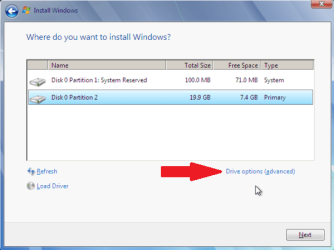
Try this: Boot to the DVD and start the Install. When you get to the screen that has the "Advanced Options"

partition_08.png

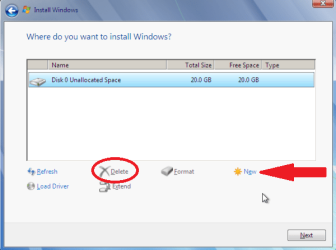
Delete everything and select the empty space to install 7?

partition_09.png

?
 

My Computer My Computer

At a glance

...
OS
...
Hi Robert,

Since I was in a loop, I canceled the installation process, took the install DVD out. It restarted to Windows 7. Then it proceeded to "set Registry" and "start Services". Now, it is back to the "Installing Windows..." dialog and working on the "Completing installation" step.
 

My Computer My Computer

At a glance

Windows Vista Home PremiumAMD Turion(tm)64 X2 Mobile Technology TL-58 1...1.00 GB
Computer Manufacturer/Model Number
Dell Inspiron 1521
OS
Windows Vista Home Premium
CPU
AMD Turion(tm)64 X2 Mobile Technology TL-58 1.90GHz
Memory
1.00 GB
Hi Robert,

Since I was in a loop, I canceled the installation process, took the install DVD out. It restarted to Windows 7. Then it proceeded to "set Registry" and "start Services". Now, it is back to the "Installing Windows..." dialog and working on the "Completing installation" step.
Hopefully it will now finish. Were you "Press any key to boot to CD/DVD" at the last reboot?

?
 

My Computer My Computer

At a glance

...
OS
...
Holding my breath....

Yes, I shall do the reinstall by booting with DVD and install it on an empty partition; if the current step failed.

After this reinstall, I shall not try any other things until getting your further instructions.

Sorry about messing it up further by blinding trying my luck.
 

My Computer My Computer

At a glance

Windows Vista Home PremiumAMD Turion(tm)64 X2 Mobile Technology TL-58 1...1.00 GB
Computer Manufacturer/Model Number
Dell Inspiron 1521
OS
Windows Vista Home Premium
CPU
AMD Turion(tm)64 X2 Mobile Technology TL-58 1.90GHz
Memory
1.00 GB
It worked!!!

Hi Robert,

It worked. I am not sure if everything is in place but I am setting it up now, using the Recommended Settings....

Will keep you posted.

Thank you so much for your patience and all the help.

I really appreciate it.

Much Obliged...Mimi
 

My Computer My Computer

At a glance

Windows Vista Home PremiumAMD Turion(tm)64 X2 Mobile Technology TL-58 1...1.00 GB
Computer Manufacturer/Model Number
Dell Inspiron 1521
OS
Windows Vista Home Premium
CPU
AMD Turion(tm)64 X2 Mobile Technology TL-58 1.90GHz
Memory
1.00 GB
Yes, I shall do the reinstall by booting with DVD and install it on an empty partition; if the current step failed.

After this reinstall, I shall not try any other things until getting your further instructions.

Sorry about messing it up further by blinding trying my luck.

Hi Robert,

It worked. I am not sure if everything is in place but I am setting it up now, using the Recommended Settings....

Will keep you posted.

Thank you so much for your patience and all the help.

I really appreciate it.

Much Obliged...Mimi
Mimi;

That's OK. Life is an education, right?

If you do the "Press any key to boot to CD/DVD" after the last reboot, then the Installer starts all over again. At the reboot, after the installer has placed all its files on the hard drive, you need to allow the computer to boot to the hard drive, or do NOT "Press any key to boot to CD/DVD" when asked to.

As a suggestion, I will give the first user account the name "Admin" and use that account to set the computer up, then I add a Limited User account for everyday use.

?
 

My Computer My Computer

At a glance

...
OS
...
Last bit of info...

Hi Robert,

I did not have to push anything for it to reboot. I just took out the Install DVD after I canceled the previous install.

Things are looking pretty good except that my files and programs were not migrated over automatically; perhaps because it is a fresh install.

I have the saved files so I should be all set.

Thanks again so very much...Mimi
 

My Computer My Computer

At a glance

Windows Vista Home PremiumAMD Turion(tm)64 X2 Mobile Technology TL-58 1...1.00 GB
Computer Manufacturer/Model Number
Dell Inspiron 1521
OS
Windows Vista Home Premium
CPU
AMD Turion(tm)64 X2 Mobile Technology TL-58 1.90GHz
Memory
1.00 GB
Hi Robert,

I did not have to push anything for it to reboot. I just took out the Install DVD after I canceled the previous install.

Things are looking pretty good except that my files and programs were not migrated over automatically; perhaps because it is a fresh install.

I have the saved files so I should be all set.

Thanks again so very much...Mimi
That is correct. A full version install does not save any of the old computer like an upgrade install. But you have all your data backed up. You will have a clean Operating System / computer you can now install only those programs you really want and it will run like greased lighting ... well almost.

You are amazing. Such determination and persistence. "Never give up ... never surrender", right? You took control and made some good choices, like the external backup. I have enjoyed working with you very much. You manner and politeness are a delight.

When you are ready for Ubuntu, I would suggest using Sun's VirtualBox. it is awesome and you don't have the dual booting headaches!!

Cheers to you!!
Robert
 

My Computer My Computer

At a glance

...
OS
...
Another Question if I may...

Hi Robert,

Hopefully this is my last question for the time being. I am sure that you are helping a lot of other folks. Thanks so much for your time.

Although nothing is migrated to my C drive (neither data nor program), my C drive is as used up as before. So, I only have very little free space left.

Nevertheless, I have nothing to clean up to reclaim the used space.

What shall I do?

Many Thanks...Mimi
 

My Computer My Computer

At a glance

Windows Vista Home PremiumAMD Turion(tm)64 X2 Mobile Technology TL-58 1...1.00 GB
Computer Manufacturer/Model Number
Dell Inspiron 1521
OS
Windows Vista Home Premium
CPU
AMD Turion(tm)64 X2 Mobile Technology TL-58 1.90GHz
Memory
1.00 GB
Hi Robert,

Hopefully this is my last question for the time being. I am sure that you are helping a lot of other folks. Thanks so much for your time.

Although nothing is migrated to my C drive (neither data nor program), my C drive is as used up as before. So, I only have very little free space left.

Nevertheless, I have nothing to clean up to reclaim the used space.

What shall I do?

Many Thanks...Mimi
You should post a screen shot of your drive map, like before ...
 

My Computer My Computer

At a glance

...
OS
...
Back
Top