How to make W7's "Windows Explorer" more like WinXP ?

shiphen

Banned
Local time
5:58 AM
Messages
207
Hi

Sorry, but I do *hate* the Windows7 "Windows Explorer".

How can I get it to look more like it did in WindowsXP?

e.g. When I am showing any given folder in the right hand column, I want it to show me where a I *VISUALLY* in the left hand column.
i.e. I what to see the full folder structrure in the left hand column !

Also I want the "vertical lines" back in the left hand column that you used to get in WindowsXP when you UN-ticked "Display simple folder view in Explorer's Folders list". Is there an equivalent option in Windows7?

Also when I use keystrokes (e.g. Up; Down; Left; Right cursor control keys) to navigate Windows Explorer in Windows7 the bl**dy thing jumps around in unexpected ways & it's hard to see what's going on.

How can I make it all more like WinXP? (!)

With thanks


Ship
 

My Computer My Computer

At a glance

Windows7 Pro x64Intel Core I5 750 2.66GHz8GB = (2GB 1066 DDR3 Memory) x4 modulesNVIDIA XTF GeForce 9500GT 512Mb
Computer Manufacturer/Model Number
Custom built
OS
Windows7 Pro x64
CPU
Intel Core I5 750 2.66GHz
Motherboard
Intel DP55WB (MA TX)
Memory
8GB = (2GB 1066 DDR3 Memory) x4 modules
Graphics Card(s)
NVIDIA XTF GeForce 9500GT 512Mb
Sound Card
none
Monitor(s) Displays
Samsung SyncMaster 244T
Screen Resolution
1920 x 1200
Hard Drives
Seagate 500Gb, RPM: 7200, Cache:32MB, SATA
PSU
500W ATX 12v 80+ PSU
Case
Midi Tower
Cooling
?
Keyboard
Logitech Y-UV90 (corded ergonomic)
Mouse
Microsoft Intellimouse Explorer Tilt Wheel Mouse
Internet Speed
ADSL
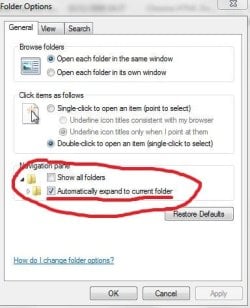
1. Open any folder
2. Click Organize (at the top keft)
3. Click Folder and Search Options
4. And try those 2 options:
Capture.JPG
5. Close all folders
6. Open My computer and try to navigate ;)
 

My Computer My Computer

At a glance

Windows 7 Ultimate x86 SP1
OS
Windows 7 Ultimate x86 SP1
Now that is strange - I hatedIB the old explorer and really like this new one. I do miss the Alt-ArrowUp shortcut though. I don't think there's any way of doing what you want without using a third-party explorer replacement. These definitely exist, and a search should turn up plenty (whether all of them will work with W7 is another question, but you should be lucky; try Windows Explorer Replacement – Free Commander)
 

My Computer My Computer

At a glance

Windows 7 Ult x64i7 9206GB DDR3GF 9400GT
OS
Windows 7 Ult x64
CPU
i7 920
Motherboard
GA-EX58-UD5
Memory
6GB DDR3
Graphics Card(s)
GF 9400GT
Monitor(s) Displays
Syncmaster 233HD
Screen Resolution
1920 x 1080
Hard Drives
loads
Case
HAF 920
1. Open any folder
2. Click Organize (at the top keft)
3. Click Folder and Search Options
4. And try those 2 options:
View attachment 48360
5. Close all folders
6. Open My computer and try to navigate ;)

Ah - thanks Jav - that's certainly a good start. :)

Mind you although slightly better than before, using cursor arrows to navigate the highlighted (i.e. current) folder does still leap around up and down the screen somewhat. :(

Also How can I get the vertical lines back though in the Folders window?
(i.e. a non- "simple view") :/

Ship
 

My Computer My Computer

At a glance

Windows7 Pro x64Intel Core I5 750 2.66GHz8GB = (2GB 1066 DDR3 Memory) x4 modulesNVIDIA XTF GeForce 9500GT 512Mb
Computer Manufacturer/Model Number
Custom built
OS
Windows7 Pro x64
CPU
Intel Core I5 750 2.66GHz
Motherboard
Intel DP55WB (MA TX)
Memory
8GB = (2GB 1066 DDR3 Memory) x4 modules
Graphics Card(s)
NVIDIA XTF GeForce 9500GT 512Mb
Sound Card
none
Monitor(s) Displays
Samsung SyncMaster 244T
Screen Resolution
1920 x 1200
Hard Drives
Seagate 500Gb, RPM: 7200, Cache:32MB, SATA
PSU
500W ATX 12v 80+ PSU
Case
Midi Tower
Cooling
?
Keyboard
Logitech Y-UV90 (corded ergonomic)
Mouse
Microsoft Intellimouse Explorer Tilt Wheel Mouse
Internet Speed
ADSL
Ah - thanks Jav - that's certainly a good start. :)

Mind you although slightly better than before, using cursor arrows to navigate the highlighted (i.e. current) folder does still leap around up and down the screen somewhat. :(

Also How can I get the vertical lines back though in the Folders window?
(i.e. a non- "simple view") :/

Ship

What do you mean by vertical lines?

(sorry, forgot XP a bit :p )
 

My Computer My Computer

At a glance

Windows 7 Ultimate x86 SP1
OS
Windows 7 Ultimate x86 SP1

My Computer My Computer

At a glance

Windows7 Pro x64Intel Core I5 750 2.66GHz8GB = (2GB 1066 DDR3 Memory) x4 modulesNVIDIA XTF GeForce 9500GT 512Mb
Computer Manufacturer/Model Number
Custom built
OS
Windows7 Pro x64
CPU
Intel Core I5 750 2.66GHz
Motherboard
Intel DP55WB (MA TX)
Memory
8GB = (2GB 1066 DDR3 Memory) x4 modules
Graphics Card(s)
NVIDIA XTF GeForce 9500GT 512Mb
Sound Card
none
Monitor(s) Displays
Samsung SyncMaster 244T
Screen Resolution
1920 x 1200
Hard Drives
Seagate 500Gb, RPM: 7200, Cache:32MB, SATA
PSU
500W ATX 12v 80+ PSU
Case
Midi Tower
Cooling
?
Keyboard
Logitech Y-UV90 (corded ergonomic)
Mouse
Microsoft Intellimouse Explorer Tilt Wheel Mouse
Internet Speed
ADSL
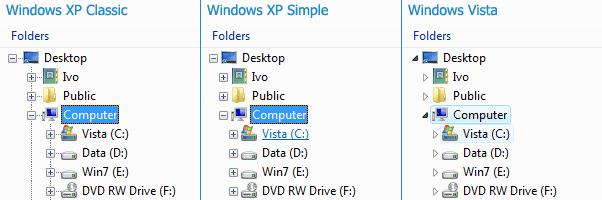
Also I want the "vertical lines" back in the left hand column that you used to get in WindowsXP when you UN-ticked "Display simple folder view in Explorer's Folders list". Is there an equivalent option in Windows7?

The latest version of Classic Shell can do that: http://www.sevenforums.com/customiz...-8-now-skinnable-start-menu-3.html#post514660

Check out the screenshots here: http://sourceforge.net/projects/classicshell/
The last screenshot shows the different ways the navigation pane can look.
 

My Computer My Computer

At a glance

Windows 7 Home 64, Vista Ultimate 64
Computer Manufacturer/Model Number
Me :) I build all my PCs
OS
Windows 7 Home 64, Vista Ultimate 64
I'm curious what these vertical lines are myself..

Is it a grid or something?
 

My Computer My Computer

At a glance

Windows 7
OS
Windows 7
Vertical lines

I'm curious what these vertical lines are myself..

Is it a grid or something?

Look at the first screenshot in the attached image.
 

Attachments

  • FolderViews.png
    FolderViews.png
    7.7 KB · Views: 286

My Computer My Computer

At a glance

Windows 7 Home 64, Vista Ultimate 64
Computer Manufacturer/Model Number
Me :) I build all my PCs
OS
Windows 7 Home 64, Vista Ultimate 64
Okay I have installed Classic Shell... and yes I have (eventually) managed to get the vertical lines back into the Folders View. However I do find it disappointing that there isn't such functionality built into Win7 itself. Afterall I dont want to have to reverse build the whole of Win7 bit by bit!
Worse, I am clearly losing a lot of other new Win7 functionality by installing Class Shell at the same time... To be fair, half the point of my getting Win7 is to become familiar with the new interface that everyone else will be using (eventually).

Anyhow thanks :)
 

My Computer My Computer

At a glance

Windows7 Pro x64Intel Core I5 750 2.66GHz8GB = (2GB 1066 DDR3 Memory) x4 modulesNVIDIA XTF GeForce 9500GT 512Mb
Computer Manufacturer/Model Number
Custom built
OS
Windows7 Pro x64
CPU
Intel Core I5 750 2.66GHz
Motherboard
Intel DP55WB (MA TX)
Memory
8GB = (2GB 1066 DDR3 Memory) x4 modules
Graphics Card(s)
NVIDIA XTF GeForce 9500GT 512Mb
Sound Card
none
Monitor(s) Displays
Samsung SyncMaster 244T
Screen Resolution
1920 x 1200
Hard Drives
Seagate 500Gb, RPM: 7200, Cache:32MB, SATA
PSU
500W ATX 12v 80+ PSU
Case
Midi Tower
Cooling
?
Keyboard
Logitech Y-UV90 (corded ergonomic)
Mouse
Microsoft Intellimouse Explorer Tilt Wheel Mouse
Internet Speed
ADSL
I'm curious what these vertical lines are myself..

Is it a grid or something?

Look at the first screenshot in the attached image.
The lines are supposed to denote dependency in the directory tree, but they soon become quite confusing or at least unhelpful (I always thought)
 

My Computer My Computer

At a glance

Windows 7 Ult x64i7 9206GB DDR3GF 9400GT
OS
Windows 7 Ult x64
CPU
i7 920
Motherboard
GA-EX58-UD5
Memory
6GB DDR3
Graphics Card(s)
GF 9400GT
Monitor(s) Displays
Syncmaster 233HD
Screen Resolution
1920 x 1080
Hard Drives
loads
Case
HAF 920
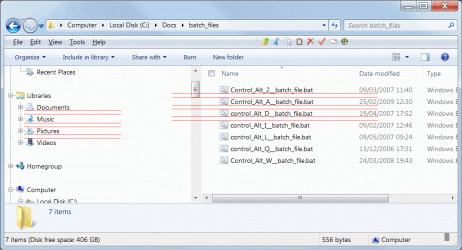
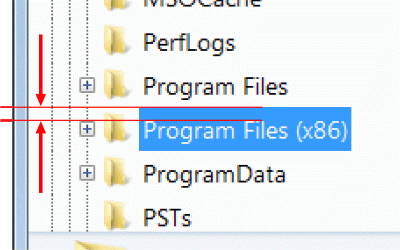
Btw, one more request: How can I reduce the space between lines of text in the Windows Explorer window?
(It is wasting a lot of vertical space when listing files.)

Ship
 

Attachments

  • white_space_in_Windows_Explorer.gif
    white_space_in_Windows_Explorer.gif
    45.3 KB · Views: 196

My Computer My Computer

At a glance

Windows7 Pro x64Intel Core I5 750 2.66GHz8GB = (2GB 1066 DDR3 Memory) x4 modulesNVIDIA XTF GeForce 9500GT 512Mb
Computer Manufacturer/Model Number
Custom built
OS
Windows7 Pro x64
CPU
Intel Core I5 750 2.66GHz
Motherboard
Intel DP55WB (MA TX)
Memory
8GB = (2GB 1066 DDR3 Memory) x4 modules
Graphics Card(s)
NVIDIA XTF GeForce 9500GT 512Mb
Sound Card
none
Monitor(s) Displays
Samsung SyncMaster 244T
Screen Resolution
1920 x 1200
Hard Drives
Seagate 500Gb, RPM: 7200, Cache:32MB, SATA
PSU
500W ATX 12v 80+ PSU
Case
Midi Tower
Cooling
?
Keyboard
Logitech Y-UV90 (corded ergonomic)
Mouse
Microsoft Intellimouse Explorer Tilt Wheel Mouse
Internet Speed
ADSL
Worse, I am clearly losing a lot of other new Win7 functionality by installing Class Shell at the same time...
What functionality are you losing with Classic Shell? Every single feature of Classic Shell is disableable. If you find something you can't disable, it is a mistake and I will fix it.
 

My Computer My Computer

At a glance

Windows 7 Home 64, Vista Ultimate 64
Computer Manufacturer/Model Number
Me :) I build all my PCs
OS
Windows 7 Home 64, Vista Ultimate 64
Btw, one more request: How can I reduce the space between lines of text in the Windows Explorer window?
(It is wasting a lot of vertical space when listing files.)

Ship

That's something I'd like to know too. I'm sure I saw a setting in one of the zillions of tutes and threads I've looked at lately, but I didn't think at the time to copy the info. I've been rooting around in windows, but haven't come across the setting yet.

mac
 

My Computer My Computer

At a glance

windows 7
OS
windows 7
Btw, one more request: How can I reduce the space between lines of text in the Windows Explorer window?
(It is wasting a lot of vertical space when listing files.)

Ship


hmm..
I think it's a problem with Classic shell..

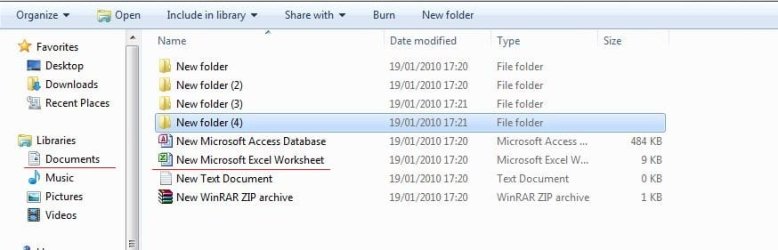
Look at mine, default by Windows 7:
Capture.JPG
 

My Computer My Computer

At a glance

Windows 7 Ultimate x86 SP1
OS
Windows 7 Ultimate x86 SP1
hmm..
I think it's a problem with Classic shell..

No, it's not. It can't be. Classic Shell doesn't mess with the file list at all.

Looks to me like Explorer uses a bigger than normal font. You seem to be using DPI larger than 96 but smaller than 120. The font size is a contributing factor to the height of each line, which determines indirectly the gaps between lines.
 

My Computer My Computer

At a glance

Windows 7 Home 64, Vista Ultimate 64
Computer Manufacturer/Model Number
Me :) I build all my PCs
OS
Windows 7 Home 64, Vista Ultimate 64
ok, thanks for confirming.. ;)
 

My Computer My Computer

At a glance

Windows 7 Ultimate x86 SP1
OS
Windows 7 Ultimate x86 SP1
I notice that the blue area indicating that you have selected a folder name does have a LOT of blank space both below and above the text itself. (see attached image)

To me this feels like the FONT is to blame. Is there a line-spacing setting somewhere?
 

Attachments

  • delme_01.gif
    delme_01.gif
    35.1 KB · Views: 24

My Computer My Computer

At a glance

Windows7 Pro x64Intel Core I5 750 2.66GHz8GB = (2GB 1066 DDR3 Memory) x4 modulesNVIDIA XTF GeForce 9500GT 512Mb
Computer Manufacturer/Model Number
Custom built
OS
Windows7 Pro x64
CPU
Intel Core I5 750 2.66GHz
Motherboard
Intel DP55WB (MA TX)
Memory
8GB = (2GB 1066 DDR3 Memory) x4 modules
Graphics Card(s)
NVIDIA XTF GeForce 9500GT 512Mb
Sound Card
none
Monitor(s) Displays
Samsung SyncMaster 244T
Screen Resolution
1920 x 1200
Hard Drives
Seagate 500Gb, RPM: 7200, Cache:32MB, SATA
PSU
500W ATX 12v 80+ PSU
Case
Midi Tower
Cooling
?
Keyboard
Logitech Y-UV90 (corded ergonomic)
Mouse
Microsoft Intellimouse Explorer Tilt Wheel Mouse
Internet Speed
ADSL
The lines are supposed to denote dependency in the directory tree, but they soon become quite confusing or at least unhelpful (I always thought)

To me it depends how many of them are in operation at once. Certainly if there are more than 3 or 4 of them side by side it does start to get confusing.

And for some reason the size of the indentation being used by Window7 (denoting each successive directory level) is quite a lot smaller than WindowsXP uses.

- Is there any way to increase the indentation size in the Windows7 version back to what it is in WindowsXP?

Ship
 

My Computer My Computer

At a glance

Windows7 Pro x64Intel Core I5 750 2.66GHz8GB = (2GB 1066 DDR3 Memory) x4 modulesNVIDIA XTF GeForce 9500GT 512Mb
Computer Manufacturer/Model Number
Custom built
OS
Windows7 Pro x64
CPU
Intel Core I5 750 2.66GHz
Motherboard
Intel DP55WB (MA TX)
Memory
8GB = (2GB 1066 DDR3 Memory) x4 modules
Graphics Card(s)
NVIDIA XTF GeForce 9500GT 512Mb
Sound Card
none
Monitor(s) Displays
Samsung SyncMaster 244T
Screen Resolution
1920 x 1200
Hard Drives
Seagate 500Gb, RPM: 7200, Cache:32MB, SATA
PSU
500W ATX 12v 80+ PSU
Case
Midi Tower
Cooling
?
Keyboard
Logitech Y-UV90 (corded ergonomic)
Mouse
Microsoft Intellimouse Explorer Tilt Wheel Mouse
Internet Speed
ADSL
- Is there any way to increase the indentation size in the Windows7 version back to what it is in WindowsXP?
Yes, there is: TVM_SETINDENT Message ()
I may make it a customizable setting for the next version of Classic Shell. I don't know when there will be a new version though. Might be 2-3 weeks from now.
 

My Computer My Computer

At a glance

Windows 7 Home 64, Vista Ultimate 64
Computer Manufacturer/Model Number
Me :) I build all my PCs
OS
Windows 7 Home 64, Vista Ultimate 64
Back
Top