
Refresh rate stucks at 60Hertz

RougeCrown

New member
Local time
9:52 AM
Messages
5
Hi guys! Im facing this really annoying problem on my computer and i need help from you guys! Thanks before hand!

To the problem, my computer is a HP Pavilion Dv5t-1000 (GPU nVIDIA 9200M) with windows 7 installed anew. I used to run windows 7 beta and the RC2, but when i upgraded to the full version, i face this issue: the screen refresh rate stucks at 60 hertz.
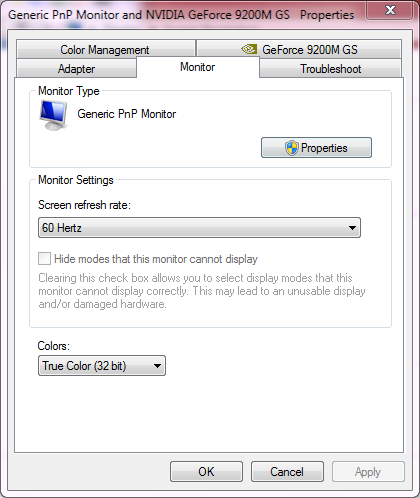


As you can see from the screenshot, theres no option to show all the unavailable display options. even in the nVIDIA control panel, the option is also disabled, and theres no way to create custom resolution, even though i have updated to the newest driver.

I think its because of the screen, as it is shown on the device manager as general PnP monitor. So i was trying to find the driver for the screen on the HP website. Then as i tried to install this file

Mobile Intel 4 Series Express Chipset Family Graphics Driver

It gives me an error, saying that my computer doesnt meet the minimum requirements for the software.

This is ridiculous. I asked a HP expert, and he asked me to upgrade my bios. Didn't help also...

I really need help desperately because 60hzt is killing my eyes :( Please help me guys!
 

My Computer My Computer

OS
windows 7
hi rougecrown , i may be totally wrong here but i think 60 htz is the standard refresh rate for lcd and tft my main pc has an lcd ,that runs at 60htz ,with no options available ,my lappys also run at 60 htz also i have no flicker,is pleasing to the eye don't know if thats any help
 

My Computer My Computer

Computer type
PC/Desktop
Computer Manufacturer/Model Number
self build
OS
win 7 ultimate32bit, Win8.1pro wmc 32bit
CPU
amd phenom x4 9600
Motherboard
asus m2n32-sli deluxe
Memory
corsair twinxs 2x2gb
Graphics Card(s)
2x nvidia 1gb 8500gt
Sound Card
onboard
Monitor(s) Displays
23" PB Viseo 233d
Screen Resolution
1920x1080
Hard Drives
maxtor sata 500gb
maxtor sata 320gb
fujitsu sata200gb
PSU
oryxx tornado 750w
Case
thermaltake xaser lll
Cooling
artic freezer64 pro + 7 case fans
My Gateway LCDs with an Nvidia graphic card gives me two options: 59 and 60. That's it.
 

My Computer My Computer

Computer Manufacturer/Model Number
Home Built
OS
Windows7 beta 7000
CPU
Intel E6550
Motherboard
Intel DP35DP
Memory
8Gb
Graphics Card(s)
Nvidia 8500 GT
Sound Card
Intel onboard sound
Monitor(s) Displays
Two Gateway 22" LCD monitors
Screen Resolution
1680x1050
Hard Drives
Two 500Gb 7200rpm SATA
Hello RougeCrown,

Have you aslready updated all your drivers to Win7 versions? Particualrily the chipset and graphics.
For Win7 32bit:Select software and drivers HP Pavilion dv5t-1000 CTO Entertainment Notebook PC - HP Customer Care (United States - English)

For Win7 64bit:Select software and drivers HP Pavilion dv5t-1000 CTO Entertainment Notebook PC - HP Customer Care (United States - English)

May be why it is showing as a generic PnP monitor.

It is however, quite common for higher resolution displays to show a refresh rate of 60 OR 59 (or 59.97 to be more exact)
 

My Computer My Computer

Computer Manufacturer/Model Number
Custom (Self Build)
OS
Windows 7 Home Premium 64bit
CPU
Intel Core i7 2700k
Motherboard
eVGA P67 SLI
Memory
8GB Mushkin Redline Ridgebacks @1866
Graphics Card(s)
EVGA GTX570 SC
Sound Card
XiFi Titanium HD
Monitor(s) Displays
LG W2453V
Screen Resolution
1920x1080
Hard Drives
Intel 320 80GB -- Intel X25-V 40GB --WD Black 1TB x2 -- WD Blue 640GB
PSU
Seasonic x750
Case
Corsair 600T SE White
Cooling
eVGA Superclocked CPU Cooler
Keyboard
Saitek Cyborg
Antivirus
Kaspersky
Browser
IE
Other Info
LG BD/DVD
Mmm, the dreaded Generic PNP monitor "bug" roars it's ugly head again.
(Do people actualy search this forum before posting...? When posting this i got a few "similar threaths" on the bottom of the screen).

If WhichmMaster's tip doesn't bring anything...

...take a look here first:
Resolution and refreshrate problems in Windows 7
for general info on what it's all about...

Then go here:
Tom's Hardware
Read through this topic from top to bottom. You either need to create your own resolutions with their refreshrates, go through Powerstrip to make your own custom driver, make your own EDID file or edit the monitor's .INF file.

For more info just Google on Windows 7 resolution problems or Windows 7 refreshrate or something like that. You then have all the info you need to solve your problem.


PS: both links handle about the inability to choose a certain resolution but not having the option to choose various refreshrates is directly related to the same problem.
PPS: tweaking your refreshrate from the 60Hz to something in between 59 and 60 can solve your problem too.
 
Last edited:

My Computer My Computer

Computer Manufacturer/Model Number
Custom build
OS
Windows 7 64-bit Ultimate
hi guys, thanks for giving me advices, but unfortunately, none of the advices works. :( I tried the nVIDIA mod, and yes, the option to create custom resolution exists. But then every time i change the refresh rate, it will turns back to 60 Hertz again.
 

My Computer My Computer

OS
windows 7
... the problem, my computer is a HP Pavilion Dv5t-1000 (GPU nVIDIA 9200M) with windows 7 installed anew... I really need help desperately because 60hzt is killing my eyes :( Please help me guys!

I'm afraid I don't understand? Are you hooking up a CRT monitor to this notebook? If you're not, then I can't see how the refresh rate is, or can be, hurting your eyes? LCD's don't work the same way CRT's do, so 60hz is more than sufficient as far as refresh rates go.

Is your screen actually flickering?
 

My Computer My Computer

OS
7 Ultimate x64
CPU
i5-2500k
Motherboard
Asus P8P67 Pro
Memory
8GB G.Skill Ripjaws X F3-12800CL7D-8GBXH 1866MHz 8-9-8-24
Graphics Card(s)
EVGA GTX 570 SC
Sound Card
X-Fi Titanium Fatality
Monitor(s) Displays
Samsung S27A550H 27" LED
Screen Resolution
1920x1080
Hard Drives
OCZ Vertex 3 120GB.
1TB Samsung F3.
2TB Samsung F4.
PSU
PC Power & Cooling Silencer 760
Case
Lian Li Lancool K62
Cooling
Thermalright Venomous X Black/Scythe S-Flex/Shin-Etsu X23
Keyboard
MS Natural Elite 4000 Ergonomic
Mouse
Logitech G500
Internet Speed
6MB/768
Other Info
Logitech Z-5500 505 watts.
D-Link DGL-4500.
Tripp-Lite Smart Pro 1500.
60Hz should be enough for an LCD (higher is better if you can set it higher, i just love the view of those 120Hz LCD monitors which are still way to expensive).

If his screen is not flickering but he gets a fuzzy screen, adjusting to refreshrate anywhere between 59Hz or 60Hz should do the trick. Which exact frequency he should use is a bit of trial and error.

@RougeCrown: As far as i know, drivers above 182.50 have problems with the creation of custom res/freq's.
If succesfull, the custom res/freq's you created should be possible to select.
If your LCD returns to 60Hz then it's possible that it does not allow a higher frequency. If your screen looks fuzzy you need to adjust the freq between 59 and 60Hz with tiny steps (i did read that some people have to go a little above 60Hz to get it right eventualy).

Questions:
- Is your screen flickering (already asked)?
- Is your screen fuzzy?
- What was the refreshrate under beta and RC2?
- Did you try through PowerStrip? If yes, did you performed the step "have disk" when creating a custom driver? You find a step by step guide in the Tom's Harwardware link above
 

My Computer My Computer

Computer Manufacturer/Model Number
Custom build
OS
Windows 7 64-bit Ultimate
Higher isn't better if the screen does not support it... and there's no distinction between 59 or 60hz, visual or otherwise, as far as the OS and drivers are concerned.

Besides, with an LCD monitor, a "refresh rate" really doesn't exist, per se, because that's just not how LCD's work: LCD's don't draw the screen 60 times a second like a CRT.

The wife is now enjoying an old BenQ of mine, and as I recall its rate was 75hz, but honestly, until this thread popped up I had forgotten all about it being the odd man out at 75hz... maybe I'll walk over there and set it to that one of these days... :) ... maybe not, because I can't say I've noticed there's anything at all wrong... it's perfect at 60.

I would say that maybe the problem was the OP didn't install the monitor's drivers... but it's a notebook... I'm assuming complete with HP cd with all his drivers, so he has everything he needs, right?
 

My Computer My Computer

OS
7 Ultimate x64
CPU
i5-2500k
Motherboard
Asus P8P67 Pro
Memory
8GB G.Skill Ripjaws X F3-12800CL7D-8GBXH 1866MHz 8-9-8-24
Graphics Card(s)
EVGA GTX 570 SC
Sound Card
X-Fi Titanium Fatality
Monitor(s) Displays
Samsung S27A550H 27" LED
Screen Resolution
1920x1080
Hard Drives
OCZ Vertex 3 120GB.
1TB Samsung F3.
2TB Samsung F4.
PSU
PC Power & Cooling Silencer 760
Case
Lian Li Lancool K62
Cooling
Thermalright Venomous X Black/Scythe S-Flex/Shin-Etsu X23
Keyboard
MS Natural Elite 4000 Ergonomic
Mouse
Logitech G500
Internet Speed
6MB/768
Other Info
Logitech Z-5500 505 watts.
D-Link DGL-4500.
Tripp-Lite Smart Pro 1500.
Higher isn't better if the screen does not support it... and there's no distinction between 59 or 60hz, visual or otherwise, as far as the OS and drivers are concerned.
I don't agree there Fumz. Not with Windows 7. A lot of people suffer (you don't as far as i can see) from either:
- a resolution problem, where they are unable to select the resolution (and it's accompanied refreshrate on CRT's) they used to use under Vista or XP. This can be solved in various ways as decribed above.
- they suffer from the problem that at the native resolution and refreshrate of the LCD, their view just looks really bad and fuzzy. This is mostly solved (on LCD's at least) by setting the refreshrate to anything in between 59Hz and 60Hz (like 59,17Hz or so... when all of a sudden your picture becomes razor sharp again). It may see and sound unlogical but it is what it is.
Just Google a bit about this problem, sit back, relax and enjoy a "long" evening of reading about both problems under Windows 7 and it's propher solutions.

I would say that maybe the problem was the OP didn't install the monitor's drivers... but it's a notebook... I'm assuming complete with HP cd with all his drivers, so he has everything he needs, right?
Right but then Windows 7 (can) work(s) a bit odd when it comes down to displays. If your monitor is recognised as a Generic PNP monitor (or another non-PNP monitor) and Windows forces a native resolution at which it thinks the hooked-up monitor should work at and that res/freq is not the real native res/freq of your monitor, you have a big problem in Windows 7.
If it happens to be equal to the one you already used on a previous OS, you see no problems at all and everything works fine. I believe you fall into that last category...:party:
 

My Computer My Computer

Computer Manufacturer/Model Number
Custom build
OS
Windows 7 64-bit Ultimate
From wiki.....


Much of the discussion of refresh rate does not apply to the liquid crystal portion of an LCD monitor. This is because while a CRT monitor uses the same mechanism for both illumination and imaging, LCDs employ a separate backlight to illuminate the image being portrayed by the LCD's liquid crystal shutters. The shutters themselves do not have a "refresh rate" as such due to the fact that they always stay at whatever opacity they were last instructed to continuously, and do not become more or less transparent until instructed to produce a different opacity. Most of the TFT LCDs used in portable devices and computer monitors need a continuous refresh. The driving voltage determines the transmittance of the liquid crystal.
The closest thing liquid crystal shutters have to a refresh rate is their response time, while nearly all LCD backlights (most notably fluorescent cathodes, which commonly operate at ~200 Hz) have a separate figure known as flicker, which describes how many times a second the backlight pulses on and off. However they also have a refresh rate that governs how often a new image is received from the video card (often at 60 Hz).
 

My Computer My Computer

Computer Manufacturer/Model Number
Custom Build.
OS
Windows 7 Ultimate x64.
CPU
i5 760 @ 4.2Ghz. 1.18v
Motherboard
Gigabyte - H55M-USB3
Memory
4g Corsair xms3 ddr3, 1600Mhz.
Graphics Card(s)
Gigabyte GTX-560Ti soc edition
Sound Card
Asus Xonar Dx - Logitech Z5500.
Monitor(s) Displays
Acer 22" LCD Wide screen 1680-1050 -Samsung 42" Plasma....
Screen Resolution
1680/1050 -----1920/1080p.
Hard Drives
2x 2TB Seagate Go Flex,
1x 1TB Seagate,
1x 640WD Black,
x16 Gig sandisc flash drive,
1x8Gig sandisc flash drive.
PSU
XigmaTek 80plus NRP-PC702 - 700w dual 30a.
Case
Venus Gamers Midi Tower Case with LED Display
Cooling
Arctic Freezer 7 Pro Rev 2... x2 Arctic F8 case fans........
Keyboard
Logitech G15-v2 Gaming.
Mouse
Microsoft Sidewinder X8.
Internet Speed
Virgin Media - 50mb down- 8mb up.
Other Info
x2 Xbox 360 wireless controllers...

Dual layer optical disc drive...

Chrome 79million

A.V = MSE
I can see Windows not recognizing an obscure monitor with an odd resolution, thereby creating this issue... but with an HP?

I noticed the OP installed the chipset driver, but didn't say whether he installed the HP graphics driver for the 9200?

32-bit version NVIDIA GeForce 9200M GS/9600M GT Video/Graphics Driver HP Pavilion dv5t-1000 CTO Entertainment Notebook PC - HP Customer Care (United States - English)

64-bit version: NVIDIA GeForce 9200M GS/9600M GT Video/Graphics Driver HP Pavilion dv5t-1000 CTO Entertainment Notebook PC - HP Customer Care (United States - English)
 

My Computer My Computer

OS
7 Ultimate x64
CPU
i5-2500k
Motherboard
Asus P8P67 Pro
Memory
8GB G.Skill Ripjaws X F3-12800CL7D-8GBXH 1866MHz 8-9-8-24
Graphics Card(s)
EVGA GTX 570 SC
Sound Card
X-Fi Titanium Fatality
Monitor(s) Displays
Samsung S27A550H 27" LED
Screen Resolution
1920x1080
Hard Drives
OCZ Vertex 3 120GB.
1TB Samsung F3.
2TB Samsung F4.
PSU
PC Power & Cooling Silencer 760
Case
Lian Li Lancool K62
Cooling
Thermalright Venomous X Black/Scythe S-Flex/Shin-Etsu X23
Keyboard
MS Natural Elite 4000 Ergonomic
Mouse
Logitech G500
Internet Speed
6MB/768
Other Info
Logitech Z-5500 505 watts.
D-Link DGL-4500.
Tripp-Lite Smart Pro 1500.
@fumz: i installed everything i could. And as the upgrade was one on my own (my laptop was bought before the win 7 upgrade period) i cant receive any help from HP. Moreover, when i bought the laptop, there was no driver cd as HP nowadays creates a restore partition in the computer instead.

I tried to check on another laptop today, it has a ATI 9200 mobile card, and it could change the refresh rate to 75hertz (running windows XP)

I think its a windows 7 thingy... most likely the EDID problem. BUt i dont know a workaround.

@Lange: the screen is not that fuzzy. but i notice that it causes eyestrains much more than last time when i was still running windows vista and win 7 RC. And i believe i fall into the last category. I have no problem with the resolution, only the refresh rate...
 

My Computer My Computer

OS
windows 7
Hi RougeCrown,

Isn't this what you installed?
That's the driver for their integrated video; not your card. I'd suggest giving the drivers I linked a shot, if you haven't yet, as they're for Windows 7, and more importantly, your card.

If I were you I'd be real cautious when it comes to forcing your screen to refresh at 75hz. If 75hz isn't supported, when you click apply the screen will go black and you'll find yourself having to remove the video drivers from safe mode. If it does support it, ok, but if not, be aware of the consequences.

The reason I doubt it's an EDID problem is that yours is an OEM, and not some obscure builder, but a rather large partner of MS. It would amaze me if anything you bought from HP wasn't "officially" supported by Windows 7.

I realize you upgraded on your own, and that HP would rather you have bought your copy from them, but they're still going to support the hardware. I'd ask them if that screen is capable of 75hz?

I'm typing all this cause I still don't quite get the eye strain issue you're talking about? Let's say you open a text document or read a web site on a crt. The reason you get eye strain is because that crt redraws that document, by Windows default, 60 times a second... 60hz. This is noticeable, and annoying; increasing to 75hz or 85hz solves this in the short term, but even with those high refresh rates, after a day of looking over documents your eyes hurt.

LCD's are different. If you were to open that same document on an LCD you don't get the eye strain because the LCD does not redraw the image 60 time a second, in fact, it doesn't redraw it at all until you change it... either by scrolling or looking at another document... so there's not that constant flicker that ends up hurting your eyes.

If you're getting that CRT like flicker, then perhaps your laptop needs servicing? Maybe there's something wrong with the backlighting? Is the problem sufficiently annoying to warrant taking it to HP and having them check it out?
 

My Computer My Computer

OS
7 Ultimate x64
CPU
i5-2500k
Motherboard
Asus P8P67 Pro
Memory
8GB G.Skill Ripjaws X F3-12800CL7D-8GBXH 1866MHz 8-9-8-24
Graphics Card(s)
EVGA GTX 570 SC
Sound Card
X-Fi Titanium Fatality
Monitor(s) Displays
Samsung S27A550H 27" LED
Screen Resolution
1920x1080
Hard Drives
OCZ Vertex 3 120GB.
1TB Samsung F3.
2TB Samsung F4.
PSU
PC Power & Cooling Silencer 760
Case
Lian Li Lancool K62
Cooling
Thermalright Venomous X Black/Scythe S-Flex/Shin-Etsu X23
Keyboard
MS Natural Elite 4000 Ergonomic
Mouse
Logitech G500
Internet Speed
6MB/768
Other Info
Logitech Z-5500 505 watts.
D-Link DGL-4500.
Tripp-Lite Smart Pro 1500.
I can see Windows not recognizing an obscure monitor with an odd resolution, thereby creating this issue... but with an HP?
Mine is IIyama HM903DT B (CRT). It's prefectly recognised by Windows because it shows up as IIyama HM903DT B as hardware device but as driver Windows uses the Generic PNP Monitor and uses it's own (limited) EDID file instead of the original monitors EDID. And it's this behaviour that causes problems. And not only with CRT's but with LCD's too and even with new ones.
My monitors specs go up to 1920x1440 (not that i use that) but Win7 limits this to 1600x1200 (went all the way up to 1920x1440 in XP). Secondly, 1152x864 is only available at 60Hz under Win7 but up to 120Hz under XP.
There is more. My screen has a 4/3 ratio. Just telll me why Win7 pushes me to use 1280x1024 every time when that has a 5/4 ratio and you get a teared image when using it?
And then the big question: Why would Win7 limit your monitor in the first place?
If there is anything that should work out of the box on every spec it mas made for on any OS then it's a monitor and a keyboard because if you don't have that, every OS is useless. Win7 let a lot people down on the monitor side. Those who are a bit skilled can get around it, those who don't...
 

My Computer My Computer

Computer Manufacturer/Model Number
Custom build
OS
Windows 7 64-bit Ultimate
@Fumz: i installed both that one and the NVIDIA card. I stated that in my first post. However, in the end only the NVIDIA driver can be installed. The intel chipset gives me an error, saying my hardware does not meet minimum requirements. This problem was not seen when i installed win 7 RC2. And last time when i used windows vista, my screen was at 75 hertz all time and there were options to choose from...

@Lange: I think it might have smthing to do with the aero features? as in if the screen is too big it screws up all those aero snaps and preview... etc. But its just my wild guess.
 

My Computer My Computer

OS
windows 7
hi guys, thanks for giving me advices, but unfortunately, none of the advices works. :( I tried the nVIDIA mod, and yes, the option to create custom resolution exists. But then every time i change the refresh rate, it will turns back to 60 Hertz again.
If you create your own custom res (just use the one you use now) with a refresh of 75, does it show up like this in the nVidia Control Panel:
http://users.telenet.be/lange/images/Custom_Resolution.jpg
Be sure to tic: Allow modes not exposed by the display

I think it might have smthing to do with the aero features? as in if the screen is too big it screws up all those aero snaps and preview... etc. But its just my wild guess.
I don't think so, at least here it didn't. I switched to basic themes and although it removed some of the fuzzyness i was experiencing when using Aero's, using a basic theme created other problems like when TrackIR software was running. So i dumped that and went for a tweaked (colours and fonts) Aero theme. But what happens if you don't use an Aero theme?
 

My Computer My Computer

Computer Manufacturer/Model Number
Custom build
OS
Windows 7 64-bit Ultimate
Mine is IIyama HM903DT B (CRT). It's prefectly recognised by Windows because it shows up as IIyama HM903DT B as hardware device but as driver Windows uses the Generic PNP Monitor and uses it's own (limited) EDID file instead of the original monitors EDID. And it's this behaviour that causes problems. And not only with CRT's but with LCD's too and even with new ones.
My monitors specs go up to 1920x1440 (not that i use that) but Win7 limits this to 1600x1200 (went all the way up to 1920x1440 in XP). Secondly, 1152x864 is only available at 60Hz under Win7 but up to 120Hz under XP.
There is more. My screen has a 4/3 ratio. Just telll me why Win7 pushes me to use 1280x1024 every time when that has a 5/4 ratio and you get a teared image when using it?
And then the big question: Why would Win7 limit your monitor in the first place?
If there is anything that should work out of the box on every spec it mas made for on any OS then it's a monitor and a keyboard because if you don't have that, every OS is useless. Win7 let a lot people down on the monitor side. Those who are a bit skilled can get around it, those who don't...

I have no idea why you're having the problems you are? However, it's somewhat different than the OP's. Your's is a resolution issue; his, a refresh rate issue. Yes, I agree that there are certain things that should work right out of the box... but it doesn't always work out that way... and in that respect, 7 is no different than any other OS.

@Fumz: i installed both that one and the NVIDIA card. I stated that in my first post. However, in the end only the NVIDIA driver can be installed. The intel chipset gives me an error, saying my hardware does not meet minimum requirements. This problem was not seen when i installed win 7 RC2. And last time when i used windows vista, my screen was at 75 hertz all time and there were options to choose from...

Ok, I accept that your monitor can do 75hz... but my question stands about your eyes hurting? When was the last time you've been to an optometrist?
 

My Computer My Computer

OS
7 Ultimate x64
CPU
i5-2500k
Motherboard
Asus P8P67 Pro
Memory
8GB G.Skill Ripjaws X F3-12800CL7D-8GBXH 1866MHz 8-9-8-24
Graphics Card(s)
EVGA GTX 570 SC
Sound Card
X-Fi Titanium Fatality
Monitor(s) Displays
Samsung S27A550H 27" LED
Screen Resolution
1920x1080
Hard Drives
OCZ Vertex 3 120GB.
1TB Samsung F3.
2TB Samsung F4.
PSU
PC Power & Cooling Silencer 760
Case
Lian Li Lancool K62
Cooling
Thermalright Venomous X Black/Scythe S-Flex/Shin-Etsu X23
Keyboard
MS Natural Elite 4000 Ergonomic
Mouse
Logitech G500
Internet Speed
6MB/768
Other Info
Logitech Z-5500 505 watts.
D-Link DGL-4500.
Tripp-Lite Smart Pro 1500.
I have no idea why you're having the problems you are? However, it's somewhat different than the OP's. Your's is a resolution issue; his, a refresh rate issue. Yes, I agree that there are certain things that should work right out of the box... but it doesn't always work out that way... and in that respect, 7 is no different than any other OS.
If you read what i've written you should have noticed i had both, resolution and refreshrate. It's because of the latter that i answered.
Looking at the way you answer, i see there is quite some denial from your side on the problem. Just google a bit and have fun reading. You'll notice that both problems point to the same problem/solution in most of the cases.

When was the last time you've been to an optometrist?
A bit over the edge this last one don't you think? Even on an LCD you can clearly see the difference of a higher refreshrate even if the word "refreshrate" is not exactly correct when talking about an LCD.
 

My Computer My Computer

Computer Manufacturer/Model Number
Custom build
OS
Windows 7 64-bit Ultimate
Lange,

I'm glad you found resolution to your problem, but honestly, why you keep going on and on about it here is beyond me? The OP did not complain about resolution issues, only that he can't change his refresh rate and that's causing eye strain. You get that, right?

It is perfectly OK to disagree with someone without resorting to attacking them personally, which is really weak... "denial", really, just because I look at the same problem from a different view as you? Wow...

I tend to approach issues from simplest to hardest... is the machine turned on?; do you have everything plugged in right?; do you have the right drivers installed?; a lot of guys do it that way. It's fine that you don't agree with that approach this time, but you get why others do, right? I mean that's not beyond you, right?

Since you're a smart guy and savvy pc user, you can surely figure out my logic; after all, I have spelled it out.

We fundamentally disagree on whether or not an LCD produces eye strain running at 60hz, and eye strain that will be resolved switching to 75hz. Get that? You offer your suggestions, I'll offer mine, we both let the OP read and make his own decisions without you tearing into others acting like a little brat because everyone doesn't see things your way.

Simple enough for you?
 

My Computer My Computer

OS
7 Ultimate x64
CPU
i5-2500k
Motherboard
Asus P8P67 Pro
Memory
8GB G.Skill Ripjaws X F3-12800CL7D-8GBXH 1866MHz 8-9-8-24
Graphics Card(s)
EVGA GTX 570 SC
Sound Card
X-Fi Titanium Fatality
Monitor(s) Displays
Samsung S27A550H 27" LED
Screen Resolution
1920x1080
Hard Drives
OCZ Vertex 3 120GB.
1TB Samsung F3.
2TB Samsung F4.
PSU
PC Power & Cooling Silencer 760
Case
Lian Li Lancool K62
Cooling
Thermalright Venomous X Black/Scythe S-Flex/Shin-Etsu X23
Keyboard
MS Natural Elite 4000 Ergonomic
Mouse
Logitech G500
Internet Speed
6MB/768
Other Info
Logitech Z-5500 505 watts.
D-Link DGL-4500.
Tripp-Lite Smart Pro 1500.
Back
Top