Tune-Up Utilities 2010 Key Issue

This is why I hate these 3rd rate software programs that you can install for free but they have no or limited removal tools tot remove the garbage after you find out is is C!%~. The answer then is to check and ask other before you install FREE NO NAME software on your computer.
My 2 Cents. :zip:

And now it's a no-name software? It isn't exactly what I would call no-name software, though I could be wrong. :huh: Let's see. Firstly, it had a trial period, but once I got a key I installed the full version. Secondly, there WAS an uninstaller, and I have countless programs to get rid of all associated "C!%~" if indeed there is any left. And thirdly, I *did* ask around, and I *did* do research to see if it was a good program (what negative feedback I did find was usually about people not fully understanding what the program did or not being able to install it, which I wasn't worried about since I've used it on my previous os - Vista - and didn't have any problems).

Is it possible to get back on topic? I would appreciate any more posts regarding solutions to my problem. However, if my problem cannot be solved or people cannot give me answers, then I will admit defeat and leave Tune-Up Utilities alone and find something else.
 

My Computer

Computer Manufacturer/Model Number
Intel (Family 6 Model 15 Level 13, Merom)
OS
Windows 7 Ultimate
CPU
Intel Pentium Dual CPU T2330
Motherboard
Hewlett-Packard 30D9
Memory
1GB
Graphics Card(s)
Mobile Intel 965 Express Chipset Family
Sound Card
Conexant High Definition
Monitor(s) Displays
Generic PnP Monitor (lol)
Screen Resolution
1280x800, 32-bit colour depth
Hard Drives
Fujitsu MHY2120BH ATA
Keyboard
Bendy Keyboard, Standard PS/2 Keyboard
Mouse
Alps Pointing Device, Logitech mouse
Other Info
I have a laptop, don't hate me. One of these days I'll build myself an awesome computer...
This is why I hate these 3rd rate software programs that you can install for free but they have no or limited removal tools tot remove the garbage after you find out is is C!%~. The answer then is to check and ask other before you install FREE NO NAME software on your computer.
My 2 Cents. :zip:

And now it's a no-name software? It isn't exactly what I would call no-name software, though I could be wrong. :huh: Let's see. Firstly, it had a trial period, but once I got a key I installed the full version. Secondly, there WAS an uninstaller, and I have countless programs to get rid of all associated "C!%~" if indeed there is any left. And thirdly, I *did* ask around, and I *did* do research to see if it was a good program (what negative feedback I did find was usually about people not fully understanding what the program did or not being able to install it, which I wasn't worried about since I've used it on my previous os - Vista - and didn't have any problems).

Is it possible to get back on topic? I would appreciate any more posts regarding solutions to my problem. However, if my problem cannot be solved or people cannot give me answers, then I will admit defeat and leave Tune-Up Utilities alone and find something else.

I made a general statement about no name products that are sold only on the web like this one. If you check around you will find many that are free then screw up your whole system because they want you to buy it. This pool sole that started this msg was having a problem that it kept on bugging him to buy it. Then he couldn't remove it totally. This is why I wrote my message. Don't take it personal. They are many good quality programs out there that install and remove cleanly. Too bad Norton or McAfee Virus scanners don't uninstall cleanly. LOL
 

My Computer

Computer type
PC/Desktop
Computer Manufacturer/Model Number
Self Built
OS
Windows 10 Pro
CPU
Intel i5
Motherboard
I have a fatherboard
Memory
I'm old and lost a few chips
Graphics Card(s)
Yup
Sound Card
Yup
Monitor(s) Displays
Samsung 32" UHD
Screen Resolution
3840 x 2160
Hard Drives
Samsung 860 EVO drives
PSU
450 Watt and some fans that blow
Case
Small tower
Cooling
Yes I am cool. lol
Keyboard
Who needs a keyboard?
Mouse
Logitech Laser G7 wireless
Internet Speed
Zippy fast UP and DOWN
Antivirus
I got a shot
Browser
The new Improved EDGE 2020
I made a general statement about no name products that are sold only on the web like this one. If you check around you will find many that are free then screw up your whole system because they want you to buy it. This pool sole that started this msg was having a problem that it kept on bugging him to buy it. Then he couldn't remove it totally. This is why I wrote my message. Don't take it personal. They are many good quality programs out there that install and remove cleanly. Too bad Norton or McAfee Virus scanners don't uninstall cleanly. LOL

Okay, opinion appreciated, but you clearly didn't read the thread, and here's why. In case you hadn't noticed, I am the "pool sole" that started this thread, therefore I am the one with the problem. Secondly, I was *not* bugged to buy the program. Rather, I got a key and *tried* to activate the program, to no success. Thirdly, part of my problem was that I couldn't remove it totally, yes, but that is not the reason the program doesn't work - I started this thread to see if anyone could figure out why it wouldn't work. And fourthly, dear sir, I am a girl, not a guy (but that is hardly relevant). All of these reasons are why I was taking your message personally. Does that make sense?
 

My Computer

Computer Manufacturer/Model Number
Intel (Family 6 Model 15 Level 13, Merom)
OS
Windows 7 Ultimate
CPU
Intel Pentium Dual CPU T2330
Motherboard
Hewlett-Packard 30D9
Memory
1GB
Graphics Card(s)
Mobile Intel 965 Express Chipset Family
Sound Card
Conexant High Definition
Monitor(s) Displays
Generic PnP Monitor (lol)
Screen Resolution
1280x800, 32-bit colour depth
Hard Drives
Fujitsu MHY2120BH ATA
Keyboard
Bendy Keyboard, Standard PS/2 Keyboard
Mouse
Alps Pointing Device, Logitech mouse
Other Info
I have a laptop, don't hate me. One of these days I'll build myself an awesome computer...
I guess u're trying to open d tune up thru d notification bar. Try launching d application from d icon on ur desktop. Besides launch it as an administrator.

Finally, pls can I have a tune up 2010 key? Thanks much much!
 

My Computer

Computer Manufacturer/Model Number
Compaq presario C751NR
OS
Vista
CPU
Intel pentium
Memory
1GB
Personally if I paid for software that wouldn't accept my key I'd bug the hell out of the company till they took the time to work it out or refunded my money. Then if you like it so much purchase it right off the get go and eliminate the trial period which seems to be giving you all the problems. JMO. Fabe
 

My Computer

Computer Manufacturer/Model Number
Self Built
OS
Windows 7 ultimate 64 bit / XP Home sp3
CPU
intel Core 2 Duo E8400 3.0ghz
Motherboard
Asus P5ND bios 1401
Memory
8 gigs 1066 OCZ Fata1ty
Graphics Card(s)
EVGA GTX 580 Call of Duty Black Ops Edition
Sound Card
Creative Soundblaster Audigy 2zs
Monitor(s) Displays
Asus 24in LCD's 2MS X2
Screen Resolution
1920x1080p @60Hz
Hard Drives
WD Caviar 500 Black/ WD Caviar 200 Blue
PSU
OCZ 700W GameXtreme
Case
NZXT Apollo
Cooling
Corsair H50 CPU/120mm x3 /60mm x2 /Corsair Dominator Ram
Keyboard
Logitech Bluetooth Wireless MX5000
Mouse
Logitech Bluetooth Wireless MX1000
Internet Speed
Download 19.83 Upload 0.97
Other Info
Logitech Z2300 Speakers/ Bose Noise Cancelling Headphones/Avermedia PCI-e Hybrid TV Bravo/Epson NX415 all in one/ 4 Port Powered USB Hub/ LG 10x Bluray Burner /TSST Corp DVDRW External
Hi guys. I've been using the trial version of Tune-Up Utilities 2010 on my lappy, and decided I really liked it and wanted the full version. About the same time the program started spamming me with notifications telling me my trial version was about to run out. I went and got a key for it, and the next time a notification came up - telling me to "Click here for more information" - I clicked on it, hoping to find a window or something where I could enter my key. :confused: No luck. There wasn't even any information, it just opened the Start Center as normal (not helpful). I searched through every part of the program I could think of, trawled through the help, and even did some Googling to see if anyone else had any ideas. No luck again. So I come to you, hoping maybe you might be able to help me with my problem. Does anyone at all have any idea how I might be able to enter my key?

Things that won't help me:
1. Telling me to reinstall the program - I already tried that, and the installer didn't give me an option to enter the key.
2. Telling me Tune-Up Utilities is a **** program and I should use something else (insert program suggestion here) - it's all fine and good if you don't like the program, but I do and I want to keep using it, so please don't recommend another program.

Thanks. Hope someone has an idea or two!

~lozneo

P.S.: System specs should tell you all you need to know about my system. Feel free to throw questions my way, I'll try and reply as soon as possible.

A better idea would be to uninstall the application and never use it altogether (or any other "tune up" program).

Windows 7 runs perfect as is and doesn't need any tuning. To spend money on a program that does it is a waste. Not to mention Best Buy's Geek Squad optimization rip off.

On my PC, a mere Core 2 Duo E6400 and 4GB DDR2 (3 year old technology) Windows 7 runs as smooth as the day I installed it. It defrags on it's own by default and Microsoft Security Essentials runs a weekly fun malware scan. No need for anything else.
 

My Computer

OS
Windows 7 Home Premium x64
CPU
Intel Core 2 Quad Q9450 @ 3.2GHz
Motherboard
Asus P5Q PRO Turbo
Memory
4GB DDR2-800
Graphics Card(s)
MSI Radeon HD 5850
Sound Card
Creative Labs Audigy2 ZS
Monitor(s) Displays
Samsung 225BW
Hard Drives
(2) 1TB Samsung F1, (2) 1.5TB Samsung F2, 1TB Samsung F2, 2TB Samsung F3
PSU
Corsair HX650
Case
Antec Nine Hundred
Okay, time to end this thread (oh, if only I knew how to close it - but I don't). Some of this has been helpful and some of it has not. I've stopped using the program and do not need any more help regarding my original problem. Thanks everyone for your help (and some of you for not helping :D).
 

My Computer

Computer Manufacturer/Model Number
Intel (Family 6 Model 15 Level 13, Merom)
OS
Windows 7 Ultimate
CPU
Intel Pentium Dual CPU T2330
Motherboard
Hewlett-Packard 30D9
Memory
1GB
Graphics Card(s)
Mobile Intel 965 Express Chipset Family
Sound Card
Conexant High Definition
Monitor(s) Displays
Generic PnP Monitor (lol)
Screen Resolution
1280x800, 32-bit colour depth
Hard Drives
Fujitsu MHY2120BH ATA
Keyboard
Bendy Keyboard, Standard PS/2 Keyboard
Mouse
Alps Pointing Device, Logitech mouse
Other Info
I have a laptop, don't hate me. One of these days I'll build myself an awesome computer...
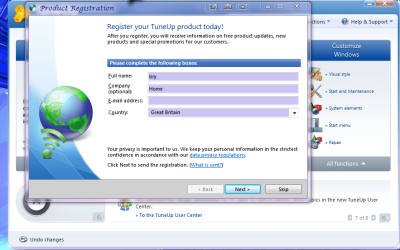
i use the same program and i think its great it does loads of stuff the best program for changing login screen , icons , optimizing is good when i put my key in this is what popped up (in the attachment and it pops up even if you are already registered) maybe if you do a complete uninstall and uninstall with revo (http://www.revouninstaller.com/) to get rid of all the registry keys may help ??
 

Attachments

  • Capture.PNG
    Capture.PNG
    222.1 KB · Views: 26

My Computer

Computer Manufacturer/Model Number
packard bell IXTREME M5722
OS
Operating System : Windows 7 Home Premium Edition 6.01.7600 SP1 (x64)
CPU
Processor : Intel Core 2 Quad Q8300 @ 2500 MHz
Motherboard
Mainboard : Packard Bell (Acer EG43M )
Memory
Physical Memory :8GB Corsair4x 2GB 800MHz C5 DDR2
Graphics Card(s)
Video Card : XFX 6700 AMD
Monitor(s) Displays
Maestro 234DL - BenQ V2220 - BenQ VW2420H
Screen Resolution
Current Display :1920x1080p pixels at 60 Hz in HD LED
Hard Drives
Hard Disks : WDC (1000 GB)
Drive C: (Hard Disk) : 428 GB available on 491 GB
Drive D: (Hard Disk) : 426 GB available on 492 GB
SAMSUNG spinpoint HD103SJ 1000.2 GB
(X 2) KINGSTON SSD NOW V 30GB
PSU
XFX ProSeries 550W PSU
Case
PACKARD BELL IXTREME
Cooling
System Blower Current: 150mA Air Flow16CFM ;Akasa 90mm rear
Keyboard
Gigabyte Aivia K8100
Mouse
TRUST-Wireless Laser Mouse - Carbon edition MI-7770C
Internet Speed
TP-LINK > TL-WN951N / AV500 Gigabit Powerline Adapters
Browser
chrome dev
Other Info
EXTRA COOLING>(FAN CONTROLLER) PC Bay Cooler 3 x 40mm fans; Akasa AK-HD-BL Blue hard drive cooler 2 x 40 mm fan 4500 rpm 29.7 dBA
Bios> American Megatrends Inc.
Version : P01-A1
Date : 08/31/2009
Skip this page, and in the upcoming page, put "dont remind me". If still it pops up, read the rest of the post :

Getting registered with them is absolutely upto you. You bought their products.... paid for license... the rest is not compulsory I think, though helpful.

If you uninstall that program using the advanced unstall option of revo, and follow all the steps upto the finishing point, surely you will get rid registry and everything. then you can reinstall it.

While reinstalling, dont forget to skip the registration page, and put "dont remind me" in the next page, if you dont want to pop it up next time.
 

My Computer

Computer type
PC/Desktop
Computer Manufacturer/Model Number
Self Assembled
OS
Microsoft Windows 10 Pro Insider Preview 64-bit
CPU
Intel(R) Core(TM) i3-4130 CPU @ 3.40GHz
Motherboard
Gigabyte Technology Co., Ltd. B85M-D3H
Memory
Corsair Vengence 4GB x2 (8.00GB Dual-Channel DDR3 @ 798MHz)
Graphics Card(s)
2047MB GeForce GTS 450 (ZOTAC International)
Sound Card
Onboard (Realtek High Definition Audio)
Monitor(s) Displays
LG Flatron E2040T
Screen Resolution
1600x900
Hard Drives
Western Digital 1 TB
Seagate 500 GB
PSU
Corsair VS550
Case
Cooler Master K380
Cooling
Cooler Master Seidon 120V Plus
Keyboard
Logitech MK260r
Mouse
Logitech MK260r
Internet Speed
PMPL Broadband
Antivirus
Windows Defender + MBAM
Browser
Firefox
Other Info
Dell Studio 15" Laptop
Back
Top