I have just upgrated from XP to Win 7 Home Premium. I'm missing the option to close my pc down with hybernation to get at much faster close down and restart.
Due to I can not get the "hybernation" menu option into the start menu.
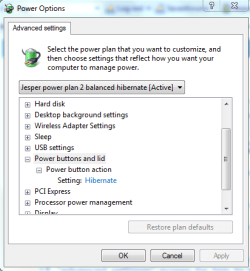
I open "Power Option" click on "Change Advanced power Settings" and click on "Power buttons and lid". Here can I only see "Power button action" and have set it to "hybernate" which works"
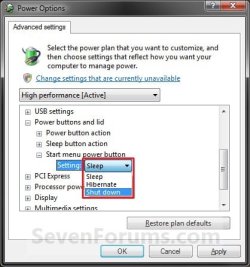
I'm missing "Sleep button action" and "Start menu power button".
Can any one help me?
 Jesper A
Due to I can not get the "hybernation" menu option into the start menu.
I open "Power Option" click on "Change Advanced power Settings" and click on "Power buttons and lid". Here can I only see "Power button action" and have set it to "hybernate" which works"
I'm missing "Sleep button action" and "Start menu power button".
Can any one help me?
Jesper AMy Computer
At a glance
Windows 7 Home PremiumAMD Athlon 64x2 3800+ (DualCore), Socket AM2(...3 GB. 2 * 512 and 2* 1GB KingstonOnboard
- Computer Manufacturer/Model Number
- Home made
- OS
- Windows 7 Home Premium
- CPU
- AMD Athlon 64x2 3800+ (DualCore), Socket AM2(940)
- Motherboard
- ASUS M3N78-VM
- Memory
- 3 GB. 2 * 512 and 2* 1GB Kingston
- Graphics Card(s)
- Onboard
- Sound Card
- Onboard
- Monitor(s) Displays
- Samsung SyncMaster 940N
- Screen Resolution
- 1280x1024
- Hard Drives
- WD Caviar RE2500YS 250 GByte, SATAII
- PSU
- In casing
- Case
- Antec Medium
- Keyboard
- Das Keyboard
- Mouse
- RollerMouse Pro
- Internet Speed
- 8mbit/0.5