
Local area connection doesn't have a valid ip configura

7777777

New member
Local time
3:24 AM
Messages
9
I’ve been using Win 7 on my Desktop PC since October, without any connectivity issues. Yesterday morning, I browsed a few web pages before going to the gym. After returning home from the gym, I had no internet access.

I went through some troubleshooting steps in attempts to resolve the matter but have had no success. Windows Network Diagnosis has completed and was unable to fix the issue. Problem Found, “Local Area Connection” doesn’t have a valid IP configuration. Systray Notification states: Currently connected to Unidentified network - no network access.

There have been no hardware or software changes in the last month.
My internet access is supplied through a cable modem, then to a Belkin Wireless Router. The Belkin Router distributes the connection wirelessly to two XP laptops and through hardwire to my Desktop pc. The laptops have internet connection, but the desktop does not.

I have tried rebooting all devices, setting router to defaults, ipconfig - release and renew, disabling and re-enabling the nic, uninstalling the nic, disabling ipv6, replacing the network cable, and even a restore point from a week ago.
I have tried updating the Belkin Router firmware as well as the network card (generic marvell yukon 88E8057)
I have tried the network cable direct from cable modem to Desktop. After much effort and searching here, I am out of ideas and am simply stumped on why this just occurred out of the blue.

Remember, until yesterday, this has been working fine for 3 months. Both laptops have internet using either wireless or network cable, but I get nothing on the Desktop with Win 7.
 

Attachments
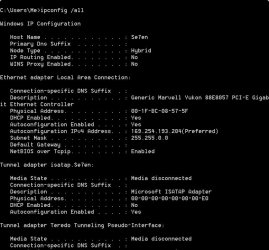
  • ipconfig-all.jpg.jpg
    ipconfig-all.jpg.jpg
    56.2 KB · Views: 594

My Computer My Computer

At a glance

Windows 7Core i7-8604 Gb DDR3 12800 Tripple ChannelATI Radeon X1900
OS
Windows 7
CPU
Core i7-860
Motherboard
EVGA P55LE
Memory
4 Gb DDR3 12800 Tripple Channel
Graphics Card(s)
ATI Radeon X1900
Sound Card
On board
Monitor(s) Displays
Hanns G 28" 1080p
Screen Resolution
1900x1200
Hard Drives
WD 160gb Sata - OS - Applications
WD 160gb Sata - Backups
Seadate 1TB - Storage
PSU
1000 watt
Case
Antec Full Tower
Cooling
Stock CPU cooler, 2 x 80mm intake, passive exhaust
Keyboard
Al-Tech IR Micro KB
Mouse
Logitech BT
In a command prompt (may need to be one with elevated permissions) type "netsh int ip reset reset.log" without the quotes. That will reset the TCP/IP stack.
 

My Computer My Computer

At a glance

Windows 7 Home Premium x64Phenom II X4 955 BE8 GB OCZ BE 1667EVGA GeForce GTX470 SC
Computer Manufacturer/Model Number
Home built
OS
Windows 7 Home Premium x64
CPU
Phenom II X4 955 BE
Motherboard
Asus Sabertooth 990FX
Memory
8 GB OCZ BE 1667
Graphics Card(s)
EVGA GeForce GTX470 SC
Monitor(s) Displays
BenQ 19"
Screen Resolution
1280x1024
Hard Drives
256 GB OCZ Vertex 3 SSD
2x WD 1 TB
1x WD 2 TB
PSU
Thermaltake 850W
Case
Coolermaster Cosmos 1000
Cooling
Air
Keyboard
Logitech
Mouse
Cyborg R.A.T 7
Internet Speed
Standard RR
Here are a couple of things you can try.

Try different network card to try in the desktop?
Try updating the network drivers for your desktop?
 

My Computer My Computer

At a glance

Windows 7 UltimatePentuim(R) Dual-Core T4200 @ 2.00GHz4 gigMobile intel(R) 4 Series Express Chipset Famely
Computer Manufacturer/Model Number
HP G60 Notebook
OS
Windows 7 Ultimate
CPU
Pentuim(R) Dual-Core T4200 @ 2.00GHz
Memory
4 gig
Graphics Card(s)
Mobile intel(R) 4 Series Express Chipset Famely
Sound Card
Conexant High Definition Smart 221
Screen Resolution
1366x768
Internet Speed
T1
Mlevy, The reset log was successful, but I still have the problem after rebooting.
Novalis, considering the possibility of corruption, I already did the drivers. You mentioned the only thing I didn't do; install another NIC. I've got a couple laying around for testing, and will try that later this afternoon, but its shows no problems in the device manager. A google search returns several hit with others who have or are experiencing the same problem, but I just can’t find one workable solution.

Thanks to both of you for responding.
 

My Computer My Computer

At a glance

Windows 7Core i7-8604 Gb DDR3 12800 Tripple ChannelATI Radeon X1900
OS
Windows 7
CPU
Core i7-860
Motherboard
EVGA P55LE
Memory
4 Gb DDR3 12800 Tripple Channel
Graphics Card(s)
ATI Radeon X1900
Sound Card
On board
Monitor(s) Displays
Hanns G 28" 1080p
Screen Resolution
1900x1200
Hard Drives
WD 160gb Sata - OS - Applications
WD 160gb Sata - Backups
Seadate 1TB - Storage
PSU
1000 watt
Case
Antec Full Tower
Cooling
Stock CPU cooler, 2 x 80mm intake, passive exhaust
Keyboard
Al-Tech IR Micro KB
Mouse
Logitech BT
Mlevy, The reset log was successful, but I still have the problem after rebooting.
Novalis, considering the possibility of corruption, I already did the drivers. You mentioned the only thing I didn't do; install another NIC. I've got a couple laying around for testing, and will try that later this afternoon, but its shows no problems in the device manager. A google search returns several hit with others who have or are experiencing the same problem, but I just can’t find one workable solution.

Thanks to both of you for responding.

You have no default gateway showing up in your ipconfig. That is a problem for certain but you should be able to type in your default gateway by going into the IPv4 advanced properties window. You should be able to obtain the correct default gateway address by doing an ipconfig on one of your other working machines.

It's hard to say why your router suddenly stopped giving you a default gateway, maybe a driver or router problem or an A/V software is blocking something.
 

My Computer My Computer

At a glance

Windows 7 Ult, Windows 8.1 Pro,Q9650-4.275GHz, E8600 4.5GHz, E6750-3.8GHzG.Skill PC2 9600 1200Mhz 5 5 5 15 2TGTX480
Computer type
PC/Desktop
Computer Manufacturer/Model Number
Home built
OS
Windows 7 Ult, Windows 8.1 Pro,
CPU
Q9650-4.275GHz, E8600 4.5GHz, E6750-3.8GHz
Motherboard
Evga 780i FTW
Memory
G.Skill PC2 9600 1200Mhz 5 5 5 15 2T
Graphics Card(s)
GTX480
Sound Card
Asus Xonar D2
Monitor(s) Displays
HannsG
Screen Resolution
1680X1050
Hard Drives
GSkill Phoenix Pro 120GB SSD
PSU
ThermalTake Toughpower 1000Watt modular
Case
ThermalTake XaserV
Cooling
Xigmatek S1283
Keyboard
Logitech G15
Mouse
Logitech G9
Internet Speed
T1
Mlevy, The reset log was successful, but I still have the problem after rebooting.
Novalis, considering the possibility of corruption, I already did the drivers. You mentioned the only thing I didn't do; install another NIC. I've got a couple laying around for testing, and will try that later this afternoon, but its shows no problems in the device manager. A google search returns several hit with others who have or are experiencing the same problem, but I just can’t find one workable solution.

Thanks to both of you for responding.

Did you read what I wrote in http://pocketpccentral.net/blog/2009...blem-resolved/ ? I was finally able to fix the same problem you are having. The fix involved updating the Windows 7 Network Adapter’s IPv4 setting, but not the first few times I tried it. At first, every time I re-booted the update would disappear. Then, I spoke with someone else and they asked me if I had reset my router. I have three desktops plugged into a Linksys Wireless Router and I had updated the firmware on the router the night before all of this happened. The only computer that still connected to the Internet was the one I used to update the firmware. I used it to research the problem. I had tried several of the fixes I found, including the ones in this post. I even applied the "fix-it" that Microsoft offered to reset the log, because I could not get that to work when I did it myself, even though I am the administrator, it kept on responding that I needed to be at the administrator level to perform the function.

Then based on what my friend had said, I unplugged my router for a couple of minutes, from the power supply, plugged it back in, then went to the network and sharing center. I set up a home connection. I then had a home and unidentified network. If this sounds like what you are experiencing, I hope this helps. I tried everything I could to delete that public network connection. Nothing worked. I kept getting a message that it could not be deleted because it was in use. My friend said it did not matter, to just leave the unidentified network. But it did matter.... I re-booted and the home network Internet connection disappeared! I was back to two networks and no Internet. I clicked on the Home Network Connection, disabled it, then enabled it. It worked, again, and I had Internet. I was about ready to settle for that and just reset after a reboot, when I decided to check the Network Adapter’s IPv4 settings. What I found were two addresses in the Default gateways IP addressess. One was a 169… the other was a 192….. address. I deleted the 169 address and the public network disappeared! I rebooted and all was well. It is still working this morning.
 

My Computer My Computer

At a glance

windows 7
Computer Manufacturer/Model Number
Gateway sx2801-01e
OS
windows 7
Hi
I am having exactly the same problem and have tried all solutions offered including that in the link above ... to no avail. I ran ipconfig /all and the results are below. Can you help please?


Windows IP Configuration

Host Name . . . . . . . . . . . . : Family-PC
Primary Dns Suffix . . . . . . . :
Node Type . . . . . . . . . . . . : Hybrid
IP Routing Enabled. . . . . . . . : No
WINS Proxy Enabled. . . . . . . . : No
DNS Suffix Search List. . . . . . : home

Ethernet adapter Bluetooth Network Connection:

Media State . . . . . . . . . . . : Media disconnected
Connection-specific DNS Suffix . :
Description . . . . . . . . . . . : Bluetooth Device (Personal Area Network)
Physical Address. . . . . . . . . : 00-21-4F-4C-98-F1
DHCP Enabled. . . . . . . . . . . : Yes
Autoconfiguration Enabled . . . . : Yes

Ethernet adapter Local Area Connection:

Connection-specific DNS Suffix . :
Description . . . . . . . . . . . : Marvell Yukon 88E8055 PCI-E Gigabit Ethernet Controller
Physical Address. . . . . . . . . : 00-1D-BA-82-AE-D0
DHCP Enabled. . . . . . . . . . . : Yes
Autoconfiguration Enabled . . . . : Yes
Link-local IPv6 Address . . . . . : fe80::dc7d:210:f1ec:9f65%12(Preferred)
Autoconfiguration IPv4 Address. . : 169.254.159.101(Preferred)
Subnet Mask . . . . . . . . . . . : 255.255.0.0
Default Gateway . . . . . . . . . :
DHCPv6 IAID . . . . . . . . . . . : 251665024
DHCPv6 Client DUID. . . . . . . . : 00-01-00-01-10-F0-59-96-00-1D-BA-82-AE-D0
DNS Servers . . . . . . . . . . . : fec0:0:0:ffff::1%1
fec0:0:0:ffff::2%1
fec0:0:0:ffff::3%1
NetBIOS over Tcpip. . . . . . . . : Enabled

Wireless LAN adapter Wireless Network Connection:

Connection-specific DNS Suffix . : home
Description . . . . . . . . . . . : Intel(R) WiFi Link 5100 AGN
Physical Address. . . . . . . . . : 00-21-5D-D8-3C-B6
DHCP Enabled. . . . . . . . . . . : Yes
Autoconfiguration Enabled . . . . : Yes
Link-local IPv6 Address . . . . . : fe80::28f4:7003:a14a:a6c2%11(Preferred)
IPv4 Address. . . . . . . . . . . : 192.168.1.11(Preferred)
Subnet Mask . . . . . . . . . . . : 255.255.255.0
Lease Obtained. . . . . . . . . . : 03 November 2010 09:46:32
Lease Expires . . . . . . . . . . : 04 November 2010 13:54:52
Default Gateway . . . . . . . . . : 192.168.1.1
DHCP Server . . . . . . . . . . . : 192.168.1.1
DHCPv6 IAID . . . . . . . . . . . : 184557917
DHCPv6 Client DUID. . . . . . . . : 00-01-00-01-10-F0-59-96-00-1D-BA-82-AE-D0
DNS Servers . . . . . . . . . . . : 192.168.1.1
NetBIOS over Tcpip. . . . . . . . : Enabled

Tunnel adapter isatap.{90B9F76B-DCD6-4562-B255-78470354B63C}:

Media State . . . . . . . . . . . : Media disconnected
Connection-specific DNS Suffix . :
Description . . . . . . . . . . . : Microsoft ISATAP Adapter
Physical Address. . . . . . . . . : 00-00-00-00-00-00-00-E0
DHCP Enabled. . . . . . . . . . . : No
Autoconfiguration Enabled . . . . : Yes

Tunnel adapter Local Area Connection* 14:

Connection-specific DNS Suffix . :
Description . . . . . . . . . . . : Teredo Tunneling Pseudo-Interface
Physical Address. . . . . . . . . : 00-00-00-00-00-00-00-E0
DHCP Enabled. . . . . . . . . . . : No
Autoconfiguration Enabled . . . . : Yes
IPv6 Address. . . . . . . . . . . : 2001:0:5ef5:79fd:1c4f:37f6:a37e:231(Preferred)
Link-local IPv6 Address . . . . . : fe80::1c4f:37f6:a37e:231%20(Preferred)
Default Gateway . . . . . . . . . : ::
NetBIOS over Tcpip. . . . . . . . : Disabled

Tunnel adapter 6TO4 Adapter:

Media State . . . . . . . . . . . : Media disconnected
Connection-specific DNS Suffix . :
Description . . . . . . . . . . . : Microsoft 6to4 Adapter
Physical Address. . . . . . . . . : 00-00-00-00-00-00-00-E0
DHCP Enabled. . . . . . . . . . . : No
Autoconfiguration Enabled . . . . : Yes

Tunnel adapter Local Area Connection* 16:

Media State . . . . . . . . . . . : Media disconnected
Connection-specific DNS Suffix . :
Description . . . . . . . . . . . : Microsoft 6to4 Adapter #4
Physical Address. . . . . . . . . : 00-00-00-00-00-00-00-E0
DHCP Enabled. . . . . . . . . . . : No
Autoconfiguration Enabled . . . . : Yes

Tunnel adapter isatap.home:

Media State . . . . . . . . . . . : Media disconnected
Connection-specific DNS Suffix . : home
Description . . . . . . . . . . . : Microsoft ISATAP Adapter #2
Physical Address. . . . . . . . . : 00-00-00-00-00-00-00-E0
DHCP Enabled. . . . . . . . . . . : No
Autoconfiguration Enabled . . . . : Yes

Tunnel adapter Local Area Connection* 15:

Media State . . . . . . . . . . . : Media disconnected
Connection-specific DNS Suffix . :
Description . . . . . . . . . . . : Microsoft 6to4 Adapter #3
Physical Address. . . . . . . . . : 00-00-00-00-00-00-00-E0
DHCP Enabled. . . . . . . . . . . : No
Autoconfiguration Enabled . . . . : Yes

Tunnel adapter Reusable Microsoft 6To4 Adapter:

Media State . . . . . . . . . . . : Media disconnected
Connection-specific DNS Suffix . :
Description . . . . . . . . . . . : Microsoft 6to4 Adapter #2
Physical Address. . . . . . . . . : 00-00-00-00-00-00-00-E0
DHCP Enabled. . . . . . . . . . . : No
Autoconfiguration Enabled . . . . : Yes
 

My Computer My Computer

At a glance

Windows 7 Home Premium 32bit
OS
Windows 7 Home Premium 32bit
Hi
I am having exactly the same problem and have tried all solutions offered including that in the link above ... to no avail. I ran ipconfig /all and the results are below. Can you help please?


Windows IP Configuration

Host Name . . . . . . . . . . . . : Family-PC
Primary Dns Suffix . . . . . . . :
Node Type . . . . . . . . . . . . : Hybrid
IP Routing Enabled. . . . . . . . : No
WINS Proxy Enabled. . . . . . . . : No
DNS Suffix Search List. . . . . . : home

Ethernet adapter Bluetooth Network Connection:

Media State . . . . . . . . . . . : Media disconnected
Connection-specific DNS Suffix . :
Description . . . . . . . . . . . : Bluetooth Device (Personal Area Network)
Physical Address. . . . . . . . . : 00-21-4F-4C-98-F1
DHCP Enabled. . . . . . . . . . . : Yes
Autoconfiguration Enabled . . . . : Yes

Ethernet adapter Local Area Connection:

Connection-specific DNS Suffix . :
Description . . . . . . . . . . . : Marvell Yukon 88E8055 PCI-E Gigabit Ethernet Controller
Physical Address. . . . . . . . . : 00-1D-BA-82-AE-D0
DHCP Enabled. . . . . . . . . . . : Yes
Autoconfiguration Enabled . . . . : Yes
Link-local IPv6 Address . . . . . : fe80::dc7d:210:f1ec:9f65%12(Preferred)
Autoconfiguration IPv4 Address. . : 169.254.159.101(Preferred)
Subnet Mask . . . . . . . . . . . : 255.255.0.0
Default Gateway . . . . . . . . . :
DHCPv6 IAID . . . . . . . . . . . : 251665024
DHCPv6 Client DUID. . . . . . . . : 00-01-00-01-10-F0-59-96-00-1D-BA-82-AE-D0
DNS Servers . . . . . . . . . . . : fec0:0:0:ffff::1%1
fec0:0:0:ffff::2%1
fec0:0:0:ffff::3%1
NetBIOS over Tcpip. . . . . . . . : Enabled

Wireless LAN adapter Wireless Network Connection:

Connection-specific DNS Suffix . : home
Description . . . . . . . . . . . : Intel(R) WiFi Link 5100 AGN
Physical Address. . . . . . . . . : 00-21-5D-D8-3C-B6
DHCP Enabled. . . . . . . . . . . : Yes
Autoconfiguration Enabled . . . . : Yes
Link-local IPv6 Address . . . . . : fe80::28f4:7003:a14a:a6c2%11(Preferred)
IPv4 Address. . . . . . . . . . . : 192.168.1.11(Preferred)
Subnet Mask . . . . . . . . . . . : 255.255.255.0
Lease Obtained. . . . . . . . . . : 03 November 2010 09:46:32
Lease Expires . . . . . . . . . . : 04 November 2010 13:54:52
Default Gateway . . . . . . . . . : 192.168.1.1
DHCP Server . . . . . . . . . . . : 192.168.1.1
DHCPv6 IAID . . . . . . . . . . . : 184557917
DHCPv6 Client DUID. . . . . . . . : 00-01-00-01-10-F0-59-96-00-1D-BA-82-AE-D0
DNS Servers . . . . . . . . . . . : 192.168.1.1
NetBIOS over Tcpip. . . . . . . . : Enabled

Tunnel adapter isatap.{90B9F76B-DCD6-4562-B255-78470354B63C}:

Media State . . . . . . . . . . . : Media disconnected
Connection-specific DNS Suffix . :
Description . . . . . . . . . . . : Microsoft ISATAP Adapter
Physical Address. . . . . . . . . : 00-00-00-00-00-00-00-E0
DHCP Enabled. . . . . . . . . . . : No
Autoconfiguration Enabled . . . . : Yes

Tunnel adapter Local Area Connection* 14:

Connection-specific DNS Suffix . :
Description . . . . . . . . . . . : Teredo Tunneling Pseudo-Interface
Physical Address. . . . . . . . . : 00-00-00-00-00-00-00-E0
DHCP Enabled. . . . . . . . . . . : No
Autoconfiguration Enabled . . . . : Yes
IPv6 Address. . . . . . . . . . . : 2001:0:5ef5:79fd:1c4f:37f6:a37e:231(Preferred)
Link-local IPv6 Address . . . . . : fe80::1c4f:37f6:a37e:231%20(Preferred)
Default Gateway . . . . . . . . . : ::
NetBIOS over Tcpip. . . . . . . . : Disabled

Tunnel adapter 6TO4 Adapter:

Media State . . . . . . . . . . . : Media disconnected
Connection-specific DNS Suffix . :
Description . . . . . . . . . . . : Microsoft 6to4 Adapter
Physical Address. . . . . . . . . : 00-00-00-00-00-00-00-E0
DHCP Enabled. . . . . . . . . . . : No
Autoconfiguration Enabled . . . . : Yes

Tunnel adapter Local Area Connection* 16:

Media State . . . . . . . . . . . : Media disconnected
Connection-specific DNS Suffix . :
Description . . . . . . . . . . . : Microsoft 6to4 Adapter #4
Physical Address. . . . . . . . . : 00-00-00-00-00-00-00-E0
DHCP Enabled. . . . . . . . . . . : No
Autoconfiguration Enabled . . . . : Yes

Tunnel adapter isatap.home:

Media State . . . . . . . . . . . : Media disconnected
Connection-specific DNS Suffix . : home
Description . . . . . . . . . . . : Microsoft ISATAP Adapter #2
Physical Address. . . . . . . . . : 00-00-00-00-00-00-00-E0
DHCP Enabled. . . . . . . . . . . : No
Autoconfiguration Enabled . . . . : Yes

Tunnel adapter Local Area Connection* 15:

Media State . . . . . . . . . . . : Media disconnected
Connection-specific DNS Suffix . :
Description . . . . . . . . . . . : Microsoft 6to4 Adapter #3
Physical Address. . . . . . . . . : 00-00-00-00-00-00-00-E0
DHCP Enabled. . . . . . . . . . . : No
Autoconfiguration Enabled . . . . : Yes

Tunnel adapter Reusable Microsoft 6To4 Adapter:

Media State . . . . . . . . . . . : Media disconnected
Connection-specific DNS Suffix . :
Description . . . . . . . . . . . : Microsoft 6to4 Adapter #2
Physical Address. . . . . . . . . : 00-00-00-00-00-00-00-E0
DHCP Enabled. . . . . . . . . . . : No
Autoconfiguration Enabled . . . . : Yes


Looking at your ipconfig I can see that your wireless is connected but the real problem here is all the extra 6 to 4 tunnel adaptors which is caused by using an out of date network driver. Once you get too many of those it will cause your network to go haywire.

If you want to get rid of those rogue tunnel adaptor entries then go to device manager, go to view at the top of the page and then select "show hidden devices". Then go to "Network adaptors" and just delate all the extra tunnel adaptors you see there, windows will create a new one automatically. After that check your ipconfig /all to see if they all have been delated.

To fix this sort of problem you need to use a different or updated network driver.

You really should start for own thread for these types of problems as it's completely different than the Op's problem.
 

My Computer My Computer

At a glance

Windows 7 Ult, Windows 8.1 Pro,Q9650-4.275GHz, E8600 4.5GHz, E6750-3.8GHzG.Skill PC2 9600 1200Mhz 5 5 5 15 2TGTX480
Computer type
PC/Desktop
Computer Manufacturer/Model Number
Home built
OS
Windows 7 Ult, Windows 8.1 Pro,
CPU
Q9650-4.275GHz, E8600 4.5GHz, E6750-3.8GHz
Motherboard
Evga 780i FTW
Memory
G.Skill PC2 9600 1200Mhz 5 5 5 15 2T
Graphics Card(s)
GTX480
Sound Card
Asus Xonar D2
Monitor(s) Displays
HannsG
Screen Resolution
1680X1050
Hard Drives
GSkill Phoenix Pro 120GB SSD
PSU
ThermalTake Toughpower 1000Watt modular
Case
ThermalTake XaserV
Cooling
Xigmatek S1283
Keyboard
Logitech G15
Mouse
Logitech G9
Internet Speed
T1
Thanks Chev65

I tried that but still having problem. I've given the new results from IPCONFIG below ... did I miss something?

Am new to this site and am definitely not an IT pro ... excuse my ignorance - Jim


Windows IP Configuration

Host Name . . . . . . . . . . . . : Family-PC
Primary Dns Suffix . . . . . . . :
Node Type . . . . . . . . . . . . : Hybrid
IP Routing Enabled. . . . . . . . : No
WINS Proxy Enabled. . . . . . . . : No
DNS Suffix Search List. . . . . . : home

Ethernet adapter Bluetooth Network Connection:

Media State . . . . . . . . . . . : Media disconnected
Connection-specific DNS Suffix . :
Description . . . . . . . . . . . : Bluetooth Device (Personal Area Network)
Physical Address. . . . . . . . . : 00-21-4F-4C-98-F1
DHCP Enabled. . . . . . . . . . . : Yes
Autoconfiguration Enabled . . . . : Yes

Ethernet adapter Local Area Connection:

Connection-specific DNS Suffix . :
Description . . . . . . . . . . . : Marvell Yukon 88E8055 PCI-E Gigabit Ethernet Controller
Physical Address. . . . . . . . . : 00-1D-BA-82-AE-D0
DHCP Enabled. . . . . . . . . . . : Yes
Autoconfiguration Enabled . . . . : Yes
Link-local IPv6 Address . . . . . : fe80::dc7d:210:f1ec:9f65%12(Preferred)
Autoconfiguration IPv4 Address. . : 169.254.159.101(Preferred)
Subnet Mask . . . . . . . . . . . : 255.255.0.0
Default Gateway . . . . . . . . . : 192.168.1.1
DHCPv6 IAID . . . . . . . . . . . : 251665024
DHCPv6 Client DUID. . . . . . . . : 00-01-00-01-10-F0-59-96-00-1D-BA-82-AE-D0
DNS Servers . . . . . . . . . . . : fec0:0:0:ffff::1%1
fec0:0:0:ffff::2%1
fec0:0:0:ffff::3%1
NetBIOS over Tcpip. . . . . . . . : Enabled

Wireless LAN adapter Wireless Network Connection:

Connection-specific DNS Suffix . : home
Description . . . . . . . . . . . : Intel(R) WiFi Link 5100 AGN
Physical Address. . . . . . . . . : 00-21-5D-D8-3C-B6
DHCP Enabled. . . . . . . . . . . : Yes
Autoconfiguration Enabled . . . . : Yes
Link-local IPv6 Address . . . . . : fe80::28f4:7003:a14a:a6c2%11(Preferred)
IPv4 Address. . . . . . . . . . . : 192.168.1.11(Preferred)
Subnet Mask . . . . . . . . . . . : 255.255.255.0
Lease Obtained. . . . . . . . . . : 03 November 2010 09:46:32
Lease Expires . . . . . . . . . . : 04 November 2010 13:54:52
Default Gateway . . . . . . . . . : 192.168.1.1
DHCP Server . . . . . . . . . . . : 192.168.1.1
DHCPv6 IAID . . . . . . . . . . . : 184557917
DHCPv6 Client DUID. . . . . . . . : 00-01-00-01-10-F0-59-96-00-1D-BA-82-AE-D0
DNS Servers . . . . . . . . . . . : 192.168.1.1
NetBIOS over Tcpip. . . . . . . . : Enabled

Tunnel adapter isatap.{90B9F76B-DCD6-4562-B255-78470354B63C}:

Media State . . . . . . . . . . . : Media disconnected
Connection-specific DNS Suffix . :
Description . . . . . . . . . . . : Microsoft ISATAP Adapter
Physical Address. . . . . . . . . : 00-00-00-00-00-00-00-E0
DHCP Enabled. . . . . . . . . . . : No
Autoconfiguration Enabled . . . . : Yes

Tunnel adapter Local Area Connection* 14:

Connection-specific DNS Suffix . :
Description . . . . . . . . . . . : Teredo Tunneling Pseudo-Interface
Physical Address. . . . . . . . . : 00-00-00-00-00-00-00-E0
DHCP Enabled. . . . . . . . . . . : No
Autoconfiguration Enabled . . . . : Yes
IPv6 Address. . . . . . . . . . . : 2001:0:5ef5:79fd:1c4f:37f6:a37e:231(Preferred)
Link-local IPv6 Address . . . . . : fe80::1c4f:37f6:a37e:231%20(Preferred)
Default Gateway . . . . . . . . . : ::
NetBIOS over Tcpip. . . . . . . . : Disabled
 

My Computer My Computer

At a glance

Windows 7 Home Premium 32bit
OS
Windows 7 Home Premium 32bit
Looks to me like your wireless connection is working? I'm not really sure what problem you are having?
 

My Computer My Computer

At a glance

Windows 7 Ult, Windows 8.1 Pro,Q9650-4.275GHz, E8600 4.5GHz, E6750-3.8GHzG.Skill PC2 9600 1200Mhz 5 5 5 15 2TGTX480
Computer type
PC/Desktop
Computer Manufacturer/Model Number
Home built
OS
Windows 7 Ult, Windows 8.1 Pro,
CPU
Q9650-4.275GHz, E8600 4.5GHz, E6750-3.8GHz
Motherboard
Evga 780i FTW
Memory
G.Skill PC2 9600 1200Mhz 5 5 5 15 2T
Graphics Card(s)
GTX480
Sound Card
Asus Xonar D2
Monitor(s) Displays
HannsG
Screen Resolution
1680X1050
Hard Drives
GSkill Phoenix Pro 120GB SSD
PSU
ThermalTake Toughpower 1000Watt modular
Case
ThermalTake XaserV
Cooling
Xigmatek S1283
Keyboard
Logitech G15
Mouse
Logitech G9
Internet Speed
T1
a 169.254 address is usually associated with the therm APIPA (Automatic Private IP Address), it's used when the PC is unable to get an address from the DHCP server.

It seems the PC can't communicate with the router to the extent that it can get an address. Make sure you're connecting to YOUR router and that there are enough available addresses.
 

My Computer My Computer

At a glance

Windows 7 Home Premium x64Phenom II X4 955 BE8 GB OCZ BE 1667EVGA GeForce GTX470 SC
Computer Manufacturer/Model Number
Home built
OS
Windows 7 Home Premium x64
CPU
Phenom II X4 955 BE
Motherboard
Asus Sabertooth 990FX
Memory
8 GB OCZ BE 1667
Graphics Card(s)
EVGA GeForce GTX470 SC
Monitor(s) Displays
BenQ 19"
Screen Resolution
1280x1024
Hard Drives
256 GB OCZ Vertex 3 SSD
2x WD 1 TB
1x WD 2 TB
PSU
Thermaltake 850W
Case
Coolermaster Cosmos 1000
Cooling
Air
Keyboard
Logitech
Mouse
Cyborg R.A.T 7
Internet Speed
Standard RR
Got it ... thanks Jim
 

My Computer My Computer

At a glance

Windows 7 Home Premium 32bit
OS
Windows 7 Home Premium 32bit
Hi guys!

I have had the same problem for a few days now, and have searched numerous forums and gone through hell and high water to fix it. nothing helped until I found the ultimate solution that will help everyone:

CALL YOUR ISP, TELL THEM WHAT HAPPENED AND THEY CAN CONFIGURE A NEW IP ADDRESS FOR YOUR CONNECTION. IT ONLY TAKES ABOUT HALF AN HOUR.

During this time you must keep your router/modem turned off, and after the ISP has fixed the problem (in my case it took half an hour) you must restart your machine with the router/modem on and connected. From then on it should be like nothing ever happened.

Just for the fun of it, here's a list of things I have tried without results:

release/renew ipconfig
restarting modem/router and computer about a zillion times
changing LAN card
creating a static IP
resetting winsock in command prompt
reinstalling Win7
reinstalling XP (I had a dual boot and I did both, losing all installations)
manually entering IP address
disabling/enabling local area connection
plugging and unplugging LAN cable
uninstalling and reinstalling LAN card driver
resetting modem/router using the reset button

And after all this, all it took was just a phone call.
This is because your ISP is THE ONLY authority when it comes to configuring your IP address. In this case, it can only be done from the outside. This is also the reason why Microsoft didn't announce any patches or fixes for this problem, because it is not their problem and responsibility.

Only one question remains, WHY is this happening? Noone has been able to answer this, and I have read tons of forum posts about it. Maybe even the guys that made Windows 7 don't know it.

I am going to copy this post on several other forums because I have seen the trouble that people are having with this problem.

If you find out why this is happening, please post it here.
 

My Computer My Computer

At a glance

XP SP2IntelKingstonGigabyte
Computer Manufacturer/Model Number
Gigabyte
OS
XP SP2
CPU
Intel
Motherboard
Gigabyte
Memory
Kingston
Graphics Card(s)
Gigabyte
Sound Card
Gigabyte
Monitor(s) Displays
Adi
Hard Drives
Maxtor
PSU
Thermal take
Case
Thermal take
Cooling
Thermal take
Back
Top