Lenovo laptop dual boot problem

maomatt

New member
Local time
10:33 AM
Messages
7
I am trying to install a windows 7 / XP dual boot on a Lenovo 550P I recently purchased. I have had no problems setting up a new partition and formatting it, but whenever I try and install XP on it, I get partway through the installation process and always get a blue screen of death. It tells me that there is a hard drive error.

To test this, I installed a copy of Vista 64 on the partition with no problems. I wiped the drive and started again with XP and had the same problem.

I am now wondering if there is an incompatability between XP and the hardware in my system. The system specs are:
OS: Windows 7 Home Premium 64-bit
CPU: Intel Core i7 720QM(1.6GHz)
Chipset: Intel PM55
HDD: 500 GB
Memory: 4 GB

I am wanting the XP OS so I can use my old 32 bit compilers. I have considered reformating the entire drive and making it an XP machine, but do not know if there is an intrensic incompatibility between XP and the hardware.
thanks.
 

My Computer My Computer

OS
Vista 64
CPU
Intel Q6600
Motherboard
EVGA nForce 680i LT
Memory
4GB Corsair XMS2
Graphics Card(s)
XFX 260 GTX
Hard Drives
2 x WD 300 GB
Cooling
Zalman
welcome to sevenforums! :D
Where did you get your windows xp cd? If you downloaded that cd from utorrent, there is a small chance that the cd isn't bootable or corrupted.
Also, I have had similar experience on my HP g70. It wouldn't install windows xp no matter what I try. I cannot run the installer from windows of course (application hard block) and whenever it boots up, it would have a disk warning.
I think that some manufacturers include something in their bios to make sure the system is stuck with vista or beyond, or that perhaps, the new hardware available in the nine years since xp made its entrance, made the xp incompatible. I mean, can your xp recognize your cpu or chipset?
Perhaps the only possible method would be to run xpfrom a virtual machine.
Judging from your system configuration, virtualization wouldn't be that bad, it would run pretty well :D
Thus, my suggestion would be to install windows 7 and simply run it from XP Mode. For that, you will need a copy of windows 7 professional or ultimate (tad bit more expensive than home premium). Or you can buy a home premium and install something like virtualbox.
Seriously xp, is more trouble than its worth. Even if you manage to install it, you will need a TON of times getting all the drivers for it. Xp doesn't have generic or native drivers so you will need a flash drive to store the drivers lol. Windows 7, however, has generic drivers for almost all modern hardware, so you will ahve a better "out of box" experience.
I hope I helped~!
 

My Computer My Computer

Computer Manufacturer/Model Number
Dell XPS 8000/HP G70 258US
OS
Windows 7 64 bit build 7600
CPU
Intel Core i5 750/Intel Pentium Duo T4200 2.00 ghz
Memory
6 gig/4 gig
Graphics Card(s)
ATI Radeon HD 4350/Intel Graphics Media Accelerator 4500MHD
Sound Card
Realtek/Conexant Smartaudio High Definition Device
Monitor(s) Displays
Two
Screen Resolution
1920x1080/1440x900
Hard Drives
750/250 gig
Internet Speed
24 mb
You can Verify your XP CD using ImgBurn. load the ISO using File icon, make sure it says Bootable in text at left. Then put in CD and verify against ISO. If necessary, re-Burn at 4x speed with Verify.
http://www.sevenforums.com/tutorial...dvd-download-tool.html?filter[2]=General Tips
Try also installing using a bootable flash stick: http://www.sevenforums.com/tutorials/31541-windows-7-usb-dvd-download-tool.html?filter[2]=General%20Tips

After eliminating the ISO and CD, the way you troubleshoot these errors is to Google the exact error message.

Often times the hard drive error with XP install on a newer computer is that the installer doesn't have the modern SATA controller driver. It needs to be slipstreamed in at the F6 prompt during driver loading. Since you can only use a floppy drive to do this (XP is really ancient now) you may have to slipstream the driver in to the installer using Nlite: How To Slipstream SATA Drivers Into XP CD
 
hmm, my computer never even gets to the loading page......I cannot use f6 lol
Don't know about maomatt...
 

My Computer My Computer

Computer Manufacturer/Model Number
Dell XPS 8000/HP G70 258US
OS
Windows 7 64 bit build 7600
CPU
Intel Core i5 750/Intel Pentium Duo T4200 2.00 ghz
Memory
6 gig/4 gig
Graphics Card(s)
ATI Radeon HD 4350/Intel Graphics Media Accelerator 4500MHD
Sound Card
Realtek/Conexant Smartaudio High Definition Device
Monitor(s) Displays
Two
Screen Resolution
1920x1080/1440x900
Hard Drives
750/250 gig
Internet Speed
24 mb
Does your system have the 100 mb Reserved System Partition?
 

My Computer My Computer

Computer Manufacturer/Model Number
Homebuilt
OS
Windows 7 x64
CPU
i7-2600K
Motherboard
Asus P8Z77-v Pro
Memory
8 G
Graphics Card(s)
GTX 480
Sound Card
Onboard
Monitor(s) Displays
LG W2753V
Screen Resolution
1920x1080
Hard Drives
Crucial M4 128 G SSD
who are you asking? :shock:
 

My Computer My Computer

Computer Manufacturer/Model Number
Dell XPS 8000/HP G70 258US
OS
Windows 7 64 bit build 7600
CPU
Intel Core i5 750/Intel Pentium Duo T4200 2.00 ghz
Memory
6 gig/4 gig
Graphics Card(s)
ATI Radeon HD 4350/Intel Graphics Media Accelerator 4500MHD
Sound Card
Realtek/Conexant Smartaudio High Definition Device
Monitor(s) Displays
Two
Screen Resolution
1920x1080/1440x900
Hard Drives
750/250 gig
Internet Speed
24 mb
Your problem is that windows XP doesn't have native support for SATA II hard drives. You have to either install SATA drivers during the XP install or disable the native SATA mode in bios in order to get it to work. Unfortunately, if you choose the 2nd option, your HDD will be about running at about 40% of it's capability.
 
Your problem is that windows XP doesn't have native support for SATA II hard drives. You have to either install SATA drivers during the XP install or disable the native SATA mode in bios in order to get it to work. Unfortunately, if you choose the 2nd option, your HDD will be about running at about 40% of it's capability.

How do I intall the SATA II drivers for XP? Is this something I have to do during boot or install, or can I update the BIOS to include them?

My XP disk is pristine and a legit copy from MS. It is not currently installed on any other machine.
 

My Computer My Computer

OS
Vista 64
CPU
Intel Q6600
Motherboard
EVGA nForce 680i LT
Memory
4GB Corsair XMS2
Graphics Card(s)
XFX 260 GTX
Hard Drives
2 x WD 300 GB
Cooling
Zalman
It's not a bios problem. The XP kernel was written before SATA drives were invented. I'm sure someone here with more experience than I have would know an alternate method, but so far as I know, the only way to install SATA drivers is with a floppy drive during the install. I'm pretty sure that in the BIOS there is a way to disable the native SATA mode, as there was with my Compaq.
 
It's something that has to be done during the install, using a floppy drive. In other words, difficult or impossible with new laptops. It's not a bios problem. The XP kernel was written before sata drives were invented. I'm sure someone here with more experience than I have would know an alternate method, but so far as I know, the only way to install SATA drivers is with a floppy drive during the install.
or using a bootable usb pendrive, then add the sata files to the pendrive and insert when asked to load drivers
 

My Computer My Computer

Computer type
PC/Desktop
Computer Manufacturer/Model Number
self build
OS
win 7 ultimate32bit, Win8.1pro wmc 32bit
CPU
amd phenom x4 9600
Motherboard
asus m2n32-sli deluxe
Memory
corsair twinxs 2x2gb
Graphics Card(s)
2x nvidia 1gb 8500gt
Sound Card
onboard
Monitor(s) Displays
23" PB Viseo 233d
Screen Resolution
1920x1080
Hard Drives
maxtor sata 500gb
maxtor sata 320gb
fujitsu sata200gb
PSU
oryxx tornado 750w
Case
thermaltake xaser lll
Cooling
artic freezer64 pro + 7 case fans
Your problem is that windows XP doesn't have native support for SATA II hard drives. You have to either install SATA drivers during the XP install or disable the native SATA mode in bios in order to get it to work. Unfortunately, if you choose the 2nd option, your HDD will be about running at about 40% of it's capability.

How do I intall the SATA II drivers for XP? Is this something I have to do during boot or install, or can I update the BIOS to include them?

My XP disk is pristine and a legit copy from MS. It is not currently installed on any other machine.

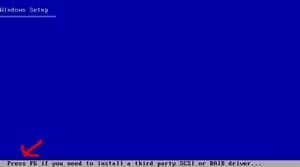
Download your win XP setup SATA drivers.

put them on a floppy disk.

Press F6 at this screen.
 

Attachments

  • winxp2.jpg
    winxp2.jpg
    1.8 KB · Views: 187

My Computer My Computer

OS
ME/XP/Vista/Win7
Download your win XP setup SATA drivers.

put them on a floppy disk.

Press F6 at this screen.

That's been established.. but if you have no floppy drive.. xp won't install sata drivers from from anything other than a drive assigned the letter A. It doesn't recognize bootable flash drives (unless I did it wrong), nor does it recognize my ancient USB zip drive (125Mb floppy)
 
They sell usb floppy drives.

You can run 32bit compilers on a 64bit machine without issue. You are really going down a path that you dont need to go down. I run a 64bit workstation that i only use for compiling 32bit code. (Its a win7 machine and the compiled code is run on xp machines.) What language are you working with, and what SDE are you using?
 

My Computer My Computer

Computer Manufacturer/Model Number
Black_Box (homebuilt)
OS
windows 7 RTM x64
CPU
Phenom II 965 Quad Core 3.4Ghz
Motherboard
Asus M4A79T Deluxe
Memory
Mushkin Blackline 8GB (4x2gb)
Graphics Card(s)
XFX Radeon 5970 Black Edition
Sound Card
onboard
Monitor(s) Displays
Dell 2408WPF-main Dell E248WFP-secondary
Screen Resolution
1920x1200-main 1920x1200-secondary
Hard Drives
OCZ Vertex Limited Edition 100GB (OS)
x1 WD Black Edition 500GB drive (Storage)
PSU
XFX 850w Black Edition (Modular)
Case
Mountian Mods H2go
Cooling
CoolITSystems ECO A.L.C.
Keyboard
Logitech MX 5500 wireless keyboard
Mouse
Razor Copperhead
Internet Speed
16Mb down/2Mb up Wowway Cable Internet
Back
Top