How to dual boot dell inspiron 1440?

RJA

New member
Local time
3:38 AM
Messages
10
I want to dual boot windows XP on Windows7 on my dell inspiron 1440 & I already have read the thread on how to do it. But the problem is on installing Windows XP, because in the middle of installation a blue screen appears and says it has an error ***STOP 0x0000007B (0xF78D2524,0xC0000034,0x00000000,0x00000000) Know I have tried switching the SATA OPERATION from AHCI to ATA mode, & the XP was succesfully installed (on partition D, Win.7 was on partition C). But the problem is that Windows7 won't boot. I really..really..Need Help on this..:cry: I can't use the XPmode since I only have Windows7 home basic.
 

My Computer My Computer

At a glance

Windows 7 Home Basic2GB
Computer Manufacturer/Model Number
Dell Inspiron 1440
OS
Windows 7 Home Basic
Memory
2GB
I want to dual boot windows XP on Windows7 on my dell inspiron 1440 & I already have read the thread on how to do it. But the problem is on installing Windows XP, because in the middle of installation a blue screen appears and says it has an error ***STOP 0x0000007B (0xF78D2524,0xC0000034,0x00000000,0x00000000) Know I have tried switching the SATA OPERATION from AHCI to ATA mode, & the XP was succesfully installed (on partition D, Win.7 was on partition C). But the problem is that Windows7 won't boot. I really..really..Need Help on this..:cry: I can't use the XPmode since I only have Windows7 home basic.
Boot from the Win7 disc and click repair>start up repair
Run start up repair 3 times,sometimes it doesnt work on the first go.

Dan
 

My Computer My Computer

At a glance

Windows 7 Ultimate 64bitAMD Phenom II 555 Black Edition Quad Core OC'...G Skill RipJaw 1333MHz 4GBATI raideon 4250 HD/XFX ATI Radeon 1GB HD4650
Computer Manufacturer/Model Number
Blue Shards 1.0
OS
Windows 7 Ultimate 64bit
CPU
AMD Phenom II 555 Black Edition Quad Core OC'd to 4.0GHz
Motherboard
ASUS M4A88T-M
Memory
G Skill RipJaw 1333MHz 4GB
Graphics Card(s)
ATI raideon 4250 HD/XFX ATI Radeon 1GB HD4650
Sound Card
Realteck HD Audio
Monitor(s) Displays
2x 22" Widescreen HD Monitors
Hard Drives
500GB Sata 7500RPM
80GB IDE
PSU
850W OCUK Modular
Case
Antec Dark Fleet DF-30
Cooling
Titan Fenrir Pro (CPU)
Keyboard
Logitech Wireless
Mouse
Logitech Wireless
Internet Speed
24Meg
Other Info
Getting soon-
2TB 7200RPM HDD
+8GB RAM
30GB SSD
HD6950/70
Hi there, can you boot with Windows XP now?
If yes, then download EasyBCD and add an entry for Windows 7.
 

My Computer My Computer

At a glance

Windows® 8 Pro (64-bit)Intel® Core™ i5 Processor 2467M (1.60GHz, 3MB...6GB DDR3 System Memory at 1,333MHz (on BD 4GB...AMD Radeon™ HD7550M 1GB DDR3 (Ext. Graphic)
Computer Manufacturer/Model Number
Samsung NP530U4B-S02IN
OS
Windows® 8 Pro (64-bit)
CPU
Intel® Core™ i5 Processor 2467M (1.60GHz, 3MB L3 Cache)
Motherboard
Samsung Electronics
Memory
6GB DDR3 System Memory at 1,333MHz (on BD 4GB + 2GB x 1)
Graphics Card(s)
AMD Radeon™ HD7550M 1GB DDR3 (Ext. Graphic)
Sound Card
Realtek High Definition Audio
Monitor(s) Displays
35.56cm (14.0) SuperBright 300nit HD LED Display
Screen Resolution
1366x768
Hard Drives
1TB S-ATA II Hard Drive (5400RPM) with ExpressCache 16GB SSD
Internet Speed
sucks
Antivirus
Microsoft Security Essentials
Browser
Google Chrome (Sync enabled)
Instead of choosing between Windows XP & Windows 7 in Windows Boot Manager. Only Windows XP appears... Additional question does changing the SATA OPERATION from ACHI to ATA won't result a problem?
 

My Computer My Computer

At a glance

Windows 7 Home Basic2GB
Computer Manufacturer/Model Number
Dell Inspiron 1440
OS
Windows 7 Home Basic
Memory
2GB
Follow dinesh post about easybcd you can add the win 7 entry to boot menu and have the option of which OS to start up
 
Last edited:

My Computer My Computer

At a glance

Win7 Ultimate X64Intel i5 3570K8GB DDR3 1600Onboard
Computer type
PC/Desktop
Computer Manufacturer/Model Number
Pauly Special
OS
Win7 Ultimate X64
CPU
Intel i5 3570K
Motherboard
Gigabyte Z77X-DS3H
Memory
8GB DDR3 1600
Graphics Card(s)
Onboard
Sound Card
Onboard
Screen Resolution
1280x1024
Hard Drives
Samsung 840 Evo SSD (OS)
1TB Spinner (Data)
PSU
800W Arctic
Case
Cooler Master
Cooling
3x120mm Fans
Keyboard
MS Wireless
Mouse
MS Wireless
Internet Speed
20M
Hi there, can you boot with Windows XP now?
If yes, then download EasyBCD and add an entry for Windows 7.

thanks for your suggestion, I'll try it..hope it works:confused:
 

My Computer My Computer

At a glance

Windows 7 Home Basic2GB
Computer Manufacturer/Model Number
Dell Inspiron 1440
OS
Windows 7 Home Basic
Memory
2GB
the problem lies in that xp doesn't recognize SATA drives unless you install the drivers during the install with a floppy drive (which are no longer available) and windows 7 BSOD's whenever the slightest change is made in hardware or bios settings between startups
 
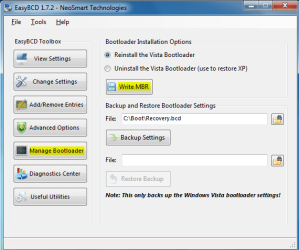
Ok download and install EasyBCD.

1: Click on Manage BootLoader. Select Reinstall the Vista bootloader and click on WriteMBR.
1.PNG
2: Now click on Add/remove Entries. . Under Add an entry, From the Type, select Windows Vista.
Under Name, type Windows 7 and click on Add entry.
2.PNG
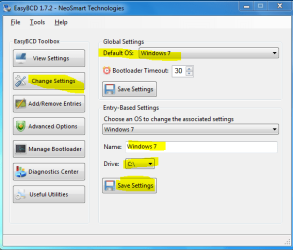
3: Now click on Change Settings tab.
Select the Default OS, check the Drive and click on Save Settings.
3.PNG
That's it.
 

My Computer My Computer

At a glance

Windows® 8 Pro (64-bit)Intel® Core™ i5 Processor 2467M (1.60GHz, 3MB...6GB DDR3 System Memory at 1,333MHz (on BD 4GB...AMD Radeon™ HD7550M 1GB DDR3 (Ext. Graphic)
Computer Manufacturer/Model Number
Samsung NP530U4B-S02IN
OS
Windows® 8 Pro (64-bit)
CPU
Intel® Core™ i5 Processor 2467M (1.60GHz, 3MB L3 Cache)
Motherboard
Samsung Electronics
Memory
6GB DDR3 System Memory at 1,333MHz (on BD 4GB + 2GB x 1)
Graphics Card(s)
AMD Radeon™ HD7550M 1GB DDR3 (Ext. Graphic)
Sound Card
Realtek High Definition Audio
Monitor(s) Displays
35.56cm (14.0) SuperBright 300nit HD LED Display
Screen Resolution
1366x768
Hard Drives
1TB S-ATA II Hard Drive (5400RPM) with ExpressCache 16GB SSD
Internet Speed
sucks
Antivirus
Microsoft Security Essentials
Browser
Google Chrome (Sync enabled)
Instead of choosing between Windows XP & Windows 7 in Windows Boot Manager. Only Windows XP appears.

at this stage that is right.

As you boot to Win XP Use Dinesh method from Win XP.
 

My Computer My Computer

At a glance

ME/XP/Vista/Win7
OS
ME/XP/Vista/Win7
the problem lies in that xp doesn't recognize SATA drives unless you install the drivers during the install with a floppy drive (which are no longer available) and windows 7 BSOD's whenever the slightest change is made in hardware or bios settings between startups

You can still download SATA drivers & buy floppy drives.
 

My Computer My Computer

At a glance

ME/XP/Vista/Win7
OS
ME/XP/Vista/Win7
Ok download and install EasyBCD.

1: Click on Manage BootLoader. Select Reinstall the Vista bootloader and click on WriteMBR.
View attachment 51202
2: Now click on Add/remove Entries. . Under Add an entry, From the Type, select Windows Vista.
Under Name, type Windows 7 and click on Add entry.
View attachment 51203
3: Now click on Change Settings tab.
Select the Default OS, check the Drive and click on Save Settings.
View attachment 51204
That's it.

I installed & run the EasyBCD but it says "Application Error: The application failed to initialize properly"
 

My Computer My Computer

At a glance

Windows 7 Home Basic2GB
Computer Manufacturer/Model Number
Dell Inspiron 1440
OS
Windows 7 Home Basic
Memory
2GB

My Computer My Computer

At a glance

Windows® 8 Pro (64-bit)Intel® Core™ i5 Processor 2467M (1.60GHz, 3MB...6GB DDR3 System Memory at 1,333MHz (on BD 4GB...AMD Radeon™ HD7550M 1GB DDR3 (Ext. Graphic)
Computer Manufacturer/Model Number
Samsung NP530U4B-S02IN
OS
Windows® 8 Pro (64-bit)
CPU
Intel® Core™ i5 Processor 2467M (1.60GHz, 3MB L3 Cache)
Motherboard
Samsung Electronics
Memory
6GB DDR3 System Memory at 1,333MHz (on BD 4GB + 2GB x 1)
Graphics Card(s)
AMD Radeon™ HD7550M 1GB DDR3 (Ext. Graphic)
Sound Card
Realtek High Definition Audio
Monitor(s) Displays
35.56cm (14.0) SuperBright 300nit HD LED Display
Screen Resolution
1366x768
Hard Drives
1TB S-ATA II Hard Drive (5400RPM) with ExpressCache 16GB SSD
Internet Speed
sucks
Antivirus
Microsoft Security Essentials
Browser
Google Chrome (Sync enabled)
Ok i tried to run&install the EasyBCD on XP and it work well(thanks 2 all esp. 2 dinesh). But another problem arise on booting windows7. On the loading part a blue screen appears and contains the message ***STOP 0x0000007B (0xF78D2524,0xC0000034,0x00000000,0x00000000) blaah..blaah. but the XP is still working the only problem left now is on how to boot the Windows7 without start-up problems.:(
 

My Computer My Computer

At a glance

Windows 7 Home Basic2GB
Computer Manufacturer/Model Number
Dell Inspiron 1440
OS
Windows 7 Home Basic
Memory
2GB
Ok i tried to run&install the EasyBCD on XP and it work well(thanks 2 all esp. 2 dinesh). But another problem arise on booting windows7. On the loading part a blue screen appears and contains the message ***STOP 0x0000007B (0xF78D2524,0xC0000034,0x00000000,0x00000000) blaah..blaah. but the XP is still working the only problem left now is on how to boot the Windows7 without start-up problems.:(

I feel like I'm the worst case scenario here..:cry:
 

My Computer My Computer

At a glance

Windows 7 Home Basic2GB
Computer Manufacturer/Model Number
Dell Inspiron 1440
OS
Windows 7 Home Basic
Memory
2GB
Change the SATA operations from SATA to ACHI. Or if there is any setting called as Combination Mode, select it.
 

My Computer My Computer

At a glance

Windows® 8 Pro (64-bit)Intel® Core™ i5 Processor 2467M (1.60GHz, 3MB...6GB DDR3 System Memory at 1,333MHz (on BD 4GB...AMD Radeon™ HD7550M 1GB DDR3 (Ext. Graphic)
Computer Manufacturer/Model Number
Samsung NP530U4B-S02IN
OS
Windows® 8 Pro (64-bit)
CPU
Intel® Core™ i5 Processor 2467M (1.60GHz, 3MB L3 Cache)
Motherboard
Samsung Electronics
Memory
6GB DDR3 System Memory at 1,333MHz (on BD 4GB + 2GB x 1)
Graphics Card(s)
AMD Radeon™ HD7550M 1GB DDR3 (Ext. Graphic)
Sound Card
Realtek High Definition Audio
Monitor(s) Displays
35.56cm (14.0) SuperBright 300nit HD LED Display
Screen Resolution
1366x768
Hard Drives
1TB S-ATA II Hard Drive (5400RPM) with ExpressCache 16GB SSD
Internet Speed
sucks
Antivirus
Microsoft Security Essentials
Browser
Google Chrome (Sync enabled)
Change the SATA operations from SATA to ACHI. Or if there is any setting called as Combination Mode, select it.

I tried switching but nothings change, unfortunately there is no Combination Mode.
 

My Computer My Computer

At a glance

Windows 7 Home Basic2GB
Computer Manufacturer/Model Number
Dell Inspiron 1440
OS
Windows 7 Home Basic
Memory
2GB

My Computer My Computer

At a glance

Windows 7 Home Basic2GB
Computer Manufacturer/Model Number
Dell Inspiron 1440
OS
Windows 7 Home Basic
Memory
2GB
Can you boot in Win 7 now?
 

My Computer My Computer

At a glance

ME/XP/Vista/Win7
OS
ME/XP/Vista/Win7
Back
Top