Laptop, VGA only output, and Multi Display problems.

Gisenu

New member
Local time
5:59 AM
Messages
11
Hey. I just finished installing my Win7, and having a major issue.
I have a MSI Ex600 which has a Nvidia 8400M graphic card. The card only has a VGA output, and for some reason, I cant make my laptop to recognize my 22' Mag screen as a seperate monitor. When I click the identify button, it just shows '1' or '2' on both screens, and it drives me insane because its not supposed to be like this, it makes 2 major issues:

1. When I close the lid, the monitor shuts down aswel
2. The laptop is running on 1200x800, so when it pops up on a 22' screen, its just huge nd not comfortable to use.

It only recognizes it as a different screen when I do the "Extend" otion. but I dont need nor want that atm. I just want to be able to seperate my monitor from my laptop and have it run on a bigger resolution, like it should.

I heard theres something about the framerates, and i tried changing it to all possible options but still got nothing. every time i try and send it to the big screen it just says "Mode is not supported" and gives me a range of Hrtz that changes every time I make it on a nother resul.

Please help me. I'm going insane here because its not fun working like this and it annoys me having my laptop open all the time.

I have to mention that I did get it to work once, but I restarted my CPU and I couldnt get it right again since, I tried everything but nothing worked. just pointing this out so you know there must be a solution, because it worked once.

Thanks for all the help.
Tom.
 

My Computer My Computer

OS
Windows 7
Hello Gisenu, welcome to the Seven Forums.

If I understood your post correctly, your displays are working exactly as they should in Win7.

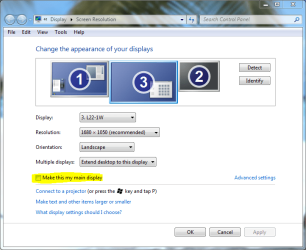
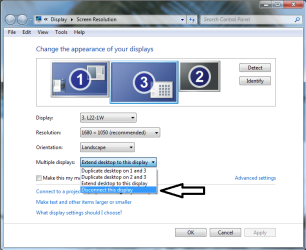
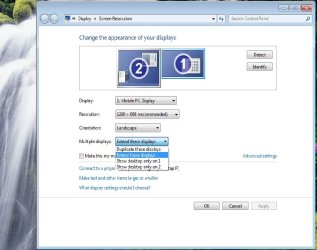
You find all display options from Screen Resolution tool by right clicking desktop and choosing it. When desktop (display) is extended, if you want to use just one display you have to first make it your main display and then disconnect the one you don't need:

SR1.PNG
SR2.png

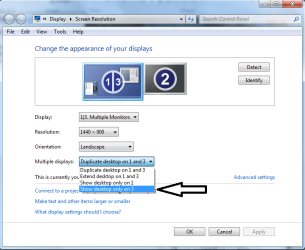
When using duplicated desktop and you want to use only one display, you have to choose Show desktop only on X, where X is the number of display:

SR3.png

If desktop is duplicated, screen resolution is same on both displays. In that case the resolution can not be bigger than maximum resolution on the display which has smaller maximum resolution.

When using extended desktop or when using just one display, resolution can be different on all displays

Hope this is not too confusing...

Kari
 

My Computer My Computer

Computer type
Laptop
Computer Manufacturer/Model Number
HP ENVY 17-1150eg
OS
Windows 10 Pro x64 EN-GB
CPU
1.6 GHz Intel Core i7-720QM Processor
Memory
6 GB
Graphics Card(s)
ATI Mobility Radeon HD 5850 Graphics
Sound Card
Beats sound system with integrated subwoofer
Monitor(s) Displays
17" laptop display, 22" LED and 32" Full HD TV through HDMI
Screen Resolution
1600*900 (1), 1920*1080 (2&3)
Hard Drives
Internal: 2 x 500 GB SATA Hard Disk Drive 7200 rpm
External: 2TB for backups, 3TB USB3 network drive for media
Cooling
As Envy runs a bit warm, I have it on a Cooler Master pad
Keyboard
Logitech diNovo Media Desktop Laser (bluetooth)
Mouse
Logitech Performance Mouse MX
Internet Speed
50/10 Mbps VDSL
Antivirus
Windows Defender 4.3.9431.0
Browser
Maxthon 3.5.2., IE11
Yes, I do. but I dont want to extend my desktop, it can make things.. not the same as only using my monitor, like I want to. I tried to do the "disconnect" thing but it didnt show up, I can only do "show only on 1\2"
so how do I fix it to only work on the monitor when I plug the VGA in?
And how do I fix the monitor shutting off every time I close the lid of my laptop?

And thanks SO MUCH for that well written post :)
 

My Computer My Computer

OS
Windows 7
There should also be an option maybe in power settings for what happens when you close the laptop
 

My Computer My Computer

Computer type
Laptop
Computer Manufacturer/Model Number
ASUS G60-RBBX05
OS
Win7 Home Premium 64x
CPU
Intel Core 2 Duo P7450 / 2.13 GHz (2.29 with Extreme Turbo)
Memory
4 GB PC-6400 Hyundai (2X2) at 800Mhz
Graphics Card(s)
NVIDIA GeForce GTX 260M 1GB DDR3 VRAM
Monitor(s) Displays
16" LED Backlit
Screen Resolution
1366 x 768 on laptop 1600x1050 max res on 22" external mon
Hard Drives
OCZ Agility 3 60GB SSD / 320 GB - Serial ATA-150 - 7200 rpm
PSU
6-cell Lithium ion { lasts 1.5 hours }
Case
ASUS G60 Laptop
Keyboard
Chicklet type back-lit (white light) keyboard
Mouse
Logitech G9 Laser Mouse 3200dpi and 1000 reports per minute
Internet Speed
Comcast 8.60mb/s up - 3.11mb/s down
Antivirus
MSE
Browser
Firefox
Other Info
General mid-budget gaming Comp. Low batterylife - High FrameRates - currently overheating problems :(

2nd Rig: Case: Rosewill BLACKHAWK Gaming ATX Mid Tower Computer Case

Mobo: GIGABYTE GA-990FXA-UD3
CPU: AMD FX-6200 Zambezi 3.8GHz (4.1GHz Turbo)
Heatsink: COOLER MASTER V8 CPU Cooler
RAM: Patriot Viper 3 8GB (2 x 4GB) 240-Pin DDR3 SDRAM 1866 (PC3 15000)
GPU: SAPPHIRE Radeon HD 6850 1GB 2
I am away from my laptop, but I know there is a setting In Power settings(?) for what happens when you close the Laptop Lid. I had to change this setting when I got my laptop this year.

I know dual monitor settings can be tricky and every laptop that I have used has some quirk that makes setting them up a pain.

I am also new to the forums and new to Windows 7. Welcome to sevenforums. There is a lot of great people and tutorials and posts...have fun
 

My Computer My Computer

Computer type
Laptop
Computer Manufacturer/Model Number
ASUS G60-RBBX05
OS
Win7 Home Premium 64x
CPU
Intel Core 2 Duo P7450 / 2.13 GHz (2.29 with Extreme Turbo)
Memory
4 GB PC-6400 Hyundai (2X2) at 800Mhz
Graphics Card(s)
NVIDIA GeForce GTX 260M 1GB DDR3 VRAM
Monitor(s) Displays
16" LED Backlit
Screen Resolution
1366 x 768 on laptop 1600x1050 max res on 22" external mon
Hard Drives
OCZ Agility 3 60GB SSD / 320 GB - Serial ATA-150 - 7200 rpm
PSU
6-cell Lithium ion { lasts 1.5 hours }
Case
ASUS G60 Laptop
Keyboard
Chicklet type back-lit (white light) keyboard
Mouse
Logitech G9 Laser Mouse 3200dpi and 1000 reports per minute
Internet Speed
Comcast 8.60mb/s up - 3.11mb/s down
Antivirus
MSE
Browser
Firefox
Other Info
General mid-budget gaming Comp. Low batterylife - High FrameRates - currently overheating problems :(

2nd Rig: Case: Rosewill BLACKHAWK Gaming ATX Mid Tower Computer Case

Mobo: GIGABYTE GA-990FXA-UD3
CPU: AMD FX-6200 Zambezi 3.8GHz (4.1GHz Turbo)
Heatsink: COOLER MASTER V8 CPU Cooler
RAM: Patriot Viper 3 8GB (2 x 4GB) 240-Pin DDR3 SDRAM 1866 (PC3 15000)
GPU: SAPPHIRE Radeon HD 6850 1GB 2
there is nothing in power saving mode, i checked twice. just something that doesnt make it go to sleep. but the display still goes off.
im going insane here, anyone knows how to handle this?..

and the most stupied thing of all, is that if i try to only send to the VGA screen, nothing happens. only if its either duplicated or extended the monitor is working. how do i just make him send to the monitor while ignoring the laptops screen?..
 

My Computer My Computer

OS
Windows 7
I tried to do the "disconnect" thing but it didnt show up, I can only do "show only on 1\2"
so how do I fix it to only work on the monitor when I plug the VGA in?

You have two ways to disconnect your laptop display:
  1. If desktop is duplicated, choose Show desktop only on 2
  2. If desktop is extended, click the laptop display icon in Screen Resolution window and choose Disconnect this display from drop-down menu
As you will notice, the disconnect option is only available when extended desktop is chosen.

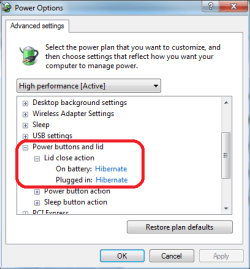
Whatever method you use, disconnecting laptop display when in extended desktop, or showing the desktop only on one display when in duplicated desktop, the result is same: you only have picture on the secondary display while laptop screen is turned off. When you then choose Do nothing when lid is closed in Power Options, you can close the laptop lid and only use your secondary display.

Kari
 

Attachments

  • PWR_options.png
    PWR_options.png
    12.1 KB · Views: 37

My Computer My Computer

Computer type
Laptop
Computer Manufacturer/Model Number
HP ENVY 17-1150eg
OS
Windows 10 Pro x64 EN-GB
CPU
1.6 GHz Intel Core i7-720QM Processor
Memory
6 GB
Graphics Card(s)
ATI Mobility Radeon HD 5850 Graphics
Sound Card
Beats sound system with integrated subwoofer
Monitor(s) Displays
17" laptop display, 22" LED and 32" Full HD TV through HDMI
Screen Resolution
1600*900 (1), 1920*1080 (2&3)
Hard Drives
Internal: 2 x 500 GB SATA Hard Disk Drive 7200 rpm
External: 2TB for backups, 3TB USB3 network drive for media
Cooling
As Envy runs a bit warm, I have it on a Cooler Master pad
Keyboard
Logitech diNovo Media Desktop Laser (bluetooth)
Mouse
Logitech Performance Mouse MX
Internet Speed
50/10 Mbps VDSL
Antivirus
Windows Defender 4.3.9431.0
Browser
Maxthon 3.5.2., IE11
i saw that and i already marked "do nothing" when it closes.
what im trying to say is:

1. when its extended, i dont have a "disconnect" option because it does not recognize it as a secondery screen for some strange reason, and on device manager it does, so i have no idea why
2. when its on duplicated mode and i press "only show on 2", which is the other screen, my monitor SHUTS DOWN. saying "mode is not supported"
 

My Computer My Computer

OS
Windows 7
What make and model is your laptop? Which graphics card it has?
 

My Computer My Computer

Computer type
Laptop
Computer Manufacturer/Model Number
HP ENVY 17-1150eg
OS
Windows 10 Pro x64 EN-GB
CPU
1.6 GHz Intel Core i7-720QM Processor
Memory
6 GB
Graphics Card(s)
ATI Mobility Radeon HD 5850 Graphics
Sound Card
Beats sound system with integrated subwoofer
Monitor(s) Displays
17" laptop display, 22" LED and 32" Full HD TV through HDMI
Screen Resolution
1600*900 (1), 1920*1080 (2&3)
Hard Drives
Internal: 2 x 500 GB SATA Hard Disk Drive 7200 rpm
External: 2TB for backups, 3TB USB3 network drive for media
Cooling
As Envy runs a bit warm, I have it on a Cooler Master pad
Keyboard
Logitech diNovo Media Desktop Laser (bluetooth)
Mouse
Logitech Performance Mouse MX
Internet Speed
50/10 Mbps VDSL
Antivirus
Windows Defender 4.3.9431.0
Browser
Maxthon 3.5.2., IE11
What make and model is your laptop? Which graphics card it has?

"I have a MSI Ex600 which has a Nvidia 8400M graphic card"
written in the main post :)
+ i just downloaded the latest version of the driver, and for win 7. so thats no issue.


Heres a pic. as you can see, im on extended but still cant remove any. and if i could, it would just tell me the error messege again "mode is not supported" on the monitor
 

Attachments

  • Untitled.jpg
    Untitled.jpg
    52.7 KB · Views: 66

My Computer My Computer

OS
Windows 7
:o Sorry, didn't go back to read it.
 

My Computer My Computer

Computer type
Laptop
Computer Manufacturer/Model Number
HP ENVY 17-1150eg
OS
Windows 10 Pro x64 EN-GB
CPU
1.6 GHz Intel Core i7-720QM Processor
Memory
6 GB
Graphics Card(s)
ATI Mobility Radeon HD 5850 Graphics
Sound Card
Beats sound system with integrated subwoofer
Monitor(s) Displays
17" laptop display, 22" LED and 32" Full HD TV through HDMI
Screen Resolution
1600*900 (1), 1920*1080 (2&3)
Hard Drives
Internal: 2 x 500 GB SATA Hard Disk Drive 7200 rpm
External: 2TB for backups, 3TB USB3 network drive for media
Cooling
As Envy runs a bit warm, I have it on a Cooler Master pad
Keyboard
Logitech diNovo Media Desktop Laser (bluetooth)
Mouse
Logitech Performance Mouse MX
Internet Speed
50/10 Mbps VDSL
Antivirus
Windows Defender 4.3.9431.0
Browser
Maxthon 3.5.2., IE11
I found this on your laptop's manual:

FnF2.PNG

Have you tried that?

Kari
 

My Computer My Computer

Computer type
Laptop
Computer Manufacturer/Model Number
HP ENVY 17-1150eg
OS
Windows 10 Pro x64 EN-GB
CPU
1.6 GHz Intel Core i7-720QM Processor
Memory
6 GB
Graphics Card(s)
ATI Mobility Radeon HD 5850 Graphics
Sound Card
Beats sound system with integrated subwoofer
Monitor(s) Displays
17" laptop display, 22" LED and 32" Full HD TV through HDMI
Screen Resolution
1600*900 (1), 1920*1080 (2&3)
Hard Drives
Internal: 2 x 500 GB SATA Hard Disk Drive 7200 rpm
External: 2TB for backups, 3TB USB3 network drive for media
Cooling
As Envy runs a bit warm, I have it on a Cooler Master pad
Keyboard
Logitech diNovo Media Desktop Laser (bluetooth)
Mouse
Logitech Performance Mouse MX
Internet Speed
50/10 Mbps VDSL
Antivirus
Windows Defender 4.3.9431.0
Browser
Maxthon 3.5.2., IE11
I asked some gurus to come and see your issue, to read this thread. Let's wait a bit and see if somebody has ideas. I don't.

Kari
 

My Computer My Computer

Computer type
Laptop
Computer Manufacturer/Model Number
HP ENVY 17-1150eg
OS
Windows 10 Pro x64 EN-GB
CPU
1.6 GHz Intel Core i7-720QM Processor
Memory
6 GB
Graphics Card(s)
ATI Mobility Radeon HD 5850 Graphics
Sound Card
Beats sound system with integrated subwoofer
Monitor(s) Displays
17" laptop display, 22" LED and 32" Full HD TV through HDMI
Screen Resolution
1600*900 (1), 1920*1080 (2&3)
Hard Drives
Internal: 2 x 500 GB SATA Hard Disk Drive 7200 rpm
External: 2TB for backups, 3TB USB3 network drive for media
Cooling
As Envy runs a bit warm, I have it on a Cooler Master pad
Keyboard
Logitech diNovo Media Desktop Laser (bluetooth)
Mouse
Logitech Performance Mouse MX
Internet Speed
50/10 Mbps VDSL
Antivirus
Windows Defender 4.3.9431.0
Browser
Maxthon 3.5.2., IE11
I asked some gurus to come and see your issue, to read this thread. Let's wait a bit and see if somebody has ideas. I don't.

Kari


thanks alot for all your efforts, i really appriciate it :) and hope to get this fixed.
 

My Computer My Computer

OS
Windows 7
A couple of things to check....

Most laptop's will ship with software to control the screens and switching of them, this is normally accomplished by the use of a function key combination and once the correct screen is the default then you should be able to set a better resolution. when in dual mode you will be, as stated limited to the smallest available resolution on both monitors, unless the software is provided on the laptop to control the graphics system, check for an icon in the system tray or a specific program in a utilities folder from the manufacturer
 

My Computers My Computers

System One System Two

  • Computer type
    PC/Desktop
    Computer Manufacturer/Model Number
    ChillBlast - Custom to my design
    OS
    Windows 11 Pro x64 [Latest Release and Release Preview]
    CPU
    Ryzen 9 5950X, 3.8 - 5.2 MHz
    Motherboard
    Asus Prime X570-Pro
    Memory
    64GB [2 x 32GB] DDR4 3200MHz
    Graphics Card(s)
    4GB NVIDIA GEFORCE GTX 1650 Ti
    Sound Card
    On-board SPDIF to 5.1 System + HDMI [5.1 system]
    Monitor(s) Displays
    32" UHD 32 Bit HDR Monitor + 43" UHD 4K 32Bit HDR TV
    Screen Resolution
    2 x 3840 x 2160 @60Hz
    Hard Drives
    1TB M2 SSD OS, 500GB Fast Access SSD, 2 x 8TB Data + Various Externals from 1TB to 4TB, 10TB NAS
    PSU
    NZXT C750 80 PLUS Gold 750W Modular PSU
    Case
    Workstation Case [Matt Black]
    Cooling
    NZXT Kraken X63 280mm CPU Cooler +2x Quiet Case fans
    Keyboard
    Logitech Wireless MX Keys & K400 + others
    Mouse
    Logitech Wireless MX Master 3S
    Internet Speed
    920 MB Down 50 MB Up
    Antivirus
    BitDefender Total Security Pro
    Browser
    Chrome (always run latest Non-Beta)
    Other Info
    Also run ...
    Laptop - Quad 8GB - Windows 10 Pro x64
    Nexus 7 Android tablet x2
    Samsung 10.2" tablet
    Blackview TAB 8 4G Android Tablet c/w Keyboard
    Wacom Intuos Pro Medium Pen Pad
    Wacom Intuos Pro Small Pen Pad
    Wacom Expresskeys Remote
    Loopdeck+ Graphics Controller
    Shuttle Pro v2 Control
  • Computer type
    Laptop
    System Manufacturer/Model Number
    Dell XPS 17 10750H
    OS
    Windows 11 Pro x64 Latest RP
    CPU
    Intel I7 10750H 5.0GHz
    Motherboard
    Dell XPS
    Memory
    32GB [2x16GB] DDR4 2933 MHz
    Graphics Card(s)
    nVidia GTX1650Ti 4 GB GDDR6
    Sound Card
    Stock [Realtek] 4 Speaker
    Monitor(s) Displays
    17" IPS UHD+ Infinity Edge Touchscreen
    Screen Resolution
    3840 x 2400
    Hard Drives
    2TB M2 NVMe, 4TB External + various 500GB & 1TB External NVMe (also have access to spinner HDD from
    PSU
    Stock
    Case
    Stock XPS Aluminium & Carbon Fibre
    Cooling
    Stock - Active Fan Control
    Keyboard
    Backlit + Various Logitech
    Mouse
    Stock Track Pad + Logitech MX Trackball
    Internet Speed
    72 MB Down 18MB Up
    Browser
    Chrome
    Other Info
    Also run ...
    Laptop - Quad 8GB - Windows 10 Pro x64
    Nexus 7 Android tablet x2
    10.2" tablet
    Sony Z3 Android Smartphone
    Wacom Intuos Pro Medium Pen Pad
    Wacom Intuos Pro Small Pen Pad
    Wacom Expresskeys Remote
    Loopdeck+ Graphics Controller
    Shuttle Pro v2 Control Pad
    10TB NAS
A couple of things to check....

Most laptop's will ship with software to control the screens and switching of them, this is normally accomplished by the use of a function key combination and once the correct screen is the default then you should be able to set a better resolution. when in dual mode you will be, as stated limited to the smallest available resolution on both monitors, unless the software is provided on the laptop to control the graphics system, check for an icon in the system tray or a specific program in a utilities folder from the manufacturer


software is working already. thing is, every time i try to switch between screens using Function button + the f3 button, it does the same thing that happends when i chose "show only on monitor 1\2". monitor goes black and doesnt respond.
i never had this problem with windows XP. its something relater to win7, that i can tell you for sure. and agian, i already did it once. i just have no idea how. but i saw it working. lid off, cpu on, on the maxed resul. question is how do i get there again :S
 

My Computer My Computer

OS
Windows 7
what options do you have in your Nvidia control panel ?
 

My Computer My Computer

Computer Manufacturer/Model Number
built my own
OS
win7 ultimate / virtual box
CPU
Intel Core i7 3770K,1155, Ivy Bridge
Motherboard
MSI Z77A-G43
Memory
GSkill Ripjaws Z Series 1600 CL 9.0 16GB
Graphics Card(s)
KFA2 GeForce GTX 670 EX OC 2048MB GDDR5 PCI-E gfx card
Sound Card
onboard Nvidia HDMI audio
Monitor(s) Displays
ASUS VK222H 22" widescreen LCD monitor
Screen Resolution
1680x1050
Hard Drives
Kingston 128gb SSD
OCZ Vertex 90gb SSD
500GB WDCaviar 16mb 5000KS
320GB WDCaviar 16mb 3200AAKS sata 2
1TB Samsung 16mb HD103SJ sata 2
PSU
Corsair HX 750W ATX2.2 Modular
Cooling
Antec 25 Kuhler H2O 620
Keyboard
logitech
Mouse
logitech MX518
Internet Speed
7mb adsl
same as i have in the "screen resolution screen", maybe a bit more (like chosing framerates and such).
look. if we solve the "mode is not supported" issue, we solved the problem. because i CAN make it send only to the monitor, but for some reason he just doesnt show anything
 

My Computer My Computer

OS
Windows 7
well i have a huge update on this one.
apperently, the problem is in the Mag screen. because i connected a 17' DELL sceren into my comp and it worked PERDECTLY. just conencted, comp lid went off, and just projecting on the dell monitor.
so what we have to do now is understand why the computer refuses to recognize my Mag monitor?
maybe its the framerates? the resul? i have no idea. please shed some light on this
 

My Computer My Computer

OS
Windows 7
Back
Top