
3G USB network set-up running wireless router, how?

hairy one

New member
Local time
3:18 PM
Messages
11
Hi All.

My first post is regarding setting up a wireless network using a Virgin 3G USB internet connection.

I am looking at making my Win 7 system as a base station for the USB modem then using a wireless router off this setup.

My question is how to go about setting such a system up and including MAC, XP and linux system within it. System sharing is not an issue (but would be nice) but internet access is.

Any information is welcomed.

cheers hairy
network virgin!
 

My Computer My Computer

OS
windows XP, 7 Puppy Linux, Mac 10.4.11
Hi, i would think this base W7 system would a laptop, right?

With it being a laptop, it should have a built-in wireless adapter whereby you can use it to broadcast your ad-hoc wireless connection. This would let the other wifi machines connect and use/share the internet off the USB modem, pending bridging capability between the USB connection and the ad-hoc.

If you want to use the router, it's a little more complicated as the router will need to be setup to broadcast your 3G internet connect to the others.
 

My Computer My Computer

Computer Manufacturer/Model Number
Lenovo ThinkPad T60
OS
Windows 7 Ultimate 64Bit
CPU
GenuineIntel Intel(R) Core(TM) DuoCore T2400 @ 1.83GHz
Motherboard
Intel(R) 82801G (ICH7 Family)
Memory
2.00 GB
Graphics Card(s)
Mobile Intel(R) 945 Express Chipset
Sound Card
SoundMAX Integrated Digital HD Audio
Monitor(s) Displays
ThinkPad Display
Screen Resolution
1400x1050
Hard Drives
100Gb SATA
Keyboard
Standard Keyboard
Mouse
HID-compliant Mouse
Internet Speed
Cable Broadband - 54Mbps
Other Info
Intel(R) PRO/1000 PL Network Connection
11a/b/g Wireless LAN Mini PCI Express Adapter
Hi aem.
No the Win 7 box is a box with htpc set up on it. I am wanting to use this system as it is on most of the time and I have just purchased a wireless router a this will improve my standing within the home with my wife asking for the dongle while I am using it.

cheers hairy
 

My Computer My Computer

OS
windows XP, 7 Puppy Linux, Mac 10.4.11
So it's a desktop, and you are using the 3G Virgin USB modem to connect to the internet. If it was me, i woud try bridging the USB internet connection with the LAN ethernet connection being the connection from the W7 to the wireless router.

W7 (USB modem) ====> router (auto ip detect, with router IP 192.168.1.1, subnet 255.255.255.0, default router 192.168.1.1). From the router setup your SSID for others to connect to.

When you connect via LAN to your router, you should be able to connect to it thru the default ip address eg. http\\192.168.1.1 (or 0.1), with with default userid/password.

Are you able to do this much first, and see how it goes?
 

My Computer My Computer

Computer Manufacturer/Model Number
Lenovo ThinkPad T60
OS
Windows 7 Ultimate 64Bit
CPU
GenuineIntel Intel(R) Core(TM) DuoCore T2400 @ 1.83GHz
Motherboard
Intel(R) 82801G (ICH7 Family)
Memory
2.00 GB
Graphics Card(s)
Mobile Intel(R) 945 Express Chipset
Sound Card
SoundMAX Integrated Digital HD Audio
Monitor(s) Displays
ThinkPad Display
Screen Resolution
1400x1050
Hard Drives
100Gb SATA
Keyboard
Standard Keyboard
Mouse
HID-compliant Mouse
Internet Speed
Cable Broadband - 54Mbps
Other Info
Intel(R) PRO/1000 PL Network Connection
11a/b/g Wireless LAN Mini PCI Express Adapter
back again.
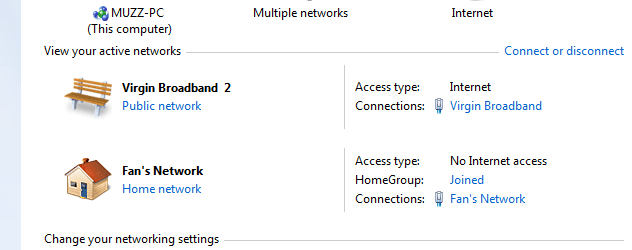
I have been able to access the net using the Virgin connection, but the wirelss connection is "No internet Access" listed
SnapShot.png

Then I try to set up a home group this comes up!SnapShot 2.png


any ideas welcomed
Cheers hairy

P.S I can access the wireles router with my lappy but not the net.
 

My Computer My Computer

OS
windows XP, 7 Puppy Linux, Mac 10.4.11
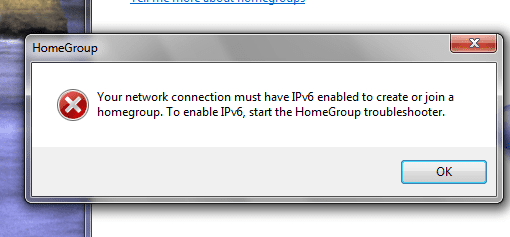
Have you bridged the connections, as i suggested?

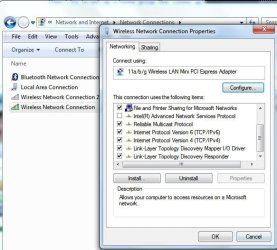
On the first image, click on "Change adapter setting" left of window. Then right-click the wireless adapter, Properties and check if ipv6 is ticked.
Noname.jpg
 

My Computer My Computer

Computer Manufacturer/Model Number
Lenovo ThinkPad T60
OS
Windows 7 Ultimate 64Bit
CPU
GenuineIntel Intel(R) Core(TM) DuoCore T2400 @ 1.83GHz
Motherboard
Intel(R) 82801G (ICH7 Family)
Memory
2.00 GB
Graphics Card(s)
Mobile Intel(R) 945 Express Chipset
Sound Card
SoundMAX Integrated Digital HD Audio
Monitor(s) Displays
ThinkPad Display
Screen Resolution
1400x1050
Hard Drives
100Gb SATA
Keyboard
Standard Keyboard
Mouse
HID-compliant Mouse
Internet Speed
Cable Broadband - 54Mbps
Other Info
Intel(R) PRO/1000 PL Network Connection
11a/b/g Wireless LAN Mini PCI Express Adapter
yes it is

SnapShot 3.png
 

My Computer My Computer

OS
windows XP, 7 Puppy Linux, Mac 10.4.11
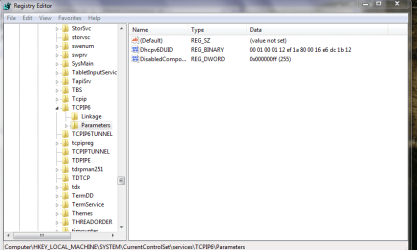
Can you screenshot this location. Open regedit.

HKEY_LOCAL_MACHINE\SYSTEM\CurrentControlSet\Services\tcpip6\Parameters\
 

My Computer My Computer

Computer Manufacturer/Model Number
Lenovo ThinkPad T60
OS
Windows 7 Ultimate 64Bit
CPU
GenuineIntel Intel(R) Core(TM) DuoCore T2400 @ 1.83GHz
Motherboard
Intel(R) 82801G (ICH7 Family)
Memory
2.00 GB
Graphics Card(s)
Mobile Intel(R) 945 Express Chipset
Sound Card
SoundMAX Integrated Digital HD Audio
Monitor(s) Displays
ThinkPad Display
Screen Resolution
1400x1050
Hard Drives
100Gb SATA
Keyboard
Standard Keyboard
Mouse
HID-compliant Mouse
Internet Speed
Cable Broadband - 54Mbps
Other Info
Intel(R) PRO/1000 PL Network Connection
11a/b/g Wireless LAN Mini PCI Express Adapter
aem, here is the hotkey info there is a difference with the spelling, the tcpip6 is in caps in mine

SnapShot 4.png
 

My Computer My Computer

OS
windows XP, 7 Puppy Linux, Mac 10.4.11
In order to achieve what you wish I believe there are two options

1 you can set-up internet connection sharing on the main PC and then set the router as a booster/relay to this service as provided by the PC. Check your router documentation on how to set this option

2. use the PC output to drive the router input and then distribute the wireless signal using the router. To do this you would plug the USB dongle into the PC and connect the Ethernet from the PC to the Router Input port You would then need to set-up the NAT on the router to a suitable subnet range that other devices could connect wirelessly.

To be honest for what you are looking to achieve you would be better off using ICS on the main PC to distribute directly via wireless to the other PCs.

The only other way I can see is if the actual router has a USB connection specifically for this purpose
 

My Computers My Computers

System One System Two

  • Computer type
    PC/Desktop
    Computer Manufacturer/Model Number
    ChillBlast - Custom to my design
    OS
    Windows 11 Pro x64 [Latest Release and Release Preview]
    CPU
    Ryzen 9 5950X, 3.8 - 5.2 MHz
    Motherboard
    Asus Prime X570-Pro
    Memory
    64GB [2 x 32GB] DDR4 3200MHz
    Graphics Card(s)
    4GB NVIDIA GEFORCE GTX 1650 Ti
    Sound Card
    On-board SPDIF to 5.1 System + HDMI [5.1 system]
    Monitor(s) Displays
    32" UHD 32 Bit HDR Monitor + 43" UHD 4K 32Bit HDR TV
    Screen Resolution
    2 x 3840 x 2160 @60Hz
    Hard Drives
    1TB M2 SSD OS, 500GB Fast Access SSD, 2 x 8TB Data + Various Externals from 1TB to 4TB, 10TB NAS
    PSU
    NZXT C750 80 PLUS Gold 750W Modular PSU
    Case
    Workstation Case [Matt Black]
    Cooling
    NZXT Kraken X63 280mm CPU Cooler +2x Quiet Case fans
    Keyboard
    Logitech Wireless MX Keys & K400 + others
    Mouse
    Logitech Wireless MX Master 3S
    Internet Speed
    920 MB Down 50 MB Up
    Antivirus
    BitDefender Total Security Pro
    Browser
    Chrome (always run latest Non-Beta)
    Other Info
    Also run ...
    Laptop - Quad 8GB - Windows 10 Pro x64
    Nexus 7 Android tablet x2
    Samsung 10.2" tablet
    Blackview TAB 8 4G Android Tablet c/w Keyboard
    Wacom Intuos Pro Medium Pen Pad
    Wacom Intuos Pro Small Pen Pad
    Wacom Expresskeys Remote
    Loopdeck+ Graphics Controller
    Shuttle Pro v2 Control
  • Computer type
    Laptop
    System Manufacturer/Model Number
    Dell XPS 17 10750H
    OS
    Windows 11 Pro x64 Latest RP
    CPU
    Intel I7 10750H 5.0GHz
    Motherboard
    Dell XPS
    Memory
    32GB [2x16GB] DDR4 2933 MHz
    Graphics Card(s)
    nVidia GTX1650Ti 4 GB GDDR6
    Sound Card
    Stock [Realtek] 4 Speaker
    Monitor(s) Displays
    17" IPS UHD+ Infinity Edge Touchscreen
    Screen Resolution
    3840 x 2400
    Hard Drives
    2TB M2 NVMe, 4TB External + various 500GB & 1TB External NVMe (also have access to spinner HDD from
    PSU
    Stock
    Case
    Stock XPS Aluminium & Carbon Fibre
    Cooling
    Stock - Active Fan Control
    Keyboard
    Backlit + Various Logitech
    Mouse
    Stock Track Pad + Logitech MX Trackball
    Internet Speed
    72 MB Down 18MB Up
    Browser
    Chrome
    Other Info
    Also run ...
    Laptop - Quad 8GB - Windows 10 Pro x64
    Nexus 7 Android tablet x2
    10.2" tablet
    Sony Z3 Android Smartphone
    Wacom Intuos Pro Medium Pen Pad
    Wacom Intuos Pro Small Pen Pad
    Wacom Expresskeys Remote
    Loopdeck+ Graphics Controller
    Shuttle Pro v2 Control Pad
    10TB NAS
aem, here is the hotkey info there is a difference with the spelling, the tcpip6 is in caps in mine

View attachment 52484

Right-click on DisabledComponents, and hit Delete.

That key is the lock key. Get rid of it will allow u to enabled ipv6.

It's cool to do it, your can always put it back.
 

My Computer My Computer

Computer Manufacturer/Model Number
Lenovo ThinkPad T60
OS
Windows 7 Ultimate 64Bit
CPU
GenuineIntel Intel(R) Core(TM) DuoCore T2400 @ 1.83GHz
Motherboard
Intel(R) 82801G (ICH7 Family)
Memory
2.00 GB
Graphics Card(s)
Mobile Intel(R) 945 Express Chipset
Sound Card
SoundMAX Integrated Digital HD Audio
Monitor(s) Displays
ThinkPad Display
Screen Resolution
1400x1050
Hard Drives
100Gb SATA
Keyboard
Standard Keyboard
Mouse
HID-compliant Mouse
Internet Speed
Cable Broadband - 54Mbps
Other Info
Intel(R) PRO/1000 PL Network Connection
11a/b/g Wireless LAN Mini PCI Express Adapter
Thank you aem, I am now able to steup my homegroup THANK YOU!!!
 

My Computer My Computer

OS
windows XP, 7 Puppy Linux, Mac 10.4.11
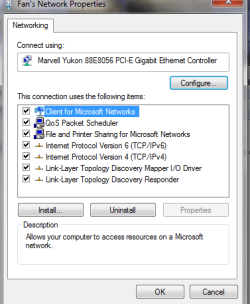
Now how do I set the connection to access the internet please!


SnapShot 6.png
 

My Computer My Computer

OS
windows XP, 7 Puppy Linux, Mac 10.4.11
Click the "Change adapter setting" in left hand side of "Network and sharing". Highlight:
1) The Virgin Broadband adapter, and
2) The Fan's network (assuming it's your LAN adapter).

When both are higlighted, righ-click on the shading, and bridge connection.

There should now be a new bridge connection created in that area. Try it.
 

My Computer My Computer

Computer Manufacturer/Model Number
Lenovo ThinkPad T60
OS
Windows 7 Ultimate 64Bit
CPU
GenuineIntel Intel(R) Core(TM) DuoCore T2400 @ 1.83GHz
Motherboard
Intel(R) 82801G (ICH7 Family)
Memory
2.00 GB
Graphics Card(s)
Mobile Intel(R) 945 Express Chipset
Sound Card
SoundMAX Integrated Digital HD Audio
Monitor(s) Displays
ThinkPad Display
Screen Resolution
1400x1050
Hard Drives
100Gb SATA
Keyboard
Standard Keyboard
Mouse
HID-compliant Mouse
Internet Speed
Cable Broadband - 54Mbps
Other Info
Intel(R) PRO/1000 PL Network Connection
11a/b/g Wireless LAN Mini PCI Express Adapter
I did tried your idea aem, but it didn't work so I went in to the propeties and here is the differences

Virgin.png


wireless.png


Cheers hairy
 

My Computer My Computer

OS
windows XP, 7 Puppy Linux, Mac 10.4.11
In what ways it's not working?
 

My Computer My Computer

Computer Manufacturer/Model Number
Lenovo ThinkPad T60
OS
Windows 7 Ultimate 64Bit
CPU
GenuineIntel Intel(R) Core(TM) DuoCore T2400 @ 1.83GHz
Motherboard
Intel(R) 82801G (ICH7 Family)
Memory
2.00 GB
Graphics Card(s)
Mobile Intel(R) 945 Express Chipset
Sound Card
SoundMAX Integrated Digital HD Audio
Monitor(s) Displays
ThinkPad Display
Screen Resolution
1400x1050
Hard Drives
100Gb SATA
Keyboard
Standard Keyboard
Mouse
HID-compliant Mouse
Internet Speed
Cable Broadband - 54Mbps
Other Info
Intel(R) PRO/1000 PL Network Connection
11a/b/g Wireless LAN Mini PCI Express Adapter
I found this post and it's exactly what I am trying to accomplish. I was able to do this with XP but not Win 7. I can ping the NIC on my host computer from my wireless laptop.

Right now I have the 3G shared out with ICS, the NIC was assigned the 192.168.137.1 IP so I changed the IP scheme on the router to the same subnet and made the default gateway on the NIC the IP on the router.
Worked in XP :confused:
I have not been able to bridge the 3G adapter and my NIC.
I have a plan B and that is a USB wifi antennae and create an ad hoc hot spot. Just prefer the security of the router.

Hairy One did you succeed with setting this up?
 

My Computer My Computer

Computer Manufacturer/Model Number
Dell Zino
OS
7 Home Premium 64bit
Memory
2GB
Monitor(s) Displays
Zenith Plasma
Back
Top