Ah, I see, you will have to keep track of which port you connect to. Try both of them out and see if you can get the "safely remove hardware" icon in the tray. That's pretty much what you're after isn't it? To be able to connect to eSATA without shutting down the system?
I would look in your manual and see if you have a controller listed on the "Block diagram" that is named JMB36(something) If you do.....I would highly recommend you go to that file server and download and install the latest drivere with "eSATA" in the name. It will make things work WAY better I found with mine.
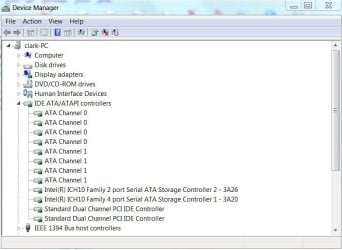
You could try the drivers on the CD, but they may not be the best ones. I was nervous at first too...but when you do.....The controller should show up in your device manager under "storage controllers" and work good.
Right now you have "generic" ones. Is your eSATA even working?
Also, yes...AHCI would be worth a try. You will need to know which controller you are changing first....
Here is your SATA setup. You should have 3 options in the BIOS for these 3 controllers, here are some shots from what I think is your manual. You DO have 3 controllers and you DO have a JMB36x (two of them it looks like) Please go to page 46 in your manual to confirm this.
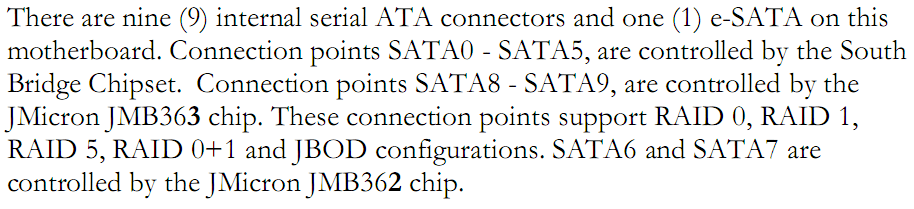
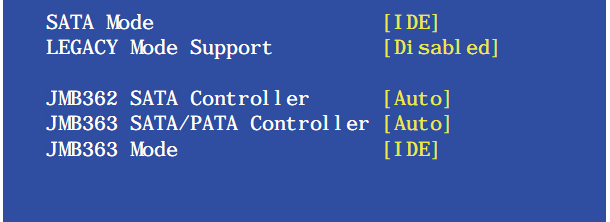
If this IS your board, connect the PCI bracket eSATA to the red SATA connector on you board by the rear panel and set your JMB363 enabled and the two eSATA will be controlled by the same controller. Set the JMB363 mode to IDE OR AHCI. Then install the new drivers and you'll be set. Good luck. Sorry about the long response.