Screwed up my dual boot.. any way to get it back?

ibex333

New member
Local time
9:46 AM
Messages
5
I was dual booting Vista and XP.

Both on different partitions. I installed Win 7 over the XP partition, and now I cannot boot Vista or XP. I dont need XP anymore, but I do need to boot into Vista to backup my old stuff. The installation and all my files are intact.... I am assuming the boot folder is messed up somehow and all I need to do is restore the files.

Waht should I do and how? Thanks.
 

My Computer My Computer

At a glance

Win 7e5200 Wolfdale @ 3.01 GHzGskill 4gb DDR2 800ATI/AMD Radeon 4890
Computer Manufacturer/Model Number
Custom built by me
OS
Win 7
CPU
e5200 Wolfdale @ 3.01 GHz
Motherboard
Gigabyte EP45-UD3L
Memory
Gskill 4gb DDR2 800
Graphics Card(s)
ATI/AMD Radeon 4890
Sound Card
SB Audigy 2 ZS
Monitor(s) Displays
Asus 1080p 22.5 inch
Hard Drives
500 & 650 GB
Seagate +WD black
PSU
600w OCZ GameXstream
Case
CoolerMaster CM 690
Cooling
Zerotherm Nirvana NV120
I was dual booting Vista and XP.

Both on different partitions. I installed Win 7 over the XP partition, and now I cannot boot Vista or XP. I dont need XP anymore, but I do need to boot into Vista to backup my old stuff. The installation and all my files are intact.... I am assuming the boot folder is messed up somehow and all I need to do is restore the files.

Waht should I do and how? Thanks.
Please look at this thread to see if any of it is of help to you: http://www.sevenforums.com/installation-setup/58680-solve-dual-boot-problem-windows-7-a.html

Then we need a screen shot of your Disk Management drive map to see what we have to work with. If you need help doing that just ask?
Cheers!
Robert
 

My Computer My Computer

At a glance

...
OS
...
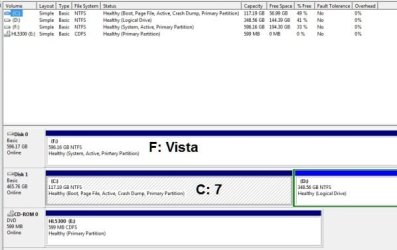
Here's the screenie.... http://img18.imageshack.us/img18/2964/35546631.jpg

F is where my Vista was installed. D is where I store my personal files so it doesn't matter. C is where XP was installed and I installed Win 7 there....

I dont want to create a sepatate boot partition as described in the guide if I can avoid it. Thanks.
 

My Computer My Computer

At a glance

Win 7e5200 Wolfdale @ 3.01 GHzGskill 4gb DDR2 800ATI/AMD Radeon 4890
Computer Manufacturer/Model Number
Custom built by me
OS
Win 7
CPU
e5200 Wolfdale @ 3.01 GHz
Motherboard
Gigabyte EP45-UD3L
Memory
Gskill 4gb DDR2 800
Graphics Card(s)
ATI/AMD Radeon 4890
Sound Card
SB Audigy 2 ZS
Monitor(s) Displays
Asus 1080p 22.5 inch
Hard Drives
500 & 650 GB
Seagate +WD black
PSU
600w OCZ GameXstream
Case
CoolerMaster CM 690
Cooling
Zerotherm Nirvana NV120
Here's the screenie.... http://img18.imageshack.us/img18/2964/35546631.jpg

F is where my Vista was installed. D is where I store my personal files so it doesn't matter. C is where XP was installed and I installed Win 7 there....

I dont want to create a sepatate boot partition as described in the guide if I can avoid it. Thanks.
Having the 100MB boot partition does solve many problems, like the one you are now having: making changes to your partitions breaks the boot manager.

However, we can fix you dual boot without it.

Here are some tips to posting screenshots on your posts ... its a time saver.

http://www.sevenforums.com/tutorials/9733-how-post-screenshot-seven-forums.html

http://www.sevenforums.com/tutorials/9717-screenshot-paint.html

I will look at your drive map also.

Cheers!
Robert
 

My Computer My Computer

At a glance

...
OS
...
Please indicate what OS is where?

screwed_up_boot_01.jpg

.
 
Last edited:

My Computer My Computer

At a glance

...
OS
...
I did... F was where I had Vista... C is where I had XP and now have 7. D is where I store my personal files...
 

My Computer My Computer

At a glance

Win 7e5200 Wolfdale @ 3.01 GHzGskill 4gb DDR2 800ATI/AMD Radeon 4890
Computer Manufacturer/Model Number
Custom built by me
OS
Win 7
CPU
e5200 Wolfdale @ 3.01 GHz
Motherboard
Gigabyte EP45-UD3L
Memory
Gskill 4gb DDR2 800
Graphics Card(s)
ATI/AMD Radeon 4890
Sound Card
SB Audigy 2 ZS
Monitor(s) Displays
Asus 1080p 22.5 inch
Hard Drives
500 & 650 GB
Seagate +WD black
PSU
600w OCZ GameXstream
Case
CoolerMaster CM 690
Cooling
Zerotherm Nirvana NV120
I did... F was where I had Vista... C is where I had XP and now have 7. D is where I store my personal files...
Thank you. I am going to assume that Vista was installed after XP, so the Vista boot code files were in the XP partition and were overwritten when you installed 7 in the XP partition. So no Vista in you boot menu ... because 7 will find Vista and normally include it without any additional steps.

There are several things to try here, it depends on what you are comfortable with and what is easier. EasyBCD2 is a free utility that should be able to add Vista to your boot menu. You can manually add the menu entry with the "bcdedit" command line instructions.

A third alternative might be to shutdown the computer, unplug the Windows 7 hard drive, then boot with the 7 Install DVD and run "Startup Repair" two maybe three times until booting to Vista is restored. Then shutdown the computer again and plug the 7 hard drive back in and boot to the 7 Install DVD and run "Startup Repair" again in order for 7 to find both 7 and Vista and add it to the boot menu.

Please let us know what you want to try and how we can help?

Cheers!
Robert
 

My Computer My Computer

At a glance

...
OS
...
Iseeuu, could he not boot to the install dvd or repair cd and go to the command window and type:

bootrec /rebuildbcd

Hit enter after and it will look for an OS not currently on the boot menu. It should find Vista and ask if you want to add it. This should give you a dual boot with Win 7 and Vista.
 

My Computer My Computer

At a glance

Windows 7 x64i7-2600K8 GGTX 480
Computer Manufacturer/Model Number
Homebuilt
OS
Windows 7 x64
CPU
i7-2600K
Motherboard
Asus P8Z77-v Pro
Memory
8 G
Graphics Card(s)
GTX 480
Sound Card
Onboard
Monitor(s) Displays
LG W2753V
Screen Resolution
1920x1080
Hard Drives
Crucial M4 128 G SSD
Iseeuu, could he not boot to the install dvd or repair cd and go to the command window and type:

bootrec /rebuildbcd

Hit enter after and it will look for an OS not currently on the boot menu. It should find Vista and ask if you want to add it. This should give you a dual boot with Win 7 and Vista.
Thank you. That would be much simpler! Go for it!

Cheers!
Robert
 

My Computer My Computer

At a glance

...
OS
...
Alright. Problem solved... Unfortunately EasyBCD didn't help, so i popped in the Vista disk and used the repair option. It recovered the needed files and I now have a nice Win7/Vista dual boot just the way I wanted. Thanks very much.
 

My Computer My Computer

At a glance

Win 7e5200 Wolfdale @ 3.01 GHzGskill 4gb DDR2 800ATI/AMD Radeon 4890
Computer Manufacturer/Model Number
Custom built by me
OS
Win 7
CPU
e5200 Wolfdale @ 3.01 GHz
Motherboard
Gigabyte EP45-UD3L
Memory
Gskill 4gb DDR2 800
Graphics Card(s)
ATI/AMD Radeon 4890
Sound Card
SB Audigy 2 ZS
Monitor(s) Displays
Asus 1080p 22.5 inch
Hard Drives
500 & 650 GB
Seagate +WD black
PSU
600w OCZ GameXstream
Case
CoolerMaster CM 690
Cooling
Zerotherm Nirvana NV120
Alright. Problem solved... Unfortunately EasyBCD didn't help, so i popped in the Vista disk and used the repair option. It recovered the needed files and I now have a nice Win7/Vista dual boot just the way I wanted. Thanks very much.
Nice! We are very glad you got it sorted out! Thanks for letting us know.

Happy surfing!
Robert
 

My Computer My Computer

At a glance

...
OS
...
Good work. The Startup Repair needed to be run from VIsta since it holds the System MBR, even though Win7 should have configured Dual Boot when it was correctly installed last. Disk Mgmt looked right.
 
Back
Top