
How To Run Ubuntu In VMWare

Arc

New member
SF Team
Local time
6:35 AM
Messages
35,002
HI FRIENDS !
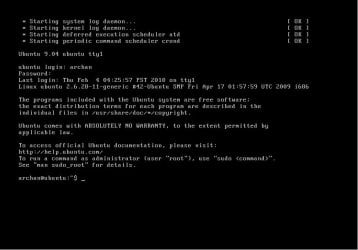
I dont know much more about Ubuntu, but having interest in it. So I installed Ubuntu 9.04 in VMWare Workstation 7 using easy install. When finished, it asked for username and password. After giving those appropriately, it shows the screen as below.

I want to know what to do next to have the ubuntu gui. Pleae help me. The host is Windows 7 Home premium.
 

Attachments
  • Untitled.jpg
    Untitled.jpg
    46.7 KB · Views: 407

My Computer

Computer type
PC/Desktop
Computer Manufacturer/Model Number
Self Assembled
OS
Microsoft Windows 10 Pro Insider Preview 64-bit
CPU
Intel(R) Core(TM) i3-4130 CPU @ 3.40GHz
Motherboard
Gigabyte Technology Co., Ltd. B85M-D3H
Memory
Corsair Vengence 4GB x2 (8.00GB Dual-Channel DDR3 @ 798MHz)
Graphics Card(s)
2047MB GeForce GTS 450 (ZOTAC International)
Sound Card
Onboard (Realtek High Definition Audio)
Monitor(s) Displays
LG Flatron E2040T
Screen Resolution
1600x900
Hard Drives
Western Digital 1 TB
Seagate 500 GB
PSU
Corsair VS550
Case
Cooler Master K380
Cooling
Cooler Master Seidon 120V Plus
Keyboard
Logitech MK260r
Mouse
Logitech MK260r
Internet Speed
PMPL Broadband
Antivirus
Windows Defender + MBAM
Browser
Firefox
Other Info
Dell Studio 15" Laptop
Hi there
I haven't used Ubuntu -- but I'd imagine when you installed the OS didn't it request you for a password for ROOT at install time.

So just login as ROOT and add or change a username and password.

Unless you are installing a "Pre generated" version of Linux then you are usually prompted for a default user and also a password for Root when installing the OS.

You could also try this Forum for more Linux info -- I'm sure the admins won't mind a referral to this Forum since you are essentially asking a Linux based question.

This is actually an EXCELLENT Linux Forum too.

LinuxQuestions.org

Cheers
jimbo
 
Last edited:

My Computer

Computer type
PC/Desktop
Computer Manufacturer/Model Number
Custom built, several laptops HP/ASUS
OS
Linux CENTOS 7 / various Windows OS'es and servers
CPU
Intel i7 Intel i5
Memory
8GB, 16GB
Graphics Card(s)
On Motherboard
Sound Card
Realtek HD audio
Monitor(s) Displays
Apple Cinema display, Samsung LCD
Screen Resolution
1920 X 1080
Hard Drives
4 X 1TB SATA
Mouse
Toshiba wireless laser
Internet Speed
> 20MB up
did you select the text mode during install, because by default Ubuntu installs with the graphical display manager by default.

i think the default boot is set to text mode. To load the graphical interface when you log in, just type
Code:
startx
To set the default start up mode as graphical, after the GUI loads up
open up a terminal window (Applications Menu -> Accessories -> Terminal)
and type
Code:
sudo gedit /boot/grub/menu.lst
check for something like this (it will be at the end)
title Ubuntu 9.04, kernel 2.6.24-19-generic
root (hd0,0)
kernel /boot/vmlinuz-2.6.24-19-generic root=UUID=21c38426-84f0-4946-bee7-318074de0787 ro quiet splash text
initrd /boot/initrd.img-2.6.24-19-generic
quiet

change the kernel line to
kernel /boot/vmlinuz-2.6.24-19-generic root=UUID=21c38426-84f0-4946-bee7-318074de0787 ro quiet splash
(remove the 'text' at the end)

Save the file and restart the virtual machine

for more info and help about Ubuntu, you can check out the official forum for Ubuntu
Ubuntu Forums

btw, you are using Ubuntu 9.04 Jaunty Jackalope
 
Last edited:

My Computer

Computer type
Laptop
Computer Manufacturer/Model Number
HP EliteBook 8530w Mobile Workstation
OS
Windows 7 Ultimate x64 (XP, 98SE, 95, 3.11, DOS 7.10 on VM) + Ubuntu 10.04 LTS Lucid Lynx
CPU
Intel Core 2 Duo Processor P8600 (2.40 GHz, 3 MB L2 cache)
Motherboard
Mobile Intel PM45 Express Chipset ICH9M-Enhanced
Memory
4GB 800 MHz DDR2 SDRAM
Graphics Card(s)
ATI Mobility FireGL V5700 with 256 MB
Sound Card
SoundMAX Integrated Digital HD Audio
Monitor(s) Displays
15.4-inch WXGA anti-glare (1280 x 800 resolution)
Screen Resolution
1280 x 800
Hard Drives
500GB + 1TB
Mouse
Synaptics PS/2 Port Touchpad, USB Mouse
Internet Speed
4 Mbps
Antivirus
MSE
Browser
Firefox, Chrome, IE
Other Info
Authentec AES2810 Fingerprint Reader
did you select the text mode during install, because by default Ubuntu installs with the graphical display manager by default.

i think the default boot is set to text mode. To load the graphical interface when you log in, just type
Code:
startx
To set the default start up mode as graphical, after the GUI loads up
open up a terminal window (Applications Menu -> Accessories -> Terminal)
and type
Code:
sudo gedit /boot/grub/menu.lst
check for something like this (it will be at the end)
title Ubuntu 9.04, kernel 2.6.24-19-generic
root (hd0,0)
kernel /boot/vmlinuz-2.6.24-19-generic root=UUID=21c38426-84f0-4946-bee7-318074de0787 ro quiet splash text
initrd /boot/initrd.img-2.6.24-19-generic
quiet

change the kernel line to
kernel /boot/vmlinuz-2.6.24-19-generic root=UUID=21c38426-84f0-4946-bee7-318074de0787 ro quiet splash
(remove the 'text' at the end)

Save the file and restart the virtual machine

for more info and help about Ubuntu, you can check out the official forum for Ubuntu
Ubuntu Forums

btw, you are using Ubuntu 9.04 Jaunty Jackalope

Yes , it is ubuntu 9.04.
during installation, I just selected easy install option of vmware and then it installed automatically including vmware tools and then it happened.

In the mean time, I deleted that vm, so at present I have no way to follow your instructions, but as I am trying to have linux in grip, I will do in again, and then I hope this guideline will help me.
 

My Computer

Computer type
PC/Desktop
Computer Manufacturer/Model Number
Self Assembled
OS
Microsoft Windows 10 Pro Insider Preview 64-bit
CPU
Intel(R) Core(TM) i3-4130 CPU @ 3.40GHz
Motherboard
Gigabyte Technology Co., Ltd. B85M-D3H
Memory
Corsair Vengence 4GB x2 (8.00GB Dual-Channel DDR3 @ 798MHz)
Graphics Card(s)
2047MB GeForce GTS 450 (ZOTAC International)
Sound Card
Onboard (Realtek High Definition Audio)
Monitor(s) Displays
LG Flatron E2040T
Screen Resolution
1600x900
Hard Drives
Western Digital 1 TB
Seagate 500 GB
PSU
Corsair VS550
Case
Cooler Master K380
Cooling
Cooler Master Seidon 120V Plus
Keyboard
Logitech MK260r
Mouse
Logitech MK260r
Internet Speed
PMPL Broadband
Antivirus
Windows Defender + MBAM
Browser
Firefox
Other Info
Dell Studio 15" Laptop
Ubuntu does not create or ask for a "root" user password. I am sure the objective is to be more user friendly. Instead, to have "root" permissions for administrative tasks, the user is asked for the "User" password created during the install. In a terminal (for command prompt) the user types: "sudo" before the command and must supply the "User" password again. It is possible to change the default settings, give "root" a password and login as "root", but it is discouraged.

Evidently the VMWare install was not like the default install as by default Ubuntu boots to a GUI login screen. It is very possible that the "startx" command would have opened the GUI, as suggested.

Ubuntu also supports WUBI: "Wubi allows you to install and uninstall Ubuntu as any other Windows application, in a simple and safe way." Use Ubuntu from within Windows.

Cheers!
Robert
 

My Computer

OS
...
as iseeuu said, you can use WUBI to install Ubuntu from within Windows and its very very easy.
Only downside is that, its not a virtual machine but a real installation within a single file in Windows. That means you cannot have both Windows and Ubuntu running at the same time.
 
Last edited:

My Computer

Computer type
Laptop
Computer Manufacturer/Model Number
HP EliteBook 8530w Mobile Workstation
OS
Windows 7 Ultimate x64 (XP, 98SE, 95, 3.11, DOS 7.10 on VM) + Ubuntu 10.04 LTS Lucid Lynx
CPU
Intel Core 2 Duo Processor P8600 (2.40 GHz, 3 MB L2 cache)
Motherboard
Mobile Intel PM45 Express Chipset ICH9M-Enhanced
Memory
4GB 800 MHz DDR2 SDRAM
Graphics Card(s)
ATI Mobility FireGL V5700 with 256 MB
Sound Card
SoundMAX Integrated Digital HD Audio
Monitor(s) Displays
15.4-inch WXGA anti-glare (1280 x 800 resolution)
Screen Resolution
1280 x 800
Hard Drives
500GB + 1TB
Mouse
Synaptics PS/2 Port Touchpad, USB Mouse
Internet Speed
4 Mbps
Antivirus
MSE
Browser
Firefox, Chrome, IE
Other Info
Authentec AES2810 Fingerprint Reader
hi,

i recently installed ubuntu 9.10 in VirtualBox. Ubuntu asks fo a user (not root) and adds it to the sudoers. so whenever you need root privileges you can use sudo:

sudo mkdir /opt

i did not manipulate any grub files or the like. Ubuntu just worked in the vm of VirtualBox.

have fun

jakob
 

My Computer

Computer Manufacturer/Model Number
HP NC6400, HP 6710B, HP 6830S
OS
Win7 Home Premium 32
Ubuntu does not create or ask for a "root" user password. I am sure the objective is to be more user friendly. Instead, to have "root" permissions for administrative tasks, the user is asked for the "User" password created during the install. In a terminal (for command prompt) the user types: "sudo" before the command and must supply the "User" password again. It is possible to change the default settings, give "root" a password and login as "root", but it is discouraged.

Evidently the VMWare install was not like the default install as by default Ubuntu boots to a GUI login screen. It is very possible that the "startx" command would have opened the GUI, as suggested.

Ubuntu also supports WUBI: "Wubi allows you to install and uninstall Ubuntu as any other Windows application, in a simple and safe way." Use Ubuntu from within Windows.

Cheers!
Robert

as iseeuu said, you can use WUBI to install Ubuntu from within Windows and its very very easy.
Only downside is that, its not a virtual machine but a real installation within a single file in Windows. That means you cannot have both Windows and Ubuntu running at the same time.

As you are suggesting, I am taking a try. Downoading it.

May I install compiz in this Ubuntu ? :o
 

My Computer

Computer type
PC/Desktop
Computer Manufacturer/Model Number
Self Assembled
OS
Microsoft Windows 10 Pro Insider Preview 64-bit
CPU
Intel(R) Core(TM) i3-4130 CPU @ 3.40GHz
Motherboard
Gigabyte Technology Co., Ltd. B85M-D3H
Memory
Corsair Vengence 4GB x2 (8.00GB Dual-Channel DDR3 @ 798MHz)
Graphics Card(s)
2047MB GeForce GTS 450 (ZOTAC International)
Sound Card
Onboard (Realtek High Definition Audio)
Monitor(s) Displays
LG Flatron E2040T
Screen Resolution
1600x900
Hard Drives
Western Digital 1 TB
Seagate 500 GB
PSU
Corsair VS550
Case
Cooler Master K380
Cooling
Cooler Master Seidon 120V Plus
Keyboard
Logitech MK260r
Mouse
Logitech MK260r
Internet Speed
PMPL Broadband
Antivirus
Windows Defender + MBAM
Browser
Firefox
Other Info
Dell Studio 15" Laptop
Arc...any reason that you have to use Ubuntu 9.04? Can you use 9.10?

I've got VMWare Player 3.0...which is very similar to the Workstation 7 product. I can run it through a test for you and tell you exactly what I do and experience.

To me, it loaded fine for you...but for whatever reason you aren't getting the GUI interface..but rather the command line.

You didn't by any chance install Ubuntu 9.04 server, did you???
 

My Computer

Computer Manufacturer/Model Number
Self-Built in July 2009
OS
Windows 7 Ultimate x64
CPU
Intel Q9550 2.83Ghz OC'd to 3.40Ghz
Motherboard
Gigabyte GA-EP45-UD3R rev. 1.1, F12 BIOS
Memory
8GB G.Skill PI DDR2-800, 4-4-4-12 timings
Graphics Card(s)
EVGA 1280MB Nvidia GeForce GTX570
Sound Card
Realtek ALC899A 8 channel onboard audio
Monitor(s) Displays
23" Acer x233H
Screen Resolution
1920x1080
Hard Drives
Intel X25-M 80GB Gen 2 SSD
Western Digital 1TB Caviar Black, 32MB cache. WD1001FALS
PSU
Corsair 620HX modular
Case
Antec P182
Cooling
stock
Keyboard
ABS M1 Mechanical
Mouse
Logitech G9 Laser Mouse
Internet Speed
15/2 cable modem
Other Info
Windows and Linux enthusiast. Logitech G35 Headset.
Arc...any reason that you have to use Ubuntu 9.04? Can you use 9.10?

I've got VMWare Player 3.0...which is very similar to the Workstation 7 product. I can run it through a test for you and tell you exactly what I do and experience.

To me, it loaded fine for you...but for whatever reason you aren't getting the GUI interface..but rather the command line.

You didn't by any chance install Ubuntu 9.04 server, did you???

I am using ubuntu 9.04 coz I am lazy, I dont have downloaded the recent 9.10.
Obviously I have installed Ubuntu9.04; not the server edition. Last hour I got it reinstalled in the same manner as previous, and I got the same thing. However, startx command worked for me this time, and now I am posting from Ubuntu :)
Perhaps my choice "easy install" creates this ! I Am choosing it coz I dont know how to install vmware tools in linux. Actually I am trying linux for the first time :(
 

My Computer

Computer type
PC/Desktop
Computer Manufacturer/Model Number
Self Assembled
OS
Microsoft Windows 10 Pro Insider Preview 64-bit
CPU
Intel(R) Core(TM) i3-4130 CPU @ 3.40GHz
Motherboard
Gigabyte Technology Co., Ltd. B85M-D3H
Memory
Corsair Vengence 4GB x2 (8.00GB Dual-Channel DDR3 @ 798MHz)
Graphics Card(s)
2047MB GeForce GTS 450 (ZOTAC International)
Sound Card
Onboard (Realtek High Definition Audio)
Monitor(s) Displays
LG Flatron E2040T
Screen Resolution
1600x900
Hard Drives
Western Digital 1 TB
Seagate 500 GB
PSU
Corsair VS550
Case
Cooler Master K380
Cooling
Cooler Master Seidon 120V Plus
Keyboard
Logitech MK260r
Mouse
Logitech MK260r
Internet Speed
PMPL Broadband
Antivirus
Windows Defender + MBAM
Browser
Firefox
Other Info
Dell Studio 15" Laptop
At present , I have two running linux installations, one is in a hard disk (other than the boot drive .... trying to make it a dual boot, Robert is helping me) And the other is on vmware (in text mode, now fixing it) and planning to have a third one, using wubi.

I just want to say .... yes! I can install linux properly.... that is why I am trying it so many times.
 

My Computer

Computer type
PC/Desktop
Computer Manufacturer/Model Number
Self Assembled
OS
Microsoft Windows 10 Pro Insider Preview 64-bit
CPU
Intel(R) Core(TM) i3-4130 CPU @ 3.40GHz
Motherboard
Gigabyte Technology Co., Ltd. B85M-D3H
Memory
Corsair Vengence 4GB x2 (8.00GB Dual-Channel DDR3 @ 798MHz)
Graphics Card(s)
2047MB GeForce GTS 450 (ZOTAC International)
Sound Card
Onboard (Realtek High Definition Audio)
Monitor(s) Displays
LG Flatron E2040T
Screen Resolution
1600x900
Hard Drives
Western Digital 1 TB
Seagate 500 GB
PSU
Corsair VS550
Case
Cooler Master K380
Cooling
Cooler Master Seidon 120V Plus
Keyboard
Logitech MK260r
Mouse
Logitech MK260r
Internet Speed
PMPL Broadband
Antivirus
Windows Defender + MBAM
Browser
Firefox
Other Info
Dell Studio 15" Laptop
I just want to say .... yes! I can install linux properly.... that is why I am trying it so many times.

With Linux, just like Windows...learning it is a matter of trial and error. Reinstalls are a necessary evil I'm afraid in the learning process.
 

My Computer

Computer Manufacturer/Model Number
Self-Built in July 2009
OS
Windows 7 Ultimate x64
CPU
Intel Q9550 2.83Ghz OC'd to 3.40Ghz
Motherboard
Gigabyte GA-EP45-UD3R rev. 1.1, F12 BIOS
Memory
8GB G.Skill PI DDR2-800, 4-4-4-12 timings
Graphics Card(s)
EVGA 1280MB Nvidia GeForce GTX570
Sound Card
Realtek ALC899A 8 channel onboard audio
Monitor(s) Displays
23" Acer x233H
Screen Resolution
1920x1080
Hard Drives
Intel X25-M 80GB Gen 2 SSD
Western Digital 1TB Caviar Black, 32MB cache. WD1001FALS
PSU
Corsair 620HX modular
Case
Antec P182
Cooling
stock
Keyboard
ABS M1 Mechanical
Mouse
Logitech G9 Laser Mouse
Internet Speed
15/2 cable modem
Other Info
Windows and Linux enthusiast. Logitech G35 Headset.
Best way to try Ubuntu is to install it using Wubi. It installs on your "real" hardware on a virtual disk. Like VHD in Windows 7.
 

My Computer

OS
Win7 RC1
Best way to try Ubuntu is to install it using Wubi. It installs on your "real" hardware on a virtual disk. Like VHD in Windows 7.

Wubi is in my plan, but first I want to fix the dual boot issue properly ...

I just want to say .... yes! I can install linux properly.... that is why I am trying it so many times.

With Linux, just like Windows...learning it is a matter of trial and error. Reinstalls are a necessary evil I'm afraid in the learning process.

:D in each and every learning processes, there are some hazards, but I must to learn to operate linux properly. Then first I am to know how to install it in every alternative ways.
 

My Computer

Computer type
PC/Desktop
Computer Manufacturer/Model Number
Self Assembled
OS
Microsoft Windows 10 Pro Insider Preview 64-bit
CPU
Intel(R) Core(TM) i3-4130 CPU @ 3.40GHz
Motherboard
Gigabyte Technology Co., Ltd. B85M-D3H
Memory
Corsair Vengence 4GB x2 (8.00GB Dual-Channel DDR3 @ 798MHz)
Graphics Card(s)
2047MB GeForce GTS 450 (ZOTAC International)
Sound Card
Onboard (Realtek High Definition Audio)
Monitor(s) Displays
LG Flatron E2040T
Screen Resolution
1600x900
Hard Drives
Western Digital 1 TB
Seagate 500 GB
PSU
Corsair VS550
Case
Cooler Master K380
Cooling
Cooler Master Seidon 120V Plus
Keyboard
Logitech MK260r
Mouse
Logitech MK260r
Internet Speed
PMPL Broadband
Antivirus
Windows Defender + MBAM
Browser
Firefox
Other Info
Dell Studio 15" Laptop
Back
Top