Photo Viewer and GIFs

netiaz

New member
Local time
11:23 AM
Messages
2
So, I noticed that when I wanted to associate gifs with the photo viewer that the photo viewer was not selectable (as in, not displayed as a choice). We all know photo viewer in 7 is not an selectable executable program. I don't want to use a browser; that's dumb as hell. I'm not typing about specifically gif animations either. I like my gifs static.

I went to the internets to see what everyone had to say and saw many others had this unresolved problem.

I gave up trying to figure it out and just wanted to add paint.net as an option to open gifs with. After I did this, photo viewer was available to choose as the default gif viewer.

This is a bug, am I right? That silly Windows...
 

My Computer My Computer

At a glance

MS Windows 7 Professional 64-bitIntel Core 2 Quad 2.4 GHz4 GBNVIDIA GeForce 9800 GT
Computer Manufacturer/Model Number
ol' Dell XPS 410 (Upgradeds!)
OS
MS Windows 7 Professional 64-bit
CPU
Intel Core 2 Quad 2.4 GHz
Motherboard
Dell?
Memory
4 GB
Graphics Card(s)
NVIDIA GeForce 9800 GT
Sound Card
Creative SB X-Fi
Monitor(s) Displays
2X Dell 20" Widescreen
Hard Drives
2x 500GB RAID Stripe
PSU
Dell
Case
Dell w/ 1ea sticker: "What would Gordon Freeman Do?"
Cooling
Really cold small tub of hot sauce.
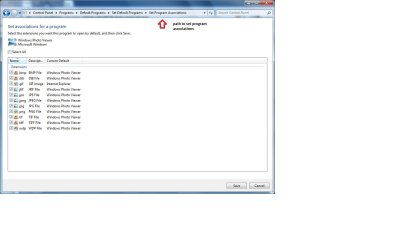
You can set program associations in the control panel/default programs.

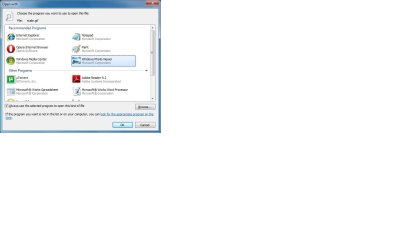
You can also right click the gif file and choose the default program to open the file.
 

Attachments

  • Capture.jpg
    Capture.jpg
    72.9 KB · Views: 269
  • Capture1.jpg
    Capture1.jpg
    56.3 KB · Views: 263

My Computer My Computer

At a glance

Windows 7
OS
Windows 7
Animated gifs don't work in Windows Photo Viewer however, so I've left them to open in I.E.
 

My Computer My Computer

At a glance

Windows 7 Ultimate x64 ®™Intel Core 2 Duo (2.2 GHz)2x 2GB Corsair (667 MHz)NVIDIA 8600M GS (256MB)
Computer Manufacturer/Model Number
Sony Vaio FZ21Z
OS
Windows 7 Ultimate x64 ®™
CPU
Intel Core 2 Duo (2.2 GHz)
Motherboard
Sony (Intel Chipset)
Memory
2x 2GB Corsair (667 MHz)
Graphics Card(s)
NVIDIA 8600M GS (256MB)
Sound Card
Sigmatel
Monitor(s) Displays
15.4" TFT X-Black
Screen Resolution
1280x800
Hard Drives
Western Digital 300GB Scorpio Black (7200rpm)
Mouse
Logitech Anywhere MX
Internet Speed
Sky 5MB
You can set program associations in the control panel/default programs.

You can also right click the gif file and choose the default program to open the file.

I just want to clear up that I could not associate files this way until I manually added another program to the list. Photo Viewer did not show up in the list until after I added Paint.net. After I selected paintdotnet.exe (I think that's it.) as the program I wished to open a gif with as a single instance; Photo Viewer along with the other applications shown in your second image (right hand), became instantly available to select.
 

My Computer My Computer

At a glance

MS Windows 7 Professional 64-bitIntel Core 2 Quad 2.4 GHz4 GBNVIDIA GeForce 9800 GT
Computer Manufacturer/Model Number
ol' Dell XPS 410 (Upgradeds!)
OS
MS Windows 7 Professional 64-bit
CPU
Intel Core 2 Quad 2.4 GHz
Motherboard
Dell?
Memory
4 GB
Graphics Card(s)
NVIDIA GeForce 9800 GT
Sound Card
Creative SB X-Fi
Monitor(s) Displays
2X Dell 20" Widescreen
Hard Drives
2x 500GB RAID Stripe
PSU
Dell
Case
Dell w/ 1ea sticker: "What would Gordon Freeman Do?"
Cooling
Really cold small tub of hot sauce.
Back
Top