Instability with Win 7 x64 + nVidia drivers (9600M GT)

phmoschetta

New member
Local time
3:23 AM
Messages
26
Location
Carlos Barbosa, RS - Brazil
Hi!

It's been 4 months since I've bought a new laptop (HP Pavilion dv7-1253ca with a GeForce 9600M GT, originally branded with Vista) and upgraded it to Windows 7 Ultimate (64-bit version). Since then, I have a series of instability problems caused by an unknown agent (possibly an incompatible/conflicting driver?), and that includes:


  • constant Firefox crashes (with the crash report window);
  • constant Chrome "Aw, Snap!" messages;
  • constant Flash Player 10 crashes with all browsers (Firefox, Chrome, Opera, IExplorer);
  • constant random crashes playing games like The Sims 3 and Fallout 3;
  • "Desktop Window Manager" service constantly stopping.

Here are a few fixes I've already tried:


  • fresh re-install of Windows 7 a couple of times (32-bit & 64-bit versions);
  • disabling DEP (Data Execution Prevention);
  • uninstalling/disabling IDT Audio drivers;
  • uninstalling/disabling Bluetooth drivers;
  • clean-boot Windows;
  • memory testing with memtest+ (diagnostic OK);
  • BIOS update to the latest version;
  • disabling Powermizer within nVidia drivers.

So, the only solution to the problem I've found was to uninstall the nVidia drivers and use the crappy "Standard VGA Display Adapter" drivers that come with Windows, that don't support Aero or let me play any game. As soon as I install the GeForce drivers, everything starts crashing again. Another solution I've found was to run Windows Vista, but that's totally unacceptable after you try Windows 7 for the first time.

I've already tried using many driver releases, from the HP-provided 179.04 to the latest 195.62 from LaptopVideo2Go.com; but it's no use...

Any ideas? Please help! It's been weeks I'm after a solution, but I'm just hopeless... Thank you!

:):)

P.S.: I'm also starting the same thread @ nVidia Forums and HP Forums.
P.S.2: One thing I've noted: older driver versions have better stability.
 

My Computer My Computer

OS
Windows 7 x64
CPU
Intel Core 2 Quad Q6600
Motherboard
Asus P5k Deluxe
Memory
4GB (2x2GB) Patriot DDR2-800 Extreme Performance
Graphics Card(s)
nVidia GeForce 8800GT 512MB
I'm experiencing the same issue with my Geforce 9800 GT.

Also, in the device manager, I have exclamations next to my processors, stating the following:
Windows cannot verify the digital signature for the drivers required for this device. A recent hardware or software change might have installed a file that is signed incorrectly or damaged, or that might be malicious software from an unknown source. (Code 52)


I had no issues in Win 7 32-bit. But I found 64-bit was working flawlessly on my Dell Latitude laptop at work. Guess my Intel i5 processor just isn't up enough to specs as the Intel Core2 Duo... even though all the parts I bought assured full 64-bit Win 7 support. Gotta love it.
 

My Computer My Computer

Computer Manufacturer/Model Number
Whitebox
OS
Win 7 Home Premium x64
CPU
Intel Core i5 750
Motherboard
Gigabyte P55-UD3L
Memory
G.Skill DDR3 2 GB
Graphics Card(s)
XFX Nvidia GeForce 9800 GT
Sound Card
Soundblaster Audigy SE
Monitor(s) Displays
HANNS-G HW191D
Screen Resolution
1440x900
Hard Drives
WDC Black 1TB
PSU
Thermaltake 430w PSU
Case
NZXT Beta
Cooling
Arctic Cooling Freezer 7 Pro
Keyboard
Logitech Internet Keyboard
Mouse
Logitech LX7; Logitech Marble Mouse
Internet Speed
Brighthouse - 10M down, 1M up.
Hi!

It's been 4 months since I've bought a new laptop (HP Pavilion dv7-1253ca with a GeForce 9600M GT, originally branded with Vista) and upgraded it to Windows 7 Ultimate (64-bit version). Since then, I have a series of instability problems caused by an unknown agent (possibly an incompatible/conflicting driver?), and that includes:


  • constant Firefox crashes (with the crash report window);
  • constant Chrome "Aw, Snap!" messages;
  • constant Flash Player 10 crashes with all browsers (Firefox, Chrome, Opera, IExplorer);
  • constant random crashes playing games like The Sims 3 and Fallout 3;
  • "Desktop Window Manager" service constantly stopping.
Here are a few fixes I've already tried:


  • fresh re-install of Windows 7 a couple of times (32-bit & 64-bit versions);
  • disabling DEP (Data Execution Prevention);
  • uninstalling/disabling IDT Audio drivers;
  • uninstalling/disabling Bluetooth drivers;
  • clean-boot Windows;
  • memory testing with memtest+ (diagnostic OK);
  • BIOS update to the latest version;
  • disabling Powermizer within nVidia drivers.
So, the only solution to the problem I've found was to uninstall the nVidia drivers and use the crappy "Standard VGA Display Adapter" drivers that come with Windows, that don't support Aero or let me play any game. As soon as I install the GeForce drivers, everything starts crashing again. Another solution I've found was to run Windows Vista, but that's totally unacceptable after you try Windows 7 for the first time.

I've already tried using many driver releases, from the HP-provided 179.04 to the latest 195.62 from LaptopVideo2Go.com; but it's no use...

Any ideas? Please help! It's been weeks I'm after a solution, but I'm just hopeless... Thank you!

:):)

P.S.: I'm also starting the same thread @ nVidia Forums and HP Forums.
P.S.2: One thing I've noted: older driver versions have better stability.

Try all of the troubleshooting guide in my sig.
 

My Computer My Computer

Computer Manufacturer/Model Number
Sony Vaio Z46GDU
OS
Windows 7 Ultimate x86-64
CPU
[email protected] 1066MHz FSB
Motherboard
Sony branded
Memory
6GB DDR3 1066MHz
Graphics Card(s)
9300M GS 256MB Dedicated (Speed) + Intel4500MHD (Stamina)
Sound Card
Realtek HD Audio
Monitor(s) Displays
13.1' WXGA
Screen Resolution
1600x900
Hard Drives
320GB 7200RPM w/ 16MB cache
Internet Speed
1MB/s
Try all of the troubleshooting guide in my sig.

Well, I think I've tried pretty much everything you suggest on your troubleshooting guide. Maybe I'm doing something wrong... Maybe nVidia drivers/services are conflicting with other device drivers (but how am I supposed to diagnostic that?)...

The strange fact is that with Mozilla Firefox, for example, there aren't normal Windows crashes with that "Check for a solution and close the program" message. There is always the Mozilla Crash Reporter window.

...

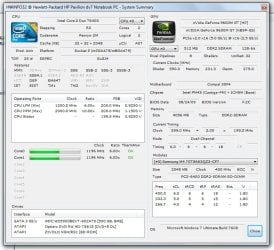
Attached: I've generated a report with HWiNFO32 for better details of my hardware configuration.
 

Attachments

My Computer My Computer

OS
Windows 7 x64
CPU
Intel Core 2 Quad Q6600
Motherboard
Asus P5k Deluxe
Memory
4GB (2x2GB) Patriot DDR2-800 Extreme Performance
Graphics Card(s)
nVidia GeForce 8800GT 512MB
I have found 191.07 driver to be very stable. I tried some of the newer ones and had issues. I'm using dual 9800gt cards in SLI mode for my desktop and a single 8600gt card in my Home Theater....so far I find both are stable on Win7 x64 for me with this driver.

I do download my drivers directly from Nvidia as I have also had some issues with the ones installed from Windows update.

http://www.nvidia.com/Download/index.aspx?lang=en-us
 

My Computer My Computer

Computer Manufacturer/Model Number
Systemax N2000 Gaming PC
OS
Windows 7 Ultimate x64
CPU
Q6600 @2.4ghz (G0 stepping)
Motherboard
XFX nforce 680i LT
Memory
8 gb OCZ vista essential sli PC-6400
Graphics Card(s)
Dual 9800gt in SLI mode
Sound Card
Integrated 8.1 High Definition Audio
Monitor(s) Displays
Dual Sceptre x246w 24 inch monitors
Screen Resolution
1920 x 1200 each monitor
Hard Drives
500 GB SATA II / 7500 rpm
PSU
Cooler Master Real Power Pro 1250W
Case
N2000 server tower
Cooling
Thermaltake Bigwater 760 is
Keyboard
MS Intelitype 6000 v2.0
Mouse
MS Intelipoint 6000
Internet Speed
Wi-power 1.5GB up / 512k down
Other Info
Windows 7 Ultimate x64, Windows 7 Pro x64, Windows Home Premium X86, Windows XP pro, Windows Home Server x86, Ubuntu 10.4 x86 and x64, Ubuntu server 10.4, SQL Server 2005, MySQL 5.0
Welcome to Seven Forums. Their is a program for modding the 9600M GT .inf file that has had success in the past. Just follow the instruction provided and hopefully it will resolve your problem. Good luck. Fabe NVIDIA MobilityModder - HardwareHeaven.com
 

My Computer My Computer

Computer Manufacturer/Model Number
Self Built
OS
Windows 7 ultimate 64 bit / XP Home sp3
CPU
intel Core 2 Duo E8400 3.0ghz
Motherboard
Asus P5ND bios 1401
Memory
8 gigs 1066 OCZ Fata1ty
Graphics Card(s)
EVGA GTX 580 Call of Duty Black Ops Edition
Sound Card
Creative Soundblaster Audigy 2zs
Monitor(s) Displays
Asus 24in LCD's 2MS X2
Screen Resolution
1920x1080p @60Hz
Hard Drives
WD Caviar 500 Black/ WD Caviar 200 Blue
PSU
OCZ 700W GameXtreme
Case
NZXT Apollo
Cooling
Corsair H50 CPU/120mm x3 /60mm x2 /Corsair Dominator Ram
Keyboard
Logitech Bluetooth Wireless MX5000
Mouse
Logitech Bluetooth Wireless MX1000
Internet Speed
Download 19.83 Upload 0.97
Other Info
Logitech Z2300 Speakers/ Bose Noise Cancelling Headphones/Avermedia PCI-e Hybrid TV Bravo/Epson NX415 all in one/ 4 Port Powered USB Hub/ LG 10x Bluray Burner /TSST Corp DVDRW External
I have found 191.07 driver to be very stable.

Yup, I tried playing some minutes with this driver version, after removing the older version with Driver Sweeper, but got no success.

Welcome to Seven Forums. Their is a program for modding the 9600M GT .inf file that has had success in the past.

Thanks! I've tried using the MobilityModder with the 191.07 drivers and some other versions, but still... Nothing.

:huh::huh:

Guys, I believe this is something all nVidia drivers have in common, like a component, or a service running, or a DirectX/Aero issue... I don't know. Because this isn't exactly an instability (with BSODs and that stuff), it looks more like a conflict/incompatibility.

Everything without the nVidia drivers, or using Windows Vista, runs fine. Why?
 

My Computer My Computer

OS
Windows 7 x64
CPU
Intel Core 2 Quad Q6600
Motherboard
Asus P5k Deluxe
Memory
4GB (2x2GB) Patriot DDR2-800 Extreme Performance
Graphics Card(s)
nVidia GeForce 8800GT 512MB

My Computer My Computer

Computer Manufacturer/Model Number
Sony Vaio FZ21Z
OS
Windows 7 Ultimate x64 ®™
CPU
Intel Core 2 Duo (2.2 GHz)
Motherboard
Sony (Intel Chipset)
Memory
2x 2GB Corsair (667 MHz)
Graphics Card(s)
NVIDIA 8600M GS (256MB)
Sound Card
Sigmatel
Monitor(s) Displays
15.4" TFT X-Black
Screen Resolution
1280x800
Hard Drives
Western Digital 300GB Scorpio Black (7200rpm)
Mouse
Logitech Anywhere MX
Internet Speed
Sky 5MB

My Computer My Computer

OS
Windows 7 x64
CPU
Intel Core 2 Quad Q6600
Motherboard
Asus P5k Deluxe
Memory
4GB (2x2GB) Patriot DDR2-800 Extreme Performance
Graphics Card(s)
nVidia GeForce 8800GT 512MB
I'm going to ask this mostly our of curiousity. What temps are you seeing? Thanks Fabe
 

My Computer My Computer

Computer Manufacturer/Model Number
Self Built
OS
Windows 7 ultimate 64 bit / XP Home sp3
CPU
intel Core 2 Duo E8400 3.0ghz
Motherboard
Asus P5ND bios 1401
Memory
8 gigs 1066 OCZ Fata1ty
Graphics Card(s)
EVGA GTX 580 Call of Duty Black Ops Edition
Sound Card
Creative Soundblaster Audigy 2zs
Monitor(s) Displays
Asus 24in LCD's 2MS X2
Screen Resolution
1920x1080p @60Hz
Hard Drives
WD Caviar 500 Black/ WD Caviar 200 Blue
PSU
OCZ 700W GameXtreme
Case
NZXT Apollo
Cooling
Corsair H50 CPU/120mm x3 /60mm x2 /Corsair Dominator Ram
Keyboard
Logitech Bluetooth Wireless MX5000
Mouse
Logitech Bluetooth Wireless MX1000
Internet Speed
Download 19.83 Upload 0.97
Other Info
Logitech Z2300 Speakers/ Bose Noise Cancelling Headphones/Avermedia PCI-e Hybrid TV Bravo/Epson NX415 all in one/ 4 Port Powered USB Hub/ LG 10x Bluray Burner /TSST Corp DVDRW External
I'm going to ask this mostly our of curiousity. What temps are you seeing? Thanks Fabe

Right now? On idle:

  • CPU: 42C/50C (min/max)
  • GPU: 51C/55C (min/max)

Benchmarking with FurMark, GPU can reach up to 75C.
 

My Computer My Computer

OS
Windows 7 x64
CPU
Intel Core 2 Quad Q6600
Motherboard
Asus P5k Deluxe
Memory
4GB (2x2GB) Patriot DDR2-800 Extreme Performance
Graphics Card(s)
nVidia GeForce 8800GT 512MB
I would better money on this being a hardware fault. Flash the BIOS from HP's site, then try uninstalling and reinstalling the ACPI driver. If that doesn't work, send it back to HP - this is probably a motherboard fault.
 

My Computer My Computer

Computer Manufacturer/Model Number
Sony Vaio Z46GDU
OS
Windows 7 Ultimate x86-64
CPU
[email protected] 1066MHz FSB
Motherboard
Sony branded
Memory
6GB DDR3 1066MHz
Graphics Card(s)
9300M GS 256MB Dedicated (Speed) + Intel4500MHD (Stamina)
Sound Card
Realtek HD Audio
Monitor(s) Displays
13.1' WXGA
Screen Resolution
1600x900
Hard Drives
320GB 7200RPM w/ 16MB cache
Internet Speed
1MB/s
I would better money on this being a hardware fault. Flash the BIOS from HP's site, then try uninstalling and reinstalling the ACPI driver. If that doesn't work, send it back to HP - this is probably a motherboard fault.

Actually, I can't rely directly on HP Support, since this laptop is not supported by HP Brazil.

I'm not an expert, but could this really be a faulty hardware? I mean, even if it was, shouldn't I be getting BSODs and things like that? And how do I exactly reinstall the ACPI drivers?
 
Last edited:

My Computer My Computer

OS
Windows 7 x64
CPU
Intel Core 2 Quad Q6600
Motherboard
Asus P5k Deluxe
Memory
4GB (2x2GB) Patriot DDR2-800 Extreme Performance
Graphics Card(s)
nVidia GeForce 8800GT 512MB
Right click the ACPI entry in device manager select uninstall and reboot. Things may slow down create a restore point before hand. This points to hardware, programs do not randomly crash, especially after fresh 7 installs.
 

My Computer My Computer

Computer Manufacturer/Model Number
Sony Vaio Z46GDU
OS
Windows 7 Ultimate x86-64
CPU
[email protected] 1066MHz FSB
Motherboard
Sony branded
Memory
6GB DDR3 1066MHz
Graphics Card(s)
9300M GS 256MB Dedicated (Speed) + Intel4500MHD (Stamina)
Sound Card
Realtek HD Audio
Monitor(s) Displays
13.1' WXGA
Screen Resolution
1600x900
Hard Drives
320GB 7200RPM w/ 16MB cache
Internet Speed
1MB/s
Right click the ACPI entry in device manager select uninstall and reboot. Things may slow down create a restore point before hand. This points to hardware, programs do not randomly crash, especially after fresh 7 installs.

There are many "ACPI" entries in the Device Manager. I can't find a guide for uninstalling it.

Under "Computer":

  • ACPI x64-based PC (this one has any "Uninstall" option greyed-out)
Under "System devices":

  • ACPI Fan
  • ACPI Fixed Feature Button
  • ACPI Lid
  • ACPI Power Button
  • ACPI Sleep Button
  • ACPI Thermal Zone
  • Microsoft ACPI-Compilant Embedded Controller
  • Microsoft ACPI-Compilant System
  • Microsoft Windows Management Interface for ACPI
 

My Computer My Computer

OS
Windows 7 x64
CPU
Intel Core 2 Quad Q6600
Motherboard
Asus P5k Deluxe
Memory
4GB (2x2GB) Patriot DDR2-800 Extreme Performance
Graphics Card(s)
nVidia GeForce 8800GT 512MB
Just a question for ya... did you have them(Nvidia) choose your driver or did you put in your card specs and d/l yourself? If so did you happen to choose 32bit instead of 64bit?
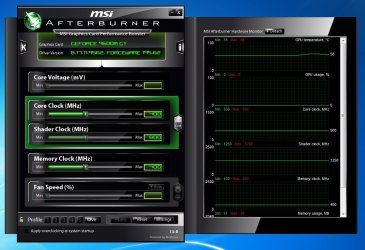
MSI Afterburner <---- get this and post a pic of your settings and temps. are you overclocking at all?
 

My Computer My Computer

OS
win7 ultimate x64
CPU
Intel Core2 Duo E8400 @ 3.0
Motherboard
NVIDIA nForce 680i SLI
Memory
4gb corsair 6400 ddr2
Graphics Card(s)
Palit GTX260 Sonic 216 SP
Sound Card
sb audigy 24bit
Monitor(s) Displays
i-inc 19" lcd
Screen Resolution
1440x900
Hard Drives
seagate barracuda 7200 250 gb
PSU
ULTRA LSP Pro 750
Case
ultra midtower
Cooling
air
Just a question for ya... did you have them(Nvidia) choose your driver or did you put in your card specs and d/l yourself? If so did you happen to choose 32bit instead of 64bit?
MSI Afterburner <---- get this and post a pic of your settings and temps. are you overclocking at all?

Nope, I've always downloaded the 64-bit versions of all driver versions I've tested, from nVidia's website and from LaptopVideo2Go.com. I never overclocked anything.

Firefox keeps crashing, and I've noticed that the bigger responsible for this is Flash Player.
 

Attachments

  • afterburner.jpg
    afterburner.jpg
    100.3 KB · Views: 71

My Computer My Computer

OS
Windows 7 x64
CPU
Intel Core 2 Quad Q6600
Motherboard
Asus P5k Deluxe
Memory
4GB (2x2GB) Patriot DDR2-800 Extreme Performance
Graphics Card(s)
nVidia GeForce 8800GT 512MB
Does your video have a fan on it...If so using the bottom control in afterburner, click it from auto then turn it up into the 60+ range and see if more air helps.
 

Attachments

  • Capture.JPG
    Capture.JPG
    109.4 KB · Views: 34

My Computer My Computer

OS
win7 ultimate x64
CPU
Intel Core2 Duo E8400 @ 3.0
Motherboard
NVIDIA nForce 680i SLI
Memory
4gb corsair 6400 ddr2
Graphics Card(s)
Palit GTX260 Sonic 216 SP
Sound Card
sb audigy 24bit
Monitor(s) Displays
i-inc 19" lcd
Screen Resolution
1440x900
Hard Drives
seagate barracuda 7200 250 gb
PSU
ULTRA LSP Pro 750
Case
ultra midtower
Cooling
air
With all your driver updating you don't happen to have an Nvidia 3d vision plug-in enabled in FF?

Also have you updated Flash itself? to 10? The plug-in and all?
 

My Computer My Computer

OS
win7 ultimate x64
CPU
Intel Core2 Duo E8400 @ 3.0
Motherboard
NVIDIA nForce 680i SLI
Memory
4gb corsair 6400 ddr2
Graphics Card(s)
Palit GTX260 Sonic 216 SP
Sound Card
sb audigy 24bit
Monitor(s) Displays
i-inc 19" lcd
Screen Resolution
1440x900
Hard Drives
seagate barracuda 7200 250 gb
PSU
ULTRA LSP Pro 750
Case
ultra midtower
Cooling
air
Does your video have a fan on it...If so using the bottom control in afterburner, click it from auto then turn it up into the 60+ range and see if more air helps.

With all your driver updating you don't happen to have an Nvidia 3d vision plug-in enabled in FF?

Also have you updated Flash itself? to 10? The plug-in and all?

I don't think there is a dedicated fan to the GPU itself, so the "Auto" button is greyed-out. I have the latest version of the Flash Player 10 plug-in. I also tried using version 9 and beta version 10.1.

Here's the thread I started @ Adobe Forums a few weeks ago: "http://forums.adobe.com/message/2607583".
 

My Computer My Computer

OS
Windows 7 x64
CPU
Intel Core 2 Quad Q6600
Motherboard
Asus P5k Deluxe
Memory
4GB (2x2GB) Patriot DDR2-800 Extreme Performance
Graphics Card(s)
nVidia GeForce 8800GT 512MB
Back
Top