
Disable Large Icon when Drag/Drop Files to New Location

rontokyo

New member
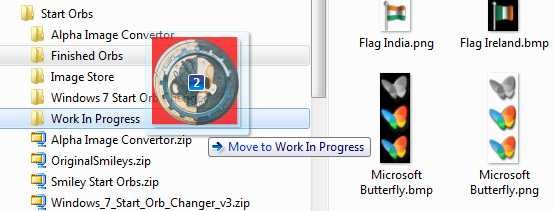
A large thumbnail appears when a file or folder is selected in the right pane of explorer and moved to another location. Aero view only -- no problem when in "classic" view. Help on how to disable this icon much appreciated.
 
Last edited:

My Computer

Computer type
PC/Desktop
Computer Manufacturer/Model Number
custom
OS
Win 7
CPU
AMD FX 6100
Motherboard
Asus M5A97 EVO
Memory
16GB
Graphics Card(s)
AMD Radeon R7 200 series
Sound Card
none - see "other info"
Monitor(s) Displays
Acer
Screen Resolution
1920x1080
Hard Drives
Samsung SSD 120GB
PSU
Enermax TriAthlor 650 watt
Keyboard
Happy Hacking Professional 2
Mouse
Logitech MX Revolution [bluetooth]
Antivirus
Bitdefender
Browser
Waterfox & Chrome
Other Info
I use the following DAC's:
Benchmark DAC1 USB [via Coax] to splitter with Teac A-H01 [via optical]

Hugo2 [connected via USB]
Which horrible large folder or file icon are you talking about.?
 

My Computer

Computer Manufacturer/Model Number
Self Build 64bit
OS
Vista Ult64, Win7600
CPU
Intel Core 2 Quad Q6600 @ 2400 MHz 64bit OS
Motherboard
Asus P5E3 Deluxe WiFi @p 64 bit OS
Memory
4096 MB DDR3-SDRAM
Graphics Card(s)
ATI Radeon HD 3870 Series x2 Crossfired
Sound Card
Realtek on board
Monitor(s) Displays
Samsung SyncMaster - 23 inches
Screen Resolution
1680x1050 pixels at 60 Hz in True Colors
Hard Drives
Hitachi (250 GB)/Samsung 750 GB. /Barracuda 160 GB.
My Book 1 TB external..
PSU
Cooler Master 1000w
Case
Cooler Master Cosmos 1000.
Cooling
Fans and fresh air,
Keyboard
Wireless
Mouse
Wireless
Internet Speed
Never fast enough
Other Info
I use a Magnum.
In Aero view, when I click on any file or folder in the right pane of explorer and start to move it, a large thumbnail appears as I move the file/folder. Very annoying . . . and unnecessary. Disabling that function should be easy [hopefully].

This situation does not exist when in "basic/classic" view, by the way.
 
Last edited:

My Computer

Computer type
PC/Desktop
Computer Manufacturer/Model Number
custom
OS
Win 7
CPU
AMD FX 6100
Motherboard
Asus M5A97 EVO
Memory
16GB
Graphics Card(s)
AMD Radeon R7 200 series
Sound Card
none - see "other info"
Monitor(s) Displays
Acer
Screen Resolution
1920x1080
Hard Drives
Samsung SSD 120GB
PSU
Enermax TriAthlor 650 watt
Keyboard
Happy Hacking Professional 2
Mouse
Logitech MX Revolution [bluetooth]
Antivirus
Bitdefender
Browser
Waterfox & Chrome
Other Info
I use the following DAC's:
Benchmark DAC1 USB [via Coax] to splitter with Teac A-H01 [via optical]

Hugo2 [connected via USB]
try shrinking all the icons in explorer.exe to the normal size,
maybe it would help
 

My Computer

OS
Win 7
CPU
Intel Core 2 Quad Q6600
Motherboard
P35 Neo Combo
Memory
G.Skill 2x2GB CL5-5-5-15
Graphics Card(s)
XFX 8800GT 670M 512MB DDR3
Monitor(s) Displays
Samsung 26inch
Hard Drives
500Gb
Case
NZXT Nemesis Elite
If I understand what you are asking, right click on your computer icon and click on Properties. Select the Advanced tab and click on Settings under Performance. Click on the Custom radio button. Look down the list and uncheck Show window contents while dragging.
 

My Computer

Computer Manufacturer/Model Number
Home built
OS
Windows 7 Ultimate 32 bit
CPU
Intel(R) Pentium(R) 4 CPU 3.00GHz
Motherboard
ASUS P4P800-VM Motherboard Chipset: Intel 865G + ICH5
Memory
2.50 GB RAM
Graphics Card(s)
NVIDIA GeForce 7600 GS
Sound Card
SoundMax Integrated Digital Audio (Chip)
Monitor(s) Displays
ViewSonic VX 1962 wm
Screen Resolution
1680 X 1050
Hard Drives
Seagate Barracuda 7200.10 80 GB
ST380215A ATA Device 18.6 GB
Western Digital "My Book" external hard drive 750 GB
Cooling
Fan based
Keyboard
Microsoft Comfort Curve Keyboard 2000 v10 USB
Mouse
Logitec optic USB
Internet Speed
3.01 Mb/s download 0.64 Mb/s upload
Thanks guys, but neither suggestion solved the problem. I've given up on Aero view and returned to Classic view . . . and no large icon problem.
 

My Computer

Computer type
PC/Desktop
Computer Manufacturer/Model Number
custom
OS
Win 7
CPU
AMD FX 6100
Motherboard
Asus M5A97 EVO
Memory
16GB
Graphics Card(s)
AMD Radeon R7 200 series
Sound Card
none - see "other info"
Monitor(s) Displays
Acer
Screen Resolution
1920x1080
Hard Drives
Samsung SSD 120GB
PSU
Enermax TriAthlor 650 watt
Keyboard
Happy Hacking Professional 2
Mouse
Logitech MX Revolution [bluetooth]
Antivirus
Bitdefender
Browser
Waterfox & Chrome
Other Info
I use the following DAC's:
Benchmark DAC1 USB [via Coax] to splitter with Teac A-H01 [via optical]

Hugo2 [connected via USB]
Do you think somehow you could take a picture of the problem and post it so we can see what the problem is?
 

My Computer

Computer Manufacturer/Model Number
Custom
OS
Windows 7 Professional x64
CPU
Intel i7 2600K OC'd @ 4620 MHz
Motherboard
Asus P8Z68-V Pro
Memory
16GB GSkill Sniper 2133 Mhz (4x4GB)
Graphics Card(s)
EVGA GeForce GTX 480 SuperClocked+
Sound Card
Realtek High Definition Audio
Monitor(s) Displays
2x Acer S273HLbmii 27"
Screen Resolution
2 x 1920x1080
Hard Drives
64GB Crucial M4 SSD

Storage: Hitachi 1TB 5400RPM, Samsung 1.5TB 5400RPM
PSU
Corsair HW Series 750w (modular)
Case
Cooler Master HAF 932 Advanced Blue Edition
Cooling
CM Hyper 212+ CPU cooler, 3x 230mm + 1x 140mm case fans
Keyboard
Logitech MK320 (wireless)
Mouse
Logitech MK320 (wireless)
Internet Speed
30 Mb/s : 2 Mb/s
Do you think somehow you could take a picture of the problem and post it so we can see what the problem is?

I think this is what he is referring to

Large Icon.jpg
 

My Computer

Computer type
Laptop
Computer Manufacturer/Model Number
HP EliteBook 8530w Mobile Workstation
OS
Windows 7 Ultimate x64 (XP, 98SE, 95, 3.11, DOS 7.10 on VM) + Ubuntu 10.04 LTS Lucid Lynx
CPU
Intel Core 2 Duo Processor P8600 (2.40 GHz, 3 MB L2 cache)
Motherboard
Mobile Intel PM45 Express Chipset ICH9M-Enhanced
Memory
4GB 800 MHz DDR2 SDRAM
Graphics Card(s)
ATI Mobility FireGL V5700 with 256 MB
Sound Card
SoundMAX Integrated Digital HD Audio
Monitor(s) Displays
15.4-inch WXGA anti-glare (1280 x 800 resolution)
Screen Resolution
1280 x 800
Hard Drives
500GB + 1TB
Mouse
Synaptics PS/2 Port Touchpad, USB Mouse
Internet Speed
4 Mbps
Antivirus
MSE
Browser
Firefox, Chrome, IE
Other Info
Authentec AES2810 Fingerprint Reader
I don't see that when I am dragging and dropping. I assume you are in Explorer when you see this?
 

My Computer

Computer Manufacturer/Model Number
Home built
OS
Windows 7 Ultimate 32 bit
CPU
Intel(R) Pentium(R) 4 CPU 3.00GHz
Motherboard
ASUS P4P800-VM Motherboard Chipset: Intel 865G + ICH5
Memory
2.50 GB RAM
Graphics Card(s)
NVIDIA GeForce 7600 GS
Sound Card
SoundMax Integrated Digital Audio (Chip)
Monitor(s) Displays
ViewSonic VX 1962 wm
Screen Resolution
1680 X 1050
Hard Drives
Seagate Barracuda 7200.10 80 GB
ST380215A ATA Device 18.6 GB
Western Digital "My Book" external hard drive 750 GB
Cooling
Fan based
Keyboard
Microsoft Comfort Curve Keyboard 2000 v10 USB
Mouse
Logitec optic USB
Internet Speed
3.01 Mb/s download 0.64 Mb/s upload
I don't see that when I am dragging and dropping. I assume you are in Explorer when you see this?

in explorer when you drag files to move them, you get this
 

My Computer

Computer type
Laptop
Computer Manufacturer/Model Number
HP EliteBook 8530w Mobile Workstation
OS
Windows 7 Ultimate x64 (XP, 98SE, 95, 3.11, DOS 7.10 on VM) + Ubuntu 10.04 LTS Lucid Lynx
CPU
Intel Core 2 Duo Processor P8600 (2.40 GHz, 3 MB L2 cache)
Motherboard
Mobile Intel PM45 Express Chipset ICH9M-Enhanced
Memory
4GB 800 MHz DDR2 SDRAM
Graphics Card(s)
ATI Mobility FireGL V5700 with 256 MB
Sound Card
SoundMAX Integrated Digital HD Audio
Monitor(s) Displays
15.4-inch WXGA anti-glare (1280 x 800 resolution)
Screen Resolution
1280 x 800
Hard Drives
500GB + 1TB
Mouse
Synaptics PS/2 Port Touchpad, USB Mouse
Internet Speed
4 Mbps
Antivirus
MSE
Browser
Firefox, Chrome, IE
Other Info
Authentec AES2810 Fingerprint Reader
Got it. Thanks.
 

My Computer

Computer Manufacturer/Model Number
Home built
OS
Windows 7 Ultimate 32 bit
CPU
Intel(R) Pentium(R) 4 CPU 3.00GHz
Motherboard
ASUS P4P800-VM Motherboard Chipset: Intel 865G + ICH5
Memory
2.50 GB RAM
Graphics Card(s)
NVIDIA GeForce 7600 GS
Sound Card
SoundMax Integrated Digital Audio (Chip)
Monitor(s) Displays
ViewSonic VX 1962 wm
Screen Resolution
1680 X 1050
Hard Drives
Seagate Barracuda 7200.10 80 GB
ST380215A ATA Device 18.6 GB
Western Digital "My Book" external hard drive 750 GB
Cooling
Fan based
Keyboard
Microsoft Comfort Curve Keyboard 2000 v10 USB
Mouse
Logitec optic USB
Internet Speed
3.01 Mb/s download 0.64 Mb/s upload

My Computer

Computer type
PC/Desktop
Computer Manufacturer/Model Number
custom
OS
Win 7
CPU
AMD FX 6100
Motherboard
Asus M5A97 EVO
Memory
16GB
Graphics Card(s)
AMD Radeon R7 200 series
Sound Card
none - see "other info"
Monitor(s) Displays
Acer
Screen Resolution
1920x1080
Hard Drives
Samsung SSD 120GB
PSU
Enermax TriAthlor 650 watt
Keyboard
Happy Hacking Professional 2
Mouse
Logitech MX Revolution [bluetooth]
Antivirus
Bitdefender
Browser
Waterfox & Chrome
Other Info
I use the following DAC's:
Benchmark DAC1 USB [via Coax] to splitter with Teac A-H01 [via optical]

Hugo2 [connected via USB]
Greetings:

As old as this issue is, has a solution ever been discovered? I'm dealing with the same thing.

There are very few hits for this on a web search, and the few found are dead ends.

This seems to be the most official answer out there, but the same as the individual that posted there, I find it hard to believe.

Anyone else know anything else?

Thanks!

MeVII
 

My Computer

Computer Manufacturer/Model Number
Alienware Area 51
OS
Windows 7 Ultimate x64
CPU
Intel Quad 2.4
Motherboard
Nforce 680i
Memory
4g
Graphics Card(s)
Nvidia 9800GT SLI
Sound Card
Logetic G930 Headset
Monitor(s) Displays
Viewsonic VM2250
Hard Drives
WD 140g 10000 RPM Raptor
PSU
1k
Case
Alienware Area 51
Cooling
Liquid
Hi. I started this thread. And like you, I find the large icon d*mned unnecessary and annoying -- and as there isn't a solution or workaround available anywhere, we may be the only two people on the planet who feel this way. But should you find anything, *please* post an update on this thread. Good luck!
 

My Computer

Computer type
PC/Desktop
Computer Manufacturer/Model Number
custom
OS
Win 7
CPU
AMD FX 6100
Motherboard
Asus M5A97 EVO
Memory
16GB
Graphics Card(s)
AMD Radeon R7 200 series
Sound Card
none - see "other info"
Monitor(s) Displays
Acer
Screen Resolution
1920x1080
Hard Drives
Samsung SSD 120GB
PSU
Enermax TriAthlor 650 watt
Keyboard
Happy Hacking Professional 2
Mouse
Logitech MX Revolution [bluetooth]
Antivirus
Bitdefender
Browser
Waterfox & Chrome
Other Info
I use the following DAC's:
Benchmark DAC1 USB [via Coax] to splitter with Teac A-H01 [via optical]

Hugo2 [connected via USB]
Greetings RonTokyo!

I have only recently bought and installed Win7 (64bU), so have only been personalizing it for the last few days. I find it odd that such an obvious and obnoxious problem as having a giant icon near center itself over your cursor was overlooked in development, and that there is not a bigger call for a solution on the web. Searching for the answer is made extra difficult by people desiring to "disable drag and drop", or "undo drag and drop", and those clutter the search for what we are trying to disable.
At any rate Im pretty persistent, when I find something Ill post it here for you. :)

MeVII
 

My Computer

Computer Manufacturer/Model Number
Alienware Area 51
OS
Windows 7 Ultimate x64
CPU
Intel Quad 2.4
Motherboard
Nforce 680i
Memory
4g
Graphics Card(s)
Nvidia 9800GT SLI
Sound Card
Logetic G930 Headset
Monitor(s) Displays
Viewsonic VM2250
Hard Drives
WD 140g 10000 RPM Raptor
PSU
1k
Case
Alienware Area 51
Cooling
Liquid
Update / Clue

For anyone that has more understanding or knowledge than I, I have noticed something about the behavior of this issue that may be a clue as to how a solution can be devised.

On my PC, picking up items in folders creates the large icon. However, items first picked up on the actual desktop (not the desktop folder), do not generate the large icon, even if carrying them over to other folders.

I am assuming since it is behaving differently in two different areas, there are Registry keys somewhere that could be edited, so that the icon behavior is the same for folders, as it is for items coming from the desktop.

Thats all I have for now ...

MeVII
 

My Computer

Computer Manufacturer/Model Number
Alienware Area 51
OS
Windows 7 Ultimate x64
CPU
Intel Quad 2.4
Motherboard
Nforce 680i
Memory
4g
Graphics Card(s)
Nvidia 9800GT SLI
Sound Card
Logetic G930 Headset
Monitor(s) Displays
Viewsonic VM2250
Hard Drives
WD 140g 10000 RPM Raptor
PSU
1k
Case
Alienware Area 51
Cooling
Liquid
And hi to you, MeVII !

My research into this problem also turned up complaints from Vista users, probably because Vista also incorporated the Aero view [??]. The large icon problem doesn't exist in Classic view, nor does it occur [as you noted] when dragging a file/folder from the desktop to Windows Explorer. [And yes, querries entitled "disable drag and drop" do clutter the search results and make finding a solution more difficult.]

Whereas the large icon is annoying, I can live with it when I'm dragging an item to a destination with a longish title as the large icon doesn't cover up the destination folder and I can see where I'm going. It's a real bitch, however, when dragging to a destination folder with a short title as it becomes all but impossible to see where I'm going.

This is an example of MS design staff overthinking and creating something totally unnessary, but doing so only because it could be done + it looks "cool."

I sure wish you luck coming up with a solution, but I'm not terribly hopeful. But we'll see . . . . :)
 

My Computer

Computer type
PC/Desktop
Computer Manufacturer/Model Number
custom
OS
Win 7
CPU
AMD FX 6100
Motherboard
Asus M5A97 EVO
Memory
16GB
Graphics Card(s)
AMD Radeon R7 200 series
Sound Card
none - see "other info"
Monitor(s) Displays
Acer
Screen Resolution
1920x1080
Hard Drives
Samsung SSD 120GB
PSU
Enermax TriAthlor 650 watt
Keyboard
Happy Hacking Professional 2
Mouse
Logitech MX Revolution [bluetooth]
Antivirus
Bitdefender
Browser
Waterfox & Chrome
Other Info
I use the following DAC's:
Benchmark DAC1 USB [via Coax] to splitter with Teac A-H01 [via optical]

Hugo2 [connected via USB]
Just got on a new version of Windows 7 with the new GUI. Gak. I've spent the last day trying to find the settings to turn off all these "helpful" new UI options. I don't even know why the UI is so different. The two versions appear to be the same. Grrrr!

I hate the giant Move icon so much. Stunning that of all the personalization, this isn't one. I'd almost call it an Accessibility issue.

Just chiming in so you know you're not alone.
 

My Computer

Computer type
PC/Desktop
Computer Manufacturer/Model Number
Dell
OS
Windows 7, SP1 64 bit
Browser
Chrome
Just installed Win 7 on a new machine, with most recent updates. Also having this issue, it seems ridiculous - the large drag thumbnail makes it harder to see where you're dragging something to. (screenshot: http://i.imgur.com/hUqVZIg.gif)

Any news on how to make it a small thumbnail, or something else less obtrusive?
 

My Computer

Computer type
Laptop
Computer Manufacturer/Model Number
HP 8510p
OS
Windows 7 Ultimate x64 SP1
CPU
Intel Core2 Duo T8100 @ 2.10GHz
Memory
4GB
Graphics Card(s)
ATI Mobility Radeon HD 2600
Hard Drives
Intel SSD 240GB AHCI
Antivirus
Avast Home
Browser
Firefox
I'm the op and no, I never came up with anything. Weird, huh?
 

My Computer

Computer type
PC/Desktop
Computer Manufacturer/Model Number
custom
OS
Win 7
CPU
AMD FX 6100
Motherboard
Asus M5A97 EVO
Memory
16GB
Graphics Card(s)
AMD Radeon R7 200 series
Sound Card
none - see "other info"
Monitor(s) Displays
Acer
Screen Resolution
1920x1080
Hard Drives
Samsung SSD 120GB
PSU
Enermax TriAthlor 650 watt
Keyboard
Happy Hacking Professional 2
Mouse
Logitech MX Revolution [bluetooth]
Antivirus
Bitdefender
Browser
Waterfox & Chrome
Other Info
I use the following DAC's:
Benchmark DAC1 USB [via Coax] to splitter with Teac A-H01 [via optical]

Hugo2 [connected via USB]
Back
Top