
I salvaged my old hard drive to an external enclosure.(

Barry Wuthrich

New member
Local time
10:56 AM
Messages
5
I put my old hard drive into an external enclosure.(XP home) How can I transfer my files to my new laptop?

Windows 7 says to export the transfer utility to my old computer. My old computer won't boot up. I think the motherboard fried.

Is there any way to import these files for transfer into my laptop from the (now) external hard drive?

I tried importing pics and finding my music. Access was denied on the "import pics" command, and I cant even see my music libraries.

I used my creative mediasource5 sniffer to search for MP3's on my external drive E. It found hundreds of little sound bites from the program files, but not my music that is in the old creative mediasource5 libraries and Windows media player library.

Many of my documents aren't showing up when I browse the files on my old hard drive E.

I need some help, please.

Thanks,
Barry
 

My Computer My Computer

At a glance

windows 7Intel celeron 9002GB ddr2 RAM, 250GB HDD
Computer Manufacturer/Model Number
Toshiba satellite L455-S5975 (laptop)
OS
windows 7
CPU
Intel celeron 900
Memory
2GB ddr2 RAM, 250GB HDD
Monitor(s) Displays
15.6 HD TruBrite Widescreen Display
Hard Drives
external drive E is a samsung with pentium 4 and 80GB
Internet Speed
dialup at home (26k) and wifi in town
Other Info
external drive E has XP hoime on it
If the drive isn't damaged, it should be as easy as plugging the external enclosure into your Windows 7 computer, then browsing the files. Are you able to use Windows Explorer to view the directories and files on the external drive?
 

My Computer My Computer

At a glance

Windows 7 Ultimate x64 SP1Core i7-2670QM8GB DDR3 PC3-10600Intel HD Graphics 3000 + GeForce GT 540M
Computer Manufacturer/Model Number
Dell XPS 15 L502x
OS
Windows 7 Ultimate x64 SP1
CPU
Core i7-2670QM
Memory
8GB DDR3 PC3-10600
Graphics Card(s)
Intel HD Graphics 3000 + GeForce GT 540M
Screen Resolution
1920x1080
Hard Drives
1TB 5400RPM Seagate
I put my old hard drive into an external enclosure.(XP home) How can I transfer my files to my new laptop?

Windows 7 says to export the transfer utility to my old computer. My old computer won't boot up. I think the motherboard fried.

Is there any way to import these files for transfer into my laptop from the (now) external hard drive?

I tried importing pics and finding my music. Access was denied on the "import pics" command, and I cant even see my music libraries.

I used my creative mediasource5 sniffer to search for MP3's on my external drive E. It found hundreds of little sound bites from the program files, but not my music that is in the old creative mediasource5 libraries and Windows media player library.

Many of my documents aren't showing up when I browse the files on my old hard drive E.

I need some help, please.

Thanks,
Barry


You might have to take ownership rights to that HD when it is plugged in ;)
 

My Computer My Computer

At a glance

Win7 Enterprise, Win7 x86 (Ult 7600), Win7 x6...AMD fx8350 4ghz, AMD-32 2400mhz, AMD-64 3200m...2gb, 4gb on the Ult 7600, 4gb on Technet RTM,...Draw my own Graphics, several nVidia cards
Computer type
PC/Desktop
Computer Manufacturer/Model Number
Built them myself, Science Experiments !
OS
Win7 Enterprise, Win7 x86 (Ult 7600), Win7 x64 Ult 7600, TechNet RTM on AMD x64 (2.8Ghz)
CPU
AMD fx8350 4ghz, AMD-32 2400mhz, AMD-64 3200mhz, AMDx64 2.8G
Motherboard
SIS 755, ECS-K8M890M-M (Ult 7600), GigaByte & others
Memory
2gb, 4gb on the Ult 7600, 4gb on Technet RTM, 32gb on FX8350
Graphics Card(s)
Draw my own Graphics, several nVidia cards
Sound Card
on motherboard
Monitor(s) Displays
19" flat scr, 28" I-Inc widescr,22" Emprex Widescr, 23" Acer
Screen Resolution
1280 x 1024, 1440 x 900, 1920 x 1080
Hard Drives
6 pata Ide HD's & 2 Sata HD's
added 80gb external on Ult 7600 computer,
numerous extra 1tb, 2TB, 3Tb SATA HD's
A collection of ext HD Docks w/ HDs
PSU
430w, 550w, 600w, 700, 800, etc
Case
All Generic Full Towers
Cooling
Open Air & a few fans, some w/ colored LEDs
Keyboard
Compaq & Dell recycled from GoodWill
Mouse
Made in China Optical Wired Mouse
Internet Speed
Fast Cable InterNet
Antivirus
AVG Free on 24 different Desktops, NO Problems!
Browser
IE 8 is preferred, but use FireFox sometimes
Other Info
Linksys Routers, switches, & Hubs
Too Many USB Flash Drives to count, Biggest is 64GB !
Eight computers in my home network.
Sixteen computers at my business network.
Linked via TeamViewer !
Lots of old used spare computer parts everywhere!
If the drive isn't damaged, it should be as easy as plugging the external enclosure into your Windows 7 computer, then browsing the files. Are you able to use Windows Explorer to view the directories and files on the external drive?

When I plug it in to my laptop, I get an autoplay menu box with several options.

I have tried most of them including, 'view files with windows explorer'. I can only see a small fraction of my stuff.
 

My Computer My Computer

At a glance

windows 7Intel celeron 9002GB ddr2 RAM, 250GB HDD
Computer Manufacturer/Model Number
Toshiba satellite L455-S5975 (laptop)
OS
windows 7
CPU
Intel celeron 900
Memory
2GB ddr2 RAM, 250GB HDD
Monitor(s) Displays
15.6 HD TruBrite Widescreen Display
Hard Drives
external drive E is a samsung with pentium 4 and 80GB
Internet Speed
dialup at home (26k) and wifi in town
Other Info
external drive E has XP hoime on it
DocBrown;361459 You might have to take ownership rights to that HD when it is plugged in ;)[/QUOTE said:
How do I take ownership rights? Someone else told me that, but the link they gave would've required a download that changed my registry. I was leary of messing with the registry, so I am still looking for a solution.
 

My Computer My Computer

At a glance

windows 7Intel celeron 9002GB ddr2 RAM, 250GB HDD
Computer Manufacturer/Model Number
Toshiba satellite L455-S5975 (laptop)
OS
windows 7
CPU
Intel celeron 900
Memory
2GB ddr2 RAM, 250GB HDD
Monitor(s) Displays
15.6 HD TruBrite Widescreen Display
Hard Drives
external drive E is a samsung with pentium 4 and 80GB
Internet Speed
dialup at home (26k) and wifi in town
Other Info
external drive E has XP hoime on it
No registry hacks are necessary. You just right click on the drive icon, select security, then advanced, and one of the tabs is an ownership tab. I'm going from memory here, so I might have missed something.
 

My Computer My Computer

At a glance

Windows 7 Ultimate x64 SP1Core i7-2670QM8GB DDR3 PC3-10600Intel HD Graphics 3000 + GeForce GT 540M
Computer Manufacturer/Model Number
Dell XPS 15 L502x
OS
Windows 7 Ultimate x64 SP1
CPU
Core i7-2670QM
Memory
8GB DDR3 PC3-10600
Graphics Card(s)
Intel HD Graphics 3000 + GeForce GT 540M
Screen Resolution
1920x1080
Hard Drives
1TB 5400RPM Seagate
Got Lucky

I couldn't take ownership of the files in the recommended way. I guess that only takes ownership of the files you can see.

I decided to browse some of the files I could see and clicked on the documents and settings folders. There were a couple of users listed.
Administrator, and CPuser and something else. I remembered that the guy who set up my computer for me fixed it so I could just turn it on and go to work without signing in. Apparently I was automatically signed in as CPuser.

When I clicked on CPuser, I got a dialog box that said I didn't have access to those files. And there was a check box to permanently take control of the files. I clicked on it and waited about a minute or two and all my lost files showed up. 15 gigs worth.

Thanks for the help.
Barry
 

My Computer My Computer

At a glance

windows 7Intel celeron 9002GB ddr2 RAM, 250GB HDD
Computer Manufacturer/Model Number
Toshiba satellite L455-S5975 (laptop)
OS
windows 7
CPU
Intel celeron 900
Memory
2GB ddr2 RAM, 250GB HDD
Monitor(s) Displays
15.6 HD TruBrite Widescreen Display
Hard Drives
external drive E is a samsung with pentium 4 and 80GB
Internet Speed
dialup at home (26k) and wifi in town
Other Info
external drive E has XP hoime on it
I am having the same problems: fried my MB but aparently good XP HD. So I purchased a new Windows 7 Core i7 machine to do video editing along with the photography editing.

I can get into and transfer any USER files (Administrator, etc) on the salvaged-XP-and-put-in-an-external-FireWire-enclosure-drive, EXCEPT I cannot get into my own User/Henry (it even denies me from seeing the file structure within my User/Henry) to transfer various files I need access to ... and am unable to "take ownership" — Win7 will not let me. (There were no passwords or logons involved with that XP HD, btw).

Any help would be appreciated. If worse comes to worse, I suppose I can put it into one of my lab's older XP machines, save the stuff out from there (to DVD, whathaveyou), then put it onto the Win7 box, but that is very time consuming and I really should not have to do that. It should be as easy as I have done in the past with older Win versions: put the drive in an external enclosure and transfer the files. Period.

Thanks for any help!
 

My Computer My Computer

At a glance

Windows 7
OS
Windows 7

My Computer My Computer

At a glance

Windows 7 Ultimate x64 ®™Intel Core 2 Duo (2.2 GHz)2x 2GB Corsair (667 MHz)NVIDIA 8600M GS (256MB)
Computer Manufacturer/Model Number
Sony Vaio FZ21Z
OS
Windows 7 Ultimate x64 ®™
CPU
Intel Core 2 Duo (2.2 GHz)
Motherboard
Sony (Intel Chipset)
Memory
2x 2GB Corsair (667 MHz)
Graphics Card(s)
NVIDIA 8600M GS (256MB)
Sound Card
Sigmatel
Monitor(s) Displays
15.4" TFT X-Black
Screen Resolution
1280x800
Hard Drives
Western Digital 300GB Scorpio Black (7200rpm)
Mouse
Logitech Anywhere MX
Internet Speed
Sky 5MB
I had Googled that site last night and followed the steps with no luck. Perhaps I missed something, though, so will try again this evening. The thing that frustrates me though, is whenever Win7 fusses at me it demounts that external drive and I have to turn it off and back on for Win7 to recognize it again (only when trying to "take ownership" of my own directory ... like I said, all other files on that drive are accessible).
 

My Computer My Computer

At a glance

Windows 7
OS
Windows 7
Strange. I've got files of a few drives requiring ownership, and all it required was a right click to take ownership of the whole drive.
 

My Computer My Computer

At a glance

Windows 7 Ultimate x64 ®™Intel Core 2 Duo (2.2 GHz)2x 2GB Corsair (667 MHz)NVIDIA 8600M GS (256MB)
Computer Manufacturer/Model Number
Sony Vaio FZ21Z
OS
Windows 7 Ultimate x64 ®™
CPU
Intel Core 2 Duo (2.2 GHz)
Motherboard
Sony (Intel Chipset)
Memory
2x 2GB Corsair (667 MHz)
Graphics Card(s)
NVIDIA 8600M GS (256MB)
Sound Card
Sigmatel
Monitor(s) Displays
15.4" TFT X-Black
Screen Resolution
1280x800
Hard Drives
Western Digital 300GB Scorpio Black (7200rpm)
Mouse
Logitech Anywhere MX
Internet Speed
Sky 5MB
Another good reason to drag your files manually and not use transfer wizards.

Normally just copying over the active User file will get everything - including hidden AppData (settings), although that is best left unimported as it is a corruption path.
 
I had Googled that site last night and followed the steps with no luck. Perhaps I missed something, though, so will try again this evening. The thing that frustrates me though, is whenever Win7 fusses at me it demounts that external drive and I have to turn it off and back on for Win7 to recognize it again (only when trying to "take ownership" of my own directory ... like I said, all other files on that drive are accessible).

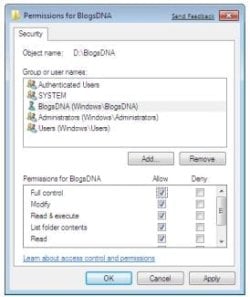
Check if you don't have a user named "All users" or something like that with no permissions for that drive / folders. Check the permissions for "Users" and "Administrators" as well, all should be full control. It happened to me that I gave my own user control, but these generic users had no access and somehow overruled and denied my access. I solved it when I changed them.
 

My Computer My Computer

At a glance

Windows 7 x64 finally!AMD Athlon II X2 240OCZ Platinum 4GB DDR2 1066 (will not work pas...MSI R4670-MD1G Radeon HD 4670 1GB 128-bit GDDR3
Computer Manufacturer/Model Number
Wally, Innc.
OS
Windows 7 x64 finally!
CPU
AMD Athlon II X2 240
Motherboard
Biostar TA790GX XE
Memory
OCZ Platinum 4GB DDR2 1066 (will not work past 800MHz)
Graphics Card(s)
MSI R4670-MD1G Radeon HD 4670 1GB 128-bit GDDR3
Sound Card
ATI High Definition Audio Device Realtek ALC888
Monitor(s) Displays
HP w19e
Screen Resolution
1440x900
Hard Drives
Western Digital Caviar Green WD5000AADS 500GB SATA
Western Digital Caviar Blue WD5000AAKS 500GB SATA
PSU
Athena Power Micro ATX 400W
Case
HEC 6T 6T10BB Black MicroATX Mini Tower
Cooling
stock
Keyboard
wired, many keys
Mouse
HP wireless, 2 buttons, 1 wheel
Internet Speed
DSL 2Mb (recently getting 1.65M!)
Thanks for everyone's suggestions. Right click for ownership does not work at all, at least for me on this external XP drive.

Dragging and dropping my files is exactly what I want to do, Greg, since I remain in control of where they go. I was able to open the other users that I looked at, Wally, but will double check to make sure I didn't miss one.
 

My Computer My Computer

At a glance

Windows 7
OS
Windows 7
Tks Henry
But I meant the users in your present computer, not the old ones still in the old drive.
When you access the Permissions window, check to see what the permissions are for all users:
permissions.JPG
 

My Computer My Computer

At a glance

Windows 7 x64 finally!AMD Athlon II X2 240OCZ Platinum 4GB DDR2 1066 (will not work pas...MSI R4670-MD1G Radeon HD 4670 1GB 128-bit GDDR3
Computer Manufacturer/Model Number
Wally, Innc.
OS
Windows 7 x64 finally!
CPU
AMD Athlon II X2 240
Motherboard
Biostar TA790GX XE
Memory
OCZ Platinum 4GB DDR2 1066 (will not work past 800MHz)
Graphics Card(s)
MSI R4670-MD1G Radeon HD 4670 1GB 128-bit GDDR3
Sound Card
ATI High Definition Audio Device Realtek ALC888
Monitor(s) Displays
HP w19e
Screen Resolution
1440x900
Hard Drives
Western Digital Caviar Green WD5000AADS 500GB SATA
Western Digital Caviar Blue WD5000AAKS 500GB SATA
PSU
Athena Power Micro ATX 400W
Case
HEC 6T 6T10BB Black MicroATX Mini Tower
Cooling
stock
Keyboard
wired, many keys
Mouse
HP wireless, 2 buttons, 1 wheel
Internet Speed
DSL 2Mb (recently getting 1.65M!)
Well, no luck ... so I simply plugged it into an XP machine and was able to read ALL the files and begin my rather selective transfers using a couple of 8gb flash drives and some DVDs. Slow, but there's less than 50gb of stuff to transfer (plus or minus). I'll go to the external backup drives/DVDs for all the rest.
 

My Computer My Computer

At a glance

Windows 7
OS
Windows 7
Sounds like you're probably about done, but I had one other thought. When I bought the external drive enclosure, the salesman told me I could just buy a pigtail to connect the HD to the USB port on my laptop. This doesn't even require the HD to be turned on for file access/transfer.

I don't know why that would make any difference, but anything is worth a try.
 

My Computer My Computer

At a glance

windows 7Intel celeron 9002GB ddr2 RAM, 250GB HDD
Computer Manufacturer/Model Number
Toshiba satellite L455-S5975 (laptop)
OS
windows 7
CPU
Intel celeron 900
Memory
2GB ddr2 RAM, 250GB HDD
Monitor(s) Displays
15.6 HD TruBrite Widescreen Display
Hard Drives
external drive E is a samsung with pentium 4 and 80GB
Internet Speed
dialup at home (26k) and wifi in town
Other Info
external drive E has XP hoime on it
Your enclosures are different from mine, Barry, and sound like the smaller "pocketable" units that require no external power other than what they receive from the USB port. I use one of them with my notebook when I'm traveling and photoediting on the job.

Mine are the older, larger, desktop kind that require external power and have a switch on them ... yet can be connected by USB, FireWire, or eSata. I tried all three types of connections and no luck ... but, like I said, plug it into another XP machine and everything was open and available for doing anything I wanted to, from copying to editing.

It's just some kind of complex security-paranoid-Micro$oft procedures that make it hard for the common man but easy for the hacker to do whatever they want ... though you would think they would make it simple. Aren't computers supposed to do that? Make our jobs simpler and automated?:sarc:

Nahhh ... and they make the OS a true nag, nag, nag product also, ala Vista. Nags you about everything!!! At least Win7 has cut the nagging down to a manageable level!!!:D
 

My Computer My Computer

At a glance

Windows 7
OS
Windows 7
Back
Top