Windows AIK Downloads without Validation check

jimbo45

New member
Guru
Gold Member
VIP
Local time
7:14 AM
Messages
5,941
Location
Hafnarfjörður IS
Hi guys
To anybody who needs to download the Windows AIK (Automated Installation Kit) you can do it directly from Windows 7 -- it bypasses all the Windows validation check and windows live ID B/S and takes you straight to the download.


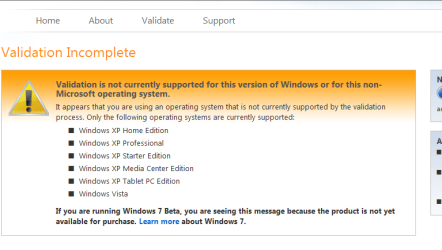
You still get the validation screen - but just click download and it all works

It's a 992 MB file however so you'll need a decent Internet Connection for this one.

This is useful for building a PE environment and deploying Windows on loads of machines.

http://www.microsoft.com/downloads/...6d-15f3-4284-9123-679830d629f2&DisplayLang=en

Cheers
jimbo
 

My Computer

Computer type
PC/Desktop
Computer Manufacturer/Model Number
Custom built, several laptops HP/ASUS
OS
Linux CENTOS 7 / various Windows OS'es and servers
CPU
Intel i7 Intel i5
Memory
8GB, 16GB
Graphics Card(s)
On Motherboard
Sound Card
Realtek HD audio
Monitor(s) Displays
Apple Cinema display, Samsung LCD
Screen Resolution
1920 X 1080
Hard Drives
4 X 1TB SATA
Mouse
Toshiba wireless laser
Internet Speed
> 20MB up
Wouldn't it be auto validating your copy of 7?
Or is yours unregistered?
 

My Computer

Computer Manufacturer/Model Number
Dell XPS 420
OS
Windows 7 Ultimate x64 7600 RTM
CPU
Intel Core 2 Quad Q6600
Memory
8GB DDR2 PC6400
Graphics Card(s)
ATI Radeon X2400
Sound Card
On Board 5.1
Monitor(s) Displays
Dual NEC MultiSync 70GX2
Screen Resolution
1280x1024
Hard Drives
WD 500GB / SeaGate 1TB
Case
Dell XPS 420
Cooling
Fan
Keyboard
Logitech G19
Mouse
Logitech MX Revolution
Internet Speed
1.5Mb Down... soon to be 12Mb Down
Hi there
Windows Genuine Validation hasn't been implemented for Windows 7 Yet.


Cheers
jimbo
 

Attachments

  • validation.png
    validation.png
    15.8 KB · Views: 515
Last edited by a moderator:

My Computer

Computer type
PC/Desktop
Computer Manufacturer/Model Number
Custom built, several laptops HP/ASUS
OS
Linux CENTOS 7 / various Windows OS'es and servers
CPU
Intel i7 Intel i5
Memory
8GB, 16GB
Graphics Card(s)
On Motherboard
Sound Card
Realtek HD audio
Monitor(s) Displays
Apple Cinema display, Samsung LCD
Screen Resolution
1920 X 1080
Hard Drives
4 X 1TB SATA
Mouse
Toshiba wireless laser
Internet Speed
> 20MB up
Ah, my apologies.
Though now that I think of it, that does make sense.
 
Last edited by a moderator:

My Computer

Computer Manufacturer/Model Number
Dell XPS 420
OS
Windows 7 Ultimate x64 7600 RTM
CPU
Intel Core 2 Quad Q6600
Memory
8GB DDR2 PC6400
Graphics Card(s)
ATI Radeon X2400
Sound Card
On Board 5.1
Monitor(s) Displays
Dual NEC MultiSync 70GX2
Screen Resolution
1280x1024
Hard Drives
WD 500GB / SeaGate 1TB
Case
Dell XPS 420
Cooling
Fan
Keyboard
Logitech G19
Mouse
Logitech MX Revolution
Internet Speed
1.5Mb Down... soon to be 12Mb Down
Jimbo, I'm an end/home user and don't need the aik for multiple installs. But I get that validation incomplete screen upon install of 7000/32 and am completely limited to what I have access to within win 7. I've tried everything I could think of to resolve, but I keep coming back to this. I'd be happy to dl aik if it would resolve that problem. Do you think it would work? And if it's worth a try, how do I integrate it into win 7 once downloaded? thx.
 

My Computer

OS
win 7
Jimbo, I'm an end/home user and don't need the aik for multiple installs. But I get that validation incomplete screen upon install of 7000/32 and am completely limited to what I have access to within win 7. I've tried everything I could think of to resolve, but I keep coming back to this. I'd be happy to dl aik if it would resolve that problem. Do you think it would work? And if it's worth a try, how do I integrate it into win 7 once downloaded? thx.

AIK will not solve the issue you are referring to - and I somehow think what you are trying to say is not actually related to this post at all.

Would you be so kind as to start from the beginning to tell us what is going on? We need specifics - what you did, how you did it and what is happening now....

The windows 7 WAIK actually does not have a validation check, the link jimbo provided is not for windows 7. Here is the windows 7 link Download details: WAIK Windows® 7 Beta

Correct - it even says "Vista" in the filename, and it's version number should be a big tip off to anyone who tries to DL it - 6000.16386.061101-2205 - Build 6000 was the Vista series, 16386 was the RTM release, 061101 is the date - November 01, 2006 and 2205 the time 2:05 PM....
 

My Computers

System One System Two

  • Computer type
    PC/Desktop
    Computer Manufacturer/Model Number
    The Beast Model A (homebrew)
    OS
    Windows 11 21H2 Current build
    CPU
    AMD Ryzen 9 3950X
    Motherboard
    MSI MEG X570 GODLIKE
    Memory
    4 * 32 GB - Corsair Vengeance 3600 MHz
    Graphics Card(s)
    EVGA GeForce RTX 3080 Ti XC3 ULTRA GAMING (12G-P5-3955-KR)
    Sound Card
    Realtek® ALC1220 Codec
    Monitor(s) Displays
    2x Eve Spectrum ES07D03 4K Gaming Monitor (Matte) | Eve Spec
    Screen Resolution
    3x 3840 x 2160
    Hard Drives
    3x Samsung 980 Pro NVMe PCIe 4 M.2 2 TB SSD (MZ-V8P2T0B/AM) } 3x Sabrent Rocket NVMe 4.0 1 TB SSD
    PSU
    PC Power & Cooling’s Silencer Series 1050 Watt, 80 Plus Plat
    Case
    Fractal Design Define 7 XL Dark ATX Full Tower Case
    Cooling
    SteelSeries Apex Pro Wired Gaming Keyboard
    Keyboard
    SteelSeries Apex Pro
    Mouse
    Logitech MX Master 3S | MX Master 3 for business
    Internet Speed
    AT&T LightSpeed Gigabit Duplex Ftth
    Antivirus
    Windows Defender + MB 3
    Browser
    Nightly (default) + Firefox (stable),Chrome, Edge
  • Computer type
    PC/Desktop
    System Manufacturer/Model Number
    Dell Latitude E5470
    OS
    ChromeOS Flex Dev Channel (current)
    CPU
    Intel(R) Core(TM) i5-6300U CPU @ 2.40GHz, 2501 Mhz, 2 Core(s), 4 Logical Processor(s)
    Motherboard
    Dell
    Memory
    16 GB
    Graphics Card(s)
    Intel(R) HD Graphics 520
    Sound Card
    Intel(R) HD Graphics 520 + RealTek Audio
    Monitor(s) Displays
    Dell laptop display 15"
    Screen Resolution
    1920 * 1080
    Hard Drives
    Toshiba 128GB M.2 22300 drive
    INTEL Cherryville 520 Series SSDSC2CW180A 180 GB SATA III SSD
    PSU
    Dell
    Case
    Dell
    Cooling
    Dell
    Keyboard
    Dell
    Mouse
    Logitech MX Master 3S (shared w. Sys 1) | Dell TouchPad
    Internet Speed
    AT&T LightSpeed Gigabit Duplex Ftth
using the dvd I made from the ms win 7 site, I loaded it on my laptop without issue. I put dvd to side until yesterday when I was ready to install on my pc. I went up and got the key (universal for 32) and installed. Initially it loaded fine, but i was having blue screen problems. Eventually I resolved it. In the meantime I was trying to get win 7 fully loaded and I continued downloading updates in hopes that I could get through them before a crash. I was also trying to download virus protection. At some point not long before resolving the crash problem (due to bad memory hardware), I began getting this validation error. Beginning with a window that would say something like, your computer may be infected. Eventually I was able to get the hd scanned and it was fine. But this window coincided with this beta expired problem. And since there is no verification in win 7, i couldn't get it to work as it should. I've reloaded the os many times in an attempt to troubleshoot/resolve. right now I'm reformatting the hd in hopes that it'll clear anything that could have caused these errors. I had to do a manual format, because win 7 wouldn't format it even when I clicked on 'format' during the boot install. We'll see where i am tom. morning when i install win 7 one more time (7000/32) - the parts of win 7 that I'm allowed in seems to be working fine though, so I don't think it's a corrupted iso file.
I apologize as I know this is the wrong place for this problem. I was just hoping the aik would be helpful. grasping at straws... :)
 
Last edited:

My Computer

OS
win 7
Hi there
my OP was about VISTA WAIK -- this is if you want to make a "BartPE" type of recovery disk for VISTA. I haven't tried the WAIK for W7 yet -- I don't see any point in this until W7 has stabilized (or at least RC level).

With stuff possibly changing between builds I'd wait until this stuff IS ready.

I used the VISTA stuff because it's very nice in having a "recovery" disk with all the latest drivers on it.The UBCD for windows and most of the "Open source" recovery disks are based on Windows XP -- great at the time but now with newer intel chipsets and SATA drivers are a bit of a "dog" to get to work.

That's why I made myuself a "Vista PE" disk -- I'll do a W7 later but using the WAIK shows the methodology will work.

Actually the VISTA PE disk boots quickly and having Acronis True Image as an application installed on it makes it a very good recovery option.

Having Windows explorer and access to a Network and the Internet on a recovery disk is also great. You can dowmload drivers and repair your (Windows 7) system even though the boot disk is a VISTA PE one. That's why I posted this on the W7 board as people often want to change / modify their systems. Having a bootable disk which can restore "Images" and Data as well as accessing the Internet IMO is a great tool - even if the WAIK was intended for "multiple deployment".


Cheers
jimbo
 

My Computer

Computer type
PC/Desktop
Computer Manufacturer/Model Number
Custom built, several laptops HP/ASUS
OS
Linux CENTOS 7 / various Windows OS'es and servers
CPU
Intel i7 Intel i5
Memory
8GB, 16GB
Graphics Card(s)
On Motherboard
Sound Card
Realtek HD audio
Monitor(s) Displays
Apple Cinema display, Samsung LCD
Screen Resolution
1920 X 1080
Hard Drives
4 X 1TB SATA
Mouse
Toshiba wireless laser
Internet Speed
> 20MB up
Understood - it's just that this information was not at all clear from the OP, and the Win7 AIK (Beta) has been out for some time now, so it seemed confusing as to why you would want to DL the Vista WAIK when one exists specifically for Win7.

As a matter of fact I am probably going to try to build a Win7 PE environment and put it on my flash drive....
 

My Computers

System One System Two

  • Computer type
    PC/Desktop
    Computer Manufacturer/Model Number
    The Beast Model A (homebrew)
    OS
    Windows 11 21H2 Current build
    CPU
    AMD Ryzen 9 3950X
    Motherboard
    MSI MEG X570 GODLIKE
    Memory
    4 * 32 GB - Corsair Vengeance 3600 MHz
    Graphics Card(s)
    EVGA GeForce RTX 3080 Ti XC3 ULTRA GAMING (12G-P5-3955-KR)
    Sound Card
    Realtek® ALC1220 Codec
    Monitor(s) Displays
    2x Eve Spectrum ES07D03 4K Gaming Monitor (Matte) | Eve Spec
    Screen Resolution
    3x 3840 x 2160
    Hard Drives
    3x Samsung 980 Pro NVMe PCIe 4 M.2 2 TB SSD (MZ-V8P2T0B/AM) } 3x Sabrent Rocket NVMe 4.0 1 TB SSD
    PSU
    PC Power & Cooling’s Silencer Series 1050 Watt, 80 Plus Plat
    Case
    Fractal Design Define 7 XL Dark ATX Full Tower Case
    Cooling
    SteelSeries Apex Pro Wired Gaming Keyboard
    Keyboard
    SteelSeries Apex Pro
    Mouse
    Logitech MX Master 3S | MX Master 3 for business
    Internet Speed
    AT&T LightSpeed Gigabit Duplex Ftth
    Antivirus
    Windows Defender + MB 3
    Browser
    Nightly (default) + Firefox (stable),Chrome, Edge
  • Computer type
    PC/Desktop
    System Manufacturer/Model Number
    Dell Latitude E5470
    OS
    ChromeOS Flex Dev Channel (current)
    CPU
    Intel(R) Core(TM) i5-6300U CPU @ 2.40GHz, 2501 Mhz, 2 Core(s), 4 Logical Processor(s)
    Motherboard
    Dell
    Memory
    16 GB
    Graphics Card(s)
    Intel(R) HD Graphics 520
    Sound Card
    Intel(R) HD Graphics 520 + RealTek Audio
    Monitor(s) Displays
    Dell laptop display 15"
    Screen Resolution
    1920 * 1080
    Hard Drives
    Toshiba 128GB M.2 22300 drive
    INTEL Cherryville 520 Series SSDSC2CW180A 180 GB SATA III SSD
    PSU
    Dell
    Case
    Dell
    Cooling
    Dell
    Keyboard
    Dell
    Mouse
    Logitech MX Master 3S (shared w. Sys 1) | Dell TouchPad
    Internet Speed
    AT&T LightSpeed Gigabit Duplex Ftth
Back
Top