

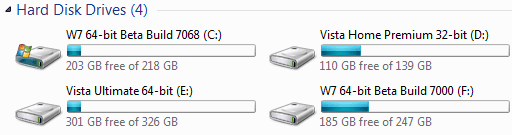
This is a little tip I learned many moons ago...
Right click on your "C" drive and select properties (you can select rename instead)
In the Name box give it a name. (Example: Win7-64)
The point of naming your "C" drive?
This tip of renaming is also good with removable USB drives. (I like to rename them by Brandname) This name stays even if you remove the device, when you plug it back in the name shows with the drive letter that windows assigns (helps me in my feeble mindlessness)
The only type of physical drive you can't rename that I know of is CD/DVD drives
Right click on your "C" drive and select properties (you can select rename instead)
In the Name box give it a name. (Example: Win7-64)
The point of naming your "C" drive?
- If you dual boot you will always know what is on that drive so you'll not make a mistake and format it

- If you boot from a VHD, makes it nice to know at a glance which drive is the host "C" drive
- If you use Diskpart to work with a drive you can use the command: list volume and the name will be shown under the label column (again helps you avoid a mistake)
This tip of renaming is also good with removable USB drives. (I like to rename them by Brandname) This name stays even if you remove the device, when you plug it back in the name shows with the drive letter that windows assigns (helps me in my feeble mindlessness)
The only type of physical drive you can't rename that I know of is CD/DVD drives
My Computer
- Computer type
- PC/Desktop
- Computer Manufacturer/Model Number
- Custom
- OS
- Windows 7 Ultimate x64
- CPU
- AMD A10-7850 Quad Core 3.7 GHz
- Motherboard
- MSI MS-7900
- Memory
- 16 GB
- Graphics Card(s)
- MSI Radeon R7 250 OC Crossfired with A10 AMD Radeon R7
- Monitor(s) Displays
- Samsung SyncMaster XL2370HD, ViewSonic VA1912wb
- Screen Resolution
- 1920*1080, 1440*900
- Hard Drives
- 128 GB SSD
512 GB SSD
500 GB HDD
- PSU
- Corsair CX500
- Case
- Rosewill THOR V2 BLACK
- Keyboard
- Logitech G15
- Mouse
- CMSTORM MS2K
- Internet Speed
- ATT U-Verse
- Antivirus
- Microsoft Security Essentials, MalwareBytes
- Browser
- Firefox (lastest stable) with NoScript
- Other Info
- Just a humdrum little system.




 *renames it to the same