Lost Files after Win7 Upgrade

KenPascoe

New member
Local time
3:57 AM
Messages
10
Location
Geelong, Australia
Howdy All

I have just done the upgrade from Win7RC to Win7 Professional.

My laptop has two internal hard drives - C where the operating system and software is, and a larger D (500GB) where all my data is.

The installation onto C went fine. After re-start, I am, horrified to find that all the FILES in my folder tree in and under d:\My Documents are missing. In My Computer, the Drive shows as 65GB free on 465GB which means the files are probably still there. They're not hidden, I show hidden files and created a hidden file just to be sure. I tried taking ownership of one of the sub folders (don't want to make wholesale changes to the entire MyDocs folder in case I destroy an recoverability. No change.

To clarify - I can navigate my way through the entire folder tree - there are just no files in there anywhere apart from the odd ini file (such as picasa.ini)

There is only one account on the laptop, it's an Administrator account. There are other folders on the D drive - the contents of those folders are visible and accessible.

The only difference I can think of with the d:\My Documents folder is that it was part of the "Documents" library.

Help!

Any assistance greatly appreciated.

Regards, Ken
 

My Computer

Computer Manufacturer/Model Number
HP 2530p
OS
Win7
Download an Ubuntu live cd and use it to see if your data can be salvaged, then clean install 7. Upgrades are useless and cause strange issues.
 

My Computer

Computer Manufacturer/Model Number
Sony Vaio Z46GDU
OS
Windows 7 Ultimate x86-64
CPU
[email protected] 1066MHz FSB
Motherboard
Sony branded
Memory
6GB DDR3 1066MHz
Graphics Card(s)
9300M GS 256MB Dedicated (Speed) + Intel4500MHD (Stamina)
Sound Card
Realtek HD Audio
Monitor(s) Displays
13.1' WXGA
Screen Resolution
1600x900
Hard Drives
320GB 7200RPM w/ 16MB cache
Internet Speed
1MB/s
My machine doesn't have a CD drive at all. It's a laptop with two internal drives.
 

My Computer

Computer Manufacturer/Model Number
HP 2530p
OS
Win7

My Computer

Computer Manufacturer/Model Number
* BFK Customs *
OS
W 7 64-bit Ultimate
CPU
Intel Q9550 Yorkfield
Motherboard
ASUS P5Q Pro
Memory
8GB Dominator 8500C5D
Graphics Card(s)
ATI : XFX 5870
Sound Card
Realtek HD Audio 7-1
Monitor(s) Displays
1x 47" LCD HDMI & 3x 26" LCD HDMI
Screen Resolution
1920x1080P & 1920x1200
Hard Drives
1x 80GB Intel X25-M G2 SSD : 1x 500GB & 1x 640GB WD Caviar Black(s)
PSU
Corsair 620HX
Case
Cooler Master RC-690
Cooling
Tuniq Tower 120, 2x 140mm and 3x 120mm case fans
Keyboard
Microsoft 500
Mouse
Razer Diamondback 3G
Internet Speed
14 Mb/s
Other Info
1x Koutech 3Gb/s SATA HDD Hot Swap Rack
If your machine has a DVD drive it will work too.
 

My Computer

Computer Manufacturer/Model Number
Sony Vaio Z46GDU
OS
Windows 7 Ultimate x86-64
CPU
[email protected] 1066MHz FSB
Motherboard
Sony branded
Memory
6GB DDR3 1066MHz
Graphics Card(s)
9300M GS 256MB Dedicated (Speed) + Intel4500MHD (Stamina)
Sound Card
Realtek HD Audio
Monitor(s) Displays
13.1' WXGA
Screen Resolution
1600x900
Hard Drives
320GB 7200RPM w/ 16MB cache
Internet Speed
1MB/s
Hi Ken, Welcome to seven forums.

Hopefully this is just a simple permissions issue :)

In Explorer

Right click on the drive in question and click permissions go to the advanced dialogue and the ownership tab and give yourself ownership of the drive.

Ok and let the permissions set on the drive

Back on the permissions tab and give your user name full control of the drive

OK and let the permissions set on the drive

You may see some errors - make a note of these and continue through until completed. you may need to repeat the procedure on these folders individually

You may also have to switch off UAC to allow initial access to the drive, but I would recommend that you turn it back on afterwards, but of course this is your choice
 

My Computers

System One System Two

  • Computer type
    PC/Desktop
    Computer Manufacturer/Model Number
    ChillBlast - Custom to my design
    OS
    Windows 11 Pro x64 [Latest Release and Release Preview]
    CPU
    Ryzen 9 5950X, 3.8 - 5.2 MHz
    Motherboard
    Asus Prime X570-Pro
    Memory
    64GB [2 x 32GB] DDR4 3200MHz
    Graphics Card(s)
    4GB NVIDIA GEFORCE GTX 1650 Ti
    Sound Card
    On-board SPDIF to 5.1 System + HDMI [5.1 system]
    Monitor(s) Displays
    32" UHD 32 Bit HDR Monitor + 43" UHD 4K 32Bit HDR TV
    Screen Resolution
    2 x 3840 x 2160 @60Hz
    Hard Drives
    1TB M2 SSD OS, 500GB Fast Access SSD, 2 x 8TB Data + Various Externals from 1TB to 4TB, 10TB NAS
    PSU
    NZXT C750 80 PLUS Gold 750W Modular PSU
    Case
    Workstation Case [Matt Black]
    Cooling
    NZXT Kraken X63 280mm CPU Cooler +2x Quiet Case fans
    Keyboard
    Logitech Wireless MX Keys & K400 + others
    Mouse
    Logitech Wireless MX Master 3S
    Internet Speed
    920 MB Down 50 MB Up
    Antivirus
    BitDefender Total Security Pro
    Browser
    Chrome (always run latest Non-Beta)
    Other Info
    Also run ...
    Laptop - Quad 8GB - Windows 10 Pro x64
    Nexus 7 Android tablet x2
    Samsung 10.2" tablet
    Blackview TAB 8 4G Android Tablet c/w Keyboard
    Wacom Intuos Pro Medium Pen Pad
    Wacom Intuos Pro Small Pen Pad
    Wacom Expresskeys Remote
    Loopdeck+ Graphics Controller
    Shuttle Pro v2 Control
  • Computer type
    Laptop
    System Manufacturer/Model Number
    Dell XPS 17 10750H
    OS
    Windows 11 Pro x64 Latest RP
    CPU
    Intel I7 10750H 5.0GHz
    Motherboard
    Dell XPS
    Memory
    32GB [2x16GB] DDR4 2933 MHz
    Graphics Card(s)
    nVidia GTX1650Ti 4 GB GDDR6
    Sound Card
    Stock [Realtek] 4 Speaker
    Monitor(s) Displays
    17" IPS UHD+ Infinity Edge Touchscreen
    Screen Resolution
    3840 x 2400
    Hard Drives
    2TB M2 NVMe, 4TB External + various 500GB & 1TB External NVMe (also have access to spinner HDD from
    PSU
    Stock
    Case
    Stock XPS Aluminium & Carbon Fibre
    Cooling
    Stock - Active Fan Control
    Keyboard
    Backlit + Various Logitech
    Mouse
    Stock Track Pad + Logitech MX Trackball
    Internet Speed
    72 MB Down 18MB Up
    Browser
    Chrome
    Other Info
    Also run ...
    Laptop - Quad 8GB - Windows 10 Pro x64
    Nexus 7 Android tablet x2
    10.2" tablet
    Sony Z3 Android Smartphone
    Wacom Intuos Pro Medium Pen Pad
    Wacom Intuos Pro Small Pen Pad
    Wacom Expresskeys Remote
    Loopdeck+ Graphics Controller
    Shuttle Pro v2 Control Pad
    10TB NAS
Sorry - No optical drive at all. Just two internal hard drives.

The problem is not hidden files. I always show hidden files. To be sure I created a text file in Mydocs and then marked it as hidden - it shows.

Thanks for the replies by the way.
 

My Computer

Computer Manufacturer/Model Number
HP 2530p
OS
Win7
Hi Ken, Welcome to seven forums.

Hopefully this is just a simple permissions issue :)

In Explorer

Right click on the drive in question and click permissions go to the advanced dialogue and the ownership tab and give yourself ownership of the drive.

Ok and let the permissions set on the drive

Back on the permissions tab and give your user name full control of the drive

OK and let the permissions set on the drive

You may see some errors - make a note of these and continue through until completed. you may need to repeat the procedure on these folders individually

You may also have to switch off UAC to allow initial access to the drive, but I would recommend that you turn it back on afterwards, but of course this is your choice


Did you see Barman58's s post above?
 

My Computer

Computer Manufacturer/Model Number
* BFK Customs *
OS
W 7 64-bit Ultimate
CPU
Intel Q9550 Yorkfield
Motherboard
ASUS P5Q Pro
Memory
8GB Dominator 8500C5D
Graphics Card(s)
ATI : XFX 5870
Sound Card
Realtek HD Audio 7-1
Monitor(s) Displays
1x 47" LCD HDMI & 3x 26" LCD HDMI
Screen Resolution
1920x1080P & 1920x1200
Hard Drives
1x 80GB Intel X25-M G2 SSD : 1x 500GB & 1x 640GB WD Caviar Black(s)
PSU
Corsair 620HX
Case
Cooler Master RC-690
Cooling
Tuniq Tower 120, 2x 140mm and 3x 120mm case fans
Keyboard
Microsoft 500
Mouse
Razer Diamondback 3G
Internet Speed
14 Mb/s
Other Info
1x Koutech 3Gb/s SATA HDD Hot Swap Rack
Sorry - No optical drive at all. Just two internal hard drives.

The problem is not hidden files. I always show hidden files. To be sure I created a text file in Mydocs and then marked it as hidden - it shows.

Thanks for the replies by the way.

Try the permissions advice. If that fails you can try Ubuntu via USB - is that how you installed 7?
 

My Computer

Computer Manufacturer/Model Number
Sony Vaio Z46GDU
OS
Windows 7 Ultimate x86-64
CPU
[email protected] 1066MHz FSB
Motherboard
Sony branded
Memory
6GB DDR3 1066MHz
Graphics Card(s)
9300M GS 256MB Dedicated (Speed) + Intel4500MHD (Stamina)
Sound Card
Realtek HD Audio
Monitor(s) Displays
13.1' WXGA
Screen Resolution
1600x900
Hard Drives
320GB 7200RPM w/ 16MB cache
Internet Speed
1MB/s
Hi Barman58

I tried your suggestion on a folder in the tree:
(a) because it's only folders/files in and under d:\my documents that are affected;
(b) I don't want to make wholesale changes until I have something I think is going to work.

So I did it on d:\my documents\V Australia\ correspondence (which has several files and folders in it).

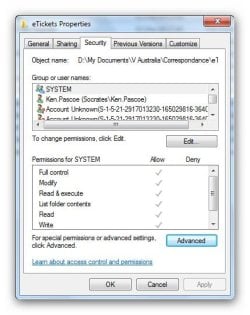
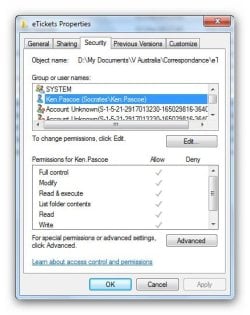
Right Click, Properties, Security, Advanced, Owner, Edit, Selected My Username, Ticked "Replace Owner on sub containers and objects", Ok, Warning Message - Ok, Ok, Ok, Right click on Folder, properties, security, looking at permissions - I have everything from Full Control through to Write (but not Special Permission).

Also - there are three "Account Unknown" entries in the Group or usernames box that I haven't seen before.

This hasn't fixed anything unfortunately - I can click into Correspondence, see the folders in it, click into those folders, create files in the folders and delete them, etc.

Again, thanks for the reply - any other suggestions?


Do you believe I should attempt what you've suggested on the whole drive? I have two potential last ditch recoveries:

- I made an Acronis Tru-Image of the C drive before the upgrade - I could restore that back to Win7RC and hope the files are accessible;
- I could remove the drive and attached it externally to another machine. Removal is a pain, last time it was done the motherboard ended up fried (it was done by a HP technician, would you believe?)

As such modifying the permissions of the whole drive (or just the MyDOcs folder, which is the only folder tree affected by this problem) worries me in that it might compromise my last ditch recovery options - horrible as they are ...

Ken
 

My Computer

Computer Manufacturer/Model Number
HP 2530p
OS
Win7
Hi ken What are the existing Ownership / permissions on one of these folders? can you possibly post some snips of the dialogues? (it's ok to blank out any personal info;) ),

The other thing you could try is to copy one of the folders to a location where you do have correct access, the basic rule is that permissions are transferred with a move but when copied take on the permissions of the folder copied to.

Another thing that will often help here is the hidden administrator account - if you enable this it should override any confused permission sets and allow you to work with these files, in fact with faulty permissions this is often the only way to work with the files
 

My Computers

System One System Two

  • Computer type
    PC/Desktop
    Computer Manufacturer/Model Number
    ChillBlast - Custom to my design
    OS
    Windows 11 Pro x64 [Latest Release and Release Preview]
    CPU
    Ryzen 9 5950X, 3.8 - 5.2 MHz
    Motherboard
    Asus Prime X570-Pro
    Memory
    64GB [2 x 32GB] DDR4 3200MHz
    Graphics Card(s)
    4GB NVIDIA GEFORCE GTX 1650 Ti
    Sound Card
    On-board SPDIF to 5.1 System + HDMI [5.1 system]
    Monitor(s) Displays
    32" UHD 32 Bit HDR Monitor + 43" UHD 4K 32Bit HDR TV
    Screen Resolution
    2 x 3840 x 2160 @60Hz
    Hard Drives
    1TB M2 SSD OS, 500GB Fast Access SSD, 2 x 8TB Data + Various Externals from 1TB to 4TB, 10TB NAS
    PSU
    NZXT C750 80 PLUS Gold 750W Modular PSU
    Case
    Workstation Case [Matt Black]
    Cooling
    NZXT Kraken X63 280mm CPU Cooler +2x Quiet Case fans
    Keyboard
    Logitech Wireless MX Keys & K400 + others
    Mouse
    Logitech Wireless MX Master 3S
    Internet Speed
    920 MB Down 50 MB Up
    Antivirus
    BitDefender Total Security Pro
    Browser
    Chrome (always run latest Non-Beta)
    Other Info
    Also run ...
    Laptop - Quad 8GB - Windows 10 Pro x64
    Nexus 7 Android tablet x2
    Samsung 10.2" tablet
    Blackview TAB 8 4G Android Tablet c/w Keyboard
    Wacom Intuos Pro Medium Pen Pad
    Wacom Intuos Pro Small Pen Pad
    Wacom Expresskeys Remote
    Loopdeck+ Graphics Controller
    Shuttle Pro v2 Control
  • Computer type
    Laptop
    System Manufacturer/Model Number
    Dell XPS 17 10750H
    OS
    Windows 11 Pro x64 Latest RP
    CPU
    Intel I7 10750H 5.0GHz
    Motherboard
    Dell XPS
    Memory
    32GB [2x16GB] DDR4 2933 MHz
    Graphics Card(s)
    nVidia GTX1650Ti 4 GB GDDR6
    Sound Card
    Stock [Realtek] 4 Speaker
    Monitor(s) Displays
    17" IPS UHD+ Infinity Edge Touchscreen
    Screen Resolution
    3840 x 2400
    Hard Drives
    2TB M2 NVMe, 4TB External + various 500GB & 1TB External NVMe (also have access to spinner HDD from
    PSU
    Stock
    Case
    Stock XPS Aluminium & Carbon Fibre
    Cooling
    Stock - Active Fan Control
    Keyboard
    Backlit + Various Logitech
    Mouse
    Stock Track Pad + Logitech MX Trackball
    Internet Speed
    72 MB Down 18MB Up
    Browser
    Chrome
    Other Info
    Also run ...
    Laptop - Quad 8GB - Windows 10 Pro x64
    Nexus 7 Android tablet x2
    10.2" tablet
    Sony Z3 Android Smartphone
    Wacom Intuos Pro Medium Pen Pad
    Wacom Intuos Pro Small Pen Pad
    Wacom Expresskeys Remote
    Loopdeck+ Graphics Controller
    Shuttle Pro v2 Control Pad
    10TB NAS

My Computer

Computer Manufacturer/Model Number
Sony Vaio Z46GDU
OS
Windows 7 Ultimate x86-64
CPU
[email protected] 1066MHz FSB
Motherboard
Sony branded
Memory
6GB DDR3 1066MHz
Graphics Card(s)
9300M GS 256MB Dedicated (Speed) + Intel4500MHD (Stamina)
Sound Card
Realtek HD Audio
Monitor(s) Displays
13.1' WXGA
Screen Resolution
1600x900
Hard Drives
320GB 7200RPM w/ 16MB cache
Internet Speed
1MB/s
The Win7 install was a screwup from the beginning. Since I don't have a DVD drive, I made a boot USB stick. I have another HP laptop with a similar config and upgraded that earlier in the day.

Older Laptop

That machine has only one hard drive, no DVD, but it does have a base station that has a DVD drive in it. I booted off the DVD and ran the install - but it stopped long after the GUI launched with "Required DVD/CD device driver missing" and the install would not continue. I spent most of yesterday hunting for a solution, found lots of references to this message, but none of them seemed germane. I chased down current DVD and chipset drivers from HP and stuck them on the USB, pointing the install at them - to no avail.

In desperation yesterday afternoon I found a reference to editing a file on the install disk that allows the Win7 install to be an upgrade over the RC. So I ended up copying the files across from the USB stick, modifying the relevant ini file, and running the install that way - first to my spare laptop, which is running fine with no files missing that I can detect.

So I did the same to my working laptop - I was running tight on time and an Upgrade where all my existing software and setting would be preserved seemed to good to be true (and it seems, it was).

And here I am.


Ken
 

My Computer

Computer Manufacturer/Model Number
HP 2530p
OS
Win7
Hi Barman58

Ok, logged in as the Administrator (no password). No files.

Damn, I really thought that was going to work.

Again, it's only files in the My Documents Folder. There are a couple of other folders off the D drive where I have some stuff stored - all Ok in there.

Damn, Damn, Damn.

Not sure what screenshots would be useful - here are three, let me know what you need to see. I have a gotomypc account, so could possible give you access through that. Or a VOIP call if that suits.

Ken

Snap1.jpg

snap2.jpg

snap3.jpg


Ken
 

My Computer

Computer Manufacturer/Model Number
HP 2530p
OS
Win7
The upgrade broke a lot of files - I'd salvage your files and then reinstall 7.
 

My Computer

Computer Manufacturer/Model Number
Sony Vaio Z46GDU
OS
Windows 7 Ultimate x86-64
CPU
[email protected] 1066MHz FSB
Motherboard
Sony branded
Memory
6GB DDR3 1066MHz
Graphics Card(s)
9300M GS 256MB Dedicated (Speed) + Intel4500MHD (Stamina)
Sound Card
Realtek HD Audio
Monitor(s) Displays
13.1' WXGA
Screen Resolution
1600x900
Hard Drives
320GB 7200RPM w/ 16MB cache
Internet Speed
1MB/s
Hey Frostmourne

More that than - the upgrade broke every single file in the My Documents structure - a good 300GB worth.

Downloading the Ubantu ISO for the USB stick at the moment ...

Part of my problem is Upgrading. If I could have installed from the USB boot and done a fresh install I would have. Of course now even if I go down that road I have no idea whether I will regain access to my files, which are all important - work and play wise.

Ken
 

My Computer

Computer Manufacturer/Model Number
HP 2530p
OS
Win7
Hey Frostmourne

More that than - the upgrade broke every single file in the My Documents structure - a good 300GB worth.

Downloading the Ubantu ISO for the USB stick at the moment ...

Part of my problem is Upgrading. If I could have installed from the USB boot and done a fresh install I would have. Of course now even if I go down that road I have no idea whether I will regain access to my files, which are all important - work and play wise.

Ken

See if Ubuntu can salvage your files, then buy a cheap DVD burner. Assuming you have a spare SATA port and power cable, the LG GH 22 series are a good buy. They don't have Bluebird either.
 

My Computer

Computer Manufacturer/Model Number
Sony Vaio Z46GDU
OS
Windows 7 Ultimate x86-64
CPU
[email protected] 1066MHz FSB
Motherboard
Sony branded
Memory
6GB DDR3 1066MHz
Graphics Card(s)
9300M GS 256MB Dedicated (Speed) + Intel4500MHD (Stamina)
Sound Card
Realtek HD Audio
Monitor(s) Displays
13.1' WXGA
Screen Resolution
1600x900
Hard Drives
320GB 7200RPM w/ 16MB cache
Internet Speed
1MB/s
OK looking at the last snip -

the interesting thing here is the administrator's group having two entries.

The special permissions one may be the key here - if you check this you may find some Deny permissions set - if so - as deny permissions override allow permissions and the administrators group is a powerful one such permissions here may be causing the problems.

The unknown accounts are remnants of your previous installs and can be removed.

As this is a data only drive what I would actually do here, for testing, is break the inherited status of the permissions, (advanced permissions dialogue, change button),
and remove all permissions.

If you then add full control to yourself, the administrators, and system, this should clear the blockage


I have to go sleep shortly, (1:30 am here), but will return in AM to see if you have had any progress

Edit
forgot to add that the above is best performed as the full admin
 

My Computers

System One System Two

  • Computer type
    PC/Desktop
    Computer Manufacturer/Model Number
    ChillBlast - Custom to my design
    OS
    Windows 11 Pro x64 [Latest Release and Release Preview]
    CPU
    Ryzen 9 5950X, 3.8 - 5.2 MHz
    Motherboard
    Asus Prime X570-Pro
    Memory
    64GB [2 x 32GB] DDR4 3200MHz
    Graphics Card(s)
    4GB NVIDIA GEFORCE GTX 1650 Ti
    Sound Card
    On-board SPDIF to 5.1 System + HDMI [5.1 system]
    Monitor(s) Displays
    32" UHD 32 Bit HDR Monitor + 43" UHD 4K 32Bit HDR TV
    Screen Resolution
    2 x 3840 x 2160 @60Hz
    Hard Drives
    1TB M2 SSD OS, 500GB Fast Access SSD, 2 x 8TB Data + Various Externals from 1TB to 4TB, 10TB NAS
    PSU
    NZXT C750 80 PLUS Gold 750W Modular PSU
    Case
    Workstation Case [Matt Black]
    Cooling
    NZXT Kraken X63 280mm CPU Cooler +2x Quiet Case fans
    Keyboard
    Logitech Wireless MX Keys & K400 + others
    Mouse
    Logitech Wireless MX Master 3S
    Internet Speed
    920 MB Down 50 MB Up
    Antivirus
    BitDefender Total Security Pro
    Browser
    Chrome (always run latest Non-Beta)
    Other Info
    Also run ...
    Laptop - Quad 8GB - Windows 10 Pro x64
    Nexus 7 Android tablet x2
    Samsung 10.2" tablet
    Blackview TAB 8 4G Android Tablet c/w Keyboard
    Wacom Intuos Pro Medium Pen Pad
    Wacom Intuos Pro Small Pen Pad
    Wacom Expresskeys Remote
    Loopdeck+ Graphics Controller
    Shuttle Pro v2 Control
  • Computer type
    Laptop
    System Manufacturer/Model Number
    Dell XPS 17 10750H
    OS
    Windows 11 Pro x64 Latest RP
    CPU
    Intel I7 10750H 5.0GHz
    Motherboard
    Dell XPS
    Memory
    32GB [2x16GB] DDR4 2933 MHz
    Graphics Card(s)
    nVidia GTX1650Ti 4 GB GDDR6
    Sound Card
    Stock [Realtek] 4 Speaker
    Monitor(s) Displays
    17" IPS UHD+ Infinity Edge Touchscreen
    Screen Resolution
    3840 x 2400
    Hard Drives
    2TB M2 NVMe, 4TB External + various 500GB & 1TB External NVMe (also have access to spinner HDD from
    PSU
    Stock
    Case
    Stock XPS Aluminium & Carbon Fibre
    Cooling
    Stock - Active Fan Control
    Keyboard
    Backlit + Various Logitech
    Mouse
    Stock Track Pad + Logitech MX Trackball
    Internet Speed
    72 MB Down 18MB Up
    Browser
    Chrome
    Other Info
    Also run ...
    Laptop - Quad 8GB - Windows 10 Pro x64
    Nexus 7 Android tablet x2
    10.2" tablet
    Sony Z3 Android Smartphone
    Wacom Intuos Pro Medium Pen Pad
    Wacom Intuos Pro Small Pen Pad
    Wacom Expresskeys Remote
    Loopdeck+ Graphics Controller
    Shuttle Pro v2 Control Pad
    10TB NAS
See if Ubuntu can salvage your files, then buy a cheap DVD burner. Assuming you have a spare SATA port and power cable, the LG GH 22 series are a good buy. They don't have Bluebird either.

That assumes the problem I'm having with the win7 install relates to a lack of burner. the other HP laptop I have has an external burner and is giving me this same missing DVD/CD device driver error. But yes, once I recover my files I will (one way or another) do a complete blitz of the C drive and a fresh Win7 install.

Ken
 

My Computer

Computer Manufacturer/Model Number
HP 2530p
OS
Win7
See if Ubuntu can salvage your files, then buy a cheap DVD burner. Assuming you have a spare SATA port and power cable, the LG GH 22 series are a good buy. They don't have Bluebird either.

That assumes the problem I'm having with the win7 install relates to a lack of burner. the other HP laptop I have has an external burner and is giving me this same missing DVD/CD device driver error. But yes, once I recover my files I will (one way or another) do a complete blitz of the C drive and a fresh Win7 install.

Ken

External drives have issues, not so much internal (or at all).
 

My Computer

Computer Manufacturer/Model Number
Sony Vaio Z46GDU
OS
Windows 7 Ultimate x86-64
CPU
[email protected] 1066MHz FSB
Motherboard
Sony branded
Memory
6GB DDR3 1066MHz
Graphics Card(s)
9300M GS 256MB Dedicated (Speed) + Intel4500MHD (Stamina)
Sound Card
Realtek HD Audio
Monitor(s) Displays
13.1' WXGA
Screen Resolution
1600x900
Hard Drives
320GB 7200RPM w/ 16MB cache
Internet Speed
1MB/s
Back
Top