Solved Windows 7 to Windows XP Permissions Help

  • Thread starter Thread starter mads
  • Start date Start date
M

mads

Guest
Hi.
I have 3 computers under the same workgroup with a Shared folder.
  1. Server (Windows 7)
  2. User 1 (Windows Xp)
  3. User 2 (Windows Xp)
User 1 and 2 Have the shared folder as a mapped network drive.

Now what we need is: inside the Shared folder there is another folder called Admin which I only want User 1 to access and not User 2.

How can i configure that from the server (windows 7)
 
Hi.
I have 3 computers under the same workgroup with a Shared folder.
  1. Server (Windows 7)
  2. User 1 (Windows Xp)
  3. User 2 (Windows Xp)
User 1 and 2 Have the shared folder as a mapped network drive.

Now what we need is: inside the Shared folder there is another folder called Admin which I only want User 1 to access and not User 2.

How can i configure that from the server (windows 7)

Two groups

Shared folder group ( has user 1, 2 as members) gives access to shared.
Admin group (has user one only)gives user one only access to admin.

Or
Just dont inherit parent rights, and change admin folder rights

Ken
 

My Computer My Computer

Computer Manufacturer/Model Number
HP Pavillion dv-7 1005 Tx
OS
Win 8 Release candidate 8400
CPU
[email protected]
Memory
4 gigs
Graphics Card(s)
Nvidia 9600M
Sound Card
HD built-in
Monitor(s) Displays
17" Wxga
Screen Resolution
1440x900
Cooling
none
Internet Speed
45Mb down 5Mb up
Thank you Ken for your reply, I get what you mean.

Forgive my question but how to create the two groups?
I went to Computer->Manage-> Local Users and Groups-> Groups but when creating new group cant find the Lan Users.

Sorry I am new to the networking thing..
 
Please note that the Windows 7 computer has Windows 7 Ultimatum on it... not windows 7 server
 
Hi Mads,

To answer your question about creating groups:
Type lusrmgr.msc into the RUN command to open the console where you can add new users and groups.
Just right click in the respective area and follow the prompts to add.
Let us know if you get stuck.
:)

PS Because you have windows 7 ultimate, you can also right click on COMPUTER and select MANAGE to open the Management Console, Users and Groups is here too.
 

My Computer My Computer

Computer Manufacturer/Model Number
Custom Hack job
OS
Windows 7 Ultimate 64 bit
CPU
Intel(R) Core(TM)2 Quad CPU Q8200 @ 2.33GHz
Motherboard
GigaByte EP45-UD3
Memory
8 GB Kingston
Graphics Card(s)
Nvidia GeForce 9600GT
Sound Card
Soundblaster Audigy
Monitor(s) Displays
AOC x2 22"
Hard Drives
2 x Samsung 500GB (RAID)
2 x Samsung 2TB
1 x WD Green 2TB
1 x Seagate 1TB
1 x Samsung 500GB
PSU
Thermaltake QFan 750W
Case
CM Scout Gaming
Cooling
Coolermaster V10
Keyboard
Microsoft Wireless Keyboard 1000
Mouse
Microsoft Wireless Optical 2000
Internet Speed
320
Other Info
Winfast PVR2000CP
LG DVD-RAM DVD/RW/DL Super Multi
Linksys WMP300Nx2 Wireless Adapter
Thank you for your reply, but i have no problem in finding the place to add the group
the thing is when i try to add the group, I am trying to add the members of the group but I can't find User1 and User 2 computers coz the only available location is the server not the workgroup.
 
Thank you for your reply, but i have no problem in finding the place to add the group
the thing is when i try to add the group, I am trying to add the members of the group but I can't find User1 and User 2 computers coz the only available location is the server not the workgroup.

AH... sorry I misunderstood. :confused:

Are they local users or users in AD? And are you trying to deny access to the computer used by user 2 or just user 2 themselves?
 

My Computer My Computer

Computer Manufacturer/Model Number
Custom Hack job
OS
Windows 7 Ultimate 64 bit
CPU
Intel(R) Core(TM)2 Quad CPU Q8200 @ 2.33GHz
Motherboard
GigaByte EP45-UD3
Memory
8 GB Kingston
Graphics Card(s)
Nvidia GeForce 9600GT
Sound Card
Soundblaster Audigy
Monitor(s) Displays
AOC x2 22"
Hard Drives
2 x Samsung 500GB (RAID)
2 x Samsung 2TB
1 x WD Green 2TB
1 x Seagate 1TB
1 x Samsung 500GB
PSU
Thermaltake QFan 750W
Case
CM Scout Gaming
Cooling
Coolermaster V10
Keyboard
Microsoft Wireless Keyboard 1000
Mouse
Microsoft Wireless Optical 2000
Internet Speed
320
Other Info
Winfast PVR2000CP
LG DVD-RAM DVD/RW/DL Super Multi
Linksys WMP300Nx2 Wireless Adapter
Yes trying to deny access to the computer used by user 2 sorry i must have explained it better.
I have one wireless router and 3 computers.
1 Windows 7 (I shared a folder and mapped network drive from Computer1 (User1-XP) and Computer2 (User2-XP)
 
Ok, I'm with you now. :)
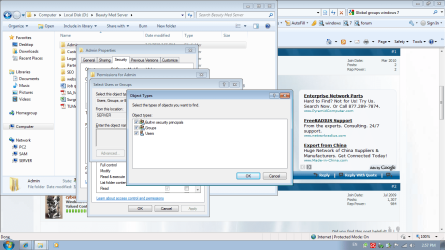
Right click on the folder and under properties / security. If you click the add button and then 'object types' (the top button) can you select Computers here?
 

My Computer My Computer

Computer Manufacturer/Model Number
Custom Hack job
OS
Windows 7 Ultimate 64 bit
CPU
Intel(R) Core(TM)2 Quad CPU Q8200 @ 2.33GHz
Motherboard
GigaByte EP45-UD3
Memory
8 GB Kingston
Graphics Card(s)
Nvidia GeForce 9600GT
Sound Card
Soundblaster Audigy
Monitor(s) Displays
AOC x2 22"
Hard Drives
2 x Samsung 500GB (RAID)
2 x Samsung 2TB
1 x WD Green 2TB
1 x Seagate 1TB
1 x Samsung 500GB
PSU
Thermaltake QFan 750W
Case
CM Scout Gaming
Cooling
Coolermaster V10
Keyboard
Microsoft Wireless Keyboard 1000
Mouse
Microsoft Wireless Optical 2000
Internet Speed
320
Other Info
Winfast PVR2000CP
LG DVD-RAM DVD/RW/DL Super Multi
Linksys WMP300Nx2 Wireless Adapter
No There are no computers
There is:
- Built in security principles
- Groups
- Users
 

Attachments

  • screenshot.png
    screenshot.png
    93.4 KB · Views: 72
Qh yes, of course... because there is no AD (I.E. your server is WIN7 not S2008). *bumps head*, I totally forgot about that! My crap excuse is that I'm travelling so I couldn't test first like I like too (i.e. My travel netbook is on XP).

So.... you can't deny the computer because there is no AD control you need to control the access locally and per user.

ZigZag understood from the start! Props there!

When the users connect, you need to have password sharing enabled (i.e. they must put in a password to enter the shared computer (they can always save this so they need not enter it next time). You now need 2 local users on the Win7 computer, e.g. call them user1 and user2 with their own respective passwords. Don't make them ADMIN users.

Note that you also need to remap the drives and use these logins and passwords for the drive mapping.

Now user1 has access to everything, so on the outside folder give them complete access (or read only as you desire, including access to the special folder inside). Repeat this action for user2. Now go to the special folder that you only want user1 to have access to. right click on it and select properties/security. On the permissions tab, have a look and write down the current permission settings (this is an important reducndancy step should something you do fail later). Now look for a tickbox to inherit parent permissions and untick this. Now give permissions only to those users that you want to access this folder. Be aware that you probably need SYSTEM and CREATOR OWNER on there.

Like all good plans, switch user to user1 on the WIN7 box and test that they can locally access what they are supposed to. Repeat with User2. Now remap the drives with the new passwords and give the passwords out to the users.

This should fix your issue.
 

My Computer My Computer

Computer Manufacturer/Model Number
Custom Hack job
OS
Windows 7 Ultimate 64 bit
CPU
Intel(R) Core(TM)2 Quad CPU Q8200 @ 2.33GHz
Motherboard
GigaByte EP45-UD3
Memory
8 GB Kingston
Graphics Card(s)
Nvidia GeForce 9600GT
Sound Card
Soundblaster Audigy
Monitor(s) Displays
AOC x2 22"
Hard Drives
2 x Samsung 500GB (RAID)
2 x Samsung 2TB
1 x WD Green 2TB
1 x Seagate 1TB
1 x Samsung 500GB
PSU
Thermaltake QFan 750W
Case
CM Scout Gaming
Cooling
Coolermaster V10
Keyboard
Microsoft Wireless Keyboard 1000
Mouse
Microsoft Wireless Optical 2000
Internet Speed
320
Other Info
Winfast PVR2000CP
LG DVD-RAM DVD/RW/DL Super Multi
Linksys WMP300Nx2 Wireless Adapter
Wow worked like a charm
Thx for your help.
Have fun in singapore.
If you come by Thailand Holla...
 
Wow worked like a charm
Thx for your help.
Have fun in singapore.
If you come by Thailand Holla...

Brilliant! glad we got you working... but props to ZigZag for being right on top of it.

Bangkok is likely in the next 18 months, stick around on the forums and I'll give you a holla. :D
 

My Computer My Computer

Computer Manufacturer/Model Number
Custom Hack job
OS
Windows 7 Ultimate 64 bit
CPU
Intel(R) Core(TM)2 Quad CPU Q8200 @ 2.33GHz
Motherboard
GigaByte EP45-UD3
Memory
8 GB Kingston
Graphics Card(s)
Nvidia GeForce 9600GT
Sound Card
Soundblaster Audigy
Monitor(s) Displays
AOC x2 22"
Hard Drives
2 x Samsung 500GB (RAID)
2 x Samsung 2TB
1 x WD Green 2TB
1 x Seagate 1TB
1 x Samsung 500GB
PSU
Thermaltake QFan 750W
Case
CM Scout Gaming
Cooling
Coolermaster V10
Keyboard
Microsoft Wireless Keyboard 1000
Mouse
Microsoft Wireless Optical 2000
Internet Speed
320
Other Info
Winfast PVR2000CP
LG DVD-RAM DVD/RW/DL Super Multi
Linksys WMP300Nx2 Wireless Adapter
Network Access problems

Hi,
I have a Win 7 Ultimate PC with shared folders and two XP (one home, one Pro) wanting to access the shares on the & machine. I can see the 7 machine on the network, but can't access it. I am the only user with the same username and password on all three machines, but still no joy? Can you please assist?
 

My Computer My Computer

Computer Manufacturer/Model Number
Dell GX620
OS
Windows 7
CPU
2.8
Memory
4GB
Graphics Card(s)
Gigabyte9500
Monitor(s) Displays
Samsung 32" LCD
Hard Drives
80GB
1TB
Back
Top