How to remove a dual boot drive partition.

Malfunction

New member
Local time
11:03 AM
Messages
9
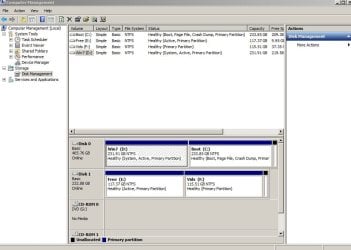
I have a HDD that is partitioned into 2 and each contains a dual boot WIN7 OS (both different ). I have backed up the latest one (that I wish to use) but other than successfully removing the dual boot option at startup I cannot find any way of reusing the older partition as a data partition.
It comes down, it seems, to that unwanted partition being a System partition although no longer the BOOT default.
Even with a external Acronis backup of the desired partition I'm loathe to just wipe the whole HDD and repartiition then recover from the archive. Why? Well.. having once lost everything to a seemingly sound backup I prefer to keep the active one on the HDD if it all possible.. If not I may be able to "test" it on another drive.. paranoid? who, me??
Any ideas? please.
.
 

My Computer My Computer

OS
Windows 7
Motherboard
ASUS
Memory
4 gig
Could you use the snipping tool and post a screen shot of your computer management screen for us to look at?
 

My Computer My Computer

Computer Manufacturer/Model Number
tw33k
OS
Windows 7 Ultimate (x64) SP1
CPU
Intel 3770k 4.6GHz
Motherboard
ASUS Maximus V Formula
Memory
8GB (2x 4GB) Crucial Ballistix
Graphics Card(s)
Sapphire 7950 (1060/1600)
Sound Card
On Board Realtek HD Audio
Monitor(s) Displays
27" Acer B273HU (via HDMI)
Screen Resolution
2048 x 1152
Hard Drives
Crucial M4 128GB
2TB WD Black
1TB Samsung F3 SATA
1TB WD Elite External
2TB WD USB 3.0
PSU
Corsair AX750 Gold
Case
Corsair Obsidian 800DW
Cooling
Corsair H100 (2x AP-121/2x UK-3000 push/pull)
Keyboard
Microsoft Wireless 5000
Mouse
Microsoft Wireless 5000
Internet Speed
5mb/s
Other Info
Logitech z-2300 2.1 speakers
Lamptron FC-5 v2
Could you use the snipping tool and post a screen shot of your computer management screen for us to look at?
What he is going to say is probably best but, what I did when I had a dual boot partition is that I formatted the drive that wanted for data then reinstall Windows 7
 

My Computer My Computer

Computer Manufacturer/Model Number
Compaq
OS
Windows 7 Ultimate 32-Bit (x86)
CPU
Intel Pentium Dual Core T3400
Motherboard
Wistron 3612
Memory
3GB DDR2
Graphics Card(s)
nVidia 9200M GE and Mobile Intel 4 Series Express Chipset
Sound Card
Conexant High Defininition SmartAudio 221
Screen Resolution
1366x768
Hard Drives
SAMSUNG HM251JI ATA 250GB
Internet Speed
160KBps
Could you use the snipping tool and post a screen shot of your computer management screen for us to look at?


Sure.. Hopefully the file is there now..

Thanks
 

Attachments

  • cms.jpg
    cms.jpg
    67.3 KB · Views: 172

My Computer My Computer

OS
Windows 7
Motherboard
ASUS
Memory
4 gig

My Computer My Computer

Computer Manufacturer/Model Number
* BFK Customs *
OS
W 7 64-bit Ultimate
CPU
Intel Q9550 Yorkfield
Motherboard
ASUS P5Q Pro
Memory
8GB Dominator 8500C5D
Graphics Card(s)
ATI : XFX 5870
Sound Card
Realtek HD Audio 7-1
Monitor(s) Displays
1x 47" LCD HDMI & 3x 26" LCD HDMI
Screen Resolution
1920x1080P & 1920x1200
Hard Drives
1x 80GB Intel X25-M G2 SSD : 1x 500GB & 1x 640GB WD Caviar Black(s)
PSU
Corsair 620HX
Case
Cooler Master RC-690
Cooling
Tuniq Tower 120, 2x 140mm and 3x 120mm case fans
Keyboard
Microsoft 500
Mouse
Razer Diamondback 3G
Internet Speed
14 Mb/s
Other Info
1x Koutech 3Gb/s SATA HDD Hot Swap Rack
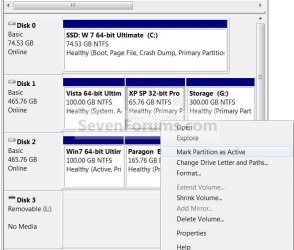
As Barefoot says, you'll need to mark C active then boot into Win7 DVD to run Startup Repair up to 3 separate time with reboots to write the MBR to D.

This will allow you to format C for data.

If you want to recover the space from C into D so that D is in the preferred lower HD address, with a new data partition to it's right, post back and we will give you the steps.
 
Thanks

Yes..that worked..!:)
I had to boot into repair 3 times before it actually sorted out the booting requirements. I think users should note that when the setup screen says, after selecting Repair, that it may boot the system a few times that in fact it means YOU may have to make it so this.. It would be possible that the unwary would think the first failed attempt was indicating total failure. Never the less, this latest installation/repair interface beats the heck out of the older "Press F8" to continue, or go to the Command line to do Dos type repairs etc, for the uniniatiated.
It seems to me that on a dual boot sytem, partucularly 2 partitions on the one HDD, that the second installed OS is somehow dependant on the first.. I guess this is where the "system" flag comes in?
Anyway, all's well and I've learned alot.
Thanks
 

My Computer My Computer

OS
Windows 7
Motherboard
ASUS
Memory
4 gig
Howdy.


The second OS installed "shares" the boot files with the first OS installed, that's why it is called the "System Partition" and can not be removed/deleted; it takes three separate repairs to move the boot files, that's why we tell people that it "may" take 3 repairs to complete.

I'm very pleased that sorted it for you and thanks for letting us know it worked.
 

My Computer My Computer

Computer Manufacturer/Model Number
* BFK Customs *
OS
W 7 64-bit Ultimate
CPU
Intel Q9550 Yorkfield
Motherboard
ASUS P5Q Pro
Memory
8GB Dominator 8500C5D
Graphics Card(s)
ATI : XFX 5870
Sound Card
Realtek HD Audio 7-1
Monitor(s) Displays
1x 47" LCD HDMI & 3x 26" LCD HDMI
Screen Resolution
1920x1080P & 1920x1200
Hard Drives
1x 80GB Intel X25-M G2 SSD : 1x 500GB & 1x 640GB WD Caviar Black(s)
PSU
Corsair 620HX
Case
Cooler Master RC-690
Cooling
Tuniq Tower 120, 2x 140mm and 3x 120mm case fans
Keyboard
Microsoft 500
Mouse
Razer Diamondback 3G
Internet Speed
14 Mb/s
Other Info
1x Koutech 3Gb/s SATA HDD Hot Swap Rack
Oh, thank you all!
It's good to know the "why" as well as the "how"..
The other thing I've noticed about the Start Repair process.. If it has to, Windows will revert to a system restore point to achieve a solution but you wont be told this until it becomes apparent.. Not that it matters at all as it would have to be manually selected (which is another nice feature "up front" ) but it would be thoughtful if it advised the user just what was going on. Oh, I know..there is a log but I'm talking about the percentage of users that are not savvy enough to seek out the answers.\, or to come here and seek assistance. Still, not complaining, they seems to have got it right..at last .
 

My Computer My Computer

OS
Windows 7
Motherboard
ASUS
Memory
4 gig

My Computer My Computer

Computer Manufacturer/Model Number
* BFK Customs *
OS
W 7 64-bit Ultimate
CPU
Intel Q9550 Yorkfield
Motherboard
ASUS P5Q Pro
Memory
8GB Dominator 8500C5D
Graphics Card(s)
ATI : XFX 5870
Sound Card
Realtek HD Audio 7-1
Monitor(s) Displays
1x 47" LCD HDMI & 3x 26" LCD HDMI
Screen Resolution
1920x1080P & 1920x1200
Hard Drives
1x 80GB Intel X25-M G2 SSD : 1x 500GB & 1x 640GB WD Caviar Black(s)
PSU
Corsair 620HX
Case
Cooler Master RC-690
Cooling
Tuniq Tower 120, 2x 140mm and 3x 120mm case fans
Keyboard
Microsoft 500
Mouse
Razer Diamondback 3G
Internet Speed
14 Mb/s
Other Info
1x Koutech 3Gb/s SATA HDD Hot Swap Rack
Thanks..the VBScript is great.. I must have goofed somewhere as my Desktop "shortcut" didn't work.. But I just copied the CreateRP script to the Desktop and it works just dandy.. I expect the startup will do the same. Nothing worse (err..maybe) than NOT having a desirable RP recent enough when needed.

This is all Forum help on steroids!:D
 

My Computer My Computer

OS
Windows 7
Motherboard
ASUS
Memory
4 gig

My Computer My Computer

Computer Manufacturer/Model Number
* BFK Customs *
OS
W 7 64-bit Ultimate
CPU
Intel Q9550 Yorkfield
Motherboard
ASUS P5Q Pro
Memory
8GB Dominator 8500C5D
Graphics Card(s)
ATI : XFX 5870
Sound Card
Realtek HD Audio 7-1
Monitor(s) Displays
1x 47" LCD HDMI & 3x 26" LCD HDMI
Screen Resolution
1920x1080P & 1920x1200
Hard Drives
1x 80GB Intel X25-M G2 SSD : 1x 500GB & 1x 640GB WD Caviar Black(s)
PSU
Corsair 620HX
Case
Cooler Master RC-690
Cooling
Tuniq Tower 120, 2x 140mm and 3x 120mm case fans
Keyboard
Microsoft 500
Mouse
Razer Diamondback 3G
Internet Speed
14 Mb/s
Other Info
1x Koutech 3Gb/s SATA HDD Hot Swap Rack
Back
Top