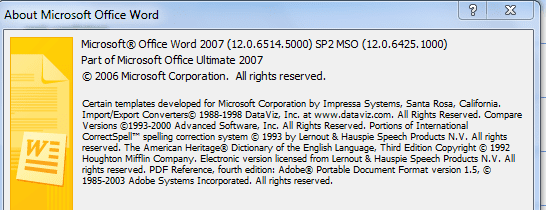
All of a sudden I got 32 updates today, with 29 of them for Office 2007.
I've had Office 2007 installed for the past 4 months and this is the first time i'm getting any updates for it
I've had Office 2007 installed for the past 4 months and this is the first time i'm getting any updates for it
2007 Microsoft Office Suite Service Pack 1 (SP1)
Download size: 193.9 MB
You may need to restart your computer for this update to take effect.
Update type: Important
Service Pack 1 provides the latest updates to the 2007 Microsoft Office Suite. This update also applies to Expression Web and Visual Web Developer.
More information:
Download details: The 2007 Microsoft Office Suite Service Pack 1 (SP1) &displaylang=en
Help and Support:
Microsoft Support
Office Genuine Advantage Notifications (KB949810)
Download size: 712 KB
Update type: Important
Office Genuine Advantage Notifications is part of Microsoft’s effort to reduce software piracy. Installing this software will help confirm that the copy of Office install on this computer is genuine and properly licensed. If the copy of Office installed on the computer is not genuine, the software will provide periodic reminders to help you take appropriate action and protect yourself from security threats posed by counterfeit software.
More information:
Genuine Microsoft Software
Help and Support:
Description of the Office Genuine Advantage Notifications application
Security Update for 2007 Microsoft Office System (KB960003)
Download size: 7.3 MB
You may need to restart your computer for this update to take effect.
Update type: Important
A security vulnerability exists in the 2007 Microsoft Office System and the Microsoft Office Compatibility Pack that could allow arbitrary code to run when a maliciously modified file is opened. This update resolves that vulnerability.
More information:
Download details: Security Update for 2007 Microsoft Office System (KB960003)
Help and Support:
Microsoft Support
Security Update for Microsoft Office 2007 (KB951550)
Download size: 2.0 MB
You may need to restart your computer for this update to take effect.
Update type: Important
A security vulnerability exists in Microsoft Office 2007 that could allow information disclosure. This update resolves that issue.
More information:
MS08-069: Description of the security update for the 2007 Office suite: November 11, 2008
Help and Support:
Microsoft Support
Security Update for Microsoft Office Excel 2007 (KB959997)
Download size: 8.4 MB
You may need to restart your computer for this update to take effect.
Update type: Important
A security vulnerability exists in Microsoft Office Excel 2007 that could allow arbitrary code to run when a maliciously modified file is opened. This update resolves that vulnerability.
More information:
Download details: Security Update for Microsoft Office Excel 2007 (KB959997)
Help and Support:
Microsoft Support
Security Update for Microsoft Office OneNote 2007 (KB950130)
Download size: 3.9 MB
You may need to restart your computer for this update to take effect.
Update type: Important
A security vulnerability exists in Microsoft Office OneNote 2007 that could allow arbitrary code to run when you click on a maliciously modified hyperlink. This update resolves that vulnerability.
More information:
Download details: Security Update for Microsoft Office OneNote 2007 (KB950130)
Help and Support:
Microsoft Support
Security Update for Microsoft Office Outlook 2007 (KB946983)
Download size: 10.2 MB
You may need to restart your computer for this update to take effect.
Update type: Important
A security vulnerability exists in Microsoft Office Outlook 2007 that could allow arbitrary code to run when you click on a maliciously modified hyperlink. This update resolves that vulnerability.
More information:
Download details: Security Update for Microsoft Office Outlook 2007 (KB946983)
Help and Support:
Microsoft Support
Security Update for Microsoft Office PowerPoint 2007 (KB951338)
Download size: 3.8 MB
You may need to restart your computer for this update to take effect.
Update type: Important
A security vulnerability exists in Microsoft Office PowerPoint 2007 that could allow arbitrary code to run when a maliciously modified document is opened. This update resolves that vulnerability.
More information:
Download details: Security Update for Microsoft Office PowerPoint 2007 (KB951338)
Help and Support:
Microsoft Support
Security Update for Microsoft Office Publisher 2007 (KB950114)
Download size: 4.0 MB
You may need to restart your computer for this update to take effect.
Update type: Important
A security vulnerability exists in Microsoft Office Publisher 2007 that could allow arbitrary code to run when a maliciously modified file is opened. This update resolves that vulnerability.
More information:
Download details: Security Update for Microsoft Office Publisher 2007 (KB950114)
Help and Support:
Microsoft Support
Security Update for Microsoft Office Word 2007 (KB956358)
Download size: 8.7 MB
You may need to restart your computer for this update to take effect.
Update type: Important
A security vulnerability exists in Microsoft Office Word 2007 that could allow arbitrary code to run when a maliciously modified file is opened. This update resolves that vulnerability.
More information:
Download details: Security Update for Microsoft Office Word 2007 (KB956358)
Help and Support:
Microsoft Support
Security Update for the 2007 Microsoft Office System (KB936514)
Download size: 7.2 MB
You may need to restart your computer for this update to take effect.
Update type: Important
A security vulnerability exists in the 2007 Microsoft Office System and the Compatibility Pack for the 2007 Office System that could allow remote code execution. This update resolves that vulnerability.
More information:
Download details: Security Update for the 2007 Microsoft Office System (KB936514)
Help and Support:
Microsoft Support
Security Update for the 2007 Microsoft Office System (KB951944)
Download size: 7.8 MB
You may need to restart your computer for this update to take effect.
Update type: Important
A security vulnerability exists in the 2007 Microsoft Office System and the Compatibility Pack for the 2007 Office system that could allow remote code execution. This update resolves that vulnerability.
More information:
MS08-055: Description of the security update for the 2007 Office system and for the Compatibility Pack for the 2007 Office system: September 9, 2008
Help and Support:
Microsoft Support
Security Update for the 2007 Microsoft Office System (KB954326)
Download size: 1.5 MB
You may need to restart your computer for this update to take effect.
Update type: Important
A security vulnerability exists in Microsoft Office system 2007 that could allow arbitrary code to run when you open a maliciously modified file. This update resolves that vulnerability.
More information:
Download details: Security Update for Office 2007 (KB954326)
Help and Support:
Microsoft Support
Security Update for the 2007 Microsoft Office System (KB956828)
Download size: 2.0 MB
You may need to restart your computer for this update to take effect.
Update type: Important
A security vulnerability exists in the 2007 Microsoft Office System and the Microsoft Office Compatibility Pack that could allow arbitrary code to run when a maliciously modified file is opened. This update resolves that vulnerability.
More information:
Download details: Security Update for 2007 Microsoft Office System (KB956828)
Help and Support:
Microsoft Support
Update for Microsoft Office Access 2007 Help (KB963663)
Download size: 18.9 MB
You may need to restart your computer for this update to take effect.
Update type: Recommended
This update installs the latest assistance content for the Microsoft Office Access 2007 Help file and the Office Access 2007 Developer Help file.
More information:
Download details: Updates for Microsoft Office Access 2007 Help
Help and Support:
Microsoft Support
Update for Microsoft Office Excel 2007 Help (KB963678)
Download size: 19.5 MB
You may need to restart your computer for this update to take effect.
Update type: Recommended
This update installs the latest assistance content for the Microsoft Office Excel 2007 Help file and the Office Excel 2007 Developer Help file.
More information:
Download details: Updates for Microsoft Office Excel 2007 Help
Help and Support:
Microsoft Support
Update for Microsoft Office InfoPath 2007 Help (KB963662)
Download size: 9.1 MB
You may need to restart your computer for this update to take effect.
Update type: Recommended
This update installs the latest assistance content for the Microsoft Office InfoPath 2007 Help file and the Office InfoPath 2007 Developer Help file.
More information:
Download details: Updates for Microsoft Office InfoPath 2007 Help
Help and Support:
Microsoft Support
Update for Microsoft Office OneNote 2007 Help (KB963670)
Download size: 1.8 MB
You may need to restart your computer for this update to take effect.
Update type: Recommended
This update installs the latest assistance content for the Microsoft Office OneNote 2007 Help file.
More information:
Download details: Updates for Microsoft Office OneNote 2007 Help
Help and Support:
Microsoft Support
Update for Microsoft Office Outlook 2007 (KB952142)
Download size: 10.3 MB
You may need to restart your computer for this update to take effect.
Update type: Important
This update (KB952142) resolves an issue where Microsoft Office Outlook 2007 behaves unexpectedly in some circumstances.
More information:
Download details: Update for Microsoft Office Outlook 2007 (KB952142)
Help and Support:
Microsoft Support
Update for Microsoft Office Outlook 2007 Help (KB963677)
Download size: 17.4 MB
You may need to restart your computer for this update to take effect.
Update type: Recommended
This update installs the latest assistance content for the Microsoft Office Outlook 2007 Help file and the Office Outlook 2007 Developer Help file.
More information:
Download details: Updates for Microsoft Office Outlook 2007 Help
Help and Support:
Microsoft Support
Update for Microsoft Office Outlook 2007 Junk Email Filter (KB977719)
Download size: 3.3 MB
You may need to restart your computer for this update to take effect.
Update type: Important
This update provides the Junk E-mail Filter in Microsoft Office Outlook 2007 with a more current definition of which e-mail messages should be considered junk e-mail.
More information:
Description of the Office Outlook 2007 Junk E-mail Filter update: February 9, 2010
Help and Support:
Microsoft Support
Update for Microsoft Office PowerPoint 2007 Help (KB963669)
Download size: 14.5 MB
You may need to restart your computer for this update to take effect.
Update type: Recommended
This update installs the latest assistance content for the Microsoft Office PowerPoint 2007 Help file and the Office PowerPoint 2007 Developer Help file.
More information:
Download details: Updates for Microsoft Office PowerPoint 2007 Help
Help and Support:
Microsoft Support
Update for Microsoft Office Publisher 2007 Help (KB963667)
Download size: 9.2 MB
You may need to restart your computer for this update to take effect.
Update type: Recommended
This update installs the latest assistance content for the Microsoft Office Publisher 2007 Help file and the Office Publisher 2007 Developer Help file.
More information:
Download details: Updates for Microsoft Office Publisher 2007 Help
Help and Support:
Microsoft Support
Update for Microsoft Office Word 2007 Help (KB963665)
Download size: 14.7 MB
You may need to restart your computer for this update to take effect.
Update type: Recommended
This update installs the latest assistance content for the Microsoft Office Word 2007 Help file and the Office Word 2007 Developer Help file.
More information:
Download details: Updates for Microsoft Office Word 2007 Help
Help and Support:
Microsoft Support
Update for Microsoft Script Editor Help (KB963671)
Download size: 4.9 MB
You may need to restart your computer for this update to take effect.
Update type: Recommended
This update installs the latest assistance content for the Microsoft Script Editor Help file that is included with the 2007 Office System.
More information:
Download details: Updates for Microsoft Script Editor Help
Help and Support:
Microsoft Support
Update for Office 2007 (KB934391)
Download size: 3.1 MB
You may need to restart your computer for this update to take effect.
Update type: Important
Microsoft has released an update for the 2007 Microsoft Office system. This update fixes conversion issues for SmartArt objects when a document is opened in an earlier Office program when you use the Microsoft Office Compatibility Pack.
More information:
Download details: Update for Office 2007 (KB934391)
Help and Support:
Microsoft Support
Update for Office 2007 (KB934393)
Download size: 1.9 MB
You may need to restart your computer for this update to take effect.
Update type: Important
Microsoft has released an update for the 2007 Microsoft Office system. This update fixes conversion issues when a binary file is opened in a Microsoft Office 2003 program when you use the Microsoft Office Compatibility Pack.
More information:
Download details: Update for Office 2007 (KB934393)
Help and Support:
Microsoft Support
Update for the 2007 Microsoft Office System (KB967642)
Download size: 376 KB
You may need to restart your computer for this update to take effect.
Update type: Important
This update fixes an error that may occur when installing the Microsoft Office suite Service Packs.
More information:
Download details: Update for the 2007 Microsoft Office System (KB967642)
Help and Support:
Microsoft Support
Update for the 2007 Microsoft Office System Help for Common Features (KB963673)
Download size: 1.2 MB
You may need to restart your computer for this update to take effect.
Update type: Recommended
This update installs the latest assistance content for the Microsoft Office 2007 Help file.
More information:
Download details: Updates for Microsoft Office 2007 Help for Common Features
Help and Support:
Microsoft Support
My Computer
- Computer type
- Laptop
- Computer Manufacturer/Model Number
- HP EliteBook 8530w Mobile Workstation
- OS
- Windows 7 Ultimate x64 (XP, 98SE, 95, 3.11, DOS 7.10 on VM) + Ubuntu 10.04 LTS Lucid Lynx
- CPU
- Intel Core 2 Duo Processor P8600 (2.40 GHz, 3 MB L2 cache)
- Motherboard
- Mobile Intel PM45 Express Chipset ICH9M-Enhanced
- Memory
- 4GB 800 MHz DDR2 SDRAM
- Graphics Card(s)
- ATI Mobility FireGL V5700 with 256 MB
- Sound Card
- SoundMAX Integrated Digital HD Audio
- Monitor(s) Displays
- 15.4-inch WXGA anti-glare (1280 x 800 resolution)
- Screen Resolution
- 1280 x 800
- Hard Drives
- 500GB + 1TB
- Mouse
- Synaptics PS/2 Port Touchpad, USB Mouse
- Internet Speed
- 4 Mbps
- Antivirus
- MSE
- Browser
- Firefox, Chrome, IE
- Other Info
- Authentec AES2810 Fingerprint Reader