Solved Remove Vista from a dual-boot w/win 7

AstaLaVista

Lost in Cyberspace
Guru
Local time
11:51 PM
Messages
1,962
Location
Miami, Florida
So I am dual booting with Vista Ultimate 64 & Win 7 RC Ultimate 64... long winded explanation first :p :o

Win 7 RC expired on March 1st but, luckily for me I had a clean copy of Win 7 RTM Ultimate 64 with a valid CD Key given to me by a friend who works with Microsoft and already registered in my name.

Installation of Win 7 RTM went well and I installed it in the same partition where I had Win 7 RC.

Everything works well but now, I want to get rid of Vista and keep Win 7 only as my main OS and I don't want to go through the headache of botching my win 7 once I delete the Vista partition... what's the easiest way to do this for a non-techie mere mortal guy? :confused:

I still have to install everything I have on Vista since I am sure I won't be able to migrate it, but first, I want to make sure that after I am done with removing Vista and recovering that partition, I am not going to end up with a corrupt mbr o have to make a clean install of win 7 loosing all my data in the process.

Again, sorry for the long winded explanation but I am trying to be as thorough as I possibly can.

Thanks guys
 

My Computer My Computer

Computer type
PC/Desktop
Computer Manufacturer/Model Number
Custom Built... Intel/Nvidia/ASRock
OS
Windows 7 x64 (Ultimate)
CPU
Intel i5-4670K
Motherboard
ASRock Z87 Extreme 6
Memory
8GBs Ripjaws 2133Mhz
Graphics Card(s)
Asus GTX660 (2GBs)
Sound Card
Onboard Realtek HD
Monitor(s) Displays
Acer AL2216W
Screen Resolution
1680 x 1050
Hard Drives
Samsung 840 SSD 120GBs
Samsung 750GB 32MB cache
1.5 TB
PSU
PC Cooling 750w Silencer
Case
Thermaltake Spedo Advance
Cooling
Std Cooler
Keyboard
Logitech G15
Mouse
Logitech G9
Internet Speed
Comcast 20Mbit
Antivirus
Avast
Browser
Firefox
Hello ALV.

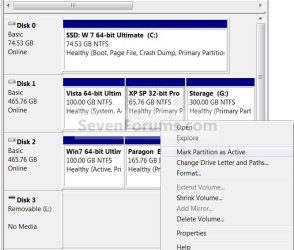
If your Vista is marked as the "System Partition" in disk management ...

You will need to mark the OS you want to keep as "Active" in disk management then run a repair on the OS that you want to keep (it may take as many as 3 "repairs" to get the job done) then if that one is marked as the "System Partition" after the repairs you'll be good to go and you can format the partition that Vista is on.

http://www.sevenforums.com/tutorials/3413-repair-install.html?ltr=R

Active.jpg
 

My Computer My Computer

Computer Manufacturer/Model Number
* BFK Customs *
OS
W 7 64-bit Ultimate
CPU
Intel Q9550 Yorkfield
Motherboard
ASUS P5Q Pro
Memory
8GB Dominator 8500C5D
Graphics Card(s)
ATI : XFX 5870
Sound Card
Realtek HD Audio 7-1
Monitor(s) Displays
1x 47" LCD HDMI & 3x 26" LCD HDMI
Screen Resolution
1920x1080P & 1920x1200
Hard Drives
1x 80GB Intel X25-M G2 SSD : 1x 500GB & 1x 640GB WD Caviar Black(s)
PSU
Corsair 620HX
Case
Cooler Master RC-690
Cooling
Tuniq Tower 120, 2x 140mm and 3x 120mm case fans
Keyboard
Microsoft 500
Mouse
Razer Diamondback 3G
Internet Speed
14 Mb/s
Other Info
1x Koutech 3Gb/s SATA HDD Hot Swap Rack
If you will post back a screenshot of your full Disk Mgmt drive map, we'll give you the exact steps for the job.

Using the Snipping Tool in Start Menu, attach file using Paper Clip in reply box.

If Vista is first partition on a multi-partition HD, let us know if you want to recover it's deleted space into Win7 partition too.
 
I'll post back as soon as I get home guys... thanks

Oh and gregrocker, that is another thing I want to do because I couldn't finish updating microsoft last night because my win 7 drive was full. I gave to much room to the Vista partition and now I am suffering with no room on my Win 7 partition.
 

My Computer My Computer

Computer type
PC/Desktop
Computer Manufacturer/Model Number
Custom Built... Intel/Nvidia/ASRock
OS
Windows 7 x64 (Ultimate)
CPU
Intel i5-4670K
Motherboard
ASRock Z87 Extreme 6
Memory
8GBs Ripjaws 2133Mhz
Graphics Card(s)
Asus GTX660 (2GBs)
Sound Card
Onboard Realtek HD
Monitor(s) Displays
Acer AL2216W
Screen Resolution
1680 x 1050
Hard Drives
Samsung 840 SSD 120GBs
Samsung 750GB 32MB cache
1.5 TB
PSU
PC Cooling 750w Silencer
Case
Thermaltake Spedo Advance
Cooling
Std Cooler
Keyboard
Logitech G15
Mouse
Logitech G9
Internet Speed
Comcast 20Mbit
Antivirus
Avast
Browser
Firefox
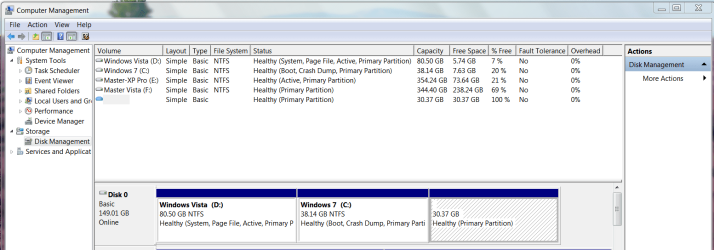
Ok, here is the image of my system, it appears that Vista has the system but windows 7 says Boot as well so... who knows, I am more confused than ever now. :(

Thanks for taking the time to help guys... I appreciate it.

Oh and, pay no attentition to Disk 1, that was my old drive that had XP & Vista but its no longer active... I am just to lazy to re format the whole thing because I still have some data on it that I am not been able to transfer so I am kinda using both partition as storage space only. ;)
 

Attachments

  • DiskManagement.PNG
    DiskManagement.PNG
    46.5 KB · Views: 115

My Computer My Computer

Computer type
PC/Desktop
Computer Manufacturer/Model Number
Custom Built... Intel/Nvidia/ASRock
OS
Windows 7 x64 (Ultimate)
CPU
Intel i5-4670K
Motherboard
ASRock Z87 Extreme 6
Memory
8GBs Ripjaws 2133Mhz
Graphics Card(s)
Asus GTX660 (2GBs)
Sound Card
Onboard Realtek HD
Monitor(s) Displays
Acer AL2216W
Screen Resolution
1680 x 1050
Hard Drives
Samsung 840 SSD 120GBs
Samsung 750GB 32MB cache
1.5 TB
PSU
PC Cooling 750w Silencer
Case
Thermaltake Spedo Advance
Cooling
Std Cooler
Keyboard
Logitech G15
Mouse
Logitech G9
Internet Speed
Comcast 20Mbit
Antivirus
Avast
Browser
Firefox
Hello ALV.

If your Vista is marked as the "System Partition" in disk management ...

You will need to mark the OS you want to keep as "Active" in disk management then run a repair on the OS that you want to keep (it may take as many as 3 "repairs" to get the job done) then if that one is marked as the "System Partition" after the repairs you'll be good to go and you can format the partition that Vista is on.

http://www.sevenforums.com/tutorials/3413-repair-install.html?ltr=R

View attachment 58584


Hello ALV, do as this says and mark Windows 7 as active and run 3 (no less) repair installs and all will be well.
 
Last edited:

My Computer My Computer

Computer Manufacturer/Model Number
* BFK Customs *
OS
W 7 64-bit Ultimate
CPU
Intel Q9550 Yorkfield
Motherboard
ASUS P5Q Pro
Memory
8GB Dominator 8500C5D
Graphics Card(s)
ATI : XFX 5870
Sound Card
Realtek HD Audio 7-1
Monitor(s) Displays
1x 47" LCD HDMI & 3x 26" LCD HDMI
Screen Resolution
1920x1080P & 1920x1200
Hard Drives
1x 80GB Intel X25-M G2 SSD : 1x 500GB & 1x 640GB WD Caviar Black(s)
PSU
Corsair 620HX
Case
Cooler Master RC-690
Cooling
Tuniq Tower 120, 2x 140mm and 3x 120mm case fans
Keyboard
Microsoft 500
Mouse
Razer Diamondback 3G
Internet Speed
14 Mb/s
Other Info
1x Koutech 3Gb/s SATA HDD Hot Swap Rack
BFK, If I go back to Disk Management and I right click on the Vista partition the "mark partition as Active" is greyed out... this mean is already marked, correct?

Aside from that, you want me to do this before I delete the partion or after I repair Win 7... sorry, I am very confused at the moment.

It may seem like I know what I am doing but, in reality... I'm not! :o :confused: ;)
 

My Computer My Computer

Computer type
PC/Desktop
Computer Manufacturer/Model Number
Custom Built... Intel/Nvidia/ASRock
OS
Windows 7 x64 (Ultimate)
CPU
Intel i5-4670K
Motherboard
ASRock Z87 Extreme 6
Memory
8GBs Ripjaws 2133Mhz
Graphics Card(s)
Asus GTX660 (2GBs)
Sound Card
Onboard Realtek HD
Monitor(s) Displays
Acer AL2216W
Screen Resolution
1680 x 1050
Hard Drives
Samsung 840 SSD 120GBs
Samsung 750GB 32MB cache
1.5 TB
PSU
PC Cooling 750w Silencer
Case
Thermaltake Spedo Advance
Cooling
Std Cooler
Keyboard
Logitech G15
Mouse
Logitech G9
Internet Speed
Comcast 20Mbit
Antivirus
Avast
Browser
Firefox
Hello mate.


You have to mark the Windows 7 partition as active then do the repairs on Windows 7 at least 3 times to finish up.

Don't be concerned, I don't know what I'm doing either. ;)
 

My Computer My Computer

Computer Manufacturer/Model Number
* BFK Customs *
OS
W 7 64-bit Ultimate
CPU
Intel Q9550 Yorkfield
Motherboard
ASUS P5Q Pro
Memory
8GB Dominator 8500C5D
Graphics Card(s)
ATI : XFX 5870
Sound Card
Realtek HD Audio 7-1
Monitor(s) Displays
1x 47" LCD HDMI & 3x 26" LCD HDMI
Screen Resolution
1920x1080P & 1920x1200
Hard Drives
1x 80GB Intel X25-M G2 SSD : 1x 500GB & 1x 640GB WD Caviar Black(s)
PSU
Corsair 620HX
Case
Cooler Master RC-690
Cooling
Tuniq Tower 120, 2x 140mm and 3x 120mm case fans
Keyboard
Microsoft 500
Mouse
Razer Diamondback 3G
Internet Speed
14 Mb/s
Other Info
1x Koutech 3Gb/s SATA HDD Hot Swap Rack
Since you also want to recover deleted Vista space into Win7 partition, the tool to use for this job is free Partition Wizard bootable CD.

Back up your files and a Win7 system image as in rare cases Resizing operations can fail.

Boot Partition Wizard CD, wait for files to load, select 1 for screen res, rightclick Vista partition to Delete, OK.

Next rightclick Win7 partition>Modify>Set to Active, OK.

Again rightclick Win7 partition>Resize>drag left grey border all the way to the left over deleted Vista space, OK. Apply all steps.

Win7 will not now boot. Instead, boot Win7 DVD Repair console or Repair CD, click through to Recovery Tools list to run Startup Repair up to 3 separate times with reboots, as it will attempt to repair and finally write the MBR to Win7 partition.
 
OK, I'll see if I can do all this over the weekend... thanks for the help.
 

My Computer My Computer

Computer type
PC/Desktop
Computer Manufacturer/Model Number
Custom Built... Intel/Nvidia/ASRock
OS
Windows 7 x64 (Ultimate)
CPU
Intel i5-4670K
Motherboard
ASRock Z87 Extreme 6
Memory
8GBs Ripjaws 2133Mhz
Graphics Card(s)
Asus GTX660 (2GBs)
Sound Card
Onboard Realtek HD
Monitor(s) Displays
Acer AL2216W
Screen Resolution
1680 x 1050
Hard Drives
Samsung 840 SSD 120GBs
Samsung 750GB 32MB cache
1.5 TB
PSU
PC Cooling 750w Silencer
Case
Thermaltake Spedo Advance
Cooling
Std Cooler
Keyboard
Logitech G15
Mouse
Logitech G9
Internet Speed
Comcast 20Mbit
Antivirus
Avast
Browser
Firefox

My Computer My Computer

Computer Manufacturer/Model Number
* BFK Customs *
OS
W 7 64-bit Ultimate
CPU
Intel Q9550 Yorkfield
Motherboard
ASUS P5Q Pro
Memory
8GB Dominator 8500C5D
Graphics Card(s)
ATI : XFX 5870
Sound Card
Realtek HD Audio 7-1
Monitor(s) Displays
1x 47" LCD HDMI & 3x 26" LCD HDMI
Screen Resolution
1920x1080P & 1920x1200
Hard Drives
1x 80GB Intel X25-M G2 SSD : 1x 500GB & 1x 640GB WD Caviar Black(s)
PSU
Corsair 620HX
Case
Cooler Master RC-690
Cooling
Tuniq Tower 120, 2x 140mm and 3x 120mm case fans
Keyboard
Microsoft 500
Mouse
Razer Diamondback 3G
Internet Speed
14 Mb/s
Other Info
1x Koutech 3Gb/s SATA HDD Hot Swap Rack
Ok, I set windows 7 partition Active and just as everybody here stated, the mbr was missing so I use the Cd to Repair it. It took me 2 tries to get it going.

Now, the only problem is that it left 3 entries in the form of:

Windows 7 (recovered)
Windows Vista (recovered)

Do I have to use EasyBCD to fix this or can I do it with a windows 7 tool? If I remember correctly, there was a way to do this but its been a while since I did the dual boot so I forgot.

I have already backed up all the data but I am going to give my wife a few days with Win 7 before I nuke vista... if I don't get desperate and nuke it later on that is. :p :D
 

My Computer My Computer

Computer type
PC/Desktop
Computer Manufacturer/Model Number
Custom Built... Intel/Nvidia/ASRock
OS
Windows 7 x64 (Ultimate)
CPU
Intel i5-4670K
Motherboard
ASRock Z87 Extreme 6
Memory
8GBs Ripjaws 2133Mhz
Graphics Card(s)
Asus GTX660 (2GBs)
Sound Card
Onboard Realtek HD
Monitor(s) Displays
Acer AL2216W
Screen Resolution
1680 x 1050
Hard Drives
Samsung 840 SSD 120GBs
Samsung 750GB 32MB cache
1.5 TB
PSU
PC Cooling 750w Silencer
Case
Thermaltake Spedo Advance
Cooling
Std Cooler
Keyboard
Logitech G15
Mouse
Logitech G9
Internet Speed
Comcast 20Mbit
Antivirus
Avast
Browser
Firefox

My Computer My Computer

Computer Manufacturer/Model Number
* BFK Customs *
OS
W 7 64-bit Ultimate
CPU
Intel Q9550 Yorkfield
Motherboard
ASUS P5Q Pro
Memory
8GB Dominator 8500C5D
Graphics Card(s)
ATI : XFX 5870
Sound Card
Realtek HD Audio 7-1
Monitor(s) Displays
1x 47" LCD HDMI & 3x 26" LCD HDMI
Screen Resolution
1920x1080P & 1920x1200
Hard Drives
1x 80GB Intel X25-M G2 SSD : 1x 500GB & 1x 640GB WD Caviar Black(s)
PSU
Corsair 620HX
Case
Cooler Master RC-690
Cooling
Tuniq Tower 120, 2x 140mm and 3x 120mm case fans
Keyboard
Microsoft 500
Mouse
Razer Diamondback 3G
Internet Speed
14 Mb/s
Other Info
1x Koutech 3Gb/s SATA HDD Hot Swap Rack
I did with the 1.72 because I did not want to register just to get a beta... it did the work nonetheless and I got rid of the 3rd entry, which happened to be the old vista entry anyways.

Well, the moment of truth is upon us, you know... the moment where you dread to nuke an OS because you feel that you forgot to back up something even though you went through it twice only to find out (days later) that you were, indeed missing something? Yeah, I have had that feeling quite a few times before! :( :D
 

My Computer My Computer

Computer type
PC/Desktop
Computer Manufacturer/Model Number
Custom Built... Intel/Nvidia/ASRock
OS
Windows 7 x64 (Ultimate)
CPU
Intel i5-4670K
Motherboard
ASRock Z87 Extreme 6
Memory
8GBs Ripjaws 2133Mhz
Graphics Card(s)
Asus GTX660 (2GBs)
Sound Card
Onboard Realtek HD
Monitor(s) Displays
Acer AL2216W
Screen Resolution
1680 x 1050
Hard Drives
Samsung 840 SSD 120GBs
Samsung 750GB 32MB cache
1.5 TB
PSU
PC Cooling 750w Silencer
Case
Thermaltake Spedo Advance
Cooling
Std Cooler
Keyboard
Logitech G15
Mouse
Logitech G9
Internet Speed
Comcast 20Mbit
Antivirus
Avast
Browser
Firefox
Since you also want to recover deleted Vista space into Win7 partition, the tool to use for this job is free Partition Wizard bootable CD.

Back up your files and a Win7 system image as in rare cases Resizing operations can fail.

Boot Partition Wizard CD, wait for files to load, select 1 for screen res, rightclick Vista partition to Delete, OK.

Next rightclick Win7 partition>Modify>Set to Active, OK.

Again rightclick Win7 partition>Resize>drag left grey border all the way to the left over deleted Vista space, OK. Apply all steps.

Win7 will not now boot. Instead, boot Win7 DVD Repair console or Repair CD, click through to Recovery Tools list to run Startup Repair up to 3 separate times with reboots, as it will attempt to repair and finally write the MBR to Win7 partition.

I'm pleased you're getting it sorted; now when you're ready have a look at what gregrocker wrote about recovering the space of the old partition Vista was on.
 

My Computer My Computer

Computer Manufacturer/Model Number
* BFK Customs *
OS
W 7 64-bit Ultimate
CPU
Intel Q9550 Yorkfield
Motherboard
ASUS P5Q Pro
Memory
8GB Dominator 8500C5D
Graphics Card(s)
ATI : XFX 5870
Sound Card
Realtek HD Audio 7-1
Monitor(s) Displays
1x 47" LCD HDMI & 3x 26" LCD HDMI
Screen Resolution
1920x1080P & 1920x1200
Hard Drives
1x 80GB Intel X25-M G2 SSD : 1x 500GB & 1x 640GB WD Caviar Black(s)
PSU
Corsair 620HX
Case
Cooler Master RC-690
Cooling
Tuniq Tower 120, 2x 140mm and 3x 120mm case fans
Keyboard
Microsoft 500
Mouse
Razer Diamondback 3G
Internet Speed
14 Mb/s
Other Info
1x Koutech 3Gb/s SATA HDD Hot Swap Rack
You should find 7 will boot up just fine after incorporating the space vacated by Vista.

If not, one run of startup repair will do the job.
 

My Computers My Computers

System One System Two

  • Computer type
    PC/Desktop
    OS
    7 X64
    CPU
    i5 8400
    Motherboard
    gigabyte b365m ds3h
    Memory
    2x8gb 3200mhz
    Hard Drives
    various
    PSU
    pure power 11 400w cm
    Case
    Coolermaster
    Cooling
    cryorig m9i
  • Computer type
    PC/Desktop
    OS
    7x64
    CPU
    g5400
    Motherboard
    ga b365m ds3h
    Memory
    8gb ddr4 2400
    PSU
    xfx pro 450w
Idiot Needs Help

BillP
 

My Computer My Computer

Computer Manufacturer/Model Number
Magic Micro
OS
Dual Boot, Windows 7 64, Vista Ultimate 64
CPU
5i
Memory
8
Monitor(s) Displays
Samsung 27
Hard Drives
2 @ 500 G
We are used to that sort of thing.

What kind of help?
 

My Computers My Computers

System One System Two

  • Computer type
    PC/Desktop
    OS
    7 X64
    CPU
    i5 8400
    Motherboard
    gigabyte b365m ds3h
    Memory
    2x8gb 3200mhz
    Hard Drives
    various
    PSU
    pure power 11 400w cm
    Case
    Coolermaster
    Cooling
    cryorig m9i
  • Computer type
    PC/Desktop
    OS
    7x64
    CPU
    g5400
    Motherboard
    ga b365m ds3h
    Memory
    8gb ddr4 2400
    PSU
    xfx pro 450w
Have installed a Dual Boot with Win 7 and Vista Ult since I was advised after getting the comp that Win 7 would not run FSX. Also installed second hard drive. I intended to put a OS on each drive. Think I have them on the same one.
Now I learn that Win 7 will run FSX so don't need or want Vista. Would like to go to a Win7 with two hard drives and a I book for back up. Need best way for not a geek.

Thanks BillP
 

My Computer My Computer

Computer Manufacturer/Model Number
Magic Micro
OS
Dual Boot, Windows 7 64, Vista Ultimate 64
CPU
5i
Memory
8
Monitor(s) Displays
Samsung 27
Hard Drives
2 @ 500 G
Back
Top