I want the Aero border with no transparency!

carlosg

New member
Local time
2:55 PM
Messages
4
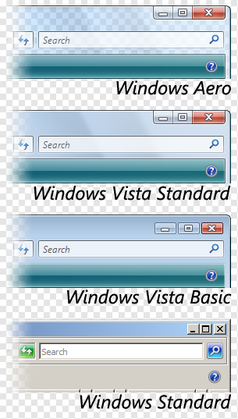
Hello! I have Windows 7. With 1GB RAM and a crappy graphic card, but I would like to have the Windows Vista Standard border frame everywhere BUT WITH NO AERO TRANSPARENCY, you know what I mean? I want the VISTA STANDARD border not the AERO one not the Win98 neither.. Because in Windows Vista you can have the vista standard border style with no graphic card:
Vista-visual-styles-comparison.png

I can't see any type of option where I can have this style with no transparency in Windows 7. I have the ugly basic style:cry:

PLEASE HELP!
 

My Computer My Computer

At a glance

Windows 7
OS
Windows 7
Hiya and welcome

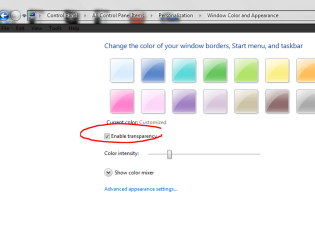
Could you fill out your system specs in full. Does your graphics card support Aero ? If it does then you could enable the theme you want then turn off "transparency"
 

Attachments

  • transparency.PNG
    transparency.PNG
    23 KB · Views: 71

My Computer My Computer

At a glance

Windows 7 Ultimate 64bitAMD Phenom Quad core 9950 black edition16Gb2x XFX Radeon 5850
Computer type
PC/Desktop
Computer Manufacturer/Model Number
Self Built
OS
Windows 7 Ultimate 64bit
CPU
AMD Phenom Quad core 9950 black edition
Motherboard
Gigabyte
Memory
16Gb
Graphics Card(s)
2x XFX Radeon 5850
Sound Card
PCI Express X-Fi Titanium / Logitech G35
Monitor(s) Displays
2x HP 2410i
Screen Resolution
1920x1080
Hard Drives
2x 500Gb Seagate
1x 300Gb Seagate
1x 1Tb Seagate
2x 1Tb Hitatchi
PSU
Jean Tech Storm 700W
Case
Cooler Master COSMOS S
Cooling
Akasa Evo Blue Pro
Keyboard
Logitech G15
Mouse
Mad Catz M.M.O. 7
Internet Speed
12mb
Hiya and welcome

Could you fill out your system specs in full. Does your graphics card support Aero ? If it does then you could enable the theme you want then turn off "transparency"
CPU: 3.2
RAM: 1GB
Card: It doesn't support Aero! :cry: But I want that border with no transparency, so it's practically No aero at all! So my card can support the border!
 

My Computer My Computer

At a glance

Windows 7
OS
Windows 7
EDIT: WOW I need to read next time. Disregard anything you read in this post. xD
 
Last edited:

My Computer My Computer

At a glance

Windows 8 Pro 64-bitIntel Core i7 950 @4.4GHz12GB DDR3 1333MHz @1400 (9-9-9-24)2x AMD Radeon HD 6770
Computer type
PC/Desktop
Computer Manufacturer/Model Number
Custom built
OS
Windows 8 Pro 64-bit
CPU
Intel Core i7 950 @4.4GHz
Motherboard
EVGA 131-GT-E767
Memory
12GB DDR3 1333MHz @1400 (9-9-9-24)
Graphics Card(s)
2x AMD Radeon HD 6770
Sound Card
Sound Blaster Audigy
Monitor(s) Displays
Acer S231HL + Acer E19T5W
Screen Resolution
1920x1080 + 1440x900
Hard Drives
128GB Samsung 840 Pro
1TB Seagate Barracuda 7200RPM 64mb
500GB Seagate Barracuda 7200RPM 16mb
PSU
Corsair GS800
Case
Custom-made
Cooling
CM Hyper212+, lots of fans
Keyboard
NMB RT8255C+
Mouse
Func MS-3
Internet Speed
30/1.5
Antivirus
Microsoft Security Essentials/Spybot SD/Malwarebytes
Browser
Google Chrome
Other Info
Onkyo TX-27 receiver & two Realistic Optimus T100s.
Hiya and welcome

Could you fill out your system specs in full. Does your graphics card support Aero ? If it does then you could enable the theme you want then turn off "transparency"
CPU: 3.2
RAM: 1GB
Card: It doesn't support Aero! :cry: But I want that border with no transparency, so it's practically No aero at all! So my card can support the border!

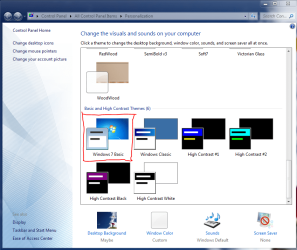
Have you tried this theme?
 

Attachments

  • Capture.PNG
    Capture.PNG
    94.1 KB · Views: 77

My Computer My Computer

At a glance

Microsoft Windows 10 Pro Insider Preview 64-bitIntel(R) Core(TM) i3-4130 CPU @ 3.40GHzCorsair Vengence 4GB x2 (8.00GB Dual-Channel ...2047MB GeForce GTS 450 (ZOTAC International)
Computer type
PC/Desktop
Computer Manufacturer/Model Number
Self Assembled
OS
Microsoft Windows 10 Pro Insider Preview 64-bit
CPU
Intel(R) Core(TM) i3-4130 CPU @ 3.40GHz
Motherboard
Gigabyte Technology Co., Ltd. B85M-D3H
Memory
Corsair Vengence 4GB x2 (8.00GB Dual-Channel DDR3 @ 798MHz)
Graphics Card(s)
2047MB GeForce GTS 450 (ZOTAC International)
Sound Card
Onboard (Realtek High Definition Audio)
Monitor(s) Displays
LG Flatron E2040T
Screen Resolution
1600x900
Hard Drives
Western Digital 1 TB
Seagate 500 GB
PSU
Corsair VS550
Case
Cooler Master K380
Cooling
Cooler Master Seidon 120V Plus
Keyboard
Logitech MK260r
Mouse
Logitech MK260r
Internet Speed
PMPL Broadband
Antivirus
Windows Defender + MBAM
Browser
Firefox
Other Info
Dell Studio 15" Laptop
Hiya and welcome

Could you fill out your system specs in full. Does your graphics card support Aero ? If it does then you could enable the theme you want then turn off "transparency"
CPU: 3.2
RAM: 1GB
Card: It doesn't support Aero! :cry: But I want that border with no transparency, so it's practically No aero at all! So my card can support the border!

Have you tried this theme?
Now what? When I click in the Window color... All I got is the personalization of the basic window border.
 

My Computer My Computer

At a glance

Windows 7
OS
Windows 7
If you wanted the buttons (close, minimize, maximize...), then I just deleted my post on it... thinking that was not what you wanted... xD

Anyway, if that's the case, then it can't be done without some modifications... which we don't know.
If that's not the case, then that's it. You're done.. :p
 

My Computer My Computer

At a glance

Windows 8 Pro 64-bitIntel Core i7 950 @4.4GHz12GB DDR3 1333MHz @1400 (9-9-9-24)2x AMD Radeon HD 6770
Computer type
PC/Desktop
Computer Manufacturer/Model Number
Custom built
OS
Windows 8 Pro 64-bit
CPU
Intel Core i7 950 @4.4GHz
Motherboard
EVGA 131-GT-E767
Memory
12GB DDR3 1333MHz @1400 (9-9-9-24)
Graphics Card(s)
2x AMD Radeon HD 6770
Sound Card
Sound Blaster Audigy
Monitor(s) Displays
Acer S231HL + Acer E19T5W
Screen Resolution
1920x1080 + 1440x900
Hard Drives
128GB Samsung 840 Pro
1TB Seagate Barracuda 7200RPM 64mb
500GB Seagate Barracuda 7200RPM 16mb
PSU
Corsair GS800
Case
Custom-made
Cooling
CM Hyper212+, lots of fans
Keyboard
NMB RT8255C+
Mouse
Func MS-3
Internet Speed
30/1.5
Antivirus
Microsoft Security Essentials/Spybot SD/Malwarebytes
Browser
Google Chrome
Other Info
Onkyo TX-27 receiver & two Realistic Optimus T100s.
CPU: 3.2
RAM: 1GB
Card: It doesn't support Aero! :cry: But I want that border with no transparency, so it's practically No aero at all! So my card can support the border!

Have you tried this theme?
Now what? When I click in the Window color... All I got is the personalization of the basic window border.

So basic, not classic, ok?
If your motherboard doesnot support aero, what you will have is only the basic theme (or third party basic themes that doesnot requires aero.). So what to do more friend ?

If you value aero, you may buy a graphics card, or change the motherboard (and the processor alongwith ).

The most valuable question is, I think, are you suing the windows 7 home basic? If your motherboard supports aero too, the os doesnot provide it, only basic and classic environment.
 

My Computer My Computer

At a glance

Microsoft Windows 10 Pro Insider Preview 64-bitIntel(R) Core(TM) i3-4130 CPU @ 3.40GHzCorsair Vengence 4GB x2 (8.00GB Dual-Channel ...2047MB GeForce GTS 450 (ZOTAC International)
Computer type
PC/Desktop
Computer Manufacturer/Model Number
Self Assembled
OS
Microsoft Windows 10 Pro Insider Preview 64-bit
CPU
Intel(R) Core(TM) i3-4130 CPU @ 3.40GHz
Motherboard
Gigabyte Technology Co., Ltd. B85M-D3H
Memory
Corsair Vengence 4GB x2 (8.00GB Dual-Channel DDR3 @ 798MHz)
Graphics Card(s)
2047MB GeForce GTS 450 (ZOTAC International)
Sound Card
Onboard (Realtek High Definition Audio)
Monitor(s) Displays
LG Flatron E2040T
Screen Resolution
1600x900
Hard Drives
Western Digital 1 TB
Seagate 500 GB
PSU
Corsair VS550
Case
Cooler Master K380
Cooling
Cooler Master Seidon 120V Plus
Keyboard
Logitech MK260r
Mouse
Logitech MK260r
Internet Speed
PMPL Broadband
Antivirus
Windows Defender + MBAM
Browser
Firefox
Other Info
Dell Studio 15" Laptop
Hiya and welcome

Could you fill out your system specs in full. Does your graphics card support Aero ? If it does then you could enable the theme you want then turn off "transparency"
CPU: 3.2
RAM: 1GB
Card: It doesn't support Aero! :cry: But I want that border with no transparency, so it's practically No aero at all! So my card can support the border!

there is a fallacy in this statement. The border is areo border at all. If a motherboard doesnot support aero, it doesnot support aero borders, whatever the extent of transparency may be.
 

My Computer My Computer

At a glance

Microsoft Windows 10 Pro Insider Preview 64-bitIntel(R) Core(TM) i3-4130 CPU @ 3.40GHzCorsair Vengence 4GB x2 (8.00GB Dual-Channel ...2047MB GeForce GTS 450 (ZOTAC International)
Computer type
PC/Desktop
Computer Manufacturer/Model Number
Self Assembled
OS
Microsoft Windows 10 Pro Insider Preview 64-bit
CPU
Intel(R) Core(TM) i3-4130 CPU @ 3.40GHz
Motherboard
Gigabyte Technology Co., Ltd. B85M-D3H
Memory
Corsair Vengence 4GB x2 (8.00GB Dual-Channel DDR3 @ 798MHz)
Graphics Card(s)
2047MB GeForce GTS 450 (ZOTAC International)
Sound Card
Onboard (Realtek High Definition Audio)
Monitor(s) Displays
LG Flatron E2040T
Screen Resolution
1600x900
Hard Drives
Western Digital 1 TB
Seagate 500 GB
PSU
Corsair VS550
Case
Cooler Master K380
Cooling
Cooler Master Seidon 120V Plus
Keyboard
Logitech MK260r
Mouse
Logitech MK260r
Internet Speed
PMPL Broadband
Antivirus
Windows Defender + MBAM
Browser
Firefox
Other Info
Dell Studio 15" Laptop
I think the OP's problem is that the window frame looks different in Aero and Basic (aside from the transparency). For example the Close button is bigger in Aero. Unfortunately I can't offer a solution, just a clarification :)
 

My Computer My Computer

At a glance

Windows 7 Home 64, Vista Ultimate 64
Computer Manufacturer/Model Number
Me :) I build all my PCs
OS
Windows 7 Home 64, Vista Ultimate 64
HiMy laptop is hp pavilion with 512mb ram and 72GB c+D can I use aero featureThank you

Do you know your graphics card? If you can't figure it out, go to HP's site, find your laptop's specs, and post them here.

On another note, Welcome to Sevenforums.
 

My Computer My Computer

At a glance

Windows 8 Pro 64-bitIntel Core i7 950 @4.4GHz12GB DDR3 1333MHz @1400 (9-9-9-24)2x AMD Radeon HD 6770
Computer type
PC/Desktop
Computer Manufacturer/Model Number
Custom built
OS
Windows 8 Pro 64-bit
CPU
Intel Core i7 950 @4.4GHz
Motherboard
EVGA 131-GT-E767
Memory
12GB DDR3 1333MHz @1400 (9-9-9-24)
Graphics Card(s)
2x AMD Radeon HD 6770
Sound Card
Sound Blaster Audigy
Monitor(s) Displays
Acer S231HL + Acer E19T5W
Screen Resolution
1920x1080 + 1440x900
Hard Drives
128GB Samsung 840 Pro
1TB Seagate Barracuda 7200RPM 64mb
500GB Seagate Barracuda 7200RPM 16mb
PSU
Corsair GS800
Case
Custom-made
Cooling
CM Hyper212+, lots of fans
Keyboard
NMB RT8255C+
Mouse
Func MS-3
Internet Speed
30/1.5
Antivirus
Microsoft Security Essentials/Spybot SD/Malwarebytes
Browser
Google Chrome
Other Info
Onkyo TX-27 receiver & two Realistic Optimus T100s.
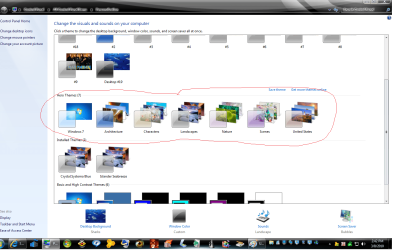
Right click the desktop>personalize then click on a aero theme and see if it works.
 

Attachments

  • Untitled.png
    Untitled.png
    115.2 KB · Views: 23

My Computer My Computer

At a glance

Windows 7 Ultimate 64BitC2D E82008GB PNY PC2-6400BFG 9600GT x 2
Computer Manufacturer/Model Number
Myself
OS
Windows 7 Ultimate 64Bit
CPU
C2D E8200
Motherboard
XFX 750i
Memory
8GB PNY PC2-6400
Graphics Card(s)
BFG 9600GT x 2
Sound Card
Stock XFX Optical
Monitor(s) Displays
Gateway 22" HD Display
Hard Drives
C: 1 TB G: 500 GB H: 500 GB
PSU
Ultra LSP 550 Pro Lifetime Series
Case
Xion2
Cooling
ThermalTake
Please! I'm even watching some youtube videos! But it's not helpful!
 

My Computer My Computer

At a glance

Windows 7
OS
Windows 7
You may try third party programs like Stardock Windowblinds . It may solve your issue.
 

My Computer My Computer

At a glance

Microsoft Windows 10 Pro Insider Preview 64-bitIntel(R) Core(TM) i3-4130 CPU @ 3.40GHzCorsair Vengence 4GB x2 (8.00GB Dual-Channel ...2047MB GeForce GTS 450 (ZOTAC International)
Computer type
PC/Desktop
Computer Manufacturer/Model Number
Self Assembled
OS
Microsoft Windows 10 Pro Insider Preview 64-bit
CPU
Intel(R) Core(TM) i3-4130 CPU @ 3.40GHz
Motherboard
Gigabyte Technology Co., Ltd. B85M-D3H
Memory
Corsair Vengence 4GB x2 (8.00GB Dual-Channel DDR3 @ 798MHz)
Graphics Card(s)
2047MB GeForce GTS 450 (ZOTAC International)
Sound Card
Onboard (Realtek High Definition Audio)
Monitor(s) Displays
LG Flatron E2040T
Screen Resolution
1600x900
Hard Drives
Western Digital 1 TB
Seagate 500 GB
PSU
Corsair VS550
Case
Cooler Master K380
Cooling
Cooler Master Seidon 120V Plus
Keyboard
Logitech MK260r
Mouse
Logitech MK260r
Internet Speed
PMPL Broadband
Antivirus
Windows Defender + MBAM
Browser
Firefox
Other Info
Dell Studio 15" Laptop
Back
Top