Burning An ISO To Be Bootable

seekermeister

Old School
Guru
VIP
Local time
11:50 AM
Messages
6,618
Location
Indian Territory
I've downloaded SuSe 11.2 iso, and need to burn it to a DVD, so that it becomes installable. I tried using Nero 8, to burn a data DVD, which was fine, except it wasn't bootable. I've done this before, and I thought that I used Nero, but apparently I'm forgetting something...what?
 

My Computer

Computer Manufacturer/Model Number
DIY
OS
W7x64 Pro, SuSe 12.1/** W7 x64 Pro, XP MCE
CPU
Phenom II 1090T w/Noctua NH-D14 /**4400+ X2 w/CM Hyper TX 3
Motherboard
ASRock 890FX Deluxe 4/**A8N-SLI
Memory
2 x 2GB Patriot PGS34g1600LLKA/**4x1GB Corsair VS
Graphics Card(s)
EVGA GTX460 SC/**EVGA 8800GTS
Sound Card
Asus Xonar D2X/**Xonar D1
Monitor(s) Displays
Acer X233H, Dell E152FPc /**LG M237-WD
Screen Resolution
1920x1080 & 1024x768/**1980x1080
Hard Drives
WDC 2TB, 1.5TB, 1TB, 500GB,Seagate 500GB , Maxtor 80GB /**500GB Seagate & WDC 1TB Black
PSU
CM RS600 w/ APC BX1000G/**Antec 500 TP w/ APC BX1000
Case
HAF922/**Antec 1040IIB
Cooling
3x200mm, 1x140 and 1x120mm/**5x80mm fans
Keyboard
Logitech Media USB/**Saitek Eclipse
Mouse
Cordless Trackman Wheel/**Ditto
Internet Speed
3.3Mbps
Other Info
SB 560 5.1 w/ Sennheiser RS140/**Creative T20 speakers, Dvico FusionHDTV7 Gold RT, Cisco E3000, HP 5510V AIO, Linksys E3000, Belkin F5U237 hub and **F5D8055 adapter
(** = 2nd rig)
Use Imgburn. Click "Write image file to disc" then just drag & drop the .iso onto Imgburn.

Hit the obvious button to start writing.

It's free software:

http://www.imgburn.com/
 

My Computer

Computer Manufacturer/Model Number
HP Media Center
OS
Windows 7 32 bit
CPU
AMD 5200+ dual core
Memory
2 GB
Graphics Card(s)
NVidia GeForce 6150SE 128 MB
Monitor(s) Displays
CRT
Screen Resolution
1280x1024
Hard Drives
500 GB Sata internal :

SIIG USB 3.0 docking stations w/WD Caviar Black 6 Gb/s drives
Keyboard
PS/2
Mouse
PS/2 Wheel Mouse
Other Info
SIIG USB 3.0 PCIexpress card.
Thanks, I installed and ran ImgBurn, but it doesn't feel right. It proceeded normally, until it got 80% finished burning, then sat idle for ~2 minutes, then fired up again and finished the writing of tracks, then stopped again at 95%, where it says that it is finalizing the disk, but it has been sitting there with no signs of life for 10 minutes. I have a feeling that I have another coaster to add to the collection. The log says nothing about verifying the burn, even though that checkbox is marked. Here is the log:

I 19:04:48 ImgBurn Version 2.5.0.0 started!
I 19:04:48 Microsoft Windows 7 Professional x64 Edition (6.1, Build 7600)
I 19:04:48 Total Physical Memory: 3,145,000 KB - Available: 1,090,800 KB
I 19:04:48 Initialising SPTI...
I 19:04:48 Searching for SCSI / ATAPI devices...
I 19:04:48 Found 2 DVD±RW/RAMs!
I 19:09:15 Operation Started!
I 19:09:15 Source File: D:\SysMan\Linux\openSUSE-11.2-DVD-x86_64.iso
I 19:09:15 Source File Sectors: 2,271,949 (MODE1/2048)
I 19:09:15 Source File Size: 4,652,951,552 bytes
I 19:09:15 Source File Volume Identifier: CDROM
I 19:09:15 Source File Application Identifier: GENISOIMAGE ISO 9660/HFS FILESYSTEM CREATOR (C) 1993 E.YOUNGDALE (C) 1997-2006 J.PEARSON/J.SCHILLING (C) 2006-2007 CDRKIT TEAM
I 19:09:15 Source File Implementation Identifier: md5sum=8cb6aeab94973ce0924123fb3edbe137
I 19:09:15 Source File File System(s): ISO9660 (Bootable), Joliet
I 19:09:15 Destination Device: [1:0:0] TSSTcorp CDDVDW SH-S202N SB01 (Y:) (ATA)
I 19:09:15 Destination Media Type: DVD+R (Disc ID: MCC-004-00) (Speeds: 4x, 6x, 8x, 12x, 16x, 18x, 20x)
I 19:09:15 Destination Media Sectors: 2,295,104
I 19:09:15 Write Mode: DVD
I 19:09:15 Write Type: DAO
I 19:09:15 Write Speed: MAX
I 19:09:16 DVD+R Reserve Track: No
I 19:09:16 Link Size: Auto
I 19:09:16 Lock Volume: Yes
I 19:09:16 Test Mode: No
I 19:09:16 OPC: No
I 19:09:16 BURN-Proof: Enabled
I 19:09:16 Book Type Setting: DVD-ROM
I 19:09:19 Filling Buffer... (40 MB)
I 19:09:19 Writing LeadIn...
I 19:09:37 Writing Session 1 of 1... (1 Track, LBA: 0 - 2271948)
I 19:09:37 Writing Track 1 of 1... (MODE1/2048, LBA: 0 - 2271948)
I 19:15:48 Synchronising Cache...
I 19:15:56 Closing Track...
I 19:15:59 Finalising Disc...
 

My Computer

Computer Manufacturer/Model Number
DIY
OS
W7x64 Pro, SuSe 12.1/** W7 x64 Pro, XP MCE
CPU
Phenom II 1090T w/Noctua NH-D14 /**4400+ X2 w/CM Hyper TX 3
Motherboard
ASRock 890FX Deluxe 4/**A8N-SLI
Memory
2 x 2GB Patriot PGS34g1600LLKA/**4x1GB Corsair VS
Graphics Card(s)
EVGA GTX460 SC/**EVGA 8800GTS
Sound Card
Asus Xonar D2X/**Xonar D1
Monitor(s) Displays
Acer X233H, Dell E152FPc /**LG M237-WD
Screen Resolution
1920x1080 & 1024x768/**1980x1080
Hard Drives
WDC 2TB, 1.5TB, 1TB, 500GB,Seagate 500GB , Maxtor 80GB /**500GB Seagate & WDC 1TB Black
PSU
CM RS600 w/ APC BX1000G/**Antec 500 TP w/ APC BX1000
Case
HAF922/**Antec 1040IIB
Cooling
3x200mm, 1x140 and 1x120mm/**5x80mm fans
Keyboard
Logitech Media USB/**Saitek Eclipse
Mouse
Cordless Trackman Wheel/**Ditto
Internet Speed
3.3Mbps
Other Info
SB 560 5.1 w/ Sennheiser RS140/**Creative T20 speakers, Dvico FusionHDTV7 Gold RT, Cisco E3000, HP 5510V AIO, Linksys E3000, Belkin F5U237 hub and **F5D8055 adapter
(** = 2nd rig)
Sounds like you need to re-download the iso.
 

My Computer

Computer Manufacturer/Model Number
Black_Box (homebuilt)
OS
windows 7 RTM x64
CPU
Phenom II 965 Quad Core 3.4Ghz
Motherboard
Asus M4A79T Deluxe
Memory
Mushkin Blackline 8GB (4x2gb)
Graphics Card(s)
XFX Radeon 5970 Black Edition
Sound Card
onboard
Monitor(s) Displays
Dell 2408WPF-main Dell E248WFP-secondary
Screen Resolution
1920x1200-main 1920x1200-secondary
Hard Drives
OCZ Vertex Limited Edition 100GB (OS)
x1 WD Black Edition 500GB drive (Storage)
PSU
XFX 850w Black Edition (Modular)
Case
Mountian Mods H2go
Cooling
CoolITSystems ECO A.L.C.
Keyboard
Logitech MX 5500 wireless keyboard
Mouse
Razor Copperhead
Internet Speed
16Mb down/2Mb up Wowway Cable Internet
I would agree if the only stall was during the burning of the iso, but since it has permanently stalled finalizing the disk, after completing the tracks, I get the impression that the problem is the burner, rather than the iso. Nero didn't have any problems writing the same iso.
 

My Computer

Computer Manufacturer/Model Number
DIY
OS
W7x64 Pro, SuSe 12.1/** W7 x64 Pro, XP MCE
CPU
Phenom II 1090T w/Noctua NH-D14 /**4400+ X2 w/CM Hyper TX 3
Motherboard
ASRock 890FX Deluxe 4/**A8N-SLI
Memory
2 x 2GB Patriot PGS34g1600LLKA/**4x1GB Corsair VS
Graphics Card(s)
EVGA GTX460 SC/**EVGA 8800GTS
Sound Card
Asus Xonar D2X/**Xonar D1
Monitor(s) Displays
Acer X233H, Dell E152FPc /**LG M237-WD
Screen Resolution
1920x1080 & 1024x768/**1980x1080
Hard Drives
WDC 2TB, 1.5TB, 1TB, 500GB,Seagate 500GB , Maxtor 80GB /**500GB Seagate & WDC 1TB Black
PSU
CM RS600 w/ APC BX1000G/**Antec 500 TP w/ APC BX1000
Case
HAF922/**Antec 1040IIB
Cooling
3x200mm, 1x140 and 1x120mm/**5x80mm fans
Keyboard
Logitech Media USB/**Saitek Eclipse
Mouse
Cordless Trackman Wheel/**Ditto
Internet Speed
3.3Mbps
Other Info
SB 560 5.1 w/ Sennheiser RS140/**Creative T20 speakers, Dvico FusionHDTV7 Gold RT, Cisco E3000, HP 5510V AIO, Linksys E3000, Belkin F5U237 hub and **F5D8055 adapter
(** = 2nd rig)
Weird. Instead of closing the burner, I left it going and forgot about it. Just a few minutes ago, a strange tune played from the computer which I couldn't find the cause of, until clearing the windows on the desktop and saw a little dialog box proudly boasting that it had successfully completed the burn...nearly 2 hours later. Here is the remainder of the log:

I 20:45:06 Exporting Graph Data...
I 20:45:06 Graph Data File: C:\Users\Administrator.Newhope\AppData\Roaming\ImgBurn\Graph Data Files\TSSTcorp_CDDVDW_SH-S202N_SB01_MONDAY-MARCH-08-2010_7-09_PM_MCC-004-00_MAX.ibg
I 20:45:06 Export Successfully Completed!
I 20:45:06 Operation Successfully Completed! - Duration: 01:35:50
I 20:45:06 Average Write Rate: 12,280 KB/s (8.9x) - Maximum Write Rate: 27,636 KB/s (20.0x)
I 20:45:06 Cycling Tray before Verify...
W 20:45:13 Waiting for device to become ready...
I 20:45:26 Device Ready!
I 20:45:27 Operation Started!
I 20:45:27 Source Device: [1:0:0] TSSTcorp CDDVDW SH-S202N SB01 (Y:) (ATA)
I 20:45:27 Source Media Type: DVD+R (Book Type: DVD-ROM) (Disc ID: MCC-004-00) (Speeds: 4x, 6x, 8x, 12x, 16x, 18x, 20x)
I 20:45:27 Image File: D:\SysMan\Linux\openSUSE-11.2-DVD-x86_64.iso
I 20:45:27 Image File Sectors: 2,271,949 (MODE1/2048)
I 20:45:27 Image File Size: 4,652,951,552 bytes
I 20:45:27 Image File Volume Identifier: CDROM
I 20:45:27 Image File Application Identifier: GENISOIMAGE ISO 9660/HFS FILESYSTEM CREATOR (C) 1993 E.YOUNGDALE (C) 1997-2006 J.PEARSON/J.SCHILLING (C) 2006-2007 CDRKIT TEAM
I 20:45:27 Image File Implementation Identifier: md5sum=8cb6aeab94973ce0924123fb3edbe137
I 20:45:27 Image File File System(s): ISO9660 (Bootable), Joliet
I 20:45:27 Read Speed (Data/Audio): MAX / MAX
I 20:45:27 Verifying Session 1 of 1... (1 Track, LBA: 0 - 2271948)
I 20:45:27 Verifying Track 1 of 1... (MODE1/2048, LBA: 0 - 2271948)
I 20:51:41 Exporting Graph Data...
I 20:51:41 Graph Data File: C:\Users\Administrator.Newhope\AppData\Roaming\ImgBurn\Graph Data Files\TSSTcorp_CDDVDW_SH-S202N_SB01_MONDAY-MARCH-08-2010_7-09_PM_MCC-004-00_MAX.ibg
I 20:51:41 Export Successfully Completed!
I 20:51:41 Operation Successfully Completed! - Duration: 00:06:09
I 20:51:41 Average Verify Rate: 12,314 KB/s (8.9x) - Maximum Verify Rate: 22,389 KB/s (16.2x)

Any odds on whether it will work?
 

My Computer

Computer Manufacturer/Model Number
DIY
OS
W7x64 Pro, SuSe 12.1/** W7 x64 Pro, XP MCE
CPU
Phenom II 1090T w/Noctua NH-D14 /**4400+ X2 w/CM Hyper TX 3
Motherboard
ASRock 890FX Deluxe 4/**A8N-SLI
Memory
2 x 2GB Patriot PGS34g1600LLKA/**4x1GB Corsair VS
Graphics Card(s)
EVGA GTX460 SC/**EVGA 8800GTS
Sound Card
Asus Xonar D2X/**Xonar D1
Monitor(s) Displays
Acer X233H, Dell E152FPc /**LG M237-WD
Screen Resolution
1920x1080 & 1024x768/**1980x1080
Hard Drives
WDC 2TB, 1.5TB, 1TB, 500GB,Seagate 500GB , Maxtor 80GB /**500GB Seagate & WDC 1TB Black
PSU
CM RS600 w/ APC BX1000G/**Antec 500 TP w/ APC BX1000
Case
HAF922/**Antec 1040IIB
Cooling
3x200mm, 1x140 and 1x120mm/**5x80mm fans
Keyboard
Logitech Media USB/**Saitek Eclipse
Mouse
Cordless Trackman Wheel/**Ditto
Internet Speed
3.3Mbps
Other Info
SB 560 5.1 w/ Sennheiser RS140/**Creative T20 speakers, Dvico FusionHDTV7 Gold RT, Cisco E3000, HP 5510V AIO, Linksys E3000, Belkin F5U237 hub and **F5D8055 adapter
(** = 2nd rig)
Nero isn't know for playing well with other software.

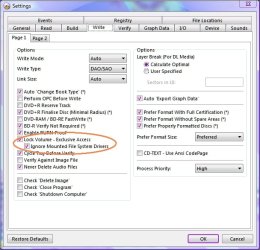
With Imgburn I recommend Lock Volume Exclusive Access
in Tools=>Settings=>Write Tab as shown in the screen shot.

Then if another software is trying to control the drive, Imgburn should give an error.

You can make all the data discs of .iso images with Nero you want, but I've never seen one boot. You need to use a special option in one of the menus to burn an image.

I haven't used Nero since Ultra version 6 so I forget which menu it's in.

btw do you by any chance have InCD installed? That will hose your burning guaranteed. It's a disaster waiting to happen.
 

Attachments

  • Imgburn.jpg
    Imgburn.jpg
    176.1 KB · Views: 62

My Computer

Computer Manufacturer/Model Number
HP Media Center
OS
Windows 7 32 bit
CPU
AMD 5200+ dual core
Memory
2 GB
Graphics Card(s)
NVidia GeForce 6150SE 128 MB
Monitor(s) Displays
CRT
Screen Resolution
1280x1024
Hard Drives
500 GB Sata internal :

SIIG USB 3.0 docking stations w/WD Caviar Black 6 Gb/s drives
Keyboard
PS/2
Mouse
PS/2 Wheel Mouse
Other Info
SIIG USB 3.0 PCIexpress card.

My Computer

Computer Manufacturer/Model Number
HP Media Center
OS
Windows 7 32 bit
CPU
AMD 5200+ dual core
Memory
2 GB
Graphics Card(s)
NVidia GeForce 6150SE 128 MB
Monitor(s) Displays
CRT
Screen Resolution
1280x1024
Hard Drives
500 GB Sata internal :

SIIG USB 3.0 docking stations w/WD Caviar Black 6 Gb/s drives
Keyboard
PS/2
Mouse
PS/2 Wheel Mouse
Other Info
SIIG USB 3.0 PCIexpress card.
Nero isn't know for playing well with other software.

With Imgburn I recommend Lock Volume Exclusive Access
in Tools=>Settings=>Write Tab as shown in the screen shot.

Then if another software is trying to control the drive, Imgburn should give an error.

You can make all the data discs of .iso images with Nero you want, but I've never seen one boot. You need to use a special option in one of the menus to burn an image.

I haven't used Nero since Ultra version 6 so I forget which menu it's in.

btw do you by any chance have InCD installed? That will hose your burning guaranteed. It's a disaster waiting to happen.

I will grope through Nero later to see what I can find, but where ever it may be, it is not obvious. I haven't actually tried to install SuSe from the disk yet, but I did test whether it would boot or not, and it did get that far, so maybe it will stay the course.

I don't have InCD installed, but I do have SecureDisk installed.
 

My Computer

Computer Manufacturer/Model Number
DIY
OS
W7x64 Pro, SuSe 12.1/** W7 x64 Pro, XP MCE
CPU
Phenom II 1090T w/Noctua NH-D14 /**4400+ X2 w/CM Hyper TX 3
Motherboard
ASRock 890FX Deluxe 4/**A8N-SLI
Memory
2 x 2GB Patriot PGS34g1600LLKA/**4x1GB Corsair VS
Graphics Card(s)
EVGA GTX460 SC/**EVGA 8800GTS
Sound Card
Asus Xonar D2X/**Xonar D1
Monitor(s) Displays
Acer X233H, Dell E152FPc /**LG M237-WD
Screen Resolution
1920x1080 & 1024x768/**1980x1080
Hard Drives
WDC 2TB, 1.5TB, 1TB, 500GB,Seagate 500GB , Maxtor 80GB /**500GB Seagate & WDC 1TB Black
PSU
CM RS600 w/ APC BX1000G/**Antec 500 TP w/ APC BX1000
Case
HAF922/**Antec 1040IIB
Cooling
3x200mm, 1x140 and 1x120mm/**5x80mm fans
Keyboard
Logitech Media USB/**Saitek Eclipse
Mouse
Cordless Trackman Wheel/**Ditto
Internet Speed
3.3Mbps
Other Info
SB 560 5.1 w/ Sennheiser RS140/**Creative T20 speakers, Dvico FusionHDTV7 Gold RT, Cisco E3000, HP 5510V AIO, Linksys E3000, Belkin F5U237 hub and **F5D8055 adapter
(** = 2nd rig)

With that, Nero and Imgburn there's prolly at least 3 applications fighting over the optical drive... depending on what crapware was also thrown on. Best to go with one versatile app that's the same on all Windows flavors.

Job #1 is get InCD off if it's on. Job #2 is run the Nero removal tool. Job #3 is disable W7 burnng.
While I understand what you are saying, I'm not inclined to disable my other burning software on the chance that ImgBurn is okay. That's too much too soon.
 

My Computer

Computer Manufacturer/Model Number
DIY
OS
W7x64 Pro, SuSe 12.1/** W7 x64 Pro, XP MCE
CPU
Phenom II 1090T w/Noctua NH-D14 /**4400+ X2 w/CM Hyper TX 3
Motherboard
ASRock 890FX Deluxe 4/**A8N-SLI
Memory
2 x 2GB Patriot PGS34g1600LLKA/**4x1GB Corsair VS
Graphics Card(s)
EVGA GTX460 SC/**EVGA 8800GTS
Sound Card
Asus Xonar D2X/**Xonar D1
Monitor(s) Displays
Acer X233H, Dell E152FPc /**LG M237-WD
Screen Resolution
1920x1080 & 1024x768/**1980x1080
Hard Drives
WDC 2TB, 1.5TB, 1TB, 500GB,Seagate 500GB , Maxtor 80GB /**500GB Seagate & WDC 1TB Black
PSU
CM RS600 w/ APC BX1000G/**Antec 500 TP w/ APC BX1000
Case
HAF922/**Antec 1040IIB
Cooling
3x200mm, 1x140 and 1x120mm/**5x80mm fans
Keyboard
Logitech Media USB/**Saitek Eclipse
Mouse
Cordless Trackman Wheel/**Ditto
Internet Speed
3.3Mbps
Other Info
SB 560 5.1 w/ Sennheiser RS140/**Creative T20 speakers, Dvico FusionHDTV7 Gold RT, Cisco E3000, HP 5510V AIO, Linksys E3000, Belkin F5U237 hub and **F5D8055 adapter
(** = 2nd rig)
If its a DVD and you chose to verify it, it will take a while. I would re-burn the .iso with a quality disc @ 4x.
 

My Computer

Computer Manufacturer/Model Number
Sony Vaio Z46GDU
OS
Windows 7 Ultimate x86-64
CPU
[email protected] 1066MHz FSB
Motherboard
Sony branded
Memory
6GB DDR3 1066MHz
Graphics Card(s)
9300M GS 256MB Dedicated (Speed) + Intel4500MHD (Stamina)
Sound Card
Realtek HD Audio
Monitor(s) Displays
13.1' WXGA
Screen Resolution
1600x900
Hard Drives
320GB 7200RPM w/ 16MB cache
Internet Speed
1MB/s
If its a DVD and you chose to verify it, it will take a while. I would re-burn the .iso with a quality disc @ 4x.
If you check the log, you will see that the verification took almost no time. The quality of the disk is quite good (Verbatim). The only part that I might agree with is burning at a slower speed, but there were only two choices...ASW, which I assume is automatic and MAX. In any case, the speed selection had nothing to do with the program taking as long as it did.

LightScribe is still burning the label, but I shall try installing with the disk as is, and see what happens, before trying anything else.
 

My Computer

Computer Manufacturer/Model Number
DIY
OS
W7x64 Pro, SuSe 12.1/** W7 x64 Pro, XP MCE
CPU
Phenom II 1090T w/Noctua NH-D14 /**4400+ X2 w/CM Hyper TX 3
Motherboard
ASRock 890FX Deluxe 4/**A8N-SLI
Memory
2 x 2GB Patriot PGS34g1600LLKA/**4x1GB Corsair VS
Graphics Card(s)
EVGA GTX460 SC/**EVGA 8800GTS
Sound Card
Asus Xonar D2X/**Xonar D1
Monitor(s) Displays
Acer X233H, Dell E152FPc /**LG M237-WD
Screen Resolution
1920x1080 & 1024x768/**1980x1080
Hard Drives
WDC 2TB, 1.5TB, 1TB, 500GB,Seagate 500GB , Maxtor 80GB /**500GB Seagate & WDC 1TB Black
PSU
CM RS600 w/ APC BX1000G/**Antec 500 TP w/ APC BX1000
Case
HAF922/**Antec 1040IIB
Cooling
3x200mm, 1x140 and 1x120mm/**5x80mm fans
Keyboard
Logitech Media USB/**Saitek Eclipse
Mouse
Cordless Trackman Wheel/**Ditto
Internet Speed
3.3Mbps
Other Info
SB 560 5.1 w/ Sennheiser RS140/**Creative T20 speakers, Dvico FusionHDTV7 Gold RT, Cisco E3000, HP 5510V AIO, Linksys E3000, Belkin F5U237 hub and **F5D8055 adapter
(** = 2nd rig)
If its a DVD and you chose to verify it, it will take a while. I would re-burn the .iso with a quality disc @ 4x.
If you check the log, you will see that the verification took almost no time. The quality of the disk is quite good (Verbatim). The only part that I might agree with is burning at a slower speed, but there were only two choices...ASW, which I assume is automatic and MAX. In any case, the speed selection had nothing to do with the program taking as long as it did.

LightScribe is still burning the label, but I shall try installing with the disk as is, and see what happens, before trying anything else.

I'll be surprised if LightScribe actually works.
 

My Computer

Computer Manufacturer/Model Number
Sony Vaio Z46GDU
OS
Windows 7 Ultimate x86-64
CPU
[email protected] 1066MHz FSB
Motherboard
Sony branded
Memory
6GB DDR3 1066MHz
Graphics Card(s)
9300M GS 256MB Dedicated (Speed) + Intel4500MHD (Stamina)
Sound Card
Realtek HD Audio
Monitor(s) Displays
13.1' WXGA
Screen Resolution
1600x900
Hard Drives
320GB 7200RPM w/ 16MB cache
Internet Speed
1MB/s
If its a DVD and you chose to verify it, it will take a while. I would re-burn the .iso with a quality disc @ 4x.
If you check the log, you will see that the verification took almost no time. The quality of the disk is quite good (Verbatim). The only part that I might agree with is burning at a slower speed, but there were only two choices...ASW, which I assume is automatic and MAX. In any case, the speed selection had nothing to do with the program taking as long as it did.

LightScribe is still burning the label, but I shall try installing with the disk as is, and see what happens, before trying anything else.

I'll be surprised if LightScribe actually works.
I don't know why you say that, because it usually works for me.
 

My Computer

Computer Manufacturer/Model Number
DIY
OS
W7x64 Pro, SuSe 12.1/** W7 x64 Pro, XP MCE
CPU
Phenom II 1090T w/Noctua NH-D14 /**4400+ X2 w/CM Hyper TX 3
Motherboard
ASRock 890FX Deluxe 4/**A8N-SLI
Memory
2 x 2GB Patriot PGS34g1600LLKA/**4x1GB Corsair VS
Graphics Card(s)
EVGA GTX460 SC/**EVGA 8800GTS
Sound Card
Asus Xonar D2X/**Xonar D1
Monitor(s) Displays
Acer X233H, Dell E152FPc /**LG M237-WD
Screen Resolution
1920x1080 & 1024x768/**1980x1080
Hard Drives
WDC 2TB, 1.5TB, 1TB, 500GB,Seagate 500GB , Maxtor 80GB /**500GB Seagate & WDC 1TB Black
PSU
CM RS600 w/ APC BX1000G/**Antec 500 TP w/ APC BX1000
Case
HAF922/**Antec 1040IIB
Cooling
3x200mm, 1x140 and 1x120mm/**5x80mm fans
Keyboard
Logitech Media USB/**Saitek Eclipse
Mouse
Cordless Trackman Wheel/**Ditto
Internet Speed
3.3Mbps
Other Info
SB 560 5.1 w/ Sennheiser RS140/**Creative T20 speakers, Dvico FusionHDTV7 Gold RT, Cisco E3000, HP 5510V AIO, Linksys E3000, Belkin F5U237 hub and **F5D8055 adapter
(** = 2nd rig)
I ran the disk through the SuSe Media Check and it pass, but when it got to the far end, I could hear the drive slow down and speed up several times, which would seem to indicate that it was having a problem reading portions of the disk.

I'm going ahead with the installation, if nothing else, just to see what happens.
 

My Computer

Computer Manufacturer/Model Number
DIY
OS
W7x64 Pro, SuSe 12.1/** W7 x64 Pro, XP MCE
CPU
Phenom II 1090T w/Noctua NH-D14 /**4400+ X2 w/CM Hyper TX 3
Motherboard
ASRock 890FX Deluxe 4/**A8N-SLI
Memory
2 x 2GB Patriot PGS34g1600LLKA/**4x1GB Corsair VS
Graphics Card(s)
EVGA GTX460 SC/**EVGA 8800GTS
Sound Card
Asus Xonar D2X/**Xonar D1
Monitor(s) Displays
Acer X233H, Dell E152FPc /**LG M237-WD
Screen Resolution
1920x1080 & 1024x768/**1980x1080
Hard Drives
WDC 2TB, 1.5TB, 1TB, 500GB,Seagate 500GB , Maxtor 80GB /**500GB Seagate & WDC 1TB Black
PSU
CM RS600 w/ APC BX1000G/**Antec 500 TP w/ APC BX1000
Case
HAF922/**Antec 1040IIB
Cooling
3x200mm, 1x140 and 1x120mm/**5x80mm fans
Keyboard
Logitech Media USB/**Saitek Eclipse
Mouse
Cordless Trackman Wheel/**Ditto
Internet Speed
3.3Mbps
Other Info
SB 560 5.1 w/ Sennheiser RS140/**Creative T20 speakers, Dvico FusionHDTV7 Gold RT, Cisco E3000, HP 5510V AIO, Linksys E3000, Belkin F5U237 hub and **F5D8055 adapter
(** = 2nd rig)
Using Control Panel | Programs and Features you need to uninstall Nero also uninstall ImgBurn (although I've had it play well with Win7)

Nero is notorious for not being well-behaved.

Follow the link given to you by Myzr7.

If you will right-click on your .iso file then you will see in big black letters at the top of that list "Burn disk image"
 

My Computer

Computer Manufacturer/Model Number
Toshiba Satellite S875D-S7239 laptop
OS
MS Windows 7 Ultimate SP1 64-bit
CPU
AMD A10-4600M
Motherboard
AMD Pumori (Socket FT1)
Memory
6.00 GB Dual-Channel DDR3 @ 798MHz (11-11-12-28)
Graphics Card(s)
AMD Radeon HD 7660G
Sound Card
High Definition Audio Device
Monitor(s) Displays
Generic PnP Monitor (1600x900@60Hz)
Screen Resolution
1600x900@60Hz
Hard Drives
SSD 119GB Corsair CSSD-V128GB2 ATA Device
Keyboard
Standard PS/2 Keyboard
Mouse
HP Wireless Optical Mobile Mouse Model FHA-3410
Internet Speed
What the local pub, local coffee shop offers.
Other Info
Optical Drive:MATSHITA BD-CMB UJ160B ATA Device


Also have an Asus ha1002xp netbook with Win 7 Ultimate installed.

With that, Nero and Imgburn there's prolly at least 3 applications fighting over the optical drive... depending on what crapware was also thrown on. Best to go with one versatile app that's the same on all Windows flavors.

Job #1 is get InCD off if it's on. Job #2 is run the Nero removal tool. Job #3 is disable W7 burnng.
While I understand what you are saying, I'm not inclined to disable my other burning software on the chance that ImgBurn is okay. That's too much too soon.

I can understand the feeling if you are new to it. When I first started burning I was glad to buy Nero as it was sort of a does it all with the kitchen sink thrown in app. But if you lurk on any of the media conversion and burning groups I think you'll find the consensus is it's best to have one burning app called Imgburn for DVD anyway. For audio CDs I use CDBurnerXP and Burrrn portable depending on my mood, if I want to print a cover etc.. But the CD only apps like CDBurnerXP and Burrrn tend not to try to hog the optical disc when not used.

As you get into using particular converters or muxers or authoring software for particular jobs, after awhile it starts to irritate when Nero makes assumptions about what you are trying to do. You have more control with individual apps.
 

My Computer

Computer Manufacturer/Model Number
HP Media Center
OS
Windows 7 32 bit
CPU
AMD 5200+ dual core
Memory
2 GB
Graphics Card(s)
NVidia GeForce 6150SE 128 MB
Monitor(s) Displays
CRT
Screen Resolution
1280x1024
Hard Drives
500 GB Sata internal :

SIIG USB 3.0 docking stations w/WD Caviar Black 6 Gb/s drives
Keyboard
PS/2
Mouse
PS/2 Wheel Mouse
Other Info
SIIG USB 3.0 PCIexpress card.
Nero isn't know for playing well with other software.

With Imgburn I recommend Lock Volume Exclusive Access
in Tools=>Settings=>Write Tab as shown in the screen shot.

Then if another software is trying to control the drive, Imgburn should give an error.

You can make all the data discs of .iso images with Nero you want, but I've never seen one boot. You need to use a special option in one of the menus to burn an image.

I haven't used Nero since Ultra version 6 so I forget which menu it's in.

btw do you by any chance have InCD installed? That will hose your burning guaranteed. It's a disaster waiting to happen.

I will grope through Nero later to see what I can find, but where ever it may be, it is not obvious. I haven't actually tried to install SuSe from the disk yet, but I did test whether it would boot or not, and it did get that far, so maybe it will stay the course.

I don't have InCD installed, but I do have SecureDisk installed.

Glad you got a good burn. I used to play around a bit with Linux myself. At various times I tried Slackware, Red Hat, Mandrake, Ubuntu, Debian and a few others. Slackware was the most frustrating but I learned the most with it. You had to configure X from scratch pretty much if you wanted to run it. And of course you had to modify all the scripts in /etc no little applets to tweak settings. Once you got something to work though, it almost never broke. I don't think I ever had a hardware lock on Slackware 3.0.

The Mandrake is nice for single CD installs with broadband. They still have a one CD install called Mandriva One CD or something. Same deal. It sets up Linux, you pick additional packages from the menus and it downloads them right then from the internet. First boot you come up to X with all the packages installed. No messing around. :)
 

My Computer

Computer Manufacturer/Model Number
HP Media Center
OS
Windows 7 32 bit
CPU
AMD 5200+ dual core
Memory
2 GB
Graphics Card(s)
NVidia GeForce 6150SE 128 MB
Monitor(s) Displays
CRT
Screen Resolution
1280x1024
Hard Drives
500 GB Sata internal :

SIIG USB 3.0 docking stations w/WD Caviar Black 6 Gb/s drives
Keyboard
PS/2
Mouse
PS/2 Wheel Mouse
Other Info
SIIG USB 3.0 PCIexpress card.
So far so good. I finished the installation of SuSe...finally. While it seems that they have trimmed down the packages that can be installed from the DVD, and that part of the installation is a whiz, running the online patch update took an eternity.

I haven't had time to check everything out, but it's going better than at times in the past. At least the internet connection and sound are configured and working, next comes the printer. I tried to set it up during the installation, but that failed, so I will have to try again.
 

My Computer

Computer Manufacturer/Model Number
DIY
OS
W7x64 Pro, SuSe 12.1/** W7 x64 Pro, XP MCE
CPU
Phenom II 1090T w/Noctua NH-D14 /**4400+ X2 w/CM Hyper TX 3
Motherboard
ASRock 890FX Deluxe 4/**A8N-SLI
Memory
2 x 2GB Patriot PGS34g1600LLKA/**4x1GB Corsair VS
Graphics Card(s)
EVGA GTX460 SC/**EVGA 8800GTS
Sound Card
Asus Xonar D2X/**Xonar D1
Monitor(s) Displays
Acer X233H, Dell E152FPc /**LG M237-WD
Screen Resolution
1920x1080 & 1024x768/**1980x1080
Hard Drives
WDC 2TB, 1.5TB, 1TB, 500GB,Seagate 500GB , Maxtor 80GB /**500GB Seagate & WDC 1TB Black
PSU
CM RS600 w/ APC BX1000G/**Antec 500 TP w/ APC BX1000
Case
HAF922/**Antec 1040IIB
Cooling
3x200mm, 1x140 and 1x120mm/**5x80mm fans
Keyboard
Logitech Media USB/**Saitek Eclipse
Mouse
Cordless Trackman Wheel/**Ditto
Internet Speed
3.3Mbps
Other Info
SB 560 5.1 w/ Sennheiser RS140/**Creative T20 speakers, Dvico FusionHDTV7 Gold RT, Cisco E3000, HP 5510V AIO, Linksys E3000, Belkin F5U237 hub and **F5D8055 adapter
(** = 2nd rig)
Back
Top