Lost the Link to Windows Explorer!

gswetsky

New member
Local time
10:10 AM
Messages
5
Location
Florida Panhandle
Windows 7 Pro. Two week old installation. Don't know how this happened, however when I right click on the Start button and choose "Open Windows Explorer", nothing happens! It was originally working properly.

If I double-click on \windows\explorer.exe, it opens. Can someone describe how to edit this link to get this working properly again?

This is no biggie admittedly, I just want it working right.

Gerry
 

My Computer

Computer Manufacturer/Model Number
Homebrew
OS
windows 7
CPU
AMD
Motherboard
MSI K9A 2VM
Memory
2 gig
Graphics Card(s)
Nvidia NX8400GS
Sound Card
On Board
Monitor(s) Displays
Gateway 22" LCD
Hard Drives
WD 320 g SATA 2
Hello Gerry, welcome to the Seven Forums.

Open Start menu, right click Windows Explorer and choose Properties from the context menu. Choose Shortcut tab, type %windir%\explorer.exe to Target field. Click OK.

Should work now.

Kari
 

Attachments

  • WinExProps.png
    WinExProps.png
    53.8 KB · Views: 15

My Computer

Computer type
Laptop
Computer Manufacturer/Model Number
HP ENVY 17-1150eg
OS
Windows 10 Pro x64 EN-GB
CPU
1.6 GHz Intel Core i7-720QM Processor
Memory
6 GB
Graphics Card(s)
ATI Mobility Radeon HD 5850 Graphics
Sound Card
Beats sound system with integrated subwoofer
Monitor(s) Displays
17" laptop display, 22" LED and 32" Full HD TV through HDMI
Screen Resolution
1600*900 (1), 1920*1080 (2&3)
Hard Drives
Internal: 2 x 500 GB SATA Hard Disk Drive 7200 rpm
External: 2TB for backups, 3TB USB3 network drive for media
Cooling
As Envy runs a bit warm, I have it on a Cooler Master pad
Keyboard
Logitech diNovo Media Desktop Laser (bluetooth)
Mouse
Logitech Performance Mouse MX
Internet Speed
50/10 Mbps VDSL
Antivirus
Windows Defender 4.3.9431.0
Browser
Maxthon 3.5.2., IE11
Thanks Kari, but you misunderstood the problem. Go to the Start button and RIGHT click on it. One of the selections is "Open Windows Explorer". That's what used to work and now does nothing.

If I OPEN the Start menu and click on "Windows Explorer", it works.

Gerry
 

My Computer

Computer Manufacturer/Model Number
Homebrew
OS
windows 7
CPU
AMD
Motherboard
MSI K9A 2VM
Memory
2 gig
Graphics Card(s)
Nvidia NX8400GS
Sound Card
On Board
Monitor(s) Displays
Gateway 22" LCD
Hard Drives
WD 320 g SATA 2
I completely misread your post. I am sorry! :o
 

My Computer

Computer type
Laptop
Computer Manufacturer/Model Number
HP ENVY 17-1150eg
OS
Windows 10 Pro x64 EN-GB
CPU
1.6 GHz Intel Core i7-720QM Processor
Memory
6 GB
Graphics Card(s)
ATI Mobility Radeon HD 5850 Graphics
Sound Card
Beats sound system with integrated subwoofer
Monitor(s) Displays
17" laptop display, 22" LED and 32" Full HD TV through HDMI
Screen Resolution
1600*900 (1), 1920*1080 (2&3)
Hard Drives
Internal: 2 x 500 GB SATA Hard Disk Drive 7200 rpm
External: 2TB for backups, 3TB USB3 network drive for media
Cooling
As Envy runs a bit warm, I have it on a Cooler Master pad
Keyboard
Logitech diNovo Media Desktop Laser (bluetooth)
Mouse
Logitech Performance Mouse MX
Internet Speed
50/10 Mbps VDSL
Antivirus
Windows Defender 4.3.9431.0
Browser
Maxthon 3.5.2., IE11
Thanks Kari, but you misunderstood the problem. Go to the Start button and RIGHT click on it. One of the selections is "Open Windows Explorer". That's what used to work and now does nothing.

If I OPEN the Start menu and click on "Windows Explorer", it works.

Gerry

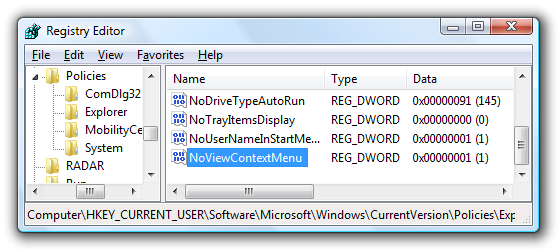
Open up regedit.exe through the start menu search or run box, and then browse down to the following key (create the key if it does not exist)
HKEY_CURRENT_USER\Software\Microsoft\Windows\CurrentVersion\Policies\Explorer
image72.png

Create a new 32-bit DWORD value on the right-hand side named NoViewContextMenu with one of these values:

  • Enable Context Menus: 0
  • Disable Context Menus: 1

maybe can help.
 

My Computer

Computer Manufacturer/Model Number
built up
OS
windows 7
CPU
Phenom II AMD Dragon 3.5Ghz
Memory
DDR3 4GB
Graphics Card(s)
ATI Radeon 512Mb
Monitor(s) Displays
HP L1506
Screen Resolution
1152 x 864
Hard Drives
WDC 1 TB SATA-II Green Power
Keyboard
HP wireless keyboard
Mouse
HP Optic
Internet Speed
1GB
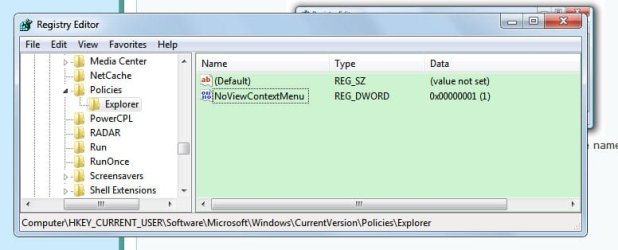
Nope. No help either....

3-9-2010%209-40-14%20PM.jpg


Then I realized I'd let Ccleaner clean the registry a day or two ago. I'd saved the file that Ccleaner created of changes It'd made and merged it. That was no help either.

At least it appears I didn't get ahold of any malware that screwed with my system. Guess that was my primary concern.

Gerry
 

Attachments

  • 3-9-2010 9-40-14 PM.jpg
    3-9-2010 9-40-14 PM.jpg
    80.5 KB · Views: 22

My Computer

Computer Manufacturer/Model Number
Homebrew
OS
windows 7
CPU
AMD
Motherboard
MSI K9A 2VM
Memory
2 gig
Graphics Card(s)
Nvidia NX8400GS
Sound Card
On Board
Monitor(s) Displays
Gateway 22" LCD
Hard Drives
WD 320 g SATA 2
have you try repair your windows...i think have some file system missing..just i guess..
 

My Computer

Computer Manufacturer/Model Number
built up
OS
windows 7
CPU
Phenom II AMD Dragon 3.5Ghz
Memory
DDR3 4GB
Graphics Card(s)
ATI Radeon 512Mb
Monitor(s) Displays
HP L1506
Screen Resolution
1152 x 864
Hard Drives
WDC 1 TB SATA-II Green Power
Keyboard
HP wireless keyboard
Mouse
HP Optic
Internet Speed
1GB
Thanks. I'll read up on using repair discs.

Gerry
 

My Computer

Computer Manufacturer/Model Number
Homebrew
OS
windows 7
CPU
AMD
Motherboard
MSI K9A 2VM
Memory
2 gig
Graphics Card(s)
Nvidia NX8400GS
Sound Card
On Board
Monitor(s) Displays
Gateway 22" LCD
Hard Drives
WD 320 g SATA 2
let we know and post your result if your problems already solve.. :D
 

My Computer

Computer Manufacturer/Model Number
built up
OS
windows 7
CPU
Phenom II AMD Dragon 3.5Ghz
Memory
DDR3 4GB
Graphics Card(s)
ATI Radeon 512Mb
Monitor(s) Displays
HP L1506
Screen Resolution
1152 x 864
Hard Drives
WDC 1 TB SATA-II Green Power
Keyboard
HP wireless keyboard
Mouse
HP Optic
Internet Speed
1GB
gswetsky:

Open up command prompt as admin (right click -> run as admin) and type:
Code:
sfc /scannow

This should fix any registry errors.

~Lordbob
 

My Computer

Computer Manufacturer/Model Number
Hera
OS
Windows 7 Ultimate x64, Mint 9
CPU
Intel i5-2500k
Motherboard
ASUS P8P67 Pro
Memory
2x 4Gb Corsair VENGEANCE DDR3-1600
Graphics Card(s)
NVidia GeForce N260GTX Twin Frozr
Sound Card
Realtek HD OnBoard Audio
Monitor(s) Displays
ASUS 24" Monitor
Screen Resolution
1920x1080
Hard Drives
G.SKILL Phoenix Series 60GB SATA II MLC Internal Solid State Drive (SSD)
SAMSUNG Spinpoint F3R 1TB 7200 RPM 32MB Cache SATA II
PSU
Cooler Master Real Power Pro 750W
Case
Cooler Master Haf 932
Cooling
Fans
Keyboard
Razer Tarantula
Mouse
Razer Lachesis
Internet Speed
not fast enough
I thought sfc just seached for damaged or missing files. At any rate, it didn't find any problems.

Thanks,
Gerry
 

My Computer

Computer Manufacturer/Model Number
Homebrew
OS
windows 7
CPU
AMD
Motherboard
MSI K9A 2VM
Memory
2 gig
Graphics Card(s)
Nvidia NX8400GS
Sound Card
On Board
Monitor(s) Displays
Gateway 22" LCD
Hard Drives
WD 320 g SATA 2
I thought sfc just seached for damaged or missing files. At any rate, it didn't find any problems.

Thanks,
Gerry
It does, which is what I would assume that to be (damaged or missing registry files).

At this point, I would recommend a Repair Install.

~Lordbob
 

My Computer

Computer Manufacturer/Model Number
Hera
OS
Windows 7 Ultimate x64, Mint 9
CPU
Intel i5-2500k
Motherboard
ASUS P8P67 Pro
Memory
2x 4Gb Corsair VENGEANCE DDR3-1600
Graphics Card(s)
NVidia GeForce N260GTX Twin Frozr
Sound Card
Realtek HD OnBoard Audio
Monitor(s) Displays
ASUS 24" Monitor
Screen Resolution
1920x1080
Hard Drives
G.SKILL Phoenix Series 60GB SATA II MLC Internal Solid State Drive (SSD)
SAMSUNG Spinpoint F3R 1TB 7200 RPM 32MB Cache SATA II
PSU
Cooler Master Real Power Pro 750W
Case
Cooler Master Haf 932
Cooling
Fans
Keyboard
Razer Tarantula
Mouse
Razer Lachesis
Internet Speed
not fast enough
I don't believe SFC does anything with the registry, only system files.http://support.microsoft.com/kb/310747

I could be wrong though. If so can anyone provide a link to some info that describes how SFC in Windows 7 behaves. I can find info on XP and Windows Server 2003 but nothing specific fro Vista or Windows 7.
 

My Computer

Computer type
PC/Desktop
Computer Manufacturer/Model Number
Lenovo IdeaCenter 450
OS
Windows 10 Pro X64
CPU
Intel Quad Core i7-4770 @ 3.4Ghz
Memory
16.0GB PC3-12800 DDR3 SDRAM 1600 MHz
Graphics Card(s)
Intel Integrated HD Graphics
Sound Card
Realtek HD Audio
Monitor(s) Displays
HP 22" LCD
Screen Resolution
1680 x 1050
Hard Drives
250GB Samsung EVO SATA-3 SSD
2TB Seagate ST2000DM001 SATA-2
1.5TB Seagate ST3150041AS SATA
Keyboard
Dell USB
Mouse
Lenovo USB
Internet Speed
Cable via Road Runner 3MB Upload, 30MB Download
Antivirus
Windows Defender, MBAM Pro, MBAE
Browser
Seamonkey
Other Info
UEFI/GPT
PLDS DVD-RW DH16AERSH

My Computer

Computer Manufacturer/Model Number
Hera
OS
Windows 7 Ultimate x64, Mint 9
CPU
Intel i5-2500k
Motherboard
ASUS P8P67 Pro
Memory
2x 4Gb Corsair VENGEANCE DDR3-1600
Graphics Card(s)
NVidia GeForce N260GTX Twin Frozr
Sound Card
Realtek HD OnBoard Audio
Monitor(s) Displays
ASUS 24" Monitor
Screen Resolution
1920x1080
Hard Drives
G.SKILL Phoenix Series 60GB SATA II MLC Internal Solid State Drive (SSD)
SAMSUNG Spinpoint F3R 1TB 7200 RPM 32MB Cache SATA II
PSU
Cooler Master Real Power Pro 750W
Case
Cooler Master Haf 932
Cooling
Fans
Keyboard
Razer Tarantula
Mouse
Razer Lachesis
Internet Speed
not fast enough
Would be good to know for sure.
 

My Computer

Computer type
PC/Desktop
Computer Manufacturer/Model Number
Lenovo IdeaCenter 450
OS
Windows 10 Pro X64
CPU
Intel Quad Core i7-4770 @ 3.4Ghz
Memory
16.0GB PC3-12800 DDR3 SDRAM 1600 MHz
Graphics Card(s)
Intel Integrated HD Graphics
Sound Card
Realtek HD Audio
Monitor(s) Displays
HP 22" LCD
Screen Resolution
1680 x 1050
Hard Drives
250GB Samsung EVO SATA-3 SSD
2TB Seagate ST2000DM001 SATA-2
1.5TB Seagate ST3150041AS SATA
Keyboard
Dell USB
Mouse
Lenovo USB
Internet Speed
Cable via Road Runner 3MB Upload, 30MB Download
Antivirus
Windows Defender, MBAM Pro, MBAE
Browser
Seamonkey
Other Info
UEFI/GPT
PLDS DVD-RW DH16AERSH
Back
Top