Assembly binding issue stops Connectify from running?

MrGump

Banned
Local time
9:46 AM
Messages
5
Thank you for taking the time to look at this. I am totally stumped. I seem to only have this issue when trying to use "Connectify". Connectify is a windows 7 only program that allows you to create a Wifi access point using software and Windows 7.


I also noticed that when I boot my computer the system resources go extremely high until i kill the Connectify process.

Thank you for any help you can offer.

p.s. I tried uninstalling and then reinstalling the software but that did not help and neither did a system restore. I am not sure if this helps, but I had been messing around with the 'programs and features' and the 'turn windows features on and off' tabs in the control panel. All i turned off and then turned back on was the Windows 7 search function, but it is back on now.
 

Attachments
  • capturezgb.png
    capturezgb.png
    52.7 KB · Views: 25

My Computer

OS
Windows Seven Ultimate 64bit
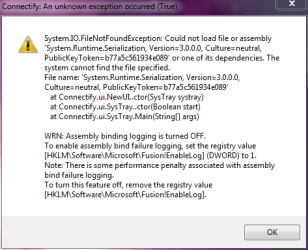
Have you made those registry changes the error message is talking about?
 

My Computer

OS
7 Pro
Have you made those registry changes the error message is talking about?

I attempted to, but, I was not able to locate anything after /Microsoft that resembled it. :cry:
 

My Computer

OS
Windows Seven Ultimate 64bit
That object is a standard .net runtime environment objhect. If it is missing or corrupt that means that either your .net install has gotten corrupted, maybe the sfc /scannow will show a problem. OR the application has tied itself to an OLD version of .net that is not installed on your machine. (a lot of times .net apps don't themselves install the .net runtime).

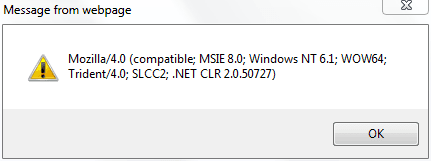
Version 3.0 probably means .net 3.0. A clever way oif quickly checking the version(s) of .net you have installed is to put this into the Address windows of IE:

javascript:alert(navigator.userAgent)

It wil llist all the versions of .net installed. If 3.0 is not listed, maybe you need to just install it from MS or from the application install CD?
 

My Computer

Computer Manufacturer/Model Number
Scratch built
OS
Windows 7 x64 Ultimate
CPU
i7 960
Motherboard
Asus P6X58D
Memory
12 Gig Corsair Dominator
Graphics Card(s)
Nvidia 480
Sound Card
Maudio Delta 44 + breakout box
Monitor(s) Displays
Dell UltraSharp U2410 24in and Samsung 21 dual monitors
Screen Resolution
1920x1200 and 1280x1024
Hard Drives
Primary: Intel X-25M G2 160G SSD
Secondary: Segate baracuda 1.0 TB
HDs in AHCI mode.
PSU
Corasair TX850
Case
Cooler Master HAF
Cooling
Corsair H50
Keyboard
Logitech G15 + N52 game pad
Mouse
Logitech MX518
Internet Speed
15kbs down 4.5kbps up
Other Info
WEI 7.6
CPU & RAM 7.6
Graphics 7.9
Hard disk 7.7
That object is a standard .net runtime environment objhect. If it is missing or corrupt that means that either your .net install has gotten corrupted, maybe the sfc /scannow will show a problem. OR the application has tied itself to an OLD version of .net that is not installed on your machine. (a lot of times .net apps don't themselves install the .net runtime).

Version 3.0 probably means .net 3.0. A clever way oif quickly checking the version(s) of .net you have installed is to put this into the Address windows of IE:

javascript:alert(navigator.userAgent)

It wil llist all the versions of .net installed. If 3.0 is not listed, maybe you need to just install it from MS or from the application install CD?

I was using IE without addons when I did this, just an FYI. I don't use IE I use Firefox.
 

Attachments

  • Capture.PNG
    Capture.PNG
    11.8 KB · Views: 8

My Computer

OS
Windows Seven Ultimate 64bit
That object is a standard .net runtime environment objhect. If it is missing or corrupt that means that either your .net install has gotten corrupted, maybe the sfc /scannow will show a problem. OR the application has tied itself to an OLD version of .net that is not installed on your machine. (a lot of times .net apps don't themselves install the .net runtime).

Version 3.0 probably means .net 3.0. A clever way oif quickly checking the version(s) of .net you have installed is to put this into the Address windows of IE:

javascript:alert(navigator.userAgent)

It wil llist all the versions of .net installed. If 3.0 is not listed, maybe you need to just install it from MS or from the application install CD?

Problem solved! WOOOOPEEE!

Fix:

I went into the ""Turn Windows Features on and Off" and enabled "Microsoft .NET Framework 3.5.1" and now Connectify works!

Thank you soo much for giving me the .NET info to go on. I knew it had to be something I did in the "Turn Windows Features on and off" section.
 

My Computer

OS
Windows Seven Ultimate 64bit
Heh cool, yeah you only had .NET 2.0 installed and it was looking for a 3.0 (or higher) module :)

The user agent command works in FF of course but it does not list the .net versions installed so you have to go spelunking in the registry to find out the same info. The IE trick is the quickest way :)
 

My Computer

Computer Manufacturer/Model Number
Scratch built
OS
Windows 7 x64 Ultimate
CPU
i7 960
Motherboard
Asus P6X58D
Memory
12 Gig Corsair Dominator
Graphics Card(s)
Nvidia 480
Sound Card
Maudio Delta 44 + breakout box
Monitor(s) Displays
Dell UltraSharp U2410 24in and Samsung 21 dual monitors
Screen Resolution
1920x1200 and 1280x1024
Hard Drives
Primary: Intel X-25M G2 160G SSD
Secondary: Segate baracuda 1.0 TB
HDs in AHCI mode.
PSU
Corasair TX850
Case
Cooler Master HAF
Cooling
Corsair H50
Keyboard
Logitech G15 + N52 game pad
Mouse
Logitech MX518
Internet Speed
15kbs down 4.5kbps up
Other Info
WEI 7.6
CPU & RAM 7.6
Graphics 7.9
Hard disk 7.7
Question to the original poster, what does connectify do? Fake an access point?
 

My Computer

Computer Manufacturer/Model Number
Black_Box (homebuilt)
OS
windows 7 RTM x64
CPU
Phenom II 965 Quad Core 3.4Ghz
Motherboard
Asus M4A79T Deluxe
Memory
Mushkin Blackline 8GB (4x2gb)
Graphics Card(s)
XFX Radeon 5970 Black Edition
Sound Card
onboard
Monitor(s) Displays
Dell 2408WPF-main Dell E248WFP-secondary
Screen Resolution
1920x1200-main 1920x1200-secondary
Hard Drives
OCZ Vertex Limited Edition 100GB (OS)
x1 WD Black Edition 500GB drive (Storage)
PSU
XFX 850w Black Edition (Modular)
Case
Mountian Mods H2go
Cooling
CoolITSystems ECO A.L.C.
Keyboard
Logitech MX 5500 wireless keyboard
Mouse
Razor Copperhead
Internet Speed
16Mb down/2Mb up Wowway Cable Internet
Question to the original poster, what does connectify do? Fake an access point?

I am no tech Guru, but as I understand it, this is only workable on a Windows 7 notebook. I believe Intel left the door open for this to work, but did not finish the job for Windows. Basically, pretty much any Windows 7 computer with modern Wifi card has the ability to be a full blown wireless access point, it just needs the code finished. This is where Connectify comes in, and it does a damn fine job at it.

It is not a mock access point, it is a real access point with security and everything. Best part is, all the stuff is already built into your computer and simply needs unlocking.

"Connectify is a free and easy to use software router for Windows 7 computers. With Connectify, users can wirelessly share any Internet connection: a cable modem, a cellular card, or even another Wi-Fi network. Other Wi-Fi enabled devices including laptops, smart phones, music players, and gaming systems can see and join your Connectify hotspot just like any other Wi-Fi access point and are kept safe and secure by password-protected WPA2 Encryption."
 

My Computer

OS
Windows Seven Ultimate 64bit
Back
Top