Win 7 7068 x64 and Touch capability PROBLEM

Should Windows 7 support ALL touchscreens?

  • No

    Votes: 0 0.0%

  • Total voters
    13

Psychlone

New member
Member
Local time
5:49 AM
Messages
23
Hey guys.

I've been using 7068 x64 since it became available and have had no issues with it (besides ATi's CCC not working properly, but no big deal)

Anyway, I have 3 X 15.1" Tek Visions ELO touchscreen monitors that I'd really like to try Se7en's touch capability on.

Here's the deal: I've had all three of these monitors working properly with WinXP Pro for the last 4 years at my restaurant as part of my Point Of Sale system, I have all the old drivers, and have downloaded all kinds of Vista x64 drivers as well.
2 of the monitors are serial (COM port) and 1 is USB (I had to send one back for repair and they just sent me a newer model)
I haven't tried either of the serial touchscreen monitors since my motherboard has no COM ports in it (I do have a couple in a drawer, but I'd rather use the USB monitor anyway)

So, here's what's been done (and hasn't worked so far)

Reading that Windows 7 has (or is going to have?) "Touch Capabilities", and reading up on the ELO drivers for these monitors, they all pretty much say that if you're using an USB touchscreen, that Windows Vista will automagically recognize the monitor as a touchscreen and it will 'just work'.
So, I tried to just plug it in by itself first - Win7 installed some HID drivers behind the scenes (I really should run ProcMon to see just wtF is going on when these things happen!) - but it still did nothing, although, it did extend the desktop to the new monitor.
Then, I downloaded the newest x64 Vista drivers directly from ELO and installed (rebooting in between), plugged it in (like the instructions say) and still nothing - even though it still is recognized as a monitor - Win7 automatically has extended the desktop to it, just no touchscreen capability.

I've uninstalled and reinstalled and did all kinds of reboots in between each change, and still have no touch capability.

So, does anyone here have any experience getting this to work? Has anyone here actually tried to utilize a touchscreen with Win7??

Any good information will be greatly appreciated (and repped!!)

Thanks in advance.

Psychlone
 

My Computer

Computer Manufacturer/Model Number
Home-Built
OS
Windows Se7en
CPU
Phenom II 940 CACVC AC 0849 APAW
Motherboard
ASUS M3A79-T Deluxe
Memory
2 X 2GB Corsair Dominator 8500C5D v1.1 (D9's Baby!)
Graphics Card(s)
Sapphire 4870X2
Sound Card
Onboard w/ Creative Gigaworks S750 7.1
Monitor(s) Displays
Acer P241W 24", Samsung Syncmaster 204B 20.1"
Screen Resolution
19X12 for most everything (I rarely use the secondary)
Hard Drives
7 X 500GB Seagate 7200RPM Barracudas
PSU
OCZ GameXstream 1010W
Case
Heavily modified CM Cosmos S (reverse paint scheme, etc.)
Cooling
TRUE + 2 Scythe Slipstream 120mm, + 7 Scythe Slipstream case
Keyboard
MS Wireless 6000 v3.0
Mouse
MS Wireless Laser 6000 v2.0
Internet Speed
7000/864
I could be way wrong here, but I haven't heard of any of the beta builds integrating the full win7 touch yet.
So I'm not so sure that the these beta builds, including 7068, have win7 touch yet.
But like I said, I could be wrong.
 

My Computer

Computer Manufacturer/Model Number
Dell XPS 420
OS
Windows 7 Ultimate x64 7600 RTM
CPU
Intel Core 2 Quad Q6600
Memory
8GB DDR2 PC6400
Graphics Card(s)
ATI Radeon X2400
Sound Card
On Board 5.1
Monitor(s) Displays
Dual NEC MultiSync 70GX2
Screen Resolution
1280x1024
Hard Drives
WD 500GB / SeaGate 1TB
Case
Dell XPS 420
Cooling
Fan
Keyboard
Logitech G19
Mouse
Logitech MX Revolution
Internet Speed
1.5Mb Down... soon to be 12Mb Down
Yea VinesKid, I'm pretty sure they do have it, both Engadget and Gizmodo gaze a demonstration of it for build 7000. I've never used it personally though, sorry can't help Psychlone =/
 

My Computer

Computer Manufacturer/Model Number
Compaq CQ50-107NR
OS
Windows 7 Build 7077 x64
CPU
AMD Athlon Dual Core QL-60 - 1.9Ghz
Memory
2GB
Graphics Card(s)
NVIDIA GeForce 8200 M G
Screen Resolution
1280 x 800
Hard Drives
120GB, Not sure of RPM but prolly 5400 or lower.
Yea VinesKid, I'm pretty sure they do have it, both Engadget and Gizmodo gaze a demonstration of it for build 7000. I've never used it personally though, sorry can't help Psychlone =/

hmm, yea I thought they would have put it in by now.
7000 is the last bulild I used before 7068, but I don't have any touch hardware.

but yea psychlone, I'm not too sure what to do either.
Have you tried uninstalling the drivers and then using device manager to search for the drivers on windows update? MS might have an obscure driver that could work...
other than that, maybe uninstall the drivers, clean reg, and do a disc clean up, just to get all the old data off, then reinstall the vista x64 drivers you have.
Let us know.
 

My Computer

Computer Manufacturer/Model Number
Dell XPS 420
OS
Windows 7 Ultimate x64 7600 RTM
CPU
Intel Core 2 Quad Q6600
Memory
8GB DDR2 PC6400
Graphics Card(s)
ATI Radeon X2400
Sound Card
On Board 5.1
Monitor(s) Displays
Dual NEC MultiSync 70GX2
Screen Resolution
1280x1024
Hard Drives
WD 500GB / SeaGate 1TB
Case
Dell XPS 420
Cooling
Fan
Keyboard
Logitech G19
Mouse
Logitech MX Revolution
Internet Speed
1.5Mb Down... soon to be 12Mb Down
Yep.

I've installed and uninstalled several times now, even tried using several different drivers direct from ELO *and* Tek Visions websites - all to no avail.

I'm not entirely sure that what I'm trying to do is even possible, since all the videos that are on YouTube and such, are showing the possibilities of Win7's Multi-Touch capabilities while using the "TouchSmart" interface via HP and Dell.

I did find a link to a really in-depth tut on Win7 touch on TechNet (via MSDN) here: Engineering Windows 7 : Touching Windows 7 - but this doesn't help my situation either.

What's the point of adding touch technology if you're forced into purchasing only hardware that's currently only available via OEM manufacturers?

Anyway, I'd be happy to just be able to utilize one of these monitors in any form of touch. On the XP Pro machines I have (3 of them), I could use the screen in the same way that a mouse would interact with items - click, double-click, drag, open, close, etc. - pretty much anything that you could do with a mouse, you could do with the Tek Visions TFT monitors...so why can't I do *any* of it in Windows 7???

Any info on this is sincerely appreciated!!

Psychlone
 

My Computer

Computer Manufacturer/Model Number
Home-Built
OS
Windows Se7en
CPU
Phenom II 940 CACVC AC 0849 APAW
Motherboard
ASUS M3A79-T Deluxe
Memory
2 X 2GB Corsair Dominator 8500C5D v1.1 (D9's Baby!)
Graphics Card(s)
Sapphire 4870X2
Sound Card
Onboard w/ Creative Gigaworks S750 7.1
Monitor(s) Displays
Acer P241W 24", Samsung Syncmaster 204B 20.1"
Screen Resolution
19X12 for most everything (I rarely use the secondary)
Hard Drives
7 X 500GB Seagate 7200RPM Barracudas
PSU
OCZ GameXstream 1010W
Case
Heavily modified CM Cosmos S (reverse paint scheme, etc.)
Cooling
TRUE + 2 Scythe Slipstream 120mm, + 7 Scythe Slipstream case
Keyboard
MS Wireless 6000 v3.0
Mouse
MS Wireless Laser 6000 v2.0
Internet Speed
7000/864
First off, apologies for the double-post. I figured this would be better served on a new post than lost in the end of the last one since there's already been several people read my previous post and probably wouldn't know there was new info.

Alright - I've tried EVERYTHING that I could think of as far as drivers are concerned...tried them all in compat mode with XP +SP2, Vista +SP1 and SP2, uninstalling, clearing the registry of all new keys and rebooting in between each change...and still no joy.

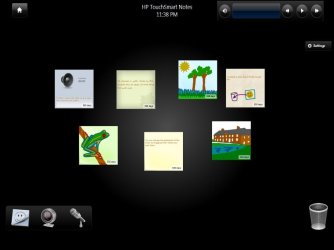
So, in my quest, I hacked the CRAP outta HP's TouchSmart app. I got it running just fine on my system - but there's *still* no 'touch' capability.
Check this out:
touchsmart.jpg
So, like I said, I've got the full TouchSmart program working fully on my machine without any issues at all - other than the fact that there's no TOUCH CAPABILITY!!! AAAARRRRRGH!!!! (sensing the frustration? lol)

So, now that I see just what kind of crap HP has going for it (even though it's kind of novel to look at things a little differently than we were raised) - my system is going to be reverted to the Acronis image I made before trying out all the driver install/uninstalls and the TouchSmart hack.

Anyone that's interested in hacking TouchSmart to run on their computers - don't. It's really not worth your time unless you've got an actual TouchSmart PC (with it's optical touch) - Not sure about the legality of doing this, and after seeing what it does and how it works, I won't be using it on any of my machines - EVER.

So, still questing for the airspeed velocity of an unladen swallow - just in case anyone knows wtF. (oh, I mean the other thing...ummm...oh yeah - TOUCH CAPABILITY on Win7!)

Psychlone
 
Last edited:

My Computer

Computer Manufacturer/Model Number
Home-Built
OS
Windows Se7en
CPU
Phenom II 940 CACVC AC 0849 APAW
Motherboard
ASUS M3A79-T Deluxe
Memory
2 X 2GB Corsair Dominator 8500C5D v1.1 (D9's Baby!)
Graphics Card(s)
Sapphire 4870X2
Sound Card
Onboard w/ Creative Gigaworks S750 7.1
Monitor(s) Displays
Acer P241W 24", Samsung Syncmaster 204B 20.1"
Screen Resolution
19X12 for most everything (I rarely use the secondary)
Hard Drives
7 X 500GB Seagate 7200RPM Barracudas
PSU
OCZ GameXstream 1010W
Case
Heavily modified CM Cosmos S (reverse paint scheme, etc.)
Cooling
TRUE + 2 Scythe Slipstream 120mm, + 7 Scythe Slipstream case
Keyboard
MS Wireless 6000 v3.0
Mouse
MS Wireless Laser 6000 v2.0
Internet Speed
7000/864
hello Psychlone

can you confirm something for me?
as i do have touch working (its a wacom USB device and was automatically installed)
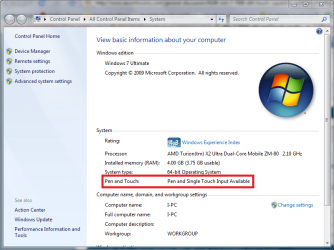
can you check if this shows?

you right click my computer then hit properties...
Touch.PNG
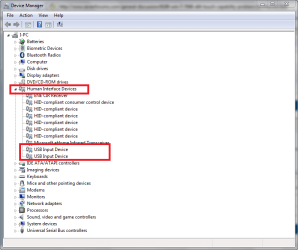
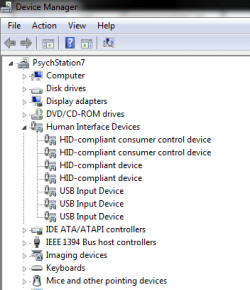
also can you show us a pic of your HID (Human Interface Devices) devices (do not close the properties display)
and click on device manager and expand the HID devices
and see if anything like USB touch input or ELO tek or something similar...
Capture.PNG

then you should have touch avaible and it might be something about calibration...

also i dont believe COM touch devices are going to be supported (as they are not usually "plug-N-play" but playing around with the xp drivers might work...
 

My Computer

Computer Manufacturer/Model Number
Tx2500z Tablet Pc/Homemade Server
OS
Windows 7 Ult x64(x2), HomePrem x32(x4), Server 08 (+VM), 08 R2 (VM) , SuSe 11.2 (VM), XP 32 (VM)
CPU
Turion X2 ultra (oh well came with laptop)/P4 @3.2 (yes P4)
Motherboard
IDK HP Motherboard / Intel DG965SS
Memory
OCZ Dual Channel 4GB kit/ 1gb Dual Channel
Graphics Card(s)
HD 3200 graphics /GMA x3100 (yay for intergrated!!)
Sound Card
Realtek HD Audio(mic working, well sort of)/Siig IC-70012
Monitor(s) Displays
built-in Hp 12" laptop screen/ Acer 19"
Screen Resolution
1280x800 /1440x900
Cooling
All Air Cooled
Mouse
Logi MX Rev. /MS Wheel Optical 1.1A /Logitech Optical Mouse
Internet Speed
College baby but its still routed through vpn to 1536k...
Other Info
love my wacom pen and pressure sensitivity...
wished it worked in 7, SUSE for that matter though
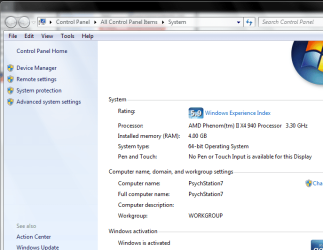
Well, my basic information says that there's no pen and touch available on this display (even though the Tek Visions touchscreen is the only monitor even plugged in right now - after a fresh install of 7068)
snip1.PNG

But, weird thing is, inside the Device Mangler, it's showing 2 HID compliant consumer control devices (both of which point to default MS drivers from 6.1.7068.0)
snip2.PNG

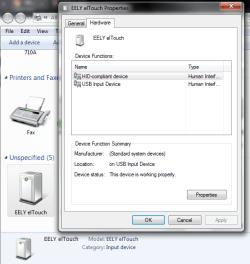
It also shows up in Devices and Printers under both Devices (as a monitor) and Unspecified (this actually shows as EELY elTouch - a touch input device)
snip3.PNG

But, of course, STILL NO JOY. I've totally formatted and installed 7068 x64 from scratch, so I'm positive it's the OS at this point and not some arbitrary driver issue.

I even went as far as dragging out one of the three PCs that these monitors were hooked up to just to see if the monitor got borked in transport or not, but it worked (I had chosen the wrong PC, so the calibration was waaayy off, but it did indeed have touch capability)

Speaking of which - I've tried ALL those drivers with Win7...none of them work - and the couple ELO or Tek Visions calibration and driver install programs that do install, Win7 won't allow the programs to work, saying missing .dll's, missing .sys's or some other arbitrary error message, even though I've taken the .dll's and .sys's direct from the other computer (via USB drive) and installed them in the correct places.

It's looking like ELO and Win7 just don't play well together. Which really sucks - what happened if I had chosen to upgrade all my computers at my restaurant to Windows7 when it came out, and I found out after the fact, that there's no touch capability???

All in all, I really like Win7, and won't give it up for anything, but this is really disconcerting...that I've spent the better part of 2 days trying to get a simple touchscreen working that worked within 2 minutes of installing on an XP Pro machine is absolutely asinine.

Anyway, please - any input is welcome!

Psychlone
 

My Computer

Computer Manufacturer/Model Number
Home-Built
OS
Windows Se7en
CPU
Phenom II 940 CACVC AC 0849 APAW
Motherboard
ASUS M3A79-T Deluxe
Memory
2 X 2GB Corsair Dominator 8500C5D v1.1 (D9's Baby!)
Graphics Card(s)
Sapphire 4870X2
Sound Card
Onboard w/ Creative Gigaworks S750 7.1
Monitor(s) Displays
Acer P241W 24", Samsung Syncmaster 204B 20.1"
Screen Resolution
19X12 for most everything (I rarely use the secondary)
Hard Drives
7 X 500GB Seagate 7200RPM Barracudas
PSU
OCZ GameXstream 1010W
Case
Heavily modified CM Cosmos S (reverse paint scheme, etc.)
Cooling
TRUE + 2 Scythe Slipstream 120mm, + 7 Scythe Slipstream case
Keyboard
MS Wireless 6000 v3.0
Mouse
MS Wireless Laser 6000 v2.0
Internet Speed
7000/864
Windows 7 differientiates between touch/tablet/mouse. My tablet gets installed fine, but windows treats it as a mouse until I install the tablet drivers.

Once I install the tablet drivers only then am I allowed to use "touch gestures" like flicking.

Thems the breaks with beta, seems like your drivers for you specific piece of hardware aren't playing nice with windows 7 yet.

Why are you making assumptions about the final release of W7 and whether it will support your hardware or not? Slow down, send feedback to microsoft and let them know your hardware isn't being supported.
 

My Computer

OS
7264x64/7260x86
^ Not really making assumptions on the final of Win7 per se - the beta 7068 *does* say it's a Release Candidate, but I also know enough about beta testing (been doing this for over 20 years) that things change.

More than anything, I'm upset that I've tried in vain for 2 days to get a simple thing running on Windows 7 that works just fine on XP Pro. Not only that, but the time involved in all the driver work that I've done trying to get this to work - uninstalling and rebooting is one thing, but reinstalling Windows and still not having anything to work with is very frustrating.

Really, it was just a test - like I stated, I have 3 touchscreens from my restaurant here at my house, and all of them worked just fine in Windows XP Pro, so I thought it would be fun to experiment with touch in Windows 7 - especially considering the placement and size of all the buttons, obviously made this way specifically for touch...but, it's not like my world is going to end because of it either. I just think that Windows 7 should have the same capability as it's predecessor in that installing a device (any device for that matter) - should just work.

Anyway, thanks for the input guys - if anyone has anything further to say, please do - I'm all ears and am willing to try pretty much anything just to test and play with test touchscreens.

Psychlone
 

My Computer

Computer Manufacturer/Model Number
Home-Built
OS
Windows Se7en
CPU
Phenom II 940 CACVC AC 0849 APAW
Motherboard
ASUS M3A79-T Deluxe
Memory
2 X 2GB Corsair Dominator 8500C5D v1.1 (D9's Baby!)
Graphics Card(s)
Sapphire 4870X2
Sound Card
Onboard w/ Creative Gigaworks S750 7.1
Monitor(s) Displays
Acer P241W 24", Samsung Syncmaster 204B 20.1"
Screen Resolution
19X12 for most everything (I rarely use the secondary)
Hard Drives
7 X 500GB Seagate 7200RPM Barracudas
PSU
OCZ GameXstream 1010W
Case
Heavily modified CM Cosmos S (reverse paint scheme, etc.)
Cooling
TRUE + 2 Scythe Slipstream 120mm, + 7 Scythe Slipstream case
Keyboard
MS Wireless 6000 v3.0
Mouse
MS Wireless Laser 6000 v2.0
Internet Speed
7000/864
Thanks for the effort copernicus...I really do appreciate it!

I've tried the drivers linked on that page - strange enough, it was a secondary link to the same exact drivers that I've already tried.
What's weird is that those are the same drivers that I was using on XP Pro, but they simply don't work on Win7 for some reason.

So, I haven't made any progress - most part of today was spent trying to do it all over again, all in vain.

Anyway, +rep to copernicus for the help.

Anyone with further information, please don't hesitate to post it up!!

Psychlone
 

My Computer

Computer Manufacturer/Model Number
Home-Built
OS
Windows Se7en
CPU
Phenom II 940 CACVC AC 0849 APAW
Motherboard
ASUS M3A79-T Deluxe
Memory
2 X 2GB Corsair Dominator 8500C5D v1.1 (D9's Baby!)
Graphics Card(s)
Sapphire 4870X2
Sound Card
Onboard w/ Creative Gigaworks S750 7.1
Monitor(s) Displays
Acer P241W 24", Samsung Syncmaster 204B 20.1"
Screen Resolution
19X12 for most everything (I rarely use the secondary)
Hard Drives
7 X 500GB Seagate 7200RPM Barracudas
PSU
OCZ GameXstream 1010W
Case
Heavily modified CM Cosmos S (reverse paint scheme, etc.)
Cooling
TRUE + 2 Scythe Slipstream 120mm, + 7 Scythe Slipstream case
Keyboard
MS Wireless 6000 v3.0
Mouse
MS Wireless Laser 6000 v2.0
Internet Speed
7000/864
I have had 7000 and 7057 installed on an Asus Eee Top (all in one PC/touchscreen). Tablet PC functionality works automatically (handwriting, pen flicks, mouse emulation) but I don't have any of the functionality I see in the YouTube videos showing touch control of Media Center ala iPod Touch.

Not a biggie but might it be fun to play with. I'll go to 7068 when it's downloaded and let you know if there's any change. Maybe you specifically need a digitizer or dual-touch capable display.
 

My Computer

OS
Windows 7 7057 x86
UPDATE

I've tried every single driver that's included in 4 different .ini files from 4 different versions of driver sets from 4 different places....and no joy. (that's a total of over 50 different separate drivers manually installed, rebooted, uninstalled, rebooted, registry cleaned in between ,etc.!)

I'm in communication with TekVisions and EELY's techs via email, and they're trying to get a driver set together that's not only Vista compliant, but is Win7 compliant - since most of Win7 is based around touch technology.

I just can't believe that it's been this hard to get something working that works without a hitch in XP. Given that MS is pushing for hardware recognition in Win7, it actually really surprises me that we've all got "Smart Card" services (running on Auto by default in Vista for God's sake) - but very limited touch capability in Win7...seriously - just how many people are using smart cards anyway?? Wouldn't there actually be more people using touchscreens (even from bygone eras) than smartcards???

Anyway, as time progresses and I receive more information, I'll keep this thread updated.

In the meantime, I sincerely appreciate the help from you guys, and if anyone has any new ideas or information, please don't hesitate to post it up!!

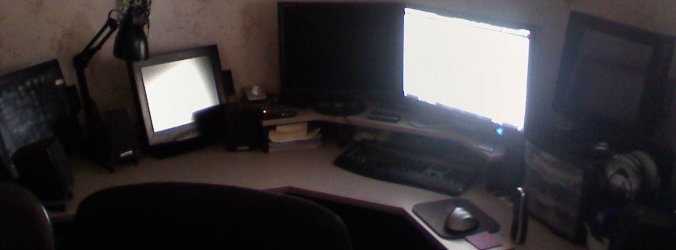
Really, wouldn't 3 touch + 2 other LCDs running through a Matrox Quad be *wicked* ??? ;)
Capture.JPG

Psychlone
 

My Computer

Computer Manufacturer/Model Number
Home-Built
OS
Windows Se7en
CPU
Phenom II 940 CACVC AC 0849 APAW
Motherboard
ASUS M3A79-T Deluxe
Memory
2 X 2GB Corsair Dominator 8500C5D v1.1 (D9's Baby!)
Graphics Card(s)
Sapphire 4870X2
Sound Card
Onboard w/ Creative Gigaworks S750 7.1
Monitor(s) Displays
Acer P241W 24", Samsung Syncmaster 204B 20.1"
Screen Resolution
19X12 for most everything (I rarely use the secondary)
Hard Drives
7 X 500GB Seagate 7200RPM Barracudas
PSU
OCZ GameXstream 1010W
Case
Heavily modified CM Cosmos S (reverse paint scheme, etc.)
Cooling
TRUE + 2 Scythe Slipstream 120mm, + 7 Scythe Slipstream case
Keyboard
MS Wireless 6000 v3.0
Mouse
MS Wireless Laser 6000 v2.0
Internet Speed
7000/864
actually psyclone...
more than you think...
i have been to organizations and schools that preffer the use of smart cards (my school preffers it instead of keys (actually physical keys) and passwords)
although outside of the private and gov sector for home use it is not widespread since the pain of using these while there are better alternatives such as Fingerprint (which i love better than SC since i can lose a SC easily, but a FP is not as easy to lose...:p'
touchscreen has been more a novelty idea for most people (although organizations have been using them (sometimes with xp/vista and some even with a custom OS...)
at this point EElY should be ashamed that it took this long in the game bring (most likely 1.0 ) vista/7 drivers....
 

My Computer

Computer Manufacturer/Model Number
Tx2500z Tablet Pc/Homemade Server
OS
Windows 7 Ult x64(x2), HomePrem x32(x4), Server 08 (+VM), 08 R2 (VM) , SuSe 11.2 (VM), XP 32 (VM)
CPU
Turion X2 ultra (oh well came with laptop)/P4 @3.2 (yes P4)
Motherboard
IDK HP Motherboard / Intel DG965SS
Memory
OCZ Dual Channel 4GB kit/ 1gb Dual Channel
Graphics Card(s)
HD 3200 graphics /GMA x3100 (yay for intergrated!!)
Sound Card
Realtek HD Audio(mic working, well sort of)/Siig IC-70012
Monitor(s) Displays
built-in Hp 12" laptop screen/ Acer 19"
Screen Resolution
1280x800 /1440x900
Cooling
All Air Cooled
Mouse
Logi MX Rev. /MS Wheel Optical 1.1A /Logitech Optical Mouse
Internet Speed
College baby but its still routed through vpn to 1536k...
Other Info
love my wacom pen and pressure sensitivity...
wished it worked in 7, SUSE for that matter though
although outside of the private and gov sector for home use it is not widespread since the pain of using these while there are better alternatives such as Fingerprint (which i love better than SC since i can lose a SC easily, but a FP is not as easy to lose...:p'

Lol - until we all have RFID tags imbedded in our hands or foreheads, I guess!! :shock:

touchscreen has been more a novelty idea for most people (although organizations have been using them (sometimes with xp/vista and some even with a custom OS...)
at this point EElY should be ashamed that it took this long in the game bring (most likely 1.0 ) vista/7 drivers....

In all honesty, I do realize that touchscreens were not only novelty, but pretty far out of the pricerange of common users. In fact, the only reason I even have them is because I own a restaurant and built a Point Of Sale system to create some efficiency out of the old hand-written hieroglyphics standard that old restaurants used to use.

But, I do agree, EELY/ELO/TekVisions really should get on the ball with drivers - for God(s) sake, it's 2009 and the last driver set released that was even WHQL was before SP2 for XP !!!!

Anyway, you did point out something that I really didn't consider or know about - smartcards. But, like I said, that's old tech now...we'll all be standing in line for our new RFID's soon enough!

Psychlone
 

My Computer

Computer Manufacturer/Model Number
Home-Built
OS
Windows Se7en
CPU
Phenom II 940 CACVC AC 0849 APAW
Motherboard
ASUS M3A79-T Deluxe
Memory
2 X 2GB Corsair Dominator 8500C5D v1.1 (D9's Baby!)
Graphics Card(s)
Sapphire 4870X2
Sound Card
Onboard w/ Creative Gigaworks S750 7.1
Monitor(s) Displays
Acer P241W 24", Samsung Syncmaster 204B 20.1"
Screen Resolution
19X12 for most everything (I rarely use the secondary)
Hard Drives
7 X 500GB Seagate 7200RPM Barracudas
PSU
OCZ GameXstream 1010W
Case
Heavily modified CM Cosmos S (reverse paint scheme, etc.)
Cooling
TRUE + 2 Scythe Slipstream 120mm, + 7 Scythe Slipstream case
Keyboard
MS Wireless 6000 v3.0
Mouse
MS Wireless Laser 6000 v2.0
Internet Speed
7000/864
your very right psyclone....
its very old tech but it works and it works well
actually better than using long and complex passwords that one might forget...

the reason why its there is because of MS's unofficial mantra of try to keep Backwards Compatibilty and also because there is still a business on it...
there are companies such as HID (which are the ones being used in my school and very popular in businesses that i went and visited)

as far as RFID's go i am completely against it being the sole for for IDing a person...
this means that with the right equipment (and know how) you can be pretty be able to get away with ID theft more easily (unless the RFID's carry a pseudo-random text that is decrypted in a server and is then sent back to whomever requested, but then like i said the person with the right equipment eventually will get in, and unless they have have some form of flood control they would be useless if someone floods the servers with a unstoppable # of requests flooding the airwave and causing the RFID tech to not work)

as you can see im all against RFID's for identifing someone...:rolleyes:
for non identifing thought i think its great (like it would be a deal more harder for shoplifters if they embed RFID's in random places of products)
and i believe that they are already using it in sports tickets and i think thats great to stop the spread the piracy in that front....;)

sorry getting OT but keep us posted...;)
 

My Computer

Computer Manufacturer/Model Number
Tx2500z Tablet Pc/Homemade Server
OS
Windows 7 Ult x64(x2), HomePrem x32(x4), Server 08 (+VM), 08 R2 (VM) , SuSe 11.2 (VM), XP 32 (VM)
CPU
Turion X2 ultra (oh well came with laptop)/P4 @3.2 (yes P4)
Motherboard
IDK HP Motherboard / Intel DG965SS
Memory
OCZ Dual Channel 4GB kit/ 1gb Dual Channel
Graphics Card(s)
HD 3200 graphics /GMA x3100 (yay for intergrated!!)
Sound Card
Realtek HD Audio(mic working, well sort of)/Siig IC-70012
Monitor(s) Displays
built-in Hp 12" laptop screen/ Acer 19"
Screen Resolution
1280x800 /1440x900
Cooling
All Air Cooled
Mouse
Logi MX Rev. /MS Wheel Optical 1.1A /Logitech Optical Mouse
Internet Speed
College baby but its still routed through vpn to 1536k...
Other Info
love my wacom pen and pressure sensitivity...
wished it worked in 7, SUSE for that matter though
Have you had any luck with this?

I just finished installing a touchscreen on my laptop with windows 7 and the the default windows drivers for the screen work as they should. Downloaded Caltouch to calibrate the screen and everything is gravy. Your thread came to mind(I feel like Im rubbing it it =P)

On a sidenote, single touch screen on seven are kinda weak. I'm getting along with it so far, but I can see where multi touch would shine.
 

My Computer

OS
7264x64/7260x86
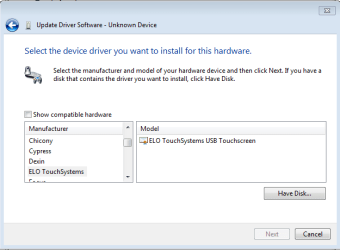
While trying to get my 3M MicroTouch EXII working the way it should in W7 (not just as an emulated mouse) I stumbled onto this topic. Today while browsing through the standard avaiable drivers in 7 I came across an ELO touchsystems usb touchscreen driver. Not sure if you already tried this one, and clueless why 7 wouldn't install this automatically, but it might be of use to you. The screenshot is in the attachment, the driver is there in both 7000 x64 and 7077 x86, I haven't tried 7068 x64.

oh, and Copernicus, does touch on your laptop also work in Media Center?
 

Attachments

  • eloTouchW7.PNG
    eloTouchW7.PNG
    10 KB · Views: 96

My Computer

OS
Windows 7 build 7077
I haven't messed around with media center since I use winamp and media player classic, but I'll double check when I get home. I remember it working in media player though, so I don't see why it wouldn't in the center.

As far as getting the touch screen to not emulate a mouse and be a "digitizer", try downloading caltouch, it has calibration, and also options to switch from mouse to digitizer.

I got it from here (second post):

http://forum.eeeuser.com/viewtopic.php?pid=464985
 

My Computer

OS
7264x64/7260x86
Back
Top