Audio Stutter on fresh install of Windows 7

protostar8

New member
Local time
3:06 AM
Messages
14
I just installed windows 7 yesterday. I took time to download the k-lite mega codec pack and vlc player. I get an audio stutter at intermittent intervals when I try to watch videos. Doesn't matter if I use Windows Media Player, WMC, VLC. I always get the stutter. It's like the audio just hangs up for a moment. I have updated my MOBO's driver, my video cards driver, installed realtek's latest release and nothing has fixed it. I'm at a loss for what to do. Anyone got some suggestions to try? Would buying a sound card fix the problem? Wanted to add that the stutter sounds like a buzz and that it happens when doing anything audio related (even watching youtube vids).

MOBO = nvidia nforce 750i sli ftw

Used the latency checker when viewing anime and it's all yellow and red. Is Win7 just a freakin mess? The beta version I had worked WONDERFULLY. I wish I could have kept the beta version and just input a license to use.
 

My Computer My Computer

At a glance

Win7
OS
Win7
I have Win 7, 64 bit and use my PC for my recording studio. The DPC checker latency is very low. Too many programs running can affect latency and other PC operations including the audio being interrupted.
If your motherboard has chipset drivers and you didn't install them, that is the first thing to do. Second, uninstall the RealTek in the Device Manger (DO NOT uninstall the drivers), then restart the PC and when Windows starts it will detect and reinstall the sound - this fixes a lot of flakey problems and may help yours.

Finally, it could be something other than the RealTek that is affecting the sound.
 

My Computer My Computer

At a glance

Windows 10 64 bitIntel i7 6700K16GB Corsair DominatorIntel CPU Graphics
Computer type
PC/Desktop
Computer Manufacturer/Model Number
My Own Build
OS
Windows 10 64 bit
CPU
Intel i7 6700K
Motherboard
ASUS ROG Maximus VIII Hero
Memory
16GB Corsair Dominator
Graphics Card(s)
Intel CPU Graphics
Sound Card
RealTek
Monitor(s) Displays
27" Dell S2719dgf
Screen Resolution
2560X1440
Hard Drives
1 TB Samsung 850 EVO SSD for Win 10 Pro
500GB Samsung 850 EVO SSD for Win 10 Insider
2 TB drive for backup
PSU
EVGA Supernova 750G2
Case
BeQuiet Silent Base 600
Cooling
Deepcool Captain 120EX
Keyboard
Microsoft Wireless 2000
Mouse
Microsoft wireless
Internet Speed
100 MB/sec (Cable)
Antivirus
Microsoft Defender and Malwarebytes
Browser
Edge/Firefox
Other Info
Cakewalk (Sonar) by BandLab and Studio One 4.1 Pro recording studio software. MOTU 896Mk3 Hybrid recording interface, Frontier Tranzport wireless control unit, Behringer X-Touch Control Surface.
Five USB connected optical drives for CD Audio production using Nero BurningROM
1, dont overclock.
2 switch off any antivirus prog before install
3 Download latest Direct x Redistribution updates (Feb 2010 edition) Updates 11, 10 + DX 9 (in one package!)
Check for stutter.
4. Problem still > reload all graphic drivers with latest update.
5. Problem still reload latest sound chip drivers realtek etc.
6. You may have an incorrect/old driver version such as "SMBUS controller"/"PCI Controller"etc or an old driver for your motherboard installed which causes sound stutter and crashes with graphics. Try only to install latest win 7 updates - not off Motherboard CD etc
It seems you will be offered some updates after you have installed others so repeat update after install/restart computer
7. Various Wireless adaptors also cause the stuttering.
 

My Computer My Computer

At a glance

WIN7 Ultimate 64bitAMD FX8150/Trinity A10-5700G-Skill 2400 x2 @ 1866 (both pc's)Sapphire (factory OC version) AMD 7770
Computer type
PC/Desktop
Computer Manufacturer/Model Number
D.I.Y.
OS
WIN7 Ultimate 64bit
CPU
AMD FX8150/Trinity A10-5700
Motherboard
Asus Sabertooth v.1 /Asus F2A85-M Pro
Memory
G-Skill 2400 x2 @ 1866 (both pc's)
Graphics Card(s)
Sapphire (factory OC version) AMD 7770
Sound Card
onboard
Monitor(s) Displays
T260 Samsung
Screen Resolution
1920x1080
Hard Drives
Western Digital Sata 2TB/1TB Caviar Blacks
Buffalo 1TB usb (excellent drive)
PSU
Be-Quiet 700W E-9/Be-Quiet 550W E-9(E-9 = built by FSP)
Case
Antec P183/Antec P180mini
Cooling
x2 Xigmatek SXHH7-U01 + C-Master R4-EXBB-20PK-R0 120mm Fans
Keyboard
Cherry
Mouse
MS Explorer 3.0
Other Info
LG Blu ray combo
Pioneer 207D/208 Blu ray burners
I'm not 100% sure it's fixed, but when I went to turn off my comp last night, it installed 20 Win7 updates (though I had rebooted the PC via restart numerous times during the day). The sound today seems to be fine. I haven't noticed any stutters. Maybe that fixed it. If not, I'm gonna start going down your list of possible culprits.

Thanks!
 

My Computer My Computer

At a glance

Win7
OS
Win7
Strange

That is quite strange. Unless you installed one of the optional updates Windows Update should only give you updates for Windows. Oh well. At least you have the problem fixed. :)
 

My Computer My Computer

At a glance

Windows 7 Home Premium 32-bitIntel Core i7 920 clocked at 2.66 GHz8 GB DDR3 Dual Channel RAMnVidia Geforce GTS 240
Computer Manufacturer/Model Number
Dell Studio XPS 9000
OS
Windows 7 Home Premium 32-bit
CPU
Intel Core i7 920 clocked at 2.66 GHz
Memory
8 GB DDR3 Dual Channel RAM
Graphics Card(s)
nVidia Geforce GTS 240
Sound Card
Integrated 7.1
Monitor(s) Displays
Dell 20 in.
Screen Resolution
1280x960
Hard Drives
One 750 GB 7200 RPM SATA HDD with a secondary 500 GB 7200 RPM SATA HDD
Internet Speed
16 MB/s
Problem is back! No clue why it went away for a day??? I hate MS so much...
Seriously, for a PC built to be a gaming and media PC, the sound stuttering b/c Win7 sucks is a HUGE issue for me. Where is the cheapest place to pickup Windows XP anymore?

Edit: Wanted to add that with videos, the screen "stutters" too. It freezes for a split second when it happens.
 
Last edited:

My Computer My Computer

At a glance

Win7
OS
Win7
Update:
Installed latest bios (via company website)
Installed latest Audio Driver (via company website)
Installed latest Graphics Driver (via company website)
Installed all Win7 updates (that showed up at least)
Installed latest Direct X.

Still have the problem. I'm at a complete loss as to why Win7 is doing this. The problem seems to be at the worst when I have more than one program open. In other words, if I have firefox running while trying to watch something, the problems come up more frequently. If I try to watch a video via firefox (like youtube), I still get problems. It's not just firefox though, the problem occurs when I have pretty much any program open. It's like my system is overloaded, but I have 4GB of ram, so I doubt that's the case unless win7 is a resource hog (then again, I'm running CA antivirus and I bet it's a resource hog too).

Anyone got any suggestions? Would contacting MS cost money since I just purchased this copy? Would contacting MS even do any good or would I just get some random person who has no clue what they are doing if it isn't on a checklist?
 

My Computer My Computer

At a glance

Win7
OS
Win7
It would be helpful to have your system specs.

I have a couple of ideas to try but need some info...

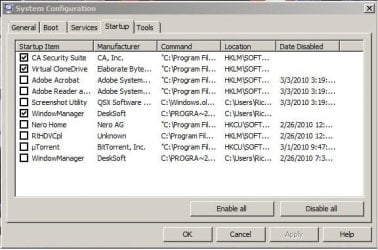
1. Open a command prompt and type msconfig What do you have listed under the startup tab? Can you post a pic.

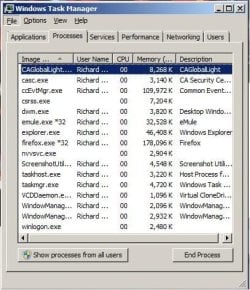
2. Next, open Task Manager, what do you have listed running, the short list, do not use the "show processes from all users", again, post a pic.

3. What, if anything resides in your startup folder.

Ap
 

My Computer My Computer

At a glance

Windows 7 Home PremiumIntel Core 2 Duo @ 3.00gHz4 GBATI Radeon HD 2600 XT
Computer Manufacturer/Model Number
Assembled in my workshop
OS
Windows 7 Home Premium
CPU
Intel Core 2 Duo @ 3.00gHz
Motherboard
Gigabyte GA-P35-S3G
Memory
4 GB
Graphics Card(s)
ATI Radeon HD 2600 XT
Sound Card
RME 24/96 Card, Realtek Internal Audio PreSonus FireStudio
Monitor(s) Displays
Acer 1917 (x2)
Screen Resolution
1280 x 1024 on both monitors
Hard Drives
Three 250GB Seagate SATA Barracuda 7200rpm
PSU
Rosewill 500-watt
Case
Rosewill mid-tower
Cooling
Noctua NH-U9B (CPU), PwrSupply fan + single large case Fan
Keyboard
Macally w/2/USB ports.
Mouse
Trackman Wheel
Other Info
Event 20/20 bas studio monitors, Yamaha sub.
Rackmount Korg/Roland/Yamaha synthesizers,
Cubase MIDI/audio recording. Sony Soundforge audio/mastering software. CD Architect Mastering. RME & Presonus audio interfaces.
System Specs:
Win7 Home Premium 64 bit
Intel Core 2 Quad CPU Q8200 @ 2.33GHz
4.0GB Ram
EVGA 750i SLI FTW Motherboard w/ onboard sound
Nvidia GeForce GTS 250 Video Card

If I've left out anything, let me know and I'll update this post.

Aphelion:
1.)Pic Posted
2.)Pic Posted (I had emule, Firefox, and a folder open at the time)
3.)Windows Manager, but the problem was around before I installed it. This program just remembers the window sizes for each window I open. I can turn it off and not really miss it though.

ALSO, I want to mention again that the mouse lags a LOT too. I can be doing just about anything and the mouse will randomly just lag or go a little crazy. Overall, the system almost seems to lag some, but since Win7 beta worked perfectly, the problem has to be win7 retail. The graphics will lag too when the audio lag occurs. The latency checker also spikes whenever it happens.

Edit: I also wanted to say THANK YOU for all the help! I really appreciate it!
 

Attachments

  • Screen0002.JPG
    Screen0002.JPG
    41.5 KB · Views: 50
  • Screen0003.JPG
    Screen0003.JPG
    43.6 KB · Views: 34

My Computer My Computer

At a glance

Win7
OS
Win7
System Specs:
Win7 Home Premium 64 bit
Intel Core 2 Quad CPU Q8200 @ 2.33GHz
4.0GB Ram
EVGA 750i SLI FTW Motherboard w/ onboard sound
Nvidia GeForce GTS 250 Video Card

If I've left out anything, let me know and I'll update this post.

Edit: I also wanted to say THANK YOU for all the help! I really appreciate it!

No problem, hope we can get it running...

First, most of the nVidea auxiliary programs are real hogs, before trying anything else go to CntrlPanel/AdminTools/Services and set to manual any of the Nvidea services... they usually (always) begin with nv. If it's something that's needed, it will start anyway. There may only be one, possibly two.

After doing so, reboot, then open task manager and quit the nvvsvc.exe task that's running, also, any other nVidea tasks that may be running, now test your system.

I think the skips are probably related peer to peer and/or network/audio conflicts but it will get the nVidea stuff out of the way.

Ap
 

My Computer My Computer

At a glance

Windows 7 Home PremiumIntel Core 2 Duo @ 3.00gHz4 GBATI Radeon HD 2600 XT
Computer Manufacturer/Model Number
Assembled in my workshop
OS
Windows 7 Home Premium
CPU
Intel Core 2 Duo @ 3.00gHz
Motherboard
Gigabyte GA-P35-S3G
Memory
4 GB
Graphics Card(s)
ATI Radeon HD 2600 XT
Sound Card
RME 24/96 Card, Realtek Internal Audio PreSonus FireStudio
Monitor(s) Displays
Acer 1917 (x2)
Screen Resolution
1280 x 1024 on both monitors
Hard Drives
Three 250GB Seagate SATA Barracuda 7200rpm
PSU
Rosewill 500-watt
Case
Rosewill mid-tower
Cooling
Noctua NH-U9B (CPU), PwrSupply fan + single large case Fan
Keyboard
Macally w/2/USB ports.
Mouse
Trackman Wheel
Other Info
Event 20/20 bas studio monitors, Yamaha sub.
Rackmount Korg/Roland/Yamaha synthesizers,
Cubase MIDI/audio recording. Sony Soundforge audio/mastering software. CD Architect Mastering. RME & Presonus audio interfaces.
I will certainly try what you suggested. I will post again if I encounter the problem. It's weird, it doesn't happen in the same place every time on videos, so I can only post once it occurs again (if it does). So far though, the PC is running much smoother. I didn't have any peer to peer programs like emule installed when the problem started, but that might not be what you're referring to.

Edit: Problem is still there. What's the next thing to try?
 
Last edited:

My Computer My Computer

At a glance

Win7
OS
Win7
Oh, I also wanted to ask if it could have ANYTHING to do with the "windows.old" folder that I just realized got migrated over when I did a clean install. Not sure why it kept a bunch of stuff from the Beta version, but it did.
 

My Computer My Computer

At a glance

Win7
OS
Win7
Oh, I also wanted to ask if it could have ANYTHING to do with the "windows.old" folder that I just realized got migrated over when I did a clean install. Not sure why it kept a bunch of stuff from the Beta version, but it did.

I would say... probably not.

There's been a lot of audio problems with the release version of Win_7 compared to the the beta version which seemed to handle audio just fine. Unfortunately, your complaint is one of many similar ones and is likely related to a hardware conflict or drivers not interacting well, that's why I suggested qutting some of the NVidea background processes.

If you want to find the problem... it will probably take a systematic examination of your system. There doesn't seem to be a magic fix that makes everything right, from what I've read on this forum it can vary from system to system. Some have had luck upgrading their BIOS, some have found a program running in the background was causing a conflict.

Ap
 

My Computer My Computer

At a glance

Windows 7 Home PremiumIntel Core 2 Duo @ 3.00gHz4 GBATI Radeon HD 2600 XT
Computer Manufacturer/Model Number
Assembled in my workshop
OS
Windows 7 Home Premium
CPU
Intel Core 2 Duo @ 3.00gHz
Motherboard
Gigabyte GA-P35-S3G
Memory
4 GB
Graphics Card(s)
ATI Radeon HD 2600 XT
Sound Card
RME 24/96 Card, Realtek Internal Audio PreSonus FireStudio
Monitor(s) Displays
Acer 1917 (x2)
Screen Resolution
1280 x 1024 on both monitors
Hard Drives
Three 250GB Seagate SATA Barracuda 7200rpm
PSU
Rosewill 500-watt
Case
Rosewill mid-tower
Cooling
Noctua NH-U9B (CPU), PwrSupply fan + single large case Fan
Keyboard
Macally w/2/USB ports.
Mouse
Trackman Wheel
Other Info
Event 20/20 bas studio monitors, Yamaha sub.
Rackmount Korg/Roland/Yamaha synthesizers,
Cubase MIDI/audio recording. Sony Soundforge audio/mastering software. CD Architect Mastering. RME & Presonus audio interfaces.
I have been trying different things. Still no luck. I have even tried re-installing drivers (after uninstalling the ones I had of course). Nothing has worked so far.

Why would P2P programs cause a conflict?
 

My Computer My Computer

At a glance

Win7
OS
Win7
I have been trying different things. Still no luck. I have even tried re-installing drivers (after uninstalling the ones I had of course). Nothing has worked so far.

Why would P2P programs cause a conflict?

P2P, uTorrent...etc, are always hitting the processor, more importantly, they're always hitting the network adapter. There's been several reports on this board of network adapters and audio conflicting.

The only way to find out is to boot the system, open Task Manager and quit all of the extra background processes you have running and see if that fixes the problem.

Hmmmmm......
I see you have Norton running, (ccEvtMgr.exe) knowing what a dog the Norton stuff is I'd say your problem lies there, at least that's where I would start.

When you quit items using task manager they're only stopped for the current session and will start up again on reboot so have at it!

I would hardly call yours a fresh install of Windows with eMule, uTorrent and a half dozen other background processes running, some of which I don't even recognize. :confused:

Ap
 

My Computer My Computer

At a glance

Windows 7 Home PremiumIntel Core 2 Duo @ 3.00gHz4 GBATI Radeon HD 2600 XT
Computer Manufacturer/Model Number
Assembled in my workshop
OS
Windows 7 Home Premium
CPU
Intel Core 2 Duo @ 3.00gHz
Motherboard
Gigabyte GA-P35-S3G
Memory
4 GB
Graphics Card(s)
ATI Radeon HD 2600 XT
Sound Card
RME 24/96 Card, Realtek Internal Audio PreSonus FireStudio
Monitor(s) Displays
Acer 1917 (x2)
Screen Resolution
1280 x 1024 on both monitors
Hard Drives
Three 250GB Seagate SATA Barracuda 7200rpm
PSU
Rosewill 500-watt
Case
Rosewill mid-tower
Cooling
Noctua NH-U9B (CPU), PwrSupply fan + single large case Fan
Keyboard
Macally w/2/USB ports.
Mouse
Trackman Wheel
Other Info
Event 20/20 bas studio monitors, Yamaha sub.
Rackmount Korg/Roland/Yamaha synthesizers,
Cubase MIDI/audio recording. Sony Soundforge audio/mastering software. CD Architect Mastering. RME & Presonus audio interfaces.
I have installed several thing since I did that fresh install. The problem though existed since I first installed Win7 and tried to play a video. I think I had only installed my antivirus program and K-lite mega codec pack (which I have tried uninstalling that codec pack to no avail). And I don't have Norton, but I do have CA Antivirus, which uses that event manager exe file. I will try shutting everything down one day except the absolute vital processes and post the results.

I have been trying different things. Still no luck. I have even tried re-installing drivers (after uninstalling the ones I had of course). Nothing has worked so far.

Why would P2P programs cause a conflict?

P2P, uTorrent...etc, are always hitting the processor, more importantly, they're always hitting the network adapter. There's been several reports on this board of network adapters and audio conflicting.

The only way to find out is to boot the system, open Task Manager and quit all of the extra background processes you have running and see if that fixes the problem.

Hmmmmm......
I see you have Norton running, (ccEvtMgr.exe) knowing what a dog the Norton stuff is I'd say your problem lies there, at least that's where I would start.

When you quit items using task manager they're only stopped for the current session and will start up again on reboot so have at it!

I would hardly call yours a fresh install of Windows with eMule, uTorrent and a half dozen other background processes running, some of which I don't even recognize. :confused:

Ap
 

My Computer My Computer

At a glance

Win7
OS
Win7
Just an update. I turned off the event manager in CA Security Suite and that really seems to have relieved the issue. I have only had it occur one time since turning it off and it was brief and in Firefox, so not a big deal. Thank you for all the help and I hope the problem stays gone!
 

My Computer My Computer

At a glance

Win7
OS
Win7
Just an update. I turned off the event manager in CA Security Suite and that really seems to have relieved the issue. I have only had it occur one time since turning it off and it was brief and in Firefox, so not a big deal. Thank you for all the help and I hope the problem stays gone!

The ccEvtMgr (Common Client Event Manager) is from Symantec and is used by Norton, CA Security and probably other virus related prgs. It continually logs the activity of the seperate programs in the virus/spyware suite.

It's known for high CPU use and generally slowing down any system it's running on.
If you have a peer to peer network running ccEveMgr is probably working overtime.

Ap
 

My Computer My Computer

At a glance

Windows 7 Home PremiumIntel Core 2 Duo @ 3.00gHz4 GBATI Radeon HD 2600 XT
Computer Manufacturer/Model Number
Assembled in my workshop
OS
Windows 7 Home Premium
CPU
Intel Core 2 Duo @ 3.00gHz
Motherboard
Gigabyte GA-P35-S3G
Memory
4 GB
Graphics Card(s)
ATI Radeon HD 2600 XT
Sound Card
RME 24/96 Card, Realtek Internal Audio PreSonus FireStudio
Monitor(s) Displays
Acer 1917 (x2)
Screen Resolution
1280 x 1024 on both monitors
Hard Drives
Three 250GB Seagate SATA Barracuda 7200rpm
PSU
Rosewill 500-watt
Case
Rosewill mid-tower
Cooling
Noctua NH-U9B (CPU), PwrSupply fan + single large case Fan
Keyboard
Macally w/2/USB ports.
Mouse
Trackman Wheel
Other Info
Event 20/20 bas studio monitors, Yamaha sub.
Rackmount Korg/Roland/Yamaha synthesizers,
Cubase MIDI/audio recording. Sony Soundforge audio/mastering software. CD Architect Mastering. RME & Presonus audio interfaces.
Just an update. I turned off the event manager in CA Security Suite and that really seems to have relieved the issue. I have only had it occur one time since turning it off and it was brief and in Firefox, so not a big deal. Thank you for all the help and I hope the problem stays gone!

The ccEvtMgr (Common Client Event Manager) is from Symantec and is used by Norton, CA Security and probably other virus related prgs. It continually logs the activity of the seperate programs in the virus/spyware suite.

It's known for high CPU use and generally slowing down any system it's running on.
If you have a peer to peer network running ccEveMgr is probably working overtime.

Ap


Good to know! I turned it off completely so that it won't even start up when I boot the comp. I have yet to have anymore problems since I turned that off (other than the mouse lagging a little and windows not closing at first, but those are minor annoyances at most). Thanks again for all the help!
 

My Computer My Computer

At a glance

Win7
OS
Win7
Oh god, I've been having a similar, if not the same problem for the past few days and it's been driving me crazy. It's basically a sound glitch, like a buzz that comes in every now and then and it's unbelievably annoying. I notice it a lot since I always listen to music when I'm in my room. I re-installed Windows 7, hoping it might solve the problem, but no luck. I installed new audio drivers but it didn't change anything either. I thought it could have been Kaspersky interferring with the soundboard, so I disabled it for some moments and noticed the sound glitch was still there.

I managed to record it using Audacity, here it is: Download Sound glitch.wav from Sendspace.com - send big files the easy way

It's right at the start of second two, during the word "force" in the "they are the force between" lyrics of the song playing.

Any ideas what to do? I'm basically desperate

Edit: I uninstalled the NVIDIA display drivers and so far I haven't encountered the glitch. I'll keep you posted.
 
Last edited:

My Computer My Computer

At a glance

Windows 7Inter Core Duo CPU (1.66 GHz, 1.67 GHz)4 GB DDR2Geforce 8600M GS 256 MB
OS
Windows 7
CPU
Inter Core Duo CPU (1.66 GHz, 1.67 GHz)
Memory
4 GB DDR2
Graphics Card(s)
Geforce 8600M GS 256 MB
Screen Resolution
1280x800
Back
Top