Explorer - NO column headers bar in details view

nickynss

New member
Local time
8:52 AM
Messages
8
Hello to ALL,

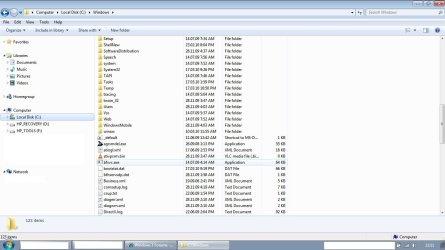
Windows Explorer in details view does not display the columns headers bar (name, type, date, size etc...) - it was there since the installation in DEC'09 but today when i opened the WE it wasn't there. The folders and files are still showed in columns, from view/choose details... menu i can select/clear which columns to appear but the columns names are not displayed.

Has anyone encountered such a behavior? Any idea how to restore the columns headers bar to be displayed?

Appreciate your help.

Thanks / Nicky
 

My Computer My Computer

OS
Windows 7 Professional 32bit
Hello Nicky, and welcome to Seven Forums.

The column headers would only be displayed in the Details folder arrangement view. Since you do, then you might see if resetting all folder views to default may restore them afterwards. If it does not help, then you might see if a repair install can without losing anything.

Hope this helps,
Shawn
 

My Computer My Computer

Computer type
PC/Desktop
Computer Manufacturer/Model Number
Self built custom
OS
64-bit Windows 11 Pro for Workstations
CPU
Intel i7-8700K OC'd to 5 GHz
Motherboard
ASUS ROG Maximus XI Formula Z390
Memory
64 GB (4x16GB) G.SKILL TridentZ RGB DDR4 3600 MHz
Graphics Card(s)
ASUS ROG-STRIX-GTX1080TI-O11G-GAMING
Sound Card
Integrated
Monitor(s) Displays
2 x Samsung Odyssey G7 27"
Screen Resolution
2560x1440
Hard Drives
1TB Samsung 990 PRO M.2,
4TB Samsung 990 PRO PRO M.2,
TerraMaster F8 SSD Plus NAS
PSU
Seasonic Prime Titanium 850W
Case
Thermaltake Core P3
Cooling
Corsair Hydro H115i
Keyboard
Logitech wireless K800
Mouse
Logitech MX Master 4
Internet Speed
2 Gb/s Download and 100 Mb/s Upload
Antivirus
Malwarebyte Anti-Malware Premium
Browser
Google Chrome
Other Info
Logitech Z625 speaker system,
Logitech BRIO 4K Pro webcam,
HP Color LaserJet Pro MFP M477fdn,
APC SMART-UPS RT 1000 XL - SURT1000XLI,
Galaxy S23 Plus phone
Thanks Shawn,

In the Folder Options window on the General and View tabs have done Restore Defaults but still no change, in Details view the columns headers are missing.

I don't think i will do the repair install of the OS just for this minor problem. If there is a way to do only the WE reinstall i can try it but not for the entire OS...there are many settings to loose and i need the machine to perform my duties.

It seems to be somekind of a malfunction of WE, its annoying and will be good to have a fix but for me a reinstall of the OS is not a choice.

Thanks once again for your ideas.

Brgds / Nicky
 

My Computer My Computer

OS
Windows 7 Professional 32bit
You might see if running a sfc /scannow command may be able to fix it.

If it has just happened recently, then you might try a system restore using a restore point dated when you did not have this problem. If the restore point is not to old, then it may be easier than a repair install.
 

My Computer My Computer

Computer type
PC/Desktop
Computer Manufacturer/Model Number
Self built custom
OS
64-bit Windows 11 Pro for Workstations
CPU
Intel i7-8700K OC'd to 5 GHz
Motherboard
ASUS ROG Maximus XI Formula Z390
Memory
64 GB (4x16GB) G.SKILL TridentZ RGB DDR4 3600 MHz
Graphics Card(s)
ASUS ROG-STRIX-GTX1080TI-O11G-GAMING
Sound Card
Integrated
Monitor(s) Displays
2 x Samsung Odyssey G7 27"
Screen Resolution
2560x1440
Hard Drives
1TB Samsung 990 PRO M.2,
4TB Samsung 990 PRO PRO M.2,
TerraMaster F8 SSD Plus NAS
PSU
Seasonic Prime Titanium 850W
Case
Thermaltake Core P3
Cooling
Corsair Hydro H115i
Keyboard
Logitech wireless K800
Mouse
Logitech MX Master 4
Internet Speed
2 Gb/s Download and 100 Mb/s Upload
Antivirus
Malwarebyte Anti-Malware Premium
Browser
Google Chrome
Other Info
Logitech Z625 speaker system,
Logitech BRIO 4K Pro webcam,
HP Color LaserJet Pro MFP M477fdn,
APC SMART-UPS RT 1000 XL - SURT1000XLI,
Galaxy S23 Plus phone
Hello Shawn,

sfc /scannow command returned "Windows Resource Protection did not find any integrity violations."

Unfortunately i am unable to do a system restore to an older restore point as it appears i have only one restore point of today after an automatic Windows Critical Updates. That's a bit strange to me as i believe WIN shall keep the old restore points at least for a month or two but by a reason not known to me i have only the latest restore point saved. I have the System Protection ON and there is enough free disk space (0.5G used of 46G allowed for system protection). I did not delete manually any restore points either.

Anyway, obviously WIN has its own way of behavior and does things without telling why is doing them. I will observe if WIN will continue to delete automatically the older restore points as for me it is an issue...you count there are restore points and when you need them there are no any...but that's another topic, i will try first read more about it to see what the reasons of that behavior might be.

As for the Explorer columns headers issue i will either use it as it is (with no headers in details view) if no fix avlb or will switch to another explorer software.

Nicky
 

My Computer My Computer

OS
Windows 7 Professional 32bit
I wish i had a solution but sadly have exactly the same problem. I restored to default, then checked registry entries. But then this happened.. Just now (as i was writing this..!), i got a crash log message from my VMWare workstation, which is interesting because it wasn't running, and haven't run that for days and there have been several restarts since then. Then Windows Explorer told me it has stopped working. I opened a new Win/explorer, and pass the beer & peanuts i have my columns back! To recap what i know i did.. in the forum page about how to set Windows Explorer to default, it shows how to downloaded a registry file and merge it with my existing one. I did that. I then opened the registry to also do the second method and confirmed that the registry entries that you are supposed to delete were already gone. (good). Then i restarted and collapsed in tears when i saw that my column headers bar was still gone and so can't change column width. Then the strange business above happened which led to the columns restoring. I hope this helps someone.

[Additional note: The column headers have disappeared again so i am no closer to having a solution. It is even worse. When i tried a third party folder viewer, (JExplorer) it also has the same problems, it looks like it uses a lot of the installed Windows explorer code which normally makes sense but in this case is bad news for me.] I will radiate intensely good thoughts in the general direction of anyone who can suggest a fix for this! ! ]
 
Last edited:

My Computer My Computer

Computer Manufacturer/Model Number
Toshiba A300
OS
Windows 7 Ultimate V6.1 (Build 7600)
CPU
centrino
Memory
4G (3G avail)
Graphics Card(s)
ATI
Windovale, thanks for the post.

Could you pls post a link to the forum page about how to set Windows Explorer to default. I still have my column headers bar missing and can give it a try.

Thanks / Nicky
 

My Computer My Computer

OS
Windows 7 Professional 32bit

My Computer My Computer

Computer type
PC/Desktop
Computer Manufacturer/Model Number
Self built custom
OS
64-bit Windows 11 Pro for Workstations
CPU
Intel i7-8700K OC'd to 5 GHz
Motherboard
ASUS ROG Maximus XI Formula Z390
Memory
64 GB (4x16GB) G.SKILL TridentZ RGB DDR4 3600 MHz
Graphics Card(s)
ASUS ROG-STRIX-GTX1080TI-O11G-GAMING
Sound Card
Integrated
Monitor(s) Displays
2 x Samsung Odyssey G7 27"
Screen Resolution
2560x1440
Hard Drives
1TB Samsung 990 PRO M.2,
4TB Samsung 990 PRO PRO M.2,
TerraMaster F8 SSD Plus NAS
PSU
Seasonic Prime Titanium 850W
Case
Thermaltake Core P3
Cooling
Corsair Hydro H115i
Keyboard
Logitech wireless K800
Mouse
Logitech MX Master 4
Internet Speed
2 Gb/s Download and 100 Mb/s Upload
Antivirus
Malwarebyte Anti-Malware Premium
Browser
Google Chrome
Other Info
Logitech Z625 speaker system,
Logitech BRIO 4K Pro webcam,
HP Color LaserJet Pro MFP M477fdn,
APC SMART-UPS RT 1000 XL - SURT1000XLI,
Galaxy S23 Plus phone
Thanks for the link Brink,

After downloading and performing the registry key merge i can cnfm that this action has not worked for me and the column headers bar in details view has not been restored.

Anyway, thanks for the help. Will continue waitring for other suggestions.

Brgds / Nicky
 

My Computer My Computer

OS
Windows 7 Professional 32bit
It looks like you may need to do a repair install to fix this then. You will not lose anything. :(
 

My Computer My Computer

Computer type
PC/Desktop
Computer Manufacturer/Model Number
Self built custom
OS
64-bit Windows 11 Pro for Workstations
CPU
Intel i7-8700K OC'd to 5 GHz
Motherboard
ASUS ROG Maximus XI Formula Z390
Memory
64 GB (4x16GB) G.SKILL TridentZ RGB DDR4 3600 MHz
Graphics Card(s)
ASUS ROG-STRIX-GTX1080TI-O11G-GAMING
Sound Card
Integrated
Monitor(s) Displays
2 x Samsung Odyssey G7 27"
Screen Resolution
2560x1440
Hard Drives
1TB Samsung 990 PRO M.2,
4TB Samsung 990 PRO PRO M.2,
TerraMaster F8 SSD Plus NAS
PSU
Seasonic Prime Titanium 850W
Case
Thermaltake Core P3
Cooling
Corsair Hydro H115i
Keyboard
Logitech wireless K800
Mouse
Logitech MX Master 4
Internet Speed
2 Gb/s Download and 100 Mb/s Upload
Antivirus
Malwarebyte Anti-Malware Premium
Browser
Google Chrome
Other Info
Logitech Z625 speaker system,
Logitech BRIO 4K Pro webcam,
HP Color LaserJet Pro MFP M477fdn,
APC SMART-UPS RT 1000 XL - SURT1000XLI,
Galaxy S23 Plus phone
nicky -

Just to confirm, the name column header is also not showing right? I know you mentioned it in your OP but in the context, it's not clear. Please confirm.
 

My Computer My Computer

Computer Manufacturer/Model Number
HP Pavilion dv7
OS
Windows 7
CPU
Core i7
Memory
8 GB
Graphics Card(s)
ATI FireGL
Monitor(s) Displays
Secondary is an HP L1940T
Screen Resolution
1680x1050
Hard Drives
160 GB SSD and 500 GB SATA
Keyboard
G11 Logitech
Mouse
G7 Logitech
Internet Speed
Fiber
Other Info
My rig smegging rules!
Will look into that but too imprtant programs and data installed...i am still afraid to take the risk...but seems i probably will have to, as still the OS continue to delete all restore points too, even those i create manualy...although the computer works (i think well) it seems there is/are bug/s.

Motc7 - yes, name column header is not shown too, as well as any other (dates, size, type, author etc...), the files/folders names and all related dtls in all of the columns are shown but not the headers bar on top. I can include or remove any column through the view/choose details menu but...no column headers...let me poin out again - in the Details View, i know that in the rest of the view methods (list, icons etc..) there are no column headers.

Herein a picture attached how it looks like.

Nicky
 

Attachments

  • Untitled.jpg
    Untitled.jpg
    99.9 KB · Views: 182

My Computer My Computer

OS
Windows 7 Professional 32bit
Will look into that but too imprtant programs and data installed...i am still afraid to take the risk...but seems i probably will have to, as still the OS continue to delete all restore points too, even those i create manualy...although the computer works (i think well) it seems there is/are bug/s.

Motc7 - yes, name column header is not shown too, as well as any other (dates, size, type, author etc...), the files/folders names and all related dtls in all of the columns are shown but not the headers bar on top. I can include or remove any column through the view/choose details menu but...no column headers...let me poin out again - in the Details View, i know that in the rest of the view methods (list, icons etc..) there are no column headers.

Herein a picture attached how it looks like.

Nicky

Got me stumped. I'm thinking yeah, repair windows. Won't take that long.
 

My Computer My Computer

Computer Manufacturer/Model Number
HP Pavilion dv7
OS
Windows 7
CPU
Core i7
Memory
8 GB
Graphics Card(s)
ATI FireGL
Monitor(s) Displays
Secondary is an HP L1940T
Screen Resolution
1680x1050
Hard Drives
160 GB SSD and 500 GB SATA
Keyboard
G11 Logitech
Mouse
G7 Logitech
Internet Speed
Fiber
Other Info
My rig smegging rules!

My Computer My Computer

Computer Manufacturer/Model Number
* BFK Customs *
OS
W 7 64-bit Ultimate
CPU
Intel Q9550 Yorkfield
Motherboard
ASUS P5Q Pro
Memory
8GB Dominator 8500C5D
Graphics Card(s)
ATI : XFX 5870
Sound Card
Realtek HD Audio 7-1
Monitor(s) Displays
1x 47" LCD HDMI & 3x 26" LCD HDMI
Screen Resolution
1920x1080P & 1920x1200
Hard Drives
1x 80GB Intel X25-M G2 SSD : 1x 500GB & 1x 640GB WD Caviar Black(s)
PSU
Corsair 620HX
Case
Cooler Master RC-690
Cooling
Tuniq Tower 120, 2x 140mm and 3x 120mm case fans
Keyboard
Microsoft 500
Mouse
Razer Diamondback 3G
Internet Speed
14 Mb/s
Other Info
1x Koutech 3Gb/s SATA HDD Hot Swap Rack
Bare Foot Kid - i have run Startup Repair but it didn't solve the problem...column headers bar is still not shown in the details view mode of WE.

Thanks anyway.

Nicky
 

My Computer My Computer

OS
Windows 7 Professional 32bit
Hello again Nicky.


Too bad that didn't solve the issue.
 

My Computer My Computer

Computer Manufacturer/Model Number
* BFK Customs *
OS
W 7 64-bit Ultimate
CPU
Intel Q9550 Yorkfield
Motherboard
ASUS P5Q Pro
Memory
8GB Dominator 8500C5D
Graphics Card(s)
ATI : XFX 5870
Sound Card
Realtek HD Audio 7-1
Monitor(s) Displays
1x 47" LCD HDMI & 3x 26" LCD HDMI
Screen Resolution
1920x1080P & 1920x1200
Hard Drives
1x 80GB Intel X25-M G2 SSD : 1x 500GB & 1x 640GB WD Caviar Black(s)
PSU
Corsair 620HX
Case
Cooler Master RC-690
Cooling
Tuniq Tower 120, 2x 140mm and 3x 120mm case fans
Keyboard
Microsoft 500
Mouse
Razer Diamondback 3G
Internet Speed
14 Mb/s
Other Info
1x Koutech 3Gb/s SATA HDD Hot Swap Rack

My Computer My Computer

Computer type
PC/Desktop
Computer Manufacturer/Model Number
Self built custom
OS
64-bit Windows 11 Pro for Workstations
CPU
Intel i7-8700K OC'd to 5 GHz
Motherboard
ASUS ROG Maximus XI Formula Z390
Memory
64 GB (4x16GB) G.SKILL TridentZ RGB DDR4 3600 MHz
Graphics Card(s)
ASUS ROG-STRIX-GTX1080TI-O11G-GAMING
Sound Card
Integrated
Monitor(s) Displays
2 x Samsung Odyssey G7 27"
Screen Resolution
2560x1440
Hard Drives
1TB Samsung 990 PRO M.2,
4TB Samsung 990 PRO PRO M.2,
TerraMaster F8 SSD Plus NAS
PSU
Seasonic Prime Titanium 850W
Case
Thermaltake Core P3
Cooling
Corsair Hydro H115i
Keyboard
Logitech wireless K800
Mouse
Logitech MX Master 4
Internet Speed
2 Gb/s Download and 100 Mb/s Upload
Antivirus
Malwarebyte Anti-Malware Premium
Browser
Google Chrome
Other Info
Logitech Z625 speaker system,
Logitech BRIO 4K Pro webcam,
HP Color LaserJet Pro MFP M477fdn,
APC SMART-UPS RT 1000 XL - SURT1000XLI,
Galaxy S23 Plus phone
Hello nickynss, welcome to Seven Forums!


They're not referring to a ( http://www.sevenforums.com/tutorials/3413-repair-install.html?ltr=R ) they are referring to Startup Repair, the terms have kind of changed and I still get confused too; have a look at the tutorial at the link below to see the difference.


http://www.sevenforums.com/tutorials/681-startup-repair.html?ltr=S <--

Nope, I'm referring to a Repair Install instead to fix this. ;)


Hello Brink, after his response I thought you may be, sorry.
 

My Computer My Computer

Computer Manufacturer/Model Number
* BFK Customs *
OS
W 7 64-bit Ultimate
CPU
Intel Q9550 Yorkfield
Motherboard
ASUS P5Q Pro
Memory
8GB Dominator 8500C5D
Graphics Card(s)
ATI : XFX 5870
Sound Card
Realtek HD Audio 7-1
Monitor(s) Displays
1x 47" LCD HDMI & 3x 26" LCD HDMI
Screen Resolution
1920x1080P & 1920x1200
Hard Drives
1x 80GB Intel X25-M G2 SSD : 1x 500GB & 1x 640GB WD Caviar Black(s)
PSU
Corsair 620HX
Case
Cooler Master RC-690
Cooling
Tuniq Tower 120, 2x 140mm and 3x 120mm case fans
Keyboard
Microsoft 500
Mouse
Razer Diamondback 3G
Internet Speed
14 Mb/s
Other Info
1x Koutech 3Gb/s SATA HDD Hot Swap Rack
LOL, no worries Ted. ;)
 

My Computer My Computer

Computer type
PC/Desktop
Computer Manufacturer/Model Number
Self built custom
OS
64-bit Windows 11 Pro for Workstations
CPU
Intel i7-8700K OC'd to 5 GHz
Motherboard
ASUS ROG Maximus XI Formula Z390
Memory
64 GB (4x16GB) G.SKILL TridentZ RGB DDR4 3600 MHz
Graphics Card(s)
ASUS ROG-STRIX-GTX1080TI-O11G-GAMING
Sound Card
Integrated
Monitor(s) Displays
2 x Samsung Odyssey G7 27"
Screen Resolution
2560x1440
Hard Drives
1TB Samsung 990 PRO M.2,
4TB Samsung 990 PRO PRO M.2,
TerraMaster F8 SSD Plus NAS
PSU
Seasonic Prime Titanium 850W
Case
Thermaltake Core P3
Cooling
Corsair Hydro H115i
Keyboard
Logitech wireless K800
Mouse
Logitech MX Master 4
Internet Speed
2 Gb/s Download and 100 Mb/s Upload
Antivirus
Malwarebyte Anti-Malware Premium
Browser
Google Chrome
Other Info
Logitech Z625 speaker system,
Logitech BRIO 4K Pro webcam,
HP Color LaserJet Pro MFP M477fdn,
APC SMART-UPS RT 1000 XL - SURT1000XLI,
Galaxy S23 Plus phone
Do we have a status back on this nicky?
 

My Computer My Computer

Computer Manufacturer/Model Number
HP Pavilion dv7
OS
Windows 7
CPU
Core i7
Memory
8 GB
Graphics Card(s)
ATI FireGL
Monitor(s) Displays
Secondary is an HP L1940T
Screen Resolution
1680x1050
Hard Drives
160 GB SSD and 500 GB SATA
Keyboard
G11 Logitech
Mouse
G7 Logitech
Internet Speed
Fiber
Other Info
My rig smegging rules!
Back
Top