No Sound After RAM Upgrade

Dj SharK

New member
Member
Local time
10:54 PM
Messages
93
Location
S.E.A
Hi. I'm having a little issue. I think this might be a long read so please bear with me as i try to explain this as best as possible.

I have only 2 RAM slots ( not planning to upgrade anytime soon ). I have 3 RAMs though.
1 x 2GB | 1 x 1GB | 1 x 512MB

Whenever i have the 2GB together with 1GB, i'll have no sound.

2GB + 1GB = No Sound
2GB + 512MB = Sound Works
1GB + 512MB = Sound Works

I've switch slots and it doesn't work too.

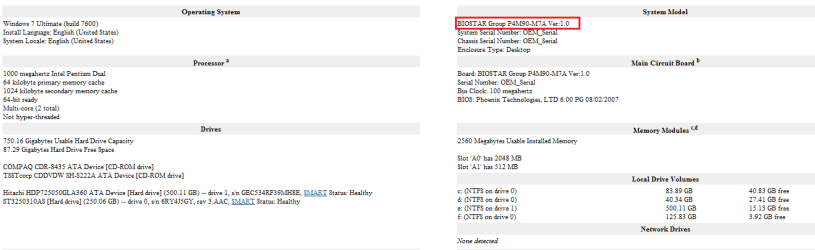
My Motherboard is Biostar P4M90-M7A. I'm using an on-board sound card ( Realtek HD Audio ).

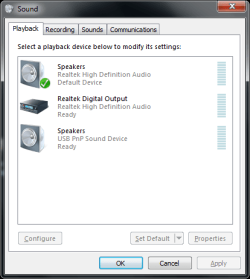
When i have my 2GB + 1GB, everything is gone from Playback Properties ( except for my USB sound card ). - Refer to image 1
Right now, i have my 2GB + 512MB and sound is back to normal - Refer to image 2

I've tried reinstalling my sound card driver and it doesn't work.

Need to point out that all 3 RAMs are identical in brand, model, etc.

Any solutions would be helpful.


Cheers
 

Attachments

  • 1.png
    1.png
    11.8 KB · Views: 11
  • 2.png
    2.png
    12.9 KB · Views: 9

My Computer My Computer

Computer Manufacturer/Model Number
DIY
OS
Windows 7 Ultimate x86 7600
CPU
Intel Pentium Dual CPU E2180 @ 2.00 GHz
Motherboard
Gigabyte G41M Combo (rev 1.3)
Memory
1 x 2GB | 1 x 1GB Kingston 667
Graphics Card(s)
512MB Nvidia GeForce EN8500GT Silent Magic
Sound Card
Onboard HD 7.1 Audio
Monitor(s) Displays
22" LG W2242T
Screen Resolution
1680 X 1050
Hard Drives
1 x 500GB SATA Hitachi ( Internal )
1 x 1TB SATA Hitachi ( Internal )
1 x 320GB Western Digital ( External )
PSU
500W
Case
Coolermaster
Cooling
Coolermaster
Keyboard
Logitech Media Wireless Keyboard
Mouse
A4Tech G6 Wireless Mouse
Internet Speed
DL : 12MB/s | UL : 1.2MB/s
Other Info
I'm not a gamer. I don't overclock. I use my PC for web browsing, listening to music and watching HD movies.
Please screen shot of device manager with 3gb installed?
 

My Computer My Computer

Computer type
Laptop
Computer Manufacturer/Model Number
Apple
OS
El Capitan / Windows 10
CPU
i7-4980HQ
Memory
16GB
Graphics Card(s)
Iris 5200
Have you tried switching slots with the 2 gig and 1 gig sticks.
I see that you have....
 

My Computer My Computer

Computer Manufacturer/Model Number
Custom built
OS
Windows 7 Ultimate 64 bit
CPU
AMD Phenom II X4 965 Black Edition
Motherboard
Gigabyte GA-MA790X-DS4
Memory
GSkill 4 X 2 GB PC 8500
Graphics Card(s)
XFX Radeon HD 6790 D
Sound Card
On board RealTek HD
Monitor(s) Displays
Dual monitors:Samsung SyncMaster S20B300
Screen Resolution
1600 X 900
Hard Drives
Seagate Barracuda 1TB (primary)
Seagate Barracuda 2 X 320 GB
PSU
Ultra X4 750 watt fully modular
Case
Thermaltake Overseer RX 1 full tower
Cooling
Core-Contact 92 mm CPU Cooler
Keyboard
Logitech G510
Mouse
Razor DeathAdder
Internet Speed
50/5 Mbps UL/DL
Other Info
Optical: Super Muliti DVD burner w/lightscribe, Hauppauge WinTV HVR-1800
What model mobo do you have?
Is this a branded PC or a custom build?
 

My Computer My Computer

Computer Manufacturer/Model Number
Custom built
OS
Windows 7 Ultimate 64 bit
CPU
AMD Phenom II X4 965 Black Edition
Motherboard
Gigabyte GA-MA790X-DS4
Memory
GSkill 4 X 2 GB PC 8500
Graphics Card(s)
XFX Radeon HD 6790 D
Sound Card
On board RealTek HD
Monitor(s) Displays
Dual monitors:Samsung SyncMaster S20B300
Screen Resolution
1600 X 900
Hard Drives
Seagate Barracuda 1TB (primary)
Seagate Barracuda 2 X 320 GB
PSU
Ultra X4 750 watt fully modular
Case
Thermaltake Overseer RX 1 full tower
Cooling
Core-Contact 92 mm CPU Cooler
Keyboard
Logitech G510
Mouse
Razor DeathAdder
Internet Speed
50/5 Mbps UL/DL
Other Info
Optical: Super Muliti DVD burner w/lightscribe, Hauppauge WinTV HVR-1800
Can you list the right motherboard model please?
 

My Computer My Computer

Computer type
PC/Desktop
Computer Manufacturer/Model Number
DELL VOSTRO 3650
OS
Windows 8.1 PRO
CPU
3rd Generation Intel Core i7‐3612QM CPU @ 2.10GHZ
Memory
8GB DDR3
Graphics Card(s)
NVIDIA GeForce GT 525M (128 bit), 1GB Grpahics
Screen Resolution
1920X1080
Hard Drives
750GB 5400RPM
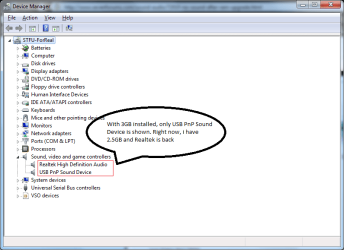
Please screen shot of device manager with 3gb installed?

It's not that easy right now. But last night when i had 3GB installed, i did take a look in Device Manager and there's no 'yellow mark' anywhere. And under audio, there's only "USB PnP Sound Device".

1.png

What model mobo do you have?
Is this a branded PC or a custom build?

Can you list the right motherboard model please?

It's custom build. No brand.
Sorry about the mobo. I just found the package box and here's the right model.
Biostar P4M900-M7 SE - BIOSTAR :: P4M900-M7 SE :: Specification

On the site, it shows v7.x but when i checked mine using Belarc Advisor, it says v1.0. Model number is wrong too. :rolleyes: :shock:

2.png
 

My Computer My Computer

Computer Manufacturer/Model Number
DIY
OS
Windows 7 Ultimate x86 7600
CPU
Intel Pentium Dual CPU E2180 @ 2.00 GHz
Motherboard
Gigabyte G41M Combo (rev 1.3)
Memory
1 x 2GB | 1 x 1GB Kingston 667
Graphics Card(s)
512MB Nvidia GeForce EN8500GT Silent Magic
Sound Card
Onboard HD 7.1 Audio
Monitor(s) Displays
22" LG W2242T
Screen Resolution
1680 X 1050
Hard Drives
1 x 500GB SATA Hitachi ( Internal )
1 x 1TB SATA Hitachi ( Internal )
1 x 320GB Western Digital ( External )
PSU
500W
Case
Coolermaster
Cooling
Coolermaster
Keyboard
Logitech Media Wireless Keyboard
Mouse
A4Tech G6 Wireless Mouse
Internet Speed
DL : 12MB/s | UL : 1.2MB/s
Other Info
I'm not a gamer. I don't overclock. I use my PC for web browsing, listening to music and watching HD movies.
Somebody? Anybody? Everybody?

Some help would be nice.
 

My Computer My Computer

Computer Manufacturer/Model Number
DIY
OS
Windows 7 Ultimate x86 7600
CPU
Intel Pentium Dual CPU E2180 @ 2.00 GHz
Motherboard
Gigabyte G41M Combo (rev 1.3)
Memory
1 x 2GB | 1 x 1GB Kingston 667
Graphics Card(s)
512MB Nvidia GeForce EN8500GT Silent Magic
Sound Card
Onboard HD 7.1 Audio
Monitor(s) Displays
22" LG W2242T
Screen Resolution
1680 X 1050
Hard Drives
1 x 500GB SATA Hitachi ( Internal )
1 x 1TB SATA Hitachi ( Internal )
1 x 320GB Western Digital ( External )
PSU
500W
Case
Coolermaster
Cooling
Coolermaster
Keyboard
Logitech Media Wireless Keyboard
Mouse
A4Tech G6 Wireless Mouse
Internet Speed
DL : 12MB/s | UL : 1.2MB/s
Other Info
I'm not a gamer. I don't overclock. I use my PC for web browsing, listening to music and watching HD movies.
Somebody? Anybody? Everybody?

Some help would be nice.

No promises... but you sound so desperate :D

If you are running x-86...

Grab a copy of Ultimate Windows Tweaker, a TweakUI for Windows 7 & Vista | The Windows Club There's a lot of good tweaks and settings in it. In particular at the bottom of one of the pages is a tweak to enable more than 2gb under x-86 Windows. What it does is remap the I/O space a bit higher in memory so there's no collision with installed ram.
 

My Computer My Computer

Computer Manufacturer/Model Number
Homebrew
OS
XP Pro SP3 X86 / Win7 Pro X86
CPU
Amd 64 x2 4200 (2.4ghz)
Motherboard
Asus M2N-MX SE Plus
Memory
Kingston DDR2 800 2gb
Graphics Card(s)
Nvidia GF-8400
Sound Card
Realtek on Motherboard
Monitor(s) Displays
Acer x-193bw
Screen Resolution
1440 x 900
Hard Drives
Western Digital 500g
PSU
350watt In-Win
Case
In-Win
Cooling
Air
Keyboard
yes
Mouse
yes
Internet Speed
5mpbs
Other Info
Also ASRock ION 330 as HTPC (on XP).
Acer Aspire as GP netbook (on XP).
If you are running x-86...

Grab a copy of Ultimate Windows Tweaker, a TweakUI for Windows 7 & Vista | The Windows Club There's a lot of good tweaks and settings in it. In particular at the bottom of one of the pages is a tweak to enable more than 2gb under x-86 Windows. What it does is remap the I/O space a bit higher in memory so there's no collision with installed ram.


Good call CT! The 3MB combination and the audio device are likely fighting for address space.

-----If possible, disable Dual Channel memory support in the BIOS.-----

Has the OP checked to see if the 2GB & 512MB chip combo are actually showing up as 2.5GB RAM. Also, BIOStar is not known as a high end Motherboard..:shock: the I/O chip programming may just have a problem with the 3GB combination.

Ap
 

My Computer My Computer

Computer Manufacturer/Model Number
Assembled in my workshop
OS
Windows 7 Home Premium
CPU
Intel Core 2 Duo @ 3.00gHz
Motherboard
Gigabyte GA-P35-S3G
Memory
4 GB
Graphics Card(s)
ATI Radeon HD 2600 XT
Sound Card
RME 24/96 Card, Realtek Internal Audio PreSonus FireStudio
Monitor(s) Displays
Acer 1917 (x2)
Screen Resolution
1280 x 1024 on both monitors
Hard Drives
Three 250GB Seagate SATA Barracuda 7200rpm
PSU
Rosewill 500-watt
Case
Rosewill mid-tower
Cooling
Noctua NH-U9B (CPU), PwrSupply fan + single large case Fan
Keyboard
Macally w/2/USB ports.
Mouse
Trackman Wheel
Other Info
Event 20/20 bas studio monitors, Yamaha sub.
Rackmount Korg/Roland/Yamaha synthesizers,
Cubase MIDI/audio recording. Sony Soundforge audio/mastering software. CD Architect Mastering. RME & Presonus audio interfaces.
-----If possible, disable Dual Channel memory support in the BIOS.-----
Also a good call. I have a BioStar socket 939 motherboard and it ONLY runs in dual channel mode. There's not even a way to disable it in the BIOS. However, when I saw the OP has already tried a mismatched pair of modules, I concluded the dual channel mode wasn't the issue, so I didn't post that suggestion.
 

My Computer My Computer

Computer Manufacturer/Model Number
NVIDIA
OS
Windows 7 Enterprise x64
CPU
AMD Athlon 64X2 Dual Core 3800+
Motherboard
GeForce 6100-M9
Memory
OCZ Platinum Dual Channel - 4x1Gb
Graphics Card(s)
NVIDIA GeForce 8800 GT PCI Express x16
Sound Card
Creative Audigy Sound Blaster Extreme PCI
Monitor(s) Displays
Compaq 7500
Screen Resolution
1024x768
Hard Drives
C: Seagate ST3250318AS SataII - 250Gb

D: Seagate ST3500418AS SataII - 500Gb
PSU
OCZ 600w Dual 12v Rails
Case
Thermaltake
Cooling
OCZ Heatsinks, Fans, and Thermal Paste on CPU & Chipsets
Keyboard
Logitech
Mouse
Radio Shack PS2
Internet Speed
Cable
Other Info
Dual Pioneer DVD/RW optical drives. LG CD/RW optical drive.
If you are running x-86...

Grab a copy of Ultimate Windows Tweaker, a TweakUI for Windows 7 & Vista | The Windows Club There's a lot of good tweaks and settings in it. In particular at the bottom of one of the pages is a tweak to enable more than 2gb under x-86 Windows. What it does is remap the I/O space a bit higher in memory so there's no collision with installed ram.

I sure am running x86 OS.

Thanks for the recommendation. I'll try them tonight when i'm available. :)

-----If possible, disable Dual Channel memory support in the BIOS.-----

What is Dual Channel Memory Support anyways?
Is that feature a bad thing or will it make any difference ( memory/performance/etc wise )?

Has the OP checked to see if the 2GB & 512MB chip combo are actually showing up as 2.5GB RAM

Yes, i've checked. Been using 2GB and 512MB for a while now since i cannot get sound to work when i replace 512 for a gig memory. Sound works well on a USB Sound Card with 3GB though. I've always thought it has something to do with the on-board sound card i'm using. Not too sure myself.

Untitled.png

Also, BIOStar is not known as a high end Motherboard..:shock: the I/O chip programming may just have a problem with the 3GB combination.

Well, i'm not exactly in need of a really good MB as i don't play any games. All i do on my PC is surf the web and watch movies + listening to music. This setup is working pretty good (so far - fingers crossed :p ).

Nevertheless, thanks. I'll try them tonight and will post an update. :)
 

My Computer My Computer

Computer Manufacturer/Model Number
DIY
OS
Windows 7 Ultimate x86 7600
CPU
Intel Pentium Dual CPU E2180 @ 2.00 GHz
Motherboard
Gigabyte G41M Combo (rev 1.3)
Memory
1 x 2GB | 1 x 1GB Kingston 667
Graphics Card(s)
512MB Nvidia GeForce EN8500GT Silent Magic
Sound Card
Onboard HD 7.1 Audio
Monitor(s) Displays
22" LG W2242T
Screen Resolution
1680 X 1050
Hard Drives
1 x 500GB SATA Hitachi ( Internal )
1 x 1TB SATA Hitachi ( Internal )
1 x 320GB Western Digital ( External )
PSU
500W
Case
Coolermaster
Cooling
Coolermaster
Keyboard
Logitech Media Wireless Keyboard
Mouse
A4Tech G6 Wireless Mouse
Internet Speed
DL : 12MB/s | UL : 1.2MB/s
Other Info
I'm not a gamer. I don't overclock. I use my PC for web browsing, listening to music and watching HD movies.
What is Dual Channel Memory Support anyways?
Is that feature a bad thing or will it make any difference ( memory/performance/etc wise )?

It won't make any difference to you as you need matching chips, two 1GB or two 2GB. Basically... dual channel support doubles the original memory bandwidth.
Some BIOS formats allow it to be enabled/disabled.


Ap
 

My Computer My Computer

Computer Manufacturer/Model Number
Assembled in my workshop
OS
Windows 7 Home Premium
CPU
Intel Core 2 Duo @ 3.00gHz
Motherboard
Gigabyte GA-P35-S3G
Memory
4 GB
Graphics Card(s)
ATI Radeon HD 2600 XT
Sound Card
RME 24/96 Card, Realtek Internal Audio PreSonus FireStudio
Monitor(s) Displays
Acer 1917 (x2)
Screen Resolution
1280 x 1024 on both monitors
Hard Drives
Three 250GB Seagate SATA Barracuda 7200rpm
PSU
Rosewill 500-watt
Case
Rosewill mid-tower
Cooling
Noctua NH-U9B (CPU), PwrSupply fan + single large case Fan
Keyboard
Macally w/2/USB ports.
Mouse
Trackman Wheel
Other Info
Event 20/20 bas studio monitors, Yamaha sub.
Rackmount Korg/Roland/Yamaha synthesizers,
Cubase MIDI/audio recording. Sony Soundforge audio/mastering software. CD Architect Mastering. RME & Presonus audio interfaces.
It won't make any difference to you as you need matching chips, two 1GB or two 2GB. Basically... dual channel support doubles the original memory bandwidth.
Some BIOS formats allow it to be enabled/disabled.


Ap

I just checked in BIOS for "Dual Channel Memory Support" and can't find anything
that's even close. I guess that option is out. :confused:

I'll be able to try all the other suggestion when the little one is asleep tonight. ;)
 

My Computer My Computer

Computer Manufacturer/Model Number
DIY
OS
Windows 7 Ultimate x86 7600
CPU
Intel Pentium Dual CPU E2180 @ 2.00 GHz
Motherboard
Gigabyte G41M Combo (rev 1.3)
Memory
1 x 2GB | 1 x 1GB Kingston 667
Graphics Card(s)
512MB Nvidia GeForce EN8500GT Silent Magic
Sound Card
Onboard HD 7.1 Audio
Monitor(s) Displays
22" LG W2242T
Screen Resolution
1680 X 1050
Hard Drives
1 x 500GB SATA Hitachi ( Internal )
1 x 1TB SATA Hitachi ( Internal )
1 x 320GB Western Digital ( External )
PSU
500W
Case
Coolermaster
Cooling
Coolermaster
Keyboard
Logitech Media Wireless Keyboard
Mouse
A4Tech G6 Wireless Mouse
Internet Speed
DL : 12MB/s | UL : 1.2MB/s
Other Info
I'm not a gamer. I don't overclock. I use my PC for web browsing, listening to music and watching HD movies.
Grab a copy of Ultimate Windows Tweaker, a TweakUI for Windows 7 & Vista | The Windows Club There's a lot of good tweaks and settings in it. In particular at the bottom of one of the pages is a tweak to enable more than 2gb under x-86 Windows. What it does is remap the I/O space a bit higher in memory so there's no collision with installed ram.

Don't think i'm seeing that option. There's one that says "Enable Support For 4GB Of RAM on 32-bit Windows OS".

But i'm not using 4GB or more than that. :confused:
 

My Computer My Computer

Computer Manufacturer/Model Number
DIY
OS
Windows 7 Ultimate x86 7600
CPU
Intel Pentium Dual CPU E2180 @ 2.00 GHz
Motherboard
Gigabyte G41M Combo (rev 1.3)
Memory
1 x 2GB | 1 x 1GB Kingston 667
Graphics Card(s)
512MB Nvidia GeForce EN8500GT Silent Magic
Sound Card
Onboard HD 7.1 Audio
Monitor(s) Displays
22" LG W2242T
Screen Resolution
1680 X 1050
Hard Drives
1 x 500GB SATA Hitachi ( Internal )
1 x 1TB SATA Hitachi ( Internal )
1 x 320GB Western Digital ( External )
PSU
500W
Case
Coolermaster
Cooling
Coolermaster
Keyboard
Logitech Media Wireless Keyboard
Mouse
A4Tech G6 Wireless Mouse
Internet Speed
DL : 12MB/s | UL : 1.2MB/s
Other Info
I'm not a gamer. I don't overclock. I use my PC for web browsing, listening to music and watching HD movies.
I just checked in BIOS for "Dual Channel Memory Support" and can't find anything
that's even close. I guess that option is out. :confused:
I've already mentioned that earlier. BioStar boards only run in dual channel. Crazy, I know, but that's the way they are.
 

My Computer My Computer

Computer Manufacturer/Model Number
NVIDIA
OS
Windows 7 Enterprise x64
CPU
AMD Athlon 64X2 Dual Core 3800+
Motherboard
GeForce 6100-M9
Memory
OCZ Platinum Dual Channel - 4x1Gb
Graphics Card(s)
NVIDIA GeForce 8800 GT PCI Express x16
Sound Card
Creative Audigy Sound Blaster Extreme PCI
Monitor(s) Displays
Compaq 7500
Screen Resolution
1024x768
Hard Drives
C: Seagate ST3250318AS SataII - 250Gb

D: Seagate ST3500418AS SataII - 500Gb
PSU
OCZ 600w Dual 12v Rails
Case
Thermaltake
Cooling
OCZ Heatsinks, Fans, and Thermal Paste on CPU & Chipsets
Keyboard
Logitech
Mouse
Radio Shack PS2
Internet Speed
Cable
Other Info
Dual Pioneer DVD/RW optical drives. LG CD/RW optical drive.
Back
Top