Remote wake MCE from xbox / Wake on Lan

SpikyOyster

New member
Local time
3:36 PM
Messages
11
When I was using MCE 2005, I used to be able to wake my MCE via xbox360. After I upgraded to Windows 7, I seem to have lost this functionality.

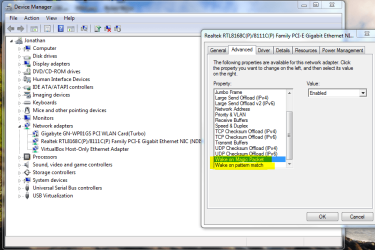
My initial suspect was that Wake on Lan is not working. When I check my driver setting on Windows 7 machine, it is checked so I would assume it is set correctly.

Anyone knows what could be the problem? Or any experience to share?

Thanks.
 

My Computer My Computer

Computer Manufacturer/Model Number
NA
OS
Windows 7
CPU
NA
Motherboard
NA
Memory
NA
Graphics Card(s)
NA
Sound Card
NA
Monitor(s) Displays
NA
Hard Drives
NA
PSU
NA
Case
NA
Cooling
NA
Make sure both of these are also enabled:

Capture.PNG
 

My Computer My Computer

Computer Manufacturer/Model Number
Custom
OS
Windows 7 Professional x64
CPU
Intel i7 2600K OC'd @ 4620 MHz
Motherboard
Asus P8Z68-V Pro
Memory
16GB GSkill Sniper 2133 Mhz (4x4GB)
Graphics Card(s)
EVGA GeForce GTX 480 SuperClocked+
Sound Card
Realtek High Definition Audio
Monitor(s) Displays
2x Acer S273HLbmii 27"
Screen Resolution
2 x 1920x1080
Hard Drives
64GB Crucial M4 SSD

Storage: Hitachi 1TB 5400RPM, Samsung 1.5TB 5400RPM
PSU
Corsair HW Series 750w (modular)
Case
Cooler Master HAF 932 Advanced Blue Edition
Cooling
CM Hyper 212+ CPU cooler, 3x 230mm + 1x 140mm case fans
Keyboard
Logitech MK320 (wireless)
Mouse
Logitech MK320 (wireless)
Internet Speed
30 Mb/s : 2 Mb/s
Those setting mentioned, WoL in the BIOS. THere are also some settings in power management that effect this.
 

My Computer My Computer

OS
Windows 7
CPU
i5-750
Motherboard
Asus
Memory
4GB DDR3 1600
Graphics Card(s)
GT220
I have checked the driver setting and it is set correctly.

I have check the bios but there is no settings that I could find that relates to wake on lan.

Any other suggestion?
 

My Computer My Computer

Computer Manufacturer/Model Number
NA
OS
Windows 7
CPU
NA
Motherboard
NA
Memory
NA
Graphics Card(s)
NA
Sound Card
NA
Monitor(s) Displays
NA
Hard Drives
NA
PSU
NA
Case
NA
Cooling
NA
I have checked the driver setting and it is set correctly.

I have check the bios but there is no settings that I could find that relates to wake on lan.

Any other suggestion?

Did you go through all your power settings? Go to advanced settings to see them all.
 

My Computer My Computer

OS
Windows 7
CPU
i5-750
Motherboard
Asus
Memory
4GB DDR3 1600
Graphics Card(s)
GT220
My BIOS has no Wake on Lan setting either. However, it is enabled by default.
 

My Computer My Computer

Computer Manufacturer/Model Number
Custom
OS
Windows 7 Professional x64
CPU
Intel i7 2600K OC'd @ 4620 MHz
Motherboard
Asus P8Z68-V Pro
Memory
16GB GSkill Sniper 2133 Mhz (4x4GB)
Graphics Card(s)
EVGA GeForce GTX 480 SuperClocked+
Sound Card
Realtek High Definition Audio
Monitor(s) Displays
2x Acer S273HLbmii 27"
Screen Resolution
2 x 1920x1080
Hard Drives
64GB Crucial M4 SSD

Storage: Hitachi 1TB 5400RPM, Samsung 1.5TB 5400RPM
PSU
Corsair HW Series 750w (modular)
Case
Cooler Master HAF 932 Advanced Blue Edition
Cooling
CM Hyper 212+ CPU cooler, 3x 230mm + 1x 140mm case fans
Keyboard
Logitech MK320 (wireless)
Mouse
Logitech MK320 (wireless)
Internet Speed
30 Mb/s : 2 Mb/s
Back
Top