Outllook 2007 no longer opening on one user account

gugarci

New member
Member
Local time
4:15 PM
Messages
47
Location
Lyndhurst, New Jersey
Good morning, first post here. As of this morning Outlook 2007 will not open on my wife's user account account. My wife uses Outlook as her default email client I use Thunderbird. we are using a Windows 7 Pro x64.

Problem started this morning. When you go to open Outlook it opens up for a split second and quickly shuts down with the following error message.
"Cannot start Microsoft Office outlook. Cannot open the window"

I also tried opening up Outlook directly by using the Outlook.exe file thinking it was a corrupt short-cut but that didn't work either.

In my user account account outlook opens up with no issues but since i don't used outlooks I get the message saying it's not my default email client.

I tried using system restore to go back to last night but it has not worked. Nothing new been installed as of late except for some MS updates but I have not heard about any issues with these last updates. The only other thing I have going on is a warning message from NOD saying my AV license will be expiring in 10 days.

Thanks
 

My Computer My Computer

At a glance

Win 7 Pro x 64, Win 7 Starter
OS
Win 7 Pro x 64, Win 7 Starter
Open any office program, click the orb in the upper left corner, click whatever Options (ex: "Excel Options"), click "Resources", look for "run Micorsoft Office Diagnostics" and click Diagnose, when the "Is Micorsoft Office having problems" box appears click continue and it will run the repair and should fix your shortcuts as well.


Or... You could open Outlook, Help, click Office Dianostics..., and it will do the same thing.

Let us know what happens. Good luck.
 

My Computer My Computer

At a glance

Windows 10 ProIntel Core i7-4770K (3.5Ghz)32 gig Corsair Dominator Platinum (4x8Gig)Sapphire Tri-X R9 Fury
Computer type
PC/Desktop
Computer Manufacturer/Model Number
Custom built by me.
OS
Windows 10 Pro
CPU
Intel Core i7-4770K (3.5Ghz)
Motherboard
Gigabyte G1 Sniper 5 (F10 Bios)
Memory
32 gig Corsair Dominator Platinum (4x8Gig)
Graphics Card(s)
Sapphire Tri-X R9 Fury
Sound Card
Soundblaster ZXR
Monitor(s) Displays
NEC PA242W 24" LCD Monitor
Screen Resolution
1920 x 1200
Hard Drives
Primary - Samsung 850 Pro (512gig), Samsung 840 Pro (256gig), 2TB WD Caviar Black.
PSU
EVGA Supernova 1000 G2
Case
Cooler Master HAF X
Cooling
Corsair H100i with Corsair Air Series SP120 Quiet Fans
Keyboard
Logitech Wireless Wave
Mouse
Logitech Performance MX
Internet Speed
High Speed Cable
Antivirus
Norton Security
Browser
IE11
Other Info
Memory Timings - 1866MHz @ 9-9-9-27-1T @ 1.5 volts
Thanks but it didn't work. It found no problems but it could not run the update diagnostic tool because it said i was missing a file. And even if I choose to get this file according to the message it can take about a week to have it. That's really strange.
 

My Computer My Computer

At a glance

Win 7 Pro x 64, Win 7 Starter
OS
Win 7 Pro x 64, Win 7 Starter
It found no problems but it could not run the update diagnostic tool because it said i was missing a file. And even if I choose to get this file according to the message it can take about a week to have it. That's really strange.

Are you running in admin mode?

And If it says you're missing a file, then you need to reinstall the program as something may have gotten corrupted.

And even if I choose to get this file according to the message it can take about a week to have it. That's really strange.

Why??? And can you screenshot this message and post it?

Also, I'm on my way out so it'll be awhile before I post back.

Later.
 

My Computer My Computer

At a glance

Windows 10 ProIntel Core i7-4770K (3.5Ghz)32 gig Corsair Dominator Platinum (4x8Gig)Sapphire Tri-X R9 Fury
Computer type
PC/Desktop
Computer Manufacturer/Model Number
Custom built by me.
OS
Windows 10 Pro
CPU
Intel Core i7-4770K (3.5Ghz)
Motherboard
Gigabyte G1 Sniper 5 (F10 Bios)
Memory
32 gig Corsair Dominator Platinum (4x8Gig)
Graphics Card(s)
Sapphire Tri-X R9 Fury
Sound Card
Soundblaster ZXR
Monitor(s) Displays
NEC PA242W 24" LCD Monitor
Screen Resolution
1920 x 1200
Hard Drives
Primary - Samsung 850 Pro (512gig), Samsung 840 Pro (256gig), 2TB WD Caviar Black.
PSU
EVGA Supernova 1000 G2
Case
Cooler Master HAF X
Cooling
Corsair H100i with Corsair Air Series SP120 Quiet Fans
Keyboard
Logitech Wireless Wave
Mouse
Logitech Performance MX
Internet Speed
High Speed Cable
Antivirus
Norton Security
Browser
IE11
Other Info
Memory Timings - 1866MHz @ 9-9-9-27-1T @ 1.5 volts
Last edited:

My Computer My Computer

At a glance

Win 7 Pro x 64, Win 7 Starter
OS
Win 7 Pro x 64, Win 7 Starter
Just tried repairing Office using the installation disk and it didn't work. Unless I can find a solutions only other thing i can think off is to completely uninstall Office and reinstall it.

I also reinstalled office up top of the current locations with no luck. And to play it safe I ran complete scans using NOD, Windows Defender, Malwarebytes, and Super AntiSpyware. I also started the compute in safe mode to see if Outlook would open but it did not.

My wife said she was deleting some junk email messages this morning when all of the sudden the computer restarted on it's own. Her Outlook has not open up again ever since that point.
 
Last edited:

My Computer My Computer

At a glance

Win 7 Pro x 64, Win 7 Starter
OS
Win 7 Pro x 64, Win 7 Starter
Hello,

You could try this Start > Run > Outlook /resetnavpane
After you execute the resetnav switch Microsoft Office Outlook will launch with out problems

Hope this help,
Captain
 

My Computer My Computer

At a glance

Windows 7 Ultimate - 64-bit | Windows 8 Pro -...Intel® Core™ i7 Processor 3,610QM (2.30Hz, 6M...8 GBNVIDIA® GeForce® GT 650M 2GB Graphics, Optimu...
Computer Manufacturer/Model Number
Samsung NP550P5C-S02IN
OS
Windows 7 Ultimate - 64-bit | Windows 8 Pro - 64-bit
CPU
Intel® Core™ i7 Processor 3,610QM (2.30Hz, 6MB L3 Cach
Memory
8 GB
Graphics Card(s)
NVIDIA® GeForce® GT 650M 2GB Graphics, Optimus™ techno
Sound Card
SoundAlive™ JBL 3 Speakers (With sub-Woofer)
Monitor(s) Displays
39.62cm (15.6) SuperBright 300nit HD+ LED Display
Screen Resolution
1,600 x 900, Anti-Reflective
Hard Drives
1TB S-ATA II Hard Drive (5,400RPM)
That did it. :D
Thanks captain Jack, and thanks sygnus21 for replying to my post.

I bookmarked this site a while ago in case i needed it and today it paid off. I've only been using window 7 since mid January so I had to search also on how to activate the run command in my start menu.

One last question, any ideas as to why this happened???
thanks.
 

My Computer My Computer

At a glance

Win 7 Pro x 64, Win 7 Starter
OS
Win 7 Pro x 64, Win 7 Starter
That did it. :D
Thanks captain Jack, and thanks sygnus21 for replying to my post.

I bookmarked this site a while ago in case i needed it and today it paid off. I've only been using window 7 since mid January so I had to search also on how to activate the run command in my start menu.

One last question, any ideas as to why this happened???
thanks.

Your Most Welcome !!

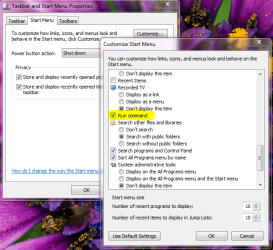
To activate Run at Start Menu

Right Click on Task bar > Properties
Go to the Tab Start Menu > Customize under that list you can find Run command check on the box click OK

Capture.PNG

For your last question I guess the Navigation Panel got corrupted by some reason that's why we just reset it.

Hope this helps,
Captain
 

My Computer My Computer

At a glance

Windows 7 Ultimate - 64-bit | Windows 8 Pro -...Intel® Core™ i7 Processor 3,610QM (2.30Hz, 6M...8 GBNVIDIA® GeForce® GT 650M 2GB Graphics, Optimu...
Computer Manufacturer/Model Number
Samsung NP550P5C-S02IN
OS
Windows 7 Ultimate - 64-bit | Windows 8 Pro - 64-bit
CPU
Intel® Core™ i7 Processor 3,610QM (2.30Hz, 6MB L3 Cach
Memory
8 GB
Graphics Card(s)
NVIDIA® GeForce® GT 650M 2GB Graphics, Optimus™ techno
Sound Card
SoundAlive™ JBL 3 Speakers (With sub-Woofer)
Monitor(s) Displays
39.62cm (15.6) SuperBright 300nit HD+ LED Display
Screen Resolution
1,600 x 900, Anti-Reflective
Hard Drives
1TB S-ATA II Hard Drive (5,400RPM)
Thanks again, and have a good night.
 

My Computer My Computer

At a glance

Win 7 Pro x 64, Win 7 Starter
OS
Win 7 Pro x 64, Win 7 Starter

My Computer My Computer

At a glance

Windows 7 Ultimate - 64-bit | Windows 8 Pro -...Intel® Core™ i7 Processor 3,610QM (2.30Hz, 6M...8 GBNVIDIA® GeForce® GT 650M 2GB Graphics, Optimu...
Computer Manufacturer/Model Number
Samsung NP550P5C-S02IN
OS
Windows 7 Ultimate - 64-bit | Windows 8 Pro - 64-bit
CPU
Intel® Core™ i7 Processor 3,610QM (2.30Hz, 6MB L3 Cach
Memory
8 GB
Graphics Card(s)
NVIDIA® GeForce® GT 650M 2GB Graphics, Optimus™ techno
Sound Card
SoundAlive™ JBL 3 Speakers (With sub-Woofer)
Monitor(s) Displays
39.62cm (15.6) SuperBright 300nit HD+ LED Display
Screen Resolution
1,600 x 900, Anti-Reflective
Hard Drives
1TB S-ATA II Hard Drive (5,400RPM)
Hey gugarci, sorry I missed you. Glad to see you got your issue resolved. Thanks Capt. Jack, I'll have to add this to my list of fixes :)
 

My Computer My Computer

At a glance

Windows 10 ProIntel Core i7-4770K (3.5Ghz)32 gig Corsair Dominator Platinum (4x8Gig)Sapphire Tri-X R9 Fury
Computer type
PC/Desktop
Computer Manufacturer/Model Number
Custom built by me.
OS
Windows 10 Pro
CPU
Intel Core i7-4770K (3.5Ghz)
Motherboard
Gigabyte G1 Sniper 5 (F10 Bios)
Memory
32 gig Corsair Dominator Platinum (4x8Gig)
Graphics Card(s)
Sapphire Tri-X R9 Fury
Sound Card
Soundblaster ZXR
Monitor(s) Displays
NEC PA242W 24" LCD Monitor
Screen Resolution
1920 x 1200
Hard Drives
Primary - Samsung 850 Pro (512gig), Samsung 840 Pro (256gig), 2TB WD Caviar Black.
PSU
EVGA Supernova 1000 G2
Case
Cooler Master HAF X
Cooling
Corsair H100i with Corsair Air Series SP120 Quiet Fans
Keyboard
Logitech Wireless Wave
Mouse
Logitech Performance MX
Internet Speed
High Speed Cable
Antivirus
Norton Security
Browser
IE11
Other Info
Memory Timings - 1866MHz @ 9-9-9-27-1T @ 1.5 volts
Thanks again guys. I added this to my list of fixes also in case this happens again.
 

My Computer My Computer

At a glance

Win 7 Pro x 64, Win 7 Starter
OS
Win 7 Pro x 64, Win 7 Starter
That did it. :D
Thanks captain Jack, and thanks sygnus21 for replying to my post.

I bookmarked this site a while ago in case i needed it and today it paid off. I've only been using window 7 since mid January so I had to search also on how to activate the run command in my start menu.

One last question, any ideas as to why this happened???
thanks.

Your Most Welcome !!

To activate Run at Start Menu

Right Click on Task bar > Properties
Go to the Tab Start Menu > Customize under that list you can find Run command check on the box click OK

View attachment 62123

For your last question I guess the Navigation Panel got corrupted by some reason that's why we just reset it.

Hope this helps,
Captain
Thanks for that tip, Captain Jack. I know I have read it on this forum before; but I neglected to implement it and I forgot about it.
 

My Computer My Computer

At a glance

Windows 7 Ultimate 32 bitIntel(R) Pentium(R) 4 CPU 3.00GHz2.50 GB RAMNVIDIA GeForce 7600 GS
Computer Manufacturer/Model Number
Home built
OS
Windows 7 Ultimate 32 bit
CPU
Intel(R) Pentium(R) 4 CPU 3.00GHz
Motherboard
ASUS P4P800-VM Motherboard Chipset: Intel 865G + ICH5
Memory
2.50 GB RAM
Graphics Card(s)
NVIDIA GeForce 7600 GS
Sound Card
SoundMax Integrated Digital Audio (Chip)
Monitor(s) Displays
ViewSonic VX 1962 wm
Screen Resolution
1680 X 1050
Hard Drives
Seagate Barracuda 7200.10 80 GB
ST380215A ATA Device 18.6 GB
Western Digital "My Book" external hard drive 750 GB
Cooling
Fan based
Keyboard
Microsoft Comfort Curve Keyboard 2000 v10 USB
Mouse
Logitec optic USB
Internet Speed
3.01 Mb/s download 0.64 Mb/s upload
Back
Top