Office Word 2007 opens for one user but not another

CarolC

New member
Local time
5:01 AM
Messages
22
Location
Hampton Twp.
After successfully installing Windows 7 on my Dell tower I replaced Office 2003 with Office 2007. All of the applications work fine, on my account (administrator). Last night my son attempted to open Word (a new document) on his account, with no luck. We also attempted to open an existing document on his account with no luck. Why would the same program on the same machine open for one user account and not another??

Thanks for any help
 

My Computer My Computer

At a glance

Windows 7 Home PremiumIntel Pentium 4 CPU 3.00 GHz 2992 Mhz 1 Core2.00 GB (RAM)
Computer Manufacturer/Model Number
Dell Dimension 8300
OS
Windows 7 Home Premium
CPU
Intel Pentium 4 CPU 3.00 GHz 2992 Mhz 1 Core
Memory
2.00 GB (RAM)
Account Permissions. Is he using "guest"? Or did you create a "standard" user account for him?
 

My Computer My Computer

At a glance

7 Pro
OS
7 Pro
He is setup as a standard user account. Excel and Power point open and both work fine.
Thank you
 

My Computer My Computer

At a glance

Windows 7 Home PremiumIntel Pentium 4 CPU 3.00 GHz 2992 Mhz 1 Core2.00 GB (RAM)
Computer Manufacturer/Model Number
Dell Dimension 8300
OS
Windows 7 Home Premium
CPU
Intel Pentium 4 CPU 3.00 GHz 2992 Mhz 1 Core
Memory
2.00 GB (RAM)
Hi carolC,
Try this.
1) In the non-admin account,

Go to <drive> \Program Files\Microsoft Office\Office12 and then double click on Winword.exe.
If it opens, then delete your existing shortcuts from start menu and desktop and create new ones.

If it doesnt, click on "Start", then "Run" and copy paste the following command, then click OK.

reg add HKCU\Software\Microsoft\Office\12.0\Word\Options /v NoReReg /t REG_DWORD /d 1

2) In case that doesnt work, temporarily switch the non-admin account to Admin level, run Word once, then switch the account back to standard.
 

My Computer My Computer

At a glance

Windows 7 x64 pro/ Windows 7 x86 Pro/ XP SP3 x86
Computer Manufacturer/Model Number
Too many to describe...
OS
Windows 7 x64 pro/ Windows 7 x86 Pro/ XP SP3 x86
Dear Bill2,

I did try your suggestions.
The "Start", then "Run" and copy paste the following command, then click OK.

reg add HKCU\Software\Microsoft\Office\12.0\Word\Options /v NoReReg /t REG_DWORD /d 1


WORKED!!!

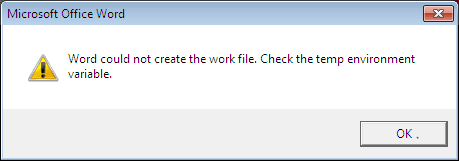
Word now opens, with one small bug. Just as Word opens I get the following popup message: Word could not create the wok file. Check the temp environment variable. I click ok and word opens.
I know I should ask if I should be concerned and if there is a fix for this.

Thank you again so very much for helping me out
 

My Computer My Computer

At a glance

Windows 7 Home PremiumIntel Pentium 4 CPU 3.00 GHz 2992 Mhz 1 Core2.00 GB (RAM)
Computer Manufacturer/Model Number
Dell Dimension 8300
OS
Windows 7 Home Premium
CPU
Intel Pentium 4 CPU 3.00 GHz 2992 Mhz 1 Core
Memory
2.00 GB (RAM)
Bill2,
I found this information, maybe you can tell me if I'm on the right track?
Re: Error : Word could not create a work file. Check Temp Environment Variable
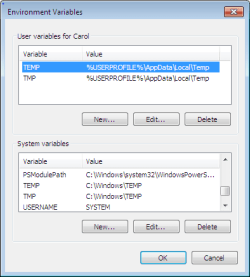
There is some sort of problem with the Windows temp folder (perhaps deleted by mistake?). To check (and fix if needed) right click on "my computer" and select "properties". In the box that opens click on the "advanced" tab. Now click the button near the bottom marked "environment variables". The path to the Windows temp folder will be shown at the top part of the box. Check to see if the path actually exists or edit it to a folder of your own choosing. Check both "TEMP" and "TMP" and, if you alter them, make them use the same folder. Okay your way out and reboot. Now try the programs you are having difficulty with.
Here is a picture from my computer, it is here that I am not sure if my system is correct or not????? Thank you again for your help.
Environment Variables.PNG
 

My Computer My Computer

At a glance

Windows 7 Home PremiumIntel Pentium 4 CPU 3.00 GHz 2992 Mhz 1 Core2.00 GB (RAM)
Computer Manufacturer/Model Number
Dell Dimension 8300
OS
Windows 7 Home Premium
CPU
Intel Pentium 4 CPU 3.00 GHz 2992 Mhz 1 Core
Memory
2.00 GB (RAM)
CarolC,
You're on the right track.
And if the error reappears do the following:
Navigate to
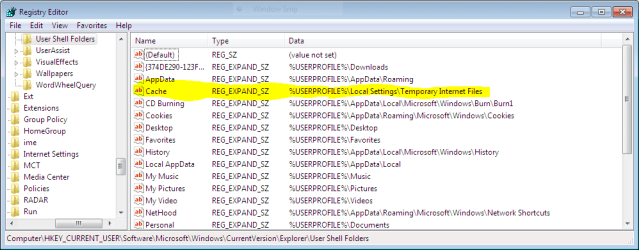
" HKEY_CURRENT_USER\Software\Microsoft\Windows\CurrentVersion\Explorer\User Shell Folders\Cache" registry key
Double click on that key and modify its value to %USERPROFILE%\Local Settings\Temporary Internet Files.
 

My Computer My Computer

At a glance

Windows 7 x64 pro/ Windows 7 x86 Pro/ XP SP3 x86
Computer Manufacturer/Model Number
Too many to describe...
OS
Windows 7 x64 pro/ Windows 7 x86 Pro/ XP SP3 x86
Dear Bill2,
Sorry I went missing for a few days. Trust me, if my problem were fixed, I would have let you know, unfortunately, the problem with my son's account is still with me. I did what you said above. I have attached a screen shot of the registry. Maybe you will see something that I missed.
Let me know. Thank you Copy of registry.PNG
 

My Computer My Computer

At a glance

Windows 7 Home PremiumIntel Pentium 4 CPU 3.00 GHz 2992 Mhz 1 Core2.00 GB (RAM)
Computer Manufacturer/Model Number
Dell Dimension 8300
OS
Windows 7 Home Premium
CPU
Intel Pentium 4 CPU 3.00 GHz 2992 Mhz 1 Core
Memory
2.00 GB (RAM)
Hi CarolC,
From the "run" line can you type in: winword.exe /a then hit enter?

This should open word for your son. If necessary we can modify your "shortcut" to always open word with the /a switch.
 

My Computer My Computer

At a glance

7 Pro
OS
7 Pro
As an added note!

With word 2007 there are two forms of documents the regular old version (2000-2003) with x.doc and the newer version (2007) that carries with x.docx. When you save any document be sure that who ever you send it to has the ability to read it so if you send it in x.docx then it will not display when the receiver tries to open it.
 

My Computer My Computer

At a glance

windows 7 home premium 64, and Windows 10 64 bitI7 94012 GB Dominator 3 channel 1600Radeon R9 Fury Nitro
Computer type
PC/Desktop
Computer Manufacturer/Model Number
Self made
OS
windows 7 home premium 64, and Windows 10 64 bit
CPU
I7 940
Motherboard
ASUS P6TX58D Premium- BIOS VERSION 1402
Memory
12 GB Dominator 3 channel 1600
Graphics Card(s)
Radeon R9 Fury Nitro
Sound Card
Z1
Monitor(s) Displays
50 Inch Panasonic TV
Screen Resolution
1920x1080
Hard Drives
Main drive OCZ Revodrive V2 and 8 TB multi drives
PSU
Coolermaster 1000
Case
CoolerMaster 932
Cooling
Coolermaster Dual fan
Keyboard
mx 5500 revolution
Mouse
mx 5500 revolution
Internet Speed
12 mb
Browser
Chrome
Other Info
set up for 3D Blue Ray applications with a surround room of 12 speaker Definitive Technology and multi amps, main is driven by yamaha M-65
Dear Techymike and Brady,
Bill2 helped me with getting word to open for my son under his account. I can click the icon, enter winwod.exe in "run" or even click an existing document, and word now opens. However, just before word opens, I receive the following popup. I can click through it and word works, except for clipart.
Office Word popup window.PNG

Any ideas?

Thank you all
 

My Computer My Computer

At a glance

Windows 7 Home PremiumIntel Pentium 4 CPU 3.00 GHz 2992 Mhz 1 Core2.00 GB (RAM)
Computer Manufacturer/Model Number
Dell Dimension 8300
OS
Windows 7 Home Premium
CPU
Intel Pentium 4 CPU 3.00 GHz 2992 Mhz 1 Core
Memory
2.00 GB (RAM)
Dear Techymike and Brady,
Bill2 helped me with getting word to open for my son under his account. I can click the icon, enter winwod.exe in "run" or even click an existing document, and word now opens. However, just before word opens, I receive the following popup. I can click through it and word works, except for clipart.
View attachment 62752

Any ideas?

Thank you all

Hello Carol,

I think even if you have got word to open but the preferences are still under your User account. You could try copy the preferences from your Profile to his profile.

From your User Profile

Start > Run > %appdata% > Microsoft folder under there will be couple of folders from there copy Excel, Office, Outlook, PowerPoint, Signatures, Templates, Word to C Drive then

Log off then Log back in the other Account and Start > Run > %appdata% > Microsoft and copy those folder from C Drive to Microsoft folder. Then reboot the System and try it.

Hope this helps,
Captain
 

My Computer My Computer

At a glance

Windows 7 Ultimate - 64-bit | Windows 8 Pro -...Intel® Core™ i7 Processor 3,610QM (2.30Hz, 6M...8 GBNVIDIA® GeForce® GT 650M 2GB Graphics, Optimu...
Computer Manufacturer/Model Number
Samsung NP550P5C-S02IN
OS
Windows 7 Ultimate - 64-bit | Windows 8 Pro - 64-bit
CPU
Intel® Core™ i7 Processor 3,610QM (2.30Hz, 6MB L3 Cach
Memory
8 GB
Graphics Card(s)
NVIDIA® GeForce® GT 650M 2GB Graphics, Optimus™ techno
Sound Card
SoundAlive™ JBL 3 Speakers (With sub-Woofer)
Monitor(s) Displays
39.62cm (15.6) SuperBright 300nit HD+ LED Display
Screen Resolution
1,600 x 900, Anti-Reflective
Hard Drives
1TB S-ATA II Hard Drive (5,400RPM)
Dear Capt. Jack (I love that!)

Sadly I tried your suggestion with no luck. The popup message still shows up when we open word.

Thank you for the info.
Carol
 

My Computer My Computer

At a glance

Windows 7 Home PremiumIntel Pentium 4 CPU 3.00 GHz 2992 Mhz 1 Core2.00 GB (RAM)
Computer Manufacturer/Model Number
Dell Dimension 8300
OS
Windows 7 Home Premium
CPU
Intel Pentium 4 CPU 3.00 GHz 2992 Mhz 1 Core
Memory
2.00 GB (RAM)
Dear Capt. Jack (I love that!)

Sadly I tried your suggestion with no luck. The popup message still shows up when we open word.

Thank you for the info.
Carol

Carol,

I guess your best bet would is if you have the Office 2007 disk run a Repair install on your son's profile that should fix it !!

Hope this helps,
Captain
 

My Computer My Computer

At a glance

Windows 7 Ultimate - 64-bit | Windows 8 Pro -...Intel® Core™ i7 Processor 3,610QM (2.30Hz, 6M...8 GBNVIDIA® GeForce® GT 650M 2GB Graphics, Optimu...
Computer Manufacturer/Model Number
Samsung NP550P5C-S02IN
OS
Windows 7 Ultimate - 64-bit | Windows 8 Pro - 64-bit
CPU
Intel® Core™ i7 Processor 3,610QM (2.30Hz, 6MB L3 Cach
Memory
8 GB
Graphics Card(s)
NVIDIA® GeForce® GT 650M 2GB Graphics, Optimus™ techno
Sound Card
SoundAlive™ JBL 3 Speakers (With sub-Woofer)
Monitor(s) Displays
39.62cm (15.6) SuperBright 300nit HD+ LED Display
Screen Resolution
1,600 x 900, Anti-Reflective
Hard Drives
1TB S-ATA II Hard Drive (5,400RPM)
Back
Top