
GTA4 error

A Night King

New member
Local time
7:24 AM
Messages
17
Location
Dubai
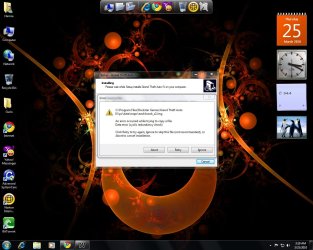
i am using Windows 7 Ultimate i just bought DVD of GTA4 so first i installed it but it didn't work then 1 of my friend says uninstall it and then try to reinstall i did so it was installing after few minuets a error appeared (cylic redundancy check ) u can see the image please help me i am crazy 4 Gta4 i want to play it please
 

Attachments
  • Untitled.jpg
    Untitled.jpg
    141.4 KB · Views: 112

My Computer My Computer

Computer Manufacturer/Model Number
System Manufacturer
OS
Microsoft Windows 7 Ultimate
CPU
P5
Motherboard
Asus Branded
Memory
4.00GB
Graphics Card(s)
Ati Catalyst 1gb
Monitor(s) Displays
NEC 1720vm
Hard Drives
C, D
PSU
standard
Case
e-view
Cooling
80MM
Hiya

*Quote*
The most common time you will see the cyclic redundancy check error message is when trying to read data from a damaged CD or DVD. Just before it appears, your CD/DVD drive will probably grind and whirl away - your PC may also become a little slugglish.

Normally, when CD/DVD drives get a CRC message from a disc, they try to read the disc again - hence the grinding sound. After several failed attempts, they give up and display the redundancy check error. The problem can be hardware (loose cables, failing drive), software or damaged media. In most cases checking and cleaning the disc is the easiest way to overcome the problem. If different clean discs produce the same error, it is likely to be a hardware issue (check the discs in another drive).
 

My Computer My Computer

Computer type
PC/Desktop
Computer Manufacturer/Model Number
Self Built
OS
Windows 7 Ultimate 64bit
CPU
AMD Phenom Quad core 9950 black edition
Motherboard
Gigabyte
Memory
16Gb
Graphics Card(s)
2x XFX Radeon 5850
Sound Card
PCI Express X-Fi Titanium / Logitech G35
Monitor(s) Displays
2x HP 2410i
Screen Resolution
1920x1080
Hard Drives
2x 500Gb Seagate
1x 300Gb Seagate
1x 1Tb Seagate
2x 1Tb Hitatchi
PSU
Jean Tech Storm 700W
Case
Cooler Master COSMOS S
Cooling
Akasa Evo Blue Pro
Keyboard
Logitech G15
Mouse
Mad Catz M.M.O. 7
Internet Speed
12mb
Hiya

*Quote*
The most common time you will see the cyclic redundancy check error message is when trying to read data from a damaged CD or DVD. Just before it appears, your CD/DVD drive will probably grind and whirl away - your PC may also become a little slugglish.

Normally, when CD/DVD drives get a CRC message from a disc, they try to read the disc again - hence the grinding sound. After several failed attempts, they give up and display the redundancy check error. The problem can be hardware (loose cables, failing drive), software or damaged media. In most cases checking and cleaning the disc is the easiest way to overcome the problem. If different clean discs produce the same error, it is likely to be a hardware issue (check the discs in another drive).

instaled after cleaning the disk but still have a problem cannot be solved at this forum
 

My Computer My Computer

Computer Manufacturer/Model Number
System Manufacturer
OS
Microsoft Windows 7 Ultimate
CPU
P5
Motherboard
Asus Branded
Memory
4.00GB
Graphics Card(s)
Ati Catalyst 1gb
Monitor(s) Displays
NEC 1720vm
Hard Drives
C, D
PSU
standard
Case
e-view
Cooling
80MM
Back
Top