Windows Media Player - Changing Background Image

How to Change the Background Image in Windows 7 WMP12

   Information
This tutorial will show you how to change the default background image in Windows Media Player that is shown in Library mode.
   Warning
This tutorial involves hacking the registry, while this hack is safe, you must follow the instructions carefully. If your at all tired or fatiqued then dont do it!


Here's How:
1) Run regedit by going to start menu and entering regedit in the search bar,

2) Navigate to the following registry key:
HKEY_CURRENT_USER\Software\Microsoft\MediaPlayer\Preferences
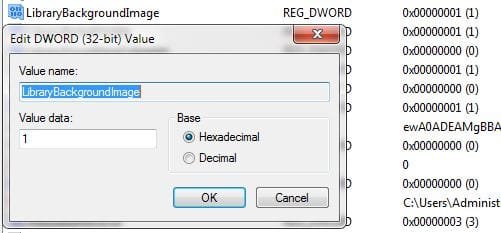
regdialog.JPG=
3) Double click on the LibraryBackgroundImage key name and a dialog box will appear asking for a value. The value to be entered is from 0 to 6. Restart WMP each time you change the key value.
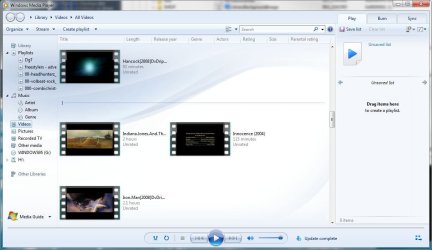
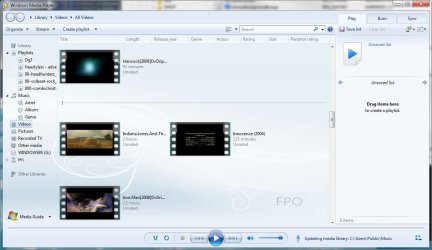
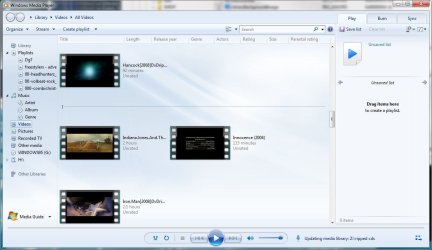
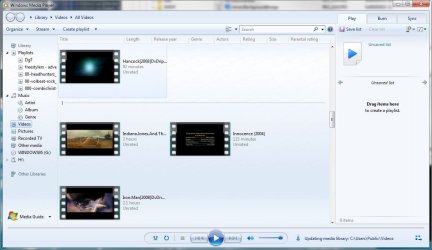
NOTE: Below are screenshots of the various backgrounds.
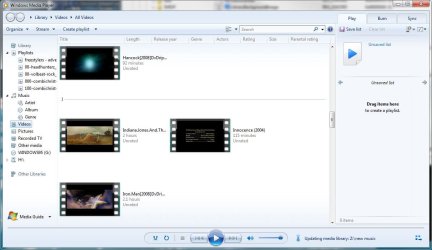
wmp1.JPG

wmp2.JPG

wmp3.JPG

wmp4.JPG

wmp5.JPG

wmp6.JPG

wmp7.JPG
 
Last edited by a moderator:

My Computer

Computer Manufacturer/Model Number
NVIDIA
OS
Windows 7 Enterprise x64
CPU
AMD Athlon 64X2 Dual Core 3800+
Motherboard
GeForce 6100-M9
Memory
OCZ Platinum Dual Channel - 4x1Gb
Graphics Card(s)
NVIDIA GeForce 8800 GT PCI Express x16
Sound Card
Creative Audigy Sound Blaster Extreme PCI
Monitor(s) Displays
Compaq 7500
Screen Resolution
1024x768
Hard Drives
C: Seagate ST3250318AS SataII - 250Gb

D: Seagate ST3500418AS SataII - 500Gb
PSU
OCZ 600w Dual 12v Rails
Case
Thermaltake
Cooling
OCZ Heatsinks, Fans, and Thermal Paste on CPU & Chipsets
Keyboard
Logitech
Mouse
Radio Shack PS2
Internet Speed
Cable
Other Info
Dual Pioneer DVD/RW optical drives. LG CD/RW optical drive.

My Computer

Computer Manufacturer/Model Number
Lenovo IdeaPad Y460
OS
64-Bit Windows 7 - Home Premium Edition; Linux Mint 11
CPU
2.67-GHz Intel Core i7-620M
Motherboard
Lenovo KL2
Memory
8-GB DDR3 RAM
Graphics Card(s)
1-GB ATI Radeon HD 5650M; Intel HD Series
Sound Card
Realtek High Definition Audio; Dolby Home Theater 3
Screen Resolution
1366 X 768 (Default); 1280 X 720 (For Video Gaming)
Hard Drives
656-GB Samsung Hybrid HDD (With Integrated 32-GB SSD); 1-TB Seagate HDD (In A.C. Ryan Enclosure And USB)
Mouse
Logitech M305 Wireless Mouse
Internet Speed
2 Mbps (Globe DSL); 1 Mbps (Sun Broadband Wireless Postpaid)
Its black WMP11-like look. The default WMP12 has a bright blue/white look.

Perhaps it depends upon the theme you have applied then, because my WMP-12 has always been black. I've never seen it blue on this machine.
 

My Computer

Computer Manufacturer/Model Number
NVIDIA
OS
Windows 7 Enterprise x64
CPU
AMD Athlon 64X2 Dual Core 3800+
Motherboard
GeForce 6100-M9
Memory
OCZ Platinum Dual Channel - 4x1Gb
Graphics Card(s)
NVIDIA GeForce 8800 GT PCI Express x16
Sound Card
Creative Audigy Sound Blaster Extreme PCI
Monitor(s) Displays
Compaq 7500
Screen Resolution
1024x768
Hard Drives
C: Seagate ST3250318AS SataII - 250Gb

D: Seagate ST3500418AS SataII - 500Gb
PSU
OCZ 600w Dual 12v Rails
Case
Thermaltake
Cooling
OCZ Heatsinks, Fans, and Thermal Paste on CPU & Chipsets
Keyboard
Logitech
Mouse
Radio Shack PS2
Internet Speed
Cable
Other Info
Dual Pioneer DVD/RW optical drives. LG CD/RW optical drive.
Maybe because you're in the Now Playing mode, which is black, and you've never been in the Library mode before. :P
 

My Computer

Computer Manufacturer/Model Number
Lenovo IdeaPad Y460
OS
64-Bit Windows 7 - Home Premium Edition; Linux Mint 11
CPU
2.67-GHz Intel Core i7-620M
Motherboard
Lenovo KL2
Memory
8-GB DDR3 RAM
Graphics Card(s)
1-GB ATI Radeon HD 5650M; Intel HD Series
Sound Card
Realtek High Definition Audio; Dolby Home Theater 3
Screen Resolution
1366 X 768 (Default); 1280 X 720 (For Video Gaming)
Hard Drives
656-GB Samsung Hybrid HDD (With Integrated 32-GB SSD); 1-TB Seagate HDD (In A.C. Ryan Enclosure And USB)
Mouse
Logitech M305 Wireless Mouse
Internet Speed
2 Mbps (Globe DSL); 1 Mbps (Sun Broadband Wireless Postpaid)
Hello people

downloaded a program that allowed me to take ownership of everything in Windows folder

http://www.sevenforums.com/tutorials/1911-take-ownership-shortcut.html


After taking ownership, i opened the wmploc.DLL and edited the library 7 image, and even all the other library images. save it to my desktop. Opened the file on my desktop and i could see the changes. then deleted the original from the system 32 folder, renamed the modified to wmploc.DLL. Opened REGEDIT when to Media Player prefferences to choose the lib background and it always reverts to the original....hmmm?? any suggestions

Cheers
 
Last edited by a moderator:

My Computer

Computer Manufacturer/Model Number
AMD 64
OS
Windows 7 Professional 64 Bit (GENUINE)
CPU
2.6 GHz
Motherboard
AMD Athlon II X4 620
Memory
4GB
Graphics Card(s)
Nvidea GeForce 6100 Series
Sound Card
On Board
Monitor(s) Displays
19"
Hard Drives
700GB
PSU
500W
Back
Top