HomeGroup works or not?

limneos

MIA
Guru
VIP
Local time
12:59 AM
Messages
1,009
Anyone had the chance to setup W7 in 2 PCs at home?

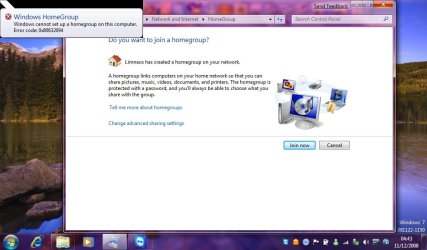
I set up a Homegroup on my network in one pc, and the other one sees it at once, and asks to connect to the homegroup. I provide the homegroup password and after trying and trying, I get an error message that this computer cannot connect to the homegroup..

Did anyone try that?
 

My Computer My Computer

Computer Manufacturer/Model Number
ENIAC
OS
Windows 7 RC 7100 32bit/64bit
CPU
Intel Core2Duo E4500 2.20 GHz
Motherboard
ASUS P5LD2-X/1333
Memory
2x1GB Kinsgston DDR2 800MHz
Graphics Card(s)
Nvidia 8500GT
Sound Card
Onboard High Definition Audio Device
Monitor(s) Displays
Sony Bravia 42"
Case
LINKW 2222
Cooling
Standard Intel
Keyboard
Some cheap one
Mouse
Microsoft Intellimouse something
Internet Speed
24MBps ADSL
Homegroup works fine for me, i am able to access all resources on my second PC, both are on WIFI :-P
 

My Computer My Computer

OS
Windows 7 Ultimate Build 6956 x32
Check Screens Below, PJMONKEE is the second PC (my sisters PC), both have 6956
 
Last edited:

My Computer My Computer

OS
Windows 7 Ultimate Build 6956 x32
Anyone had the chance to setup W7 in 2 PCs at home?

I set up a Homegroup on my network in one pc, and the other one sees it at once, and asks to connect to the homegroup. I provide the homegroup password and after trying and trying, I get an error message that this computer cannot connect to the homegroup..

Did anyone try that?


what build are these comps??
 

My Computer My Computer

Computer Manufacturer/Model Number
Tx2500z Tablet Pc/Homemade Server
OS
Windows 7 Ult x64(x2), HomePrem x32(x4), Server 08 (+VM), 08 R2 (VM) , SuSe 11.2 (VM), XP 32 (VM)
CPU
Turion X2 ultra (oh well came with laptop)/P4 @3.2 (yes P4)
Motherboard
IDK HP Motherboard / Intel DG965SS
Memory
OCZ Dual Channel 4GB kit/ 1gb Dual Channel
Graphics Card(s)
HD 3200 graphics /GMA x3100 (yay for intergrated!!)
Sound Card
Realtek HD Audio(mic working, well sort of)/Siig IC-70012
Monitor(s) Displays
built-in Hp 12" laptop screen/ Acer 19"
Screen Resolution
1280x800 /1440x900
Cooling
All Air Cooled
Mouse
Logi MX Rev. /MS Wheel Optical 1.1A /Logitech Optical Mouse
Internet Speed
College baby but its still routed through vpn to 1536k...
Other Info
love my wacom pen and pressure sensitivity...
wished it worked in 7, SUSE for that matter though
they are both 6956.
 

My Computer My Computer

Computer Manufacturer/Model Number
ENIAC
OS
Windows 7 RC 7100 32bit/64bit
CPU
Intel Core2Duo E4500 2.20 GHz
Motherboard
ASUS P5LD2-X/1333
Memory
2x1GB Kinsgston DDR2 800MHz
Graphics Card(s)
Nvidia 8500GT
Sound Card
Onboard High Definition Audio Device
Monitor(s) Displays
Sony Bravia 42"
Case
LINKW 2222
Cooling
Standard Intel
Keyboard
Some cheap one
Mouse
Microsoft Intellimouse something
Internet Speed
24MBps ADSL
hmm...then it's got to be something with my setup.

Kryptonit, what is your UAC status on the PCs? is it on or off?
Have you disabled the firewall or anything?
Have you enabled any other options on the HomeGroup starter pc? ( password sharing, public network settings etc?)

Regards
 

My Computer My Computer

Computer Manufacturer/Model Number
ENIAC
OS
Windows 7 RC 7100 32bit/64bit
CPU
Intel Core2Duo E4500 2.20 GHz
Motherboard
ASUS P5LD2-X/1333
Memory
2x1GB Kinsgston DDR2 800MHz
Graphics Card(s)
Nvidia 8500GT
Sound Card
Onboard High Definition Audio Device
Monitor(s) Displays
Sony Bravia 42"
Case
LINKW 2222
Cooling
Standard Intel
Keyboard
Some cheap one
Mouse
Microsoft Intellimouse something
Internet Speed
24MBps ADSL
do you have network discovery on??
did you try the homegroup on both machines???


(setup from both??)
 

My Computer My Computer

Computer Manufacturer/Model Number
Tx2500z Tablet Pc/Homemade Server
OS
Windows 7 Ult x64(x2), HomePrem x32(x4), Server 08 (+VM), 08 R2 (VM) , SuSe 11.2 (VM), XP 32 (VM)
CPU
Turion X2 ultra (oh well came with laptop)/P4 @3.2 (yes P4)
Motherboard
IDK HP Motherboard / Intel DG965SS
Memory
OCZ Dual Channel 4GB kit/ 1gb Dual Channel
Graphics Card(s)
HD 3200 graphics /GMA x3100 (yay for intergrated!!)
Sound Card
Realtek HD Audio(mic working, well sort of)/Siig IC-70012
Monitor(s) Displays
built-in Hp 12" laptop screen/ Acer 19"
Screen Resolution
1280x800 /1440x900
Cooling
All Air Cooled
Mouse
Logi MX Rev. /MS Wheel Optical 1.1A /Logitech Optical Mouse
Internet Speed
College baby but its still routed through vpn to 1536k...
Other Info
love my wacom pen and pressure sensitivity...
wished it worked in 7, SUSE for that matter though
hmm...then it's got to be something with my setup.

Kryptonit, what is your UAC status on the PCs? is it on or off?
Have you disabled the firewall or anything?
Have you enabled any other options on the HomeGroup starter pc? ( password sharing, public network settings etc?)

Regards

I have UAC completely turned off on both PC's

10ws9sh.jpg


And for Network Sharing

2u9i9vr.jpg


Turn On Network Discovery

Turn on File and Printer Sharing (you can set permissions for shared folders and files)

And on my network:
Turn on sharing so anyone with network access can open, change and create file
**again even with that on, you can set read-only to shared folders and files**

Media Sharing:
Media sharing is on.

Password Protected Sharing:
Turn On password Protected sharing

Windows HomeGroup Connections:
Allow Windows HomeGroup to manage homegroup connections
**if not you will need the user account name and password of the other PC**
 

My Computer My Computer

OS
Windows 7 Ultimate Build 6956 x32
Thanks a lot for the tips, I believe it had to do with either the VMWARE virtual network cards, they belonged in a Public Network which was somehow conflicting... (?) or the network bridge I had made.

It was fixed when I disabled them both...
 

My Computer My Computer

Computer Manufacturer/Model Number
ENIAC
OS
Windows 7 RC 7100 32bit/64bit
CPU
Intel Core2Duo E4500 2.20 GHz
Motherboard
ASUS P5LD2-X/1333
Memory
2x1GB Kinsgston DDR2 800MHz
Graphics Card(s)
Nvidia 8500GT
Sound Card
Onboard High Definition Audio Device
Monitor(s) Displays
Sony Bravia 42"
Case
LINKW 2222
Cooling
Standard Intel
Keyboard
Some cheap one
Mouse
Microsoft Intellimouse something
Internet Speed
24MBps ADSL
Thanks a lot for the tips, I believe it had to do with either the VMWARE virtual network cards, they belonged in a Public Network which was somehow conflicting... (?) or the network bridge I had made.

It was fixed when I disabled them both...


ok thats good
it would of been better if you would specified that you were using a VM...
i was thinking it was an actual machine...lol
 

My Computer My Computer

Computer Manufacturer/Model Number
Tx2500z Tablet Pc/Homemade Server
OS
Windows 7 Ult x64(x2), HomePrem x32(x4), Server 08 (+VM), 08 R2 (VM) , SuSe 11.2 (VM), XP 32 (VM)
CPU
Turion X2 ultra (oh well came with laptop)/P4 @3.2 (yes P4)
Motherboard
IDK HP Motherboard / Intel DG965SS
Memory
OCZ Dual Channel 4GB kit/ 1gb Dual Channel
Graphics Card(s)
HD 3200 graphics /GMA x3100 (yay for intergrated!!)
Sound Card
Realtek HD Audio(mic working, well sort of)/Siig IC-70012
Monitor(s) Displays
built-in Hp 12" laptop screen/ Acer 19"
Screen Resolution
1280x800 /1440x900
Cooling
All Air Cooled
Mouse
Logi MX Rev. /MS Wheel Optical 1.1A /Logitech Optical Mouse
Internet Speed
College baby but its still routed through vpn to 1536k...
Other Info
love my wacom pen and pressure sensitivity...
wished it worked in 7, SUSE for that matter though
it IS an actual machine, it's just that I also have VM installed on this actual machine, and it adds 2 lan virtual cards to the system.
 

My Computer My Computer

Computer Manufacturer/Model Number
ENIAC
OS
Windows 7 RC 7100 32bit/64bit
CPU
Intel Core2Duo E4500 2.20 GHz
Motherboard
ASUS P5LD2-X/1333
Memory
2x1GB Kinsgston DDR2 800MHz
Graphics Card(s)
Nvidia 8500GT
Sound Card
Onboard High Definition Audio Device
Monitor(s) Displays
Sony Bravia 42"
Case
LINKW 2222
Cooling
Standard Intel
Keyboard
Some cheap one
Mouse
Microsoft Intellimouse something
Internet Speed
24MBps ADSL
it IS an actual machine, it's just that I also have VM installed on this actual machine, and it adds 2 lan virtual cards to the system.


ohh i see i thought you were making a homegroup with using vmware...;)
ok cool
 

My Computer My Computer

Computer Manufacturer/Model Number
Tx2500z Tablet Pc/Homemade Server
OS
Windows 7 Ult x64(x2), HomePrem x32(x4), Server 08 (+VM), 08 R2 (VM) , SuSe 11.2 (VM), XP 32 (VM)
CPU
Turion X2 ultra (oh well came with laptop)/P4 @3.2 (yes P4)
Motherboard
IDK HP Motherboard / Intel DG965SS
Memory
OCZ Dual Channel 4GB kit/ 1gb Dual Channel
Graphics Card(s)
HD 3200 graphics /GMA x3100 (yay for intergrated!!)
Sound Card
Realtek HD Audio(mic working, well sort of)/Siig IC-70012
Monitor(s) Displays
built-in Hp 12" laptop screen/ Acer 19"
Screen Resolution
1280x800 /1440x900
Cooling
All Air Cooled
Mouse
Logi MX Rev. /MS Wheel Optical 1.1A /Logitech Optical Mouse
Internet Speed
College baby but its still routed through vpn to 1536k...
Other Info
love my wacom pen and pressure sensitivity...
wished it worked in 7, SUSE for that matter though
well, given that networking is enabled on VM machine, this should have worked too ! ;)
 

My Computer My Computer

Computer Manufacturer/Model Number
ENIAC
OS
Windows 7 RC 7100 32bit/64bit
CPU
Intel Core2Duo E4500 2.20 GHz
Motherboard
ASUS P5LD2-X/1333
Memory
2x1GB Kinsgston DDR2 800MHz
Graphics Card(s)
Nvidia 8500GT
Sound Card
Onboard High Definition Audio Device
Monitor(s) Displays
Sony Bravia 42"
Case
LINKW 2222
Cooling
Standard Intel
Keyboard
Some cheap one
Mouse
Microsoft Intellimouse something
Internet Speed
24MBps ADSL

My Computer My Computer

Computer type
Laptop
Computer Manufacturer/Model Number
Apple
OS
El Capitan / Windows 10
CPU
i7-4980HQ
Memory
16GB
Graphics Card(s)
Iris 5200
Homegroup networking relies on multicast IP traffic which is blocked by some routers and adapter drivers. It can usually be configured to be switched on but the location for this configuration varies. Your best bet is to verify that this is a multicast issue first before spellunking about for multicast settings. Try Serial and IP Solutions for Telemetry and Security from SimpleComTools and Serial and IP Solutions for Telemetry and Security from SimpleComTools


from what i know only older routers and network hardware have this disabled or dont even have the option for this correct...

even the cheapest router have multicast enable by default...
 

My Computer My Computer

Computer Manufacturer/Model Number
Tx2500z Tablet Pc/Homemade Server
OS
Windows 7 Ult x64(x2), HomePrem x32(x4), Server 08 (+VM), 08 R2 (VM) , SuSe 11.2 (VM), XP 32 (VM)
CPU
Turion X2 ultra (oh well came with laptop)/P4 @3.2 (yes P4)
Motherboard
IDK HP Motherboard / Intel DG965SS
Memory
OCZ Dual Channel 4GB kit/ 1gb Dual Channel
Graphics Card(s)
HD 3200 graphics /GMA x3100 (yay for intergrated!!)
Sound Card
Realtek HD Audio(mic working, well sort of)/Siig IC-70012
Monitor(s) Displays
built-in Hp 12" laptop screen/ Acer 19"
Screen Resolution
1280x800 /1440x900
Cooling
All Air Cooled
Mouse
Logi MX Rev. /MS Wheel Optical 1.1A /Logitech Optical Mouse
Internet Speed
College baby but its still routed through vpn to 1536k...
Other Info
love my wacom pen and pressure sensitivity...
wished it worked in 7, SUSE for that matter though
from what i know only older routers and network hardware have this disabled or dont even have the option for this correct...

even the cheapest router have multicast enable by default...

I suspect the VM's virtual adapter(s) rather than the network hardware. Multicast with virtualized endpoints gets a little sticky to configure so the natural tendency would be to disable multicast by default on the virtual endpoints so as not to interfere with the native hardware endpoints.
 

My Computer My Computer

Computer type
Laptop
Computer Manufacturer/Model Number
Apple
OS
El Capitan / Windows 10
CPU
i7-4980HQ
Memory
16GB
Graphics Card(s)
Iris 5200
it is indeed the VM adapters, cause I enable them , it gets stuck..I disable them, it works.. I'm only trying to figure why now...I got to the reason though , that's a start. I dont think multicast is the issue here , plus no router is in between.
I really start to believe its a setting that has to do with your Location... Home, Work or Public. Those Virtual cards belonged in a public network which I couldn't alter from anywhere , but network and sharing center listed them both as a public network....now considering these cards might be clones of my other 2 network cards (otherwise why 2?) it has to lead to some conflict theory....or a multicast issue with these 2 vm cards...
 

My Computer My Computer

Computer Manufacturer/Model Number
ENIAC
OS
Windows 7 RC 7100 32bit/64bit
CPU
Intel Core2Duo E4500 2.20 GHz
Motherboard
ASUS P5LD2-X/1333
Memory
2x1GB Kinsgston DDR2 800MHz
Graphics Card(s)
Nvidia 8500GT
Sound Card
Onboard High Definition Audio Device
Monitor(s) Displays
Sony Bravia 42"
Case
LINKW 2222
Cooling
Standard Intel
Keyboard
Some cheap one
Mouse
Microsoft Intellimouse something
Internet Speed
24MBps ADSL
Network discovery is only enabled be default for private networks. It depends on multicast. Maybe that's it. Have you tried enabling network discovery for public networks temporarily?
 

My Computer My Computer

Computer type
Laptop
Computer Manufacturer/Model Number
Apple
OS
El Capitan / Windows 10
CPU
i7-4980HQ
Memory
16GB
Graphics Card(s)
Iris 5200
Network discovery is only enabled be default for private networks. It depends on multicast. Maybe that's it. Have you tried enabling network discovery for public networks temporarily?


not only that but homegroup simply refuses to work if it is not set to home
 

My Computer My Computer

Computer Manufacturer/Model Number
Tx2500z Tablet Pc/Homemade Server
OS
Windows 7 Ult x64(x2), HomePrem x32(x4), Server 08 (+VM), 08 R2 (VM) , SuSe 11.2 (VM), XP 32 (VM)
CPU
Turion X2 ultra (oh well came with laptop)/P4 @3.2 (yes P4)
Motherboard
IDK HP Motherboard / Intel DG965SS
Memory
OCZ Dual Channel 4GB kit/ 1gb Dual Channel
Graphics Card(s)
HD 3200 graphics /GMA x3100 (yay for intergrated!!)
Sound Card
Realtek HD Audio(mic working, well sort of)/Siig IC-70012
Monitor(s) Displays
built-in Hp 12" laptop screen/ Acer 19"
Screen Resolution
1280x800 /1440x900
Cooling
All Air Cooled
Mouse
Logi MX Rev. /MS Wheel Optical 1.1A /Logitech Optical Mouse
Internet Speed
College baby but its still routed through vpn to 1536k...
Other Info
love my wacom pen and pressure sensitivity...
wished it worked in 7, SUSE for that matter though
well...my apologies to everyone , I guess I made a really bad debugging here...

I disabled/removed the cards...I ditched VM, restarted, cleaned up everything, and still I can't connect...only time I managed to connect , as I remember, was yesterday right after I clicked "Restore Defaults" on Firewall settings on the host pc.
However, I didn't tweak any firewall rules/settings except for allowing some programs out when asked, so why would it need resetting the firewall?

I'll post a network map / configuration in a few hours cause I'm really sleepy now (5.30 am in Greece).

Cheers
 

Attachments

  • Untitled.jpg
    Untitled.jpg
    67.9 KB · Views: 83

My Computer My Computer

Computer Manufacturer/Model Number
ENIAC
OS
Windows 7 RC 7100 32bit/64bit
CPU
Intel Core2Duo E4500 2.20 GHz
Motherboard
ASUS P5LD2-X/1333
Memory
2x1GB Kinsgston DDR2 800MHz
Graphics Card(s)
Nvidia 8500GT
Sound Card
Onboard High Definition Audio Device
Monitor(s) Displays
Sony Bravia 42"
Case
LINKW 2222
Cooling
Standard Intel
Keyboard
Some cheap one
Mouse
Microsoft Intellimouse something
Internet Speed
24MBps ADSL
Back
Top