Pagefile refuses to maintain adequate size

desolator4u

New member
Local time
3:37 PM
Messages
14
Sup ppl?
I got this problem with my page file. Weather it's managed by the system or given a custom size, it refuses to stay at a decent size. Every time I login, it's at about 200MB. I have 1GB RAM, and I set the page file to 1500 MB, but it keeps going back to a small size, and as a result, I am constantly getting the low memory warning from Windows, and my apps start to look and act weird, or crash.

I notice my Commit (whatever that is) under the Performance tab in the Task Manager is usually about 1500 with the small pagefile. I can always go to the Virtual Memory setting is System and set the custom size to something around 1500MB and stop the low memory warning, but I shouldn't have to do this every time I boot.

My harddrive is just 20GB 'cause i'm using a dumb laptop, but I usually try to keep at least 800MB free even after the pagefile is taking up 1500MB. How do I solve this annoying problem guys? Thanks.

Nuff Respeck
~Des
 

My Computer My Computer

Computer Manufacturer/Model Number
Dell D510 Notebook
OS
Win 7 32Bit
CPU
1.7GHz (Single Core)
Motherboard
Intel 915
Memory
1 GB
Graphics Card(s)
Intel 915GM
Sound Card
Sigmatel C Audio
Hard Drives
80 GB
Sup ppl?
I got this problem with my page file. Weather it's managed by the system or given a custom size, it refuses to stay at a decent size.

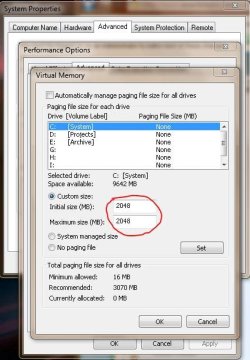
If you manage it manually and make the Initial and Maximum sizes the same you should not have this problem...

Capture.JPG
 

My Computer My Computer

Computer Manufacturer/Model Number
Homebrew
OS
XP Pro SP3 X86 / Win7 Pro X86
CPU
Amd 64 x2 4200 (2.4ghz)
Motherboard
Asus M2N-MX SE Plus
Memory
Kingston DDR2 800 2gb
Graphics Card(s)
Nvidia GF-8400
Sound Card
Realtek on Motherboard
Monitor(s) Displays
Acer x-193bw
Screen Resolution
1440 x 900
Hard Drives
Western Digital 500g
PSU
350watt In-Win
Case
In-Win
Cooling
Air
Keyboard
yes
Mouse
yes
Internet Speed
5mpbs
Other Info
Also ASRock ION 330 as HTPC (on XP).
Acer Aspire as GP netbook (on XP).
Sup ppl?
I got this problem with my page file. Weather it's managed by the system or given a custom size, it refuses to stay at a decent size. Every time I login, it's at about 200MB. I have 1GB RAM, and I set the page file to 1500 MB, but it keeps going back to a small size, and as a result, I am constantly getting the low memory warning from Windows, and my apps start to look and act weird, or crash.

I notice my Commit (whatever that is) under the Performance tab in the Task Manager is usually about 1500 with the small pagefile. I can always go to the Virtual Memory setting is System and set the custom size to something around 1500MB and stop the low memory warning, but I shouldn't have to do this every time I boot.

My harddrive is just 20GB 'cause i'm using a dumb laptop, but I usually try to keep at least 800MB free even after the pagefile is taking up 1500MB. How do I solve this annoying problem guys? Thanks.

Nuff Respeck
~Des

Several things going on here. first you dont have enough ram, second you dont have enough free space on the hard drive. Until you solve one of these you will continue to get the low memory warning.

If you have 20 gigs what is using up the rest? win 7 should use maybe 15 gigs, whats using the other 5 ?

ken
 

My Computer My Computer

Computer Manufacturer/Model Number
HP Pavillion dv-7 1005 Tx
OS
Win 8 Release candidate 8400
CPU
[email protected]
Memory
4 gigs
Graphics Card(s)
Nvidia 9600M
Sound Card
HD built-in
Monitor(s) Displays
17" Wxga
Screen Resolution
1440x900
Cooling
none
Internet Speed
45Mb down 5Mb up
win 7 should use maybe 15 gigs

Sorry, I know this is off topic a little bit... but really 15gb?

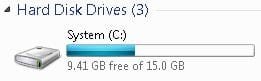
Here's my C: drive with Win7 and all my software installed...

Capture.JPG

Now I'm not disputing your figures; just the opposite, I'm now wondering if I gave myself enough space???
 

My Computer My Computer

Computer Manufacturer/Model Number
Homebrew
OS
XP Pro SP3 X86 / Win7 Pro X86
CPU
Amd 64 x2 4200 (2.4ghz)
Motherboard
Asus M2N-MX SE Plus
Memory
Kingston DDR2 800 2gb
Graphics Card(s)
Nvidia GF-8400
Sound Card
Realtek on Motherboard
Monitor(s) Displays
Acer x-193bw
Screen Resolution
1440 x 900
Hard Drives
Western Digital 500g
PSU
350watt In-Win
Case
In-Win
Cooling
Air
Keyboard
yes
Mouse
yes
Internet Speed
5mpbs
Other Info
Also ASRock ION 330 as HTPC (on XP).
Acer Aspire as GP netbook (on XP).
When making a change to the pagefile's settings. You did click on "Set" correct?
 

My Computer My Computer

Computer type
PC/Desktop
Computer Manufacturer/Model Number
Alienware Aurora ALX R4
OS
Windows 10 Pro (x64)
CPU
Intel Core i7-3930K (3.2GHz - 4.5GHz)
Motherboard
Alienware Aurora-R4 x79
Memory
4x Samsung 4GB PC3-12800 DDR3 (16GB 1600MHz)
Graphics Card(s)
Nvidia Geforce GTX 690
Sound Card
SteelSeries Siberia Elite
Monitor(s) Displays
Dell UltraSharp U3011
Screen Resolution
2560x1600
Hard Drives
Samsung 850 Pro 256 GB, Seagate 1TB Desktop Hybrid HDD, 2x Western Digital 4TB Green HDD
PSU
875W Some Dell PSU <.<
Case
Alienware Aurora ALX
Cooling
Custom Liquid Cooling (EK CPU & GPU blocks) dual EK 480RAD
Keyboard
Logitech G710+ Mechanical
Mouse
Logitech G700s
Internet Speed
Verizon Fios (50 mbps average)
Other Info
Server: Intel NUC D54250WYK: i5-4250U, 16GB, 256 GB mSATA, Windows Server 2012 R2
When making a change to the pagefile's settings. You did click on "Set" correct?

Yes I did... I just set that up to show the OP an example.

I usually run my systems without swap files.
 

My Computer My Computer

Computer Manufacturer/Model Number
Homebrew
OS
XP Pro SP3 X86 / Win7 Pro X86
CPU
Amd 64 x2 4200 (2.4ghz)
Motherboard
Asus M2N-MX SE Plus
Memory
Kingston DDR2 800 2gb
Graphics Card(s)
Nvidia GF-8400
Sound Card
Realtek on Motherboard
Monitor(s) Displays
Acer x-193bw
Screen Resolution
1440 x 900
Hard Drives
Western Digital 500g
PSU
350watt In-Win
Case
In-Win
Cooling
Air
Keyboard
yes
Mouse
yes
Internet Speed
5mpbs
Other Info
Also ASRock ION 330 as HTPC (on XP).
Acer Aspire as GP netbook (on XP).
Yes, I remembered to click Set when I put in my custom values. I have set both Min and Max sizes to 1500MB and also tried with Minimum a few megs smaller. My hard drive is 80GB, I just meant the boot partition is just 20GB, but the entire OS takes up like 8GB.

I don't see how it can be that my 1GB of RAM is too small, because even with tons of Powerpoit and Word docs open, and Firefox with 50 addons and like 20 tabs open, I still have like 100MB RAM free (Win 7 seems more snappy then even Win XP)

As I said, once the page file is like over 1GB, I do not get any low memory warnings, it's just that I have to set the pagefile myself every time I login to Windows, because the file is usually very small. I assume it should be automatically getting larger in size when more virtual memory is needed?

Nuff Respeck
~Des
 

My Computer My Computer

Computer Manufacturer/Model Number
Dell D510 Notebook
OS
Win 7 32Bit
CPU
1.7GHz (Single Core)
Motherboard
Intel 915
Memory
1 GB
Graphics Card(s)
Intel 915GM
Sound Card
Sigmatel C Audio
Hard Drives
80 GB
If your page file settings are not sticking, then you have another problem.
If every time you set it and reboot, the settings are not what you set, then you have another issue.
You should not have to do that.

Also, when you open an app it could open temp files also which are eating away at the remainder of disk space.

20G OS partition for your use just may not be enough.
 

My Computer My Computer

Computer Manufacturer/Model Number
Self Built
OS
Win 7 Ultimate 32bit
CPU
C2D E6600 2.4Ghz
Motherboard
Intel D965WH
Memory
4G Kingston KHX5400D2
Graphics Card(s)
EVGA GTX 570 HD SC (012-P3-1573-KR)
Sound Card
On-Board
Monitor(s) Displays
Samsung 226BW
Screen Resolution
1680 x 1050
Hard Drives
2 x 250 Seagate Barracuda
2 x 500 Seagate Barracuda (Raid1)
PSU
Corsair TX750W
Case
In-Win C589
Cooling
Stock Intel Cooling
@desolator4u it may be helpful if you post a screen shot such as CommonTater's. Then we can all what the settings are.

edit: btw I've noticed when setting custom values in the past, it hasn't always "stuck" for me either. I think not only do you have to hit Set, but then Ok, then Apply on the dialog underneath. Or else it just sets it back the way it wants.
 
Last edited:

My Computer My Computer

Computer Manufacturer/Model Number
HP Media Center
OS
Windows 7 32 bit
CPU
AMD 5200+ dual core
Memory
2 GB
Graphics Card(s)
NVidia GeForce 6150SE 128 MB
Monitor(s) Displays
CRT
Screen Resolution
1280x1024
Hard Drives
500 GB Sata internal :

SIIG USB 3.0 docking stations w/WD Caviar Black 6 Gb/s drives
Keyboard
PS/2
Mouse
PS/2 Wheel Mouse
Other Info
SIIG USB 3.0 PCIexpress card.
win 7 should use maybe 15 gigs

Sorry, I know this is off topic a little bit... but really 15gb?

Here's my C: drive with Win7 and all my software installed...

View attachment 63561

Now I'm not disputing your figures; just the opposite, I'm now wondering if I gave myself enough space???

Capture.JPG

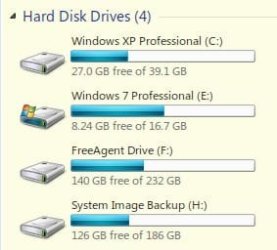
I'm wondering the same at times but Win 7 has been installed since 10/22 and I've installed a boat load of crapps. Before the install of 7, I was unsure as to whether I would like it or not. It took me five years to custom tailor XP to my personal likings. With that in mind, I set up Win 7 as dual boot with XP giving myself just the bare minimum for Win 7. Long story short, I rarely boot into my precious highly customized XP anymore and do wish I had allotted more disk space.
 

My Computer My Computer

Computer Manufacturer/Model Number
Averatec 6130HS-20
OS
Windows 7 Professional 32-bit (6.1, Build 7600)
CPU
Intel(R) Pentium(R) 4 3.00 GHz HT
Memory
2.0 GB
Graphics Card(s)
ATI Mobility Radeon 9600 64MB
Sound Card
Realtek AC'97 Audio
Screen Resolution
1280 x 800
Hard Drives
Seagate 96023A 60GB 7200RPM -
Seagate FreeAgentDesktop 250GB
Cooling
20 Inch Box Fan
Mouse
Targus PAWM10 Wireless Optical Laptop Mouse
Never had that happen. Set it, click Set, then Apply and close out or just Ok and reboot.
Never has changed for me, on it's own.
 

My Computer My Computer

Computer Manufacturer/Model Number
Self Built
OS
Win 7 Ultimate 32bit
CPU
C2D E6600 2.4Ghz
Motherboard
Intel D965WH
Memory
4G Kingston KHX5400D2
Graphics Card(s)
EVGA GTX 570 HD SC (012-P3-1573-KR)
Sound Card
On-Board
Monitor(s) Displays
Samsung 226BW
Screen Resolution
1680 x 1050
Hard Drives
2 x 250 Seagate Barracuda
2 x 500 Seagate Barracuda (Raid1)
PSU
Corsair TX750W
Case
In-Win C589
Cooling
Stock Intel Cooling
so, delete the XP Partition and expand the Win 7 Partition
 

My Computer My Computer

Computer Manufacturer/Model Number
Self Built
OS
Win 7 Ultimate 32bit
CPU
C2D E6600 2.4Ghz
Motherboard
Intel D965WH
Memory
4G Kingston KHX5400D2
Graphics Card(s)
EVGA GTX 570 HD SC (012-P3-1573-KR)
Sound Card
On-Board
Monitor(s) Displays
Samsung 226BW
Screen Resolution
1680 x 1050
Hard Drives
2 x 250 Seagate Barracuda
2 x 500 Seagate Barracuda (Raid1)
PSU
Corsair TX750W
Case
In-Win C589
Cooling
Stock Intel Cooling
so, delete the XP Partition and expand the Win 7 Partition
lol, I can't bring myself to do it. I still keep 45'a, LP's and Eight tracks. I may put it on a larger HD someday.
 

My Computer My Computer

Computer Manufacturer/Model Number
Averatec 6130HS-20
OS
Windows 7 Professional 32-bit (6.1, Build 7600)
CPU
Intel(R) Pentium(R) 4 3.00 GHz HT
Memory
2.0 GB
Graphics Card(s)
ATI Mobility Radeon 9600 64MB
Sound Card
Realtek AC'97 Audio
Screen Resolution
1280 x 800
Hard Drives
Seagate 96023A 60GB 7200RPM -
Seagate FreeAgentDesktop 250GB
Cooling
20 Inch Box Fan
Mouse
Targus PAWM10 Wireless Optical Laptop Mouse
Never had that happen. Set it, click Set, then Apply and close out or just Ok and reboot.
Never has changed for me, on it's own.

Maybe it's a quirk of HP desktops. I've owned about 5 of 'em and had that happen pretty much all the way along. Seems like no matter how many buttons I hit it never takes it on the first go.
 

My Computer My Computer

Computer Manufacturer/Model Number
HP Media Center
OS
Windows 7 32 bit
CPU
AMD 5200+ dual core
Memory
2 GB
Graphics Card(s)
NVidia GeForce 6150SE 128 MB
Monitor(s) Displays
CRT
Screen Resolution
1280x1024
Hard Drives
500 GB Sata internal :

SIIG USB 3.0 docking stations w/WD Caviar Black 6 Gb/s drives
Keyboard
PS/2
Mouse
PS/2 Wheel Mouse
Other Info
SIIG USB 3.0 PCIexpress card.
Back
Top