User Account Password - Change from WinRE

How to Change the User Account Password if Unable to Login to Windows

   Information
This tutorial will help you remove the existing user account password and set up a new password incase you have forgotten the user password using WinRE (Windows Recovery Environment)


Here's how:
1. Boot to WinRE (Windows Recovery Environment).
1.png
2. Click on the Command Prompt option.


3. Type the following commands and press enter after each one:
  • C:
  • CD Windows\system32
  • ren cmd.exe cmd.old
  • ren magnify.exe cmd.exe
  • ren cmd.old magnify.exe
4. Restart computer.

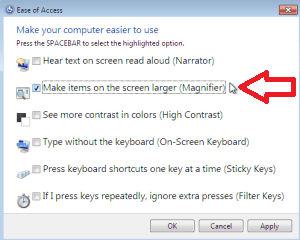
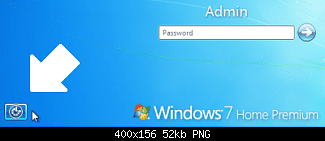
5. Click on Easy of Access centre left side bottom à Choose Magnify option.
2.png
3.png
6. A Command prompt opens up

7. Type: net user administrator /active:yes and press enter.

8. Restart the computer.

9. Logon on to the "Administrator" account, and then using User Accounts page in the Control Panel, remove or change the password of the other account.

10. Type Magnify.exe in Start Menu search box and press enter and open it.

11. Command prompt opens up

12. Type: net user administrator /active:no and press enter.

13. Restart the computer
NOTE: This will disable the administrator account.

14. Now, Boot to winRE again, and click on the Command Prompt option.


15. Type the following commands and press enter after each one:
  • C:
  • CD Windows\system32
  • ren magnify.exe cmd.old
  • ren cmd.exe magnify.exe
  • ren cmd.old cmd.exe
  • exit
16. Restart the computer – system logs on to the User account without asking for password provided there is only one user account.
That's it.
Special thanks for iseeuu for providing the screenshots.


Last edited by a moderator:
Nice work Dinesh, I've seen the need for this lately.
 

My Computer

Computer type
PC/Desktop
Computer Manufacturer/Model Number
Self Built
OS
Win 10 Pro x64
CPU
Intel I5-2500K @3.3GHz
Motherboard
Asrock P67 Extreme4
Memory
16GB G.Skill Ripjaws X (4x4GB)
Graphics Card(s)
EVGA GeForce 750 Ti SC 2GB
Sound Card
ASUS Xonar DG 5.1 Channels 24-bit 96KHz PCI Interface Sound
Monitor(s) Displays
auria eq2367
Screen Resolution
1920 x 1080
Hard Drives
250GB Samsung 850 EVO SSD
1TB WD Blue
1TB Hitachi
PSU
SeaSonic X 650W 80 Plus Gold
Case
Corsair Obsidian 750D
Cooling
Corsair H60, Three 140mm case fans
Keyboard
Logitech Wireless Keyboard K520
Mouse
Logitech Wireless Mouse M310
Internet Speed
Wave Broadband ~ 100 dn 5 up
Antivirus
Windows Defender, Malwarebytes Premium
Browser
Edge, IE11, Chrome
Other Info
Laptop specs: HP g7-1365dx /
CPU: AMD A6-3420M APU with Radeon(tm) HD Graphics /
RAM: Crucial 8Gb (2x4Gb) /
SSD: Crucial M4-CT128M4SSD2 ATA Device/ FW 000F /
GFX: AMD Radeon HD 6520G /
OS: Windows 10 Pro x64
Thanks mate. :)
 

My Computer

Computer Manufacturer/Model Number
Samsung NP530U4B-S02IN
OS
Windows® 8 Pro (64-bit)
CPU
Intel® Core™ i5 Processor 2467M (1.60GHz, 3MB L3 Cache)
Motherboard
Samsung Electronics
Memory
6GB DDR3 System Memory at 1,333MHz (on BD 4GB + 2GB x 1)
Graphics Card(s)
AMD Radeon™ HD7550M 1GB DDR3 (Ext. Graphic)
Sound Card
Realtek High Definition Audio
Monitor(s) Displays
35.56cm (14.0) SuperBright 300nit HD LED Display
Screen Resolution
1366x768
Hard Drives
1TB S-ATA II Hard Drive (5400RPM) with ExpressCache 16GB SSD
Internet Speed
sucks
Antivirus
Microsoft Security Essentials
Browser
Google Chrome (Sync enabled)

My Computer

Computer type
PC/Desktop
Computer Manufacturer/Model Number
Self Built
OS
Win 10 Pro x64
CPU
Intel I5-2500K @3.3GHz
Motherboard
Asrock P67 Extreme4
Memory
16GB G.Skill Ripjaws X (4x4GB)
Graphics Card(s)
EVGA GeForce 750 Ti SC 2GB
Sound Card
ASUS Xonar DG 5.1 Channels 24-bit 96KHz PCI Interface Sound
Monitor(s) Displays
auria eq2367
Screen Resolution
1920 x 1080
Hard Drives
250GB Samsung 850 EVO SSD
1TB WD Blue
1TB Hitachi
PSU
SeaSonic X 650W 80 Plus Gold
Case
Corsair Obsidian 750D
Cooling
Corsair H60, Three 140mm case fans
Keyboard
Logitech Wireless Keyboard K520
Mouse
Logitech Wireless Mouse M310
Internet Speed
Wave Broadband ~ 100 dn 5 up
Antivirus
Windows Defender, Malwarebytes Premium
Browser
Edge, IE11, Chrome
Other Info
Laptop specs: HP g7-1365dx /
CPU: AMD A6-3420M APU with Radeon(tm) HD Graphics /
RAM: Crucial 8Gb (2x4Gb) /
SSD: Crucial M4-CT128M4SSD2 ATA Device/ FW 000F /
GFX: AMD Radeon HD 6520G /
OS: Windows 10 Pro x64
Beautiful! This was exactly what I needed. Thank you so much.
 

My Computer

OS
Windows 7
You are welcome parkerfarms. :)
 

My Computer

Computer Manufacturer/Model Number
Samsung NP530U4B-S02IN
OS
Windows® 8 Pro (64-bit)
CPU
Intel® Core™ i5 Processor 2467M (1.60GHz, 3MB L3 Cache)
Motherboard
Samsung Electronics
Memory
6GB DDR3 System Memory at 1,333MHz (on BD 4GB + 2GB x 1)
Graphics Card(s)
AMD Radeon™ HD7550M 1GB DDR3 (Ext. Graphic)
Sound Card
Realtek High Definition Audio
Monitor(s) Displays
35.56cm (14.0) SuperBright 300nit HD LED Display
Screen Resolution
1366x768
Hard Drives
1TB S-ATA II Hard Drive (5400RPM) with ExpressCache 16GB SSD
Internet Speed
sucks
Antivirus
Microsoft Security Essentials
Browser
Google Chrome (Sync enabled)
Now, what if there was a password created will this guide still work? Like, what if the user forgot the password? Will using this guide help?

Thank you very much for the information by the way.

Edit: I read the title: "This tutorial will help you remove the existing user account password and set up a new password incase you have forgotten the user password using WinRE (Windows Recovery Environment)"

That answers my question.

Thank you very much for this guide!
 

My Computer

Computer type
PC/Desktop
Computer Manufacturer/Model Number
Custom build
OS
Windows 7 Home Premium x64
CPU
Intel Core i5-4690k
Motherboard
Gigabyte H97 SATA Express M.2 SSD UEFI DualBIOS DDR3 1600 LG
Memory
8GB
Graphics Card(s)
EVGA GeForce GTX 970
Monitor(s) Displays
2
Hard Drives
2:
- Samsung 850 EVO 250GB 2.5-Inch SATA III Internal SSD (MZ-75E250B/AM)
- Crucial MX300 275GB SATA 2.5 Inch Internal Solid State Drive - CT275MX300SSD1
PSU
Corsair 650x
Case
C70
Cooling
4 Fans
Internet Speed
Comcast Cable 22mbs
Antivirus
Microsoft Security Essentials
Browser
Chrome
You are welcome mate. :)
 

My Computer

Computer Manufacturer/Model Number
Samsung NP530U4B-S02IN
OS
Windows® 8 Pro (64-bit)
CPU
Intel® Core™ i5 Processor 2467M (1.60GHz, 3MB L3 Cache)
Motherboard
Samsung Electronics
Memory
6GB DDR3 System Memory at 1,333MHz (on BD 4GB + 2GB x 1)
Graphics Card(s)
AMD Radeon™ HD7550M 1GB DDR3 (Ext. Graphic)
Sound Card
Realtek High Definition Audio
Monitor(s) Displays
35.56cm (14.0) SuperBright 300nit HD LED Display
Screen Resolution
1366x768
Hard Drives
1TB S-ATA II Hard Drive (5400RPM) with ExpressCache 16GB SSD
Internet Speed
sucks
Antivirus
Microsoft Security Essentials
Browser
Google Chrome (Sync enabled)
Great Tutorial...
Also bad if it fell in the wrong hands....

I am going to throw this out there...
DO NOT CHANGE THE ADMINISTRATOR PASSWORD.
It will make you not able to do some things on your machine and you will hate yourself...
It was the same way in Vista.
 

My Computer

Computer Manufacturer/Model Number
SMN-Productions
OS
Windows 7 x86/x64, Server 2008r2, Web Server 2008
CPU
i7 v2 3930K Steping stone 2
Motherboard
ASUS Rampage IV Extreme
Memory
G.SKILL Ripjaws Z Series 32GB
Graphics Card(s)
AMD HD 5770
Monitor(s) Displays
Acer 21" and Samsung 20"
Hard Drives
Patriot Pyro 80GB
PSU
1000 Watt
Case
HAF-X
Cooling
4 Fans
Keyboard
Black Widow Ultimate
I have a question about the guide.

"16. Restart the computer – system logs on to the User account without asking for password provided there is only one user account. "

Could you please elaborate a bit? Provided there is only one user account. What does that mean exactly? There can only be one account and not two accounts? On my PC I've got the admin account and the offline Guest account.

Great Tutorial...
Also bad if it fell in the wrong hands....

I am going to throw this out there...
DO NOT CHANGE THE ADMINISTRATOR PASSWORD.
It will make you not able to do some things on your machine and you will hate yourself...
It was the same way in Vista.

For real? What kind of bad things? That's scary because I have a password on mine. :confused:
 
Last edited:

My Computer

Computer type
PC/Desktop
Computer Manufacturer/Model Number
Custom build
OS
Windows 7 Home Premium x64
CPU
Intel Core i5-4690k
Motherboard
Gigabyte H97 SATA Express M.2 SSD UEFI DualBIOS DDR3 1600 LG
Memory
8GB
Graphics Card(s)
EVGA GeForce GTX 970
Monitor(s) Displays
2
Hard Drives
2:
- Samsung 850 EVO 250GB 2.5-Inch SATA III Internal SSD (MZ-75E250B/AM)
- Crucial MX300 275GB SATA 2.5 Inch Internal Solid State Drive - CT275MX300SSD1
PSU
Corsair 650x
Case
C70
Cooling
4 Fans
Internet Speed
Comcast Cable 22mbs
Antivirus
Microsoft Security Essentials
Browser
Chrome
I have a question about the guide.

"16. Restart the computer – system logs on to the User account without asking for password provided there is only one user account. "

Could you please elaborate a bit? Provided there is only one user account. What does that mean exactly? There can only be one account and not two accounts? On my PC I've got the admin account and the offline Guest account.

Great Tutorial...
Also bad if it fell in the wrong hands....

I am going to throw this out there...
DO NOT CHANGE THE ADMINISTRATOR PASSWORD.
It will make you not able to do some things on your machine and you will hate yourself...
It was the same way in Vista.

For real? What kind of bad things? That's scary because I have a password on mine. :confused:
Hello TheTalker, you have asked a good question and mckillwashere has also given good advice. Please allow me to elaborate.

This Tutorial assumes that you cannot login to your computer. Perhaps you were short sighted and created only one user account and have forgotten the password or the password or possibly the user account has become corrupted.

Lets be clear. This Tutorial does one and only one thing. It allows you a way to enable the Default Administrator account when you do not have a user account with Admin privileges. It is not a 'crack' or 'hack' to allow someone to break in to your computer. If you have given your Default Administrator account a password, as you should if you need to secure your computer, enabling the Default Administrator account in this way will not allow anyone access to your computer without the password.

All user accounts from the Default Administrator to Limited User have a normal way to change the account password. Actually, Windows will regularly ask you to change your password unless you tell it to stop. What do you do when your account is locked and you do not have the correct password? If you use one account to erase / change the password of a second account, you will loose access to certain secured data. And if you use a bootable CD, for example to erase / change the password of a locked account, specifically the Default Administrator account, that account may become unusable. So, yes you are taking a chance. But when the alternative is to wipe the hard drive clean and start over with nothing, you may choose to take the risk.

This Tutorial allows you a way to enable the Default Administrator account. If you have secured it with a password, only you can then use the account to perform whatever maintenance or repairs are needed, like replacing a forgotten /corrupt password on one of your other accounts, giving one of your other accounts Administrative privileges, or creating a new account to replace a corrupt one. Afterwards, you should hide or 'disable' the Default Administrator account for use in the next emergency. Because if you use the Default Administrator account for everyday use and it gets corrupted, your only option is to wipe the hard drive clean and start over. I say that with the assumption that a user concerned enough to make back-ups most likely understands the risk and will avoid using the Default Administrator account for daily use.

Cheers!
Robert
 

My Computer

OS
...
I have a question about the guide.

"16. Restart the computer – system logs on to the User account without asking for password provided there is only one user account. "

Could you please elaborate a bit? Provided there is only one user account. What does that mean exactly? There can only be one account and not two accounts? On my PC I've got the admin account and the offline Guest account.

Great Tutorial...
Also bad if it fell in the wrong hands....

I am going to throw this out there...
DO NOT CHANGE THE ADMINISTRATOR PASSWORD.
It will make you not able to do some things on your machine and you will hate yourself...
It was the same way in Vista.

For real? What kind of bad things? That's scary because I have a password on mine. :confused:
Hello TheTalker, you have asked a good question and mckillwashere has also given good advice. Please allow me to elaborate.

This Tutorial assumes that you cannot login to your computer. Perhaps you were short sighted and created only one user account and have forgotten the password or the password or possibly the user account has become corrupted.

Lets be clear. This Tutorial does one and only one thing. It allows you a way to enable the Default Administrator account when you do not have a user account with Admin privileges. It is not a 'crack' or 'hack' to allow someone to break in to your computer. If you have given your Default Administrator account a password, as you should if you need to secure your computer, enabling the Default Administrator account in this way will not allow anyone access to your computer without the password.

All user accounts from the Default Administrator to Limited User have a normal way to change the account password. Actually, Windows will regularly ask you to change your password unless you tell it to stop. What do you do when your account is locked and you do not have the correct password? If you use one account to erase / change the password of a second account, you will loose access to certain secured data. And if you use a bootable CD, for example to erase / change the password of a locked account, specifically the Default Administrator account, that account may become unusable. So, yes you are taking a chance. But when the alternative is to wipe the hard drive clean and start over with nothing, you may choose to take the risk.

This Tutorial allows you a way to enable the Default Administrator account. If you have secured it with a password, only you can then use the account to perform whatever maintenance or repairs are needed, like replacing a forgotten /corrupt password on one of your other accounts, giving one of your other accounts Administrative privileges, or creating a new account to replace a corrupt one. Afterwards, you should hide or 'disable' the Default Administrator account for use in the next emergency. Because if you use the Default Administrator account for everyday use and it gets corrupted, your only option is to wipe the hard drive clean and start over. I say that with the assumption that a user concerned enough to make back-ups most likely understands the risk and will avoid using the Default Administrator account for daily use.

Cheers!
Robert

Thank you Iseeuu. Yes, Dinesh wrote a great guide!

So, in short, this guide shows users how to enable the Hidden Admin account so they can change/remove the password that they forgot, (or it was corrupted), on the other non-usable account?

However, from what I gather, if they change/remove the password from that other account then they will lose some privileges from that account? If this is the case then why even try to access that account? Why not just make a new one? Because users won't have full access to programs, etc, anymore.

Also, if the Hidden Admin account has a password could that one be corrupted? And I was told that it should not be changed once a password is made.

Thank you for writing that long post to me. I appreciate your time. Hopefully I'll get it straight! :)
 

My Computer

Computer type
PC/Desktop
Computer Manufacturer/Model Number
Custom build
OS
Windows 7 Home Premium x64
CPU
Intel Core i5-4690k
Motherboard
Gigabyte H97 SATA Express M.2 SSD UEFI DualBIOS DDR3 1600 LG
Memory
8GB
Graphics Card(s)
EVGA GeForce GTX 970
Monitor(s) Displays
2
Hard Drives
2:
- Samsung 850 EVO 250GB 2.5-Inch SATA III Internal SSD (MZ-75E250B/AM)
- Crucial MX300 275GB SATA 2.5 Inch Internal Solid State Drive - CT275MX300SSD1
PSU
Corsair 650x
Case
C70
Cooling
4 Fans
Internet Speed
Comcast Cable 22mbs
Antivirus
Microsoft Security Essentials
Browser
Chrome
Thank you Iseeuu. Yes, Dinesh wrote a great guide!

So, in short, this guide shows users how to enable the Hidden Admin account so they can change/remove the password that they forgot, (or it was corrupted), on the other non-usable account?
The Hidden Admin account is the Default Administrator account and can not be deleted. It has full privileges over all other accounts, so yes you can use to make changes or repairs to other accounts as a last resort.

However, from what I gather, if they change/remove the password from that other account then they will lose some privileges from that account?
No. This is what Microsoft says: "Resetting a local account password for a user may result in some data loss for that user if the user has encrypted data"

Reset the password for a local user account

So if you are not using "encryption" there is little danger when changing a "Limited User" account password.

If this is the case then why even try to access that account? Why not just make a new one? Because users won't have full access to programs, etc, anymore.
Because you can copy the user profile to the new user and save all your settings.

Also, if the Hidden Admin account has a password could that one be corrupted?
Yes! That is one reason to leave it "Hidden" and not use it.

And I was told that it should not be changed once a password is made.
Do you believe everything you hear? When logged in as the Hidden Administrator, there is no more danger connected with changing the password than there is with any other account. (If there is EVIDENCE this statement is not correct, I would like to opportunity to verify that and correct myself.)

Thank you for writing that long post to me. I appreciate your time. Hopefully I'll get it straight! :)
You are most welcome. It is wise to gather information before you need it!

One way to protect you Hidden Administrator Account: http://www.sevenforums.com/tutorials/64742-password-reset-disk-windows-7-vista.html

Here is an alternative way to recover from password troubles: http://www.sevenforums.com/tutorial...indows-7-a.html?highlight=password+reset+disk

Cheers!
Robert
 
Last edited:

My Computer

OS
...
The Hidden Admin account is the Default Administrator account and can not be deleted. It has full privileges over all other accounts, so yes you can use to make changes or repairs to other accounts as a last resort.

Okay, I understand this part.

No. This is what Microsoft says: "Resetting a local account password for a user may result in some data loss for that user if the user has encrypted data"

Reset the password for a local user account

So if you are not using "encryption" there is little danger when changing a "Limited User" account password.

What is encryption? I'm sorry. I know what it means but what is it referring to in this case? And does a "Limited User" account also mean me? I'm running as an Admin but not the Hidden Admin. Am I still a limited user?

Because you can copy the user profile to the new user and save all your settings.

How would I go about learning how to copy the user profile over to a new user profile without losing any important privileges, etc?

Yes! That is one reason to leave it "Hidden" and not use it.

Gotcha! Will do.

Do you believe everything you hear? When logged in as the Hidden Administrator, there is no more danger connected with changing the password than there is with any other account. (If there is EVIDENCE this statement is not correct, I would like to opportunity to verify that and correct myself.)

The information came from someone on this site and who had a good amount of rep. I could've gotten my information wrong.

You are most welcome. It is wise to gather information before you need it!

One way to protect you Hidden Administrator Account: http://www.sevenforums.com/tutorial...em-startup.html?highlight=password+reset+disk

Here is an alternative way to recover from password troubles: http://www.sevenforums.com/tutorial...indows-7-a.html?highlight=password+reset+disk

Cheers!
Robert

Thank you so much for the links! I will look into them.
 

My Computer

Computer type
PC/Desktop
Computer Manufacturer/Model Number
Custom build
OS
Windows 7 Home Premium x64
CPU
Intel Core i5-4690k
Motherboard
Gigabyte H97 SATA Express M.2 SSD UEFI DualBIOS DDR3 1600 LG
Memory
8GB
Graphics Card(s)
EVGA GeForce GTX 970
Monitor(s) Displays
2
Hard Drives
2:
- Samsung 850 EVO 250GB 2.5-Inch SATA III Internal SSD (MZ-75E250B/AM)
- Crucial MX300 275GB SATA 2.5 Inch Internal Solid State Drive - CT275MX300SSD1
PSU
Corsair 650x
Case
C70
Cooling
4 Fans
Internet Speed
Comcast Cable 22mbs
Antivirus
Microsoft Security Essentials
Browser
Chrome
What is encryption? I'm sorry. I know what it means but what is it referring to in this case?
You use encryption, for example, to password protect a file or folder. When you use the normal password change, the permissions are passed to the new password. If you use other means to change the password, you are locked out of the password protected, or encrypted files and folders.

And does a "Limited User" account also mean me? I'm running as an Admin but not the Hidden Admin. Am I still a limited user?
No. Running as an Admin is not the same as running as a User. If your computer is compromised, the bad guy will have Admin access to everything. I you use a "Limited User" account for every day activities and your computer is compromised, the bad guy is also limited in the bad he can do. Please check out this link: Configuring Windows 7 for a Limited User Account

How would I go about learning how to copy the user profile over to a new user profile without losing any important privileges, etc?
http://www.sevenforums.com/tutorials/18629-user-folders-change-default-location.html?ltr=U

The information came from someone on this site and who had a good amount of rep. I could've gotten my information wrong.
Well ... perhaps you or he just misunderstood. There can be adverse consequences to forcing a password change outside of the normal Windows change of password. In those situations, the account may become unusable.

BTW I did not copy the link I wanted in my previous post. Here is the link I wanted to post: http://www.sevenforums.com/tutorials/64742-password-reset-disk-windows-7-vista.html

Cheers!
Robert
 

My Computer

OS
...
Thank you very much for the great information Iseeuu!

I went and made a Password Reset Disk. I put it on my USB drive and hid it away, heh heh. I like how it doesn't have to be updated even if you made a different password.

Too bad it requires the previous password to reset it but that's okay. I've got many sources of my password hidden away where only I would look.

Now, with this password reset disk made I still a question.

If I wake up one morning and the password is corrupted, (God forbid), on my computer and I can't log in would I be able to use my Password Reset Disk to make a new password without having to access the Hidden Admin account?

Thanks again!
 

My Computer

Computer type
PC/Desktop
Computer Manufacturer/Model Number
Custom build
OS
Windows 7 Home Premium x64
CPU
Intel Core i5-4690k
Motherboard
Gigabyte H97 SATA Express M.2 SSD UEFI DualBIOS DDR3 1600 LG
Memory
8GB
Graphics Card(s)
EVGA GeForce GTX 970
Monitor(s) Displays
2
Hard Drives
2:
- Samsung 850 EVO 250GB 2.5-Inch SATA III Internal SSD (MZ-75E250B/AM)
- Crucial MX300 275GB SATA 2.5 Inch Internal Solid State Drive - CT275MX300SSD1
PSU
Corsair 650x
Case
C70
Cooling
4 Fans
Internet Speed
Comcast Cable 22mbs
Antivirus
Microsoft Security Essentials
Browser
Chrome
Thank you very much for the great information Iseeuu!

I went and made a Password Reset Disk. I put it on my USB drive and hid it away, heh heh. I like how it doesn't have to be updated even if you made a different password.

Too bad it requires the previous password to reset it but that's okay. I've got many sources of my password hidden away where only I would look.

Now, with this password reset disk made I still a question.

If I wake up one morning and the password is corrupted, (God forbid), on my computer and I can't log in would I be able to use my Password Reset Disk to make a new password without having to access the Hidden Admin account?

Thanks again!
Thank you TheTalker, I am glad you found some helpful info. Please be sure and let Bare Foot Kid know you found his tutorial helpful as well.

The reset disk works on the user account on the computer where it was created ... only. If you have created a Hidden Admin reset disk, it will only work for the Hidden Admin account on that computer. You can create password reset disks for your other accounts as well?

Cheers!
Robert
 

My Computer

OS
...
Thank you very much for the great information Iseeuu!

I went and made a Password Reset Disk. I put it on my USB drive and hid it away, heh heh. I like how it doesn't have to be updated even if you made a different password.

Too bad it requires the previous password to reset it but that's okay. I've got many sources of my password hidden away where only I would look.

Now, with this password reset disk made I still a question.

If I wake up one morning and the password is corrupted, (God forbid), on my computer and I can't log in would I be able to use my Password Reset Disk to make a new password without having to access the Hidden Admin account?

Thanks again!
Thank you TheTalker, I am glad you found some helpful info. Please be sure and let Bare Foot Kid know you found his tutorial helpful as well.

The reset disk works on the user account on the computer where it was created ... only. If you have created a Hidden Admin reset disk, it will only work for the Hidden Admin account on that computer. You can create password reset disks for your other accounts as well?

Cheers!
Robert

Thank you.

I definitely found this guide to be useful but I hope I never have to use it, haha. That would mean I've got problems with the computer's password and all---which I wouldn't want to have happen. But I bookmarked this guide and sent it to two buddies of mine who also bookmarked it just in case we have problems or know someone who has problems and needs help.

I know that the password reset disk can only be used on this computer and on for this user account. But my question is this: If this account ever has a problem with it's password to where I can't get in will I be able to use the password reset disk to reset the password instead of needing to access the Hidden Admin account?
 

My Computer

Computer type
PC/Desktop
Computer Manufacturer/Model Number
Custom build
OS
Windows 7 Home Premium x64
CPU
Intel Core i5-4690k
Motherboard
Gigabyte H97 SATA Express M.2 SSD UEFI DualBIOS DDR3 1600 LG
Memory
8GB
Graphics Card(s)
EVGA GeForce GTX 970
Monitor(s) Displays
2
Hard Drives
2:
- Samsung 850 EVO 250GB 2.5-Inch SATA III Internal SSD (MZ-75E250B/AM)
- Crucial MX300 275GB SATA 2.5 Inch Internal Solid State Drive - CT275MX300SSD1
PSU
Corsair 650x
Case
C70
Cooling
4 Fans
Internet Speed
Comcast Cable 22mbs
Antivirus
Microsoft Security Essentials
Browser
Chrome
But my question is this: If this account ever has a problem with it's password to where I can't get in will I be able to use the password reset disk to reset the password instead of needing to access the Hidden Admin account?
Yes. As a matter of fact, it is safer and would be a better choice to use a reset disk instead of forcing a password change from a different account.

Cheers!
Robert
 

My Computer

OS
...
But my question is this: If this account ever has a problem with it's password to where I can't get in will I be able to use the password reset disk to reset the password instead of needing to access the Hidden Admin account?
Yes. As a matter of fact, it is safer and would be a better choice to use a reset disk instead of forcing a password change from a different account.

Cheers!
Robert

I knew it would be safer but will it work in all situations? Like, will resetting the password work even if the current password is corrupted?
 

My Computer

Computer type
PC/Desktop
Computer Manufacturer/Model Number
Custom build
OS
Windows 7 Home Premium x64
CPU
Intel Core i5-4690k
Motherboard
Gigabyte H97 SATA Express M.2 SSD UEFI DualBIOS DDR3 1600 LG
Memory
8GB
Graphics Card(s)
EVGA GeForce GTX 970
Monitor(s) Displays
2
Hard Drives
2:
- Samsung 850 EVO 250GB 2.5-Inch SATA III Internal SSD (MZ-75E250B/AM)
- Crucial MX300 275GB SATA 2.5 Inch Internal Solid State Drive - CT275MX300SSD1
PSU
Corsair 650x
Case
C70
Cooling
4 Fans
Internet Speed
Comcast Cable 22mbs
Antivirus
Microsoft Security Essentials
Browser
Chrome
Back
Top