Sleeping computers invisible on LAN; Need WOL

mendopaul

New member
Member
VIP
Local time
3:04 AM
Messages
122
Location
Northern California Coast
MS says that Wake-on-Lan is on by default in Win 7. I've upgraded 5 of my machines to Win 7 and none of them are visible on the LAN when in sleep mode. They are all visible when awake. Is there a magic packet we need to load to wake them up? Anyone have this problem also?
 

My Computer My Computer

Computer Manufacturer/Model Number
Homebuilt
OS
Windows 7 64 bit Home Premium
CPU
Intel Core i5-2500K @ 3.30 ghz
Motherboard
ASUS P8Z68-V PRO GEN 3
Memory
8 GB of Corsair
Graphics Card(s)
Intel integrated
Sound Card
none, Realtek HD integrated
Monitor(s) Displays
ACER X223W LCD Monitor
Screen Resolution
VGA for the moment: to change
Hard Drives
Samsung 128gb 830 series SSD;
WDC WD15EARS 1.5 TB
PSU
HX 750 watt Corsair
Case
NZXT
Cooling
Cooler Master Hyper 212 Plus
Keyboard
MS Digital Multimedia Pro
Mouse
MS Wired Comfort Optical Mouse
Internet Speed
Cable ?
Hello,

To wake on LAN, you do need to send a magic packet. Many sites and utilities facilitate this. Here's is the one I use: Depicus

Let me know if you need help with that program.
 

My Computer My Computer

Computer Manufacturer/Model Number
Custom
OS
Windows 7 Professional x64
CPU
Intel i7 2600K OC'd @ 4620 MHz
Motherboard
Asus P8Z68-V Pro
Memory
16GB GSkill Sniper 2133 Mhz (4x4GB)
Graphics Card(s)
EVGA GeForce GTX 480 SuperClocked+
Sound Card
Realtek High Definition Audio
Monitor(s) Displays
2x Acer S273HLbmii 27"
Screen Resolution
2 x 1920x1080
Hard Drives
64GB Crucial M4 SSD

Storage: Hitachi 1TB 5400RPM, Samsung 1.5TB 5400RPM
PSU
Corsair HW Series 750w (modular)
Case
Cooler Master HAF 932 Advanced Blue Edition
Cooling
CM Hyper 212+ CPU cooler, 3x 230mm + 1x 140mm case fans
Keyboard
Logitech MK320 (wireless)
Mouse
Logitech MK320 (wireless)
Internet Speed
30 Mb/s : 2 Mb/s
your hardware has to support such a feature. Often you need to turn it on in the bios if you have an on board nic.

You will not see the machines on the network while they are sleeping. And as Jonathan pointed out, you have to have a utility to send the magic packet to wake the machine.
 

My Computer My Computer

Computer Manufacturer/Model Number
Home Built
OS
Windows 7; Server 08; Window Home Server; Vista; XP
CPU
Intel E8400 @ 3.4Ghz
Motherboard
Gigabyte P35 DS3L
Memory
8 Gb Patriot DDr2 800
Graphics Card(s)
NVidia GTX460 OC
Sound Card
Onboard
Monitor(s) Displays
Samsung 21"
Screen Resolution
1920x1080
Hard Drives
Seagate 160Gb x2
Samsung 250Gb
PSU
Cooler Master 650w 52a on 12v
Case
Antec 300
Cooling
Stock
Keyboard
HP Standard USB
Mouse
Logitech 518
Internet Speed
25Mbit Down 1.5Mbit up
Other Info
http://www.speedtest.net/result/723924362.png
MS says that Wake-on-Lan is on by default in Win 7. I've upgraded 5 of my machines to Win 7 and none of them are visible on the LAN when in sleep mode. They are all visible when awake. Is there a magic packet we need to load to wake them up? Anyone have this problem also?

In your user folder, make a folder "Network" and in that folder make shortcuts to the machines on your LAN ... Probing them from the shortcut should wake them up.. or at least it does on mine.

The "magic packet" is simply a "Ping" sent to any port on the machine.

Also, be aware that "Wake On LAN" doesn't work with wireless devices as they turn off their radios when going standby.
 

My Computer My Computer

Computer Manufacturer/Model Number
Homebrew
OS
XP Pro SP3 X86 / Win7 Pro X86
CPU
Amd 64 x2 4200 (2.4ghz)
Motherboard
Asus M2N-MX SE Plus
Memory
Kingston DDR2 800 2gb
Graphics Card(s)
Nvidia GF-8400
Sound Card
Realtek on Motherboard
Monitor(s) Displays
Acer x-193bw
Screen Resolution
1440 x 900
Hard Drives
Western Digital 500g
PSU
350watt In-Win
Case
In-Win
Cooling
Air
Keyboard
yes
Mouse
yes
Internet Speed
5mpbs
Other Info
Also ASRock ION 330 as HTPC (on XP).
Acer Aspire as GP netbook (on XP).

My Computer My Computer

Computer Manufacturer/Model Number
Custom
OS
Windows 7 Professional x64
CPU
Intel i7 2600K OC'd @ 4620 MHz
Motherboard
Asus P8Z68-V Pro
Memory
16GB GSkill Sniper 2133 Mhz (4x4GB)
Graphics Card(s)
EVGA GeForce GTX 480 SuperClocked+
Sound Card
Realtek High Definition Audio
Monitor(s) Displays
2x Acer S273HLbmii 27"
Screen Resolution
2 x 1920x1080
Hard Drives
64GB Crucial M4 SSD

Storage: Hitachi 1TB 5400RPM, Samsung 1.5TB 5400RPM
PSU
Corsair HW Series 750w (modular)
Case
Cooler Master HAF 932 Advanced Blue Edition
Cooling
CM Hyper 212+ CPU cooler, 3x 230mm + 1x 140mm case fans
Keyboard
Logitech MK320 (wireless)
Mouse
Logitech MK320 (wireless)
Internet Speed
30 Mb/s : 2 Mb/s

My Computer My Computer

Computer Manufacturer/Model Number
Homebrew
OS
XP Pro SP3 X86 / Win7 Pro X86
CPU
Amd 64 x2 4200 (2.4ghz)
Motherboard
Asus M2N-MX SE Plus
Memory
Kingston DDR2 800 2gb
Graphics Card(s)
Nvidia GF-8400
Sound Card
Realtek on Motherboard
Monitor(s) Displays
Acer x-193bw
Screen Resolution
1440 x 900
Hard Drives
Western Digital 500g
PSU
350watt In-Win
Case
In-Win
Cooling
Air
Keyboard
yes
Mouse
yes
Internet Speed
5mpbs
Other Info
Also ASRock ION 330 as HTPC (on XP).
Acer Aspire as GP netbook (on XP).
Hey Jonathan, Naxcid, and CommonTater, thanks a lot for very helpful advice and info.

I looked at the Depicus program and read the Wiki article. I've adjusted the power-on settings in the bios of my machines and I've made sure that all of the network adapters will use the magic packet to wake up.

However, I'm not the brightest bulb in the networking department. So I take it that I must get the MAC address of each machine I want to wake and then make those shortcuts (?) you suggested with the appropriate address in each one. I'm not sure how that would look or be done (?).

Am I on the right track here? First step to get the MAC addresses of each machine?

Thanks for the great suggestions and advice! I've been bothered by this for years.
 

My Computer My Computer

Computer Manufacturer/Model Number
Homebuilt
OS
Windows 7 64 bit Home Premium
CPU
Intel Core i5-2500K @ 3.30 ghz
Motherboard
ASUS P8Z68-V PRO GEN 3
Memory
8 GB of Corsair
Graphics Card(s)
Intel integrated
Sound Card
none, Realtek HD integrated
Monitor(s) Displays
ACER X223W LCD Monitor
Screen Resolution
VGA for the moment: to change
Hard Drives
Samsung 128gb 830 series SSD;
WDC WD15EARS 1.5 TB
PSU
HX 750 watt Corsair
Case
NZXT
Cooling
Cooler Master Hyper 212 Plus
Keyboard
MS Digital Multimedia Pro
Mouse
MS Wired Comfort Optical Mouse
Internet Speed
Cable ?
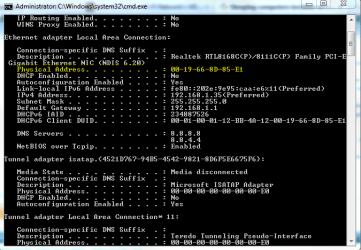
You need the mac addresses of the network cards. Open up a command prompt and enter ipconfig /all.

You'll find the mac address here.

Capture1.PNG
 

My Computer My Computer

Computer Manufacturer/Model Number
Custom
OS
Windows 7 Professional x64
CPU
Intel i7 2600K OC'd @ 4620 MHz
Motherboard
Asus P8Z68-V Pro
Memory
16GB GSkill Sniper 2133 Mhz (4x4GB)
Graphics Card(s)
EVGA GeForce GTX 480 SuperClocked+
Sound Card
Realtek High Definition Audio
Monitor(s) Displays
2x Acer S273HLbmii 27"
Screen Resolution
2 x 1920x1080
Hard Drives
64GB Crucial M4 SSD

Storage: Hitachi 1TB 5400RPM, Samsung 1.5TB 5400RPM
PSU
Corsair HW Series 750w (modular)
Case
Cooler Master HAF 932 Advanced Blue Edition
Cooling
CM Hyper 212+ CPU cooler, 3x 230mm + 1x 140mm case fans
Keyboard
Logitech MK320 (wireless)
Mouse
Logitech MK320 (wireless)
Internet Speed
30 Mb/s : 2 Mb/s
However, I'm not the brightest bulb in the networking department. So I take it that I must get the MAC address of each machine I want to wake and then make those shortcuts (?) you suggested with the appropriate address in each one. I'm not sure how that would look or be done (?).

It doesn't need to be complicated. In your user folder right click and select New then Folder... name it "Network" or whatever suits... Now open my network with all your machines running (so you can see them) and drag the icons over to the new folder. Now when you click on them in the new folder they will cause the system to probe the machine and wake it up. Knowing win7 you may have to click the icon 3 or 4 times, cancelling suggestions that the machine is not available before it actually gives you a list of shares....

(On XP this trick was the best replacement you could have for "My Network Places" and would give you a list of shares right off the bat... Win 7 is a bit slow on the uptake but it does eventually get the idea.)
 

My Computer My Computer

Computer Manufacturer/Model Number
Homebrew
OS
XP Pro SP3 X86 / Win7 Pro X86
CPU
Amd 64 x2 4200 (2.4ghz)
Motherboard
Asus M2N-MX SE Plus
Memory
Kingston DDR2 800 2gb
Graphics Card(s)
Nvidia GF-8400
Sound Card
Realtek on Motherboard
Monitor(s) Displays
Acer x-193bw
Screen Resolution
1440 x 900
Hard Drives
Western Digital 500g
PSU
350watt In-Win
Case
In-Win
Cooling
Air
Keyboard
yes
Mouse
yes
Internet Speed
5mpbs
Other Info
Also ASRock ION 330 as HTPC (on XP).
Acer Aspire as GP netbook (on XP).
You need the mac addresses of the network cards. Open up a command prompt and enter ipconfig /all.

You'll find the mac address here.

No he doesn't... in his adaptor properties he only needs to enable "Wake in Magic Packet" and "Wake on Pattern". In the shortcut itself he only needs the computer's name in UNC format... For example if the machine is named "fred" the target slot in the shortcut would read \\fred ... its the same as making a shortcut to a folder ... all you need is the folder's name. A network address is seen as a system folder, just like any other.

Heres the thing... Network adaptors have no brains, they rely upon the CPU to make their decisions for them. ANYTHING coming into a network port requires the machine to wakeup, examine the packet and decide what to do with it... Some software might decide not to allow connecting to the port, or others might implement a secure ACK-NAK sequence... but it has to wake the machine out of standby to do that.

So... no matter what you send to that port it's going to wake the machine up. From there it will discard the bad first packet, but it's awake now so it will process the request for a share list from the shortcut.

Yes it's an exploit... the bane of modern computing... but hey if it works....
 

My Computer My Computer

Computer Manufacturer/Model Number
Homebrew
OS
XP Pro SP3 X86 / Win7 Pro X86
CPU
Amd 64 x2 4200 (2.4ghz)
Motherboard
Asus M2N-MX SE Plus
Memory
Kingston DDR2 800 2gb
Graphics Card(s)
Nvidia GF-8400
Sound Card
Realtek on Motherboard
Monitor(s) Displays
Acer x-193bw
Screen Resolution
1440 x 900
Hard Drives
Western Digital 500g
PSU
350watt In-Win
Case
In-Win
Cooling
Air
Keyboard
yes
Mouse
yes
Internet Speed
5mpbs
Other Info
Also ASRock ION 330 as HTPC (on XP).
Acer Aspire as GP netbook (on XP).
I've had little time lately to work on this problem and I'm eager to get it solved.

But I do have a couple of puzzling problem when I'm following your recommendations: 1st, I've discovered that there is no Run Command on the Start menu on at least 2 of my Win 7 computers. There is a Run command on my own machine.

2nd, When I press Run or enter IPconfig on any machine, a DOS window opens and closes in a flash. It's barely visible as it flashes on and then off. This is the same on at least 4 of my machines...I haven't tried on the others. I'm sure not used to this. I've worked with the DOS windows for many years and have never had this problem. New to Win 7 I guess. Any thoughts?
 

My Computer My Computer

Computer Manufacturer/Model Number
Homebuilt
OS
Windows 7 64 bit Home Premium
CPU
Intel Core i5-2500K @ 3.30 ghz
Motherboard
ASUS P8Z68-V PRO GEN 3
Memory
8 GB of Corsair
Graphics Card(s)
Intel integrated
Sound Card
none, Realtek HD integrated
Monitor(s) Displays
ACER X223W LCD Monitor
Screen Resolution
VGA for the moment: to change
Hard Drives
Samsung 128gb 830 series SSD;
WDC WD15EARS 1.5 TB
PSU
HX 750 watt Corsair
Case
NZXT
Cooling
Cooler Master Hyper 212 Plus
Keyboard
MS Digital Multimedia Pro
Mouse
MS Wired Comfort Optical Mouse
Internet Speed
Cable ?
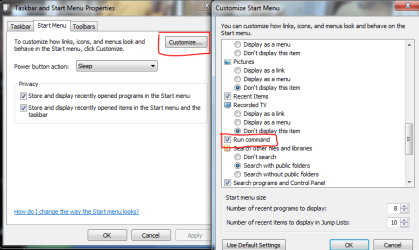
First, the run command can be shown or hidden int he start menu properties.

Capture.PNG

Second, to run ipconfig, first open a command prompt (type cmd into the start menu), then run ipconfig.
 

My Computer My Computer

Computer Manufacturer/Model Number
Custom
OS
Windows 7 Professional x64
CPU
Intel i7 2600K OC'd @ 4620 MHz
Motherboard
Asus P8Z68-V Pro
Memory
16GB GSkill Sniper 2133 Mhz (4x4GB)
Graphics Card(s)
EVGA GeForce GTX 480 SuperClocked+
Sound Card
Realtek High Definition Audio
Monitor(s) Displays
2x Acer S273HLbmii 27"
Screen Resolution
2 x 1920x1080
Hard Drives
64GB Crucial M4 SSD

Storage: Hitachi 1TB 5400RPM, Samsung 1.5TB 5400RPM
PSU
Corsair HW Series 750w (modular)
Case
Cooler Master HAF 932 Advanced Blue Edition
Cooling
CM Hyper 212+ CPU cooler, 3x 230mm + 1x 140mm case fans
Keyboard
Logitech MK320 (wireless)
Mouse
Logitech MK320 (wireless)
Internet Speed
30 Mb/s : 2 Mb/s
I've had little time lately to work on this problem and I'm eager to get it solved.

But I do have a couple of puzzling problem when I'm following your recommendations: 1st, I've discovered that there is no Run Command on the Start menu on at least 2 of my Win 7 computers. There is a Run command on my own machine.

2nd, When I press Run or enter IPconfig on any machine, a DOS window opens and closes in a flash. It's barely visible as it flashes on and then off. This is the same on at least 4 of my machines...I haven't tried on the others. I'm sure not used to this. I've worked with the DOS windows for many years and have never had this problem. New to Win 7 I guess. Any thoughts?

Well that's simple enough... Hold down the windows key and type an R.
 

My Computer My Computer

Computer Manufacturer/Model Number
Homebrew
OS
XP Pro SP3 X86 / Win7 Pro X86
CPU
Amd 64 x2 4200 (2.4ghz)
Motherboard
Asus M2N-MX SE Plus
Memory
Kingston DDR2 800 2gb
Graphics Card(s)
Nvidia GF-8400
Sound Card
Realtek on Motherboard
Monitor(s) Displays
Acer x-193bw
Screen Resolution
1440 x 900
Hard Drives
Western Digital 500g
PSU
350watt In-Win
Case
In-Win
Cooling
Air
Keyboard
yes
Mouse
yes
Internet Speed
5mpbs
Other Info
Also ASRock ION 330 as HTPC (on XP).
Acer Aspire as GP netbook (on XP).
Yep, I can get the "run" window open in a couple of ways but my main point is still the problem. I can't get the window to stay open. It flashes for a half second and then closes.........no matter what I do. This is true on several of my machines.
 

My Computer My Computer

Computer Manufacturer/Model Number
Homebuilt
OS
Windows 7 64 bit Home Premium
CPU
Intel Core i5-2500K @ 3.30 ghz
Motherboard
ASUS P8Z68-V PRO GEN 3
Memory
8 GB of Corsair
Graphics Card(s)
Intel integrated
Sound Card
none, Realtek HD integrated
Monitor(s) Displays
ACER X223W LCD Monitor
Screen Resolution
VGA for the moment: to change
Hard Drives
Samsung 128gb 830 series SSD;
WDC WD15EARS 1.5 TB
PSU
HX 750 watt Corsair
Case
NZXT
Cooling
Cooler Master Hyper 212 Plus
Keyboard
MS Digital Multimedia Pro
Mouse
MS Wired Comfort Optical Mouse
Internet Speed
Cable ?
You need to run the command from the command prompt, not the run dialogue. Open up a copy of cmd and then type your command.
 

My Computer My Computer

Computer Manufacturer/Model Number
Custom
OS
Windows 7 Professional x64
CPU
Intel i7 2600K OC'd @ 4620 MHz
Motherboard
Asus P8Z68-V Pro
Memory
16GB GSkill Sniper 2133 Mhz (4x4GB)
Graphics Card(s)
EVGA GeForce GTX 480 SuperClocked+
Sound Card
Realtek High Definition Audio
Monitor(s) Displays
2x Acer S273HLbmii 27"
Screen Resolution
2 x 1920x1080
Hard Drives
64GB Crucial M4 SSD

Storage: Hitachi 1TB 5400RPM, Samsung 1.5TB 5400RPM
PSU
Corsair HW Series 750w (modular)
Case
Cooler Master HAF 932 Advanced Blue Edition
Cooling
CM Hyper 212+ CPU cooler, 3x 230mm + 1x 140mm case fans
Keyboard
Logitech MK320 (wireless)
Mouse
Logitech MK320 (wireless)
Internet Speed
30 Mb/s : 2 Mb/s
Yep, I can get the "run" window open in a couple of ways but my main point is still the problem. I can't get the window to stay open. It flashes for a half second and then closes.........no matter what I do. This is true on several of my machines.

WindowsKey+r ... type CMD click Ok... Now type the command you were going to type into the run dialog....
 

My Computer My Computer

Computer Manufacturer/Model Number
Homebrew
OS
XP Pro SP3 X86 / Win7 Pro X86
CPU
Amd 64 x2 4200 (2.4ghz)
Motherboard
Asus M2N-MX SE Plus
Memory
Kingston DDR2 800 2gb
Graphics Card(s)
Nvidia GF-8400
Sound Card
Realtek on Motherboard
Monitor(s) Displays
Acer x-193bw
Screen Resolution
1440 x 900
Hard Drives
Western Digital 500g
PSU
350watt In-Win
Case
In-Win
Cooling
Air
Keyboard
yes
Mouse
yes
Internet Speed
5mpbs
Other Info
Also ASRock ION 330 as HTPC (on XP).
Acer Aspire as GP netbook (on XP).
OKJ that did it. I'm fast........it only takes 3 or 4 times for me to get it.

Thanks for the patient help. Now I'll get back to your original advice.
 

My Computer My Computer

Computer Manufacturer/Model Number
Homebuilt
OS
Windows 7 64 bit Home Premium
CPU
Intel Core i5-2500K @ 3.30 ghz
Motherboard
ASUS P8Z68-V PRO GEN 3
Memory
8 GB of Corsair
Graphics Card(s)
Intel integrated
Sound Card
none, Realtek HD integrated
Monitor(s) Displays
ACER X223W LCD Monitor
Screen Resolution
VGA for the moment: to change
Hard Drives
Samsung 128gb 830 series SSD;
WDC WD15EARS 1.5 TB
PSU
HX 750 watt Corsair
Case
NZXT
Cooling
Cooler Master Hyper 212 Plus
Keyboard
MS Digital Multimedia Pro
Mouse
MS Wired Comfort Optical Mouse
Internet Speed
Cable ?
You need to run the command from the command prompt, not the run dialogue. Open up a copy of cmd and then type your command.

Alternative trick... start->All Programs->Accessories->Command Prompt -> Right click->Pin to start menu.

From there it's as easy as opening the run command.
 

My Computer My Computer

Computer Manufacturer/Model Number
Homebrew
OS
XP Pro SP3 X86 / Win7 Pro X86
CPU
Amd 64 x2 4200 (2.4ghz)
Motherboard
Asus M2N-MX SE Plus
Memory
Kingston DDR2 800 2gb
Graphics Card(s)
Nvidia GF-8400
Sound Card
Realtek on Motherboard
Monitor(s) Displays
Acer x-193bw
Screen Resolution
1440 x 900
Hard Drives
Western Digital 500g
PSU
350watt In-Win
Case
In-Win
Cooling
Air
Keyboard
yes
Mouse
yes
Internet Speed
5mpbs
Other Info
Also ASRock ION 330 as HTPC (on XP).
Acer Aspire as GP netbook (on XP).
Back
Top