
You are using an out of date browser. It may not display this or other websites correctly.
You should upgrade or use an alternative browser.
You should upgrade or use an alternative browser.
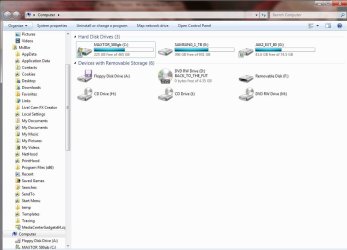
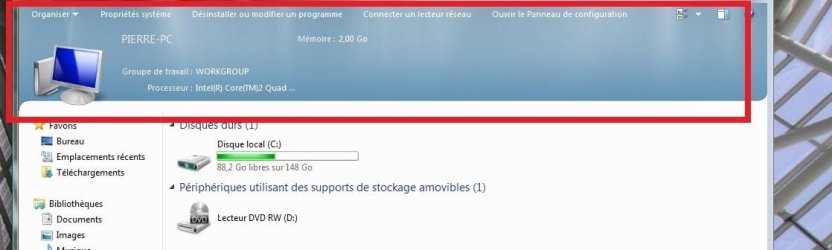
How to display System information in My COmputer?
- Thread starter sillyjav
- Start date


DocBrown
Crazy Scientific Senior
My Computer
- Computer type
- PC/Desktop
- Computer Manufacturer/Model Number
- Built them myself, Science Experiments !
- OS
- Win7 Enterprise, Win7 x86 (Ult 7600), Win7 x64 Ult 7600, TechNet RTM on AMD x64 (2.8Ghz)
- CPU
- AMD fx8350 4ghz, AMD-32 2400mhz, AMD-64 3200mhz, AMDx64 2.8G
- Motherboard
- SIS 755, ECS-K8M890M-M (Ult 7600), GigaByte & others
- Memory
- 2gb, 4gb on the Ult 7600, 4gb on Technet RTM, 32gb on FX8350
- Graphics Card(s)
- Draw my own Graphics, several nVidia cards
- Sound Card
- on motherboard
- Monitor(s) Displays
- 19" flat scr, 28" I-Inc widescr,22" Emprex Widescr, 23" Acer
- Screen Resolution
- 1280 x 1024, 1440 x 900, 1920 x 1080
- Hard Drives
- 6 pata Ide HD's & 2 Sata HD's
added 80gb external on Ult 7600 computer,
numerous extra 1tb, 2TB, 3Tb SATA HD's
A collection of ext HD Docks w/ HDs
- PSU
- 430w, 550w, 600w, 700, 800, etc
- Case
- All Generic Full Towers
- Cooling
- Open Air & a few fans, some w/ colored LEDs
- Keyboard
- Compaq & Dell recycled from GoodWill
- Mouse
- Made in China Optical Wired Mouse
- Internet Speed
- Fast Cable InterNet
- Antivirus
- AVG Free on 24 different Desktops, NO Problems!
- Browser
- IE 8 is preferred, but use FireFox sometimes
- Other Info
- Linksys Routers, switches, & Hubs
Too Many USB Flash Drives to count, Biggest is 64GB !
Eight computers in my home network.
Sixteen computers at my business network.
Linked via TeamViewer !
Lots of old used spare computer parts everywhere!
DocBrown
Crazy Scientific Senior
Do you have a language pack, & or a special theme pack installed ?
Do you want basic system information ?
Do you want basic system information ?
My Computer
- Computer type
- PC/Desktop
- Computer Manufacturer/Model Number
- Built them myself, Science Experiments !
- OS
- Win7 Enterprise, Win7 x86 (Ult 7600), Win7 x64 Ult 7600, TechNet RTM on AMD x64 (2.8Ghz)
- CPU
- AMD fx8350 4ghz, AMD-32 2400mhz, AMD-64 3200mhz, AMDx64 2.8G
- Motherboard
- SIS 755, ECS-K8M890M-M (Ult 7600), GigaByte & others
- Memory
- 2gb, 4gb on the Ult 7600, 4gb on Technet RTM, 32gb on FX8350
- Graphics Card(s)
- Draw my own Graphics, several nVidia cards
- Sound Card
- on motherboard
- Monitor(s) Displays
- 19" flat scr, 28" I-Inc widescr,22" Emprex Widescr, 23" Acer
- Screen Resolution
- 1280 x 1024, 1440 x 900, 1920 x 1080
- Hard Drives
- 6 pata Ide HD's & 2 Sata HD's
added 80gb external on Ult 7600 computer,
numerous extra 1tb, 2TB, 3Tb SATA HD's
A collection of ext HD Docks w/ HDs
- PSU
- 430w, 550w, 600w, 700, 800, etc
- Case
- All Generic Full Towers
- Cooling
- Open Air & a few fans, some w/ colored LEDs
- Keyboard
- Compaq & Dell recycled from GoodWill
- Mouse
- Made in China Optical Wired Mouse
- Internet Speed
- Fast Cable InterNet
- Antivirus
- AVG Free on 24 different Desktops, NO Problems!
- Browser
- IE 8 is preferred, but use FireFox sometimes
- Other Info
- Linksys Routers, switches, & Hubs
Too Many USB Flash Drives to count, Biggest is 64GB !
Eight computers in my home network.
Sixteen computers at my business network.
Linked via TeamViewer !
Lots of old used spare computer parts everywhere!
DocBrown
Crazy Scientific Senior
Have you ever used CPU-Z, SIW (System Info for Windows), HWInfo32, Vista Forums Sys Info ? All are Freeware/Shareware to explore your system information 
My Computer
- Computer type
- PC/Desktop
- Computer Manufacturer/Model Number
- Built them myself, Science Experiments !
- OS
- Win7 Enterprise, Win7 x86 (Ult 7600), Win7 x64 Ult 7600, TechNet RTM on AMD x64 (2.8Ghz)
- CPU
- AMD fx8350 4ghz, AMD-32 2400mhz, AMD-64 3200mhz, AMDx64 2.8G
- Motherboard
- SIS 755, ECS-K8M890M-M (Ult 7600), GigaByte & others
- Memory
- 2gb, 4gb on the Ult 7600, 4gb on Technet RTM, 32gb on FX8350
- Graphics Card(s)
- Draw my own Graphics, several nVidia cards
- Sound Card
- on motherboard
- Monitor(s) Displays
- 19" flat scr, 28" I-Inc widescr,22" Emprex Widescr, 23" Acer
- Screen Resolution
- 1280 x 1024, 1440 x 900, 1920 x 1080
- Hard Drives
- 6 pata Ide HD's & 2 Sata HD's
added 80gb external on Ult 7600 computer,
numerous extra 1tb, 2TB, 3Tb SATA HD's
A collection of ext HD Docks w/ HDs
- PSU
- 430w, 550w, 600w, 700, 800, etc
- Case
- All Generic Full Towers
- Cooling
- Open Air & a few fans, some w/ colored LEDs
- Keyboard
- Compaq & Dell recycled from GoodWill
- Mouse
- Made in China Optical Wired Mouse
- Internet Speed
- Fast Cable InterNet
- Antivirus
- AVG Free on 24 different Desktops, NO Problems!
- Browser
- IE 8 is preferred, but use FireFox sometimes
- Other Info
- Linksys Routers, switches, & Hubs
Too Many USB Flash Drives to count, Biggest is 64GB !
Eight computers in my home network.
Sixteen computers at my business network.
Linked via TeamViewer !
Lots of old used spare computer parts everywhere!
The info from the screenshot is pulled from the basic windows sysinfo screen. Right click on my computer and go to properties. If you want more detailed info, go start>run(or search) and type dxdiag and hit enter. I'm not sure how they got it to display in My Computer though.
My Computer
- Computer Manufacturer/Model Number
- Custom Built
- OS
- Windows 7 Ultimate x86
- CPU
- Athlon II X2 OC'd to 3.4 Ghz
- Motherboard
- Zotac GF8100
- Memory
- 2.5 GB DDR2
- Graphics Card(s)
- Radeon HD 3650
- Sound Card
- Realtek onboard 7.1 HD
- Monitor(s) Displays
- 16:10 19 inch LCD
- Hard Drives
- 150 GB Maxtor
- PSU
- 400 Watts
- Cooling
- Cooler Master
sergiogarcia9
︻┳テ=一
This information should show when you open the computer link from your start menu

FZ21Z
~Live Forever~
Open explorer and copy this - Control Panel\All Control Panel Items\System - into the address bar.How to display System information in My COmputer?
My Computer
- Computer Manufacturer/Model Number
- Sony Vaio FZ21Z
- OS
- Windows 7 Ultimate x64 ®™
- CPU
- Intel Core 2 Duo (2.2 GHz)
- Motherboard
- Sony (Intel Chipset)
- Memory
- 2x 2GB Corsair (667 MHz)
- Graphics Card(s)
- NVIDIA 8600M GS (256MB)
- Sound Card
- Sigmatel
- Monitor(s) Displays
- 15.4" TFT X-Black
- Screen Resolution
- 1280x800
- Hard Drives
- Western Digital 300GB Scorpio Black (7200rpm)
- Mouse
- Logitech Anywhere MX
- Internet Speed
- Sky 5MB

Ivo
New member
Press Win+Break. It opens the same page in Explorer.Open explorer and copy this - Control Panel\All Control Panel Items\System - into the address bar.How to display System information in My COmputer?
My Computer
- Computer Manufacturer/Model Number
- Me :) I build all my PCs
- OS
- Windows 7 Home 64, Vista Ultimate 64
This information is already displayed in My Computer by default(it's at the bottom of the window). All they did was make it go from the bottom of the window to the top. As for how exactly they did this, I'm not sure. I do recall a tut floating around on the forums that does tell you how to do it though.
My Computer
- Computer Manufacturer/Model Number
- Dell
- OS
- Windows 7 Home Premium x64
- Memory
- 4GB

Bongo
Jerry ☮ 1956-2019 R.I.P.
This information is already displayed in My Computer by default(it's at the bottom of the window). All they did was make it go from the bottom of the window to the top. As for how exactly they did this, I'm not sure. I do recall a tut floating around on the forums that does tell you how to do it though.
Here is 1
How to Move / Show Details Pane At Top in Windows Vista and 7 Explorer? - Tweaking with Vishal
My Computer
- Computer type
- Laptop
- Computer Manufacturer/Model Number
- Sager NP9170
- OS
- Win 7 Pro x64 / Win 10 Pro
- CPU
- Intel(R) Core(TM) i7-3630QM CPU @ 2.40GHz
- Motherboard
- CLEVO P170EM
- Memory
- 12 GB
- Graphics Card(s)
- (1) Intel(R) HD Graphics 4000 (2) NVIDIA GeForce GTX 675M
- Sound Card
- (1) Realtek High Definition Audio (2) Intel(R) Display Aud
- Monitor(s) Displays
- 17.3
- Screen Resolution
- 1920x1080
- Hard Drives
- (1) Samsung 860 EVO 500GB(OS) (1) Samsung 860 EVO 500GB(Data)
- Keyboard
- Backlite
- Antivirus
- MSE, Malwarebytes Pro
- Browser
- Firefox
- Other Info
- DESKTOP: Custom-built.
OS: Win 10 Pro x64.
CASE: Rosewill R5.
CPU: Intel I5 4670K CPU @ 3.40GHz.
CPU COOLER: Cool Master Hyper 212 EVO.
MOTHERBOARD: Asus Z87-A.
MEMORY: Kingston HyperX 2x4 GB.
GPU: Nvidia Geforce 650 TI.
PSU: Corsair TX750.
DRIVES: (1) Samsung 840 120 GB SSD (2) Western Digital blue 500 GB 7200 RPM.