Bobs your uncle.
Wow ... you know that too.

Now will surely have to trouble you a bit more.

My Computer
At a glance
XP Pro SP3 | Vista Home Premium x86 | Windows...
- OS
- XP Pro SP3 | Vista Home Premium x86 | Windows 7 Pro x86

Bobs your uncle.

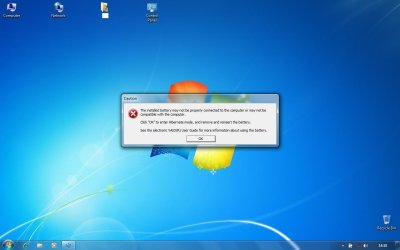
Tried removing the battery & replacing it but no luck. For now have disabled the ISB Utility from the startup & the message is not popping up. But I feel the battery is draining a bit quickly. Using the laptop for about 30-40mins brought it down from 93% to 55%.The installed battery may not be properly connected to the computer or may not be compatible with this computer.
Click 'OK' to enter Hibernate mode and remove and re-insert the battery.

Successfully clean installed W7 Pro on VAIO CS17G & gladly the most dreaded issues were taken care.
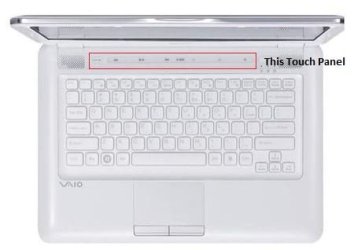
1) The Touch Panel is'nt working.
Unless using the Windows Key + X is a major issue, I wouldn't be too bothered about that. I managed to get mine working, but have since stopped because I didn't want Sony utilities running just to be able to use two keys, that I hardly ever use anyway.2) The Brightness Adjustment FN Keys are also not working.
There has been numerous reports about battery issues with Windows 7, which a google search will confirm, so I don't think there is a great deal that can be done right now about that. Did you use the Battery Checker from HERE?Using the laptop for about 30-40mins brought it down from 93% to 55%.
Thanks Mate, it was majorily coz of your support.
Which one? Is'nt it working on the installation of the set of utilities;Try using the original driver...
Hv'nt check that, will update.Unless using the Windows Key + X is a major issue
Nope, i downloaded it from here. Looks to be the same version.Did you use the Battery Checker from HERE?
File name: Pointing.EXEWhich one?
Try reinstalling the program to see if that helps.So what should I do with that error message?

Okay, I did this for pointing - Synaptics Pointing Driver for 32 Bit (EP0000128146.exe)File name: Pointing.EXE
File size: 6.48MB (6,795,620 Byte)
From where, the link provided by you? But how do I uninstall the same in first place.Try reinstalling the program to see if that helps.
They are both the same so it doesn't really matter. Try running the installer and see if it gives you any options.From where, the link provided by you?
Without googling it I wouldn't know, as it's not something I've bothered to use.Also, what exactly is the purpose of Battery Checker?
I take it you've installed the driver from your driver page?Also, right now tried sending a file to another laptop via Bluetooth, though the file got transferred but got an error message of missing driver for adapter. :huh:
Okay, will do & update.Try running the installer and see if it gives you any options.
I did ... cld'nt find anything of relevance. How can I uninstall the Battery Checker?Without googling it I wouldn't know, as it's not something I've bothered to use.
I take it you've installed the driver from your driver page?
To answer that I'd have to google it.How can I uninstall the Battery Checker?
Worth a try.Yup ... what should I do? Re-install?
I've set my on/off button to shut down when it's pressed, not sure about a keyboard shortcut though.Whats the keyboard shortcut for 'Shut Down' in W7?
I didn't say I was going to google the answer, it was a hint for you to, as I don't use it and don't want to install it to figure out how to remove it.Okay, will wait for your answer on how to uninstall Battery Checker.
Tried installing it in the compatibility mode but did'nt work.Try using the original driver...1) The Touch Panel is'nt working.
Original Drivers for VGN-CS1 Series : Sony Asia Pacific
Did but not much except this.To answer that I'd have to google it.
Worth a try.Yup ... what should I do? Re-install?
Tried installing it in the compatibility mode but did'nt work.
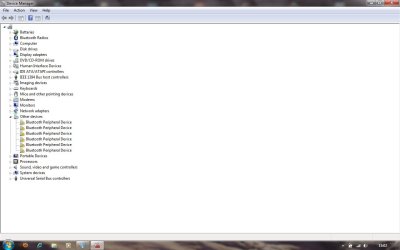
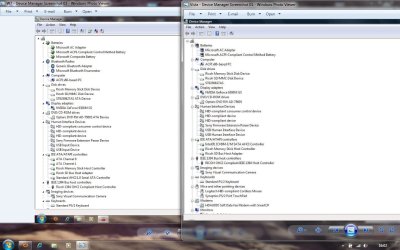
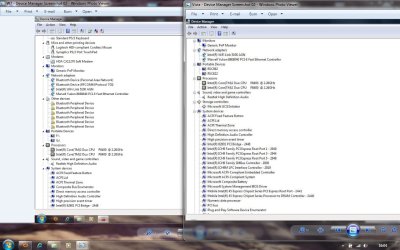
Just to clarify, are you installing the Windows 7 drivers from the support page and finding they are not working, or finding the devices are not working without installing the drivers then coming to ask here? It will help to know what you have and haven't installed from the support page.Did but nothing, have screenshot 1 in device manager & getting this (screenshot 2) from the Action Center. Its directing to Broadcom.
It's strange how the drivers from your support page aren't working, so wasn't sure if you were actually installing them. Download the drivers from Broadcom, and this for your mouse pad - Download License Agreement | SynapticsHope I have been able to clarify your doubt.
this for your mouse pad - Download License Agreement | Synaptics
I was unsure what you were referring to, so assumed you meant the mouse pad.Mouse Pad or Touch Panel?
Not too sure then if you've installed all the drivers in the recommended order.Its the touch panel (with LED's) with Volume, Play/ Pause, Previous, Forward & AV Mode buttons and the Capture Button that are not working.
Thanks.BTW, nice new signature; looks cool.
Thought so.I was unsure what you were referring to, so assumed you meant the mouse pad.
I installed the drivers in order they are given on the Sony Support page and the utilities in this order;Not too sure then if you've installed all the drivers in the recommended order.
What about the Vaio Launcher?I installed the drivers in order they are given on the Sony Support page and the utilities in this order;
Sony Shared Library
Setting Utility Series
VAIO Event Services