Why do I get G in WLAN instead of N?

Gil

Sleep Guru
Member
VIP
Local time
8:25 AM
Messages
109
Location
Sydney

My Computer My Computer

At a glance

Windows 7 x64Core i7 3770K @ 4.5Ghz4x4 Corsair Vengence 1600Sepphire HD 6970
Computer type
PC/Desktop
OS
Windows 7 x64
CPU
Core i7 3770K @ 4.5Ghz
Motherboard
Asus P8Z77-V-Deluxe
Memory
4x4 Corsair Vengence 1600
Graphics Card(s)
Sepphire HD 6970
Hard Drives
Intel 520 SSD 240GB
PSU
Thermaltake 750W
Case
Antec P2
Cooling
Corsair H100i
Keyboard
Razer blackwidow 2012
Mouse
Roccat Kone XTD
Antivirus
Bitdefender
Browser
Chrome
Useful links for you to look through.

Edimax BR-6424n - Wireless IEEE802.11 b/g/n Broadband Router
http://www.edimax.co.uk/images/Image/manual/Wireless/BR-6424n/BR-6424n-User-Manual_EN.pdf

Edimax EW-7717Un - Wireless 802.11n USB Adapter
http://www.edimax.co.uk/images/Imag...eries/WLAN_Adapter_series-UserManual-0710.pdf

I've had a quick look through the manuals. Check the Wireless mode setting of your USB adapter. The available options are 802.11 B/G mix, 802.11 B only, and 802.11 B/G/N mix (p56 of the PDF manual).
 

My Computer My Computer

At a glance

Windows 8.1 Pro RTM x64Intel Core-i5-3570K 4-core @ 3.4GHz (Ivy Brid...4 x 4GB DDR3-1600 Corsair Vengeance CMZ8GX3M2...MSI GeForce GTX770 Gaming OC 2GB
Computer type
PC/Desktop
Computer Manufacturer/Model Number
Dwarf Dwf/11/2012 r09/2013
OS
Windows 8.1 Pro RTM x64
CPU
Intel Core-i5-3570K 4-core @ 3.4GHz (Ivy Bridge) (OC 4.4GHz)
Motherboard
ASRock Z77 Extreme4-M
Memory
4 x 4GB DDR3-1600 Corsair Vengeance CMZ8GX3M2A1600C9B (16GB)
Graphics Card(s)
MSI GeForce GTX770 Gaming OC 2GB
Sound Card
Realtek High Definition on board solution (ALC 898)
Monitor(s) Displays
ViewSonic VA1912w Widescreen (VGA)
Screen Resolution
1440x900
Hard Drives
OCZ Agility 3 SSD 120GB SATA III x2 (RAID 0)
Samsung HD501LJ 500GB SATA II x2
Hitachi HDS721010CLA332 1TB SATA II
Iomega 1.5TB Ext USB 2.0
WD 2.0TB Ext USB 3.0
PSU
XFX Pro Series 850W Semi-Modular
Case
Gigabyte IF233
Cooling
1 x 120mm Front Inlet 1 x 120mm Rear Exhaust
Keyboard
Microsoft Comfort Curve Keyboard 3000 (USB)
Mouse
Microsoft Comfort Mouse 3000 for Business (USB)
Internet Speed
NetGear DG834Gv3 ADSL Modem/Router (Ethernet) ~4.0 Mb/s (O2)
Antivirus
Avast! 8.0.1497
Browser
IE 11
Other Info
Optical Drive: HL-DT-ST BD-RE BH10LS30 SATA Bluray
Lexmark S305 Printer/Scanner/Copier (USB)
WEI Score: 8.1/8.1/8.5/8.5/8.25
Asus Eee PC 1011PX Netbook (Windows 7 x86 Starter)
hi........
Why do I get G in WLAN instead of N?
that's because wireless mode is set to G mode and not n or mixed mode.
Wireless n Benefits over Previous 802.11 Wi-Fi Technologies
your router supports 802.11n standard...Edimax BR-6424n - Wireless IEEE802.11 b/g/n Broadband Router
Wireless-N Broadband Router
Edimax BR-6424n is a wireless 11n solution for home and small business. With advanced MIMO technology, it's wireless data transmission rate can be 12 times better (up to 300Mbps) and 5 times better coverage than a standard 802.11g/b router.

well not your model but this might just help you...
forum.thinkpads.com • View topic - Using T61 in 802.11n Wireless Mode
 

My Computer My Computer

At a glance

windows 7 ultimate 64 bit,Windows 7 ultimate ...
OS
windows 7 ultimate 64 bit,Windows 7 ultimate 32 bit,Windows XP sp3 home
I've looked in the PDF but I don't have that option.


My Computer My Computer

At a glance

Windows 7 x64Core i7 3770K @ 4.5Ghz4x4 Corsair Vengence 1600Sepphire HD 6970
Computer type
PC/Desktop
OS
Windows 7 x64
CPU
Core i7 3770K @ 4.5Ghz
Motherboard
Asus P8Z77-V-Deluxe
Memory
4x4 Corsair Vengence 1600
Graphics Card(s)
Sepphire HD 6970
Hard Drives
Intel 520 SSD 240GB
PSU
Thermaltake 750W
Case
Antec P2
Cooling
Corsair H100i
Keyboard
Razer blackwidow 2012
Mouse
Roccat Kone XTD
Antivirus
Bitdefender
Browser
Chrome
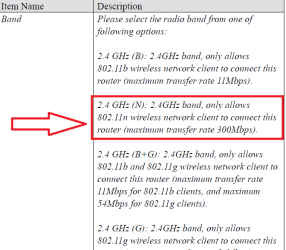
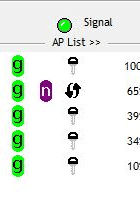
Ok I think I got it. I see now in the window of the wireless connection that I have B G N rather then B and G only. See image in the first post. The guy below me has B G N. Now i have the same.

How can I make sure that the remote computer is actually using the N?
I tried to copy a file from the host to the remote computer and the rate was pretty slow, about 8MB/s. I'm sure it can go faster. Can someone help me with this?
 

My Computer My Computer

At a glance

Windows 7 x64Core i7 3770K @ 4.5Ghz4x4 Corsair Vengence 1600Sepphire HD 6970
Computer type
PC/Desktop
OS
Windows 7 x64
CPU
Core i7 3770K @ 4.5Ghz
Motherboard
Asus P8Z77-V-Deluxe
Memory
4x4 Corsair Vengence 1600
Graphics Card(s)
Sepphire HD 6970
Hard Drives
Intel 520 SSD 240GB
PSU
Thermaltake 750W
Case
Antec P2
Cooling
Corsair H100i
Keyboard
Razer blackwidow 2012
Mouse
Roccat Kone XTD
Antivirus
Bitdefender
Browser
Chrome
hi have you tried the settings mentioned in the manual(pdf) esp. page 76 about AP node
 

Attachments

  • edimax2.4n.PNG
    edimax2.4n.PNG
    30.9 KB · Views: 13
  • ap list.PNG
    ap list.PNG
    8.4 KB · Views: 932

My Computer My Computer

At a glance

windows 7 ultimate 64 bit,Windows 7 ultimate ...
OS
windows 7 ultimate 64 bit,Windows 7 ultimate 32 bit,Windows XP sp3 home
do you know for certain that the remote pc has an "N" enabled card ? :)
 

My Computer My Computer

At a glance

win 7 ultimate32bit, Win8.1pro wmc 32bitamd phenom x4 9600corsair twinxs 2x2gb2x nvidia 1gb 8500gt
Computer type
PC/Desktop
Computer Manufacturer/Model Number
self build
OS
win 7 ultimate32bit, Win8.1pro wmc 32bit
CPU
amd phenom x4 9600
Motherboard
asus m2n32-sli deluxe
Memory
corsair twinxs 2x2gb
Graphics Card(s)
2x nvidia 1gb 8500gt
Sound Card
onboard
Monitor(s) Displays
23" PB Viseo 233d
Screen Resolution
1920x1080
Hard Drives
maxtor sata 500gb
maxtor sata 320gb
fujitsu sata200gb
PSU
oryxx tornado 750w
Case
thermaltake xaser lll
Cooling
artic freezer64 pro + 7 case fans
do you know for certain that the remote pc has an "N" enabled card ? :)

well that's why i asked him to look at in this first place different model but some what similar situation :p
 

My Computer My Computer

At a glance

windows 7 ultimate 64 bit,Windows 7 ultimate ...
OS
windows 7 ultimate 64 bit,Windows 7 ultimate 32 bit,Windows XP sp3 home
With my 'n' card (cisco/linksys) there are options to switch 'n' modes on and off in

Device manager > right click on Wireless n card > properties > advanced >

My card has a menu to switch on various stuff like
"802.11 'n' Adhoc"
"802.11 'h' "
(Also Country Region setting for)
2.4GHz should be set to 1-13 for UK
5.2GHz 36-140 (UK)
"Multimedia/Gaming/Video Maximum Performance" (W.D.S.)
"SmartScan" (no idea lol)
 
Last edited:

My Computer My Computer

At a glance

WIN7 Ultimate 64bitAMD FX8150/Trinity A10-5700G-Skill 2400 x2 @ 1866 (both pc's)Sapphire (factory OC version) AMD 7770
Computer type
PC/Desktop
Computer Manufacturer/Model Number
D.I.Y.
OS
WIN7 Ultimate 64bit
CPU
AMD FX8150/Trinity A10-5700
Motherboard
Asus Sabertooth v.1 /Asus F2A85-M Pro
Memory
G-Skill 2400 x2 @ 1866 (both pc's)
Graphics Card(s)
Sapphire (factory OC version) AMD 7770
Sound Card
onboard
Monitor(s) Displays
T260 Samsung
Screen Resolution
1920x1080
Hard Drives
Western Digital Sata 2TB/1TB Caviar Blacks
Buffalo 1TB usb (excellent drive)
PSU
Be-Quiet 700W E-9/Be-Quiet 550W E-9(E-9 = built by FSP)
Case
Antec P183/Antec P180mini
Cooling
x2 Xigmatek SXHH7-U01 + C-Master R4-EXBB-20PK-R0 120mm Fans
Keyboard
Cherry
Mouse
MS Explorer 3.0
Other Info
LG Blu ray combo
Pioneer 207D/208 Blu ray burners
I'm quite a noob when it comes to set LAN stuff. About Page 72 I don't get that part. also the utility i use is different then the one shown in the PDF.

This is what I did:
1.

2.


3.

Then i used the WLAN adapter utility and I had to create a profile in order to edit the connectivity settings, so I chose the settings according to what I've applied in the router and then I saw that I have N standard as sown in the first screenshot I've posted.
Does it necessarily means that I have 300Mbps connection? If I copy a file from one computer to another, what speed should I expect?
 

My Computer My Computer

At a glance

Windows 7 x64Core i7 3770K @ 4.5Ghz4x4 Corsair Vengence 1600Sepphire HD 6970
Computer type
PC/Desktop
OS
Windows 7 x64
CPU
Core i7 3770K @ 4.5Ghz
Motherboard
Asus P8Z77-V-Deluxe
Memory
4x4 Corsair Vengence 1600
Graphics Card(s)
Sepphire HD 6970
Hard Drives
Intel 520 SSD 240GB
PSU
Thermaltake 750W
Case
Antec P2
Cooling
Corsair H100i
Keyboard
Razer blackwidow 2012
Mouse
Roccat Kone XTD
Antivirus
Bitdefender
Browser
Chrome
then I saw that I have N standard as sown in the first screenshot I've posted.Does it necessarily means that I have 300Mbps connection?
well practically its <130 Mbps at best....you might be interested in this
 

My Computer My Computer

At a glance

windows 7 ultimate 64 bit,Windows 7 ultimate ...
OS
windows 7 ultimate 64 bit,Windows 7 ultimate 32 bit,Windows XP sp3 home

My Computer My Computer

At a glance

Win 8 Release candidate 8400[email protected]4 gigsNvidia 9600M
Computer Manufacturer/Model Number
HP Pavillion dv-7 1005 Tx
OS
Win 8 Release candidate 8400
CPU
[email protected]
Memory
4 gigs
Graphics Card(s)
Nvidia 9600M
Sound Card
HD built-in
Monitor(s) Displays
17" Wxga
Screen Resolution
1440x900
Cooling
none
Internet Speed
45Mb down 5Mb up
I tried to read but I couldn't figure out anything out of it.
I have no idea if they are both n enabled.
How can I check it or what info should I give you?
 

My Computer My Computer

At a glance

Windows 7 x64Core i7 3770K @ 4.5Ghz4x4 Corsair Vengence 1600Sepphire HD 6970
Computer type
PC/Desktop
OS
Windows 7 x64
CPU
Core i7 3770K @ 4.5Ghz
Motherboard
Asus P8Z77-V-Deluxe
Memory
4x4 Corsair Vengence 1600
Graphics Card(s)
Sepphire HD 6970
Hard Drives
Intel 520 SSD 240GB
PSU
Thermaltake 750W
Case
Antec P2
Cooling
Corsair H100i
Keyboard
Razer blackwidow 2012
Mouse
Roccat Kone XTD
Antivirus
Bitdefender
Browser
Chrome
Back
Top