Sony VAIO CS17G - Drivers Assistance

My Computer My Computer

At a glance

XP Pro SP3 | Vista Home Premium x86 | Windows...
OS
XP Pro SP3 | Vista Home Premium x86 | Windows 7 Pro x86

Thanks osholt, FZ21Z, CassieFWinTeam & thefabe for all your pre-installation assistance.
Successfully clean installed W7 Pro on VAIO CS17G & gladly the most dreaded issues were taken care. The device manager is recognizing web cam as earlier 'Sony Visual Communication Camera' (though hv'nt checked using it). The Volume, Mute, Home, End, Pg Up & Pg Dwn FN keys are working.:thumbsup:

But ... (now comes the time for assisting on the other side)

1) The Touch Panel is'nt working.

2) The Brightness Adjustment FN Keys are also not working.

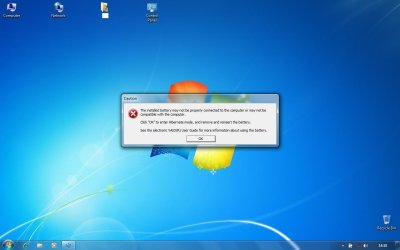
3) While going around with the drivers, faced issue with Battery Checker 4.0.0.05260 (EP0000204359.exe). As the system rebooted after installation of this, started getting error message (screenshot attached) stating;
The installed battery may not be properly connected to the computer or may not be compatible with this computer.

Click 'OK' to enter Hibernate mode and remove and re-insert the battery.
Tried removing the battery & replacing it but no luck. For now have disabled the ISB Utility from the startup & the message is not popping up. But I feel the battery is draining a bit quickly. Using the laptop for about 30-40mins brought it down from 93% to 55%.

Pls assist.
 

Attachments

  • VAIO CS17G - Battery Error.jpg
    VAIO CS17G - Battery Error.jpg
    53.7 KB · Views: 67

My Computer My Computer

At a glance

XP Pro SP3 | Vista Home Premium x86 | Windows...
OS
XP Pro SP3 | Vista Home Premium x86 | Windows 7 Pro x86
Successfully clean installed W7 Pro on VAIO CS17G & gladly the most dreaded issues were taken care.
:thumbsup:

1) The Touch Panel is'nt working.

Try using the original driver...

Original Drivers for VGN-CS1 Series : Sony Asia Pacific

2) The Brightness Adjustment FN Keys are also not working.
Unless using the Windows Key + X is a major issue, I wouldn't be too bothered about that. I managed to get mine working, but have since stopped because I didn't want Sony utilities running just to be able to use two keys, that I hardly ever use anyway.
Using the laptop for about 30-40mins brought it down from 93% to 55%.
There has been numerous reports about battery issues with Windows 7, which a google search will confirm, so I don't think there is a great deal that can be done right now about that. Did you use the Battery Checker from HERE?
 

My Computer My Computer

At a glance

Windows 7 Ultimate x64 ®™Intel Core 2 Duo (2.2 GHz)2x 2GB Corsair (667 MHz)NVIDIA 8600M GS (256MB)
Computer Manufacturer/Model Number
Sony Vaio FZ21Z
OS
Windows 7 Ultimate x64 ®™
CPU
Intel Core 2 Duo (2.2 GHz)
Motherboard
Sony (Intel Chipset)
Memory
2x 2GB Corsair (667 MHz)
Graphics Card(s)
NVIDIA 8600M GS (256MB)
Sound Card
Sigmatel
Monitor(s) Displays
15.4" TFT X-Black
Screen Resolution
1280x800
Hard Drives
Western Digital 300GB Scorpio Black (7200rpm)
Mouse
Logitech Anywhere MX
Internet Speed
Sky 5MB
Thanks Mate, it was majorily coz of your support.

Try using the original driver...
Which one? Is'nt it working on the installation of the set of utilities;
Sony Shared Library
Setting Utility Series
VAIO Event Services

Unless using the Windows Key + X is a major issue
Hv'nt check that, will update.

Did you use the Battery Checker from HERE?
Nope, i downloaded it from here. Looks to be the same version.
So what should I do with that error message?
 

My Computer My Computer

At a glance

XP Pro SP3 | Vista Home Premium x86 | Windows...
OS
XP Pro SP3 | Vista Home Premium x86 | Windows 7 Pro x86

My Computer My Computer

At a glance

Windows 7 Ultimate x64 ®™Intel Core 2 Duo (2.2 GHz)2x 2GB Corsair (667 MHz)NVIDIA 8600M GS (256MB)
Computer Manufacturer/Model Number
Sony Vaio FZ21Z
OS
Windows 7 Ultimate x64 ®™
CPU
Intel Core 2 Duo (2.2 GHz)
Motherboard
Sony (Intel Chipset)
Memory
2x 2GB Corsair (667 MHz)
Graphics Card(s)
NVIDIA 8600M GS (256MB)
Sound Card
Sigmatel
Monitor(s) Displays
15.4" TFT X-Black
Screen Resolution
1280x800
Hard Drives
Western Digital 300GB Scorpio Black (7200rpm)
Mouse
Logitech Anywhere MX
Internet Speed
Sky 5MB
The Win+X is working. :D

File name: Pointing.EXE
File size: 6.48MB (6,795,620 Byte)
Okay, I did this for pointing - Synaptics Pointing Driver for 32 Bit (EP0000128146.exe)

Try reinstalling the program to see if that helps.
From where, the link provided by you? But how do I uninstall the same in first place.
Its not showing in Control Panel/ Program & Features. Also, what exactly is the purpose of Battery Checker?

Also, right now tried sending a file to another laptop via Bluetooth, though the file got transferred but got an error message of missing driver for adapter. :huh:
 

My Computer My Computer

At a glance

XP Pro SP3 | Vista Home Premium x86 | Windows...
OS
XP Pro SP3 | Vista Home Premium x86 | Windows 7 Pro x86
From where, the link provided by you?
They are both the same so it doesn't really matter. Try running the installer and see if it gives you any options.

Also, what exactly is the purpose of Battery Checker?
Without googling it I wouldn't know, as it's not something I've bothered to use.

Also, right now tried sending a file to another laptop via Bluetooth, though the file got transferred but got an error message of missing driver for adapter. :huh:
I take it you've installed the driver from your driver page?
 

My Computer My Computer

At a glance

Windows 7 Ultimate x64 ®™Intel Core 2 Duo (2.2 GHz)2x 2GB Corsair (667 MHz)NVIDIA 8600M GS (256MB)
Computer Manufacturer/Model Number
Sony Vaio FZ21Z
OS
Windows 7 Ultimate x64 ®™
CPU
Intel Core 2 Duo (2.2 GHz)
Motherboard
Sony (Intel Chipset)
Memory
2x 2GB Corsair (667 MHz)
Graphics Card(s)
NVIDIA 8600M GS (256MB)
Sound Card
Sigmatel
Monitor(s) Displays
15.4" TFT X-Black
Screen Resolution
1280x800
Hard Drives
Western Digital 300GB Scorpio Black (7200rpm)
Mouse
Logitech Anywhere MX
Internet Speed
Sky 5MB
Try running the installer and see if it gives you any options.
Okay, will do & update.

Without googling it I wouldn't know, as it's not something I've bothered to use.
I did ... cld'nt find anything of relevance. How can I uninstall the Battery Checker?

I take it you've installed the driver from your driver page?

Yup ... what should I do? Re-install?

BTW, thanks for Win+X, was'nt aware of the shortcut.
Whats the keyboard shortcut for 'Shut Down' in W7?
 

My Computer My Computer

At a glance

XP Pro SP3 | Vista Home Premium x86 | Windows...
OS
XP Pro SP3 | Vista Home Premium x86 | Windows 7 Pro x86

My Computer My Computer

At a glance

Windows 7 Ultimate x64 ®™Intel Core 2 Duo (2.2 GHz)2x 2GB Corsair (667 MHz)NVIDIA 8600M GS (256MB)
Computer Manufacturer/Model Number
Sony Vaio FZ21Z
OS
Windows 7 Ultimate x64 ®™
CPU
Intel Core 2 Duo (2.2 GHz)
Motherboard
Sony (Intel Chipset)
Memory
2x 2GB Corsair (667 MHz)
Graphics Card(s)
NVIDIA 8600M GS (256MB)
Sound Card
Sigmatel
Monitor(s) Displays
15.4" TFT X-Black
Screen Resolution
1280x800
Hard Drives
Western Digital 300GB Scorpio Black (7200rpm)
Mouse
Logitech Anywhere MX
Internet Speed
Sky 5MB
Okay, will wait for your answer on how to uninstall Battery Checker.
What I have been using as keyboard shortcut for 'Shut Down' is; 'Win Key' then 'Right Cursor' then 'Enter'
 

My Computer My Computer

At a glance

XP Pro SP3 | Vista Home Premium x86 | Windows...
OS
XP Pro SP3 | Vista Home Premium x86 | Windows 7 Pro x86
Okay, will wait for your answer on how to uninstall Battery Checker.
I didn't say I was going to google the answer, it was a hint for you to, as I don't use it and don't want to install it to figure out how to remove it.
 

My Computer My Computer

At a glance

Windows 7 Ultimate x64 ®™Intel Core 2 Duo (2.2 GHz)2x 2GB Corsair (667 MHz)NVIDIA 8600M GS (256MB)
Computer Manufacturer/Model Number
Sony Vaio FZ21Z
OS
Windows 7 Ultimate x64 ®™
CPU
Intel Core 2 Duo (2.2 GHz)
Motherboard
Sony (Intel Chipset)
Memory
2x 2GB Corsair (667 MHz)
Graphics Card(s)
NVIDIA 8600M GS (256MB)
Sound Card
Sigmatel
Monitor(s) Displays
15.4" TFT X-Black
Screen Resolution
1280x800
Hard Drives
Western Digital 300GB Scorpio Black (7200rpm)
Mouse
Logitech Anywhere MX
Internet Speed
Sky 5MB
Thanks for Arcsoft Web Companion, installed; looks better than the pre-installed one.
The FN Zoom Keys are also not working but just checked & the brightness keys were working. :D

1) The Touch Panel is'nt working.
Try using the original driver...
Original Drivers for VGN-CS1 Series : Sony Asia Pacific
Tried installing it in the compatibility mode but did'nt work.

To answer that I'd have to google it. ;)
Did but not much except this.

Yup ... what should I do? Re-install?
Worth a try.

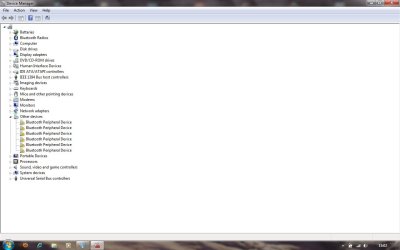
Did but nothing, have screenshot 1 in device manager & getting this (screenshot 2) from the Action Center. Its directing to Broadcom.
 

Attachments

  • Device Manager.jpg
    Device Manager.jpg
    50.6 KB · Views: 70
  • Bluetooth Device Missing Driver.jpg
    Bluetooth Device Missing Driver.jpg
    53.3 KB · Views: 57

My Computer My Computer

At a glance

XP Pro SP3 | Vista Home Premium x86 | Windows...
OS
XP Pro SP3 | Vista Home Premium x86 | Windows 7 Pro x86
An Observation

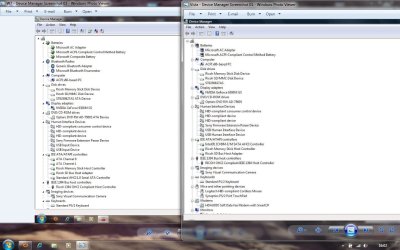
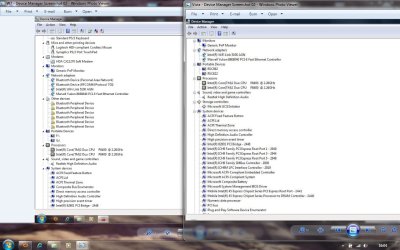
Prior to clean installing W7, had taken the screen shots of my Device Manager in Vista. Now just comparing them with the current Device Manager have found the following differences, which could be a cause of all/ some of the conflicts we are discussing. Both the screen shots are attached for reference.

Batteries: (screenshot 1)
W7: There's a addition with 'Microsoft Composite Batteries'.
Vista: Whereas, the above is not present.

Bluetooth Radios: (screenshot 1)
W7: Bluetooth Radios is present here. Expanding it shows - Generic Bluetooth Adapter & Microsoft Bluetooth Enumerator.
Vista: Bluetooth Radios is not present.

IDE ATA/ ATAPI Controllers: (screen shot 1)
W7: Expanding this shows us ATA Channel 0 & ATA Channel 1
Vista: Whereas, this shows Intel (R) ICH RM-E/M SATA AHCI Controller
Is this the cause of the Windows 7 Intel SATA Driver Registry Patch Update provided by Sony?

Modems: (screenshot 2 for W7 & screenshot 2 for Vista)
W7: HDA CX11270 Soft Modem
Vista: HDAudio Soft Data Fax Modem with SmartCP

Network Adapters: (screenshot 2)
W7: Bluetooth Device (Personal Area Network) & (RFCOMM Protocol TDI)
Vista: Nothing of this sort.

Storage Controllers: (screenshot 2)
W7: Not there.
Vista: Microsoft iSCSI Initiator
 

Attachments

  • W7 & Vista - Device Manager Comparison 01.jpg
    W7 & Vista - Device Manager Comparison 01.jpg
    107.9 KB · Views: 83
  • W7 & Vista - Device Manager Comparison 02.jpg
    W7 & Vista - Device Manager Comparison 02.jpg
    116 KB · Views: 74

My Computer My Computer

At a glance

XP Pro SP3 | Vista Home Premium x86 | Windows...
OS
XP Pro SP3 | Vista Home Premium x86 | Windows 7 Pro x86
Tried installing it in the compatibility mode but did'nt work.

Did but nothing, have screenshot 1 in device manager & getting this (screenshot 2) from the Action Center. Its directing to Broadcom.
Just to clarify, are you installing the Windows 7 drivers from the support page and finding they are not working, or finding the devices are not working without installing the drivers then coming to ask here? It will help to know what you have and haven't installed from the support page.
 

My Computer My Computer

At a glance

Windows 7 Ultimate x64 ®™Intel Core 2 Duo (2.2 GHz)2x 2GB Corsair (667 MHz)NVIDIA 8600M GS (256MB)
Computer Manufacturer/Model Number
Sony Vaio FZ21Z
OS
Windows 7 Ultimate x64 ®™
CPU
Intel Core 2 Duo (2.2 GHz)
Motherboard
Sony (Intel Chipset)
Memory
2x 2GB Corsair (667 MHz)
Graphics Card(s)
NVIDIA 8600M GS (256MB)
Sound Card
Sigmatel
Monitor(s) Displays
15.4" TFT X-Black
Screen Resolution
1280x800
Hard Drives
Western Digital 300GB Scorpio Black (7200rpm)
Mouse
Logitech Anywhere MX
Internet Speed
Sky 5MB
After the clean install, I installed the Graphics Driver from HERE followed by each & every driver given by Sony for W7 on their support page i.e, HERE.

Hope I have been able to clarify your doubt.
 

My Computer My Computer

At a glance

XP Pro SP3 | Vista Home Premium x86 | Windows...
OS
XP Pro SP3 | Vista Home Premium x86 | Windows 7 Pro x86

My Computer My Computer

At a glance

Windows 7 Ultimate x64 ®™Intel Core 2 Duo (2.2 GHz)2x 2GB Corsair (667 MHz)NVIDIA 8600M GS (256MB)
Computer Manufacturer/Model Number
Sony Vaio FZ21Z
OS
Windows 7 Ultimate x64 ®™
CPU
Intel Core 2 Duo (2.2 GHz)
Motherboard
Sony (Intel Chipset)
Memory
2x 2GB Corsair (667 MHz)
Graphics Card(s)
NVIDIA 8600M GS (256MB)
Sound Card
Sigmatel
Monitor(s) Displays
15.4" TFT X-Black
Screen Resolution
1280x800
Hard Drives
Western Digital 300GB Scorpio Black (7200rpm)
Mouse
Logitech Anywhere MX
Internet Speed
Sky 5MB
The Sony people also advised for Synaptics Pointing Driver for this, which I installed from Sony Support Page.


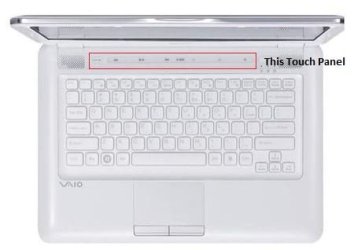
Mouse Pad or Touch Panel? I hope you have got it right. Its the touch panel (with LED's) with Volume, Play/ Pause, Previous, Forward & AV Mode buttons and the Capture Button that are not working.

BTW, nice new signature; looks cool. :)
 

Attachments

  • Sony VAIO CS Series - Touch Panel.jpg
    Sony VAIO CS Series - Touch Panel.jpg
    14.2 KB · Views: 43

My Computer My Computer

At a glance

XP Pro SP3 | Vista Home Premium x86 | Windows...
OS
XP Pro SP3 | Vista Home Premium x86 | Windows 7 Pro x86
Mouse Pad or Touch Panel?
I was unsure what you were referring to, so assumed you meant the mouse pad.

Its the touch panel (with LED's) with Volume, Play/ Pause, Previous, Forward & AV Mode buttons and the Capture Button that are not working.
Not too sure then if you've installed all the drivers in the recommended order.

BTW, nice new signature; looks cool. :)
Thanks. :)
 

My Computer My Computer

At a glance

Windows 7 Ultimate x64 ®™Intel Core 2 Duo (2.2 GHz)2x 2GB Corsair (667 MHz)NVIDIA 8600M GS (256MB)
Computer Manufacturer/Model Number
Sony Vaio FZ21Z
OS
Windows 7 Ultimate x64 ®™
CPU
Intel Core 2 Duo (2.2 GHz)
Motherboard
Sony (Intel Chipset)
Memory
2x 2GB Corsair (667 MHz)
Graphics Card(s)
NVIDIA 8600M GS (256MB)
Sound Card
Sigmatel
Monitor(s) Displays
15.4" TFT X-Black
Screen Resolution
1280x800
Hard Drives
Western Digital 300GB Scorpio Black (7200rpm)
Mouse
Logitech Anywhere MX
Internet Speed
Sky 5MB
I was unsure what you were referring to, so assumed you meant the mouse pad.
Thought so.

Not too sure then if you've installed all the drivers in the recommended order.
I installed the drivers in order they are given on the Sony Support page and the utilities in this order;
Sony Shared Library
Setting Utility Series
VAIO Event Services
 

My Computer My Computer

At a glance

XP Pro SP3 | Vista Home Premium x86 | Windows...
OS
XP Pro SP3 | Vista Home Premium x86 | Windows 7 Pro x86
I installed the drivers in order they are given on the Sony Support page and the utilities in this order;
Sony Shared Library
Setting Utility Series
VAIO Event Services
What about the Vaio Launcher?
 

My Computer My Computer

At a glance

Windows 7 Ultimate x64 ®™Intel Core 2 Duo (2.2 GHz)2x 2GB Corsair (667 MHz)NVIDIA 8600M GS (256MB)
Computer Manufacturer/Model Number
Sony Vaio FZ21Z
OS
Windows 7 Ultimate x64 ®™
CPU
Intel Core 2 Duo (2.2 GHz)
Motherboard
Sony (Intel Chipset)
Memory
2x 2GB Corsair (667 MHz)
Graphics Card(s)
NVIDIA 8600M GS (256MB)
Sound Card
Sigmatel
Monitor(s) Displays
15.4" TFT X-Black
Screen Resolution
1280x800
Hard Drives
Western Digital 300GB Scorpio Black (7200rpm)
Mouse
Logitech Anywhere MX
Internet Speed
Sky 5MB
Back
Top