Solved Stop client from changing nstatic IP address

  • Thread starter Thread starter Yanta
  • Start date Start date
Y

Yanta

Guest
Is it possible to stop someone changing their IP address, or setting their system to DHCP? I have ACLs defined and somone is changing their IP address to get around the rules. This only applies to one rogue person who just won't play by the rules, so I'd prefer not to make everyone suffer because of one rebel.

Eg. A registry change? Remove/Disable the network configuration?

thanks
Tanya
 
Hiya

If you don't mind me asking, What OS is on the clients machines ? and are you using a server (if so which OS please) or is it just a peer to peer network with a router using DHCP ? ;)
 

My Computer

Computer type
PC/Desktop
Computer Manufacturer/Model Number
Self Built
OS
Windows 7 Ultimate 64bit
CPU
AMD Phenom Quad core 9950 black edition
Motherboard
Gigabyte
Memory
16Gb
Graphics Card(s)
2x XFX Radeon 5850
Sound Card
PCI Express X-Fi Titanium / Logitech G35
Monitor(s) Displays
2x HP 2410i
Screen Resolution
1920x1080
Hard Drives
2x 500Gb Seagate
1x 300Gb Seagate
1x 1Tb Seagate
2x 1Tb Hitatchi
PSU
Jean Tech Storm 700W
Case
Cooler Master COSMOS S
Cooling
Akasa Evo Blue Pro
Keyboard
Logitech G15
Mouse
Mad Catz M.M.O. 7
Internet Speed
12mb
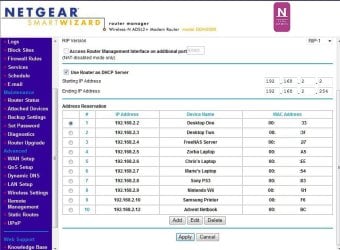
If you're using a Router maybe doing as I do and setting each IP a reserved address might help.

I have Netgear Router and it allows me to assign an IP address to each device on the Network. As this is tied to the devices MAC address, depsite them all using Auto DHCP configurations the router will always make sure each device gets the same address everytime.
Clipboard01.jpg

You could limit the IP address range to just cover the number of devices in your Network, then if someone did try to bypass DHCP they couldn't get a different IP as they would all be reserved with no "spares".
 

My Computer

Computer Manufacturer/Model Number
Self Build
OS
Windows 7 Home Premium x64
CPU
Intel Core 2 Quad Q6600 @ 2.40GHz
Motherboard
Asus P5B-E
Memory
4Gb (2x Corsair CM2X2048-6400C5)
Graphics Card(s)
NVIDIA GeForce 9600 GT 512Mb
Sound Card
Realtek High Definition Audio Device
Monitor(s) Displays
Mirai 22" Widescreen and LG 19" Standard
Screen Resolution
1680 x 1050 and 1280 x 1024
Hard Drives
Western Digital 500Gb SATA x 2
Samsung 1Tb SATA
PSU
Hiper Modular 530W
Case
Akasa Ecplise 62 Midi
Cooling
Artic Cooling Freezer Pro 7
Keyboard
Advent Standard with Hotkeys
Mouse
PC Line PCL-FL1 Wired Laser
Internet Speed
ISP: Fast.co.uk up to 8Mb
Other Info
Netgear Router plus 5 Way LAN Switch, Samsung Ethernet Laser Printer, Epson PX650 Colour PSC, plus 2 more Desktop PCs, 3 Laptops and 2 Netbooks in same Home Network.
If you're using a Router maybe doing as I do and setting each IP a reserved address might help.

I have Netgear Router and it allows me to assign an IP address to each device on the Network. As this is tied to the devices MAC address, depsite them all using Auto DHCP configurations the router will always make sure each device gets the same address everytime.
View attachment 65218

You could limit the IP address range to just cover the number of devices in your Network, then if someone did try to bypass DHCP they couldn't get a different IP as they would all be reserved with no "spares".

That only works if they have DHCP running...

If they are changing static IPs DHCP reservations do nothing.
 

My Computer

Computer Manufacturer/Model Number
Homebrew
OS
XP Pro SP3 X86 / Win7 Pro X86
CPU
Amd 64 x2 4200 (2.4ghz)
Motherboard
Asus M2N-MX SE Plus
Memory
Kingston DDR2 800 2gb
Graphics Card(s)
Nvidia GF-8400
Sound Card
Realtek on Motherboard
Monitor(s) Displays
Acer x-193bw
Screen Resolution
1440 x 900
Hard Drives
Western Digital 500g
PSU
350watt In-Win
Case
In-Win
Cooling
Air
Keyboard
yes
Mouse
yes
Internet Speed
5mpbs
Other Info
Also ASRock ION 330 as HTPC (on XP).
Acer Aspire as GP netbook (on XP).
Yes but if you reserved say addresses 192.168.2.2 to 192.168.2.6 on a 5 device Network and limited the Starting and Ending IP address range to just those 5 then surely the router wouldn't allow access to someone trying to use say 192.168.2.7 as it was out of this range.

They couldn't use any of the available 5 as they would all be assigned to particular MAC addresses. Unless of course they were clever enough to go down the MAC spoofing avenue!

If that's not the case I think the Router is maybe not as clever as its made out to be by some sources.
 

My Computer

Computer Manufacturer/Model Number
Self Build
OS
Windows 7 Home Premium x64
CPU
Intel Core 2 Quad Q6600 @ 2.40GHz
Motherboard
Asus P5B-E
Memory
4Gb (2x Corsair CM2X2048-6400C5)
Graphics Card(s)
NVIDIA GeForce 9600 GT 512Mb
Sound Card
Realtek High Definition Audio Device
Monitor(s) Displays
Mirai 22" Widescreen and LG 19" Standard
Screen Resolution
1680 x 1050 and 1280 x 1024
Hard Drives
Western Digital 500Gb SATA x 2
Samsung 1Tb SATA
PSU
Hiper Modular 530W
Case
Akasa Ecplise 62 Midi
Cooling
Artic Cooling Freezer Pro 7
Keyboard
Advent Standard with Hotkeys
Mouse
PC Line PCL-FL1 Wired Laser
Internet Speed
ISP: Fast.co.uk up to 8Mb
Other Info
Netgear Router plus 5 Way LAN Switch, Samsung Ethernet Laser Printer, Epson PX650 Colour PSC, plus 2 more Desktop PCs, 3 Laptops and 2 Netbooks in same Home Network.
Is it possible to stop someone changing their IP address, or setting their system to DHCP? I have ACLs defined and somone is changing their IP address to get around the rules. This only applies to one rogue person who just won't play by the rules, so I'd prefer not to make everyone suffer because of one rebel.

Eg. A registry change? Remove/Disable the network configuration?

thanks
Tanya

Tanya... There are ways in the Security Policy to prevent people from accessing certain control panel applets, etc... You could also set a deny security flag on the network control panel applet....

However... Having many times been asked to fix the carnage caused by the unchained child-mind, please let me suggest you might be further ahead addressing the source of the problem. What you risk by playing cat and mouse is that it will be seen as a challenge and the game will simply begin to escallate... which I'm pretty sure isn't what you want.

Far better I would think, to address at the "What the hell do you think you're trying to pull" level... You didn't say whether this was a work, home or school environment but in any event, confronting the bad actor is likely the only way you're going to stop it.
 

My Computer

Computer Manufacturer/Model Number
Homebrew
OS
XP Pro SP3 X86 / Win7 Pro X86
CPU
Amd 64 x2 4200 (2.4ghz)
Motherboard
Asus M2N-MX SE Plus
Memory
Kingston DDR2 800 2gb
Graphics Card(s)
Nvidia GF-8400
Sound Card
Realtek on Motherboard
Monitor(s) Displays
Acer x-193bw
Screen Resolution
1440 x 900
Hard Drives
Western Digital 500g
PSU
350watt In-Win
Case
In-Win
Cooling
Air
Keyboard
yes
Mouse
yes
Internet Speed
5mpbs
Other Info
Also ASRock ION 330 as HTPC (on XP).
Acer Aspire as GP netbook (on XP).
Yes but if you reserved say addresses 192.168.2.2 to 192.168.2.6 on a 5 device Network and limited the Starting and Ending IP address range to just those 5 then surely the router wouldn't allow access to someone trying to use say 192.168.2.7 as it was out of this range.

They couldn't use any of the available 5 as they would all be assigned to particular MAC addresses. Unless of course they were clever enough to go down the MAC spoofing avenue!

If that's not the case I think the Router is maybe not as clever as its made out to be by some sources.

Ahhh... now I see where you're going... good idea ...
 

My Computer

Computer Manufacturer/Model Number
Homebrew
OS
XP Pro SP3 X86 / Win7 Pro X86
CPU
Amd 64 x2 4200 (2.4ghz)
Motherboard
Asus M2N-MX SE Plus
Memory
Kingston DDR2 800 2gb
Graphics Card(s)
Nvidia GF-8400
Sound Card
Realtek on Motherboard
Monitor(s) Displays
Acer x-193bw
Screen Resolution
1440 x 900
Hard Drives
Western Digital 500g
PSU
350watt In-Win
Case
In-Win
Cooling
Air
Keyboard
yes
Mouse
yes
Internet Speed
5mpbs
Other Info
Also ASRock ION 330 as HTPC (on XP).
Acer Aspire as GP netbook (on XP).
Is it possible to stop someone changing their IP address, or setting their system to DHCP? I have ACLs defined and somone is changing their IP address to get around the rules. This only applies to one rogue person who just won't play by the rules, so I'd prefer not to make everyone suffer because of one rebel.

Eg. A registry change? Remove/Disable the network configuration?

thanks
Tanya

Shoot the person, leave the NIC. You can make the network control panel read only and owned by admin.

You can force that mac address to=set ip in router. If he changes the IP the router wont pass it to the internet.

If there are only a few machines on the subnet you can define them all in the router, then block the rest of the subnet.

We need some more info

Ken
 

My Computer

Computer Manufacturer/Model Number
HP Pavillion dv-7 1005 Tx
OS
Win 8 Release candidate 8400
CPU
[email protected]
Memory
4 gigs
Graphics Card(s)
Nvidia 9600M
Sound Card
HD built-in
Monitor(s) Displays
17" Wxga
Screen Resolution
1440x900
Cooling
none
Internet Speed
45Mb down 5Mb up
Hiya

If you don't mind me asking, What OS is on the clients machines ? and are you using a server (if so which OS please) or is it just a peer to peer network with a router using DHCP ? ;)

Clients are using WIndows 7 ultimate.

Yes, I have a server for our home web site, a syslog server and file storage. It runs Windows XP Sp3.
 
>Shoot the person,

leave the NIC. You can make the network control panel read only and owned by admin.

>You can force that mac address to=set ip in router. If he changes the IP the >router wont pass it to the internet.

If there are only a few machines on the subnet you can define them all in the router, then block the rest of the subnet.

We need some more info

Ken[/QUOTE]

I like the way u think. Unfortunately, I need him to pay rent :-)

I'll see if this D-Link allows me to do match MAC addresses to IP address.

There are 11 Windows 7 machines, 1 XP (used as a small server), 4 ipod/iphones (which use DHCP), a PC3, a Wii and an XBox.

The router is a D-Link DIR-655, which is very limited in it's capacity (32 IP addresses in ACLS, and 40 website filters etc). Internet is a cable connection. I use 192.168.1.x for the network. I currently use 101-106 for the DHCP addresses, basically to allow only the iphones/ipods. I have a rule that blocks all internet access for all addresses outside 192.168.1.14 - 192.168.1.100, and 192.168.1.107 - 192.168.1.249. Router is at 192.168.1.250. And 251-255 are also blocked.

The website I created delivers tailored content based on IP address. So each person sees their version of the website. hence why I have used static IP addresses.

I thought I had it tight enough, but he manages to grab one of the DHCP addresses.

thanks for your help.
 
Is it possible to stop someone changing their IP address, or setting their system to DHCP? I have ACLs defined and somone is changing their IP address to get around the rules. This only applies to one rogue person who just won't play by the rules, so I'd prefer not to make everyone suffer because of one rebel.

Eg. A registry change? Remove/Disable the network configuration?

thanks
Tanya

Tanya... There are ways in the Security Policy to prevent people from accessing certain control panel applets, etc... You could also set a deny security flag on the network control panel applet....

However... Having many times been asked to fix the carnage caused by the unchained child-mind, please let me suggest you might be further ahead addressing the source of the problem. What you risk by playing cat and mouse is that it will be seen as a challenge and the game will simply begin to escallate... which I'm pretty sure isn't what you want.

Far better I would think, to address at the "What the hell do you think you're trying to pull" level... You didn't say whether this was a work, home or school environment but in any event, confronting the bad actor is likely the only way you're going to stop it.

I agree with your thoughts, and I wish it were that simple.

This is a home issue. My son. I've confronted him several times. I'm tearing my hair out, he wont do as asked. The problem is our Internet has mb limits per month. I continually ask him to limit his downloads, and use off peak, but he refuses to listen, resulting in our allowance running out mid month and being limited to 128kbps for the rest of the month. And we have 90gigs.

I've been trying to find a way to limit http downloads, and get monitoring software that will enable me to quantify exactly what is going on, but no matter where I turn there doesn't seem to be an effective solution.

I could get tough with him, but that will only serve to push him away. I can't seem to appeal to his sense of fairness, and cooperation; a problem that is typical of many people of his generation... but I digress... sorry.

Anyway, we'll see what happens when I match mac to IP in the router...

thanks
Tanya
 
I agree with your thoughts, and I wish it were that simple.

This is a home issue. My son. I've confronted him several times. I'm tearing my hair out, he wont do as asked. The problem is our Internet has mb limits per month. I continually ask him to limit his downloads, and use off peak, but he refuses to listen, resulting in our allowance running out mid month and being limited to 128kbps for the rest of the month. And we have 90gigs.

I've been trying to find a way to limit http downloads, and get monitoring software that will enable me to quantify exactly what is going on, but no matter where I turn there doesn't seem to be an effective solution.

I could get tough with him, but that will only serve to push him away. I can't seem to appeal to his sense of fairness, and cooperation; a problem that is typical of many people of his generation... but I digress... sorry.

Anyway, we'll see what happens when I match mac to IP in the router...

thanks
Tanya

I can certainly empathise. My own lan is pretty open, basically if you know the passwords you've got access to everything and I try to be as trusting as possible... My family is grown, the youngest is 26 (and still at home :shock: ) for the most part it's me using the equipment but the rest gather on weekends, laptops in hand, to swap pictures and "borrow" movies and such... In total there are 8 machines on this lan.

I've had problems with friends of family guesting in and making a mess of stuff. Not long ago I had to nuke a couple of accounts where my son's friends had been hacking around on his passwords... But fortunately no harm was done.

I think what I'd be prone to do in your place would be to set limits and anyone going over their limit gets to pay their own way on the downloads... Maybe if it comes out of your son's own pocket he'll get the idea...

But I can promise you this... was this going on in my family, junior would quickly discover life without access... I'd just haul right off and block his mac address at least until he paid for the overages on the account. If that didn't work, he'd see first hand just how much damage an ax can do to a computer...

You and I are different... I don't mess with people who mess with me.

I do hope you can get this solved. There's nothing worse than an unresolved family conflict...

One more thing you can try is to set DHCP reservations on your router. Most DLinks support it. The idea is that each time a given device is connected it gets the same IP from DHCP, it's keyed to the MAC number. But it also prevents issuing a reserved IP to anything but that MAC address... so DHCP would fail and he would not get a connection. With the way you have everything else locked up, he's pretty much toast at that point. (Edit: I see this has already been suggested.... )
 

My Computer

Computer Manufacturer/Model Number
Homebrew
OS
XP Pro SP3 X86 / Win7 Pro X86
CPU
Amd 64 x2 4200 (2.4ghz)
Motherboard
Asus M2N-MX SE Plus
Memory
Kingston DDR2 800 2gb
Graphics Card(s)
Nvidia GF-8400
Sound Card
Realtek on Motherboard
Monitor(s) Displays
Acer x-193bw
Screen Resolution
1440 x 900
Hard Drives
Western Digital 500g
PSU
350watt In-Win
Case
In-Win
Cooling
Air
Keyboard
yes
Mouse
yes
Internet Speed
5mpbs
Other Info
Also ASRock ION 330 as HTPC (on XP).
Acer Aspire as GP netbook (on XP).
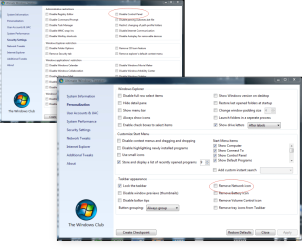
Whilst using the router is an option, and there are registry tweaks to disable certain icons, shortcuts etc. you could also maybe try a 3rd party software like Ultimate Windows Tweaker which is a free program which you just whack onto a usb pen (run it from the pen, don't leave it on the PC) then adjust the settings to the way you want, restart the machine ... job done. (you have to re run the util from the pen to undo the changes)

But I have to agree, a good talking to the responsible person would be a better option, explaing the security implications and damage that could be done is crucial. The thing is whatever option you go for surely this person will know that you've blocked the loophole and will be just as peed of as they would be after a good telling off. It's easy for me to say as I run a corporate network, but I have had to tell a few people off that thought they were clever, one or two ignored my Mr nice guy approach and carried on .... they got a surprise the next time they tried it when the "clear history" button had suddenly disappeared .... strange thing is they've never tried playing silly buggers since :(
 

Attachments

  • tweak.png
    tweak.png
    90.4 KB · Views: 25

My Computer

Computer type
PC/Desktop
Computer Manufacturer/Model Number
Self Built
OS
Windows 7 Ultimate 64bit
CPU
AMD Phenom Quad core 9950 black edition
Motherboard
Gigabyte
Memory
16Gb
Graphics Card(s)
2x XFX Radeon 5850
Sound Card
PCI Express X-Fi Titanium / Logitech G35
Monitor(s) Displays
2x HP 2410i
Screen Resolution
1920x1080
Hard Drives
2x 500Gb Seagate
1x 300Gb Seagate
1x 1Tb Seagate
2x 1Tb Hitatchi
PSU
Jean Tech Storm 700W
Case
Cooler Master COSMOS S
Cooling
Akasa Evo Blue Pro
Keyboard
Logitech G15
Mouse
Mad Catz M.M.O. 7
Internet Speed
12mb
[Editted ....]

One more thing you can try is to set DHCP reservations on your router. Most DLinks support it. The idea is that each time a given device is connected it gets the same IP from DHCP, it's keyed to the MAC number. But it also prevents issuing a reserved IP to anything but that MAC address... so DHCP would fail and he would not get a connection. With the way you have everything else locked up, he's pretty much toast at that point. (Edit: I see this has already been suggested.... )

Thanks everyone for your feedback. Sorry I haven't responded for a few days, been busy with the school holidays.

If I use the DCHP reservation, how would this go for the iPods and iPhones, I assume the same applies.

So, basically, I add a reservation for every PC, console and iPod device in the house (and I assume that also includes my Canon MX850 network attached printer), after first setting my dhcp range so that I can keep the same addresses.

Well, I'll set it up now that the kids have gone to stay with the ex for a few days and see what happens.

thanks for all your help.

 
So, basically, I add a reservation for every PC, console and iPod device in the house (and I assume that also includes my Canon MX850 network attached printer), after first setting my dhcp range so that I can keep the same addresses.

Yep... then block all other IPs. The reservation keys to the device's MAC address so you have to have it connected when creating the reservation. Then you set everything to DHCP... Junior gets 1 address and 1 address only, no matter what he does... and you can block that if you need to.

(Read back through the thread... I can't take credit for the idea... it wasn't mine.)
 

My Computer

Computer Manufacturer/Model Number
Homebrew
OS
XP Pro SP3 X86 / Win7 Pro X86
CPU
Amd 64 x2 4200 (2.4ghz)
Motherboard
Asus M2N-MX SE Plus
Memory
Kingston DDR2 800 2gb
Graphics Card(s)
Nvidia GF-8400
Sound Card
Realtek on Motherboard
Monitor(s) Displays
Acer x-193bw
Screen Resolution
1440 x 900
Hard Drives
Western Digital 500g
PSU
350watt In-Win
Case
In-Win
Cooling
Air
Keyboard
yes
Mouse
yes
Internet Speed
5mpbs
Other Info
Also ASRock ION 330 as HTPC (on XP).
Acer Aspire as GP netbook (on XP).
One other thing that may be an option - this depends on having full password control of the router, so may be difficult to control in a home environment.

the use of a DNS service in the router, such as OpenDNS, allows you to blacklist the complete peer to peer network set or to individually blacklist specific sites.this may solve your issue.
 

My Computers

System One System Two

  • Computer type
    PC/Desktop
    Computer Manufacturer/Model Number
    ChillBlast - Custom to my design
    OS
    Windows 11 Pro x64 [Latest Release and Release Preview]
    CPU
    Ryzen 9 5950X, 3.8 - 5.2 MHz
    Motherboard
    Asus Prime X570-Pro
    Memory
    64GB [2 x 32GB] DDR4 3200MHz
    Graphics Card(s)
    4GB NVIDIA GEFORCE GTX 1650 Ti
    Sound Card
    On-board SPDIF to 5.1 System + HDMI [5.1 system]
    Monitor(s) Displays
    32" UHD 32 Bit HDR Monitor + 43" UHD 4K 32Bit HDR TV
    Screen Resolution
    2 x 3840 x 2160 @60Hz
    Hard Drives
    1TB M2 SSD OS, 500GB Fast Access SSD, 2 x 8TB Data + Various Externals from 1TB to 4TB, 10TB NAS
    PSU
    NZXT C750 80 PLUS Gold 750W Modular PSU
    Case
    Workstation Case [Matt Black]
    Cooling
    NZXT Kraken X63 280mm CPU Cooler +2x Quiet Case fans
    Keyboard
    Logitech Wireless MX Keys & K400 + others
    Mouse
    Logitech Wireless MX Master 3S
    Internet Speed
    920 MB Down 50 MB Up
    Antivirus
    BitDefender Total Security Pro
    Browser
    Chrome (always run latest Non-Beta)
    Other Info
    Also run ...
    Laptop - Quad 8GB - Windows 10 Pro x64
    Nexus 7 Android tablet x2
    Samsung 10.2" tablet
    Blackview TAB 8 4G Android Tablet c/w Keyboard
    Wacom Intuos Pro Medium Pen Pad
    Wacom Intuos Pro Small Pen Pad
    Wacom Expresskeys Remote
    Loopdeck+ Graphics Controller
    Shuttle Pro v2 Control
  • Computer type
    Laptop
    System Manufacturer/Model Number
    Dell XPS 17 10750H
    OS
    Windows 11 Pro x64 Latest RP
    CPU
    Intel I7 10750H 5.0GHz
    Motherboard
    Dell XPS
    Memory
    32GB [2x16GB] DDR4 2933 MHz
    Graphics Card(s)
    nVidia GTX1650Ti 4 GB GDDR6
    Sound Card
    Stock [Realtek] 4 Speaker
    Monitor(s) Displays
    17" IPS UHD+ Infinity Edge Touchscreen
    Screen Resolution
    3840 x 2400
    Hard Drives
    2TB M2 NVMe, 4TB External + various 500GB & 1TB External NVMe (also have access to spinner HDD from
    PSU
    Stock
    Case
    Stock XPS Aluminium & Carbon Fibre
    Cooling
    Stock - Active Fan Control
    Keyboard
    Backlit + Various Logitech
    Mouse
    Stock Track Pad + Logitech MX Trackball
    Internet Speed
    72 MB Down 18MB Up
    Browser
    Chrome
    Other Info
    Also run ...
    Laptop - Quad 8GB - Windows 10 Pro x64
    Nexus 7 Android tablet x2
    10.2" tablet
    Sony Z3 Android Smartphone
    Wacom Intuos Pro Medium Pen Pad
    Wacom Intuos Pro Small Pen Pad
    Wacom Expresskeys Remote
    Loopdeck+ Graphics Controller
    Shuttle Pro v2 Control Pad
    10TB NAS
WEll, I've had the dhcp reservation set up for just over a week now, and so far so good.

But I'd like to know more about the openDNS, Barman58.

I am the only one with access to the router. No one has the password, and I do not allow any one to play with it.

Can u provide a little more info, or provide some links?

thanks
Tanya
 
Hi Tanya,

All you need to know about OpenDNS can be found at their website.


OpenDNS | Internet Navigation And Security

Changind the DNS servers to their addresses should normally improve the performance over the ISP locations - assuming that the ISP will allow this (most will)

Take a little time to read about the blocking options and then give them a try.
 

My Computers

System One System Two

  • Computer type
    PC/Desktop
    Computer Manufacturer/Model Number
    ChillBlast - Custom to my design
    OS
    Windows 11 Pro x64 [Latest Release and Release Preview]
    CPU
    Ryzen 9 5950X, 3.8 - 5.2 MHz
    Motherboard
    Asus Prime X570-Pro
    Memory
    64GB [2 x 32GB] DDR4 3200MHz
    Graphics Card(s)
    4GB NVIDIA GEFORCE GTX 1650 Ti
    Sound Card
    On-board SPDIF to 5.1 System + HDMI [5.1 system]
    Monitor(s) Displays
    32" UHD 32 Bit HDR Monitor + 43" UHD 4K 32Bit HDR TV
    Screen Resolution
    2 x 3840 x 2160 @60Hz
    Hard Drives
    1TB M2 SSD OS, 500GB Fast Access SSD, 2 x 8TB Data + Various Externals from 1TB to 4TB, 10TB NAS
    PSU
    NZXT C750 80 PLUS Gold 750W Modular PSU
    Case
    Workstation Case [Matt Black]
    Cooling
    NZXT Kraken X63 280mm CPU Cooler +2x Quiet Case fans
    Keyboard
    Logitech Wireless MX Keys & K400 + others
    Mouse
    Logitech Wireless MX Master 3S
    Internet Speed
    920 MB Down 50 MB Up
    Antivirus
    BitDefender Total Security Pro
    Browser
    Chrome (always run latest Non-Beta)
    Other Info
    Also run ...
    Laptop - Quad 8GB - Windows 10 Pro x64
    Nexus 7 Android tablet x2
    Samsung 10.2" tablet
    Blackview TAB 8 4G Android Tablet c/w Keyboard
    Wacom Intuos Pro Medium Pen Pad
    Wacom Intuos Pro Small Pen Pad
    Wacom Expresskeys Remote
    Loopdeck+ Graphics Controller
    Shuttle Pro v2 Control
  • Computer type
    Laptop
    System Manufacturer/Model Number
    Dell XPS 17 10750H
    OS
    Windows 11 Pro x64 Latest RP
    CPU
    Intel I7 10750H 5.0GHz
    Motherboard
    Dell XPS
    Memory
    32GB [2x16GB] DDR4 2933 MHz
    Graphics Card(s)
    nVidia GTX1650Ti 4 GB GDDR6
    Sound Card
    Stock [Realtek] 4 Speaker
    Monitor(s) Displays
    17" IPS UHD+ Infinity Edge Touchscreen
    Screen Resolution
    3840 x 2400
    Hard Drives
    2TB M2 NVMe, 4TB External + various 500GB & 1TB External NVMe (also have access to spinner HDD from
    PSU
    Stock
    Case
    Stock XPS Aluminium & Carbon Fibre
    Cooling
    Stock - Active Fan Control
    Keyboard
    Backlit + Various Logitech
    Mouse
    Stock Track Pad + Logitech MX Trackball
    Internet Speed
    72 MB Down 18MB Up
    Browser
    Chrome
    Other Info
    Also run ...
    Laptop - Quad 8GB - Windows 10 Pro x64
    Nexus 7 Android tablet x2
    10.2" tablet
    Sony Z3 Android Smartphone
    Wacom Intuos Pro Medium Pen Pad
    Wacom Intuos Pro Small Pen Pad
    Wacom Expresskeys Remote
    Loopdeck+ Graphics Controller
    Shuttle Pro v2 Control Pad
    10TB NAS
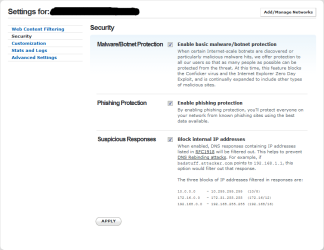
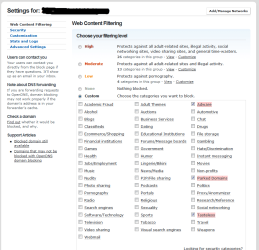
In addition to Barman58's input...
Some of the services OpenDNS offers (I use the free option)
 

Attachments

  • opendns2.PNG
    opendns2.PNG
    22.1 KB · Views: 13
  • opendns3.png
    opendns3.png
    34.1 KB · Views: 13

My Computer

Computer Manufacturer/Model Number
Rig 1
OS
Windows 7 Ultimate x64
CPU
AMD Phenom II X4 940 Black Edition @ 3.4GHz (AM2+)
Motherboard
Gigabyte GA-MA790X-UD4P (AM2+)
Memory
Corsair CM2X4096-8500C5 (4 X 2GB)
Graphics Card(s)
XFX Radeon HD 5770 / Diamond Radeon HD 5770 CrossFireX
Sound Card
Asus Xonar DS (PCI)
Monitor(s) Displays
Samsung SyncMaster 932bw+ (3)
Screen Resolution
4320x900
Hard Drives
OCZ Vertex 2 80 GB - Windows 7 System --
WD Caviar Black 1TB - Music, Movies, Vids, Pics --
WD Caviar Black 640GB - User Profiles & Games --
WD My Book 320GB external
PSU
Corsair CMPSU-750TX
Case
Cooler Master HAF 932
Cooling
Corsair Hydro Series H50
Keyboard
Logitech Desktop Wave
Mouse
Logitech LX8 Laser
Internet Speed
20 down / 2 up
Other Info
LG GGC-H20L Blu-Ray / HDDVD combo --
Hauppauge HVR-1250 --
Silverstone MFP-51 --
Logitech Webcam C600
Thanks all. I have set up opendns (using the free option).
I have set up the dhcp reservations and it seems to be working well, with one exception, which appears to be related to the router, and I've followed up with D-link for that.

thanks for all your help and support.
Tanya
 
Back
Top