Remote Desktop under different network

cashng

New member
How to remote desktop under different network, what are the ports need to forward?

I've have a computer at home and I would like to remote desktop, I've forwarded port 3389 to the destination computer in the router, but I still cannot remote. But when I am in the same network, I can remote.

Need help on this, I personally think that there is some settings I've overlook. My client computer is running win7 ultimate x86 build 7600, my destination computer is running the same version of OS. Please help~~ thank you:D
 

My Computer

Computer Manufacturer/Model Number
Acer Aspire 4730Z
OS
Windows 7 Ultimate 32-bit
CPU
Intel Pentium @2.00GHz Merom 65nm Technology
Motherboard
Acer Aspire 4730Z (uPGA-478)
Memory
4.0 Dual-Channel DDR2 @ 332MHz 5-5-5-15
Graphics Card(s)
Mobile Intel(R) 4 Series Express Chipset Family
Monitor(s) Displays
Generic PnP Monitor
Screen Resolution
1280x800
Hard Drives
160GB Hitachi
Hi, remote desktop can be very very tricky to setup manually. It's much easier to use a solution such as Windows Live Mesh or Teamviewer

If you have any queries don't hesitate to ask.

Oli
 

My Computer

Computer Manufacturer/Model Number
Apple MacBook 5,1
OS
Windows 7 Profesional x86, Mac OS X 10.6 Snow Leopard
CPU
Intel Core 2 Duo 2.4Ghz
Memory
4GB DDR3
Graphics Card(s)
Nvidia 9400m
Monitor(s) Displays
13.3" Internal + 22" DVI + 21.5" USB
Screen Resolution
1280x800 + 1920x1080 + 1920x1080
Hard Drives
Internal SATA 2.5" 500GB (395GB Mac HFS+, 105GB Windows NTFS)
2.48TB RAID consisting of 5 disks (HFS+)
Case
Aluminium Unibody
Keyboard
Apple Late 2009 Wireless Keyboard (US)
Mouse
Apple Magic Mouse
Internet Speed
6.33Mb/s up. 0.36Mb/s down.
Other Info
Harman Kardon Soundsticks II Speakers
Welcome!

First, to eliminate as many factors as possible, disable any firewalls you might have.

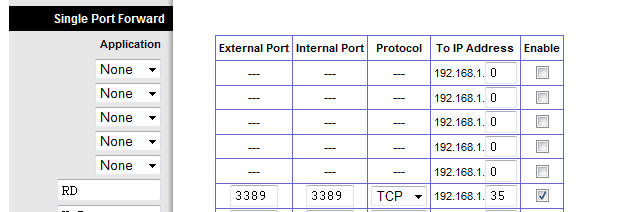
Then, forward something like this:

Capture.PNG

The .35 part is my IP address. Modify that to match your computer's IP address.
 

My Computer

Computer Manufacturer/Model Number
Custom
OS
Windows 7 Professional x64
CPU
Intel i7 2600K OC'd @ 4620 MHz
Motherboard
Asus P8Z68-V Pro
Memory
16GB GSkill Sniper 2133 Mhz (4x4GB)
Graphics Card(s)
EVGA GeForce GTX 480 SuperClocked+
Sound Card
Realtek High Definition Audio
Monitor(s) Displays
2x Acer S273HLbmii 27"
Screen Resolution
2 x 1920x1080
Hard Drives
64GB Crucial M4 SSD

Storage: Hitachi 1TB 5400RPM, Samsung 1.5TB 5400RPM
PSU
Corsair HW Series 750w (modular)
Case
Cooler Master HAF 932 Advanced Blue Edition
Cooling
CM Hyper 212+ CPU cooler, 3x 230mm + 1x 140mm case fans
Keyboard
Logitech MK320 (wireless)
Mouse
Logitech MK320 (wireless)
Internet Speed
30 Mb/s : 2 Mb/s
Hi, remote desktop can be very very tricky to setup manually. It's much easier to use a solution such as Windows Live Mesh or Teamviewer

If you have any queries don't hesitate to ask.

Oli

Why... it's just more bloat --and win7 has tons of that-- and it offers no new functionality at all.

This is a settings problem not a capability problem.
 

My Computer

Computer Manufacturer/Model Number
Homebrew
OS
XP Pro SP3 X86 / Win7 Pro X86
CPU
Amd 64 x2 4200 (2.4ghz)
Motherboard
Asus M2N-MX SE Plus
Memory
Kingston DDR2 800 2gb
Graphics Card(s)
Nvidia GF-8400
Sound Card
Realtek on Motherboard
Monitor(s) Displays
Acer x-193bw
Screen Resolution
1440 x 900
Hard Drives
Western Digital 500g
PSU
350watt In-Win
Case
In-Win
Cooling
Air
Keyboard
yes
Mouse
yes
Internet Speed
5mpbs
Other Info
Also ASRock ION 330 as HTPC (on XP).
Acer Aspire as GP netbook (on XP).
I've forwarded 3389 tcp port in my router to the destination ip as what u did. but i still couldn't remote, I've stopped windows firewall too, however, i can connect the VPN, as well as ping to my ip. It works, but not remote desktop :shock:
 

My Computer

Computer Manufacturer/Model Number
Acer Aspire 4730Z
OS
Windows 7 Ultimate 32-bit
CPU
Intel Pentium @2.00GHz Merom 65nm Technology
Motherboard
Acer Aspire 4730Z (uPGA-478)
Memory
4.0 Dual-Channel DDR2 @ 332MHz 5-5-5-15
Graphics Card(s)
Mobile Intel(R) 4 Series Express Chipset Family
Monitor(s) Displays
Generic PnP Monitor
Screen Resolution
1280x800
Hard Drives
160GB Hitachi
Make sure the remote settings are configured like mine:

Capture.PNG

Also make sure your user is added to the allowed list.

On your client, disable any firewalls too.
 

My Computer

Computer Manufacturer/Model Number
Custom
OS
Windows 7 Professional x64
CPU
Intel i7 2600K OC'd @ 4620 MHz
Motherboard
Asus P8Z68-V Pro
Memory
16GB GSkill Sniper 2133 Mhz (4x4GB)
Graphics Card(s)
EVGA GeForce GTX 480 SuperClocked+
Sound Card
Realtek High Definition Audio
Monitor(s) Displays
2x Acer S273HLbmii 27"
Screen Resolution
2 x 1920x1080
Hard Drives
64GB Crucial M4 SSD

Storage: Hitachi 1TB 5400RPM, Samsung 1.5TB 5400RPM
PSU
Corsair HW Series 750w (modular)
Case
Cooler Master HAF 932 Advanced Blue Edition
Cooling
CM Hyper 212+ CPU cooler, 3x 230mm + 1x 140mm case fans
Keyboard
Logitech MK320 (wireless)
Mouse
Logitech MK320 (wireless)
Internet Speed
30 Mb/s : 2 Mb/s
Make sure the remote settings are configured like mine:

View attachment 65259

Also make sure your user is added to the allowed list.

On your client, disable any firewalls too.


That's what I was thinking...need to give rights to use RDP to users as well.
 

My Computer

Computer Manufacturer/Model Number
Sytemax
OS
7 Pro 64 Bit
CPU
8300 Quad 2.53Ghz
Motherboard
Asus
Memory
4GB DDR Crucial
Graphics Card(s)
Intel
Make sure the remote settings are configured like mine:

View attachment 65259

Also make sure your user is added to the allowed list.

On your client, disable any firewalls too.


That's what I was thinking...need to give rights to use RDP to users as well.

I've done that too, file attached is the print screen that I've done under [Allow remote assistance], still no luck. I am thinking, could it be the ISP? is there any possibility on this?
 

Attachments

  • Remote.jpg
    Remote.jpg
    213.2 KB · Views: 188
  • Remote1.jpg
    Remote1.jpg
    206.6 KB · Views: 114

My Computer

Computer Manufacturer/Model Number
Acer Aspire 4730Z
OS
Windows 7 Ultimate 32-bit
CPU
Intel Pentium @2.00GHz Merom 65nm Technology
Motherboard
Acer Aspire 4730Z (uPGA-478)
Memory
4.0 Dual-Channel DDR2 @ 332MHz 5-5-5-15
Graphics Card(s)
Mobile Intel(R) 4 Series Express Chipset Family
Monitor(s) Displays
Generic PnP Monitor
Screen Resolution
1280x800
Hard Drives
160GB Hitachi
Make sure to set a static IP on your host. The 35 can be replaced with just about any number you choose.

Capture.PNG

Now just to confirm, the syntax in Remote Desktop is your External IP:Port. If you don't enter any port number, it defaults to 3389, which is forwarded in your router.
 

My Computer

Computer Manufacturer/Model Number
Custom
OS
Windows 7 Professional x64
CPU
Intel i7 2600K OC'd @ 4620 MHz
Motherboard
Asus P8Z68-V Pro
Memory
16GB GSkill Sniper 2133 Mhz (4x4GB)
Graphics Card(s)
EVGA GeForce GTX 480 SuperClocked+
Sound Card
Realtek High Definition Audio
Monitor(s) Displays
2x Acer S273HLbmii 27"
Screen Resolution
2 x 1920x1080
Hard Drives
64GB Crucial M4 SSD

Storage: Hitachi 1TB 5400RPM, Samsung 1.5TB 5400RPM
PSU
Corsair HW Series 750w (modular)
Case
Cooler Master HAF 932 Advanced Blue Edition
Cooling
CM Hyper 212+ CPU cooler, 3x 230mm + 1x 140mm case fans
Keyboard
Logitech MK320 (wireless)
Mouse
Logitech MK320 (wireless)
Internet Speed
30 Mb/s : 2 Mb/s
I've done that steps too, I've also forwarded the port to the IP i've set. So if i don't forward any port, by default its 3389? :sarc:
 

My Computer

Computer Manufacturer/Model Number
Acer Aspire 4730Z
OS
Windows 7 Ultimate 32-bit
CPU
Intel Pentium @2.00GHz Merom 65nm Technology
Motherboard
Acer Aspire 4730Z (uPGA-478)
Memory
4.0 Dual-Channel DDR2 @ 332MHz 5-5-5-15
Graphics Card(s)
Mobile Intel(R) 4 Series Express Chipset Family
Monitor(s) Displays
Generic PnP Monitor
Screen Resolution
1280x800
Hard Drives
160GB Hitachi
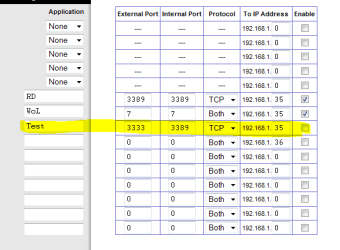
No, you need to forward port 3389 to your computer. Here's what I mean: let's say I have 2 computers in my network, and I use RD for both. I could tell my router to forward port 3333 to one computer, and 3389 to the other. I would need to instruct the router to change 3333 to 3389 after it's forwarded.

Say my IP address is 66.67.111.111. Outside my network, to access computer 1, I would enter 66.67.111.111:3333.

To access computer 2: 66.67.111.111:3389

If you leave off the port, it automatically sends out the request on port 3389.
 

My Computer

Computer Manufacturer/Model Number
Custom
OS
Windows 7 Professional x64
CPU
Intel i7 2600K OC'd @ 4620 MHz
Motherboard
Asus P8Z68-V Pro
Memory
16GB GSkill Sniper 2133 Mhz (4x4GB)
Graphics Card(s)
EVGA GeForce GTX 480 SuperClocked+
Sound Card
Realtek High Definition Audio
Monitor(s) Displays
2x Acer S273HLbmii 27"
Screen Resolution
2 x 1920x1080
Hard Drives
64GB Crucial M4 SSD

Storage: Hitachi 1TB 5400RPM, Samsung 1.5TB 5400RPM
PSU
Corsair HW Series 750w (modular)
Case
Cooler Master HAF 932 Advanced Blue Edition
Cooling
CM Hyper 212+ CPU cooler, 3x 230mm + 1x 140mm case fans
Keyboard
Logitech MK320 (wireless)
Mouse
Logitech MK320 (wireless)
Internet Speed
30 Mb/s : 2 Mb/s
No, you need to forward port 3389 to your computer. Here's what I mean: let's say I have 2 computers in my network, and I use RD for both. I could tell my router to forward port 3333 to one computer, and 3389 to the other. I would need to instruct the router to change 3333 to 3389 after it's forwarded.

Say my IP address is 66.67.111.111. Outside my network, to access computer 1, I would enter 66.67.111.111:3333.

To access computer 2: 66.67.111.111:3389

If you leave off the port, it automatically sends out the request on port 3389.

I see, got it, thank you very much :D
 

My Computer

Computer Manufacturer/Model Number
Acer Aspire 4730Z
OS
Windows 7 Ultimate 32-bit
CPU
Intel Pentium @2.00GHz Merom 65nm Technology
Motherboard
Acer Aspire 4730Z (uPGA-478)
Memory
4.0 Dual-Channel DDR2 @ 332MHz 5-5-5-15
Graphics Card(s)
Mobile Intel(R) 4 Series Express Chipset Family
Monitor(s) Displays
Generic PnP Monitor
Screen Resolution
1280x800
Hard Drives
160GB Hitachi
Actually...that's half right...or half way there I should say.
The computer that is using port 3333 on the router would have the change the registry entry to listen for RDP traffic on port 3333...or the traffic wouldn't get to it. Even though you told the router to forward to a specific IP inside your LAN...RDP by default will listen to port 3389 on the computer.
This is how you change the listening port for RDP:
How to change the listening port for Remote Desktop

I sat there playing with a RDP app for my iPod for half an hour before I realized my brain fart...
 

My Computer

Computer Manufacturer/Model Number
Sytemax
OS
7 Pro 64 Bit
CPU
8300 Quad 2.53Ghz
Motherboard
Asus
Memory
4GB DDR Crucial
Graphics Card(s)
Intel
Actually...that's half right...or half way there I should say.
The computer that is using port 3333 on the router would have the change the registry entry to listen for RDP traffic on port 3333...or the traffic wouldn't get to it. Even though you told the router to forward to a specific IP inside your LAN...RDP by default will listen to port 3389 on the computer.
This is how you change the listening port for RDP:
How to change the listening port for Remote Desktop

I sat there playing with a RDP app for my iPod for half an hour before I realized my brain fart...
You could always have the router change 3333 to 3389 before it sends it to the computer.
 

My Computer

Computer Manufacturer/Model Number
Custom
OS
Windows 7 Professional x64
CPU
Intel i7 2600K OC'd @ 4620 MHz
Motherboard
Asus P8Z68-V Pro
Memory
16GB GSkill Sniper 2133 Mhz (4x4GB)
Graphics Card(s)
EVGA GeForce GTX 480 SuperClocked+
Sound Card
Realtek High Definition Audio
Monitor(s) Displays
2x Acer S273HLbmii 27"
Screen Resolution
2 x 1920x1080
Hard Drives
64GB Crucial M4 SSD

Storage: Hitachi 1TB 5400RPM, Samsung 1.5TB 5400RPM
PSU
Corsair HW Series 750w (modular)
Case
Cooler Master HAF 932 Advanced Blue Edition
Cooling
CM Hyper 212+ CPU cooler, 3x 230mm + 1x 140mm case fans
Keyboard
Logitech MK320 (wireless)
Mouse
Logitech MK320 (wireless)
Internet Speed
30 Mb/s : 2 Mb/s
Too much work, IMO...
Here's a screen shot of what I mean, my setup in my router.
Not all routers may support that...either.


My Computer

Computer Manufacturer/Model Number
Sytemax
OS
7 Pro 64 Bit
CPU
8300 Quad 2.53Ghz
Motherboard
Asus
Memory
4GB DDR Crucial
Graphics Card(s)
Intel
It's a bit easier with mine:

Capture.PNG
 

My Computer

Computer Manufacturer/Model Number
Custom
OS
Windows 7 Professional x64
CPU
Intel i7 2600K OC'd @ 4620 MHz
Motherboard
Asus P8Z68-V Pro
Memory
16GB GSkill Sniper 2133 Mhz (4x4GB)
Graphics Card(s)
EVGA GeForce GTX 480 SuperClocked+
Sound Card
Realtek High Definition Audio
Monitor(s) Displays
2x Acer S273HLbmii 27"
Screen Resolution
2 x 1920x1080
Hard Drives
64GB Crucial M4 SSD

Storage: Hitachi 1TB 5400RPM, Samsung 1.5TB 5400RPM
PSU
Corsair HW Series 750w (modular)
Case
Cooler Master HAF 932 Advanced Blue Edition
Cooling
CM Hyper 212+ CPU cooler, 3x 230mm + 1x 140mm case fans
Keyboard
Logitech MK320 (wireless)
Mouse
Logitech MK320 (wireless)
Internet Speed
30 Mb/s : 2 Mb/s
Very nice post...
I just have my ATT provided router/modem...no need for anything fancy...and I don't have a public/private programming option.
At work, I would program a Cisco PIX or ASA device to do what you're talking about...obviously a lot more options and keeps from having to customize and put your hands on PCs, when you can do it with hardware.
Central administration is the name of the game!!
If the user doesn't have the ability to port map inside/outside interfaces...he'll have to do my way.
If he does...go your way...:)

Good info JK.
 

My Computer

Computer Manufacturer/Model Number
Sytemax
OS
7 Pro 64 Bit
CPU
8300 Quad 2.53Ghz
Motherboard
Asus
Memory
4GB DDR Crucial
Graphics Card(s)
Intel
these both are a very good way, :D thanks man, i will try it later when i am home, thank you all very much~
 

My Computer

Computer Manufacturer/Model Number
Acer Aspire 4730Z
OS
Windows 7 Ultimate 32-bit
CPU
Intel Pentium @2.00GHz Merom 65nm Technology
Motherboard
Acer Aspire 4730Z (uPGA-478)
Memory
4.0 Dual-Channel DDR2 @ 332MHz 5-5-5-15
Graphics Card(s)
Mobile Intel(R) 4 Series Express Chipset Family
Monitor(s) Displays
Generic PnP Monitor
Screen Resolution
1280x800
Hard Drives
160GB Hitachi
Before I had all settings well done on my home computer and tried to connect RDC, but failed. I had forwarded port 3389 but still failed. Until port 443, SSL port, is also forwarded. Then, I can remote desktop and connect to VPN from my work place, which is very far and reachable only by sea and air. I am not too sure, if these port443 is as important. Need to someone to correct me if I am wrong. Thanks guys.
 

My Computer

Computer Manufacturer/Model Number
Acer Aspire 4730Z
OS
Windows 7 Ultimate 32-bit
CPU
Intel Pentium @2.00GHz Merom 65nm Technology
Motherboard
Acer Aspire 4730Z (uPGA-478)
Memory
4.0 Dual-Channel DDR2 @ 332MHz 5-5-5-15
Graphics Card(s)
Mobile Intel(R) 4 Series Express Chipset Family
Monitor(s) Displays
Generic PnP Monitor
Screen Resolution
1280x800
Hard Drives
160GB Hitachi
Back
Top